ECO mode CHEVROLET SUBURBAN 2009 User Guide
[x] Cancel search | Manufacturer: CHEVROLET, Model Year: 2009, Model line: SUBURBAN, Model: CHEVROLET SUBURBAN 2009Pages: 578, PDF Size: 3.04 MB
Page 148 of 578
Shifting Into Four-Wheel Drive High or
AUTO (Automatic Four-Wheel Drive)
Turn the knob to the Four-Wheel High or AUTO position.
This can be done at any speed, except when shifting
from Four-Wheel Drive Low. The indicator light will
ash while shifting. It will remain on when the shift is
completed.
Shifting Into Two-Wheel Drive High
Turn the knob to the Two-Wheel High position.
This can be done at any speed, except when shifting
from Four-Wheel Drive Low.
See shifting out of Four-Wheel Drive Low later in this
section for more information.
Shifting Into Four-Wheel Drive Low
When Four-Wheel Low is engaged, vehicle speed
should be kept below 45 mph (72 km/h). Extended
high-speed operation in 4L may damage or shorten
the life of the drivetrain.
To shift to the Four-Wheel Drive Low position, the
ignition must be in ON/RUN and the vehicle must be
stopped or moving less than 3 mph (5 km/h) with
the transmission in N (Neutral). The preferred method
for shifting into Four-Wheel Drive Low is to have
the vehicle moving 1 to 2 mph (1.6 to 3.2 km/h).
Turn the knob to the Four-Wheel Drive Low position.You must wait for the Four-Wheel Drive Low indicator
light to stop ashing and remain on before shifting
the transmission into gear.
Notice:Shifting the transmission into gear before
the Four-Wheel Drive Low indicator light has
stopped ashing could damage the transfer case.
To help avoid damaging the vehicle, always wait for
the Four-Wheel Drive Low indicator light to stop
ashing before shifting the transmission into gear.
The vehicle may have signicant engagement noise
and bump when shifting between Four-Wheel Drive Low
and Four-Wheel Drive High ranges or from N (Neutral)
while the engine is running.
If the knob is turned to the Four-Wheel Drive Low
position when the vehicle is in gear and/or moving,
the Four-Wheel Drive Low indicator light will ash for
30 seconds and not complete the shift unless the vehicle
is moving less than 3 mph (5 km/h) and the transmission
is in N (Neutral). After 30 seconds the transfer case
will shift to Four-Wheel Drive High mode.
2-42
Page 150 of 578
7. If the engine is running, verify that the transfer case
is in N (Neutral) by shifting the transmission to
R (Reverse) for one second, then shift the
transmission to D (Drive) for one second.
8. Turn the ignition to ACC/ACCESSORY, which will
turn the engine off.
9. Place the transmission shift lever in P (Park).
10. Release the parking brake prior to moving the
vehicle.
11. Turn the ignition to LOCK/OFF.
Shifting Out of Neutral
To shift out of N Neutral do the following:
1. Set the parking brake and apply the regular brake
pedal.
2. Turn the ignition to ON/RUN with the engine off,
and shift the transmission to N (Neutral).3. Turn the transfer case dial to the desired transfer
case shift position (Two-Wheel Drive High,
Four-Wheel Drive High, AUTO).
After the transfer case has shifted out of N (Neutral),
the N (Neutral) light will go out.
4. Release the parking brake prior to moving the
vehicle.
Notice:Shifting the transmission into gear before
the Four-Wheel Drive Low indicator light has
stopped ashing could damage the transfer case.
To help avoid damaging the vehicle, always wait for
the Four-Wheel Drive Low indicator light to stop
ashing before shifting the transmission into gear.
5. Start the engine and shift the transmission to
the desired position.
Excessively shifting the transfer case into or out of the
different modes may cause the transfer case to enter the
shift protection mode. This will protect the transfer case
from possible damage and will only allow the transfer
case to respond to one shift per 10 seconds. The transfer
case may stay in this mode for up to three minutes.
2-44
Page 182 of 578
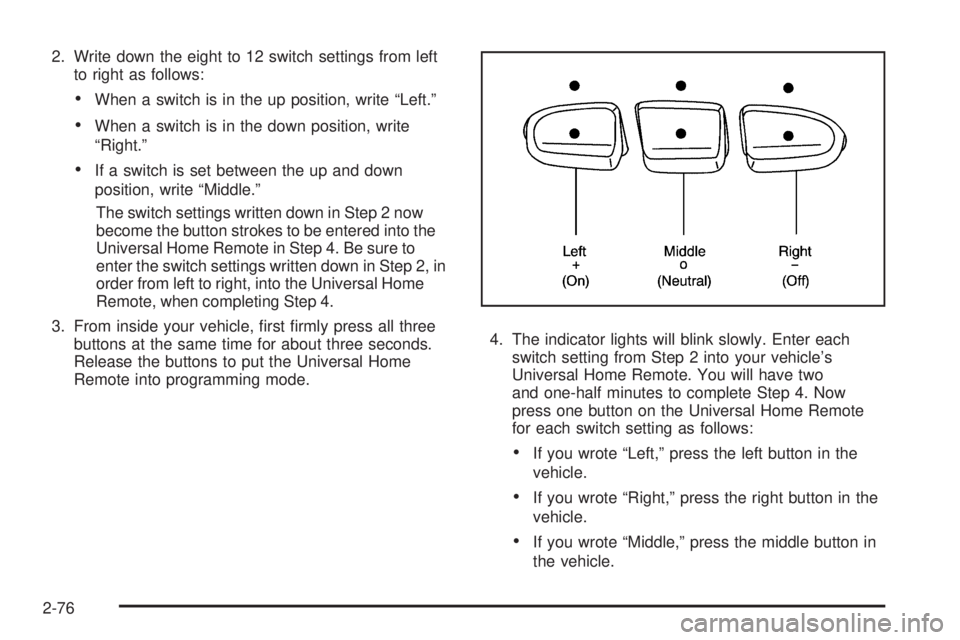
2. Write down the eight to 12 switch settings from left
to right as follows:
When a switch is in the up position, write “Left.”
When a switch is in the down position, write
“Right.”
If a switch is set between the up and down
position, write “Middle.”
The switch settings written down in Step 2 now
become the button strokes to be entered into the
Universal Home Remote in Step 4. Be sure to
enter the switch settings written down in Step 2, in
order from left to right, into the Universal Home
Remote, when completing Step 4.
3. From inside your vehicle, rst rmly press all three
buttons at the same time for about three seconds.
Release the buttons to put the Universal Home
Remote into programming mode.4. The indicator lights will blink slowly. Enter each
switch setting from Step 2 into your vehicle’s
Universal Home Remote. You will have two
and one-half minutes to complete Step 4. Now
press one button on the Universal Home Remote
for each switch setting as follows:
If you wrote “Left,” press the left button in the
vehicle.
If you wrote “Right,” press the right button in the
vehicle.
If you wrote “Middle,” press the middle button in
the vehicle.
2-76
Page 195 of 578
Turn Signal/Multifunction Lever
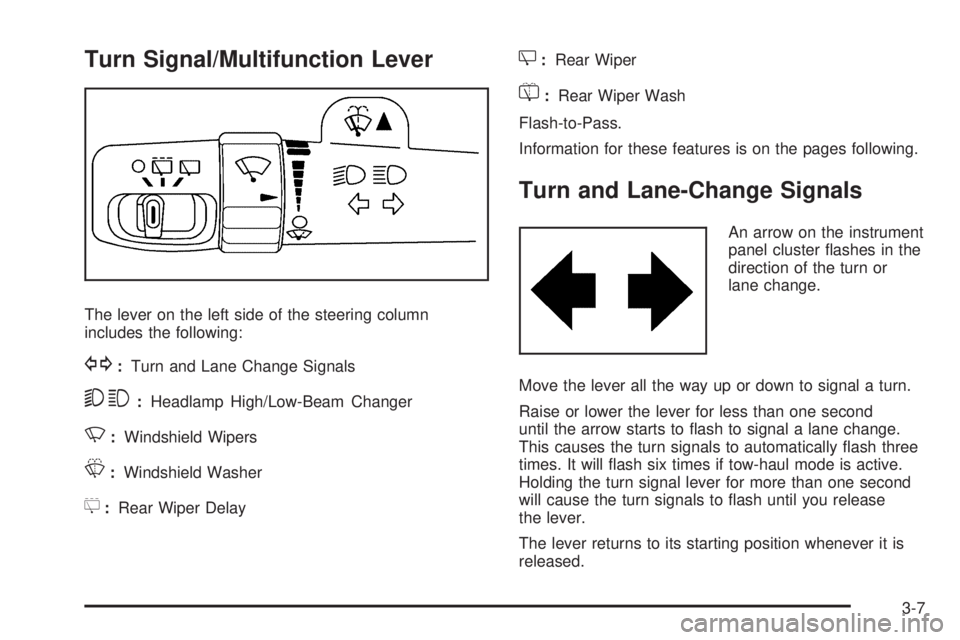
The lever on the left side of the steering column
includes the following:
G:Turn and Lane Change Signals
53:Headlamp High/Low-Beam Changer
N:Windshield Wipers
L:Windshield Washer
5:Rear Wiper Delay
Z:Rear Wiper
=:Rear Wiper Wash
Flash-to-Pass.
Information for these features is on the pages following.
Turn and Lane-Change Signals
An arrow on the instrument
panel cluster ashes in the
direction of the turn or
lane change.
Move the lever all the way up or down to signal a turn.
Raise or lower the lever for less than one second
until the arrow starts to ash to signal a lane change.
This causes the turn signals to automatically ash three
times. It will ash six times if tow-haul mode is active.
Holding the turn signal lever for more than one second
will cause the turn signals to ash until you release
the lever.
The lever returns to its starting position whenever it is
released.
3-7
Page 197 of 578
Windshield Wipers
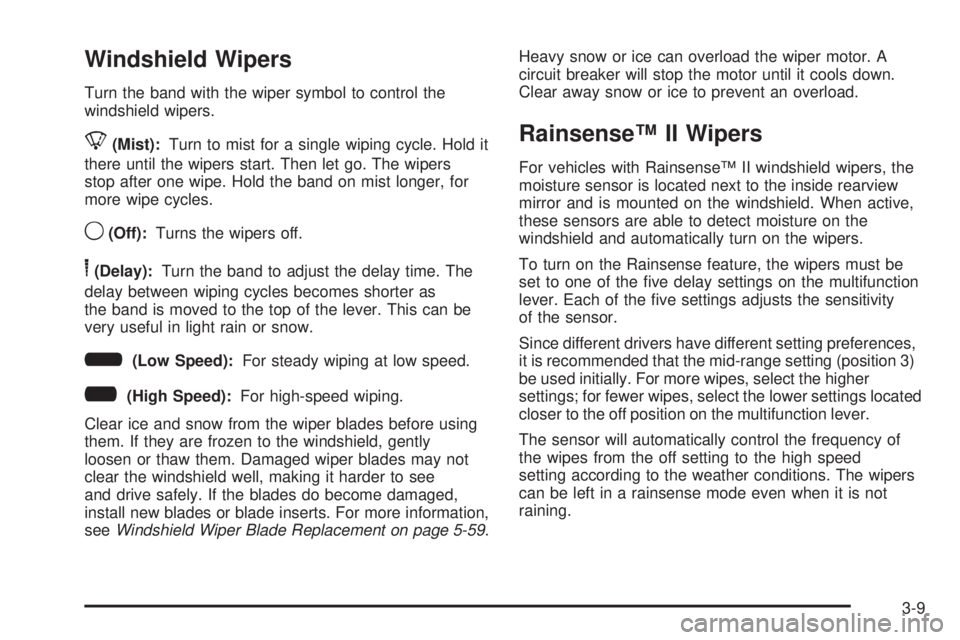
Turn the band with the wiper symbol to control the
windshield wipers.
8(Mist):Turn to mist for a single wiping cycle. Hold it
there until the wipers start. Then let go. The wipers
stop after one wipe. Hold the band on mist longer, for
more wipe cycles.
9(Off):Turns the wipers off.
6(Delay):Turn the band to adjust the delay time. The
delay between wiping cycles becomes shorter as
the band is moved to the top of the lever. This can be
very useful in light rain or snow.
6(Low Speed):For steady wiping at low speed.
?(High Speed):For high-speed wiping.
Clear ice and snow from the wiper blades before using
them. If they are frozen to the windshield, gently
loosen or thaw them. Damaged wiper blades may not
clear the windshield well, making it harder to see
and drive safely. If the blades do become damaged,
install new blades or blade inserts. For more information,
seeWindshield Wiper Blade Replacement on page 5-59.Heavy snow or ice can overload the wiper motor. A
circuit breaker will stop the motor until it cools down.
Clear away snow or ice to prevent an overload.
Rainsense™ II Wipers
For vehicles with Rainsense™ II windshield wipers, the
moisture sensor is located next to the inside rearview
mirror and is mounted on the windshield. When active,
these sensors are able to detect moisture on the
windshield and automatically turn on the wipers.
To turn on the Rainsense feature, the wipers must be
set to one of the ve delay settings on the multifunction
lever. Each of the ve settings adjusts the sensitivity
of the sensor.
Since different drivers have different setting preferences,
it is recommended that the mid-range setting (position 3)
be used initially. For more wipes, select the higher
settings; for fewer wipes, select the lower settings located
closer to the off position on the multifunction lever.
The sensor will automatically control the frequency of
the wipes from the off setting to the high speed
setting according to the weather conditions. The wipers
can be left in a rainsense mode even when it is not
raining.
3-9
Page 210 of 578
Climate Controls
Climate Control System
The heating, cooling, and ventilation in the vehicle can
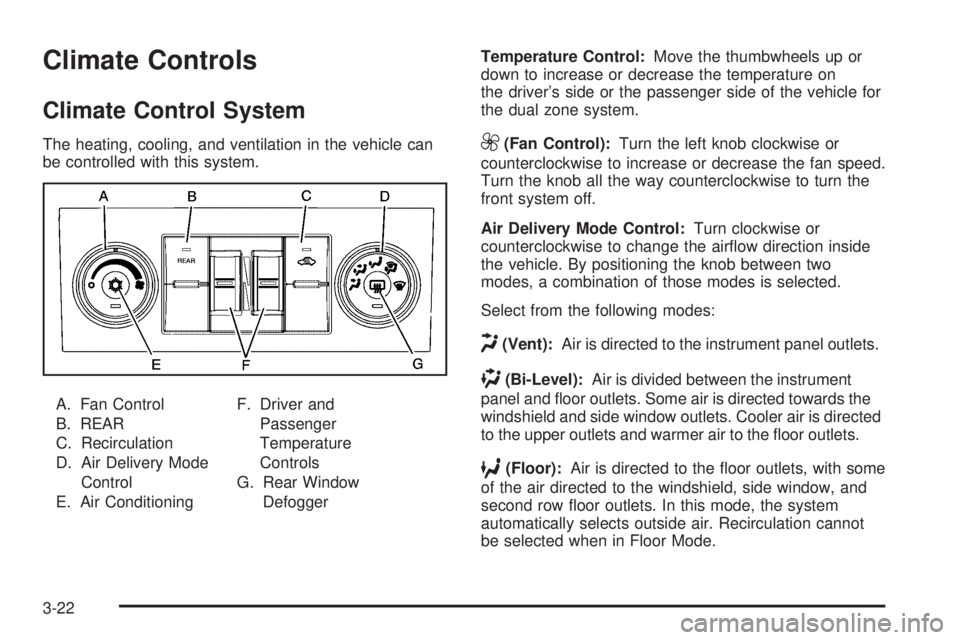
be controlled with this system.
A. Fan Control
B. REAR
C. Recirculation
D. Air Delivery Mode
Control
E. Air ConditioningF. Driver and
Passenger
Temperature
Controls
G. Rear Window
DefoggerTemperature Control:Move the thumbwheels up or
down to increase or decrease the temperature on
the driver’s side or the passenger side of the vehicle for
the dual zone system.9(Fan Control):Turn the left knob clockwise or
counterclockwise to increase or decrease the fan speed.
Turn the knob all the way counterclockwise to turn the
front system off.
Air Delivery Mode Control:Turn clockwise or
counterclockwise to change the airow direction inside
the vehicle. By positioning the knob between two
modes, a combination of those modes is selected.
Select from the following modes:
H(Vent):Air is directed to the instrument panel outlets.
)(Bi-Level):Air is divided between the instrument
panel and oor outlets. Some air is directed towards the
windshield and side window outlets. Cooler air is directed
to the upper outlets and warmer air to the oor outlets.
6(Floor):Air is directed to the oor outlets, with some
of the air directed to the windshield, side window, and
second row oor outlets. In this mode, the system
automatically selects outside air. Recirculation cannot
be selected when in Floor Mode.
3-22
Page 214 of 578
The passenger’s temperature setting can be set to
match the driver’s temperature setting by pressing the
PASS button and turning off the PASS indicator.
When the passenger’s temperature setting is set
different than the driver’s setting, the indicator on the
PASS button illuminates and both the driver side
and passenger side temperature displays are shown.
Automatic Operation
AUTO (Automatic):When automatic operation is
active the system will control the inside temperature, the
air delivery, and the fan speed.
Use the steps below to place the entire system in
automatic mode:
1. Press the AUTO button.
When AUTO is selected, the display will change to
show the current temperature(s) and AUTO will
be lit on the display. The current delivery mode and
fan speed will also be displayed for approximately
5 seconds.
When AUTO is selected, the air conditioning
operation and air inlet will be automatically
controlled. The air conditioning compressor will run
when the outside temperature is over about
40°F (4°C). The air inlet will normally be set to
outside air. If it is hot outside, the air inlet mayautomatically switch to recirculate inside air to help
quickly cool down the vehicle. The light on the
button comes on in recirculation.
2. Set the driver’s and passenger’s temperature.
To nd your comfort setting, start with a 74°F (23°C)
temperature setting and allow about 20 minutes
for the system to regulate. Use the driver’s or
passenger’s temperature buttons to adjust the
temperature setting as necessary. If a temperature
setting of 60°F (15°C) is chosen, the system remains
at the maximum cooling setting. If a temperature
setting of 90°F (32°C) is chosen, the system remains
at the maximum heat setting. Choosing either
maximum setting will not cause the vehicle to heat or
cool any faster.
Do not to cover the solar sensor located on the top
of the instrument panel near the windshield. This sensor
regulates air temperature based on sun load and also
turns on the headlamps. For more information on
the solar sensor, see “Sensors” later in this section.
To avoid blowing cold air in cold weather, the system will
delay turning on the fan until warm air is available.
The length of delay depends on the engine coolant
temperature. Pressing the fan switch will override this
delay and change the fan to a selected speed.
3-26
Page 215 of 578
Manual Operation
DC(Fan Control):Press these buttons to increase or
decrease the fan speed.
Pressing either fan button while in automatic control
places the fan under manual control. The fan setting
remains displayed and the AUTO light turns off. The air
delivery mode remains under automatic control.
HG(Air Delivery Mode Control):Press these buttons
to change the direction of the airow in the vehicle.
Repeatedly press either button until the desired mode
appears on the display. Pressing either mode button
while the system is off changes the air delivery mode
without turning the system on. Pressing either mode
button while in automatic control places the mode under
manual control.
The air delivery mode setting is displayed and the
AUTO light turns off. The fan remains under automatic
control.
H(Vent):Air is directed to the instrument panel outlets.
)(Bi-Level):Air is divided between the instrument
panel and oor outlets. Some air is directed towards the
windshield and side window outlets.
6(Floor):Air is directed to the oor outlets, with
some to the windshield, side window outlets, and second
row oor outlets. In this mode, the system automatically
selects outside air.
-(Defog):This mode clears the windows of fog or
moisture. Air is directed to the windshield, oor outlets,
and side window vents. In this mode, the system
turns off recirculation and runs the air conditioning
compressor unless the outside temperature is close to
freezing. The recirculation mode cannot be selected
while in the defog mode.
0(Defrost):This mode removes fog or frost from the
windshield more quickly. Air is directed to the windshield
and side window vents, with some directed to the oor
vents. In this mode, the system automatically forces
outside air into the vehicle and runs the air conditioning
compressor unless the outside temperature is close to
freezing. The recirculation mode cannot be selected while
in the defrost mode.
Do not drive the vehicle until all the windows are clear.
3-27
Page 218 of 578
The interior temperature sensors located in the headliner
above the driver side seat and if equipped, in the
headliner above the second row seats measure the
temperature of the air inside the vehicle.
There is also an exterior temperature sensor located
behind the front grille. This sensor reads the outside air
temperature and helps maintain the temperature
inside the vehicle. Any cover on the front of the vehicle
could cause a false reading in the displayed
temperature.
The climate control system uses the information from
these sensors to maintain your comfort setting by
adjusting the outlet temperature, fan speed, and the air
delivery mode. The system may also supply cooler
air to the side of the vehicle facing the sun. The
recirculation mode will also be used as needed to
maintain cool outlet temperatures.
Outlet Adjustment
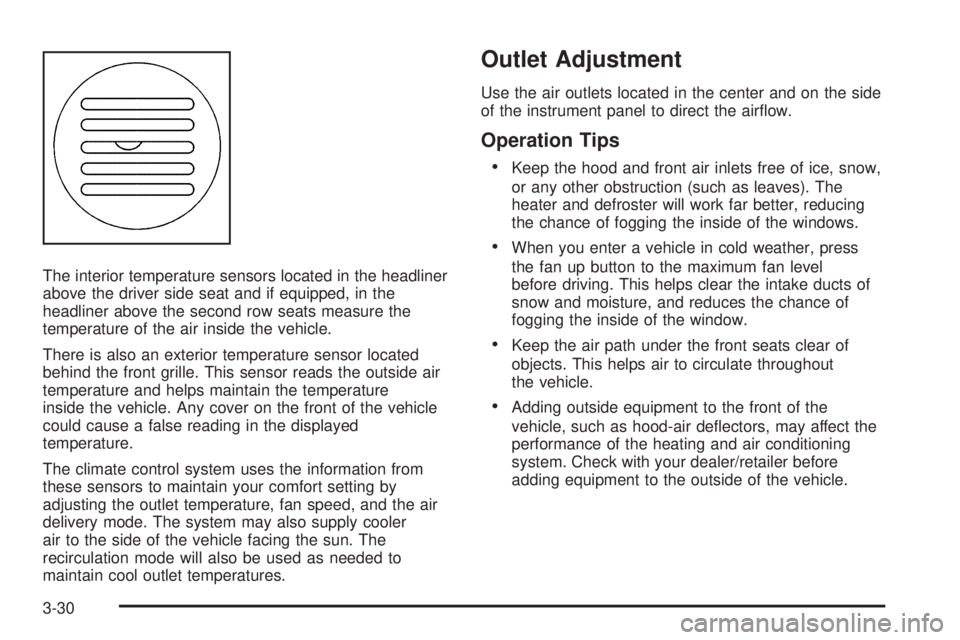
Use the air outlets located in the center and on the side
of the instrument panel to direct the airow.
Operation Tips
Keep the hood and front air inlets free of ice, snow,
or any other obstruction (such as leaves). The
heater and defroster will work far better, reducing
the chance of fogging the inside of the windows.
When you enter a vehicle in cold weather, press
the fan up button to the maximum fan level
before driving. This helps clear the intake ducts of
snow and moisture, and reduces the chance of
fogging the inside of the window.
Keep the air path under the front seats clear of
objects. This helps air to circulate throughout
the vehicle.
Adding outside equipment to the front of the
vehicle, such as hood-air deectors, may affect the
performance of the heating and air conditioning
system. Check with your dealer/retailer before
adding equipment to the outside of the vehicle.
3-30
Page 219 of 578
Rear Air Conditioning and Heating
System
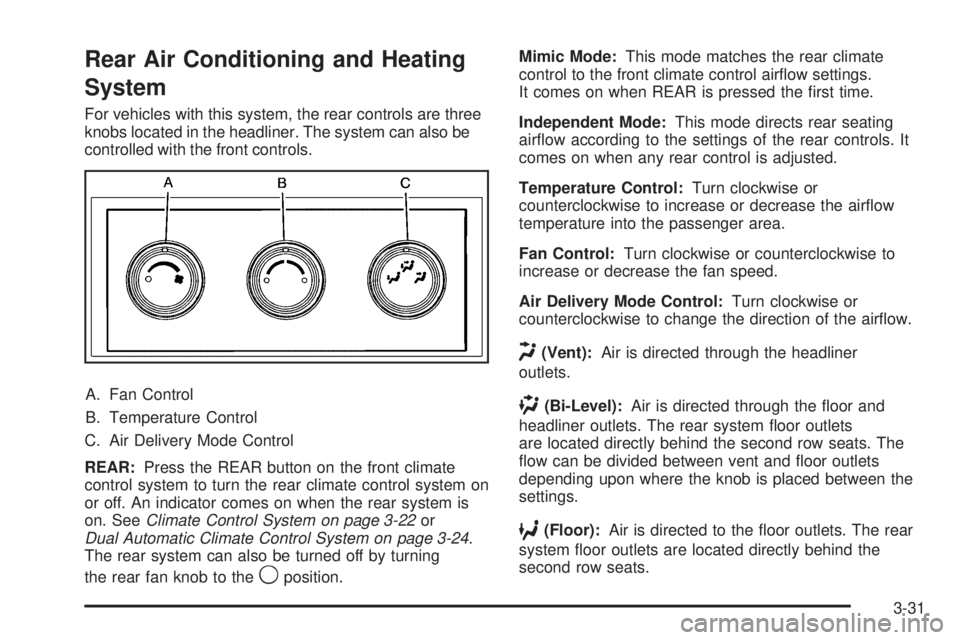
For vehicles with this system, the rear controls are three
knobs located in the headliner. The system can also be
controlled with the front controls.
A. Fan Control
B. Temperature Control
C. Air Delivery Mode Control
REAR:Press the REAR button on the front climate
control system to turn the rear climate control system on
or off. An indicator comes on when the rear system is
on. SeeClimate Control System on page 3-22or
Dual Automatic Climate Control System on page 3-24.
The rear system can also be turned off by turning
the rear fan knob to the
9position.Mimic Mode:This mode matches the rear climate
control to the front climate control airow settings.
It comes on when REAR is pressed the rst time.
Independent Mode:This mode directs rear seating
airow according to the settings of the rear controls. It
comes on when any rear control is adjusted.
Temperature Control:Turn clockwise or
counterclockwise to increase or decrease the airow
temperature into the passenger area.
Fan Control:Turn clockwise or counterclockwise to
increase or decrease the fan speed.
Air Delivery Mode Control:Turn clockwise or
counterclockwise to change the direction of the airow.
H(Vent):Air is directed through the headliner
outlets.
)(Bi-Level):Air is directed through the oor and
headliner outlets. The rear system oor outlets
are located directly behind the second row seats. The
ow can be divided between vent and oor outlets
depending upon where the knob is placed between the
settings.
6(Floor):Air is directed to the oor outlets. The rear
system oor outlets are located directly behind the
second row seats.
3-31