display CHEVROLET SUBURBAN 2009 User Guide
[x] Cancel search | Manufacturer: CHEVROLET, Model Year: 2009, Model line: SUBURBAN, Model: CHEVROLET SUBURBAN 2009Pages: 578, PDF Size: 3.04 MB
Page 165 of 578
The manufacturer is not responsible for any radio or TV
interference caused by unauthorized modications to
this equipment. Such modications could void the user’s
authority to operate the equipment.
{CAUTION:
SBZA is only a lane changing aid and does not
replace driver vision. SBZA does not detect:
Vehicles outside the side blind zones which
may be rapidly approaching.
Pedestrians, bicyclists, or animals.
Failure to use proper care when changing lanes
may result in damage to the vehicle, injury, or
death. Always check the outside and rearview
mirrors, glance over your shoulder, and use the
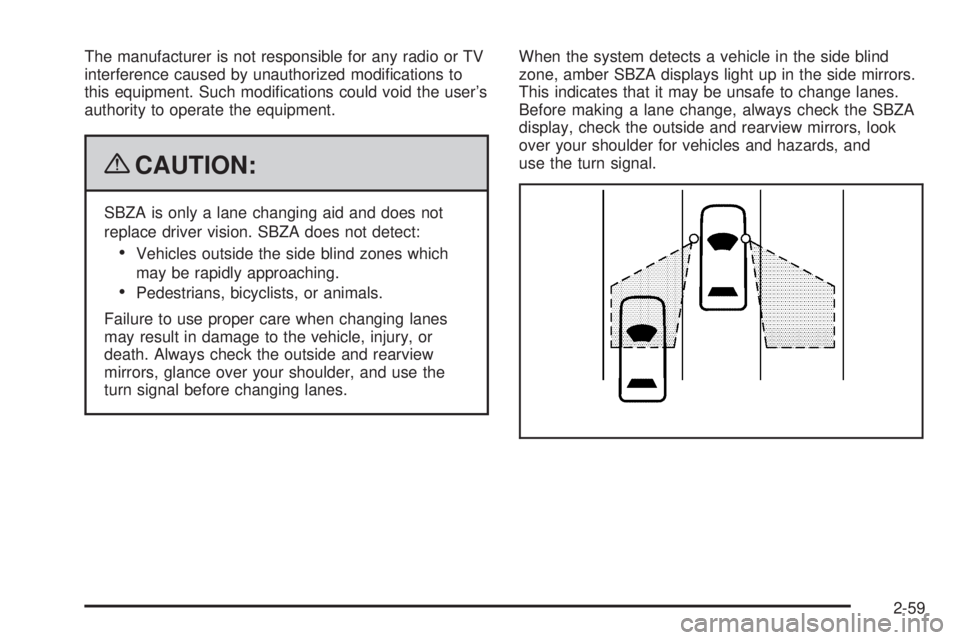
turn signal before changing lanes.When the system detects a vehicle in the side blind
zone, amber SBZA displays light up in the side mirrors.
This indicates that it may be unsafe to change lanes.
Before making a lane change, always check the SBZA
display, check the outside and rearview mirrors, look
over your shoulder for vehicles and hazards, and
use the turn signal.
2-59
Page 166 of 578
SBZA Detection Zones
The SBZA sensor covers a zone of approximately one
lane over from both sides of the vehicle, 11 ft. or
3.5 m. This zone starts at each side mirror and goes
back approximately 16 ft. (5.0 m). The height of the zone
is approximately between 1.5 ft. (0.5 m) and 6 ft. (2.0 m)
off the ground.
Use caution while changing lanes when towing a trailer,
as the SBZA detection zones do not change when a
trailer is towed.
How the System Works
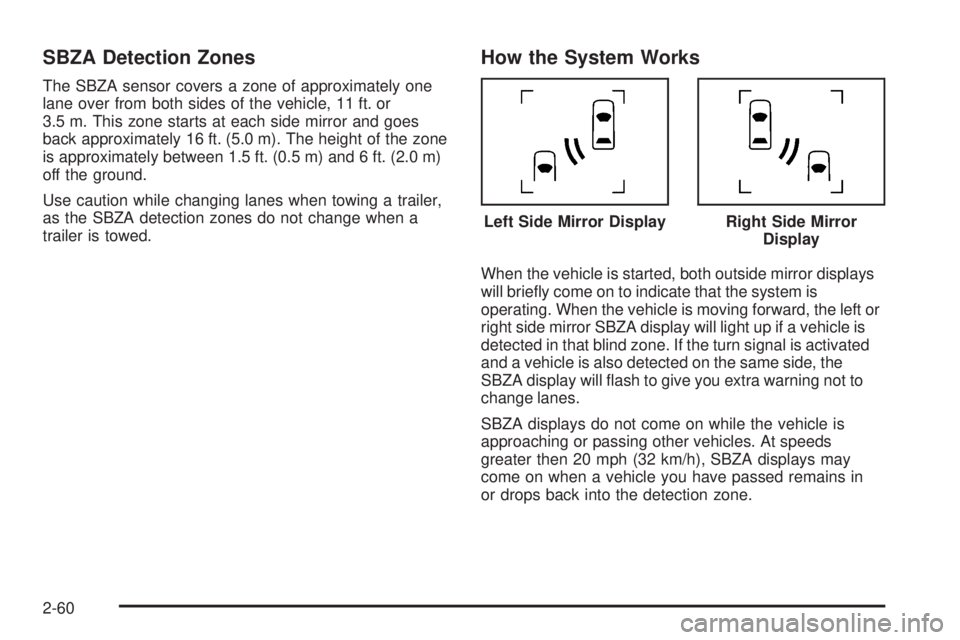
When the vehicle is started, both outside mirror displays
will briey come on to indicate that the system is
operating. When the vehicle is moving forward, the left or
right side mirror SBZA display will light up if a vehicle is
detected in that blind zone. If the turn signal is activated
and a vehicle is also detected on the same side, the
SBZA display will ash to give you extra warning not to
change lanes.
SBZA displays do not come on while the vehicle is
approaching or passing other vehicles. At speeds
greater then 20 mph (32 km/h), SBZA displays may
come on when a vehicle you have passed remains in
or drops back into the detection zone.Left Side Mirror Display
Right Side Mirror
Display
2-60
Page 167 of 578
SBZA can be disabled through the Driver Information
Center (DIC). SeeDriver Information Center (DIC)
on page 3-51for more information. If the SBZA
is disabled by the driver, the SBZA mirror displays
will not light up during normal driving.
When the System Does Not Seem To Work
Properly
Occasional missed alerts can occur under normal
circumstances and will increase in wet conditions.
The system does not need to be serviced due to
an occasional missed alert. The number of missed
alerts will increase with increased rainfall or road spray.
If the SBZA displays do not light up when the system is
on and vehicles are in the blind zone, the system may
need service. Take the vehicle to your dealer/retailer.
SBZA is designed to ignore stationary objects; however,
the system may occasionally light up due to guard
rails, signs, trees, shrubs, and other stationary objects.
This is normal system operation, the vehicle does
not need service.SBZA does not operate when the left or right corners
of the rear bumper are covered with mud, dirt, snow, ice,
slush, or in heavy rainstorms. For cleaning instructions,
seeWashing Your Vehicle on page 5-110. If the DIC still
displays the SIDE BLIND ZONE SYS. UNAVAILABLE
message after cleaning the bumper, see your
dealer/retailer.
The SBZA displays may remain on if a trailer is attached
to the vehicle, or a bicycle or object is extending out
to either side of the vehicle.
When SBZA is disabled for any reason other than the
driver turning it off, the driver will not be able to turn
SBZA back on using the DIC. The SIDE BLIND ZONE
ALERT ON option will not be selectable if the
conditions for normal system operation are not met.
Until normal operating conditions for SBZA are met,
you should not rely upon SBZA while driving.
2-61
Page 168 of 578
SBZA Error Messages
The following messages may appear in the DIC:
SIDE BLIND ZONE ALERT SYSTEM OFF:This
message indicates that the driver has turned the
system off.
SIDE BLIND ZONE SYS. UNAVAILABLE:This
message indicates that the SBZA system is disabled
either because the sensor is blocked and cannot detect
vehicles in your blind zone, or the vehicle is passing
through an open eld of view area, such as the desert,
where there is insufficient data for operation. The sensor
may be blocked by mud, dirt, snow, ice, slush, or even
heavy rainstorms. This message may also activate during
heavy rain or due to road spray. The vehicle does not
need service. For cleaning, seeWashing Your Vehicle
on page 5-110.
SERVICE SIDE BLIND ZONE ALERT SYSTEM:If this
message appears, both SBZA displays will remain on
indicating there is a problem with the SBZA system.
If these displays remain on after continued driving,
the system needs service. Take the vehicle to your
dealer/retailer.
Rear Vision Camera (RVC)
This vehicle may have a Rear Vision Camera system.
Read this entire section before using it.
{CAUTION:
The Rear Vision Camera (RVC) system does not
replace driver vision. RVC does not:
Detect objects that are outside the camera’s
eld of view, below the bumper, or
underneath the vehicle.
Detect children, pedestrians, bicyclists, or pets.
Do not back the vehicle by only looking at the rear
vision camera screen, or use the screen during
longer, higher speed backing maneuvers or where
there could be cross-traffic. Your judged distances
using the screen will differ from actual distances.
So if you do not use proper care before backing up,
you could hit a vehicle, child, pedestrian, bicyclist,
or pet, resulting in vehicle damage, injury, or death.
Even though the vehicle has the RVC system,
always check carefully before backing up by
checking behind and around the vehicle.
2-62
Page 169 of 578
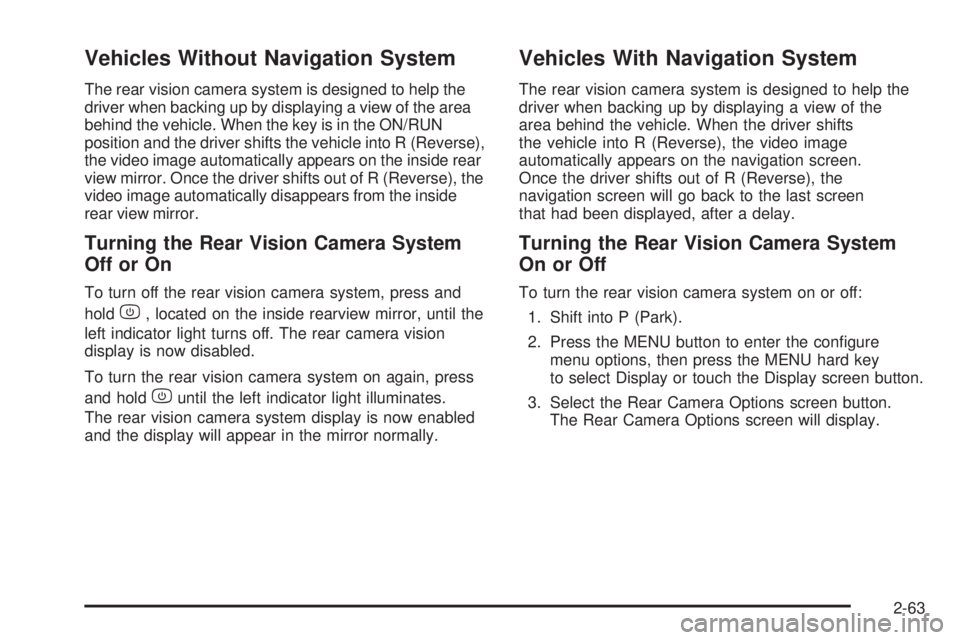
Vehicles Without Navigation System
The rear vision camera system is designed to help the
driver when backing up by displaying a view of the area
behind the vehicle. When the key is in the ON/RUN
position and the driver shifts the vehicle into R (Reverse),
the video image automatically appears on the inside rear
view mirror. Once the driver shifts out of R (Reverse), the
video image automatically disappears from the inside
rear view mirror.
Turning the Rear Vision Camera System
OfforOn
To turn off the rear vision camera system, press and
hold
z, located on the inside rearview mirror, until the
left indicator light turns off. The rear camera vision
display is now disabled.
To turn the rear vision camera system on again, press
and hold
zuntil the left indicator light illuminates.
The rear vision camera system display is now enabled
and the display will appear in the mirror normally.
Vehicles With Navigation System
The rear vision camera system is designed to help the
driver when backing up by displaying a view of the
area behind the vehicle. When the driver shifts
the vehicle into R (Reverse), the video image
automatically appears on the navigation screen.
Once the driver shifts out of R (Reverse), the
navigation screen will go back to the last screen
that had been displayed, after a delay.
Turning the Rear Vision Camera System
On or Off
To turn the rear vision camera system on or off:
1. Shift into P (Park).
2. Press the MENU button to enter the congure
menu options, then press the MENU hard key
to select Display or touch the Display screen button.
3. Select the Rear Camera Options screen button.
The Rear Camera Options screen will display.
2-63
Page 170 of 578
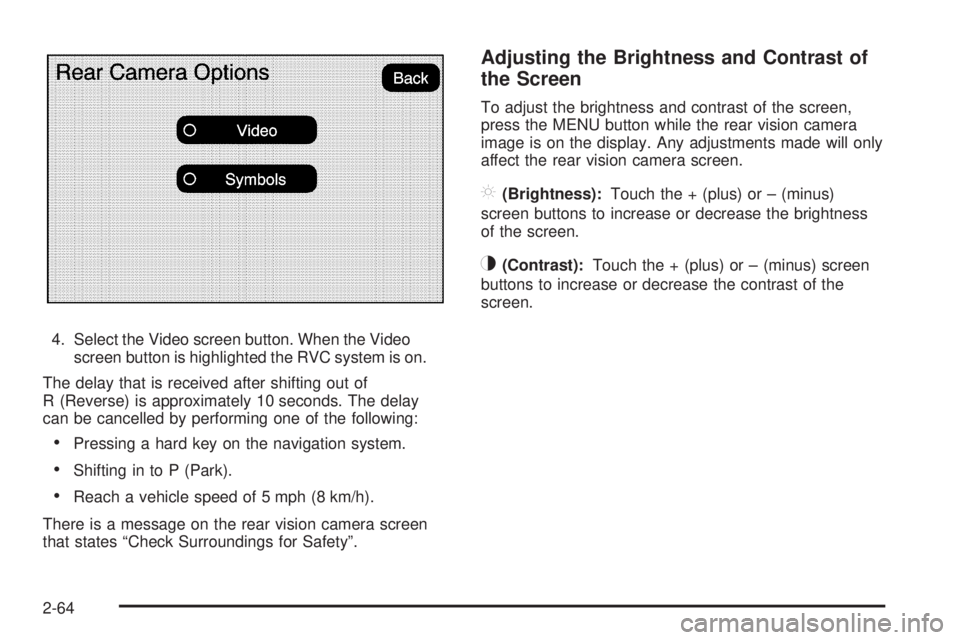
4. Select the Video screen button. When the Video
screen button is highlighted the RVC system is on.
The delay that is received after shifting out of
R (Reverse) is approximately 10 seconds. The delay
can be cancelled by performing one of the following:
Pressing a hard key on the navigation system.
Shifting in to P (Park).
Reach a vehicle speed of 5 mph (8 km/h).
There is a message on the rear vision camera screen
that states “Check Surroundings for Safety”.
Adjusting the Brightness and Contrast of
the Screen
To adjust the brightness and contrast of the screen,
press the MENU button while the rear vision camera
image is on the display. Any adjustments made will only
affect the rear vision camera screen.
](Brightness):Touch the + (plus) or – (minus)
screen buttons to increase or decrease the brightness
of the screen.
_(Contrast):Touch the + (plus) or – (minus) screen
buttons to increase or decrease the contrast of the
screen.
2-64
Page 171 of 578
Symbols
The navigation system may have a feature that lets the
driver view symbols on the navigation screen while using
the rear vision camera. The Ultrasonic Rear Park Assist
(URPA) system must not be disabled to use the caution
symbols. If URPA has been disabled and the symbols
have been turned on, the Rear Parking Assist Symbols
Unavailable error message may display. SeeUltrasonic
Rear Parking Assist (URPA) on page 2-56.
The symbols appear when an object has been detected
by the URPA system. The symbol may cover the
object when viewing the navigation screen.To turn the symbols on or off:
1. Make sure that URPA has not been disabled.
2. Shift into P (Park).
3. Press the MENU hard key to enter the congure
menu options, then press the MENU hard key
repeatedly until Display is selected or touch
the Display screen button.
4. Select the Rear Camera Options screen button.
The Rear Camera Options screen will display.
5. Touch the Symbols screen button. The screen
button will be highlighted when on.
Rear Vision Camera Error Messages
Service Rear Vision Camera System:This message
can display when the system is not receiving
information it requires from other vehicle systems.
If any other problem occurs or if a problem persists, see
your dealer/retailer.
2-65
Page 172 of 578
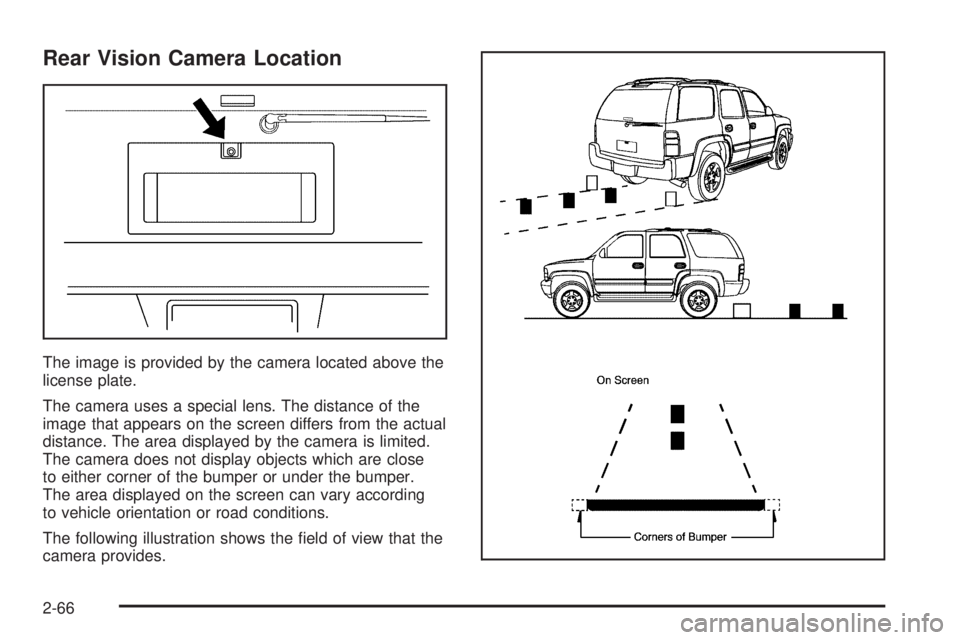
Rear Vision Camera Location
The image is provided by the camera located above the
license plate.
The camera uses a special lens. The distance of the
image that appears on the screen differs from the actual
distance. The area displayed by the camera is limited.
The camera does not display objects which are close
to either corner of the bumper or under the bumper.
The area displayed on the screen can vary according
to vehicle orientation or road conditions.
The following illustration shows the eld of view that the
camera provides.
2-66
Page 173 of 578
When the System Does Not Seem To
Work Properly
The rear vision camera system might not work properly
or display a clear image if:
The RVC is turned off. See “Turning the Rear
Camera System On or Off” earlier in this section.
It is dark.
The sun or the beam of headlights is shining
directly into the camera lens.
Ice, snow, mud, or anything else builds up on the
camera lens. Clean the lens, rinse it with water,
and wipe it with a soft cloth.
The back of the vehicle is in an accident, the
position and mounting angle of the camera
can change or the camera can be affected. Be sure
to have the camera and its position and mounting
angle checked at your dealer/retailer.
There are extreme temperature changes.The rear vision camera system display in the rearview
mirror may turn off or not appear as expected due to
one of the following conditions. If this occurs the
left indicator light on the mirror will ash.
A slow ash may indicate a loss of video signal, or
no video signal present during the reverse cycle.
A fast ash may indicate that the display has
been on for the maximum allowable time during
a reverse cycle, or the display has reached an
Over Temperature limit.
The fast ash conditions are used to protect the
video device from high temperature conditions.
Once conditions return to normal the device will
reset and the green indicator will stop ashing.
During any of these fault conditions, the display will be
blank and the indicator will continue to ash as long
as the vehicle is in R (Reverse) or until the conditions
return to normal.
Pressing and holding
zwhen the left indicator light is
ashing will turn off the video display along with the
left indicator light.
2-67
Page 190 of 578
Oil Pressure Light.........................................3-48
Security Light...............................................3-48
Fog Lamp Light............................................3-49
Cruise Control Light......................................3-49
Highbeam On Light.......................................3-49
Tow/Haul Mode Light....................................3-49
Fuel Gage...................................................3-50
Low Fuel Warning Light.................................3-51
Driver Information Center (DIC).......................3-51
DIC Operation and Displays
(With DIC Buttons)....................................3-52
DIC Operation and Displays
(Without DIC Buttons)................................3-58
DIC Compass..............................................3-61
DIC Warnings and Messages.........................3-64
DIC Vehicle Customization
(With DIC Buttons)....................................3-74Audio System(s).............................................3-83
Setting the Clock..........................................3-84
Radio(s)......................................................3-86
Using an MP3 (Radio with CD or
Six-Disc CD Player).................................3-105
Using an MP3 (Radio with CD and DVD
Player)...................................................3-109
XM Radio Messages...................................3-114
Navigation/Radio System..............................3-115
Bluetooth
®.................................................3-115
Rear Seat Entertainment (RSE) System.........3-127
Rear Seat Audio (RSA)................................3-136
Theft-Deterrent Feature................................3-138
Audio Steering Wheel Controls......................3-138
Radio Reception.........................................3-139
Rear Side Window Antenna..........................3-140
XM™ Satellite Radio Antenna System............3-140
Section 3 Instrument Panel
3-2