towing CHEVROLET SUBURBAN 2009 Owner's Guide
[x] Cancel search | Manufacturer: CHEVROLET, Model Year: 2009, Model line: SUBURBAN, Model: CHEVROLET SUBURBAN 2009Pages: 578, PDF Size: 3.04 MB
Page 373 of 578
3. Securely attach the vehicle being towed to the tow
vehicle.
{CAUTION:
Shifting a four-wheel-drive vehicle’s transfer case
into N (Neutral) can cause the vehicle to roll even
if the transmission is in P (Park). The driver or
others could be injured. Make sure the parking
brake is rmly set before the transfer case is
shifted to N (Neutral).4. Shift the transfer case to N (Neutral). See “Shifting
into Neutral” underFour-Wheel Drive on page 2-40
for the proper procedure to select the Neutral
position for the vehicle.
5. Release the parking brake only after the vehicle
being towed is rmly attached to the towing vehicle.
6. Turn the ignition to LOCK/OFF and remove the
key — the steering wheel will still turn.
After towing, see “Shifting Out of Neutral” under
Four-Wheel Drive on page 2-40for the proper procedure
to take the vehicle out of the Neutral position.
4-45
Page 374 of 578
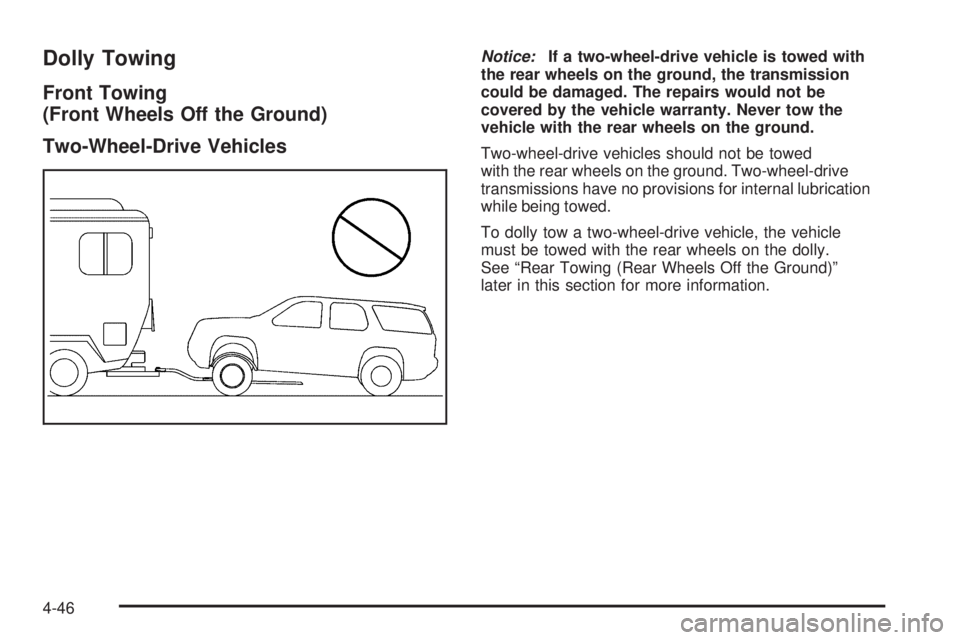
Dolly Towing
Front Towing
(Front Wheels Off the Ground)
Two-Wheel-Drive Vehicles
Notice:If a two-wheel-drive vehicle is towed with
the rear wheels on the ground, the transmission
could be damaged. The repairs would not be
covered by the vehicle warranty. Never tow the
vehicle with the rear wheels on the ground.
Two-wheel-drive vehicles should not be towed
with the rear wheels on the ground. Two-wheel-drive
transmissions have no provisions for internal lubrication
while being towed.
To dolly tow a two-wheel-drive vehicle, the vehicle
must be towed with the rear wheels on the dolly.
See “Rear Towing (Rear Wheels Off the Ground)”
later in this section for more information.
4-46
Page 375 of 578
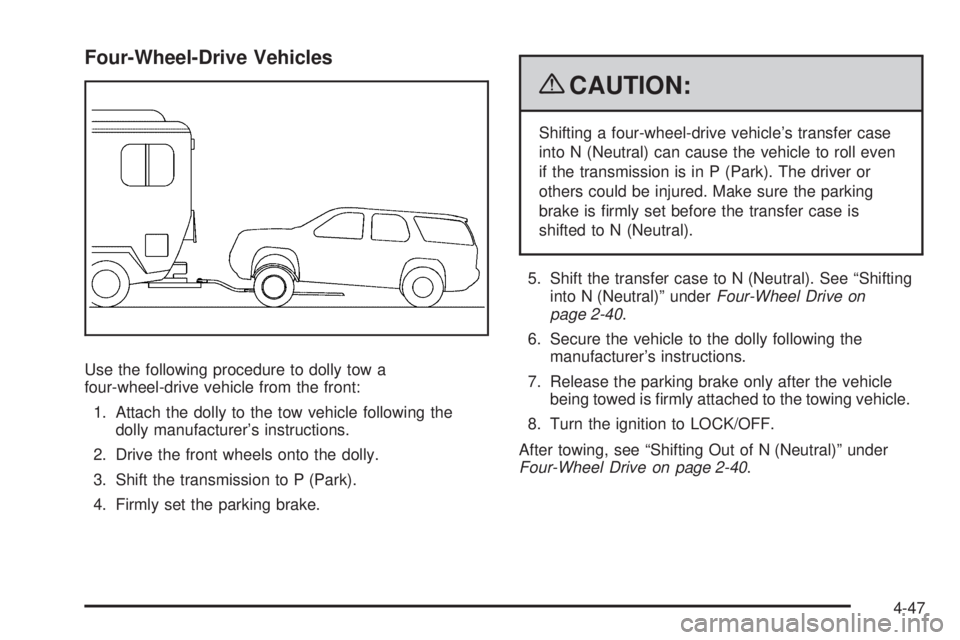
Four-Wheel-Drive Vehicles
Use the following procedure to dolly tow a
four-wheel-drive vehicle from the front:
1. Attach the dolly to the tow vehicle following the
dolly manufacturer’s instructions.
2. Drive the front wheels onto the dolly.
3. Shift the transmission to P (Park).
4. Firmly set the parking brake.
{CAUTION:
Shifting a four-wheel-drive vehicle’s transfer case
into N (Neutral) can cause the vehicle to roll even
if the transmission is in P (Park). The driver or
others could be injured. Make sure the parking
brake is rmly set before the transfer case is
shifted to N (Neutral).
5. Shift the transfer case to N (Neutral). See “Shifting
into N (Neutral)” underFour-Wheel Drive on
page 2-40.
6. Secure the vehicle to the dolly following the
manufacturer’s instructions.
7. Release the parking brake only after the vehicle
being towed is rmly attached to the towing vehicle.
8. Turn the ignition to LOCK/OFF.
After towing, see “Shifting Out of N (Neutral)” under
Four-Wheel Drive on page 2-40.
4-47
Page 376 of 578
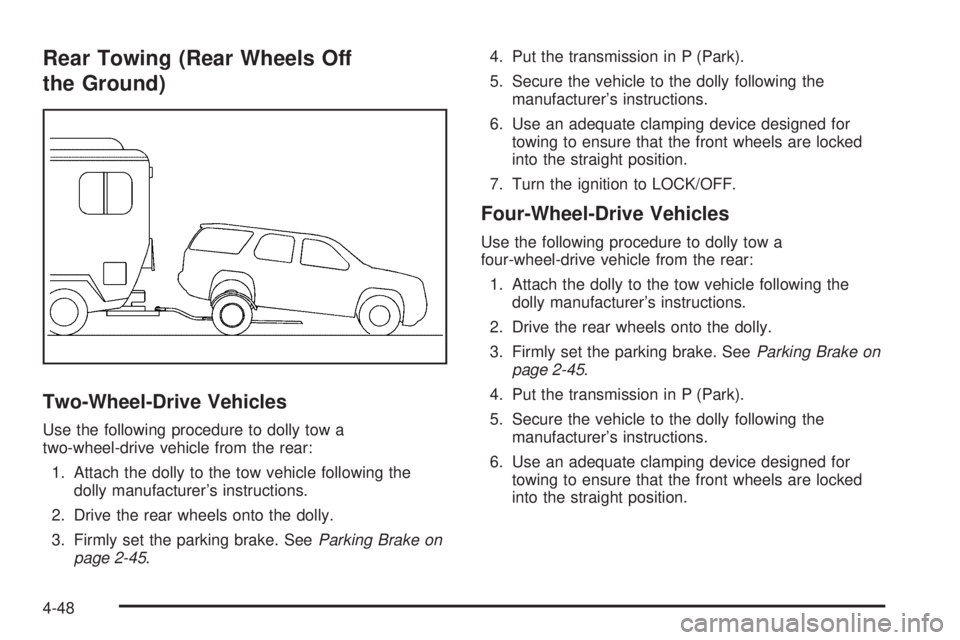
Rear Towing (Rear Wheels Off
the Ground)
Two-Wheel-Drive Vehicles
Use the following procedure to dolly tow a
two-wheel-drive vehicle from the rear:
1. Attach the dolly to the tow vehicle following the
dolly manufacturer’s instructions.
2. Drive the rear wheels onto the dolly.
3. Firmly set the parking brake. SeeParking Brake on
page 2-45.4. Put the transmission in P (Park).
5. Secure the vehicle to the dolly following the
manufacturer’s instructions.
6. Use an adequate clamping device designed for
towing to ensure that the front wheels are locked
into the straight position.
7. Turn the ignition to LOCK/OFF.
Four-Wheel-Drive Vehicles
Use the following procedure to dolly tow a
four-wheel-drive vehicle from the rear:
1. Attach the dolly to the tow vehicle following the
dolly manufacturer’s instructions.
2. Drive the rear wheels onto the dolly.
3. Firmly set the parking brake. SeeParking Brake on
page 2-45.
4. Put the transmission in P (Park).
5. Secure the vehicle to the dolly following the
manufacturer’s instructions.
6. Use an adequate clamping device designed for
towing to ensure that the front wheels are locked
into the straight position.
4-48
Page 377 of 578
{CAUTION:
Shifting a four-wheel-drive vehicle’s transfer case
into N (Neutral) can cause the vehicle to roll even
if the transmission is in P (Park). The driver or
others could be injured. Make sure the parking
brake is rmly set before the transfer case is
shifted to N (Neutral).
7. Shift the transfer case to N (Neutral). See “Shifting
into N (Neutral)” underFour-Wheel Drive on
page 2-40.
8. Turn the ignition to LOCK/OFF.
After towing, see “Shifting Out of N (Neutral)” under
Four-Wheel Drive on page 2-40.
Level Control
Automatic Level Control
The automatic level control rear suspension is available
on light-duty vehicles and comes as a part of the
Autoride
®suspension, if equipped.
This type of level control is fully automatic and will
provide a better leveled riding position as well as
better handling under a variety of passenger and
loading conditions. An air compressor connected
to the rear shocks will raise or lower the rear of the
vehicle to maintain proper vehicle height. The system
is activated when the ignition key is turned to ON/RUN
and will automatically adjust vehicle height thereafter.
The system may exhaust (lower vehicle height) for up
to ten minutes after the ignition key has been turned off.
You may hear the air compressor operating when the
height is being adjusted.
If a weight-distributing hitch is being used, it is
recommended to allow the shocks to inate, thereby
leveling the vehicle prior to adjusting the hitch.
4-49
Page 378 of 578
Autoride®
With this feature, improved vehicle ride and handling is
provided under a variety of passenger and loading
conditions.
The system is fully automatic and uses a computer
controller to continuously monitor vehicle speed, wheel to
body position, lift/dive and steering position of the vehicle.
The controller then sends signals to each shock absorber
to independently adjust the damping level to provide the
optimum vehicle ride.
Autoride also interacts with the tow/haul mode that,
when activated, will provide additional control of the
shock absorbers. This additional control results in better
ride and handling characteristics when the vehicle is
loaded or towing a trailer. See “Tow/Haul Mode” under
Towing a Trailer on page 4-50for more information.
Towing a Trailer
Do not tow a trailer during break-in. SeeNew Vehicle
Break-In on page 2-26for more information.
{CAUTION:
The driver can lose control when pulling a trailer if
the correct equipment is not used or the vehicle is
not driven properly. For example, if the trailer is too
heavy, the brakes may not work well — or even at
all. The driver and passengers could be seriously
injured. The vehicle may also be damaged; the
resulting repairs would not be covered by the
vehicle warranty. Pull a trailer only if all the steps
in this section have been followed. Ask your
dealer/retailer for advice and information about
towing a trailer with the vehicle.
4-50
Page 379 of 578
Notice:Pulling a trailer improperly can damage
the vehicle and result in costly repairs not covered
by the vehicle warranty. To pull a trailer correctly,
follow the advice in this section and see your
dealer/retailer for important information about
towing a trailer with the vehicle.
To identify the trailering capacity of the vehicle, read
the information in “Weight of the Trailer” that appears
later in this section.
Trailering is different than just driving the vehicle by
itself. Trailering means changes in handling, acceleration,
braking, durability and fuel economy. Successful, safe
trailering takes correct equipment, and it has to be used
properly.
The following information has many time-tested,
important trailering tips and safety rules. Many of
these are important for your safety and that of your
passengers. So please read this section carefully
before pulling a trailer.Pulling A Trailer
Here are some important points:
There are many different laws, including speed limit
restrictions, having to do with trailering. Make sure
the rig will be legal, not only where you live but
also where you will be driving. A good source for
this information can be state or provincial police.
Consider using a sway control. See “Hitches” later
in this section.
Do not tow a trailer at all during the rst 500 miles
(800 km) the new vehicle is driven. The engine,
axle or other parts could be damaged.
Then, during the rst 500 miles (800 km) that a
trailer is towed, do not drive over 50 mph (80 km/h)
and do not make starts at full throttle. This helps
the engine and other parts of the vehicle wear in
at the heavier loads.
Vehicles can tow in D (Drive). Shift the transmission
to a lower gear if the transmission shifts too often
under heavy loads and/or hilly conditions.
If the vehicle has the Side Blind Zone Alert (SBZA)
system and it doesn’t seem to be working properly
while pulling a trailer, turn the system off. SeeSide
Blind Zone Alert (SBZA) on page 2-58for more
information.
4-51
Page 382 of 578
Weight of the Trailer Tongue
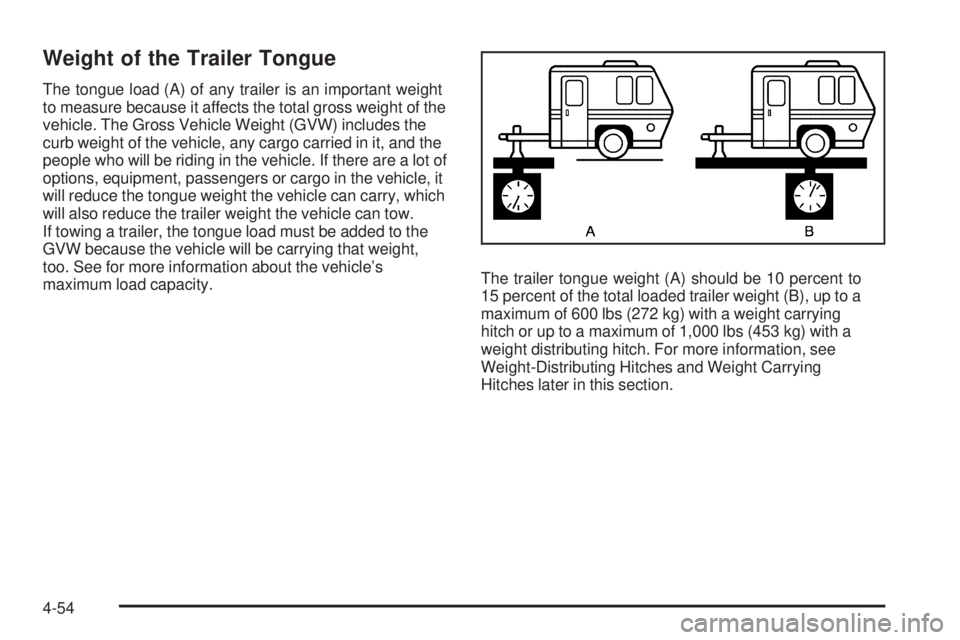
The tongue load (A) of any trailer is an important weight
to measure because it affects the total gross weight of the
vehicle. The Gross Vehicle Weight (GVW) includes the
curb weight of the vehicle, any cargo carried in it, and the
people who will be riding in the vehicle. If there are a lot of
options, equipment, passengers or cargo in the vehicle, it
will reduce the tongue weight the vehicle can carry, which
will also reduce the trailer weight the vehicle can tow.
If towing a trailer, the tongue load must be added to the
GVW because the vehicle will be carrying that weight,
too. See for more information about the vehicle’s
maximum load capacity.The trailer tongue weight (A) should be 10 percent to
15 percent of the total loaded trailer weight (B), up to a
maximum of 600 lbs (272 kg) with a weight carrying
hitch or up to a maximum of 1,000 lbs (453 kg) with a
weight distributing hitch. For more information, see
Weight-Distributing Hitches and Weight Carrying
Hitches later in this section.
4-54
Page 388 of 578
The ITBC system is powered through the vehicle’s
electrical system. Turning the ignition off will also turn
off the ITBC system. The ITBC system is fully functional
only when the ignition is in ON or in RUN.
The ITBC system can only be used with trailers with
electric brakes.
{CAUTION:
Connecting a trailer that is not compatible with the
ITBC system may result in reduced or complete
loss of trailer braking. There may be an increase in
stopping distance or trailer instability which could
result in personal injury or damage to the vehicle,
trailer, or other property. An aftermarket controller
may be available for use with trailers with surge,
air or electric-over-hydraulic trailer brake systems.
To determine the type of brakes on the trailer and
the availability of controllers, check with your trailer
manufacturer or dealer/retailer.When trailering, make sure of the following:
The ITBC system is used only with trailers that are
equipped with electric brakes.
All applicable local and federal laws and regulations
are followed.
All electrical and mechanical connections to the
trailer are made correctly.
The trailer’s brakes are in proper working condition.
The trailer and vehicle are properly loaded for
the towing condition.
The ITBC system is a factory installed item.
Out-of-factory installation of this system should not
be attempted. GM is not responsible for warranty
or performance of the system resulting from
out-of-factory installation.
4-60
Page 392 of 578
Trailer Gain Adjustment Procedure
Trailer Gain should be set for a specic trailering
condition and must be adjusted any time vehicle loading,
trailer loading or road surface conditions change.
Setting the Trailer Gain properly is needed for the best
trailer stopping performance. A trailer that is over-gained
may result in locked trailer brakes. A trailer that is
under-gained may result in not enough trailer braking.
Both of these conditions may result in poorer stopping
and stability of the vehicle and trailer.
Use the following procedure to correctly adjust Trailer
Gain for each towing condition:
1. Make sure the trailer brakes are in proper working
condition.
2. Connect a properly loaded trailer to the vehicle
and make all necessary mechanical and electrical
connections. SeeLoading the Vehicle on page 4-33
for more information.
3. After the electrical connection is made to a trailer
equipped with electric brakes:
A TRAILER CONNECTED message will be
briey displayed on the DIC display.
The Trailer Brake Display Page will appear on
the DIC showing TRAILER GAIN and TRAILER
OUTPUT.
In the Trailer Output display on the DIC, “------“
will disappear if there is no error present.
Connecting a trailer without electric brakes
will not clear the six dashed lines.
4. Adjust the Trailer Gain by using the gain adjustment
(+ /−) buttons on the Trailer Brake Control Panel.
5. Drive the vehicle with the trailer attached on a
level road surface representative of the towing
condition and free of traffic at about 20 to 25 mph
(32 to 40 km/h) and fully apply the Manual Trailer
Brake Apply lever.
Adjusting trailer gain at speeds lower than
20 to 25 mph (32 to 40 km/h) may result in
an incorrect gain setting.
6. Adjust the Trailer Gain to just below the point of
trailer wheel lock-up, indicated by trailer wheel
squeal or tire smoke when a trailer wheel locks.
Trailer wheel lock-up may not occur if towing
a heavily loaded trailer. In this case, adjust the
Trailer Gain to the highest allowable setting for
the towing condition.
7. Re-adjust Trailer Gain any time vehicle loading,
trailer loading or road surface conditions change
or if trailer wheel lock-up is noticed at any time
while towing
4-64