transmission CHEVROLET SUBURBAN 2011 10.G Owners Manual
[x] Cancel search | Manufacturer: CHEVROLET, Model Year: 2011, Model line: SUBURBAN, Model: CHEVROLET SUBURBAN 2011 10.GPages: 542, PDF Size: 7.54 MB
Page 1 of 542

Black plate (1,1)Chevrolet Tahoe/Suburban Owner Manual - 2011
2011 Chevrolet Tahoe/Suburban Owner ManualM
In Brief. . . . . . . . . . . . . . . . . . . . . . . . 1-1
Instrument Panel . . . . . . . . . . . . . . 1-2
Initial Drive Information . . . . . . . . 1-4
Vehicle Features . . . . . . . . . . . . . 1-20
Performance and Maintenance . . . . . . . . . . . . . . . . 1-26
Keys, Doors and Windows . . . 2-1
Keys and Locks . . . . . . . . . . . . . . . 2-2
Doors . . . . . . . . . . . . . . . . . . . . . . . . 2-10
Vehicle Security . . . . . . . . . . . . . . 2-14
Exterior Mirrors . . . . . . . . . . . . . . . 2-17
Interior Mirrors . . . . . . . . . . . . . . . . 2-21
Windows . . . . . . . . . . . . . . . . . . . . . 2-22
Roof . . . . . . . . . . . . . . . . . . . . . . . . . . 2-24
Seats and Restraints . . . . . . . . . 3-1
Head Restraints . . . . . . . . . . . . . . . 3-2
Front Seats . . . . . . . . . . . . . . . . . . . . 3-3
Rear Seats . . . . . . . . . . . . . . . . . . . 3-11
Safety Belts . . . . . . . . . . . . . . . . . . 3-24
Airbag System . . . . . . . . . . . . . . . . 3-41
Child Restraints . . . . . . . . . . . . . . 3-57 Storage
. . . . . . . . . . . . . . . . . . . . . . . 4-1
Storage Compartments . . . . . . . . 4-1
Additional Storage Features . . . 4-2
Roof Rack System . . . . . . . . . . . . . 4-3
Instruments and Controls . . . . 5-1
Controls . . . . . . . . . . . . . . . . . . . . . . . 5-2
Warning Lights, Gauges, and
Indicators . . . . . . . . . . . . . . . . . . . 5-12
Information Displays . . . . . . . . . . 5-29
Vehicle Messages . . . . . . . . . . . . 5-38
Vehicle Personalization . . . . . . . 5-49
Universal Remote System . . . . 5-57
Lighting . . . . . . . . . . . . . . . . . . . . . . . 6-1
Exterior Lighting . . . . . . . . . . . . . . . 6-1
Interior Lighting . . . . . . . . . . . . . . . . 6-7
Lighting Features . . . . . . . . . . . . . . 6-8
Infotainment System . . . . . . . . . 7-1
Introduction . . . . . . . . . . . . . . . . . . . . 7-1
Radio . . . . . . . . . . . . . . . . . . . . . . . . . . 7-8
Audio Players . . . . . . . . . . . . . . . . 7-15
Rear Seat Infotainment . . . . . . . 7-36
Phone . . . . . . . . . . . . . . . . . . . . . . . . 7-48 Climate Controls
. . . . . . . . . . . . . 8-1
Climate Control Systems . . . . . . 8-1
Air Vents . . . . . . . . . . . . . . . . . . . . . 8-13
Driving and Operating . . . . . . . . 9-1
Driving Information . . . . . . . . . . . . . 9-2
Starting and Operating . . . . . . . 9-29
Engine Exhaust . . . . . . . . . . . . . . 9-37
Automatic Transmission . . . . . . 9-39
Drive Systems . . . . . . . . . . . . . . . . 9-46
Brakes . . . . . . . . . . . . . . . . . . . . . . . 9-53
Ride Control Systems . . . . . . . . 9-55
Cruise Control . . . . . . . . . . . . . . . . 9-58
Object Detection Systems . . . . 9-61
Fuel . . . . . . . . . . . . . . . . . . . . . . . . . . 9-71
Towing . . . . . . . . . . . . . . . . . . . . . . . 9-78
Conversions and Add-Ons . . . 9-97
Page 7 of 542
Black plate (1,1)Chevrolet Tahoe/Suburban Owner Manual - 2011
In Brief 1-1
In Brief
Instrument Panel
Instrument Panel Overview . . . . 1-2
Initial Drive Information
Initial Drive Information . . . . . . . . 1-4
Remote Keyless Entry (RKE)System . . . . . . . . . . . . . . . . . . . . . . 1-4
Remote Vehicle Start . . . . . . . . . 1-5
Door Locks . . . . . . . . . . . . . . . . . . . 1-5
Liftgate . . . . . . . . . . . . . . . . . . . . . . . . 1-6
Windows . . . . . . . . . . . . . . . . . . . . . . 1-6
Seat Adjustment . . . . . . . . . . . . . . 1-7
Memory Features . . . . . . . . . . . . . 1-9
Second Row Seats . . . . . . . . . . 1-10
Third Row Seats . . . . . . . . . . . . . 1-10
Heated Seats . . . . . . . . . . . . . . . . 1-11
Head Restraint Adjustment . . . . . . . . . . . . . . . . . 1-11
Safety Belts . . . . . . . . . . . . . . . . . . 1-12
Sensing System for Passenger Airbag . . . . . . . . . . 1-12
Mirror Adjustment . . . . . . . . . . . . 1-13
Steering Wheel Adjustment . . . . . . . . . . . . . . . . . 1-14
Throttle and Brake Pedal Adjustment . . . . . . . . . . . . . . . . . 1-14 Interior Lighting . . . . . . . . . . . . . . 1-15
Exterior Lighting . . . . . . . . . . . . . 1-16
Windshield Wiper/Washer . . . . 1-16
Climate Controls . . . . . . . . . . . . . 1-17
Transmission . . . . . . . . . . . . . . . . 1-18
Four-Wheel Drive . . . . . . . . . . . . 1-19Vehicle Features
Radio(s) . . . . . . . . . . . . . . . . . . . . . 1-20
Satellite Radio . . . . . . . . . . . . . . . 1-22
Portable Audio Devices . . . . . . 1-22
Bluetooth
®. . . . . . . . . . . . . . . . . . . 1-22
Steering Wheel Controls . . . . . 1-23
Cruise Control . . . . . . . . . . . . . . . 1-23
Navigation System . . . . . . . . . . . 1-24
Side Blind Zone Alert (SBZA) . . . . . . . . . . . . . . . 1-24
Rear Vision Camera (RVC) . . . . . . . . . . . . . 1-24
Ultrasonic Parking Assist . . . . 1-25
Power Outlets . . . . . . . . . . . . . . . 1-25
Universal Remote System . . . 1-25
Sunroof . . . . . . . . . . . . . . . . . . . . . . 1-26
Performance and Maintenance
StabiliTrak®System . . . . . . . . . 1-26
Tire Pressure Monitor . . . . . . . . 1-27
Engine Oil Life System . . . . . . 1-27
Fuel E85 (85% Ethanol) . . . . . 1-28 Driving for Better Fuel
Economy . . . . . . . . . . . . . . . . . . . 1-28
Roadside Assistance Program . . . . . . . . . . . . . . . . . . . . 1-28
OnStar
®. . . . . . . . . . . . . . . . . . . . . 1-29
Page 9 of 542

Black plate (3,1)Chevrolet Tahoe/Suburban Owner Manual - 2011
In Brief 1-3
A.Air Vents on page 8‑13.
B. Turn and Lane‐Change Lever. See Turn and Lane-Change
Signals on page 6‑5.
Windshield Wiper/Washer on
page 5‑5.
Rear Window Wiper/Washer on
page 5‑6.
C. Instrument Cluster on
page 5‑13.
D. Hazard Warning Flashers on
page 6‑5.
E. Shift Lever. See Automatic
Transmission on page 9‑39.
F. Tow/Haul Mode on page 9‑44
(If Equipped).
G. Driver Information Center (DIC) Buttons. See Driver Information
Center (DIC) on page 5‑29.
H. AM-FM Radio on page 7‑8.
I. Exterior Lamp Controls on
page 6‑1. J.
Dome Lamps on page 6‑7.
Instrument Panel Illumination
Control on page 6‑7.
Fog Lamps on page 6‑6
(If Equipped).
K. Hood Release. See Hood on
page 10‑5.
L. Integrated Trailer Brake Controller (If Equipped). See
Towing Equipment on
page 9‑87.
M. Data Link Connector (DLC) (Out of view). See Malfunction
Indicator Lamp on page 5‑22.
N. Automatic Transfer Case Control. (If Equipped). See
Four-Wheel Drive (Two Speed
Automatic Transfer Case) on
page 9‑46 orFour-Wheel Drive
(Single Speed Automatic
Transfer Case) on page 9‑51.
O. Cruise Control on page 9‑58. P.
Steering Wheel Adjustment on
page 5‑2.
Q. Horn on page 5‑5.
R. Steering Wheel Controls on
page 5‑3.
S. Climate Control Systems on
page 8‑1 (If Equipped).
Dual Automatic Climate Control
System on page 8‑4
(If Equipped).
T. Power Outlets on page 5‑10.
U. StabiliTrak
®System on
page 9‑55 (If Equipped).
Pedal Adjust Button
(If Equipped). See Adjustable
Throttle and Brake Pedal on
page 9‑29. Ultrasonic Parking
Assist on page 9‑61
(If Equipped).
Power Assist Steps on
page 2‑14 (If Equipped).
V. Glove Box on page 4‑1.
Page 24 of 542
Black plate (18,1)Chevrolet Tahoe/Suburban Owner Manual - 2011
1-18 In Brief
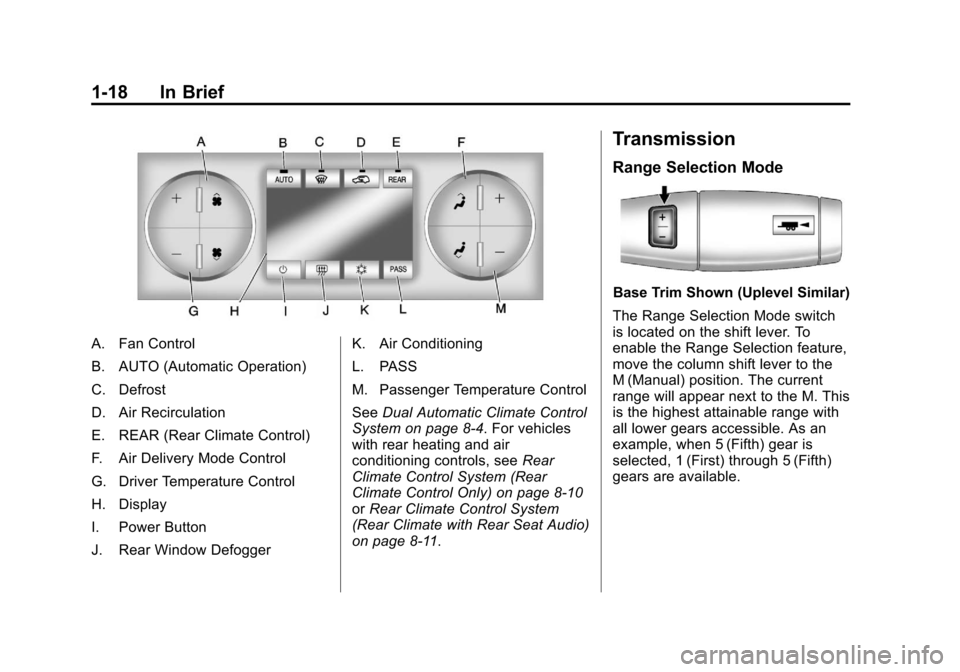
A. Fan Control
B. AUTO (Automatic Operation)
C. Defrost
D. Air Recirculation
E. REAR (Rear Climate Control)
F. Air Delivery Mode Control
G. Driver Temperature Control
H. Display
I. Power Button
J. Rear Window DefoggerK. Air Conditioning
L. PASS
M. Passenger Temperature Control
See
Dual Automatic Climate Control
System on page 8‑4. For vehicles
with rear heating and air
conditioning controls, see Rear
Climate Control System (Rear
Climate Control Only) on page 8‑10
or Rear Climate Control System
(Rear Climate with Rear Seat Audio)
on page 8‑11.
Transmission
Range Selection Mode
Base Trim Shown (Uplevel Similar)
The Range Selection Mode switch
is located on the shift lever. To
enable the Range Selection feature,
move the column shift lever to the
M (Manual) position. The current
range will appear next to the M. This
is the highest attainable range with
all lower gears accessible. As an
example, when 5 (Fifth) gear is
selected, 1 (First) through 5 (Fifth)
gears are available.
Page 49 of 542
Black plate (11,1)Chevrolet Tahoe/Suburban Owner Manual - 2011
Keys, Doors and Windows 2-11
The power liftgate can be power
opened and closed in the
following ways:
.Press and hold&on the
Remote Keyless Entry (RKE)
transmitter until the liftgate starts
moving. See Remote Keyless
Entry (RKE) System Operation
on page 2‑3.
.Press&on the overhead
console.
.Press the touchpad on the
outside liftgate handle.
Pressing the buttons, or touchpad
switch a second time while the
liftgate is moving reverses the
direction.
l: The liftgate can also be
closed by pressing this button next
to the liftgate latch.
Press the button a second time
during liftgate operation to reverse
that operation. The power liftgate may be
temporarily disabled under extreme
temperatures, or under low battery
conditions. If this occurs, the liftgate
can still be operated manually.
If the transmission is shifted out of
P (Park) while the power function is
in progress, the liftgate power
function will continue to completion.
If the transmission is shifted out of
P (Park) and the vehicle accelerates
before the power liftgate latches
closed, the liftgate may reverse to
the open position. Cargo could fall
out of the vehicle. Always make
sure the power liftgate is closed and
latched before you drive away.
If you power open the liftgate and
the liftgate support struts have lost
pressure, the lamps will flash and a
chime will sound. The liftgate will
stay open temporarily, then slowly
close. See your dealer for service
before using the liftgate.
Obstacle Detection Features
If the liftgate encounters an obstacle
during a power open or close cycle,
a warning chime will sound and the
liftgate will automatically reverse
direction to the full closed or open
position. After removing the
obstruction, the power liftgate
operation can be used again. If the
liftgate encounters multiple
obstacles on the same power cycle,
the power function will deactivate,
and you must manually open or
close the liftgate. The REAR
ACCESS OPEN warning message
in the Driver Information Center
(DIC) will indicate that the liftgate is
open. After removing the
obstructions, manually open the
liftgate to the full open position or
close the liftgate to the fully closed
and latched position. The liftgate will
now resume normal power
operation.
Page 78 of 542
Black plate (14,1)Chevrolet Tahoe/Suburban Owner Manual - 2011
3-14 Seats and Restraints
Automatic Seat Release Fold
and Tumble Feature
The transmission must be in
P (Park) for this feature to work.
{WARNING
Automatically folding and
tumbling the seat when someone
is sitting in the seat, could cause
injury to the person sitting there.
Always make sure there is no one
sitting in the seat before pressing
the automatic seat release button.
Folding and Tumbling the Second
Row Seat from the Third Row Seat
or Outside
{WARNING
Using the third row seating
position while the second row is
folded, or folded and tumbled,
could cause injury in a sudden (Continued)
WARNING (Continued)
stop or crash. Be sure to return
the seat to the passenger seating
position. Push and pull on the
seat to make sure it is locked into
place.
To fold and tumble the seat from the
third row seat, if equipped:
1. Make sure that there is nothing under, in front of, or on the seat.
Notice: Folding a rear seat with
the safety belts still fastened may
cause damage to the seat or the
safety belts. Always unbuckle the
safety belts and return them to
their normal stowed position
before folding a rear seat.
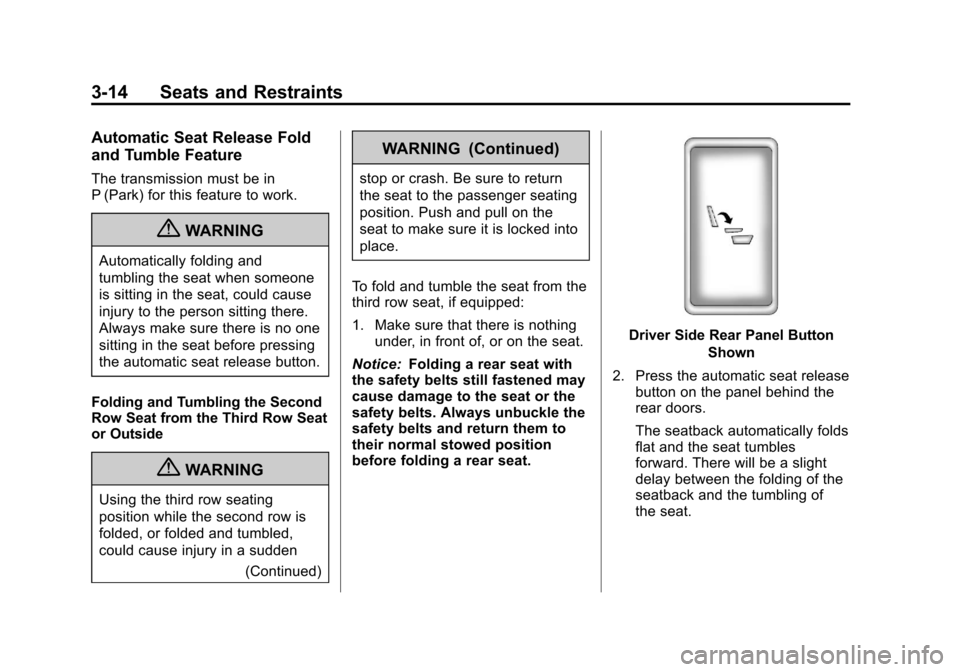
Driver Side Rear Panel Button
Shown
2. Press the automatic seat release button on the panel behind the
rear doors.
The seatback automatically folds
flat and the seat tumbles
forward. There will be a slight
delay between the folding of the
seatback and the tumbling of
the seat.
Page 82 of 542
Black plate (18,1)Chevrolet Tahoe/Suburban Owner Manual - 2011
3-18 Seats and Restraints
Folding and Tumbling the Seat
from the Third Row Seat
{WARNING
Using the third row seating
position while the second row is
folded, or folded and tumbled,
could cause injury in a sudden
stop or crash. Be sure to return
the seat to the passenger seating
position. Push and pull on the
seat to make sure it is locked into
place.
To fold and tumble the seat from the
third row seat, if equipped:
1. Make sure that there is nothing under, in front of, or on the seat.
Notice: Folding a rear seat with
the safety belts still fastened may
cause damage to the seat or the
safety belts. Always unbuckle the
safety belts and return them to
their normal stowed position
before folding a rear seat.
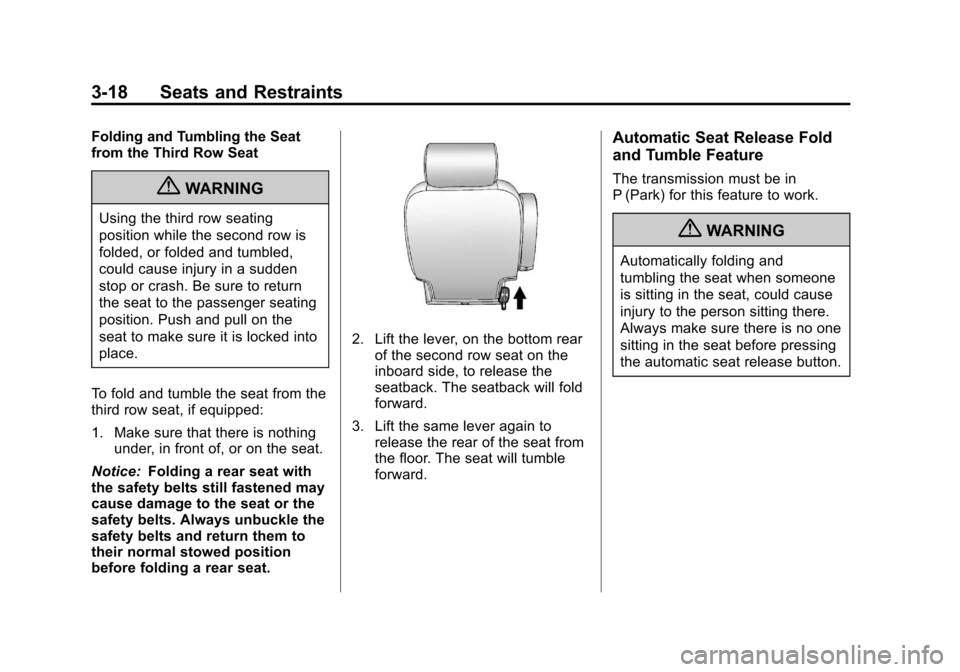
2. Lift the lever, on the bottom rear of the second row seat on the
inboard side, to release the
seatback. The seatback will fold
forward.
3. Lift the same lever again to release the rear of the seat from
the floor. The seat will tumble
forward.
Automatic Seat Release Fold
and Tumble Feature
The transmission must be in
P (Park) for this feature to work.
{WARNING
Automatically folding and
tumbling the seat when someone
is sitting in the seat, could cause
injury to the person sitting there.
Always make sure there is no one
sitting in the seat before pressing
the automatic seat release button.
Page 149 of 542
Black plate (1,1)Chevrolet Tahoe/Suburban Owner Manual - 2011
Instruments and Controls 5-1
Instruments and
Controls
Controls
Steering Wheel Adjustment . . . 5-2
Steering Wheel Controls . . . . . . 5-3
Horn . . . . . . . . . . . . . . . . . . . . . . . . . . 5-5
Windshield Wiper/Washer . . . . . 5-5
Rear Window Wiper/Washer . . . . . . . . . . . . . . . . . . . . . . 5-6
Compass . . . . . . . . . . . . . . . . . . . . . 5-7
Clock . . . . . . . . . . . . . . . . . . . . . . . . . 5-9
Power Outlets . . . . . . . . . . . . . . . 5-10
Warning Lights, Gauges, and
Indicators
Warning Lights, Gauges, and Indicators . . . . . . . . . . . . . . . . . . 5-12
Instrument Cluster . . . . . . . . . . . 5-13
Speedometer . . . . . . . . . . . . . . . . 5-14
Odometer . . . . . . . . . . . . . . . . . . . . 5-14
Trip Odometer . . . . . . . . . . . . . . . 5-14
Tachometer . . . . . . . . . . . . . . . . . . 5-14
Fuel Gauge . . . . . . . . . . . . . . . . . . 5-15
Engine Oil Pressure Gauge . . . . . . . . . . . . . . . . . . . . . . 5-16 Engine Coolant Temperature
Gauge . . . . . . . . . . . . . . . . . . . . . . 5-17
Voltmeter Gauge . . . . . . . . . . . . . 5-18
Safety Belt Reminders . . . . . . . 5-18
Airbag Readiness Light . . . . . . 5-19
Passenger Airbag Status Indicator . . . . . . . . . . . . . . . . . . . . 5-20
Charging System Light . . . . . . 5-21
Malfunction Indicator Lamp . . . . . . . . . . . . . 5-22
Brake System Warning Light . . . . . . . . . . . . . . . . . . . . . . . 5-24
Antilock Brake System (ABS) Warning Light . . . . . . . . . . . . . . 5-25
Tow/Haul Mode Light . . . . . . . . 5-26
StabiliTrak
®Indicator Light . . . 5-26
Tire Pressure Light . . . . . . . . . . 5-26
Engine Oil Pressure Light . . . . 5-27
Low Fuel Warning Light . . . . . . 5-28
Security Light . . . . . . . . . . . . . . . . 5-28
High-Beam on Light . . . . . . . . . 5-28
Front Fog Lamp Light . . . . . . . . 5-28
Cruise Control Light . . . . . . . . . 5-29
Information Displays
Driver Information Center (DIC) . . . . . . . . . . . . . . . 5-29
Vehicle Messages
Vehicle Messages . . . . . . . . . . . 5-38
Battery Voltage and ChargingMessages . . . . . . . . . . . . . . . . . . 5-38
Brake System Messages . . . . 5-39
Door Ajar Messages . . . . . . . . . 5-39
Engine Cooling System Messages . . . . . . . . . . . . . . . . . . 5-40
Engine Oil Messages . . . . . . . . 5-41
Engine Power Messages . . . . 5-42
Fuel System Messages . . . . . . 5-42
Key and Lock Messages . . . . . 5-43
Lamp Messages . . . . . . . . . . . . . 5-43
Object Detection System Messages . . . . . . . . . . . . . . . . . . 5-43
Ride Control System Messages . . . . . . . . . . . . . . . . . . 5-44
Airbag System Messages . . . . 5-45
Anti-Theft Alarm System Messages . . . . . . . . . . . . . . . . . . 5-46
Tire Messages . . . . . . . . . . . . . . . 5-46
Transmission Messages . . . . . 5-47
Vehicle Reminder Messages . . . . . . . . . . . . . . . . . . 5-47
Washer Fluid Messages . . . . . 5-48
Page 170 of 542
Black plate (22,1)Chevrolet Tahoe/Suburban Owner Manual - 2011
5-22 Instruments and Controls
Malfunction
Indicator Lamp
A computer system called OBD II
(On-Board Diagnostics-Second
Generation) monitors operation of
the fuel, ignition, and emission
control systems. It ensures that
emissions are at acceptable levels
for the life of the vehicle, helping to
produce a cleaner environment.
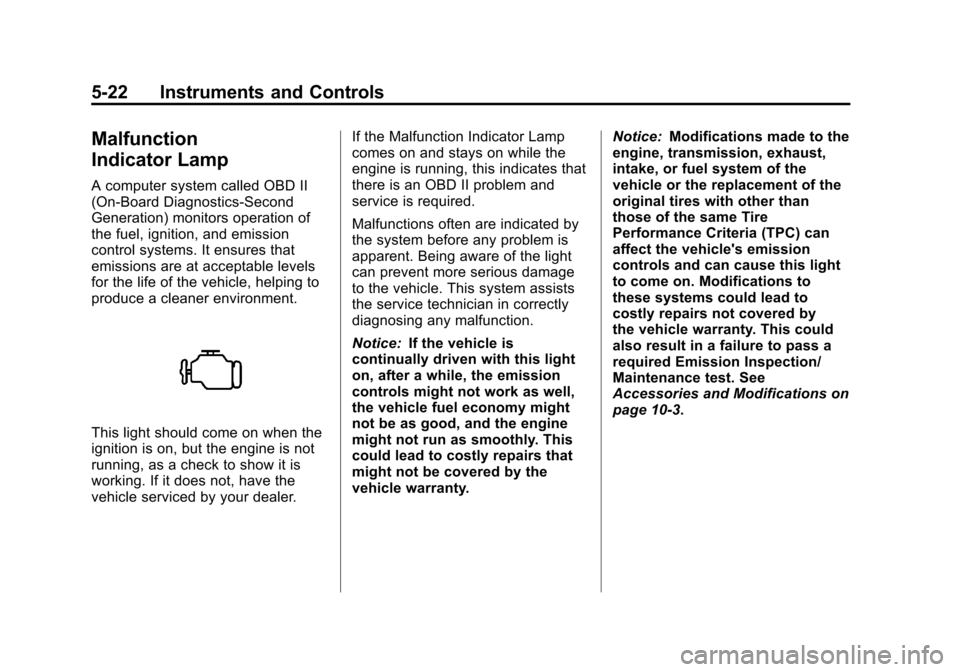
This light should come on when the
ignition is on, but the engine is not
running, as a check to show it is
working. If it does not, have the
vehicle serviced by your dealer.If the Malfunction Indicator Lamp
comes on and stays on while the
engine is running, this indicates that
there is an OBD II problem and
service is required.
Malfunctions often are indicated by
the system before any problem is
apparent. Being aware of the light
can prevent more serious damage
to the vehicle. This system assists
the service technician in correctly
diagnosing any malfunction.
Notice:
If the vehicle is
continually driven with this light
on, after a while, the emission
controls might not work as well,
the vehicle fuel economy might
not be as good, and the engine
might not run as smoothly. This
could lead to costly repairs that
might not be covered by the
vehicle warranty. Notice:
Modifications made to the
engine, transmission, exhaust,
intake, or fuel system of the
vehicle or the replacement of the
original tires with other than
those of the same Tire
Performance Criteria (TPC) can
affect the vehicle's emission
controls and can cause this light
to come on. Modifications to
these systems could lead to
costly repairs not covered by
the vehicle warranty. This could
also result in a failure to pass a
required Emission Inspection/
Maintenance test. See
Accessories and Modifications on
page 10‑3.
Page 178 of 542
Black plate (30,1)Chevrolet Tahoe/Suburban Owner Manual - 2011
5-30 Instruments and Controls
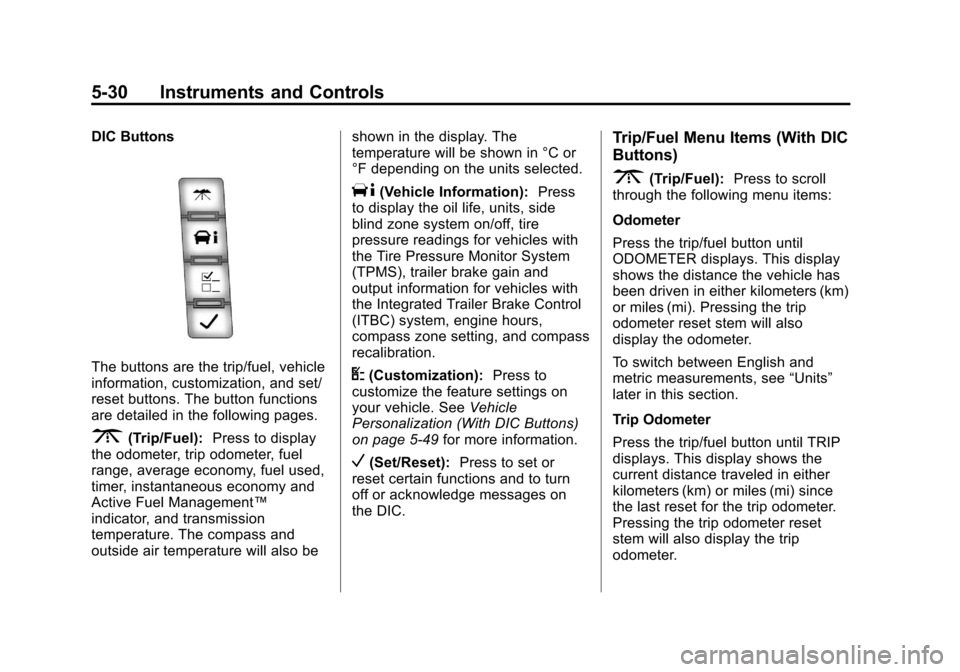
DIC Buttons
The buttons are the trip/fuel, vehicle
information, customization, and set/
reset buttons. The button functions
are detailed in the following pages.
3(Trip/Fuel):Press to display
the odometer, trip odometer, fuel
range, average economy, fuel used,
timer, instantaneous economy and
Active Fuel Management™
indicator, and transmission
temperature. The compass and
outside air temperature will also be shown in the display. The
temperature will be shown in °C or
°F depending on the units selected.
T(Vehicle Information):
Press
to display the oil life, units, side
blind zone system on/off, tire
pressure readings for vehicles with
the Tire Pressure Monitor System
(TPMS), trailer brake gain and
output information for vehicles with
the Integrated Trailer Brake Control
(ITBC) system, engine hours,
compass zone setting, and compass
recalibration.
U(Customization): Press to
customize the feature settings on
your vehicle. See Vehicle
Personalization (With DIC Buttons)
on page 5‑49 for more information.
V(Set/Reset):Press to set or
reset certain functions and to turn
off or acknowledge messages on
the DIC.
Trip/Fuel Menu Items (With DIC
Buttons)
3(Trip/Fuel): Press to scroll
through the following menu items:
Odometer
Press the trip/fuel button until
ODOMETER displays. This display
shows the distance the vehicle has
been driven in either kilometers (km)
or miles (mi). Pressing the trip
odometer reset stem will also
display the odometer.
To switch between English and
metric measurements, see “Units”
later in this section.
Trip Odometer
Press the trip/fuel button until TRIP
displays. This display shows the
current distance traveled in either
kilometers (km) or miles (mi) since
the last reset for the trip odometer.
Pressing the trip odometer reset
stem will also display the trip
odometer.