reset CHEVROLET SUBURBAN 2012 10.G Owners Manual
[x] Cancel search | Manufacturer: CHEVROLET, Model Year: 2012, Model line: SUBURBAN, Model: CHEVROLET SUBURBAN 2012 10.GPages: 514, PDF Size: 7.54 MB
Page 33 of 514
Black plate (27,1)Chevrolet Tahoe/Suburban Owner Manual - 2012
In Brief 1-27
During cooler conditions, the low tire
pressure warning light may appear
when the vehicle is first started and
then turn off. This may be an early
indicator that the tire pressures are
getting low and the tires need to be
inflated to the proper pressure.
The TPMS does not replace normal
monthly tire maintenance. It is the
driver’s responsibility to maintain
correct tire pressures.
See Tire Pressure Monitor System
on page 10‑53.
Engine Oil Life System
The engine oil life system calculates
engine oil life based on vehicle use
and, on most vehicles, displays a
DIC message when it is necessary
to change the engine oil and filter.
The oil life system should be reset
to 100% only following an oil
change. Resetting the Oil Life System
To reset the Engine Oil Life System
on most vehicles:
1. Display OIL LIFE REMAINING
on the DIC. If the vehicle does
not have DIC buttons, the
vehicle must be in P (Park) to
access this display.
2. Press and hold the SET/RESET button on the DIC, or the trip
odometer reset stem if the
vehicle does not have DIC
buttons, for more than
five seconds. The oil life will
change to 100%.
On all vehicles, the Engine Oil Life
System can be reset as follows:
1. Turn the ignition to ON/RUN with the engine off.
2. Fully press the accelerator pedal slowly three times within
five seconds.
3. Display OIL LIFE REMAINING on the DIC. If the display
shows 100%, the system is
reset. See
Engine Oil Life System on
page 10‑9.
Fuel E85 (85% Ethanol)
Vehicles that have a FlexFuel badge
and a yellow fuel cap can use either
unleaded gasoline or ethanol fuel
containing up to 85% ethanol (E85).
See Fuel E85 (85% Ethanol) on
page 9‑62. For all other vehicles,
use only the unleaded gasoline
described under Recommended
Fuel on page 9‑60.
Driving for Better Fuel
Economy
Driving habits can affect fuel
mileage. Here are some driving
tips to get the best fuel economy
possible.
.Avoid fast starts and accelerate
smoothly.
.Brake gradually and avoid
abrupt stops.
.Avoid idling the engine for long
periods of time.
Page 52 of 514
Black plate (18,1)Chevrolet Tahoe/Suburban Owner Manual - 2012
2-18 Keys, Doors, and Windows
Power Foldaway
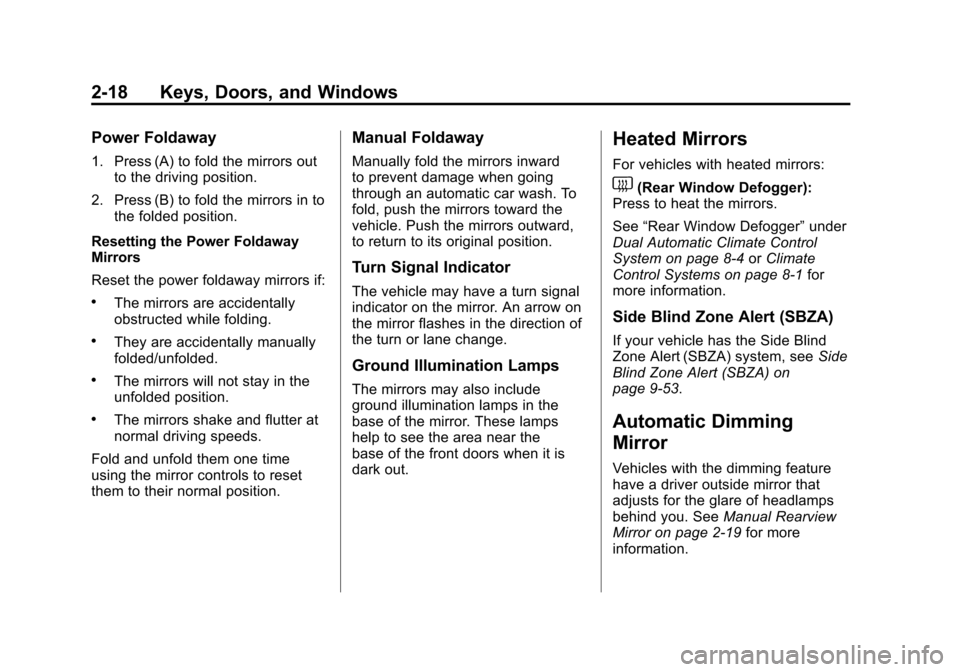
1. Press (A) to fold the mirrors outto the driving position.
2. Press (B) to fold the mirrors in to the folded position.
Resetting the Power Foldaway
Mirrors
Reset the power foldaway mirrors if:
.The mirrors are accidentally
obstructed while folding.
.They are accidentally manually
folded/unfolded.
.The mirrors will not stay in the
unfolded position.
.The mirrors shake and flutter at
normal driving speeds.
Fold and unfold them one time
using the mirror controls to reset
them to their normal position.
Manual Foldaway
Manually fold the mirrors inward
to prevent damage when going
through an automatic car wash. To
fold, push the mirrors toward the
vehicle. Push the mirrors outward,
to return to its original position.
Turn Signal Indicator
The vehicle may have a turn signal
indicator on the mirror. An arrow on
the mirror flashes in the direction of
the turn or lane change.
Ground Illumination Lamps
The mirrors may also include
ground illumination lamps in the
base of the mirror. These lamps
help to see the area near the
base of the front doors when it is
dark out.
Heated Mirrors
For vehicles with heated mirrors:
1(Rear Window Defogger):
Press to heat the mirrors.
See “Rear Window Defogger” under
Dual Automatic Climate Control
System on page 8‑4 orClimate
Control Systems on page 8‑1 for
more information.
Side Blind Zone Alert (SBZA)
If your vehicle has the Side Blind
Zone Alert (SBZA) system, see Side
Blind Zone Alert (SBZA) on
page 9‑53.
Automatic Dimming
Mirror
Vehicles with the dimming feature
have a driver outside mirror that
adjusts for the glare of headlamps
behind you. See Manual Rearview
Mirror on page 2‑19 for more
information.
Page 129 of 514
Black plate (3,1)Chevrolet Tahoe/Suburban Owner Manual - 2012
Instruments and Controls 5-3
c/x(Phone On Hook):Press
to go to the previous favorite radio
station, track on a CD, or folder on
an iPod
®or USB device. Press to
reject an incoming call, or end a
current call.
Radio
To select preset or favorite radio
stations:
Press and release
worc/xto
go to the next or previous radio
station stored as a preset or
favorite.
CD/DVD
To select tracks on a CD/DVD:
Press and release
worc/xto
go to the next or previous track. Selecting Tracks on an iPod or
USB Device (Vehicles without a
Navigation System)
1. Press and hold
worc/x
while listening to a song until the
contents of the current folder
display on the radio display.
2. Press and release
worc/x
to scroll up or down the list, then
press and hold
w, or press¨to
play the highlighted track.
Navigating Folders on an iPod or
USB Device (Vehicles without a
Navigation System):
1. Press and hold
worc/x
while listening to a song until the
contents of the current folder
display on the radio display.
2. Press and hold
c/xto go
back to the previous folder list. 3. Press and release
worc/x
to scroll up or down the list.
.To select a folder,
press and hold
w, or
press
¨when the folder is
highlighted.
.To go back further in
the folder list, press and
hold
c/x.
Navigating an iPod or USB Device
on the Main Audio Screen
(Vehicles with a Navigation
System)
1. Press and release
worc/x
to select the next or previous
track within the selected
category.
2. Press and hold
worc/xto
move quickly through the tracks.
3. Press and release
¨to move up
one track within the selected
category.
Page 131 of 514
Black plate (5,1)Chevrolet Tahoe/Suburban Owner Manual - 2012
Instruments and Controls 5-5
Windshield Wiper/Washer
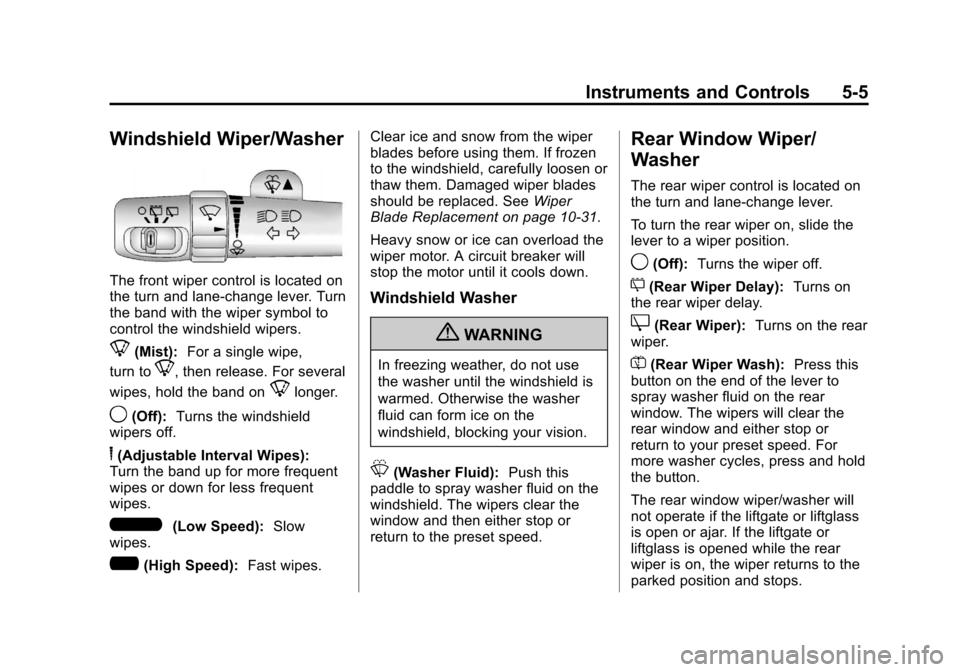
The front wiper control is located on
the turn and lane‐change lever. Turn
the band with the wiper symbol to
control the windshield wipers.
8(Mist):For a single wipe,
turn to
8, then release. For several
wipes, hold the band on
8longer.
9(Off): Turns the windshield
wipers off.
6(Adjustable Interval Wipes):
Turn the band up for more frequent
wipes or down for less frequent
wipes.
6(Low Speed): Slow
wipes.
?(High Speed): Fast wipes. Clear ice and snow from the wiper
blades before using them. If frozen
to the windshield, carefully loosen or
thaw them. Damaged wiper blades
should be replaced. See
Wiper
Blade Replacement on page 10‑31.
Heavy snow or ice can overload the
wiper motor. A circuit breaker will
stop the motor until it cools down.
Windshield Washer
{WARNING
In freezing weather, do not use
the washer until the windshield is
warmed. Otherwise the washer
fluid can form ice on the
windshield, blocking your vision.
L(Washer Fluid): Push this
paddle to spray washer fluid on the
windshield. The wipers clear the
window and then either stop or
return to the preset speed.
Rear Window Wiper/
Washer
The rear wiper control is located on
the turn and lane‐change lever.
To turn the rear wiper on, slide the
lever to a wiper position.
9(Off): Turns the wiper off.
5(Rear Wiper Delay): Turns on
the rear wiper delay.
Z(Rear Wiper): Turns on the rear
wiper.
=(Rear Wiper Wash): Press this
button on the end of the lever to
spray washer fluid on the rear
window. The wipers will clear the
rear window and either stop or
return to your preset speed. For
more washer cycles, press and hold
the button.
The rear window wiper/washer will
not operate if the liftgate or liftglass
is open or ajar. If the liftgate or
liftglass is opened while the rear
wiper is on, the wiper returns to the
parked position and stops.
Page 132 of 514
Black plate (6,1)Chevrolet Tahoe/Suburban Owner Manual - 2012
5-6 Instruments and Controls
Compass
The vehicle may have a compass in
the Driver Information Center (DIC).
Compass Zone
The zone is set to zone eight upon
leaving the factory. Your dealer
will set the correct zone for your
location.
Under certain circumstances,
such as during a long-distance,
cross-country trip or moving to a
new state or province, it will be
necessary to compensate for
compass variance by resetting
the zone through the DIC if the
zone is not set correctly.
Compass variance is the difference
between the earth's magnetic north
and true geographic north. If the
compass is not set to the zone
where you live, the compass may
give false readings. The compass
must be set to the variance zone in
which the vehicle is traveling.To adjust for compass variance, use
the following procedure:
Compass Variance (Zone)
Procedure
1. Do not set the compass zone
when the vehicle is moving. Only
set it when the vehicle is in
P (Park).
Press the vehicle information
button until PRESS
VTO
CHANGE COMPASS ZONE
displays. Or, if the vehicle does
not have DIC buttons, press the
trip odometer reset stem until
CHANGE COMPASS ZONE
displays.
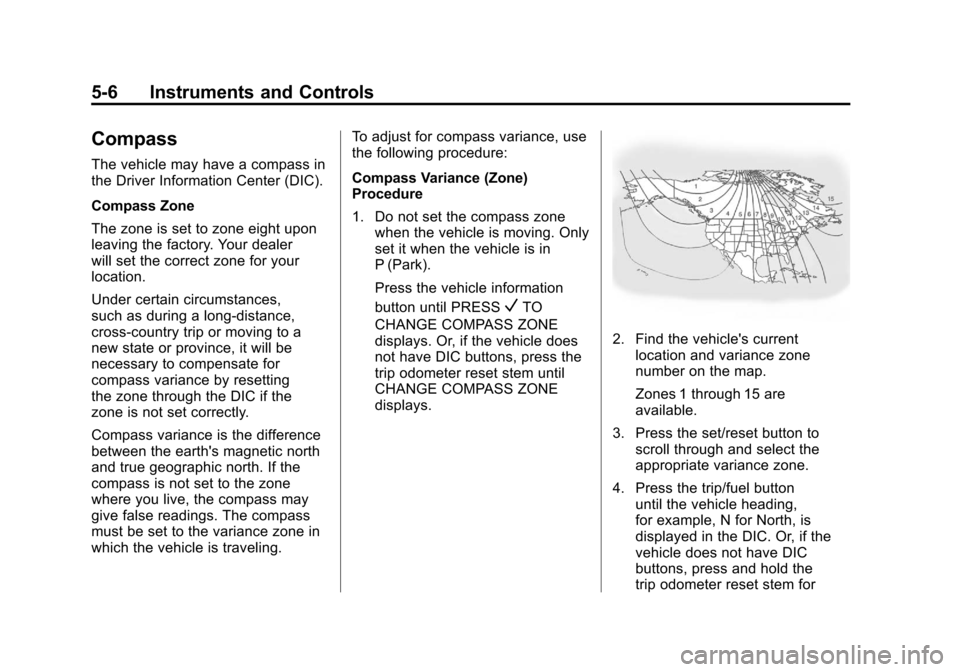
2. Find the vehicle's current location and variance zone
number on the map.
Zones 1 through 15 are
available.
3. Press the set/reset button to scroll through and select the
appropriate variance zone.
4. Press the trip/fuel button until the vehicle heading,
for example, N for North, is
displayed in the DIC. Or, if the
vehicle does not have DIC
buttons, press and hold the
trip odometer reset stem for
Page 133 of 514
Black plate (7,1)Chevrolet Tahoe/Suburban Owner Manual - 2012
Instruments and Controls 5-7
two seconds to select the next
available variance zone. Repeat
this step until the appropriate
variance zone is displayed.
5. If calibration is necessary, calibrate the compass. See
“Compass Calibration
Procedure” following.
Compass Calibration
The compass can be manually
calibrated. Only calibrate the
compass in a magnetically clean
and safe location, such as an open
parking lot, where driving the
vehicle in circles is not a danger.
It is suggested to calibrate away
from tall buildings, utility wires,
manhole covers, or other industrial
structures, if possible.
If CAL should ever appear in the
DIC display, the compass should be
calibrated.
If the DIC display does not show a
heading, for example, N for North,
or the heading does not change
after making turns, there may be a strong magnetic field interfering with
the compass. Such interference
may be caused by a magnetic CB
or cell phone antenna mount, a
magnetic emergency light, magnetic
note pad holder, or any other
magnetic item. Turn off the vehicle,
move the magnetic item, then turn
on the vehicle and calibrate the
compass.
To calibrate the compass, use the
following procedure:
Compass Calibration Procedure
1. Before calibrating the compass,
make sure the compass zone is
set to the variance zone in which
the vehicle is located. See
“Compass Variance (Zone)
Procedure” earlier in this
section.
Do not operate any switches
such as window, sunroof,
climate controls, or seats during
the calibration procedure. 2. Press the vehicle information
button until PRESS
VTO
CALIBRATE COMPASS
displays. Or, if the vehicle does
not have DIC buttons, press
the trip odometer reset stem
until CALIBRATE COMPASS
displays.
3. Press the set/reset button to start the compass calibration.
Or, if the vehicle does not have
DIC buttons, press and hold
the trip odometer reset stem
for two seconds to start the
compass calibration.
4. The DIC will display CALIBRATING: DRIVE IN
CIRCLES. Drive the vehicle
in tight circles at less than
8 km/h (5 mph) to complete
the calibration. The DIC
will display CALIBRATION
COMPLETE for a few seconds
when the calibration is complete.
The DIC display will then return
to the previous menu.
Page 136 of 514
Black plate (10,1)Chevrolet Tahoe/Suburban Owner Manual - 2012
5-10 Instruments and Controls
If equipment is connected using
more than 150 watts or a system
fault is detected, a protection circuit
shuts off the power supply and the
indicator light turns off. To reset the
circuit, unplug the item and plug
it back in or turn the Remote
Accessory Power (RAP) off and
then back on. SeeRetained
Accessory Power (RAP) on
page 9‑26
The power outlet is not designed for
and may not work properly, if the
following are plugged in:
.Equipment with high initial
peak wattage such as:
compressor-driven refrigerators
and electric power tools.
.Other equipment requiring
an extremely stable
power supply such as:
microcomputer-controlled
electric blankets, touch sensor
lamps, etc.
Warning Lights,
Gauges, and
Indicators
Warning lights and gauges can
signal that something is wrong
before it becomes serious enough
to cause an expensive repair or
replacement. Paying attention to the
warning lights and gauges could
prevent injury.
Warning lights come on when there
could be a problem with a vehicle
function. Some warning lights come
on briefly when the engine is started
to indicate they are working. Gauges can indicate when there
could be a problem with a vehicle
function. Often gauges and warning
lights work together to indicate a
problem with the vehicle.
When one of the warning lights
comes on and stays on while
driving, or when one of the gauges
shows there may be a problem,
check the section that explains what
to do. Follow this manual's advice.
Waiting to do repairs can be costly
and even dangerous.
Page 138 of 514
Black plate (12,1)Chevrolet Tahoe/Suburban Owner Manual - 2012
5-12 Instruments and Controls
If the vehicle is a hybrid, see the
hybrid supplement for more
information.
Speedometer
The speedometer shows the
vehicle's speed in either kilometers
per hour (km/h) or miles per
hour (mph).
Odometer
The odometer shows how far the
vehicle has been driven, in either
kilometers or miles.
Trip Odometer
The trip odometer can show how far
the vehicle has been driven since
the trip odometer was last set
to zero.Press the reset button, located on
the instrument panel cluster next to
the trip odometer display, to toggle
between the trip odometer and the
regular odometer. Holding the reset
button for approximately one second
while the trip odometer is displayed
resets it.
To display the odometer reading
with the ignition off, press the reset
button.
Tachometer
The tachometer displays the
engine speed in revolutions per
minute (rpm).
If the vehicle is a hybrid, see the
hybrid supplement for more
information.
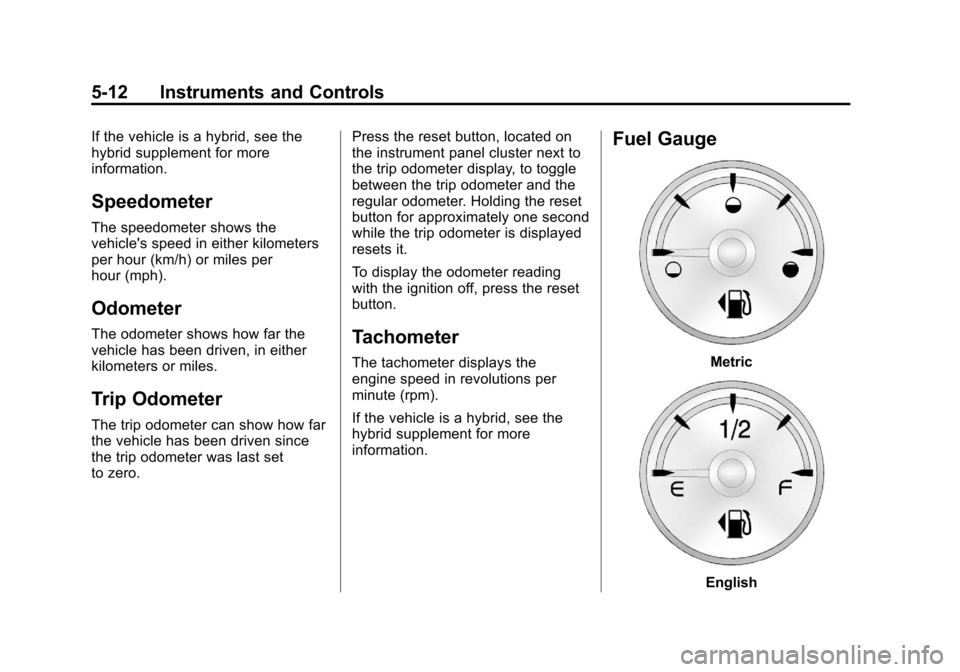
Fuel Gauge
Metric
English
Page 148 of 514
Black plate (22,1)Chevrolet Tahoe/Suburban Owner Manual - 2012
5-22 Instruments and Controls
Antilock Brake System
(ABS) Warning Light
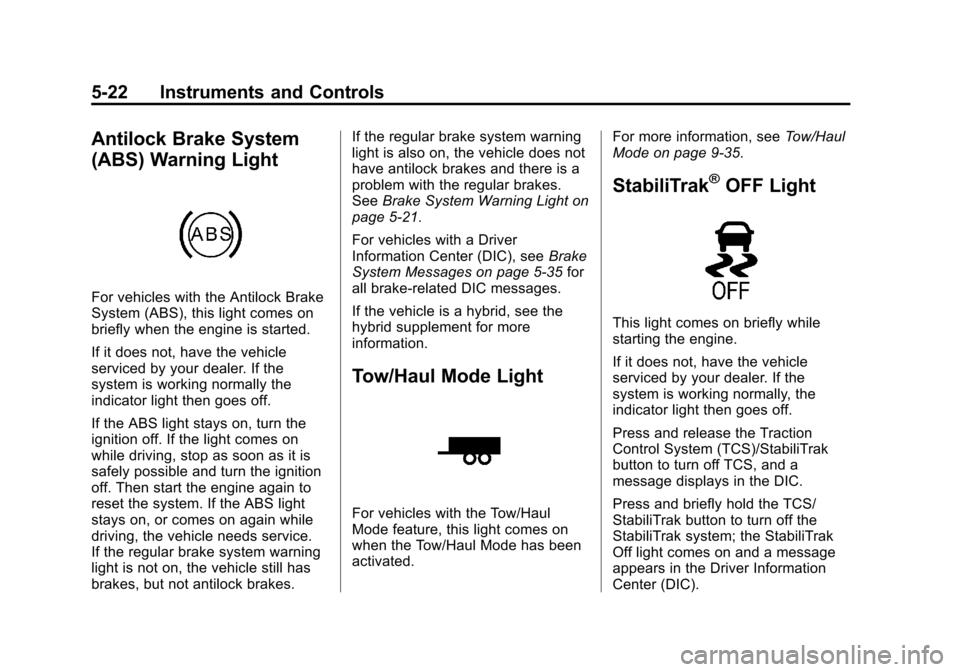
For vehicles with the Antilock Brake
System (ABS), this light comes on
briefly when the engine is started.
If it does not, have the vehicle
serviced by your dealer. If the
system is working normally the
indicator light then goes off.
If the ABS light stays on, turn the
ignition off. If the light comes on
while driving, stop as soon as it is
safely possible and turn the ignition
off. Then start the engine again to
reset the system. If the ABS light
stays on, or comes on again while
driving, the vehicle needs service.
If the regular brake system warning
light is not on, the vehicle still has
brakes, but not antilock brakes.If the regular brake system warning
light is also on, the vehicle does not
have antilock brakes and there is a
problem with the regular brakes.
See
Brake System Warning Light on
page 5‑21.
For vehicles with a Driver
Information Center (DIC), see Brake
System Messages on page 5‑35 for
all brake‐related DIC messages.
If the vehicle is a hybrid, see the
hybrid supplement for more
information.
Tow/Haul Mode Light
For vehicles with the Tow/Haul
Mode feature, this light comes on
when the Tow/Haul Mode has been
activated. For more information, see
Tow/Haul
Mode on page 9‑35.
StabiliTrak®OFF Light
This light comes on briefly while
starting the engine.
If it does not, have the vehicle
serviced by your dealer. If the
system is working normally, the
indicator light then goes off.
Press and release the Traction
Control System (TCS)/StabiliTrak
button to turn off TCS, and a
message displays in the DIC.
Press and briefly hold the TCS/
StabiliTrak button to turn off the
StabiliTrak system; the StabiliTrak
Off light comes on and a message
appears in the Driver Information
Center (DIC).
Page 152 of 514
Black plate (26,1)Chevrolet Tahoe/Suburban Owner Manual - 2012
5-26 Instruments and Controls
Information Displays
Driver Information
Center (DIC)
Your vehicle has a Driver
Information Center (DIC).
The DIC displays information
about your vehicle. It also displays
warning messages if a system
problem is detected.
All messages will appear in the
DIC display located below the
tachometer in the instrument panel
cluster.
The DIC comes on when the ignition
is on. After a short delay, the DIC
will display the information that was
last displayed before the engine
was turned off.The DIC has different displays
which can be accessed by pressing
the DIC buttons located on the
instrument panel, next to the
steering wheel. If the vehicle does
not have DIC buttons, the trip
odometer reset stem can be used to
access some of the menu items.
The DIC displays trip, fuel, and
vehicle system information, and
warning messages if a system
problem is detected.
The DIC also allows some features
to be customized. See
Vehicle
Personalization (With DIC Buttons)
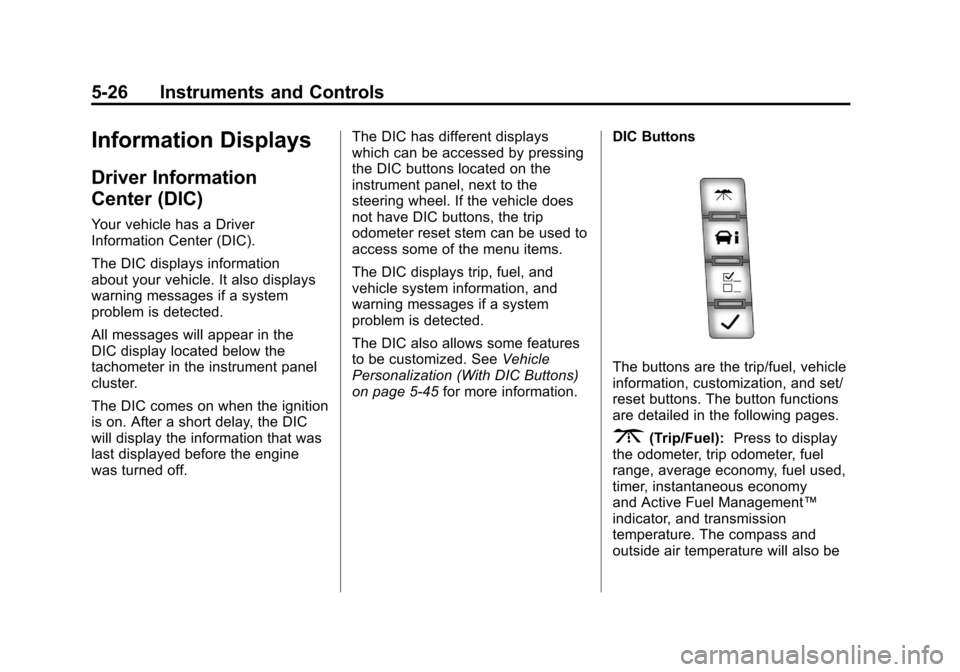
on page 5‑45 for more information. DIC Buttons
The buttons are the trip/fuel, vehicle
information, customization, and set/
reset buttons. The button functions
are detailed in the following pages.
3(Trip/Fuel):
Press to display
the odometer, trip odometer, fuel
range, average economy, fuel used,
timer, instantaneous economy
and Active Fuel Management™
indicator, and transmission
temperature. The compass and
outside air temperature will also be