automatic CHEVROLET SUBURBAN 2016 11.G Owners Manual
[x] Cancel search | Manufacturer: CHEVROLET, Model Year: 2016, Model line: SUBURBAN, Model: CHEVROLET SUBURBAN 2016 11.GPages: 453, PDF Size: 6.23 MB
Page 6 of 453
Chevrolet Tahoe/Suburban Owner Manual (GMNA-Localizing-U.S./Canada/
Mexico-9159366) - 2016 - crc - 5/19/15
In Brief 5
In Brief
Instrument Panel
Instrument Panel Overview . . . . . . 6
Initial Drive Information
Initial Drive Information . . . . . . . . . . 8
Remote Keyless Entry (RKE)System . . . . . . . . . . . . . . . . . . . . . . . . 8
Remote Vehicle Start . . . . . . . . . . . 9
Door Locks . . . . . . . . . . . . . . . . . . . . . 9
Liftgate . . . . . . . . . . . . . . . . . . . . . . . . 10
Windows . . . . . . . . . . . . . . . . . . . . . . . 11
Seat Adjustment . . . . . . . . . . . . . . . 11
Memory Features . . . . . . . . . . . . . . 13
Second Row Seats . . . . . . . . . . . . 13
Third Row Seats . . . . . . . . . . . . . . . 13
Heated and Cooled Front Seats . . . . . . . . . . . . . . . . . . . . . . . . . 14
Head Restraint Adjustment . . . . 14
Safety Belts . . . . . . . . . . . . . . . . . . . . 15
Passenger Sensing System . . . 15
Mirror Adjustment . . . . . . . . . . . . . . 15
Steering Wheel Adjustment . . . . 16
Throttle and Brake Pedal Adjustment . . . . . . . . . . . . . . . . . . . 17
Interior Lighting . . . . . . . . . . . . . . . . 18
Exterior Lighting . . . . . . . . . . . . . . . 18
Windshield Wiper/Washer . . . . . . 19
Climate Controls . . . . . . . . . . . . . . . 20 Transmission . . . . . . . . . . . . . . . . . . 20
Four-Wheel Drive . . . . . . . . . . . . . . 21
Vehicle Features
Infotainment System . . . . . . . . . . . 22
Radio(s) . . . . . . . . . . . . . . . . . . . . . . . 22
Satellite Radio . . . . . . . . . . . . . . . . . 22
Portable Audio Devices . . . . . . . . 23
Bluetooth
®. . . . . . . . . . . . . . . . . . . . . 23
Steering Wheel Controls . . . . . . . 23
Cruise Control . . . . . . . . . . . . . . . . . 24
Driver Information Center (DIC) . . . . . . . . . . . . . . . . . 24
Forward Collision Alert (FCA) System . . . . . . . . . . . . . . . . . . . . . . . 25
Front Automatic Braking (FAB) System . . . . . . . . . . . . . . . . . . . . . . . 25
Lane Keep Assist (LKA) . . . . . . . 25
Lane Change Alert (LCA) . . . . . . 25
Rear Vision Camera (RVC) . . . . 26
Rear Cross Traffic Alert (RCTA) System . . . . . . . . . . . . . . . . . . . . . . . 26
Parking Assist . . . . . . . . . . . . . . . . . 26
Power Outlets . . . . . . . . . . . . . . . . . 26
Universal Remote System . . . . . 27
Sunroof . . . . . . . . . . . . . . . . . . . . . . . . 27
Performance and Maintenance
Traction Control/Electronic Stability Control . . . . . . . . . . . . . . 28
Tire Pressure Monitor . . . . . . . . . . 28 Engine Oil Life System . . . . . . . . 28
E85 or FlexFuel . . . . . . . . . . . . . . . . 29
Driving for Better Fuel
Economy . . . . . . . . . . . . . . . . . . . . . 29
Roadside Assistance
Program . . . . . . . . . . . . . . . . . . . . . . 30
Page 8 of 453

Chevrolet Tahoe/Suburban Owner Manual (GMNA-Localizing-U.S./Canada/
Mexico-9159366) - 2016 - crc - 5/19/15
In Brief 7
1.Air Vents 0225.
2.
gTraction Control/Electronic
Stability Control 0267.
jPower Assist Steps 051 (If
Equipped).
XParking Assist Button (If
Equipped). See Assistance
Systems for Parking or Backing
0 281.
ALane Keep Assist (LKA)
0 289 (If Equipped).
0Pedal Adjust Switch (If
Equipped). See Adjustable
Throttle and Brake Pedal
0 244.
3. Turn Signal Lever. See Turn
and Lane-Change Signals
0 187.
Windshield Wiper/Washer
0 129.
4. Favorite Switches (Out of View). See Steering Wheel
Controls 0128. Volume Switches (Out of View).
See
Steering Wheel Controls
0 128.
5. Instrument Cluster 0137.
6. Hazard Warning Flashers
0187.
7. Shift Lever. See Automatic
Transmission 0255.
Tow/Haul Selector Button. See
Tow/Haul Mode 0259.
Range Selection Mode (If
Equipped). See Manual Mode
0 257.
8. Light Sensor. See Automatic
Headlamp System 0186.
9. Infotainment 0192.
10. Dual Automatic Climate Control
System 0220.
11. Heated and Cooled Front
Seats 070 (If Equipped).
12. 110 Volt Power Outlet (If Equipped). See Power Outlets
0 133.
13. Power Outlets 0133 (If
Equipped). 14. Rear Climate Control Buttons.
SeeDual Automatic Climate
Control System 0220.
15. Steering Wheel Controls 0128.
16. Horn 0129.
17. Steering Wheel Adjustment
0127.
18. Hood Release. See Hood
0 313.
19. Cruise Control 0271.
Adaptive Cruise Control 0273
(If Equipped).
Forward Collision Alert (FCA)
System 0283 (If Equipped).
Heated Steering Wheel 0129
(If Equipped).
20. Trailer Brake Control Panel (If Equipped). See Towing
Equipment 0302.
21. Data Link Connector (DLC) (Out of View). See Malfunction
Indicator Lamp (Check Engine
Light) 0146.
22. Four-Wheel Drive 0260 (If
Equipped).
Page 14 of 453
Chevrolet Tahoe/Suburban Owner Manual (GMNA-Localizing-U.S./Canada/
Mexico-9159366) - 2016 - crc - 5/19/15
In Brief 13
SeeLumbar Adjustment 066.
Memory Features
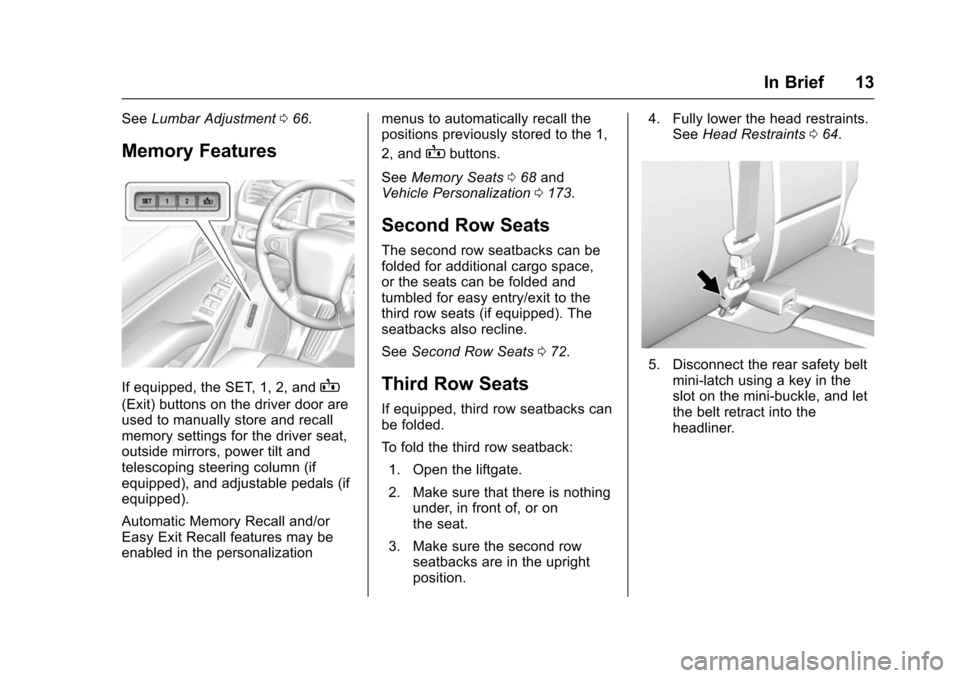
If equipped, the SET, 1, 2, andB
(Exit) buttons on the driver door are
used to manually store and recall
memory settings for the driver seat,
outside mirrors, power tilt and
telescoping steering column (if
equipped), and adjustable pedals (if
equipped).
Automatic Memory Recall and/or
Easy Exit Recall features may be
enabled in the personalization menus to automatically recall the
positions previously stored to the 1,
2, and
Bbuttons.
See Memory Seats 068 and
Vehicle Personalization 0173.
Second Row Seats
The second row seatbacks can be
folded for additional cargo space,
or the seats can be folded and
tumbled for easy entry/exit to the
third row seats (if equipped). The
seatbacks also recline.
See Second Row Seats 072.
Third Row Seats
If equipped, third row seatbacks can
be folded.
To fold the third row seatback:
1. Open the liftgate.
2. Make sure that there is nothing under, in front of, or on
the seat.
3. Make sure the second row seatbacks are in the upright
position. 4. Fully lower the head restraints.
See Head Restraints 064.
5. Disconnect the rear safety belt
mini-latch using a key in the
slot on the mini-buckle, and let
the belt retract into the
headliner.
Page 16 of 453
Chevrolet Tahoe/Suburban Owner Manual (GMNA-Localizing-U.S./Canada/
Mexico-9159366) - 2016 - crc - 5/19/15
In Brief 15
Safety Belts
Refer to the following sections for
important information on how to use
safety belts properly:
.Safety Belts 080.
. How to Wear Safety Belts
Properly 081.
. Lap-Shoulder Belt 082.
. Lower Anchors and Tethers for
Children (LATCH System) 0109.
Passenger Sensing
System
United States
Canada and Mexico
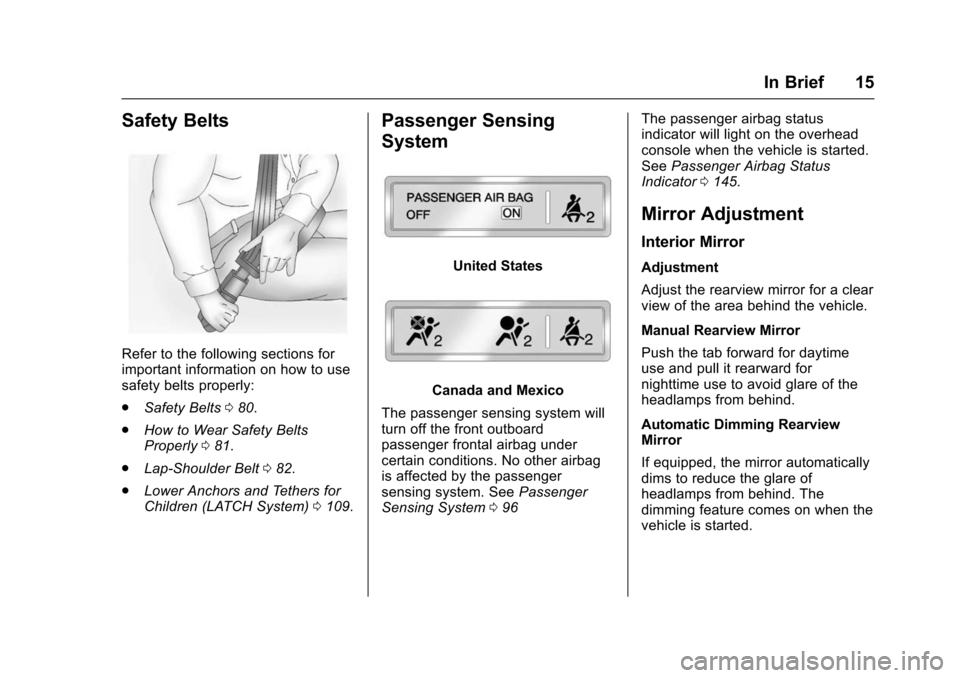
The passenger sensing system will
turn off the front outboard
passenger frontal airbag under
certain conditions. No other airbag
is affected by the passenger
sensing system. See Passenger
Sensing System 096 The passenger airbag status
indicator will light on the overhead
console when the vehicle is started.
See
Passenger Airbag Status
Indicator 0145.
Mirror Adjustment
Interior Mirror
Adjustment
Adjust the rearview mirror for a clear
view of the area behind the vehicle.
Manual Rearview Mirror
Push the tab forward for daytime
use and pull it rearward for
nighttime use to avoid glare of the
headlamps from behind.
Automatic Dimming Rearview
Mirror
If equipped, the mirror automatically
dims to reduce the glare of
headlamps from behind. The
dimming feature comes on when the
vehicle is started.
Page 17 of 453
Chevrolet Tahoe/Suburban Owner Manual (GMNA-Localizing-U.S./Canada/
Mexico-9159366) - 2016 - crc - 5/19/15
16 In Brief
Exterior Mirrors
Power Mirrors
Shown with Power Folding
Mirrors, Manual Folding Similar
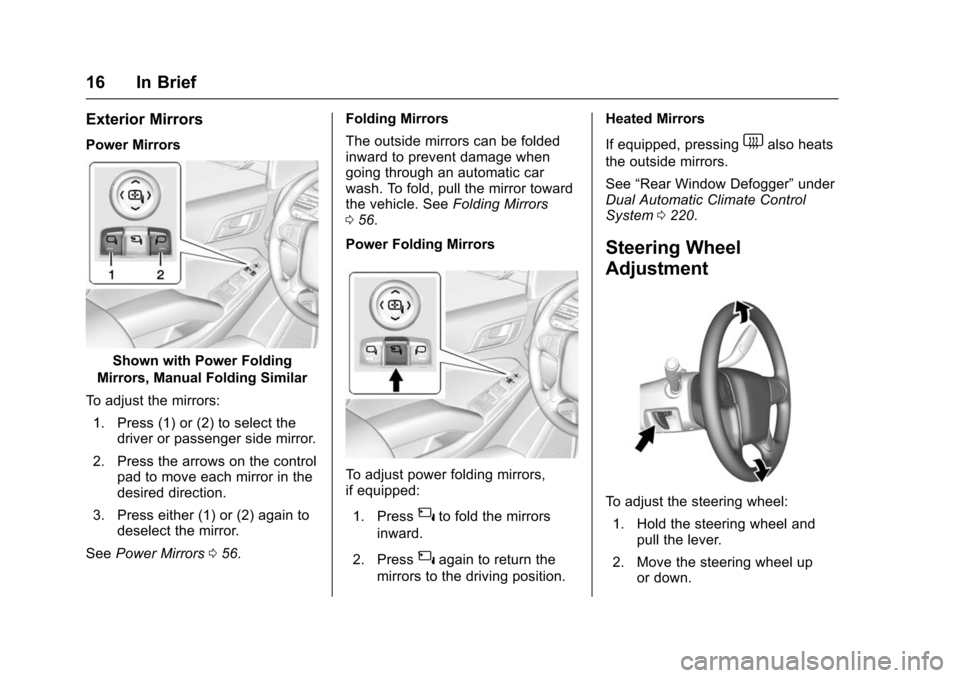
To adjust the mirrors: 1. Press (1) or (2) to select the driver or passenger side mirror.
2. Press the arrows on the control pad to move each mirror in the
desired direction.
3. Press either (1) or (2) again to deselect the mirror.
See Power Mirrors 056. Folding Mirrors
The outside mirrors can be folded
inward to prevent damage when
going through an automatic car
wash. To fold, pull the mirror toward
the vehicle. See
Folding Mirrors
0 56.
Power Folding Mirrors
To adjust power folding mirrors,
if equipped:
1. Press
{to fold the mirrors
inward.
2. Press
{again to return the
mirrors to the driving position. Heated Mirrors
If equipped, pressing
1also heats
the outside mirrors.
See “Rear Window Defogger” under
Dual Automatic Climate Control
System 0220.
Steering Wheel
Adjustment
To adjust the steering wheel:
1. Hold the steering wheel and pull the lever.
2. Move the steering wheel up or down.
Page 19 of 453
Chevrolet Tahoe/Suburban Owner Manual (GMNA-Localizing-U.S./Canada/
Mexico-9159366) - 2016 - crc - 5/19/15
18 In Brief
The vehicle may have a memory
function, which lets pedal settings
be saved and recalled. SeeMemory
Seats 068.
Interior Lighting
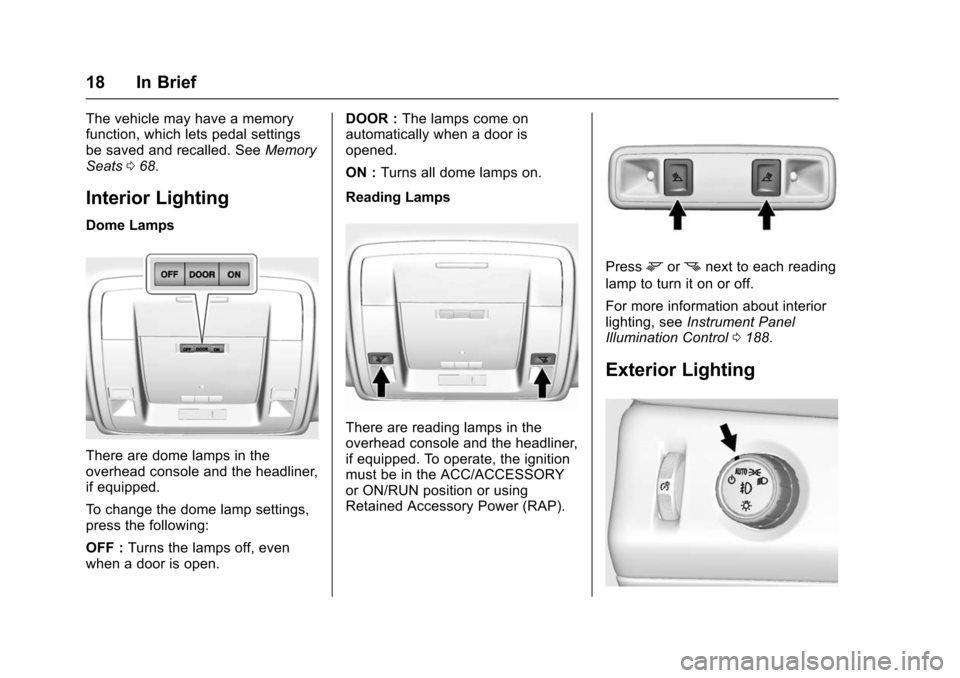
Dome Lamps
There are dome lamps in the
overhead console and the headliner,
if equipped.
To change the dome lamp settings,
press the following:
OFF : Turns the lamps off, even
when a door is open. DOOR :
The lamps come on
automatically when a door is
opened.
ON : Turns all dome lamps on.
Reading Lamps
There are reading lamps in the
overhead console and the headliner,
if equipped. To operate, the ignition
must be in the ACC/ACCESSORY
or ON/RUN position or using
Retained Accessory Power (RAP).
Pressmornnext to each reading
lamp to turn it on or off.
For more information about interior
lighting, see Instrument Panel
Illumination Control 0188.
Exterior Lighting
Page 20 of 453
Chevrolet Tahoe/Suburban Owner Manual (GMNA-Localizing-U.S./Canada/
Mexico-9159366) - 2016 - crc - 5/19/15
In Brief 19
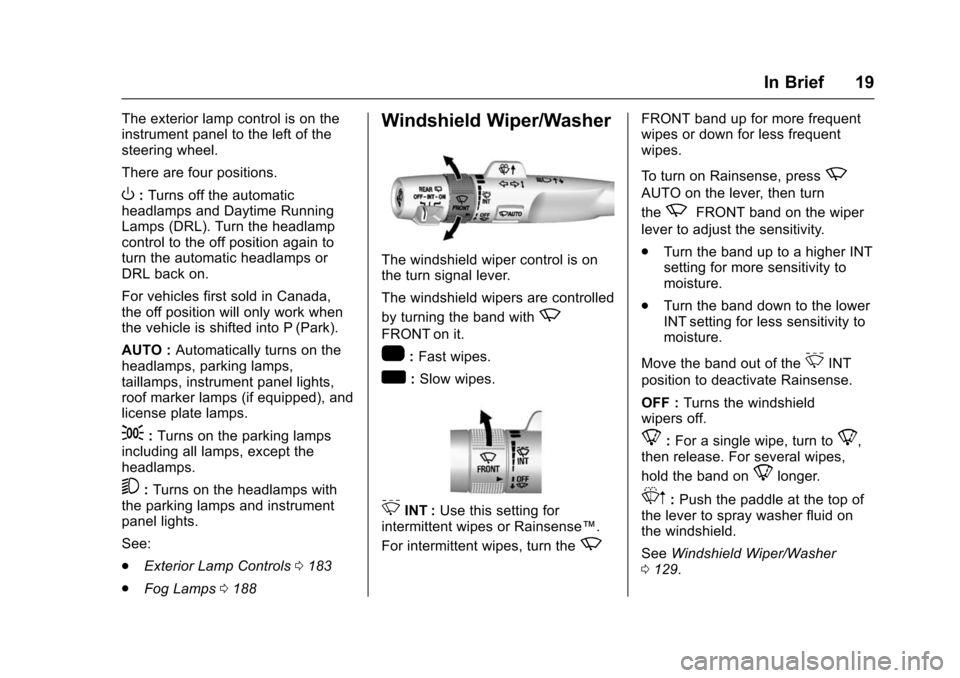
The exterior lamp control is on the
instrument panel to the left of the
steering wheel.
There are four positions.
O:Turns off the automatic
headlamps and Daytime Running
Lamps (DRL). Turn the headlamp
control to the off position again to
turn the automatic headlamps or
DRL back on.
For vehicles first sold in Canada,
the off position will only work when
the vehicle is shifted into P (Park).
AUTO : Automatically turns on the
headlamps, parking lamps,
taillamps, instrument panel lights,
roof marker lamps (if equipped), and
license plate lamps.
;: Turns on the parking lamps
including all lamps, except the
headlamps.
5: Turns on the headlamps with
the parking lamps and instrument
panel lights.
See:
. Exterior Lamp Controls 0183
. Fog Lamps 0188
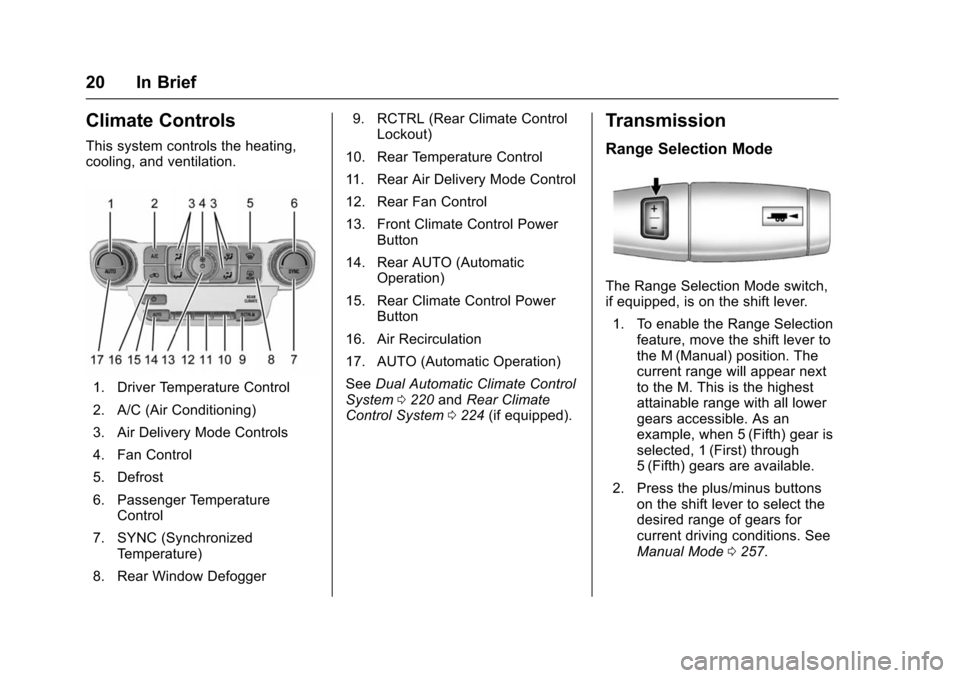
Windshield Wiper/Washer
The windshield wiper control is on
the turn signal lever.
The windshield wipers are controlled
by turning the band with
z
FRONT on it.
1:Fast wipes.
w:Slow wipes.
3INT : Use this setting for
intermittent wipes or Rainsense™.
For intermittent wipes, turn the
z
FRONT band up for more frequent
wipes or down for less frequent
wipes.
To turn on Rainsense, press
z
AUTO on the lever, then turn
the
zFRONT band on the wiper
lever to adjust the sensitivity.
. Turn the band up to a higher INT
setting for more sensitivity to
moisture.
. Turn the band down to the lower
INT setting for less sensitivity to
moisture.
Move the band out of the
3INT
position to deactivate Rainsense.
OFF : Turns the windshield
wipers off.
8: For a single wipe, turn to8,
then release. For several wipes,
hold the band on
8longer.
Lm: Push the paddle at the top of
the lever to spray washer fluid on
the windshield.
See Windshield Wiper/Washer
0 129.
Page 21 of 453
Chevrolet Tahoe/Suburban Owner Manual (GMNA-Localizing-U.S./Canada/
Mexico-9159366) - 2016 - crc - 5/19/15
20 In Brief
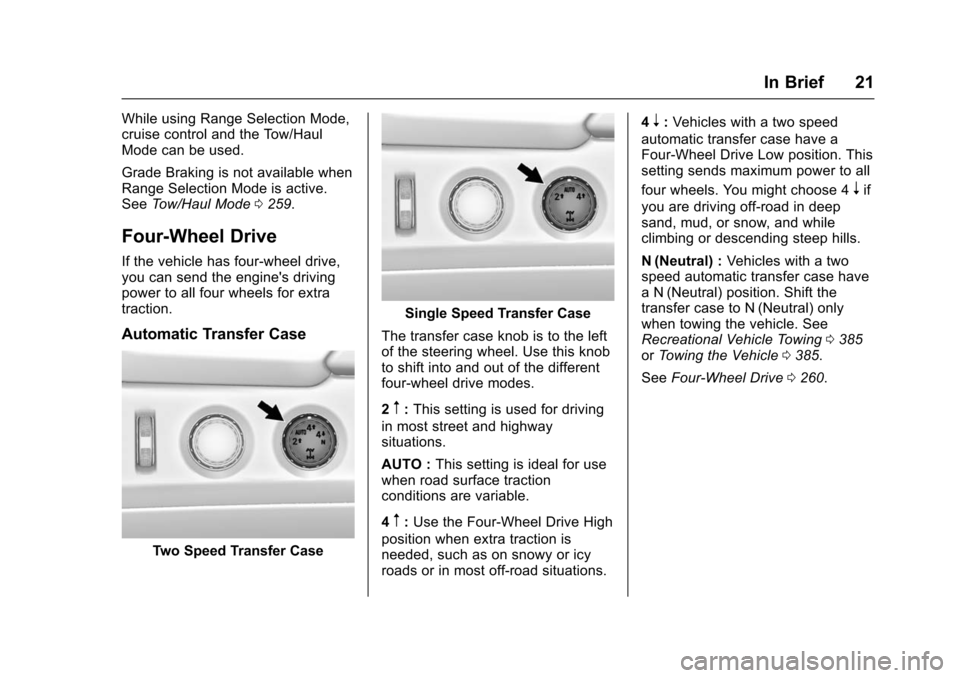
Climate Controls
This system controls the heating,
cooling, and ventilation.
1. Driver Temperature Control
2. A/C (Air Conditioning)
3. Air Delivery Mode Controls
4. Fan Control
5. Defrost
6. Passenger TemperatureControl
7. SYNC (Synchronized Temperature)
8. Rear Window Defogger 9. RCTRL (Rear Climate Control
Lockout)
10. Rear Temperature Control
11. Rear Air Delivery Mode Control
12. Rear Fan Control
13. Front Climate Control Power Button
14. Rear AUTO (Automatic Operation)
15. Rear Climate Control Power Button
16. Air Recirculation
17. AUTO (Automatic Operation)
See Dual Automatic Climate Control
System 0220 andRear Climate
Control System 0224 (if equipped).
Transmission
Range Selection Mode
The Range Selection Mode switch,
if equipped, is on the shift lever.
1. To enable the Range Selection feature, move the shift lever to
the M (Manual) position. The
current range will appear next
to the M. This is the highest
attainable range with all lower
gears accessible. As an
example, when 5 (Fifth) gear is
selected, 1 (First) through
5 (Fifth) gears are available.
2. Press the plus/minus buttons on the shift lever to select the
desired range of gears for
current driving conditions. See
Manual Mode 0257.
Page 22 of 453
Chevrolet Tahoe/Suburban Owner Manual (GMNA-Localizing-U.S./Canada/
Mexico-9159366) - 2016 - crc - 5/19/15
In Brief 21
While using Range Selection Mode,
cruise control and the Tow/Haul
Mode can be used.
Grade Braking is not available when
Range Selection Mode is active.
SeeTow/Haul Mode 0259.
Four-Wheel Drive
If the vehicle has four-wheel drive,
you can send the engine's driving
power to all four wheels for extra
traction.
Automatic Transfer Case
Two Speed Transfer Case
Single Speed Transfer Case
The transfer case knob is to the left
of the steering wheel. Use this knob
to shift into and out of the different
four-wheel drive modes.
2
m: This setting is used for driving
in most street and highway
situations.
AUTO : This setting is ideal for use
when road surface traction
conditions are variable.
4
m: Use the Four-Wheel Drive High
position when extra traction is
needed, such as on snowy or icy
roads or in most off-road situations. 4
n:
Vehicles with a two speed
automatic transfer case have a
Four-Wheel Drive Low position. This
setting sends maximum power to all
four wheels. You might choose 4
nif
you are driving off-road in deep
sand, mud, or snow, and while
climbing or descending steep hills.
N (Neutral) : Vehicles with a two
speed automatic transfer case have
a N (Neutral) position. Shift the
transfer case to N (Neutral) only
when towing the vehicle. See
Recreational Vehicle Towing 0385
or Towing the Vehicle 0385.
See Four-Wheel Drive 0260.
Page 26 of 453
Chevrolet Tahoe/Suburban Owner Manual (GMNA-Localizing-U.S./Canada/
Mexico-9159366) - 2016 - crc - 5/19/15
In Brief 25
V:Press to open a menu or select
a menu item. Press and hold to
reset values on certain screens.
See Driver Information Center (DIC)
(Base Level) 0153 orDriver
Information Center (DIC) (Uplevel)
0 155.
Forward Collision Alert
(FCA) System
If equipped, FCA may help avoid or
reduce the harm caused by
front-end crashes. FCA provides a
green indicator,
V, when a vehicle
is detected ahead. This indicator
displays amber if you follow a
vehicle much too closely. When
approaching a vehicle ahead too
quickly, FCA provides a flashing red
alert on the windshield and rapidly
beeps or pulses the driver seat.
See Forward Collision Alert (FCA)
System 0283.
Front Automatic Braking
(FAB) System
If the vehicle has Adaptive Cruise
Control (ACC), it also has FAB,
which includes Intelligent Brake
Assist (IBA). When the system
detects a vehicle ahead in your path
that is traveling in the same
direction that you may be about to
crash into, it can provide a boost to
braking or automatically brake the
vehicle. This can help avoid or
lessen the severity of crashes when
driving in a forward gear.
See Front Automatic Braking (FAB)
System 0286.
Lane Keep Assist (LKA)
If equipped, LKA may help avoid
crashes due to unintentional lane
departures. It may assist by gently
turning the steering wheel if the
vehicle approaches a detected lane
marking without using a turn signal
in that direction. It may also provide
a Lane Departure Warning (LDW)
alert as the lane marking is crossed.
The system will not assist or alert if it detects that you are actively
steering. Override LKA by turning
the steering wheel. LKA uses a
camera to detect lane markings
between 60 km/h (37 mph) and
180 km/h (112 mph).
See
Lane Departure Warning (LDW)
0 289 andLane Keep Assist (LKA)
0 289.
Lane Change Alert (LCA)
If equipped, the LCA system is a
lane-changing aid that assists
drivers with avoiding lane change
crashes that occur with moving
vehicles in the side blind zone (or
spot) areas or with vehicles rapidly
approaching these areas from
behind. The LCA warning display
will light up in the corresponding
outside side mirror and will flash if
the turn signal is on. The Side Blind
Zone Alert (SBZA) system is
included as part of the LCA system.
See Side Blind Zone Alert (SBZA)
0 287 andLane Change Alert (LCA)
0 287.