display CHEVROLET SUBURBAN 2019 User Guide
[x] Cancel search | Manufacturer: CHEVROLET, Model Year: 2019, Model line: SUBURBAN, Model: CHEVROLET SUBURBAN 2019Pages: 460, PDF Size: 6.77 MB
Page 41 of 460
Chevrolet Tahoe/Suburban Owner Manual (GMNA-Localizing-U.S./Canada/
Mexico-12460269) - 2019 - CRC - 9/11/18
40 Keys, Doors, and Windows
Battery Replacement
Replace the battery in the
transmitter soon if the DIC displays
REPLACE BATTERY IN
REMOTE KEY.
Caution
When replacing the battery, do
not touch any of the circuitry on
the transmitter. Static from your
body could damage the
transmitter.
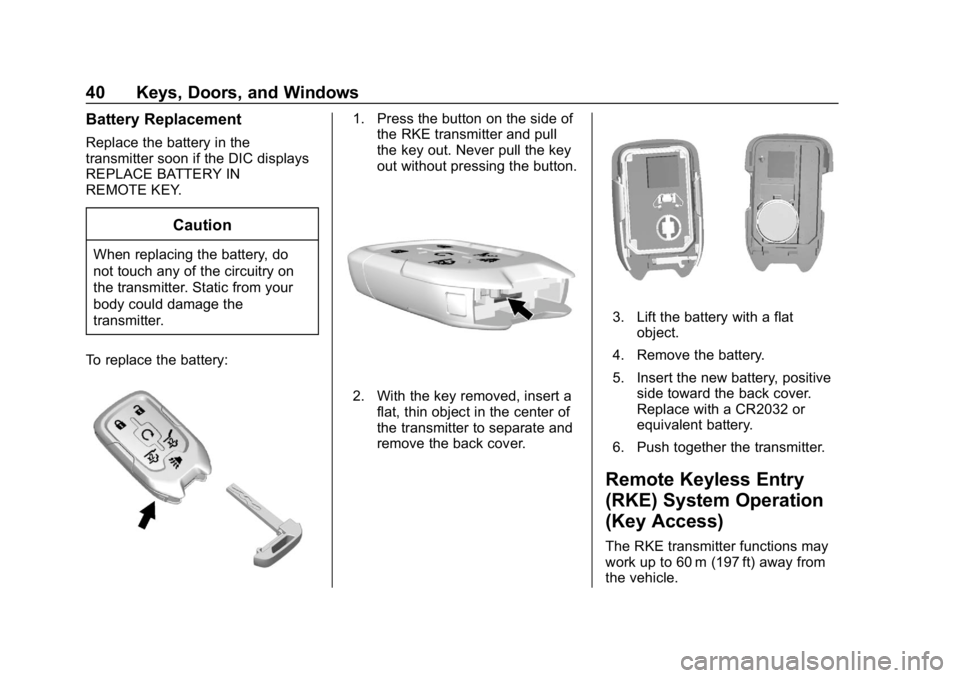
To replace the battery:
1. Press the button on the side of the RKE transmitter and pull
the key out. Never pull the key
out without pressing the button.
2. With the key removed, insert a
flat, thin object in the center of
the transmitter to separate and
remove the back cover.
3. Lift the battery with a flatobject.
4. Remove the battery.
5. Insert the new battery, positive side toward the back cover.
Replace with a CR2032 or
equivalent battery.
6. Push together the transmitter.
Remote Keyless Entry
(RKE) System Operation
(Key Access)
The RKE transmitter functions may
work up to 60 m (197 ft) away from
the vehicle.
Page 43 of 460
Chevrolet Tahoe/Suburban Owner Manual (GMNA-Localizing-U.S./Canada/
Mexico-12460269) - 2019 - CRC - 9/11/18
42 Keys, Doors, and Windows
when the ignition is turned on or7
is pressed again. The ignition must
be off for the panic alarm to work.
Programming Transmitters to
the Vehicle
Only RKE transmitters programmed
to this vehicle will work. If a
transmitter is lost or stolen, a
replacement can be purchased and
programmed through your dealer.
Each vehicle can have up to
eight transmitters programmed to it.
See your dealer for transmitter
programming.
For the Tahoe Police and Tahoe
Special Service Packages, see the
Tahoe Police and Tahoe Special
Service Packages Supplement.
Battery Replacement
Replace the battery in the
transmitter soon if the Driver
Information Center (DIC) displays
REPLACE BATTERY IN
REMOTE KEY.
Caution
When replacing the battery, do
not touch any of the circuitry on
the transmitter. Static from your
body could damage the
transmitter.
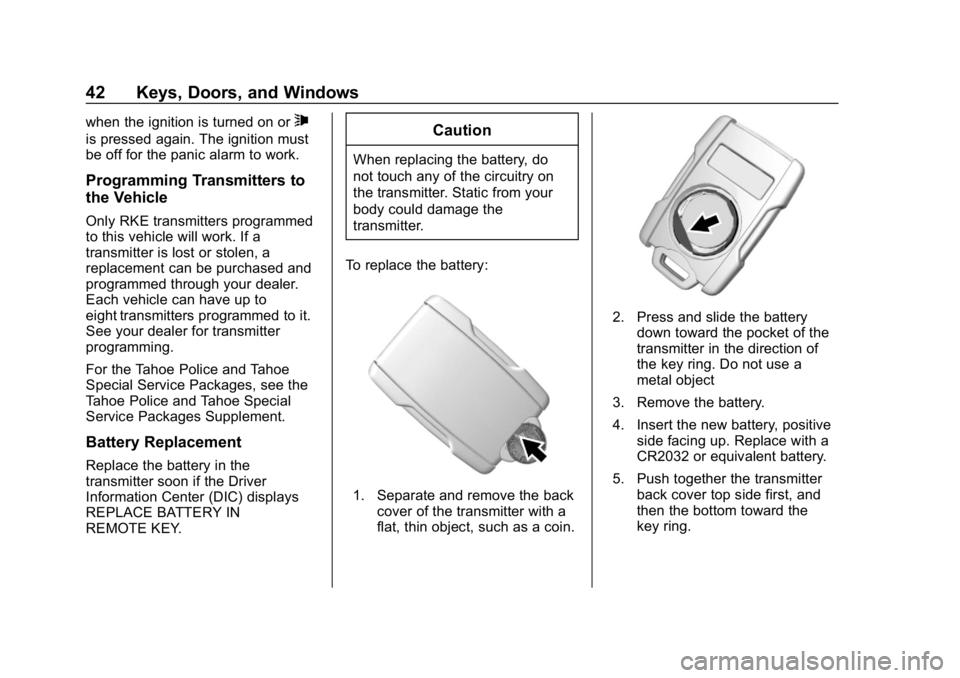
To replace the battery:
1. Separate and remove the back cover of the transmitter with a
flat, thin object, such as a coin.
2. Press and slide the batterydown toward the pocket of the
transmitter in the direction of
the key ring. Do not use a
metal object
3. Remove the battery.
4. Insert the new battery, positive side facing up. Replace with a
CR2032 or equivalent battery.
5. Push together the transmitter back cover top side first, and
then the bottom toward the
key ring.
Page 54 of 460
Chevrolet Tahoe/Suburban Owner Manual (GMNA-Localizing-U.S./Canada/
Mexico-12460269) - 2019 - CRC - 9/11/18
Keys, Doors, and Windows 53
To extend both power assist
steps for cleaning, press
j
while the vehicle is in P (Park) or
N (Neutral). Press
jagain to
retract them. The DIC will display a
message.
Enable/Disable
Press and hold
jfor four seconds
to lock and disable the power
assist steps. Press and hold
jfor
four seconds again to enable them.
The DIC will display a message.
Vehicle Security
This vehicle has theft-deterrent
features; however, they do not make
the vehicle impossible to steal.
Vehicle Alarm System
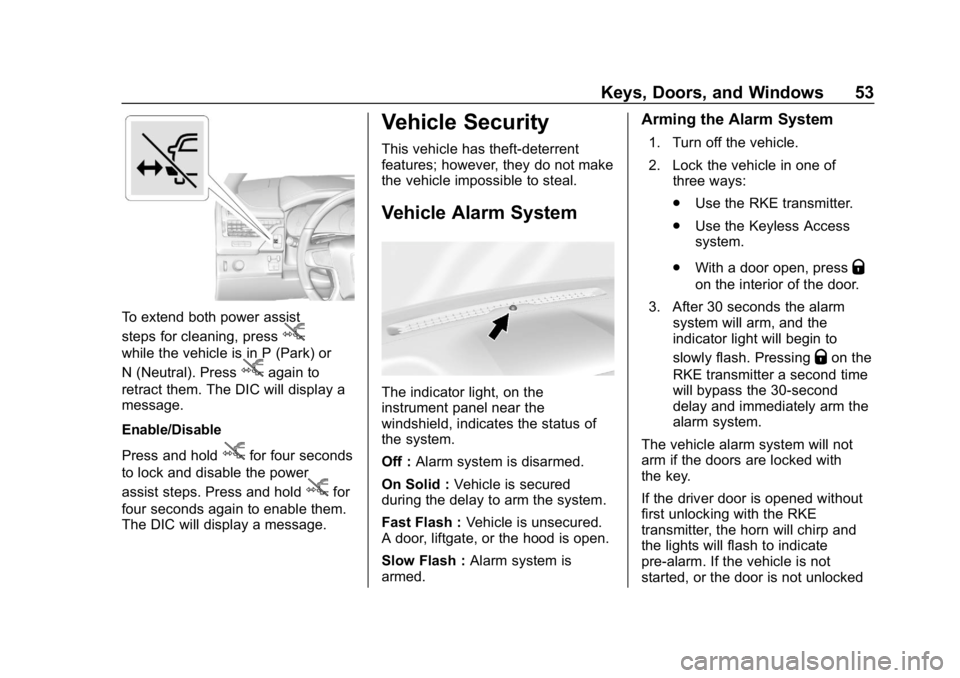
The indicator light, on the
instrument panel near the
windshield, indicates the status of
the system.
Off : Alarm system is disarmed.
On Solid : Vehicle is secured
during the delay to arm the system.
Fast Flash : Vehicle is unsecured.
A door, liftgate, or the hood is open.
Slow Flash : Alarm system is
armed.
Arming the Alarm System
1. Turn off the vehicle.
2. Lock the vehicle in one of three ways:
.Use the RKE transmitter.
. Use the Keyless Access
system.
. With a door open, press
Q
on the interior of the door.
3. After 30 seconds the alarm system will arm, and the
indicator light will begin to
slowly flash. Pressing
Qon the
RKE transmitter a second time
will bypass the 30-second
delay and immediately arm the
alarm system.
The vehicle alarm system will not
arm if the doors are locked with
the key.
If the driver door is opened without
first unlocking with the RKE
transmitter, the horn will chirp and
the lights will flash to indicate
pre-alarm. If the vehicle is not
started, or the door is not unlocked
Page 71 of 460
Chevrolet Tahoe/Suburban Owner Manual (GMNA-Localizing-U.S./Canada/
Mexico-12460269) - 2019 - CRC - 9/11/18
70 Seats and Restraints
.Tilt the top of the control forward
to raise.
Memory Seats
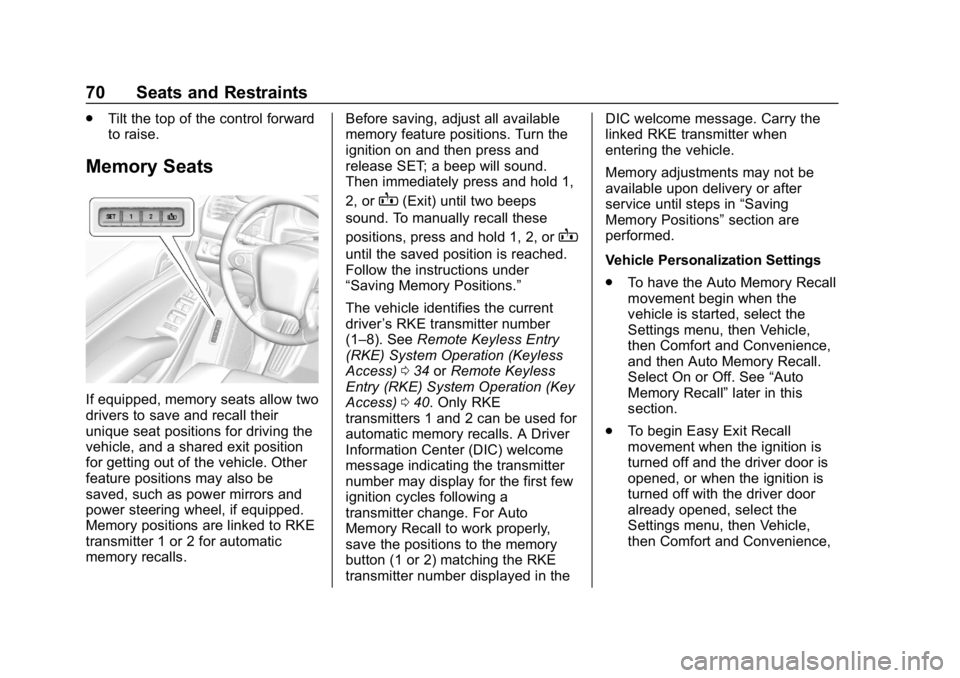
If equipped, memory seats allow two
drivers to save and recall their
unique seat positions for driving the
vehicle, and a shared exit position
for getting out of the vehicle. Other
feature positions may also be
saved, such as power mirrors and
power steering wheel, if equipped.
Memory positions are linked to RKE
transmitter 1 or 2 for automatic
memory recalls. Before saving, adjust all available
memory feature positions. Turn the
ignition on and then press and
release SET; a beep will sound.
Then immediately press and hold 1,
2, or
B(Exit) until two beeps
sound. To manually recall these
positions, press and hold 1, 2, or
B
until the saved position is reached.
Follow the instructions under
“Saving Memory Positions.”
The vehicle identifies the current
driver ’s RKE transmitter number
(1–8). See Remote Keyless Entry
(RKE) System Operation (Keyless
Access) 034 orRemote Keyless
Entry (RKE) System Operation (Key
Access) 040. Only RKE
transmitters 1 and 2 can be used for
automatic memory recalls. A Driver
Information Center (DIC) welcome
message indicating the transmitter
number may display for the first few
ignition cycles following a
transmitter change. For Auto
Memory Recall to work properly,
save the positions to the memory
button (1 or 2) matching the RKE
transmitter number displayed in the DIC welcome message. Carry the
linked RKE transmitter when
entering the vehicle.
Memory adjustments may not be
available upon delivery or after
service until steps in
“Saving
Memory Positions” section are
performed.
Vehicle Personalization Settings
. To have the Auto Memory Recall
movement begin when the
vehicle is started, select the
Settings menu, then Vehicle,
then Comfort and Convenience,
and then Auto Memory Recall.
Select On or Off. See “Auto
Memory Recall” later in this
section.
. To begin Easy Exit Recall
movement when the ignition is
turned off and the driver door is
opened, or when the ignition is
turned off with the driver door
already opened, select the
Settings menu, then Vehicle,
then Comfort and Convenience,
Page 72 of 460
Chevrolet Tahoe/Suburban Owner Manual (GMNA-Localizing-U.S./Canada/
Mexico-12460269) - 2019 - CRC - 9/11/18
Seats and Restraints 71
and then Easy Exit Options.
Select On or Off. See“Easy Exit
Recall” later in this section.
. See Vehicle Personalization
0 172 for additional setting
information.
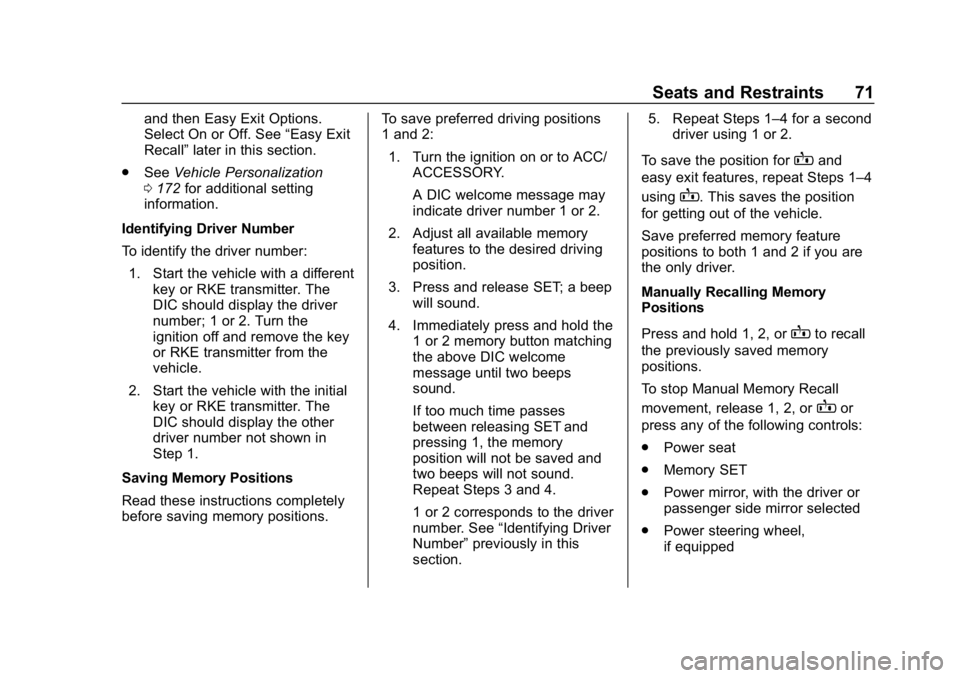
Identifying Driver Number
To identify the driver number: 1. Start the vehicle with a different key or RKE transmitter. The
DIC should display the driver
number; 1 or 2. Turn the
ignition off and remove the key
or RKE transmitter from the
vehicle.
2. Start the vehicle with the initial key or RKE transmitter. The
DIC should display the other
driver number not shown in
Step 1.
Saving Memory Positions
Read these instructions completely
before saving memory positions. To save preferred driving positions
1 and 2:
1. Turn the ignition on or to ACC/ ACCESSORY.
A DIC welcome message may
indicate driver number 1 or 2.
2. Adjust all available memory features to the desired driving
position.
3. Press and release SET; a beep will sound.
4. Immediately press and hold the 1 or 2 memory button matching
the above DIC welcome
message until two beeps
sound.
If too much time passes
between releasing SET and
pressing 1, the memory
position will not be saved and
two beeps will not sound.
Repeat Steps 3 and 4.
1 or 2 corresponds to the driver
number. See “Identifying Driver
Number” previously in this
section. 5. Repeat Steps 1–4 for a second
driver using 1 or 2.
To save the position for
Band
easy exit features, repeat Steps 1–4
using
B. This saves the position
for getting out of the vehicle.
Save preferred memory feature
positions to both 1 and 2 if you are
the only driver.
Manually Recalling Memory
Positions
Press and hold 1, 2, or
Bto recall
the previously saved memory
positions.
To stop Manual Memory Recall
movement, release 1, 2, or
Bor
press any of the following controls:
. Power seat
. Memory SET
. Power mirror, with the driver or
passenger side mirror selected
. Power steering wheel,
if equipped
Page 75 of 460
Chevrolet Tahoe/Suburban Owner Manual (GMNA-Localizing-U.S./Canada/
Mexico-12460269) - 2019 - CRC - 9/11/18
74 Seats and Restraints
The heated or ventilated seat
indicator lights do not turn on during
a remote start.
The temperature performance of an
unoccupied seat may be reduced.
This is normal.
The heated or ventilated seats will
not turn on during a remote start
unless they are enabled in the
vehicle personalization menu.
SeeRemote Vehicle Start 043 and
Vehicle Personalization 0172.Rear Seats
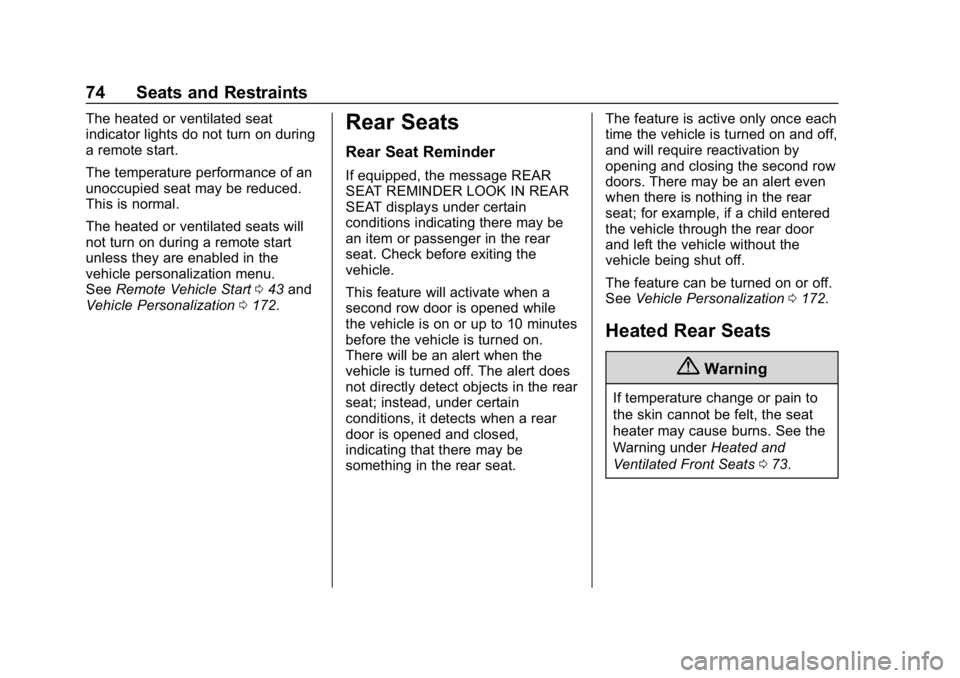
Rear Seat Reminder
If equipped, the message REAR
SEAT REMINDER LOOK IN REAR
SEAT displays under certain
conditions indicating there may be
an item or passenger in the rear
seat. Check before exiting the
vehicle.
This feature will activate when a
second row door is opened while
the vehicle is on or up to 10 minutes
before the vehicle is turned on.
There will be an alert when the
vehicle is turned off. The alert does
not directly detect objects in the rear
seat; instead, under certain
conditions, it detects when a rear
door is opened and closed,
indicating that there may be
something in the rear seat. The feature is active only once each
time the vehicle is turned on and off,
and will require reactivation by
opening and closing the second row
doors. There may be an alert even
when there is nothing in the rear
seat; for example, if a child entered
the vehicle through the rear door
and left the vehicle without the
vehicle being shut off.
The feature can be turned on or off.
See
Vehicle Personalization 0172.
Heated Rear Seats
{Warning
If temperature change or pain to
the skin cannot be felt, the seat
heater may cause burns. See the
Warning under Heated and
Ventilated Front Seats 073.
Page 134 of 460
Chevrolet Tahoe/Suburban Owner Manual (GMNA-Localizing-U.S./Canada/
Mexico-12460269) - 2019 - CRC - 9/11/18
Instruments and Controls 133
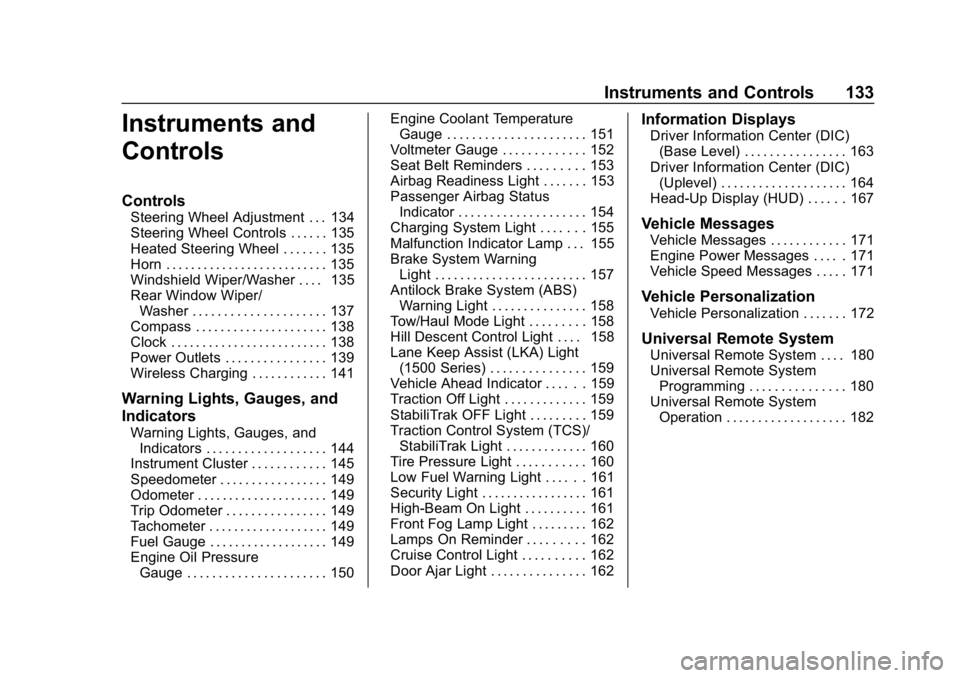
Instruments and
Controls
Controls
Steering Wheel Adjustment . . . 134
Steering Wheel Controls . . . . . . 135
Heated Steering Wheel . . . . . . . 135
Horn . . . . . . . . . . . . . . . . . . . . . . . . . . 135
Windshield Wiper/Washer . . . . 135
Rear Window Wiper/Washer . . . . . . . . . . . . . . . . . . . . . 137
Compass . . . . . . . . . . . . . . . . . . . . . 138
Clock . . . . . . . . . . . . . . . . . . . . . . . . . 138
Power Outlets . . . . . . . . . . . . . . . . 139
Wireless Charging . . . . . . . . . . . . 141
Warning Lights, Gauges, and
Indicators
Warning Lights, Gauges, and Indicators . . . . . . . . . . . . . . . . . . . 144
Instrument Cluster . . . . . . . . . . . . 145
Speedometer . . . . . . . . . . . . . . . . . 149
Odometer . . . . . . . . . . . . . . . . . . . . . 149
Trip Odometer . . . . . . . . . . . . . . . . 149
Tachometer . . . . . . . . . . . . . . . . . . . 149
Fuel Gauge . . . . . . . . . . . . . . . . . . . 149
Engine Oil Pressure
Gauge . . . . . . . . . . . . . . . . . . . . . . 150 Engine Coolant Temperature
Gauge . . . . . . . . . . . . . . . . . . . . . . 151
Voltmeter Gauge . . . . . . . . . . . . . 152
Seat Belt Reminders . . . . . . . . . 153
Airbag Readiness Light . . . . . . . 153
Passenger Airbag Status Indicator . . . . . . . . . . . . . . . . . . . . 154
Charging System Light . . . . . . . 155
Malfunction Indicator Lamp . . . 155
Brake System Warning Light . . . . . . . . . . . . . . . . . . . . . . . . 157
Antilock Brake System (ABS) Warning Light . . . . . . . . . . . . . . . 158
Tow/Haul Mode Light . . . . . . . . . 158
Hill Descent Control Light . . . . 158
Lane Keep Assist (LKA) Light (1500 Series) . . . . . . . . . . . . . . . 159
Vehicle Ahead Indicator . . . . . . 159
Traction Off Light . . . . . . . . . . . . . 159
StabiliTrak OFF Light . . . . . . . . . 159
Traction Control System (TCS)/ StabiliTrak Light . . . . . . . . . . . . . 160
Tire Pressure Light . . . . . . . . . . . 160
Low Fuel Warning Light . . . . . . 161
Security Light . . . . . . . . . . . . . . . . . 161
High-Beam On Light . . . . . . . . . . 161
Front Fog Lamp Light . . . . . . . . . 162
Lamps On Reminder . . . . . . . . . 162
Cruise Control Light . . . . . . . . . . 162
Door Ajar Light . . . . . . . . . . . . . . . 162
Information Displays
Driver Information Center (DIC) (Base Level) . . . . . . . . . . . . . . . . 163
Driver Information Center (DIC) (Uplevel) . . . . . . . . . . . . . . . . . . . . 164
Head-Up Display (HUD) . . . . . . 167
Vehicle Messages
Vehicle Messages . . . . . . . . . . . . 171
Engine Power Messages . . . . . 171
Vehicle Speed Messages . . . . . 171
Vehicle Personalization
Vehicle Personalization . . . . . . . 172
Universal Remote System
Universal Remote System . . . . 180
Universal Remote System
Programming . . . . . . . . . . . . . . . 180
Universal Remote System Operation . . . . . . . . . . . . . . . . . . . 182
Page 136 of 460
Chevrolet Tahoe/Suburban Owner Manual (GMNA-Localizing-U.S./Canada/
Mexico-12460269) - 2019 - CRC - 9/11/18
Instruments and Controls 135
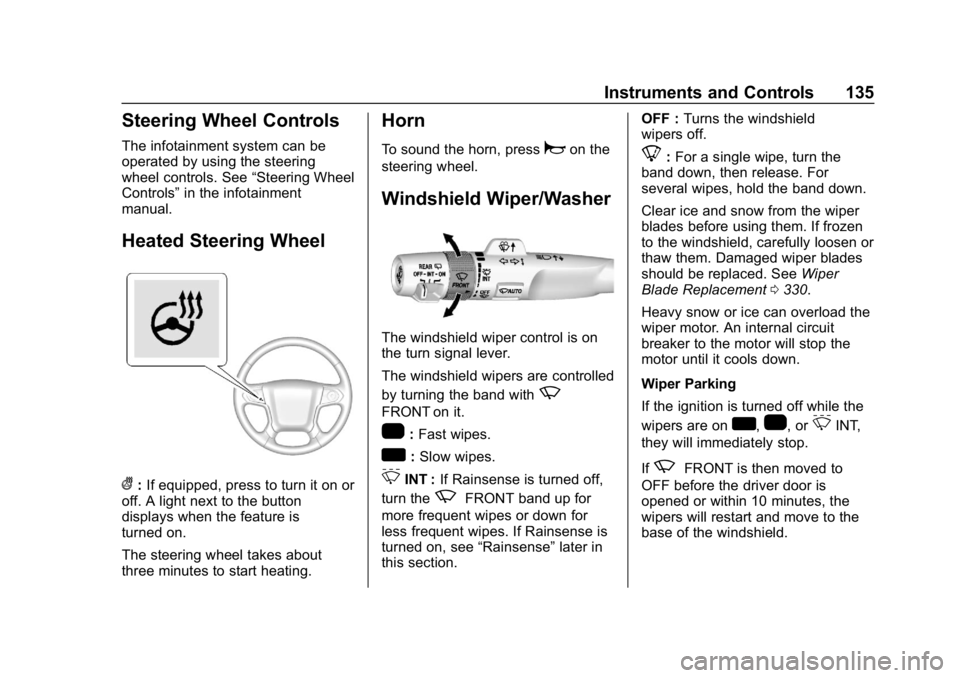
Steering Wheel Controls
The infotainment system can be
operated by using the steering
wheel controls. See“Steering Wheel
Controls” in the infotainment
manual.
Heated Steering Wheel
(: If equipped, press to turn it on or
off. A light next to the button
displays when the feature is
turned on.
The steering wheel takes about
three minutes to start heating.
Horn
To sound the horn, pressaon the
steering wheel.
Windshield Wiper/Washer
The windshield wiper control is on
the turn signal lever.
The windshield wipers are controlled
by turning the band with
z
FRONT on it.
1: Fast wipes.
w:Slow wipes.
3INT : If Rainsense is turned off,
turn the
zFRONT band up for
more frequent wipes or down for
less frequent wipes. If Rainsense is
turned on, see “Rainsense”later in
this section. OFF :
Turns the windshield
wipers off.
8: For a single wipe, turn the
band down, then release. For
several wipes, hold the band down.
Clear ice and snow from the wiper
blades before using them. If frozen
to the windshield, carefully loosen or
thaw them. Damaged wiper blades
should be replaced. See Wiper
Blade Replacement 0330.
Heavy snow or ice can overload the
wiper motor. An internal circuit
breaker to the motor will stop the
motor until it cools down.
Wiper Parking
If the ignition is turned off while the
wipers are on
w,1, or3INT,
they will immediately stop.
If
zFRONT is then moved to
OFF before the driver door is
opened or within 10 minutes, the
wipers will restart and move to the
base of the windshield.
Page 137 of 460
Chevrolet Tahoe/Suburban Owner Manual (GMNA-Localizing-U.S./Canada/
Mexico-12460269) - 2019 - CRC - 9/11/18
136 Instruments and Controls
If the ignition is turned off while the
wipers are performing wipes due to
windshield washing or Rainsense,
the wipers continue to run until they
reach the base of the windshield.
Rainsense
With Rainsense, a sensor near the
top center of the windshield detects
the amount of water on the
windshield and controls the
frequency of the windshield wiper.
Keep this area of the windshield
clear of debris to allow for best
system performance.
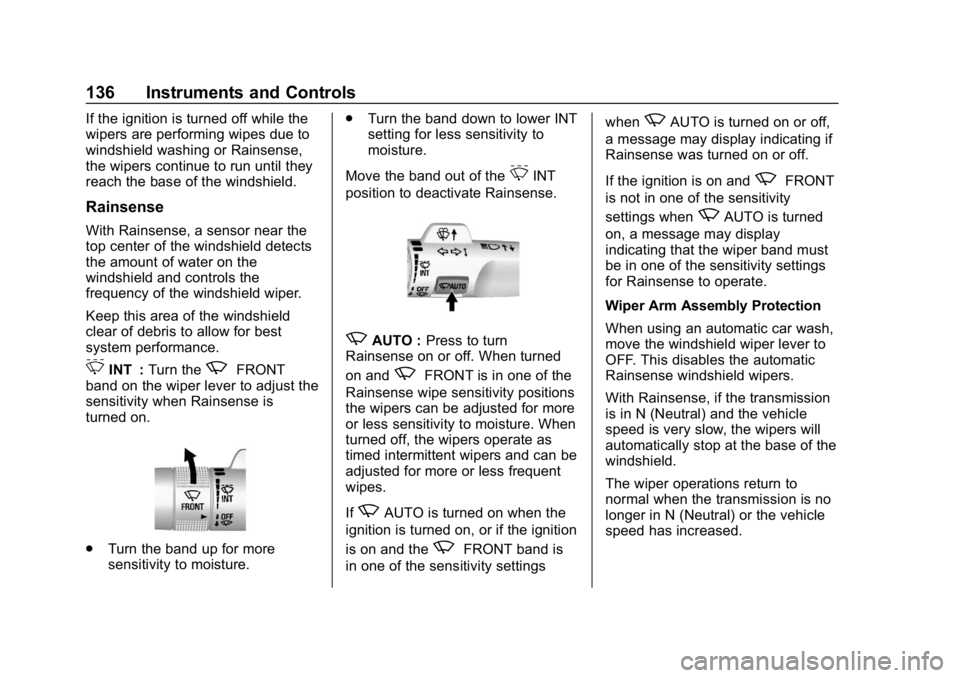
3INT :Turn thezFRONT
band on the wiper lever to adjust the
sensitivity when Rainsense is
turned on.
. Turn the band up for more
sensitivity to moisture. .
Turn the band down to lower INT
setting for less sensitivity to
moisture.
Move the band out of the
3INT
position to deactivate Rainsense.
zAUTO : Press to turn
Rainsense on or off. When turned
on and
zFRONT is in one of the
Rainsense wipe sensitivity positions
the wipers can be adjusted for more
or less sensitivity to moisture. When
turned off, the wipers operate as
timed intermittent wipers and can be
adjusted for more or less frequent
wipes.
If
zAUTO is turned on when the
ignition is turned on, or if the ignition
is on and the
zFRONT band is
in one of the sensitivity settings when
zAUTO is turned on or off,
a message may display indicating if
Rainsense was turned on or off.
If the ignition is on and
zFRONT
is not in one of the sensitivity
settings when
zAUTO is turned
on, a message may display
indicating that the wiper band must
be in one of the sensitivity settings
for Rainsense to operate.
Wiper Arm Assembly Protection
When using an automatic car wash,
move the windshield wiper lever to
OFF. This disables the automatic
Rainsense windshield wipers.
With Rainsense, if the transmission
is in N (Neutral) and the vehicle
speed is very slow, the wipers will
automatically stop at the base of the
windshield.
The wiper operations return to
normal when the transmission is no
longer in N (Neutral) or the vehicle
speed has increased.
Page 139 of 460
Chevrolet Tahoe/Suburban Owner Manual (GMNA-Localizing-U.S./Canada/
Mexico-12460269) - 2019 - CRC - 9/11/18
138 Instruments and Controls
in R (Reverse), and the front
windshield wiper is performing
interval wipes, then the rear wiper
automatically performs interval
wipes.
This feature can be turned on or off.
SeeVehicle Personalization 0172.
The windshield washer reservoir is
used for the windshield and the rear
window. Check the fluid level in the
reservoir if either washer is not
working. See Washer Fluid 0323.
Compass
The vehicle may have a compass
display on the Driver Information
Center (DIC). The compass receives
its heading and other information
from the Global Positioning
System (GPS) antenna, StabiliTrak/
Electronic Stability Control (ESC),
and vehicle speed information.
The compass system is designed to
operate for a certain number of
miles or degrees of turn before
needing a signal from the GPS
satellites. When the compass
display shows CAL, drive the vehicle for a short distance in an
open area where it can receive a
GPS signal. The compass system
will automatically determine when a
GPS signal is restored and provide
a heading again.
Clock
Setting the Time and Date with
Center Stack Controls
To set the time or date:
1. Select SETTINGS from the Home Page, then select Time
and Date.
2. Select the desired function.
3. Turn the MENU knob to increase or decrease the value.
4. Press the MENU knob to go to the next value. After the last
value is selected, the system
will update and return to the
Settings menu. Press
oBACK
to go to the last menu and
save the changes.
Auto Set requires an active OnStar
or connected service plan. If auto timing is set, the time
displayed on the clock may not
update immediately when driving
into a new time zone.
To set the clock display:
1. Select SETTINGS from the Home Page, then select Time
and Date.
2. Select Clock Display.
3. Turn the MENU knob to Off or On.
4. Press the MENU knob to select.
Press
oBACK to go to the last
menu and save the changes.
Setting the Time and Date with
Infotainment Display Controls
To set the time:
1. Touch SETTINGS on the Home Page, then touch Time
and Date.