key CHEVROLET SUBURBAN 2019 Service Manual
[x] Cancel search | Manufacturer: CHEVROLET, Model Year: 2019, Model line: SUBURBAN, Model: CHEVROLET SUBURBAN 2019Pages: 460, PDF Size: 6.77 MB
Page 71 of 460
Chevrolet Tahoe/Suburban Owner Manual (GMNA-Localizing-U.S./Canada/
Mexico-12460269) - 2019 - CRC - 9/11/18
70 Seats and Restraints
.Tilt the top of the control forward
to raise.
Memory Seats
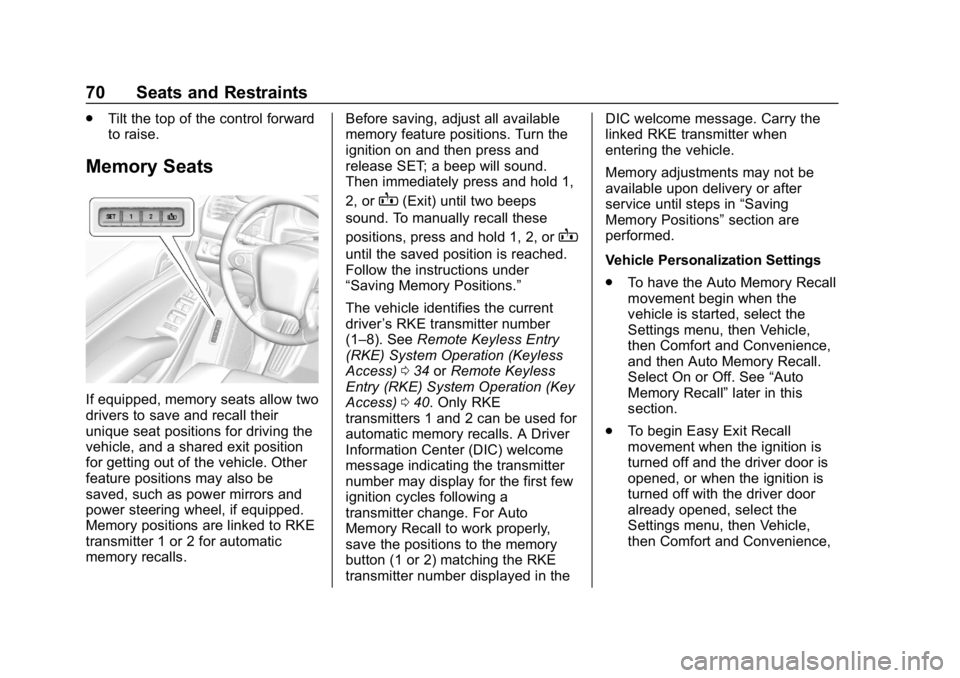
If equipped, memory seats allow two
drivers to save and recall their
unique seat positions for driving the
vehicle, and a shared exit position
for getting out of the vehicle. Other
feature positions may also be
saved, such as power mirrors and
power steering wheel, if equipped.
Memory positions are linked to RKE
transmitter 1 or 2 for automatic
memory recalls. Before saving, adjust all available
memory feature positions. Turn the
ignition on and then press and
release SET; a beep will sound.
Then immediately press and hold 1,
2, or
B(Exit) until two beeps
sound. To manually recall these
positions, press and hold 1, 2, or
B
until the saved position is reached.
Follow the instructions under
“Saving Memory Positions.”
The vehicle identifies the current
driver ’s RKE transmitter number
(1–8). See Remote Keyless Entry
(RKE) System Operation (Keyless
Access) 034 orRemote Keyless
Entry (RKE) System Operation (Key
Access) 040. Only RKE
transmitters 1 and 2 can be used for
automatic memory recalls. A Driver
Information Center (DIC) welcome
message indicating the transmitter
number may display for the first few
ignition cycles following a
transmitter change. For Auto
Memory Recall to work properly,
save the positions to the memory
button (1 or 2) matching the RKE
transmitter number displayed in the DIC welcome message. Carry the
linked RKE transmitter when
entering the vehicle.
Memory adjustments may not be
available upon delivery or after
service until steps in
“Saving
Memory Positions” section are
performed.
Vehicle Personalization Settings
. To have the Auto Memory Recall
movement begin when the
vehicle is started, select the
Settings menu, then Vehicle,
then Comfort and Convenience,
and then Auto Memory Recall.
Select On or Off. See “Auto
Memory Recall” later in this
section.
. To begin Easy Exit Recall
movement when the ignition is
turned off and the driver door is
opened, or when the ignition is
turned off with the driver door
already opened, select the
Settings menu, then Vehicle,
then Comfort and Convenience,
Page 72 of 460
Chevrolet Tahoe/Suburban Owner Manual (GMNA-Localizing-U.S./Canada/
Mexico-12460269) - 2019 - CRC - 9/11/18
Seats and Restraints 71
and then Easy Exit Options.
Select On or Off. See“Easy Exit
Recall” later in this section.
. See Vehicle Personalization
0 172 for additional setting
information.
Identifying Driver Number
To identify the driver number: 1. Start the vehicle with a different key or RKE transmitter. The
DIC should display the driver
number; 1 or 2. Turn the
ignition off and remove the key
or RKE transmitter from the
vehicle.
2. Start the vehicle with the initial key or RKE transmitter. The
DIC should display the other
driver number not shown in
Step 1.
Saving Memory Positions
Read these instructions completely
before saving memory positions. To save preferred driving positions
1 and 2:
1. Turn the ignition on or to ACC/ ACCESSORY.
A DIC welcome message may
indicate driver number 1 or 2.
2. Adjust all available memory features to the desired driving
position.
3. Press and release SET; a beep will sound.
4. Immediately press and hold the 1 or 2 memory button matching
the above DIC welcome
message until two beeps
sound.
If too much time passes
between releasing SET and
pressing 1, the memory
position will not be saved and
two beeps will not sound.
Repeat Steps 3 and 4.
1 or 2 corresponds to the driver
number. See “Identifying Driver
Number” previously in this
section. 5. Repeat Steps 1–4 for a second
driver using 1 or 2.
To save the position for
Band
easy exit features, repeat Steps 1–4
using
B. This saves the position
for getting out of the vehicle.
Save preferred memory feature
positions to both 1 and 2 if you are
the only driver.
Manually Recalling Memory
Positions
Press and hold 1, 2, or
Bto recall
the previously saved memory
positions.
To stop Manual Memory Recall
movement, release 1, 2, or
Bor
press any of the following controls:
. Power seat
. Memory SET
. Power mirror, with the driver or
passenger side mirror selected
. Power steering wheel,
if equipped
Page 73 of 460
Chevrolet Tahoe/Suburban Owner Manual (GMNA-Localizing-U.S./Canada/
Mexico-12460269) - 2019 - CRC - 9/11/18
72 Seats and Restraints
Auto Memory Recall
The vehicle identifies the number of
the current driver’s RKE transmitter
(1–8). See Remote Keyless Entry
(RKE) System Operation (Keyless
Access) 034 orRemote Keyless
Entry (RKE) System Operation (Key
Access) 040. If the RKE transmitter
is 1 or 2, and Auto Memory Recall is
programmed on in vehicle
personalization, the positions saved
to the same memory button number
1 or 2 are automatically recalled
when the ignition is turned on,
or turned from off to ACC/
ACCESSORY. RKE transmitters 3–8
will not provide automatic memory
recalls.
To turn Auto Memory Recall on or
off, see "Vehicle Personalization
Settings" previously in this section
and Vehicle Personalization 0172.
The shift lever must be in P (Park)
to start Auto Memory Recall. Auto
Memory Recall will complete if the
vehicle is shifted out of P (Park)
prior to reaching the saved memory
position. To stop Auto Memory Recall
movement, turn the ignition off or
press any of the following controls:
.
Power seat
. Memory SET, 1, 2, or
B
.Power mirror, with the driver or
passenger side mirror selected
. Power steering wheel,
if equipped
If the saved memory seat position
does not automatically recall or
recalls to the wrong positions, the
driver ’s RKE transmitter number (1
or 2) may not match the memory
button number that positions were
saved to. Try saving the position to
the other memory button or try the
other RKE transmitter.
Easy Exit Recall
Easy Exit Recall is not linked to an
RKE transmitter. The position saved
to
Bis used for all drivers. To turn
Easy Exit Recall on or off, see
"Vehicle Personalization Settings"
previously in this section and
Vehicle Personalization 0172. If turned on, the position saved to
Bis automatically recalled when
one of the following occurs:
. The vehicle is turned off and the
driver door is opened within a
short time.
. The vehicle is turned off with the
driver door open.
To stop Easy Exit Recall movement,
press any of the following memory
controls:
. Power seat
. Memory SET, 1, 2, or
B
.Power mirror, with the driver or
passenger side mirror selected
. Power steering wheel,
if equipped
Obstructions
If something has blocked the driver
seat and/or power steering wheel
while recalling a memory position,
the recall may stop. Remove the
obstruction and try the recall again.
If the memory position still does not
recall, see your dealer for service.
Page 81 of 460
Chevrolet Tahoe/Suburban Owner Manual (GMNA-Localizing-U.S./Canada/
Mexico-12460269) - 2019 - CRC - 9/11/18
80 Seats and Restraints
On third row seats, if equipped, the
seatbacks can be folded to increase
cargo space.
Manual Operation
To fold the seatback, if equipped:1. Open the liftgate.
2. Make sure that there is nothing under, in front of, or on
the seat.
3. Make sure the second row seatbacks are in the upright
position.
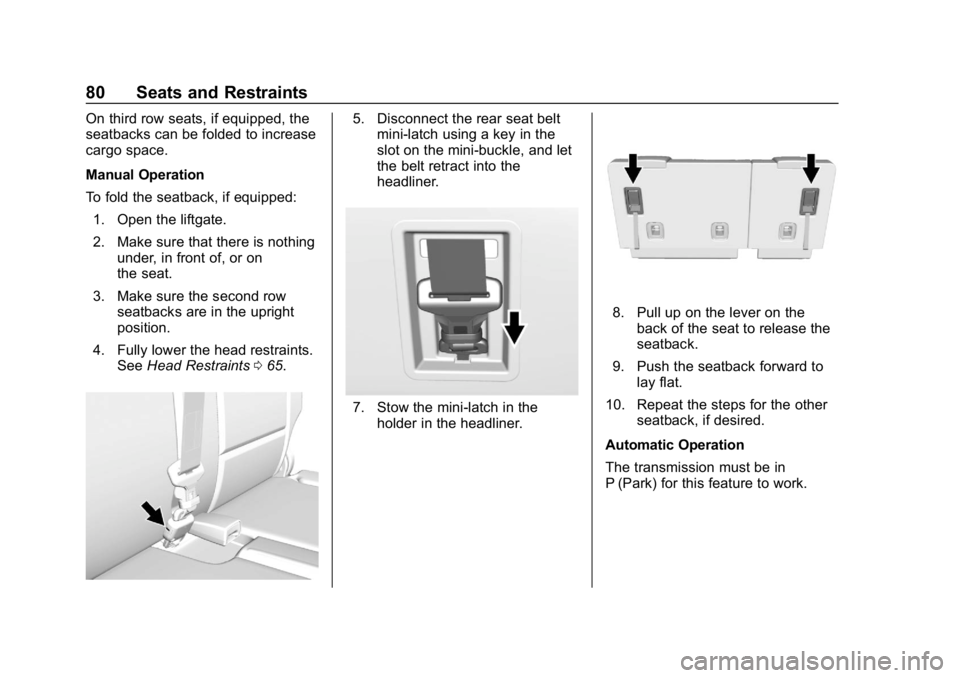
4. Fully lower the head restraints. See Head Restraints 065.5. Disconnect the rear seat belt
mini-latch using a key in the
slot on the mini-buckle, and let
the belt retract into the
headliner.
7. Stow the mini-latch in the
holder in the headliner.
8. Pull up on the lever on theback of the seat to release the
seatback.
9. Push the seatback forward to lay flat.
10. Repeat the steps for the other seatback, if desired.
Automatic Operation
The transmission must be in
P (Park) for this feature to work.
Page 82 of 460
Chevrolet Tahoe/Suburban Owner Manual (GMNA-Localizing-U.S./Canada/
Mexico-12460269) - 2019 - CRC - 9/11/18
Seats and Restraints 81
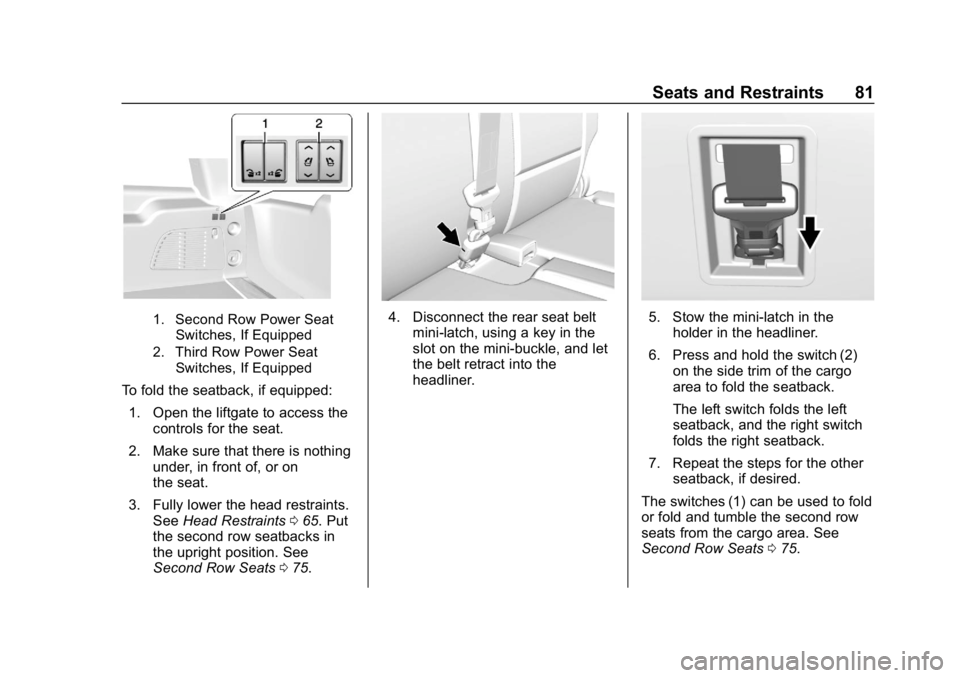
1. Second Row Power SeatSwitches, If Equipped
2. Third Row Power Seat Switches, If Equipped
To fold the seatback, if equipped:
1. Open the liftgate to access the controls for the seat.
2. Make sure that there is nothing under, in front of, or on
the seat.
3. Fully lower the head restraints. See Head Restraints 065. Put
the second row seatbacks in
the upright position. See
Second Row Seats 075.
4. Disconnect the rear seat belt
mini-latch, using a key in the
slot on the mini-buckle, and let
the belt retract into the
headliner.5. Stow the mini-latch in theholder in the headliner.
6. Press and hold the switch (2) on the side trim of the cargo
area to fold the seatback.
The left switch folds the left
seatback, and the right switch
folds the right seatback.
7. Repeat the steps for the other seatback, if desired.
The switches (1) can be used to fold
or fold and tumble the second row
seats from the cargo area. See
Second Row Seats 075.
Page 92 of 460
Chevrolet Tahoe/Suburban Owner Manual (GMNA-Localizing-U.S./Canada/
Mexico-12460269) - 2019 - CRC - 9/11/18
Seats and Restraints 91
To remove and store the comfort
guide, squeeze the belt edges
together so that the seat belt can be
removed from the guide. Slide the
guide onto its storage clip.
Third Row Seating Positions
Comfort guides are available
through your dealer for third row
seating positions. Instructions are
included with the guides.
Seat Belt Use During
Pregnancy
Seat belts work for everyone,
including pregnant women. Like all
occupants, they are more likely to
be seriously injured if they do not
wear seat belts.
A pregnant woman should wear a
lap-shoulder belt, and the lap
portion should be worn as low as
possible, below the rounding,
throughout the pregnancy.
The best way to protect the fetus is
to protect the mother. When a seat
belt is worn properly, it is more likely
that the fetus will not be hurt in a
crash. For pregnant women, as for
anyone, the key to making seat
belts effective is wearing them
properly.
Lap Belt
This section is only for the lap belt.
To learn how to wear a lap-shoulder
belt, seeLap-Shoulder Belt 086.
The vehicle may have a center
seating position with a lap seat belt.
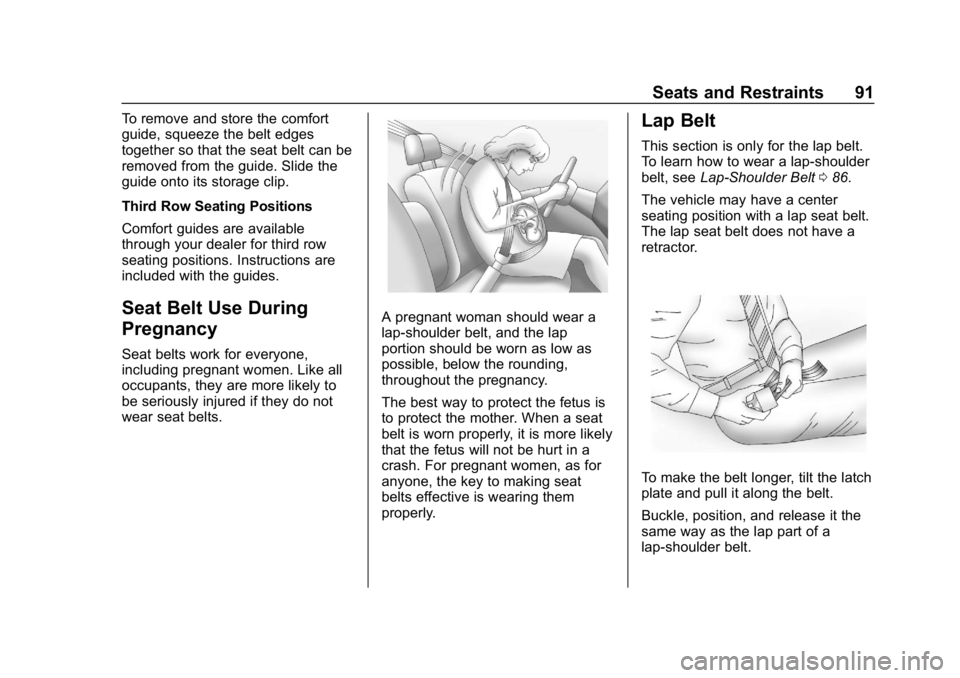
The lap seat belt does not have a
retractor.
To make the belt longer, tilt the latch
plate and pull it along the belt.
Buckle, position, and release it the
same way as the lap part of a
lap-shoulder belt.
Page 132 of 460
Chevrolet Tahoe/Suburban Owner Manual (GMNA-Localizing-U.S./Canada/
Mexico-12460269) - 2019 - CRC - 9/11/18
Storage 131
Floor Console Storage
If equipped with front center seat
storage, unlock with the ignition key,
press the latch, and lift to open.
Additional Storage
Features
Cargo Tie-Downs
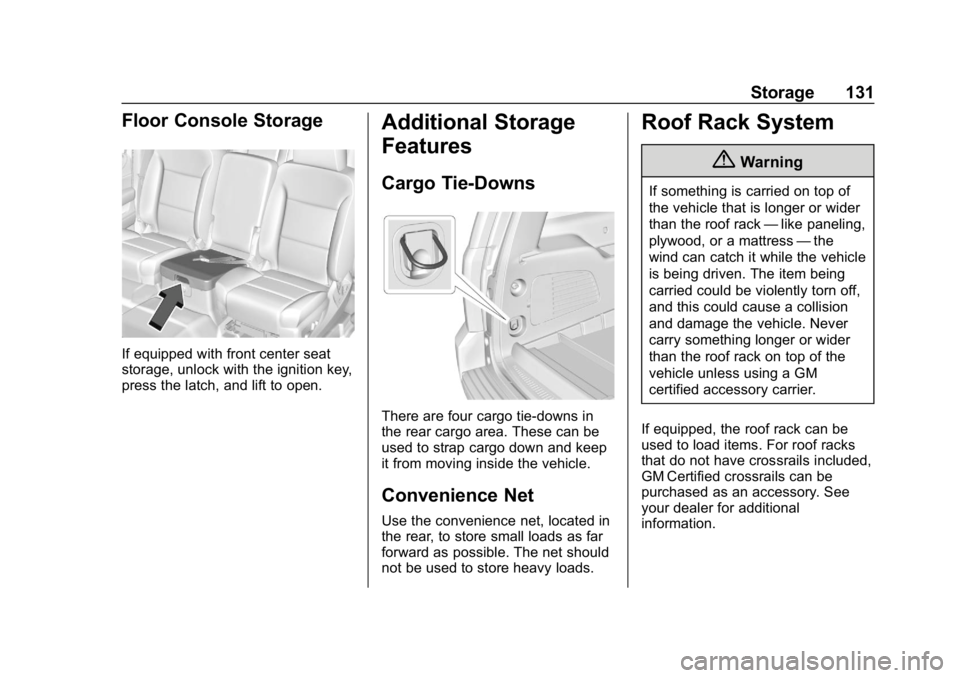
There are four cargo tie-downs in
the rear cargo area. These can be
used to strap cargo down and keep
it from moving inside the vehicle.
Convenience Net
Use the convenience net, located in
the rear, to store small loads as far
forward as possible. The net should
not be used to store heavy loads.
Roof Rack System
{Warning
If something is carried on top of
the vehicle that is longer or wider
than the roof rack—like paneling,
plywood, or a mattress —the
wind can catch it while the vehicle
is being driven. The item being
carried could be violently torn off,
and this could cause a collision
and damage the vehicle. Never
carry something longer or wider
than the roof rack on top of the
vehicle unless using a GM
certified accessory carrier.
If equipped, the roof rack can be
used to load items. For roof racks
that do not have crossrails included,
GM Certified crossrails can be
purchased as an accessory. See
your dealer for additional
information.
Page 141 of 460
Chevrolet Tahoe/Suburban Owner Manual (GMNA-Localizing-U.S./Canada/
Mexico-12460269) - 2019 - CRC - 9/11/18
140 Instruments and Controls
The accessory power outlets are
powered as follows:
.The power outlet near the
cupholders for vehicles with a
center console or on the center
stack for vehicles with bench
seats, can be configured to
operate using Retained
Accessory Power (RAP) or
battery power modes. If these
power outlets are used while in
the battery power mode, this
could cause interference
between the Remote Keyless
Entry (RKE) transmitter and the
vehicle, and the vehicle may not
start. See Ignition Positions (Key
Access) 0220 orIgnition
Positions (Keyless Access)
0 222.
. The power outlets in the third
row seat area or in the rear
cargo area are powered at all
times. The power outlets inside
the storage area, on the rear of
the console, or on the bench
seat are only powered when the ignition is on or in ACC/
ACCESSORY, or when RAP is
active.
{Warning
Power is always supplied to the
outlet, if configured accordingly.
Do not leave electrical equipment
plugged in when the vehicle is not
in use because the vehicle could
catch fire and cause injury or
death.
Caution
Leaving electrical equipment
plugged in for an extended period
of time while the ignition is off will
drain the battery. Always unplug
electrical equipment when not in
use and do not plug in equipment
that exceeds the maximum
15 amp rating.
Certain power accessory plugs may
not be compatible with the
accessory power outlet and could
overload vehicle or adapter fuses.
If a problem is experienced, see
your dealer.
When adding electrical equipment,
be sure to follow the proper
installation instructions included with
the equipment. See
Add-On
Electrical Equipment 0298.
Caution
Hanging heavy equipment from
the power outlet can cause
damage not covered by the
vehicle warranty. The power
outlets are designed for
accessory power plugs only, such
as cell phone charge cords.
Page 143 of 460
Chevrolet Tahoe/Suburban Owner Manual (GMNA-Localizing-U.S./Canada/
Mexico-12460269) - 2019 - CRC - 9/11/18
142 Instruments and Controls
The vehicle must be on, in ACC/
ACCESSORY, or Retained
Accessory Power (RAP) must be
active. The wireless charging
feature may not correctly indicate
charging when the vehicle is in RAP.
SeeRetained Accessory Power
(RAP) 0227.
The operating temperature is −20 °C
(−4 °F) to 60 °C (140 °F) for the
charging system and 0 °C (32 °F) to
35 °C (95 °F) for the smartphone.
{Warning
Remove all objects from the
charging pad before charging
your compatible smartphone.
Objects, such as coins, keys,
rings, paper clips, or cards,
between the smartphone and
charging pad will become very
hot. On the rare occasion that the
charging system does not detect
an object, and the object gets
wedged between the smartphone
and charger, remove the
(Continued)
Warning (Continued)
smartphone and allow the object
to cool before removing it from
the charging pad, to prevent
burns.
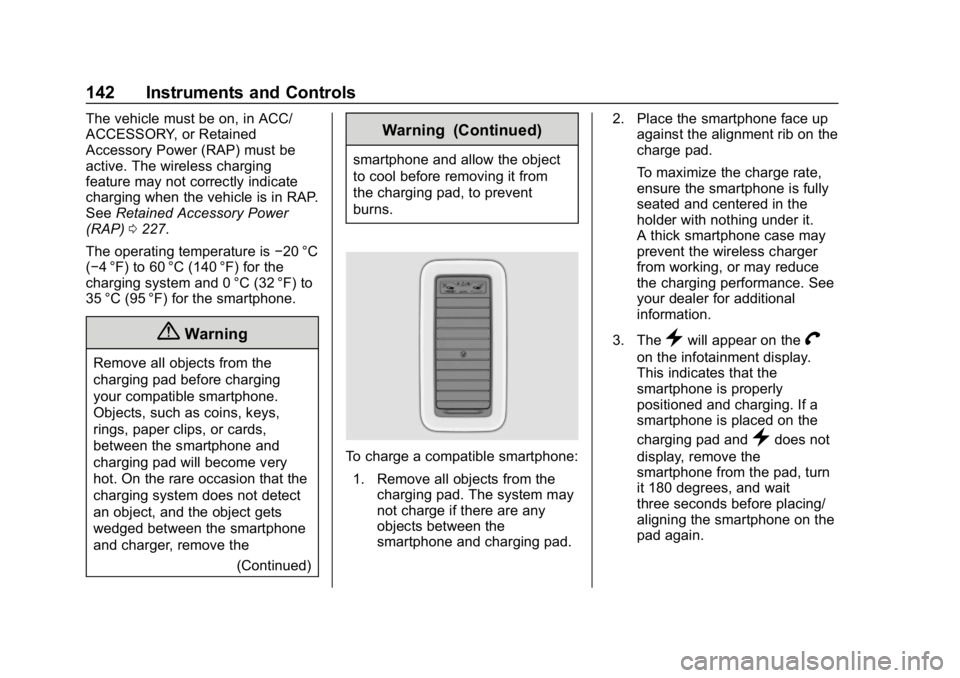
To charge a compatible smartphone:
1. Remove all objects from the charging pad. The system may
not charge if there are any
objects between the
smartphone and charging pad. 2. Place the smartphone face up
against the alignment rib on the
charge pad.
To maximize the charge rate,
ensure the smartphone is fully
seated and centered in the
holder with nothing under it.
A thick smartphone case may
prevent the wireless charger
from working, or may reduce
the charging performance. See
your dealer for additional
information.
3. The
}will appear on theV
on the infotainment display.
This indicates that the
smartphone is properly
positioned and charging. If a
smartphone is placed on the
charging pad and
}does not
display, remove the
smartphone from the pad, turn
it 180 degrees, and wait
three seconds before placing/
aligning the smartphone on the
pad again.
Page 156 of 460
Chevrolet Tahoe/Suburban Owner Manual (GMNA-Localizing-U.S./Canada/
Mexico-12460269) - 2019 - CRC - 9/11/18
Instruments and Controls 155
Warning (Continued)
away. SeeAirbag Readiness
Light 0153 for more information,
including important safety
information.
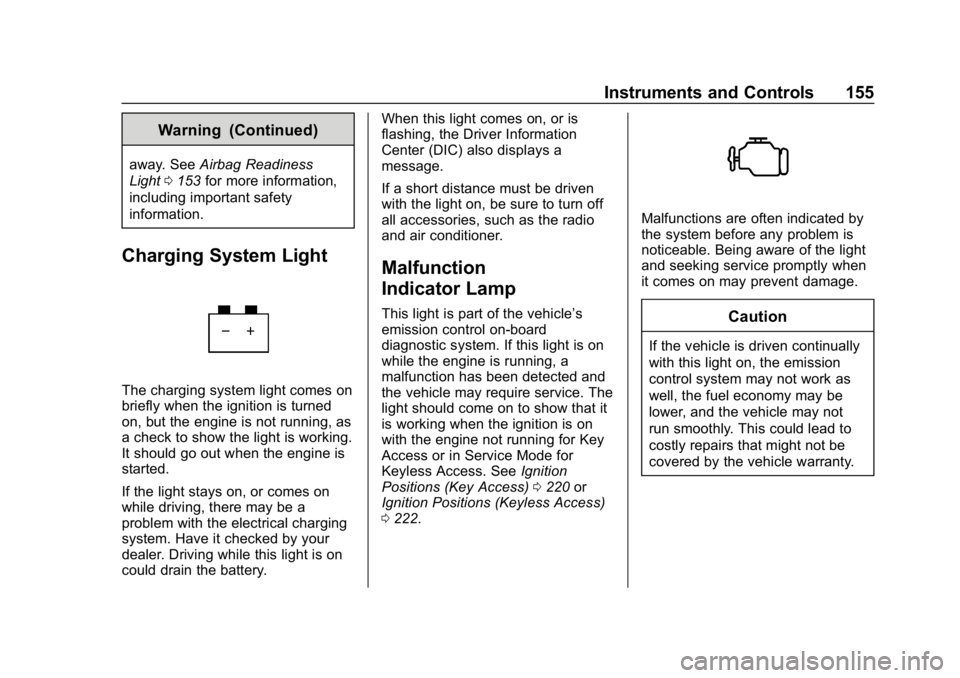
Charging System Light
The charging system light comes on
briefly when the ignition is turned
on, but the engine is not running, as
a check to show the light is working.
It should go out when the engine is
started.
If the light stays on, or comes on
while driving, there may be a
problem with the electrical charging
system. Have it checked by your
dealer. Driving while this light is on
could drain the battery. When this light comes on, or is
flashing, the Driver Information
Center (DIC) also displays a
message.
If a short distance must be driven
with the light on, be sure to turn off
all accessories, such as the radio
and air conditioner.
Malfunction
Indicator Lamp
This light is part of the vehicle’s
emission control on-board
diagnostic system. If this light is on
while the engine is running, a
malfunction has been detected and
the vehicle may require service. The
light should come on to show that it
is working when the ignition is on
with the engine not running for Key
Access or in Service Mode for
Keyless Access. See
Ignition
Positions (Key Access) 0220 or
Ignition Positions (Keyless Access)
0 222.
Malfunctions are often indicated by
the system before any problem is
noticeable. Being aware of the light
and seeking service promptly when
it comes on may prevent damage.
Caution
If the vehicle is driven continually
with this light on, the emission
control system may not work as
well, the fuel economy may be
lower, and the vehicle may not
run smoothly. This could lead to
costly repairs that might not be
covered by the vehicle warranty.