ECU CHEVROLET SUBURBAN 2020 Workshop Manual
[x] Cancel search | Manufacturer: CHEVROLET, Model Year: 2020, Model line: SUBURBAN, Model: CHEVROLET SUBURBAN 2020Pages: 438, PDF Size: 6.76 MB
Page 305 of 438
Chevrolet Tahoe/Suburban Owner Manual (GMNA-Localizing-U.S./Canada/
Mexico-13566622) - 2020 - CRC - 4/15/19
304 Vehicle Care
Caution
Failure to follow the specific
coolant fill procedure could cause
the engine to overheat and could
cause system damage. If coolant
is not visible in the surge tank,
contact your dealer.
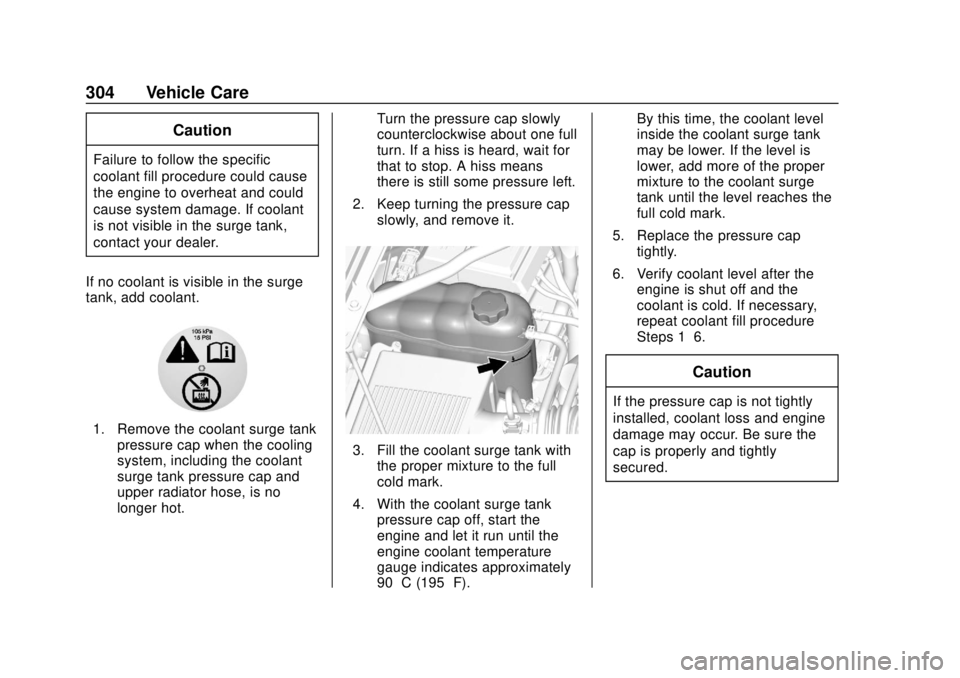
If no coolant is visible in the surge
tank, add coolant.
1. Remove the coolant surge tank pressure cap when the cooling
system, including the coolant
surge tank pressure cap and
upper radiator hose, is no
longer hot. Turn the pressure cap slowly
counterclockwise about one full
turn. If a hiss is heard, wait for
that to stop. A hiss means
there is still some pressure left.
2. Keep turning the pressure cap slowly, and remove it.
3. Fill the coolant surge tank withthe proper mixture to the full
cold mark.
4. With the coolant surge tank pressure cap off, start the
engine and let it run until the
engine coolant temperature
gauge indicates approximately
90 °C (195 °F). By this time, the coolant level
inside the coolant surge tank
may be lower. If the level is
lower, add more of the proper
mixture to the coolant surge
tank until the level reaches the
full cold mark.
5. Replace the pressure cap tightly.
6. Verify coolant level after the engine is shut off and the
coolant is cold. If necessary,
repeat coolant fill procedure
Steps 1–6.
Caution
If the pressure cap is not tightly
installed, coolant loss and engine
damage may occur. Be sure the
cap is properly and tightly
secured.
Page 314 of 438
Chevrolet Tahoe/Suburban Owner Manual (GMNA-Localizing-U.S./Canada/
Mexico-13566622) - 2020 - CRC - 4/15/19
Vehicle Care 313
2. Lift up on the latch in themiddle of the wiper blade
where the wiper arm attaches.
3. With the latch open, pull the wiper blade down toward the
windshield far enough to
release it from the J-hooked
end of the wiper arm.
4. Remove the wiper blade.
5. Reverse Steps 1–3 for wiper blade replacement.
Rear Wiper Blade Replacement
To replace the rear wiper blade:
1. With the rear wiper in the off position, open the liftglass to
access the rear wiper arm/
blade.
The rear wiper blade will not
lock in a vertical position so
use care when pulling it away
from the vehicle.
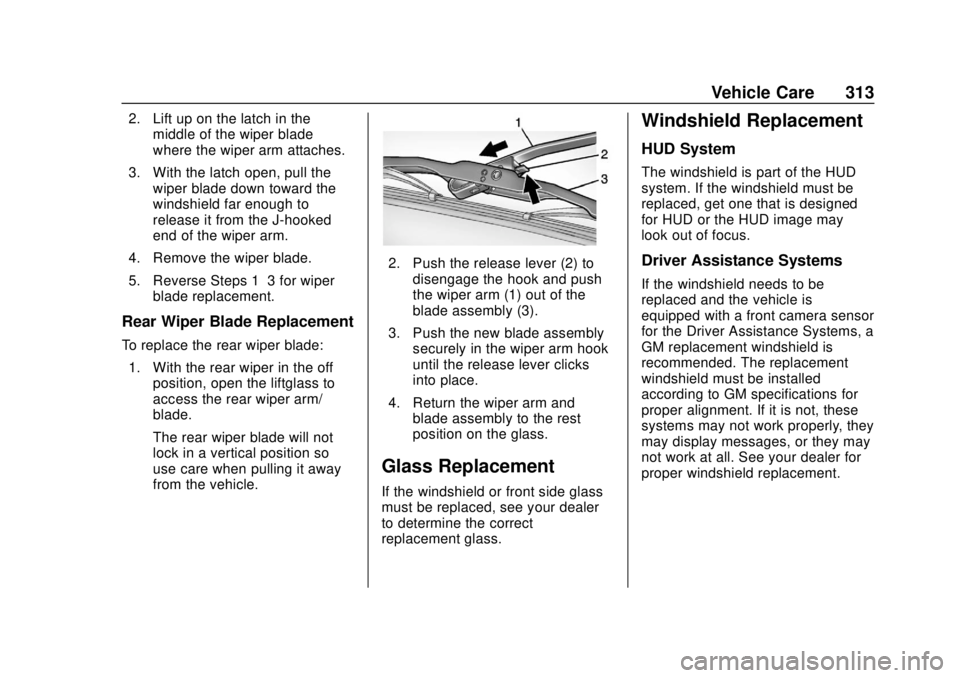
2. Push the release lever (2) to
disengage the hook and push
the wiper arm (1) out of the
blade assembly (3).
3. Push the new blade assembly securely in the wiper arm hook
until the release lever clicks
into place.
4. Return the wiper arm and blade assembly to the rest
position on the glass.
Glass Replacement
If the windshield or front side glass
must be replaced, see your dealer
to determine the correct
replacement glass.
Windshield Replacement
HUD System
The windshield is part of the HUD
system. If the windshield must be
replaced, get one that is designed
for HUD or the HUD image may
look out of focus.
Driver Assistance Systems
If the windshield needs to be
replaced and the vehicle is
equipped with a front camera sensor
for the Driver Assistance Systems, a
GM replacement windshield is
recommended. The replacement
windshield must be installed
according to GM specifications for
proper alignment. If it is not, these
systems may not work properly, they
may display messages, or they may
not work at all. See your dealer for
proper windshield replacement.
Page 317 of 438
Chevrolet Tahoe/Suburban Owner Manual (GMNA-Localizing-U.S./Canada/
Mexico-13566622) - 2020 - CRC - 4/15/19
316 Vehicle Care
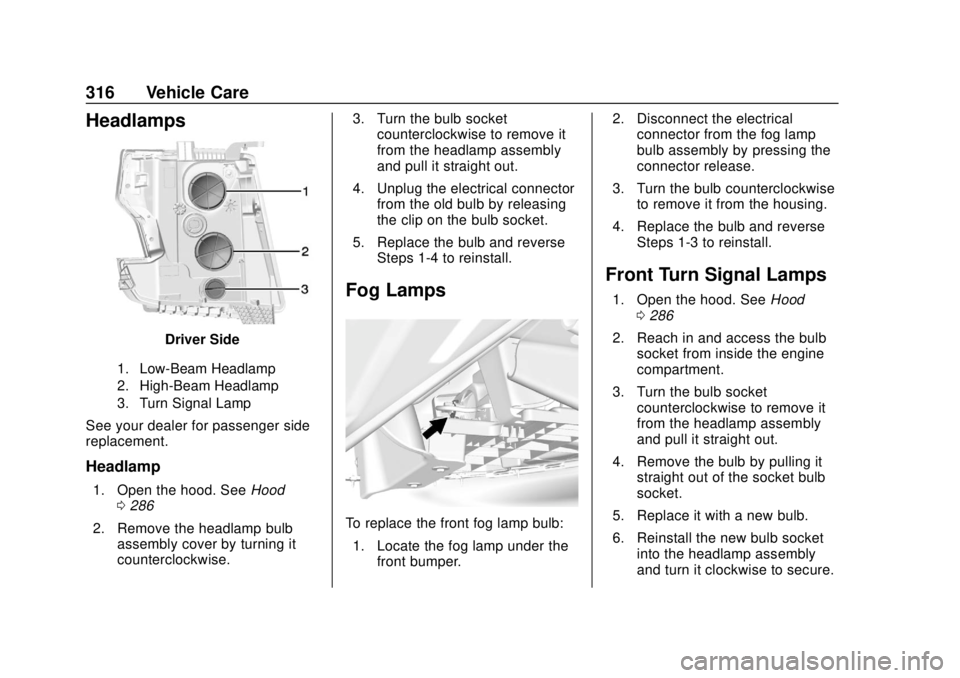
Headlamps
Driver Side
1. Low-Beam Headlamp
2. High-Beam Headlamp
3. Turn Signal Lamp
See your dealer for passenger side
replacement.
Headlamp
1. Open the hood. SeeHood
0 286
2. Remove the headlamp bulb assembly cover by turning it
counterclockwise. 3. Turn the bulb socket
counterclockwise to remove it
from the headlamp assembly
and pull it straight out.
4. Unplug the electrical connector from the old bulb by releasing
the clip on the bulb socket.
5. Replace the bulb and reverse Steps 1-4 to reinstall.
Fog Lamps
To replace the front fog lamp bulb:
1. Locate the fog lamp under the front bumper. 2. Disconnect the electrical
connector from the fog lamp
bulb assembly by pressing the
connector release.
3. Turn the bulb counterclockwise to remove it from the housing.
4. Replace the bulb and reverse Steps 1-3 to reinstall.
Front Turn Signal Lamps
1. Open the hood. See Hood
0 286
2. Reach in and access the bulb socket from inside the engine
compartment.
3. Turn the bulb socket counterclockwise to remove it
from the headlamp assembly
and pull it straight out.
4. Remove the bulb by pulling it straight out of the socket bulb
socket.
5. Replace it with a new bulb.
6. Reinstall the new bulb socket into the headlamp assembly
and turn it clockwise to secure.
Page 352 of 438
Chevrolet Tahoe/Suburban Owner Manual (GMNA-Localizing-U.S./Canada/
Mexico-13566622) - 2020 - CRC - 4/15/19
Vehicle Care 351
Warning (Continued)
parts. The area damaged by the
tire chains could cause loss of
control and a crash.
Use another type of traction
device only if its manufacturer
recommends it for the vehicle's
tire size combination and road
conditions. Follow that
manufacturer's instructions. To
avoid vehicle damage, drive slow
and readjust or remove the
traction device if it is contacting
the vehicle. Do not spin the
wheels.
If traction devices are used, install
them on the rear tires.
Caution
If the vehicle has P255/70R17,
P265/70R17, or LT265/70R17
size tires, use tire chains only(Continued)
Caution (Continued)
where legal and only when
necessary. Use chains that are
the proper size for the tires. Install
them on the rear tires only. Do not
use chains on the front tires.
Tighten them as tightly as
possible with the ends securely
fastened. Drive slowly and follow
the chain manufacturer's
instructions. If the chains contact
the vehicle, stop and retighten
them. If the contact continues,
slow down until it stops. Driving
too fast or spinning the wheels
with chains on will damage the
vehicle.
If a Tire Goes Flat
It is unusual for a tire to blowout
while driving, especially if the tires
are maintained properly. If air goes
out of a tire, it is much more likely to
leak out slowly. But if there ever is a
blowout, here are a few tips about
what to expect and what to do: If a front tire fails, the flat tire
creates a drag that pulls the vehicle
toward that side. Take your foot off
the accelerator pedal and grip the
steering wheel firmly. Steer to
maintain lane position, and then
gently brake to a stop, well off the
road, if possible.
A rear blowout, particularly on a
curve, acts much like a skid and
may require the same correction as
used in a skid. Stop pressing the
accelerator pedal and steer to
straighten the vehicle. It may be
very bumpy and noisy. Gently brake
to a stop, well off the road,
if possible.
{Warning
Driving on a flat tire will cause
permanent damage to the tire.
Re-inflating a tire after it has been
driven on while severely
underinflated or flat may cause a
blowout and a serious crash.
Never attempt to re-inflate a tire
(Continued)
Page 361 of 438
Chevrolet Tahoe/Suburban Owner Manual (GMNA-Localizing-U.S./Canada/
Mexico-13566622) - 2020 - CRC - 4/15/19
360 Vehicle Care
{Warning
Failure to follow these tire storage
instructions carefully could result
in personal injury or property
damage if the hoist cable fails or
if the tire comes loose. Make sure
the tire is stored securely before
driving.
Caution
Storing an aluminum wheel with a
flat tire under your vehicle for an
extended period of time or with
the valve stem pointing up can
damage the wheel. Always stow
the wheel with the valve stem
pointing down and have the
wheel/tire repaired as soon as
possible.
Caution
The tire hoist can be damaged if
there is no tension on the cable
when using it. To have the
necessary tension, the spare or
road tire and wheel assembly
must be installed on the tire hoist
to use it.
{Warning
An improperly stored spare tire
could come loose and cause a
crash. To avoid personal injury or
property damage, always store
the spare tire when the vehicle is
parked on a level surface.
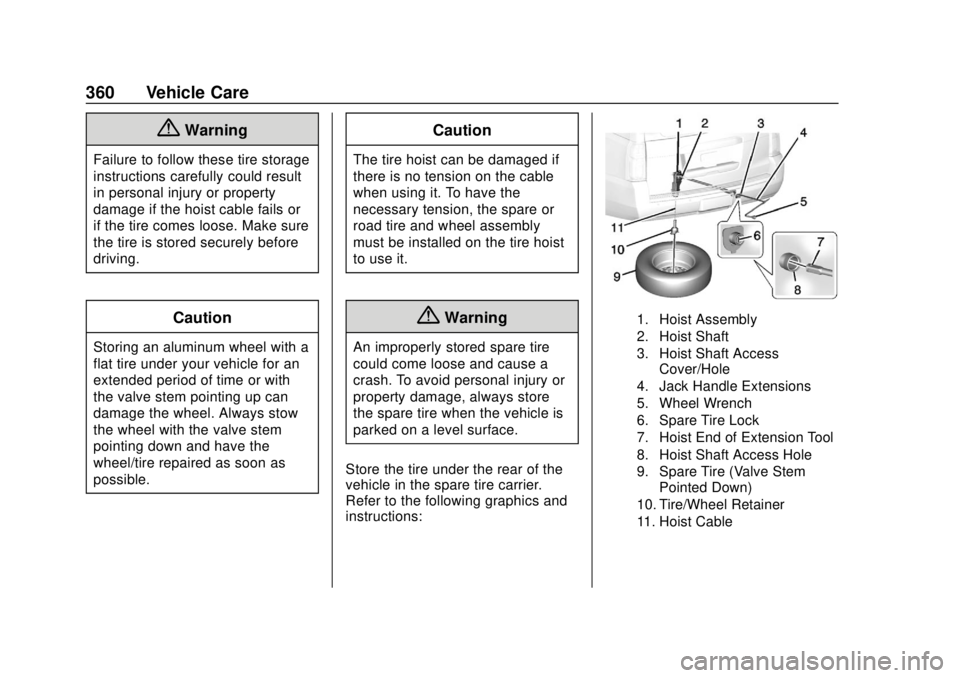
Store the tire under the rear of the
vehicle in the spare tire carrier.
Refer to the following graphics and
instructions:
1. Hoist Assembly
2. Hoist Shaft
3. Hoist Shaft Access Cover/Hole
4. Jack Handle Extensions
5. Wheel Wrench
6. Spare Tire Lock
7. Hoist End of Extension Tool
8. Hoist Shaft Access Hole
9. Spare Tire (Valve Stem Pointed Down)
10. Tire/Wheel Retainer
11. Hoist Cable
Page 363 of 438
Chevrolet Tahoe/Suburban Owner Manual (GMNA-Localizing-U.S./Canada/
Mexico-13566622) - 2020 - CRC - 4/15/19
362 Vehicle Care
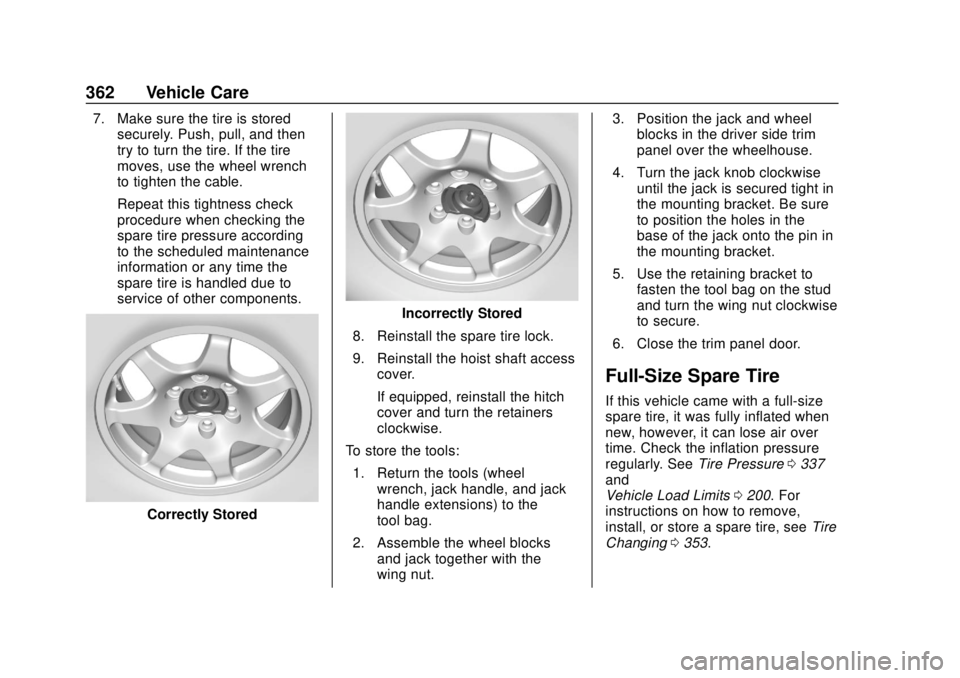
7. Make sure the tire is storedsecurely. Push, pull, and then
try to turn the tire. If the tire
moves, use the wheel wrench
to tighten the cable.
Repeat this tightness check
procedure when checking the
spare tire pressure according
to the scheduled maintenance
information or any time the
spare tire is handled due to
service of other components.
Correctly Stored
Incorrectly Stored
8. Reinstall the spare tire lock.
9. Reinstall the hoist shaft access cover.
If equipped, reinstall the hitch
cover and turn the retainers
clockwise.
To store the tools:
1. Return the tools (wheel wrench, jack handle, and jack
handle extensions) to the
tool bag.
2. Assemble the wheel blocks and jack together with the
wing nut. 3. Position the jack and wheel
blocks in the driver side trim
panel over the wheelhouse.
4. Turn the jack knob clockwise until the jack is secured tight in
the mounting bracket. Be sure
to position the holes in the
base of the jack onto the pin in
the mounting bracket.
5. Use the retaining bracket to fasten the tool bag on the stud
and turn the wing nut clockwise
to secure.
6. Close the trim panel door.
Full-Size Spare Tire
If this vehicle came with a full-size
spare tire, it was fully inflated when
new, however, it can lose air over
time. Check the inflation pressure
regularly. See Tire Pressure0337
and
Vehicle Load Limits 0200. For
instructions on how to remove,
install, or store a spare tire, see Tire
Changing 0353.
Page 368 of 438
Chevrolet Tahoe/Suburban Owner Manual (GMNA-Localizing-U.S./Canada/
Mexico-13566622) - 2020 - CRC - 4/15/19
Vehicle Care 367
Caution
If the jumper cables are
connected or removed in the
wrong order, electrical shorting
may occur and damage the
vehicle. The repairs would not be
covered by the vehicle warranty.
Always connect and remove the
jumper cables in the correct order,
making sure that the cables do
not touch each other or other
metal.
Jumper Cable Removal
Reverse the sequence exactly when
removing the jumper cables.
After starting the disabled vehicle
and removing the jumper cables,
allow it to idle for several minutes.
Towing the Vehicle
Caution
Incorrectly towing a disabled
vehicle may cause damage. The
damage would not be covered by
the vehicle warranty. Do not lash
or hook to suspension
components. Use the proper
straps around the tires to secure
the vehicle. Do not drag a locked
wheel/tire. Use tire skates or
dollies under any locked wheel/
tire while loading the vehicle. Do
not use a sling type lift to tow the
vehicle. This could damage the
vehicle.
Caution
If the vehicle cannot be shifted
into Neutral (N), do not use the
tow eye to tow the vehicle.
Vehicle damage may occur. GM recommends a flatbed tow truck
to transport a disabled vehicle. Use
ramps to help reduce approach
angles, if necessary. A towed
vehicle should have its drive wheels
off the ground. Contact Roadside
Assistance or a professional towing
service if the disabled vehicle must
be towed.
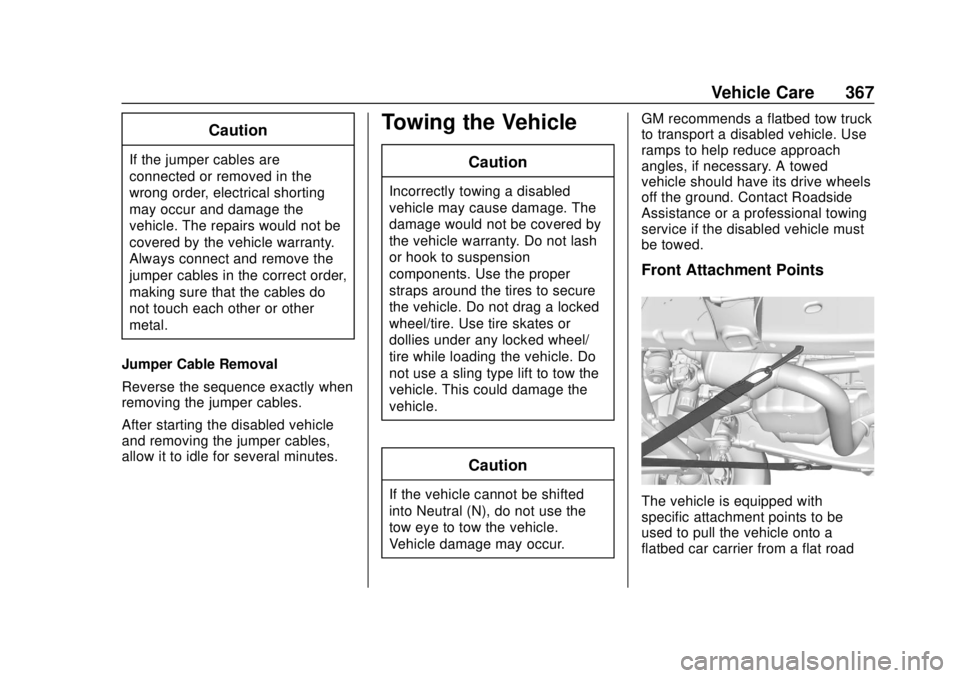
Front Attachment Points
The vehicle is equipped with
specific attachment points to be
used to pull the vehicle onto a
flatbed car carrier from a flat road
Page 370 of 438
Chevrolet Tahoe/Suburban Owner Manual (GMNA-Localizing-U.S./Canada/
Mexico-13566622) - 2020 - CRC - 4/15/19
Vehicle Care 369
Caution
If the two-wheel-drive vehicle is
towed with all four wheels on the
ground, the drivetrain
components could be damaged.
The repairs would not be covered
by the vehicle warranty.
Two-wheel-drive vehicles should not
be towed with all four wheels on the
ground.
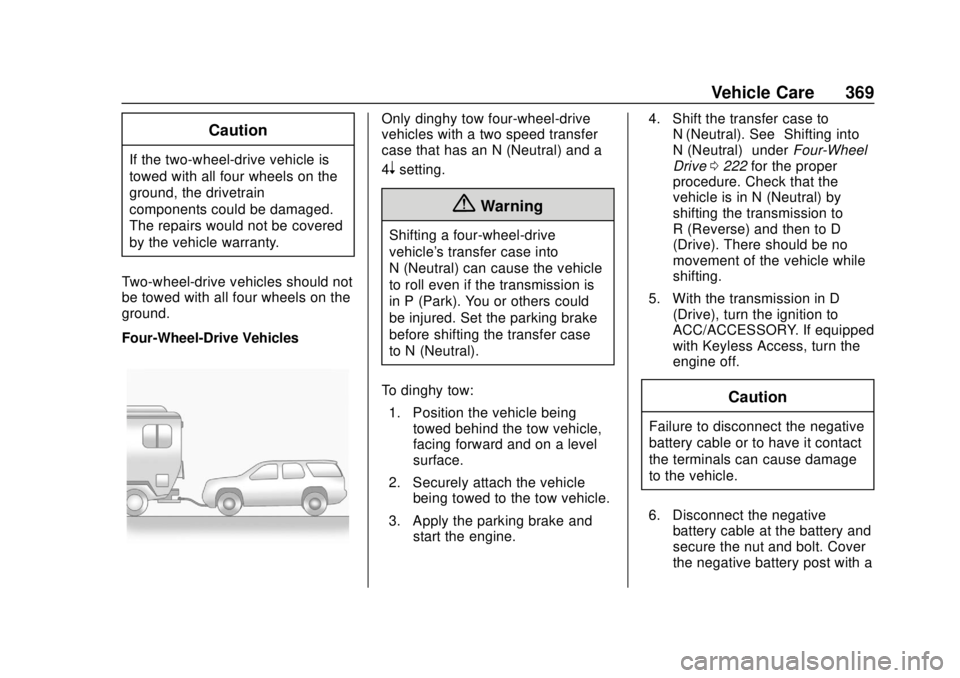
Four-Wheel-Drive Vehicles
Only dinghy tow four-wheel-drive
vehicles with a two speed transfer
case that has an N (Neutral) and a
4
nsetting.
{Warning
Shifting a four-wheel-drive
vehicle's transfer case into
N (Neutral) can cause the vehicle
to roll even if the transmission is
in P (Park). You or others could
be injured. Set the parking brake
before shifting the transfer case
to N (Neutral).
To dinghy tow: 1. Position the vehicle being towed behind the tow vehicle,
facing forward and on a level
surface.
2. Securely attach the vehicle being towed to the tow vehicle.
3. Apply the parking brake and start the engine. 4. Shift the transfer case to
N (Neutral). See “Shifting into
N (Neutral)” underFour-Wheel
Drive 0222 for the proper
procedure. Check that the
vehicle is in N (Neutral) by
shifting the transmission to
R (Reverse) and then to D
(Drive). There should be no
movement of the vehicle while
shifting.
5. With the transmission in D (Drive), turn the ignition to
ACC/ACCESSORY. If equipped
with Keyless Access, turn the
engine off.
Caution
Failure to disconnect the negative
battery cable or to have it contact
the terminals can cause damage
to the vehicle.
6. Disconnect the negative battery cable at the battery and
secure the nut and bolt. Cover
the negative battery post with a
Page 381 of 438
Chevrolet Tahoe/Suburban Owner Manual (GMNA-Localizing-U.S./Canada/
Mexico-13566622) - 2020 - CRC - 4/15/19
380 Vehicle Care
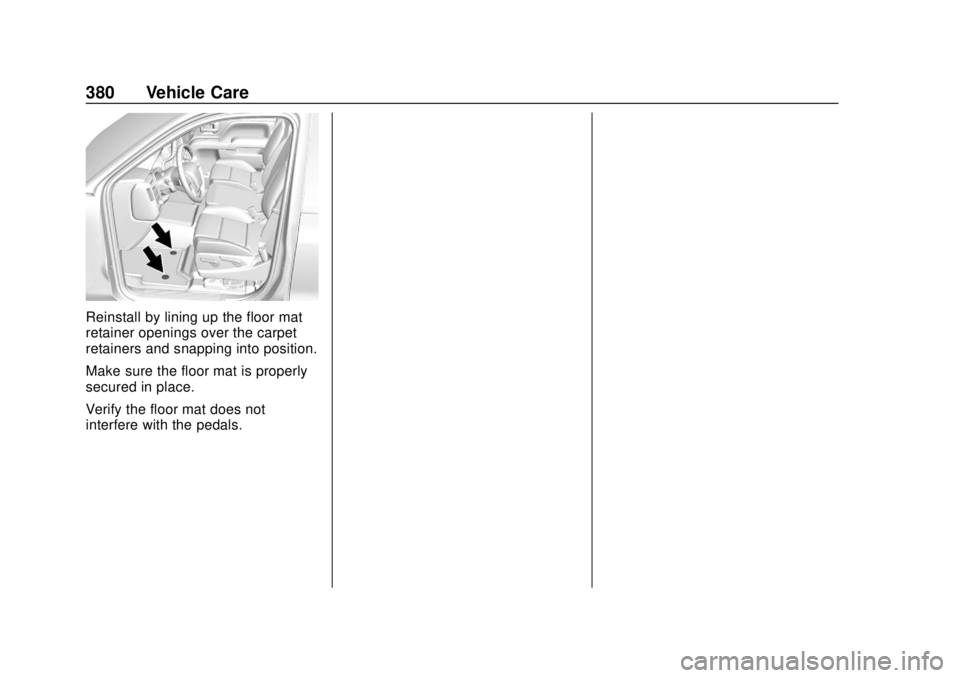
Reinstall by lining up the floor mat
retainer openings over the carpet
retainers and snapping into position.
Make sure the floor mat is properly
secured in place.
Verify the floor mat does not
interfere with the pedals.
Page 401 of 438
Chevrolet Tahoe/Suburban Owner Manual (GMNA-Localizing-U.S./Canada/
Mexico-13566622) - 2020 - CRC - 4/15/19
400 Customer Information
Customer
Information
Customer Information
Customer SatisfactionProcedure . . . . . . . . . . . . . . . . . . . 400
Customer Assistance Offices . . . . . . . . . . . . . . . . . . . . . . 402
Customer Assistance for Text Telephone (TTY) Users . . . . . 403
Online Owner Center . . . . . . . . . 403
GM Mobility Reimbursement Program . . . . . . . . . . . . . . . . . . . . 404
Roadside Assistance Program . . . . . . . . . . . . . . . . . . . . 404
Scheduling Service Appointments . . . . . . . . . . . . . . . 406
Courtesy Transportation Program . . . . . . . . . . . . . . . . . . . . 406
Collision Damage Repair . . . . . 407
Publication Ordering Information . . . . . . . . . . . . . . . . . . 409
Radio Frequency Statement . . . . . . . . . . . . . . . . . . . 410
Reporting Safety Defects
Reporting Safety Defects tothe United States
Government . . . . . . . . . . . . . . . . . 410
Reporting Safety Defects to the Canadian Government . . . . . . 411
Reporting Safety Defects to General Motors . . . . . . . . . . . . . 411
Vehicle Data Recording and
Privacy
Vehicle Data Recording andPrivacy . . . . . . . . . . . . . . . . . . . . . . 412
Cybersecurity . . . . . . . . . . . . . . . . . 412
Event Data Recorders . . . . . . . . 412
OnStar . . . . . . . . . . . . . . . . . . . . . . . 413
Infotainment System . . . . . . . . . . 413
Customer Information
Customer Satisfaction
Procedure
Your satisfaction and goodwill are
important to your dealer and to
Chevrolet. Normally, any concerns
with the sales transaction or the
operation of the vehicle will be
resolved by your dealer's sales or
service departments. Sometimes,
however, despite the best intentions
of all concerned, misunderstandings
can occur. If your concern has not
been resolved to your satisfaction,
the following steps should be taken:
STEP ONE : Discuss your concern
with a member of dealership
management. Normally, concerns
can be quickly resolved at that level.
If the matter has already been
reviewed with the sales, service,
or parts manager, contact the owner
of your dealership or the general
manager.
STEP TWO : If after contacting a
member of dealership management,
it appears your concern cannot be