switch CHEVROLET SUBURBAN 2021 User Guide
[x] Cancel search | Manufacturer: CHEVROLET, Model Year: 2021, Model line: SUBURBAN, Model: CHEVROLET SUBURBAN 2021Pages: 433, PDF Size: 7.36 MB
Page 34 of 433
Chevrolet Tahoe/Suburban Owner Manual (GMNA-Localizing-U.S./Canada/
Mexico-13690484) - 2021 - crc - 8/17/20
Keys, Doors, and Windows 33
Warning (Continued)
children in the rear seat, use the window
lockout switch to prevent operation of
the windows. SeeKeys07.
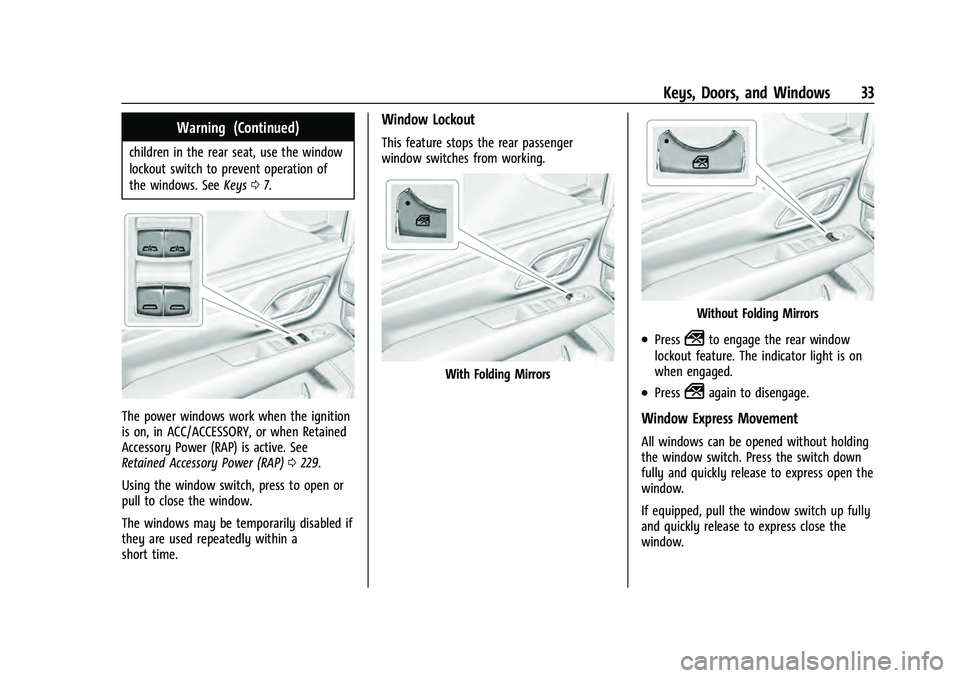
The power windows work when the ignition
is on, in ACC/ACCESSORY, or when Retained
Accessory Power (RAP) is active. See
Retained Accessory Power (RAP) 0229.
Using the window switch, press to open or
pull to close the window.
The windows may be temporarily disabled if
they are used repeatedly within a
short time.
Window Lockout
This feature stops the rear passenger
window switches from working.
With Folding Mirrors
Without Folding Mirrors
.Press2to engage the rear window
lockout feature. The indicator light is on
when engaged.
.Press2again to disengage.
Window Express Movement
All windows can be opened without holding
the window switch. Press the switch down
fully and quickly release to express open the
window.
If equipped, pull the window switch up fully
and quickly release to express close the
window.
Page 35 of 433
Chevrolet Tahoe/Suburban Owner Manual (GMNA-Localizing-U.S./Canada/
Mexico-13690484) - 2021 - crc - 8/17/20
34 Keys, Doors, and Windows
Briefly press or pull the window switch in
the same direction to stop that window’s
express movement.
Window Automatic Reversal System
The express-close feature will reverse
window movement if it comes in contact
with an object. Extreme cold or ice could
cause the window to auto-reverse. The
window will operate normally after the
object or condition is removed.
Automatic Reversal System Override
{Warning
If automatic reversal system override is
active, the window will not reverse
automatically. You or others could be
injured and the window could be
damaged. Before using automatic reversal
system override, make sure that all
people and obstructions are clear of the
window path.
When the engine is on, override the
automatic reversal system by pulling and
holding the window switch if conditions
prevent it from closing.
Programming the Power Windows
Programming may be necessary if the
vehicle battery has been disconnected or
discharged. If the window is unable to
express-up, program each express-close
window: 1. Close all doors.
2. Turn the ignition on or to ACC/ ACCESSORY.
3. Partially open the window to be programmed. Then close it and continue
to pull the switch briefly after the
window has fully closed.
4. Open the window and continue to press the switch briefly after the window has
fully opened.
Remote Window Operation
If equipped, this feature allows the windows
to be opened remotely. If enabled in vehicle
personalization, press and hold
Kon the
remote key. See Vehicle Personalization
0 124.
Sun Visors
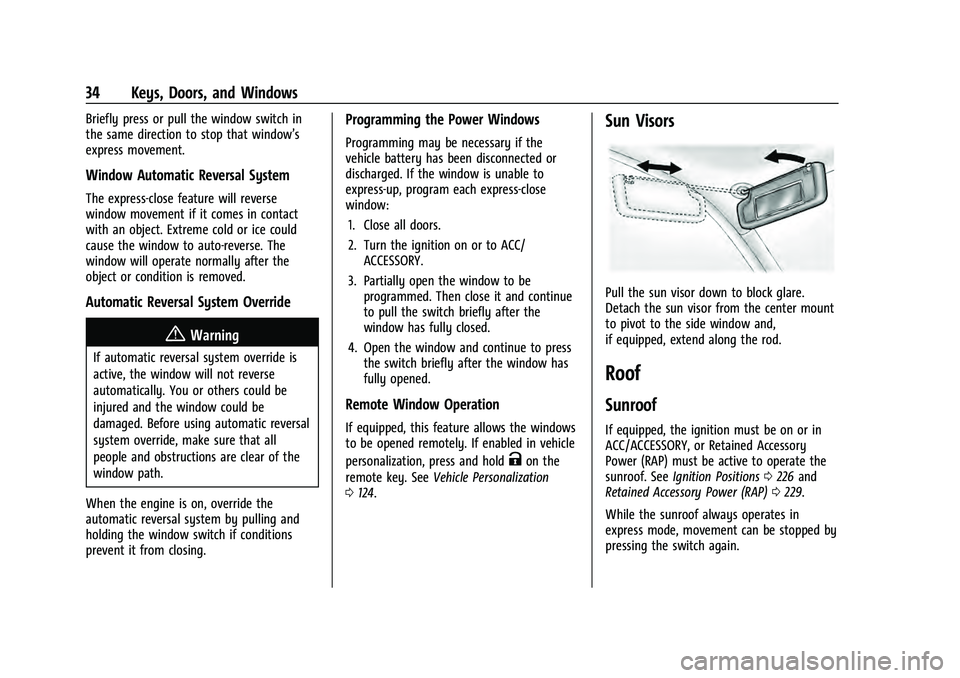
Pull the sun visor down to block glare.
Detach the sun visor from the center mount
to pivot to the side window and,
if equipped, extend along the rod.
Roof
Sunroof
If equipped, the ignition must be on or in
ACC/ACCESSORY, or Retained Accessory
Power (RAP) must be active to operate the
sunroof. See Ignition Positions 0226 and
Retained Accessory Power (RAP) 0229.
While the sunroof always operates in
express mode, movement can be stopped by
pressing the switch again.
Page 36 of 433
Chevrolet Tahoe/Suburban Owner Manual (GMNA-Localizing-U.S./Canada/
Mexico-13690484) - 2021 - crc - 8/17/20
Keys, Doors, and Windows 35
The sunroof cannot be opened or closed if
the vehicle has an electrical failure.
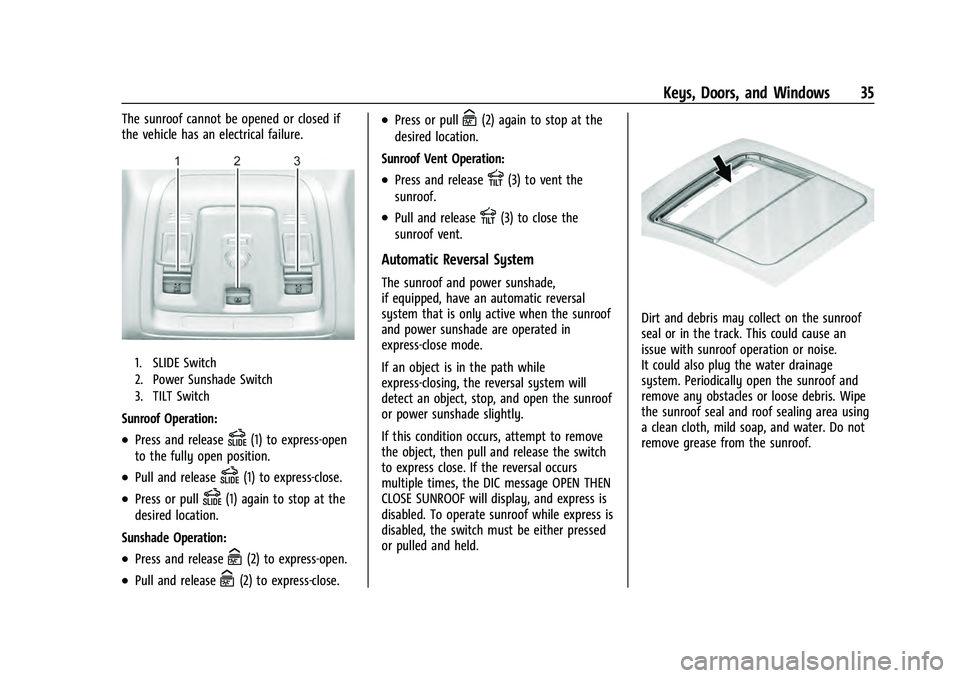
1. SLIDE Switch
2. Power Sunshade Switch
3. TILT Switch
Sunroof Operation:
.Press and releaseD(1) to express-open
to the fully open position.
.Pull and releaseD(1) to express-close.
.Press or pullD(1) again to stop at the
desired location.
Sunshade Operation:
.Press and releaseC(2) to express-open.
.Pull and releaseC(2) to express-close.
.Press or pullC(2) again to stop at the
desired location.
Sunroof Vent Operation:
.Press and releaseE(3) to vent the
sunroof.
.Pull and releaseE(3) to close the
sunroof vent.
Automatic Reversal System
The sunroof and power sunshade,
if equipped, have an automatic reversal
system that is only active when the sunroof
and power sunshade are operated in
express-close mode.
If an object is in the path while
express-closing, the reversal system will
detect an object, stop, and open the sunroof
or power sunshade slightly.
If this condition occurs, attempt to remove
the object, then pull and release the switch
to express close. If the reversal occurs
multiple times, the DIC message OPEN THEN
CLOSE SUNROOF will display, and express is
disabled. To operate sunroof while express is
disabled, the switch must be either pressed
or pulled and held.
Dirt and debris may collect on the sunroof
seal or in the track. This could cause an
issue with sunroof operation or noise.
It could also plug the water drainage
system. Periodically open the sunroof and
remove any obstacles or loose debris. Wipe
the sunroof seal and roof sealing area using
a clean cloth, mild soap, and water. Do not
remove grease from the sunroof.
Page 49 of 433
Chevrolet Tahoe/Suburban Owner Manual (GMNA-Localizing-U.S./Canada/
Mexico-13690484) - 2021 - crc - 8/17/20
48 Seats and Restraints
Warning (Continued)
seating position before driving the
vehicle. Push and pull on the seat to
make sure it is locked into place.
{Warning
Automatically folding and tumbling the
seat when someone is sitting in the seat,
could cause injury to the person sitting
there. Always make sure there is no one
sitting in the seat before pressing the
automatic seat release switch.
Caution
Folding a rear seat with the seat belts
still fastened may cause damage to the
seat or the seat belts. Always unbuckle
the seat belts and return them to their
normal stowed position before folding a
rear seat.
The vehicle must be in P (Park) for this
feature to work.
Folding and Tumbling the Seat
To fold and tumble the seat: 1. Make sure that there is nothing under,
in front of, or on the seat.
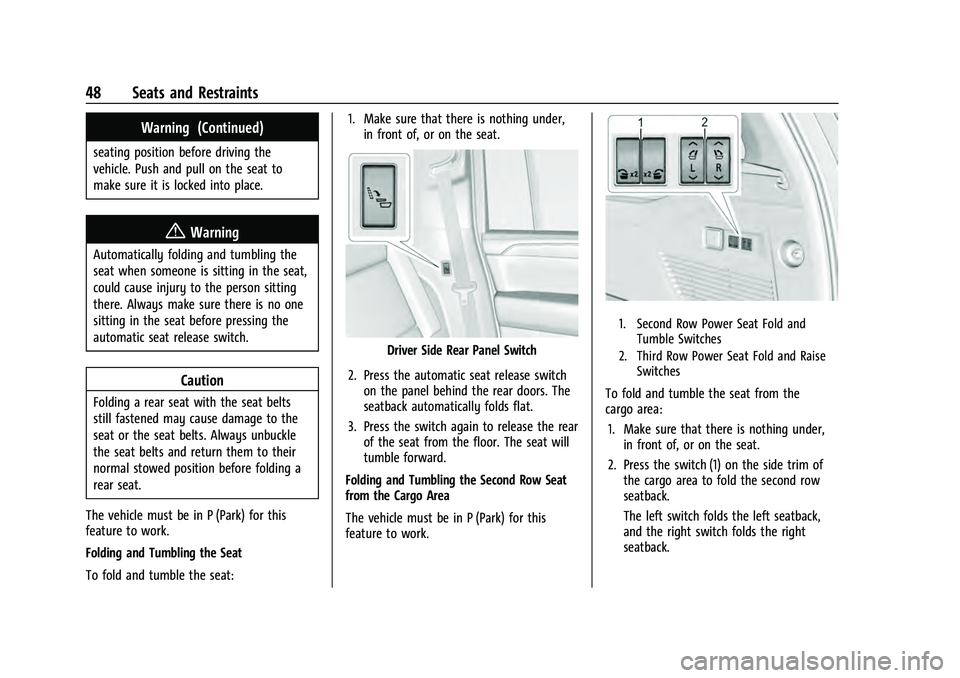
Driver Side Rear Panel Switch
2. Press the automatic seat release switch on the panel behind the rear doors. The
seatback automatically folds flat.
3. Press the switch again to release the rear of the seat from the floor. The seat will
tumble forward.
Folding and Tumbling the Second Row Seat
from the Cargo Area
The vehicle must be in P (Park) for this
feature to work.
1. Second Row Power Seat Fold and Tumble Switches
2. Third Row Power Seat Fold and Raise Switches
To fold and tumble the seat from the
cargo area:
1. Make sure that there is nothing under, in front of, or on the seat.
2. Press the switch (1) on the side trim of the cargo area to fold the second row
seatback.
The left switch folds the left seatback,
and the right switch folds the right
seatback.
Page 50 of 433
Chevrolet Tahoe/Suburban Owner Manual (GMNA-Localizing-U.S./Canada/
Mexico-13690484) - 2021 - crc - 8/17/20
Seats and Restraints 49
3. Press the switch again to release the rearof the seat from the floor. The seat will
tumble forward.
The switches (2) can be used to fold the
third row seatbacks from the cargo area. See
Third Row Seats 049.
Returning the Seat to the Sitting Position
{Warning
If either seatback is not locked, it could
move forward in a sudden stop or crash.
That could cause injury to the person
sitting there. Always push and pull on
the seatbacks to be sure they are locked.
To return the seat to the sitting position
from the tumbled position: 1. Pull the seat down until it latches to the floor. The seatback cannot be raised if
the seat is not latched to the floor.
2. Lift the seatback and push it rearward. Push and pull on the seatback to make
sure it is locked.
3. For the 60/40 split-bench seat, make sure the seat belt in the center seating
position is not caught between the two
seats and is not twisted.
Third Row Seats
Caution
Folding a rear seat with the seat belts
still fastened may cause damage to the
seat or the seat belts. Always unbuckle
the seat belts and return them to their
normal stowed position before folding a
rear seat.
The third row seatbacks can be folded to
increase cargo space. 1. Open the liftgate to access the controls for the third row seat.
2. Make sure that there is nothing under, in front of, or on the seat.
3. If the second row seat is in the full rear position, adjust it forward to allow the
third row seat to fold fully flat.
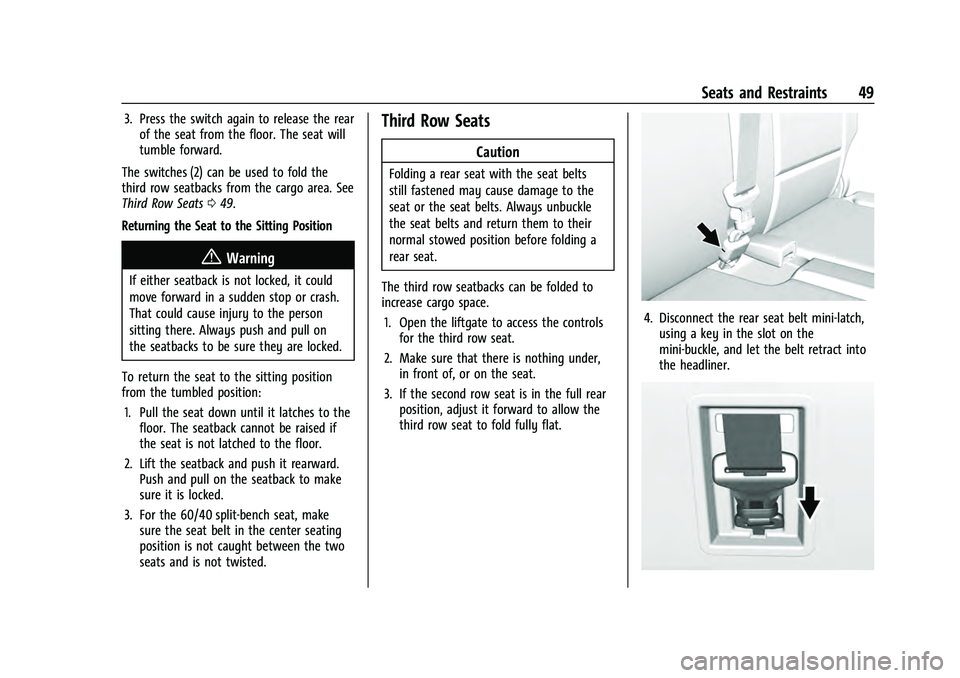
4. Disconnect the rear seat belt mini-latch,using a key in the slot on the
mini-buckle, and let the belt retract into
the headliner.
Page 51 of 433
Chevrolet Tahoe/Suburban Owner Manual (GMNA-Localizing-U.S./Canada/
Mexico-13690484) - 2021 - crc - 8/17/20
50 Seats and Restraints
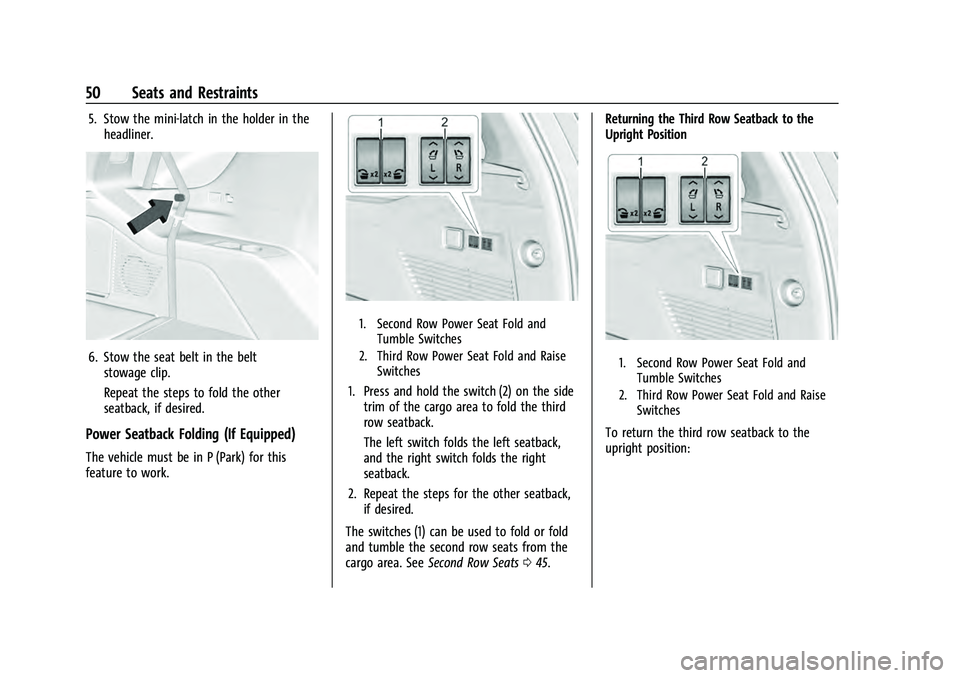
5. Stow the mini-latch in the holder in theheadliner.
6. Stow the seat belt in the beltstowage clip.
Repeat the steps to fold the other
seatback, if desired.
Power Seatback Folding (If Equipped)
The vehicle must be in P (Park) for this
feature to work.
1. Second Row Power Seat Fold and Tumble Switches
2. Third Row Power Seat Fold and Raise Switches
1. Press and hold the switch (2) on the sidetrim of the cargo area to fold the third
row seatback.
The left switch folds the left seatback,
and the right switch folds the right
seatback.
2. Repeat the steps for the other seatback, if desired.
The switches (1) can be used to fold or fold
and tumble the second row seats from the
cargo area. See Second Row Seats 045. Returning the Third Row Seatback to the
Upright Position
1. Second Row Power Seat Fold and
Tumble Switches
2. Third Row Power Seat Fold and Raise Switches
To return the third row seatback to the
upright position:
Page 52 of 433
Chevrolet Tahoe/Suburban Owner Manual (GMNA-Localizing-U.S./Canada/
Mexico-13690484) - 2021 - crc - 8/17/20
Seats and Restraints 51
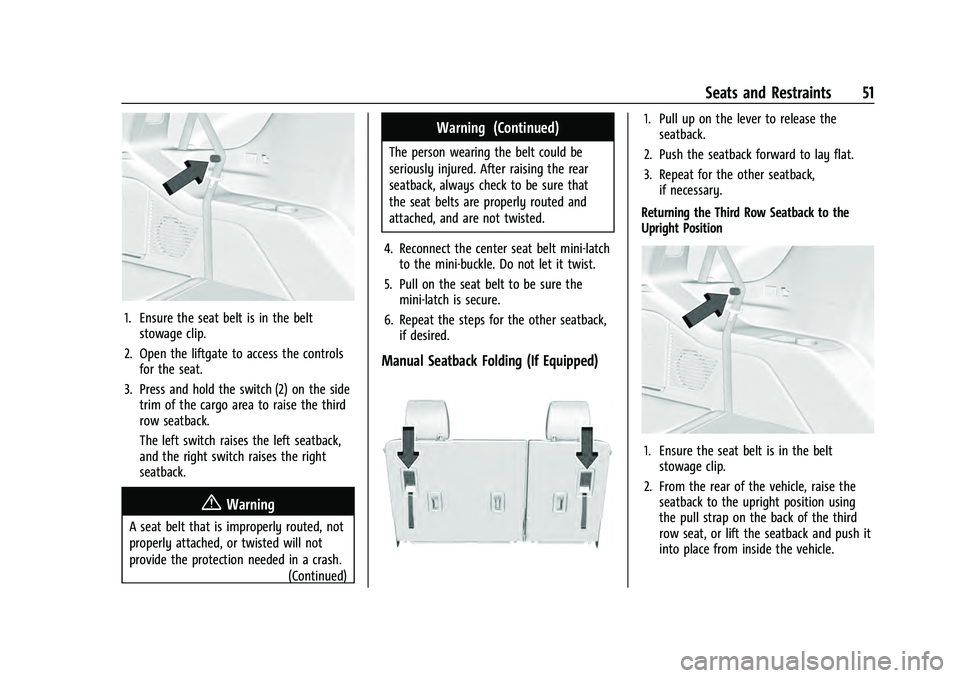
1. Ensure the seat belt is in the beltstowage clip.
2. Open the liftgate to access the controls for the seat.
3. Press and hold the switch (2) on the side trim of the cargo area to raise the third
row seatback.
The left switch raises the left seatback,
and the right switch raises the right
seatback.
{Warning
A seat belt that is improperly routed, not
properly attached, or twisted will not
provide the protection needed in a crash.
(Continued)
Warning (Continued)
The person wearing the belt could be
seriously injured. After raising the rear
seatback, always check to be sure that
the seat belts are properly routed and
attached, and are not twisted.
4. Reconnect the center seat belt mini-latch to the mini-buckle. Do not let it twist.
5. Pull on the seat belt to be sure the mini-latch is secure.
6. Repeat the steps for the other seatback, if desired.
Manual Seatback Folding (If Equipped)
1. Pull up on the lever to release theseatback.
2. Push the seatback forward to lay flat.
3. Repeat for the other seatback, if necessary.
Returning the Third Row Seatback to the
Upright Position
1. Ensure the seat belt is in the belt stowage clip.
2. From the rear of the vehicle, raise the seatback to the upright position using
the pull strap on the back of the third
row seat, or lift the seatback and push it
into place from inside the vehicle.
Page 53 of 433
Chevrolet Tahoe/Suburban Owner Manual (GMNA-Localizing-U.S./Canada/
Mexico-13690484) - 2021 - crc - 8/17/20
52 Seats and Restraints
{Warning
If either seatback is not locked, it could
move forward in a sudden stop or crash.
That could cause injury to the person
sitting there. Always push and pull on
the seatbacks to be sure they are locked.
3. Push and pull on the seatback to make sure it is locked in place.
{Warning
A seat belt that is improperly routed, not
properly attached, or twisted will not
provide the protection needed in a crash.
The person wearing the belt could be
seriously injured. After raising the rear
seatback, always check to be sure that
the seat belts are properly routed and
attached, and are not twisted.
4. Reconnect the center seat belt mini-latch to the mini-buckle. Do not let it twist.
5. Pull on the seat belt to be sure the mini-latch is secure. Folding the Third Row Seats from the
Overhead Console
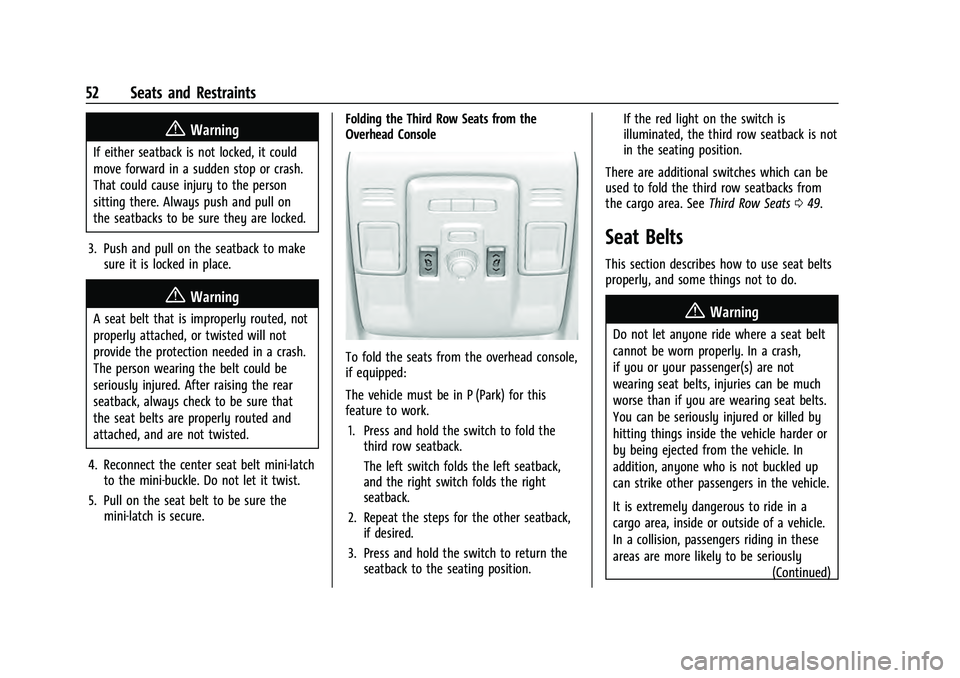
To fold the seats from the overhead console,
if equipped:
The vehicle must be in P (Park) for this
feature to work.
1. Press and hold the switch to fold the third row seatback.
The left switch folds the left seatback,
and the right switch folds the right
seatback.
2. Repeat the steps for the other seatback, if desired.
3. Press and hold the switch to return the seatback to the seating position. If the red light on the switch is
illuminated, the third row seatback is not
in the seating position.
There are additional switches which can be
used to fold the third row seatbacks from
the cargo area. See Third Row Seats049.
Seat Belts
This section describes how to use seat belts
properly, and some things not to do.
{Warning
Do not let anyone ride where a seat belt
cannot be worn properly. In a crash,
if you or your passenger(s) are not
wearing seat belts, injuries can be much
worse than if you are wearing seat belts.
You can be seriously injured or killed by
hitting things inside the vehicle harder or
by being ejected from the vehicle. In
addition, anyone who is not buckled up
can strike other passengers in the vehicle.
It is extremely dangerous to ride in a
cargo area, inside or outside of a vehicle.
In a collision, passengers riding in these
areas are more likely to be seriously
(Continued)
Page 105 of 433
Chevrolet Tahoe/Suburban Owner Manual (GMNA-Localizing-U.S./Canada/
Mexico-13690484) - 2021 - crc - 8/17/20
104 Instruments and Controls
.Info App. This is where the selected Driver
Information Center (DIC) displays can be
viewed. See“Driver Information Center
(DIC) (Uplevel)” in the Index.
.Audio
.Navigation
.Phone
.Options
Home
Information displayed here can be
customized from the Options menu.
Speedometer : Displays how fast the vehicle
is moving in either kilometers per hour
(km/h) or miles per hour (mph).
Speed Sign : If equipped, shows sign
information, which comes from a roadway
database in the onboard navigation,
if equipped.
Temperature : Displays the outside air
temperature.
Time : Displays the current time.
Fuel Range : Displays the approximate
distance the vehicle can be driven without
refueling. The fuel range estimate is based
on an average of the vehicle’s fuel economy over recent driving history and the amount
of fuel remaining in the fuel tank. Fuel
range cannot be reset.
Audio
In the Audio menu, use the thumbwheel to
scroll through options, browse for music,
select from favorites, or change the audio
source. In the main view, scroll to change
the station or go to the next or previous
track.
Navigation
In the Navigation menu, if there is no active
route, a compass will be displayed. If there
is an active route, press the thumbwheel to
cancel or resume route guidance, mute or
unmute voice guidance, or access Recents or
Favorites.
Phone
In the Phone menu, if there is no active
phone call, view recent calls, scroll through
contacts, select from the favorites, or change
the phone source. If there is an active call,
mute the phone or switch to handset
operation.
Options
Use the thumbwheel to scroll through items
in the Options menu.Head-up Display (HUD) :
If equipped, this
feature allows for adjusting the angle of the
HUD image and changing or turning off the
Speed Limit Sign.
HUD Rotation: Press the thumbwheel while
Adjust Rotation is highlighted to enter
Adjust Mode. Scroll to adjust the angle of
the HUD display. Press the thumbwheel to
confirm and save the setting. This feature
may only be available in P (Park).
Speed Limit Style: Press the thumbwheel
while Speed Limit Style is highlighted to
change the speed sign style or to turn it off.
Units : Press the thumbwheel while Units is
displayed to enter the Units menu. Choose
US or metric units by pressing the
thumbwheel while the desired item is
highlighted. A selected mark will be
displayed next to the selected item.
Info Page Options : Press the thumbwheel
while Info Page Options is displayed to
enter and select the items to be displayed
in the Info app. A selected mark will be
displayed next to the selected item.
Page 128 of 433
Chevrolet Tahoe/Suburban Owner Manual (GMNA-Localizing-U.S./Canada/
Mexico-13690484) - 2021 - crc - 8/17/20
Instruments and Controls 127
Touch Off, On - Driver and Passenger, On -
Driver, or On - Passenger.
Remote Mirror Folding
When on, the outside mirrors will remotely
fold or unfold when the Remote Key
Qor
Kbutton is pressed and held. SeeFolding
Mirrors 028.
Touch Off or On.
Rain Sense Wipers
This setting automatically turns on the
wipers when moisture is detected and the
wiper switch is in intermittent mode.
Touch Disabled or Enabled.
Auto Wipe in Reverse Gear
When on and the front wiper is on, the rear
wiper will automatically activate when the
vehicle is shifted into R (Reverse).
Touch Off or On.
Lighting
Touch and the following may display:
.Vehicle Locator Lights
.Exit Lighting
.Automatic High Beam Assist Vehicle Locator Lights
This setting flashes the vehicle’s headlamps
when
Kis pressed on the Remote Key.
Touch Off or On.
Exit Lighting
This setting specifies how long the
headlamps stay on after the vehicle is
turned off and exited.
Touch Off, 30 Seconds, 60 Seconds,
or 120 Seconds.
Automatic High Beam Assist
This setting specifies how the high beams
adjust based on the vehicle environment.
See Exterior Lamp Controls 0133.
Touch IntelliBeam or Adaptive Headlight
System.
Power Door Locks
Touch and the following may display:
.Auto Door Unlock
.Delayed Door Lock
Auto Door Unlock
This setting allows selection of which doors
will automatically unlock when the vehicle is
shifted into P (Park). Touch Off, All Doors, or Driver Door.
Delayed Door Lock
When on, this feature will delay the locking
of the doors. To override the delay, press
the power door lock switch on the door.
Touch Off or On.
Remote Lock, Unlock, and Start
Touch and the following may display:
.Remote Unlock Light Feedback
.Remote Lock Feedback
.Remote Door Unlock
.Remote Start Auto Cool Seats
.Remote Start Auto Heat Seats
.Remote Window Operation
.Passive Door Unlock
.Passive Door Lock
.Remote Left in Vehicle Alert
.Remote Removed from Vehicle Alert
Remote Unlock Light Feedback
When on, the exterior lamps will flash when
unlocking the vehicle with the Remote Key.
Touch Off or Flash Lights.