cooling CHEVROLET TAHOE 2003 2.G Owners Manual
[x] Cancel search | Manufacturer: CHEVROLET, Model Year: 2003, Model line: TAHOE, Model: CHEVROLET TAHOE 2003 2.GPages: 552, PDF Size: 3.44 MB
Page 110 of 552

Liftgate
{CAUTION:
It Can be dangerous to drive with the liftgate
glass, liftgate or rear doors open because
carbon monoxide (CO) gas can come into your
vehicle. You can't see or smell CO. It can
cause unconsciousness and even death.
If you must drive with the liftgate glass, liftgate
or rear doors open or if electrical wiring or
other cable connections must pass through
the seal between the body and the liftgate
glass, liftgate or rear doors:
·Make sure all other windows are shut.
·Turn the fan on your heating or cooling
system to its highest speed with the
setting on VENT or OUTSIDE AIR. That will
force outside air into your vehicle. See
ªClimate Control Systemº in the Index.
·If you have air outlets on or under the
instrument panel, open them all the way.
See ªEngine Exhaustº in the Index.
Liftgate Glass and Liftgate
To open a mechanical lock system from the outside,
insert the key into the lock and turn it counterclockwise
to unlock the glass and liftgate.
The liftgate glass can be opened using the button on
the liftgate after the doors have been unlocked. This can
be done by using either the power door locks or the
remote keyless entry system.
To open the entire liftgate, lift the handle located in the
center of the door.
To lock a power lock system from the outside, insert the
key into the lock button and turn clockwise. All doors will
lock. You may also use the keyless entry system or the
power door locks to lock the liftgate and liftgate glass.
2-14
Page 185 of 552
Temperature Knob
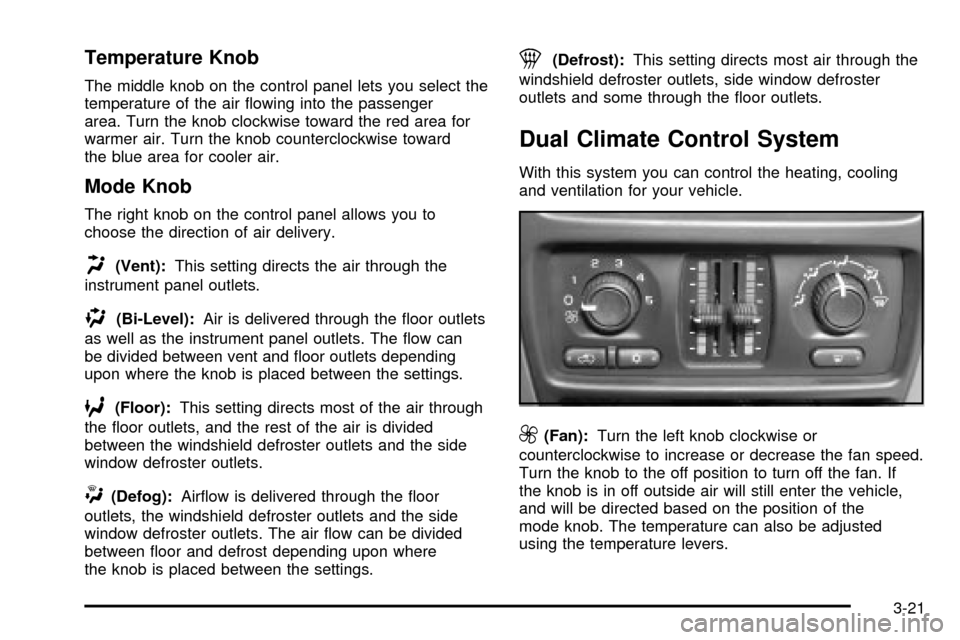
The middle knob on the control panel lets you select the
temperature of the air ¯owing into the passenger
area. Turn the knob clockwise toward the red area for
warmer air. Turn the knob counterclockwise toward
the blue area for cooler air.
Mode Knob
The right knob on the control panel allows you to
choose the direction of air delivery.
H(Vent):This setting directs the air through the
instrument panel outlets.
)(Bi-Level):Air is delivered through the ¯oor outlets
as well as the instrument panel outlets. The ¯ow can
be divided between vent and ¯oor outlets depending
upon where the knob is placed between the settings.
6(Floor):This setting directs most of the air through
the ¯oor outlets, and the rest of the air is divided
between the windshield defroster outlets and the side
window defroster outlets.
W(Defog):Air¯ow is delivered through the ¯oor
outlets, the windshield defroster outlets and the side
window defroster outlets. The air ¯ow can be divided
between ¯oor and defrost depending upon where
the knob is placed between the settings.
1(Defrost):This setting directs most air through the
windshield defroster outlets, side window defroster
outlets and some through the ¯oor outlets.
Dual Climate Control System
With this system you can control the heating, cooling
and ventilation for your vehicle.
9(Fan):Turn the left knob clockwise or
counterclockwise to increase or decrease the fan speed.
Turn the knob to the off position to turn off the fan. If
the knob is in off outside air will still enter the vehicle,
and will be directed based on the position of the
mode knob. The temperature can also be adjusted
using the temperature levers.
3-21
Page 189 of 552
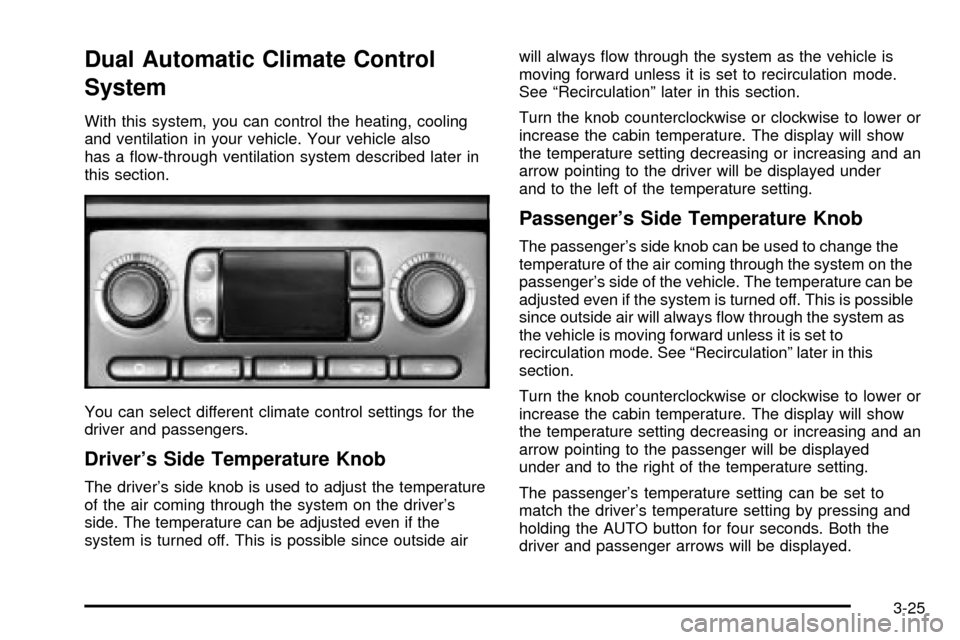
Dual Automatic Climate Control
System
With this system, you can control the heating, cooling
and ventilation in your vehicle. Your vehicle also
has a ¯ow-through ventilation system described later in
this section.
You can select different climate control settings for the
driver and passengers.
Driver's Side Temperature Knob
The driver's side knob is used to adjust the temperature
of the air coming through the system on the driver's
side. The temperature can be adjusted even if the
system is turned off. This is possible since outside airwill always ¯ow through the system as the vehicle is
moving forward unless it is set to recirculation mode.
See ªRecirculationº later in this section.
Turn the knob counterclockwise or clockwise to lower or
increase the cabin temperature. The display will show
the temperature setting decreasing or increasing and an
arrow pointing to the driver will be displayed under
and to the left of the temperature setting.
Passenger's Side Temperature Knob
The passenger's side knob can be used to change the
temperature of the air coming through the system on the
passenger's side of the vehicle. The temperature can be
adjusted even if the system is turned off. This is possible
since outside air will always ¯ow through the system as
the vehicle is moving forward unless it is set to
recirculation mode. See ªRecirculationº later in this
section.
Turn the knob counterclockwise or clockwise to lower or
increase the cabin temperature. The display will show
the temperature setting decreasing or increasing and an
arrow pointing to the passenger will be displayed
under and to the right of the temperature setting.
The passenger's temperature setting can be set to
match the driver's temperature setting by pressing and
holding the AUTO button for four seconds. Both the
driver and passenger arrows will be displayed.
3-25
Page 190 of 552

Automatic Operation
AUTO (Automatic):When automatic operation is
active the system will control the inside temperature, the
air delivery, and the fan speed.
Use the steps below to place the entire system in
automatic mode:
1. Press the AUTO button.
When AUTO is selected, the display will change to
show the current driver's set temperature, delivery
mode and fan speed. Press the AUTO button again
within ®ve seconds to display the passenger's set
temperature.
If the driver and passenger's temperature settings
are not the same, the opposite side temperature
setting will be displayed for an additional ®ve
seconds. To make the passenger's temperature the
same as the driver's press and hold the AUTO
button for about four seconds.
When auto is selected, the air conditioning operation
and air inlet will be automatically controlled. The
air conditioning compressor will run when the
outside temperature is over about 40ÉF (4ÉC). The
air inlet will normally be set to outside air. If it's
hot outside, the air inlet may automatically switch to
recirculate inside air to help quickly cool down
your vehicle. The light on the button will illuminate
in recirculation.2. Set the driver's and passenger's temperature.
To ®nd your comfort setting, start with a 74ÉF (23ÉC)
temperature setting and allow about 20 minutes for
the system to regulate. Turn the driver's or
passenger's side temperature knob to adjust the
temperature setting as necessary. If you choose the
temperature setting of 60ÉF (15ÉC) the system will
remain at the maximum cooling setting. If you choose
the temperature setting of 90ÉF (32ÉC) the system
will remain at the maximum heat setting. Choosing
either maximum setting will not cause the vehicle to
heat or cool any faster.
Be careful not to cover the sensor located on the
top of the instrument panel near the windshield. This
sensor regulates air temperature based on sun
load, and also turns on your headlamps.
To avoid blowing cold air in cold weather, the system
will delay turning on the fan until warm air is
available. The length of delay depends on the engine
coolant temperature. Pressing the fan switch will
override this delay and change the fan to a selected
speed.
3-26
Page 209 of 552

The traction off light may come on for the following
reasons:
·If you turn the system off by pressing the TAS
on/off button located to the left of the steering wheel,
the light will come on and stay on. To turn the
system back on, press the button again; the light
should go off.
·If you move the shift lever to FIRST (1), the light will
come on and stay on to indicate that the traction
system is off. This is normal operation. To turn the
system back on, move the shift lever back to a
position other than FIRST (1); the light should go off.
See
Traction Assist System (TAS) on page 4-10.
·The light will come on and stay on if the TAS
automatic engagement feature has been turned off.
To turn the system on, press the TAS off/on button;
the light should go off. To turn the automatic
engagement feature back on, see
Traction Assist
System (TAS) on page 4-10.
·If the Traction Assist System is affected by an
anti-lock brake system, TAS or engine-related
problem, the system will turn off and the light will
come on. Have your vehicle serviced.
·If the vehicle is driven over an extremely rough road,
the system will turn off and the light will come on. The
light will go off a few seconds after the rough road
conditions go away or when the vehicle comes to a
complete stop. This is normal operation.
Engine Coolant Temperature Gage
This gage shows the engine coolant temperature.
It also provides an indicator of how hard your vehicle is
working. During a majority of the operation, the gage
will read 210ÉF (100ÉC) or less. If you are pulling a load
or going up hills, it is normal for the temperature to
¯uctuate and approach the 250ÉF (122ÉC) mark. If the
gage reaches the 260ÉF (125ÉC) mark, it indicates
that the cooling system is working beyond its capacity.
See
Engine Overheating on page 5-33. United States
Canada
3-45
Page 230 of 552

CHECK OIL LEVEL
If the oil level in the vehicle is low, this message will
appear on the DIC. Check the oil level and correct it as
necessary. You may need to let the vehicle cool or
warm up and cycle the ignition to be sure this message
will clear. The message will clear itself after 10
seconds, until the next ignition cycle. Once the problem
is corrected, press the select button to clear the
message from the DIC display.
CHECK TIRE PRESSURE
If a low tire pressure is detected in any of the vehicle's
tires, this message will appear on the DIC, along
with a chime. Press the select button, or reset stem, to
acknowledge the message and clear it from the DIC
display. It will appear at each ignition cycle until the tires
are in¯ated to the correct in¯ation pressure.
CHECK WASHER FLUID
If the washer ¯uid level is low, this message will appear
on the DIC. Press the select button to acknowledge
the message and clear it from the DIC display.
The message will clear itself after 10 seconds, or until
the next ignition cycle. Adding washer ¯uid will clear the
message.
DRIVER DOOR AJAR
If the driver's door is not fully closed, this message will
appear on the display and you will hear a chime.
Stop and turn off the vehicle, check the door for
obstacles, and close the door again. Check to see if the
message still appears on the DIC. Press the select
button to acknowledge the message and clear it from
the DIC display.
ENGINE COOLANT HOT
If the cooling system temperature gets hot, this message
will appear in the DIC. Stop the vehicle and let the
engine idle in PARK (P) to allow the coolant to reach a
safe temperature. This message will clear when the
coolant temperature drops to safe operating
temperature. To acknowledge this message press the
select button
ENGINE OVERHEATED
If the engine cooling system reaches unsafe
temperatures for operation, this message will appear in
the DIC and you will hear a chime. Stop and turn off
the vehicle as soon as it is safe to do so to avoid severe
damage. The message will clear when the engine has
cooled to a safe operating temperature.
3-66
Page 232 of 552

REDUCED ENGINE POWER
This message is displayed when the cooling system
temperature gets too hot and the engine further enters
the engine coolant protection mode.
See
Engine Overheating on page 5-33for further
information.
REPLACE LIFTGATE FUSE
This message will be displayed if the liftgate lock
malfunctions and/or the liftgate fuse blows. For more
information on fuses, see
Fuses and Circuit Breakers on
page 5-109.
If the message returns after replacing the fuse, see you
dealer for service.
KEYFOB X BATTERY LOW
If a remote keyless entry transmitter battery is low, this
message will appear on the DIC. The battery needs
to be replaced in the transmitter. Press the select button
to acknowledge the message and clear it from the
DIC display.
SERVICE AIRBAG
If there is a problem with the air bag system, this
message will be displayed on the DIC. Have a quali®ed
technician inspect the system for problems. Press
the select button to acknowledge this message and clear
it from the DIC display.
SERVICE BRAKE SYSTEM
If there is a problem with the brake system, this
message will be displayed on the DIC. If this message
appears, stop as soon as possible and turn off the
vehicle. Restart the vehicle and check for the message
on the DIC display. If the message is still displayed,
or appears again when you begin driving, the brake
system needs service. Press the select button to
acknowledge the message.
SERVICE 4 WHEEL STEER
If a problem occurs with the 4 wheel steer system, this
message will appear on the DIC. If the message
appears, stop as soon as possible, and turn off the
vehicle. Restart the vehicle and check for the message
on the DIC display. If the message is still displayed,
or appears again when you begin driving, the four wheel
steer system needs service. Press the select button
to acknowledge the message.
3-68
Page 334 of 552

After Off-Road Driving
Remove any brush or debris that has collected on the
underbody, chassis or under the hood. These
accumulations can be a ®re hazard.
After operation in mud or sand, have the brake linings
cleaned and checked. These substances can cause
glazing and uneven braking. Check the body structure,
steering, suspension, wheels, tires and exhaust
system for damage. Also, check the fuel lines and
cooling system for any leakage.
Your vehicle will require more frequent service due to
off-road use. Refer to the Maintenance Schedule
for additional information.
Driving at Night
Night driving is more dangerous than day driving. One
reason is that some drivers are likely to be impaired Ð by
alcohol or drugs, with night vision problems, or by fatigue.
Here are some tips on night driving.
·Drive defensively.
·Don't drink and drive.
·Adjust your inside rearview mirror to reduce the
glare from headlamps behind you.
4-40
Page 343 of 552
Hill and Mountain Roads
Driving on steep hills or mountains is different from
driving in ¯at or rolling terrain.
If you drive regularly in steep country, or if you're
planning to visit there, here are some tips that can make
your trips safer and more enjoyable. See
Off-Road
Driving with Your Four-Wheel-Drive Vehicle on
page 4-23
for information about driving off-road.
·Keep your vehicle in good shape. Check all ¯uid
levels and also the brakes, tires, cooling system
and transmission. These parts can work hard
on mountain roads.
·Know how to go down hills. The most important
thing to know is this: let your engine do some of
the slowing down. Shift to a lower gear when you go
down a steep or long hill.
{CAUTION:
If you do not shift down, your brakes could get
so hot that they would not work well. You
would then have poor braking or even none
going down a hill. You could crash. Shift down
to let your engine assist your brakes on a
steep downhill slope.
4-49
Page 367 of 552
Trailer Brakes
If your trailer weighs more than 2,000 lbs. (900 kg)
loaded, then it needs its own brakes ± and they must be
adequate. Be sure to read and follow the instructions
for the trailer brakes so you'll be able to install,
adjust and maintain them properly.
If your vehicle is equipped with Stabilitrak
ž, your trailer
cannot tap into the vehicle's hydraulic brake system.
Your trailer brake system can tap into the vehicle's
hydraulic brake system only if:
·The trailer parts can withstand 3,000 psi
(20 650 kPa) of pressure.
·The trailer's brake system will use less than
0.02 cubic inches (0.3 cc) of ¯uid from your vehicle's
master cylinder. Otherwise, both braking systems
won't work well. You could even lose your brakes.
If everything checks out this far, make the brake tap at
the port on the master cylinder that sends the ¯uid
to the rear brakes. But don't use copper tubing for this.
If you do, it will bend and ®nally break off. Use steel
brake tubing.
Driving with a Trailer
{CAUTION:
If you have a rear-most window open and you
pull a trailer with your vehicle, carbon
monoxide (CO) could come into your vehicle.
You can't see or smell CO. It can cause
unconsciousness or death. See ªEngine
Exhaustº in the Index. To maximize your safety
when towing a trailer:
·Have your exhaust system inspected for
leaks, and make necessary repairs before
starting on your trip.
·Keep the rear-most windows closed.
·If exhaust does come into your vehicle
through a window in the rear or another
opening, drive with your front, main heating
or cooling system on and with the fan on
any speed. This will bring fresh, outside air
into your vehicle. Do not use the climate
control setting for maximum air because it
only recirculates the air inside your vehicle.
See ªClimate Controlsº in the Index.
4-73