remote control CHEVROLET TAHOE 2017 4.G Owner's Manual
[x] Cancel search | Manufacturer: CHEVROLET, Model Year: 2017, Model line: TAHOE, Model: CHEVROLET TAHOE 2017 4.GPages: 465, PDF Size: 7.47 MB
Page 189 of 465
Chevrolet Tahoe/Suburban Owner Manual (GMNA-Localizing-U.S./Canada/
Mexico-9955986) - 2017 - crc - 7/5/16
188 Instruments and Controls
Universal Remote System
Operation
Using the Universal Remote
System
Press and hold the appropriate
Universal Remote system button for
at least one-half second. The
indicator light will come on while the
signal is being transmitted.
Erasing Universal Remote
System Buttons
Erase all programmed buttons when
vehicle ownership is terminated.
To erase:1. Press and hold the two outside buttons until the indicator light
begins to flash. This should
take about 10 seconds.
2. Release both buttons.
Reprogramming a Single
Universal Remote System
Button
To reprogram any of the system
buttons: 1. Press and hold any one of the buttons. Do not release the
button.
2. The indicator light will begin to flash after 20 seconds. Without
releasing the button, proceed
with Step 1 under
“Programming the Universal
Remote System.”
Page 197 of 465
Chevrolet Tahoe/Suburban Owner Manual (GMNA-Localizing-U.S./Canada/
Mexico-9955986) - 2017 - crc - 7/5/16
196 Lighting
Lighting Features
Entry Lighting
Some exterior lamps and the interior
lamps turn on briefly at night, or in
areas with limited lighting, when
K
is pressed on the Remote Keyless
Entry (RKE) transmitter. When a
door is opened, the interior lamps
come on if the dome lamp control is
in the DOOR position. After about
30 seconds the exterior lamps turn
off. Entry lighting can be disabled
manually by changing the ignition
out of the OFF position, or by
pressing the RKE transmitter
Q
button.
This feature can be changed. See
“Vehicle Locator Lights”under
Vehicle Personalization 0178.
Exit Lighting
Some exterior lamps and interior
lamps come on when the key is
removed from the ignition. The
exterior and interior lamps remain
on for a set amount of time, then
automatically turn off. If equipped with Keyless Access,
the exterior lamps automatically turn
on when the driver
’s door is opened
after the ignition is turned to OFF.
The interior lights turn on when the
ignition is turned to OFF.
The exterior lamps turn off
immediately by turning the exterior
lamp control off.
This feature can be changed. See
Vehicle Personalization 0178.
Battery Load
Management
The vehicle has Electric Power
Management (EPM), which
estimates the battery's temperature
and state of charge. It then adjusts
the voltage for best performance
and extended life of the battery.
When the battery's state of charge
is low, the voltage is raised slightly
to quickly bring the charge back up.
When the state of charge is high,
the voltage is lowered slightly to
prevent overcharging. The voltmeter
gauge or the voltage display on the
Driver Information Center (DIC), if equipped, may show the voltage
moving up or down. This is normal.
If there is a problem, an alert will be
displayed.
The battery can be discharged at
idle if the electrical loads are very
high. This is true for all vehicles.
This is because the generator
(alternator) may not be spinning fast
enough at idle to produce all the
power that is needed for very high
electrical loads.
A high electrical load occurs when
several of the following are on, such
as: headlamps, high beams, fog
lamps, rear window defogger,
climate control fan at high speed,
heated seats, engine cooling fans,
trailer loads, and loads plugged into
accessory power outlets.
EPM works to prevent excessive
discharge of the battery. It does this
by balancing the generator's output
and the vehicle's electrical needs.
It can increase engine idle speed to
generate more power, whenever
needed. It can temporarily reduce
the power demands of some
accessories.
Page 230 of 465
Chevrolet Tahoe/Suburban Owner Manual (GMNA-Localizing-U.S./Canada/
Mexico-9955986) - 2017 - crc - 7/5/16
Climate Controls 229
Caution
Using a razor blade or sharp
object to clear the inside rear
window can damage the rear
window defogger. Repairs would
not be covered by the vehicle
warranty. Do not clear the inside
rear window with sharp objects.
Heated Mirror : If equipped with
heated outside rearview mirrors, the
mirrors heat to help clear fog or frost
from the surface of the mirror when
the rear window defog button is
pressed. See Heated Mirrors 058.
Rear Climate Controls
O:Press to turn the rear climate
control system on or off.
AUTO : Press AUTO to control the
rear passenger temperature, air
delivery, and fan speed. AUTO
appears in the display when
automatic operation is active. If any
of the climate control settings
except rear temperature are
manually adjusted, this cancels full
automatic operation. Fan Control :
Press up or down to
increase or decrease the rear
passenger area fan speed.
Air Delivery Mode Control : Press
up or down to change the direction
of the rear passenger airflow.
Repeatedly press the switch until
the desired mode appears on the
display. Multiple presses will cycle
through the delivery selections.
Temperature Control : Press up or
down to increase or decrease the
airflow temperature into the rear
passenger area.
RCTRL : Press to lock or unlock
control of the rear climate control
system from the rear seat
passengers. When locked, the rear
climate control can only be adjusted
from the front seat.
Remote Start Climate Control
Operation
If equipped with the remote start
feature, the climate control system
will come on when the vehicle is
started remotely, depending on the
outside temperature. The rear
window defogger and heated seats, if equipped, may also come on. See
Remote Vehicle Start
044 and
Heated and Ventilated Front
Seats 072.
Sensors
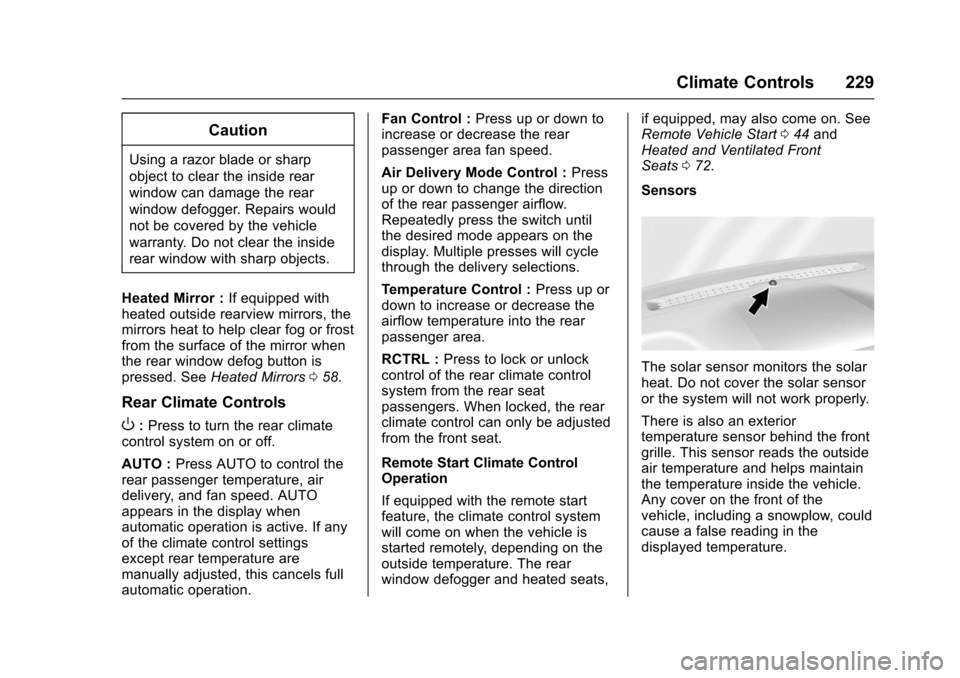
The solar sensor monitors the solar
heat. Do not cover the solar sensor
or the system will not work properly.
There is also an exterior
temperature sensor behind the front
grille. This sensor reads the outside
air temperature and helps maintain
the temperature inside the vehicle.
Any cover on the front of the
vehicle, including a snowplow, could
cause a false reading in the
displayed temperature.
Page 313 of 465
Chevrolet Tahoe/Suburban Owner Manual (GMNA-Localizing-U.S./Canada/
Mexico-9955986) - 2017 - crc - 7/5/16
312 Driving and Operating
Be sure to read and follow the
instructions for the trailer brakes so
they are installed, adjusted, and
maintained properly.
Since the vehicle is equipped with
StabiliTrak, the trailer brakes cannot
tap into the vehicle's hydraulic
system.
Trailer Wiring Harness
The seven-pin trailer connector is
mounted in the bumper. This
connector can be plugged into a
seven-pin universal heavy-duty
trailer connector available through
your dealer.
Use only a round, seven-wire
connector with flat blade terminals
meeting SAE J2863 specifications
for proper electrical connectivity.
The seven-wire harness contains
the following trailer circuits:
.Yellow: Left Stop/Turn Signal
. Green/Violet: Right Stop/Turn
Signal
. Brown: Taillamps
. White: Ground .
Light Green: Back-up Lamps
. Red/Green: Battery Feed
. Dark Blue: Trailer Brake
To help charge a remote
(non-vehicle) battery, press the Tow/
Haul Mode button at the end of the
shift lever. If the trailer is too light for
Tow/Haul Mode, turn on the
headlamps to help charge the
battery.
Electric Brake Control Wiring
Provisions
These wiring provisions are
included with the vehicle as part of
the trailer wiring package. These
provisions are for an electric brake
controller.
The harness should be installed by
your dealer or a qualified service
center.
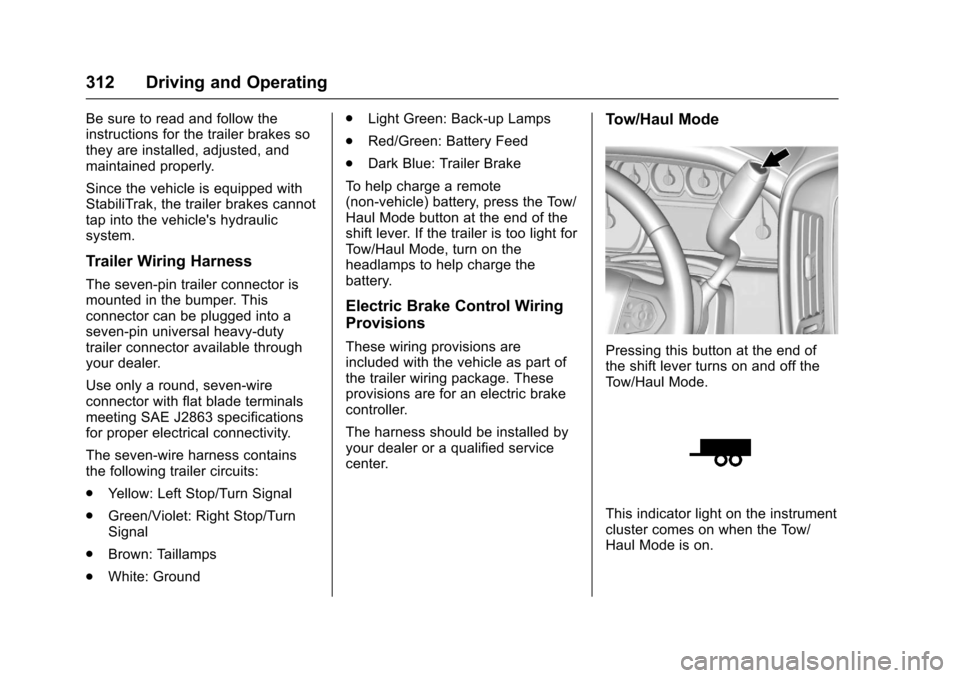
Tow/Haul Mode
Pressing this button at the end of
the shift lever turns on and off the
Tow/Haul Mode.
This indicator light on the instrument
cluster comes on when the Tow/
Haul Mode is on.
Page 322 of 465
Chevrolet Tahoe/Suburban Owner Manual (GMNA-Localizing-U.S./Canada/
Mexico-9955986) - 2017 - crc - 7/5/16
Vehicle Care 321
cause cancer and birth defects or
other reproductive harm. Engine
exhaust, many parts and systems,
many fluids, and some component
wear by-products contain and/or
emit these chemicals.
SeeBattery - North America 0340
and Jump Starting - North
America 0393.
California Perchlorate
Materials Requirements
Certain types of automotive
applications, such as airbag
initiators, safety belt pretensioners,
and lithium batteries contained in
Remote Keyless Entry transmitters,
may contain perchlorate materials.
Special handling may be necessary.
For additional information, see
www.dtsc.ca.gov/hazardouswaste/
perchlorate.
Accessories and
Modifications
Adding non-dealer accessories or
making modifications to the vehicle
can affect vehicle performance and
safety, including such things as
airbags, braking, stability, ride and
handling, emissions systems,
aerodynamics, durability, and
electronic systems like antilock
brakes, traction control, and stability
control. These accessories or
modifications could even cause
malfunction or damage not covered
by the vehicle warranty.
Damage to suspension components
caused by modifying vehicle height
outside of factory settings will not be
covered by the vehicle warranty.
Damage to vehicle components
resulting from modifications or the
installation or use of non-GM
certified parts, including control
module or software modifications, is
not covered under the terms of the
vehicle warranty and may affect
remaining warranty coverage for
affected parts. GM Accessories are designed to
complement and function with other
systems on the vehicle. See your
dealer to accessorize the vehicle
using genuine GM Accessories
installed by a dealer technician.
Also, see
Adding Equipment to the
Airbag-Equipped Vehicle 0102.
Page 447 of 465
Chevrolet Tahoe/Suburban Owner Manual (GMNA-Localizing-U.S./Canada/
Mexico-9955986) - 2017 - crc - 7/5/16
446 OnStar
from each other and use a
combination of letters, numbers,
and symbols to increase the
security.
. Change the default name of the
SSID (Service Set Identifier).
This is your network’s name that
is visible to other wireless
devices. Choose a unique name
and avoid family names or
vehicle descriptions.
OnStar Wi-Fi
®Hotspot (If
Equipped)
The vehicle may have a built-in
Wi-Fi hotspot that provides access
to the Internet and web content at
4G LTE speed. Up to seven mobile
devices can be connected. A data
plan is required. Use the in-vehicle
controls only when it is safe to
do so.
1. To retrieve Wi-Fi hotspot information, press
=, wait for
the prompt, then say “Wi-Fi
settings.” On some vehicles,
touch Wi-Fi Settings on the
screen. 2. The Wi-Fi settings will display
the Wi-Fi hotspot name (SSID),
password, and on some
vehicles, the connection type
(no Internet connection, 3G,
4G, 4G LTE), and signal quality
(poor, good, excellent).
3. To change the SSID or password, press
Qor call
1-888-4ONSTAR to connect
with an Advisor.
After initial set-up, your vehicle’s
Wi-Fi hotspot will connect
automatically to your mobile
devices. Manage data usage by
turning Wi-Fi on or off on your
mobile device, using the
RemoteLink mobile app, or by
contacting an OnStar Advisor.
OnStar RemoteLink
®Mobile App
(If Equipped)
Download the OnStar RemoteLink
mobile app to select Apple
®iOS,
Android™, BlackBerry®,
or Windows®mobile devices.
OnStar Subscribers can access the
following services from a mobile
device: .
Remotely start/stop the vehicle,
if factory-equipped.
. Lock/unlock doors, if equipped
with automatic locks.
. Activate the horn and lamps.
. Check the vehicle’s fuel level, oil
life, or tire pressure,
if factory-equipped with the Tire
Pressure Monitor System.
. Send directions to the vehicle.
. Locate the vehicle on a map
(U.S. market only).
. Turn the vehicle's Wi-Fi hotspot
on/off, manage settings, and
monitor data consumption,
if equipped.
For OnStar RemoteLink information
and compatibility, see
www.onstar.com (U.S.) or
www.onstar.ca (Canada).
Remote Services
Contact an OnStar Advisor to
unlock the doors or sound the horn
and flash the lamps.
Page 449 of 465
Chevrolet Tahoe/Suburban Owner Manual (GMNA-Localizing-U.S./Canada/
Mexico-9955986) - 2017 - crc - 7/5/16
448 OnStar
OnStar Additional
Information
In-Vehicle Audio Messages
Audio messages may play important
information at the following times:
.Prior to vehicle purchase. Press
Qto set up an account.
. With the OnStar Basic Plan,
every 60 days.
. After change in ownership and
at 90 days.
Transferring Service
PressQto request account transfer
eligibility information. The Advisor
can cancel or change account
information.
Selling/Transferring the
Vehicle
Call 1-888-4ONSTAR
(1-888-466-7827) immediately to
terminate your OnStar services if
the vehicle is disposed of, sold,
transferred, or if the lease ends.
Reactivation for Subsequent
Owners
PressQand follow the prompts to
speak to an Advisor as soon as
possible. The Advisor will update
vehicle records and explain OnStar
service options.
How OnStar Service Works
Automatic Crash Response,
Emergency Services, Crisis Assist,
Stolen Vehicle Assistance,
Advanced Vehicle Diagnostics,
Remote Services, Roadside
Assistance, Turn-by-Turn
Navigation, and Hands-Free Calling
are available on most vehicles. Not
all OnStar services are available
everywhere or on all vehicles. For
more information, a full description
of OnStar services, system
limitations, and OnStar User Terms,
Privacy Statement, and Software
Terms:
. Call 1-888-4ONSTAR
(1-888-466-7827).
. See www.onstar.com (U.S.).
. See www.onstar.ca (Canada). .
Call TTY 1-877-248-2080.
. Press
Qto speak with an
Advisor.
OnStar services cannot work unless
the vehicle is in a place where
OnStar has an agreement with a
wireless service provider for service
in that area. The wireless service
provider must also have coverage,
network capacity, reception, and
technology compatible with OnStar
services. Service involving location
information about the vehicle cannot
work unless GPS signals are
available, unobstructed, and
compatible with the OnStar
hardware. OnStar services may not
work if the OnStar equipment is not
properly installed or it has not been
properly maintained. If equipment or
software is added, connected,
or modified, OnStar services may
not work. Other problems beyond
the control of OnStar —such as
hills, tall buildings, tunnels, weather,
electrical system design and
architecture of the vehicle, damage
Page 459 of 465

Chevrolet Tahoe/Suburban Owner Manual (GMNA-Localizing-U.S./Canada/
Mexico-9955986) - 2017 - crc - 7/5/16
458 Index
Headlamps (cont'd)High Intensity Discharge
(HID) Lighting . . . . . . . . . . . . . . . 347
High-Beam On Light . . . . . . . . . . 157
High/Low Beam Changer . . . . . 191
Lamps On Reminder . . . . . . . . . 157
Heated Rear Seats . . . . . . . . . . . . . . . . . . . . . 74
Steering Wheel . . . . . . . . . . . . . . . 132
Heated and Ventilated Front Seats . . . . . . . . . . . . . . . . . . . . . . . . . . 72
Heated Mirrors . . . . . . . . . . . . . . . . . . . 58
Heater Engine . . . . . . . . . . . . . . . . . . . . . . . . 257
Heating . . . . . . . . . . . . . . . . . . . . 226, 230
High-Beam On Light . . . . . . . . . . . . 157
High-Speed Operation . . . . . . . . . . 370
Hill and Mountain Roads . . . . . . . . 243
Hill Descent Control (HDC) . . . . . 276
Hill Descent Control Light . . . . . . . 154
Hill Start Assist (HSA) . . . . . . . . . . 274
Home Page . . . . . . . . . . . . . . . . . . . . . 202
Hood . . . . . . . . . . . . . . . . . . . . . . . . . . . 322
Horn . . . . . . . . . . . . . . . . . . . . . . . . . . . . 132
How to Wear Safety Belts Properly . . . . . . . . . . . . . . . . . . . . . . . . 84
HVAC . . . . . . . . . . . . . . . . . . . . . . 226, 230I
Ignition Positions . . . . . . . . . . 252, 254
Ignition Transmission Lock Check . . . . . . . . . . . . . . . . . . . . . . . . . 344
Immobilizer . . . . . . . . . . . . . . . . . . . . . . 55
Indicator
Vehicle Ahead . . . . . . . . . . . . . . . . 155
Infants and Young Children, Restraints . . . . . . . . . . . . . . . . . . . . . 106
Infotainment . . . . . . . . . . . . . . . . . . . . 198
Infotainment System . . . . . . . . . . . . 442
Instrument Cluster . . . . . . . . . . . . . . 141
Instrument Panel Storage Area . . . . . . . . . . . . . . . . . 125
Instrument Panel Overview . . . . . . . 6
Interior Rearview Mirrors . . . . . . . . . 60
Introduction . . . . . . . . . . . . . . . . . . . . . . . 2
J
Jack Auxiliary . . . . . . . . . . . . . . . . . . . . . . 213
Jump Starting - North America . . . . . . . . . . . . . . . . . . . . . . . 393
K
Key and Lock Messages . . . . . . . . 170
Keyless EntryRemote (RKE) System . . . . . 35, 37
Keys . . . . . . . . . . . . . . . . . . . . . . . . . 31, 34
L
Labeling, Tire Sidewall . . . . . . . . . . 364
Lamps Daytime Running (DRL) . . . . . . 192
Dome . . . . . . . . . . . . . . . . . . . . . . . . . 195
Exterior Controls . . . . . . . . . . . . . . 189
Exterior Lamps OffReminder . . . . . . . . . . . . . . . . . . . 191
Front Turn Signal . . . . . . . . . . . . . 348
License Plate . . . . . . . . . . . . . . . . . 350
Malfunction Indicator . . . . . . . . . 151
Messages . . . . . . . . . . . . . . . . . . . . 170
On Reminder . . . . . . . . . . . . . . . . . 157
Reading . . . . . . . . . . . . . . . . . . . . . . 195
Lane Change Alert (LCA) . . . . . . . 294
Lane Departure Warning (LDW) . . . . . . . . . . . . . . . . 296
Lane Keep Assist (LKA) . . . . . . . . 297
Lane Keep Assist Light . . . . . . . . . 154
Lap Belt . . . . . . . . . . . . . . . . . . . . . . . . . 90
Lap-Shoulder Belt . . . . . . . . . . . . . . . 85
LATCH System Replacing Parts after aCrash . . . . . . . . . . . . . . . . . . . . . . . .119
LATCH, Lower Anchors and Tethers for Children . . . . . . . . . . . 111
LED Lighting . . . . . . . . . . . . . . . . . . . . 347
Page 462 of 465

Chevrolet Tahoe/Suburban Owner Manual (GMNA-Localizing-U.S./Canada/
Mexico-9955986) - 2017 - crc - 7/5/16
Index 461
PortUSB . . . . . . . . . . . . . . . . . . . . . . . . . . 210
Power Door Locks . . . . . . . . . . . . . . . . . . . . . 45
Mirrors . . . . . . . . . . . . . . . . . . . . . . . . . . 57
Outlets . . . . . . . . . . . . . . . . . . . . . . . 136
Protection, Battery . . . . . . . . . . . . 197
Retained Accessory (RAP) . . . 258
Seat Adjustment . . . . . . . . . . . . . . . . 68
Steering Fluid . . . . . . . . . . . . . . . . . 338
Windows . . . . . . . . . . . . . . . . . . . . . . . 61
Power Assist Steps . . . . . . . . . . . . . . 52
Pregnancy, Using Safety Belts . . . 89
Privacy Vehicle Data Recording . . . . . . . 440
Program
Courtesy Transportation . . . . . . 435
Proposition 65 Warning,
California . . . . . . . . . . . .320, 340, 393
R
Radio Frequency Statement . . . . 439
Radio Reception . . . . . . . . . . . . . . . . 206
RadiosAM-FM Radio . . . . . . . . . . . . . . . . . 204
Satellite . . . . . . . . . . . . . . . . . . . . . . . 206
Reading Lamps . . . . . . . . . . . . . . . . . 195
Rear Axle . . . . . . . . . . . . . . . . . . . . . . . 342 Rear Axle (cont'd)
Locking . . . . . . . . . . . . . . . . . . . . . . . 277
Rear Climate Control System . . . 230
Rear Seats . . . . . . . . . . . . . . . . . . . . . . 73 Heated . . . . . . . . . . . . . . . . . . . . . . . . . 74
Rear Side Window Antenna . . . . 207
Rear Storage . . . . . . . . . . . . . . . . . . . 126
Rear Vision Camera (RVC) . . . . . 288
Rear Window Washer/Wiper . . . . 134
Rearview Mirrors . . . . . . . . . . . . . . . . 60 Automatic Dimming . . . . . . . . . . . . . 60
Reclining Seatbacks . . . . . . . . . . . . . 69
Recommended Fluids and Lubricants . . . . . . . . . . . . . . . . . . . . . 421
Records Maintenance . . . . . . . . . . . . . . . . . . 424
Recreational Vehicle Towing . . . . 396
Reimbursement Program, GM Mobility . . . . . . . . . . . . . . . . . . . 433
Remote Keyless Entry (RKE) System . . . . . . . . . . . . . . 35, 37
Remote Vehicle Start . . . . . . . . . . . . 44
Replacement Glass . . . . . . . . . . . . . . . . . . . . . . . . . 346
Replacement Bulbs . . . . . . . . . . . . . 351
Replacement Parts Airbags . . . . . . . . . . . . . . . . . . . . . . . 103
Maintenance . . . . . . . . . . . . . . . . . . 422 Replacing Airbag System . . . . . . . 103
Replacing LATCH System
Parts after a Crash . . . . . . . . . . . . 119
Replacing Safety Belt System Parts after a Crash . . . . . . . . . . . . . 91
Reporting Safety Defects Canadian Government . . . . . . . . 440
General Motors . . . . . . . . . . . . . . . 440
U.S. Government . . . . . . . . . . . . . 439
Restraints Where to Put . . . . . . . . . . . . . . . . . .110
Retained Accessory Power (RAP) . . . . . . . . . . . . . . . . . . 258
Reverse Tilt Mirrors . . . . . . . . . . . . . . 59
Ride Control Systems Magnetic . . . . . . . . . . . . . . . . . . . . . 277
Messages . . . . . . . . . . . . . . . . . . . . 172
Roads Driving, Wet . . . . . . . . . . . . . . . . . . 243
Roadside Assistance Program . . . . . . . . . . . . . . . . . . . . . . . 433
Roof Sunroof . . . . . . . . . . . . . . . . . . . . . . . . . 63
Roof Rack System . . . . . . . . . . . . . . 127
Rotation, Tires . . . . . . . . . . . . . . . . . . 375
Routing, Engine Drive Belt . . . . . . 428
Running the Vehicle While Parked . . . . . . . . . . . . . . . . . . . . . . . . 262
Page 463 of 465

Chevrolet Tahoe/Suburban Owner Manual (GMNA-Localizing-U.S./Canada/
Mexico-9955986) - 2017 - crc - 7/5/16
462 Index
S
Safety Belts . . . . . . . . . . . . . . . . . . . . . 83Care . . . . . . . . . . . . . . . . . . . . . . . . . . . . 91
Extender . . . . . . . . . . . . . . . . . . . . . . . . 90
How to Wear Safety BeltsProperly . . . . . . . . . . . . . . . . . . . . . . . 84
Lap Belt . . . . . . . . . . . . . . . . . . . . . . . . 90
Lap-Shoulder Belt . . . . . . . . . . . . . . 85
Reminders . . . . . . . . . . . . . . . . . . . . 149
Replacing after a Crash . . . . . . . . 91
Use During Pregnancy . . . . . . . . . . 89
Safety Defects Reporting Canadian Government . . . . . . . . 440
General Motors . . . . . . . . . . . . . . . 440
U.S. Government . . . . . . . . . . . . . 439
Safety Locks . . . . . . . . . . . . . . . . . . . . . 47
Safety System Check . . . . . . . . . . . . 90
Satellite Radio . . . . . . . . . . . . . . . . . . 206
Scheduling Appointments . . . . . . . 435
Seats Adjustment, Front . . . . . . . . . . . . . . . 67
Center Seat . . . . . . . . . . . . . . . . . . . . 68
Head Restraints . . . . . . . . . . . . . . . . 66
Heated and Ventilated Front . . . . 72
Heated, Rear . . . . . . . . . . . . . . . . . . . 74
Lumbar Adjustment, Front . . . . . . 68
Memory . . . . . . . . . . . . . . . . . . . . . . . . . 70
Power Adjustment, Front . . . . . . . 68 Seats (cont'd)
Rear . . . . . . . . . . . . . . . . . . . . . . . . . . . . 73
Reclining Seatbacks . . . . . . . . . . . . 69
Second Row . . . . . . . . . . . . . . . . . . . . 74
Third Row Seat . . . . . . . . . . . . . . . . . 79
Second Row Seats . . . . . . . . . . . . . . 74
Securing Child Restraints . . . . . . . . . . . 119, 121, 122
Security
Light . . . . . . . . . . . . . . . . . . . . . . . . . . 157
Messages . . . . . . . . . . . . . . . . . . . . 174
OnStar
®. . . . . . . . . . . . . . . . . . . . . . 444
Vehicle . . . . . . . . . . . . . . . . . . . . . . . . . 53
Vehicle Alarm . . . . . . . . . . . . . . . . . . . 53
Service . . . . . . . . . . . . . . . . . . . . . . . . . 233 Accessories andModifications . . . . . . . . . . . . . . . . 321
Doing Your Own Work . . . . . . . . 322
Engine Soon Light . . . . . . . . . . . . 151
Maintenance Records . . . . . . . . 424
Maintenance, General
Information . . . . . . . . . . . . . . . . . . .411
Parts Identification Label . . . . . 425
Publications Ordering
Information . . . . . . . . . . . . . . . . . . 438
Scheduling Appointments . . . . . 435
Services Special Application . . . . . . . . . . . 418 Servicing the Airbag . . . . . . . . . . . . 102
Shift Lock Control Function
Check, Automatic
Transmission . . . . . . . . . . . . . . . . . . 344
Shifting Into Park . . . . . . . . . . . . . . . . . . . . . . 259
Out of Park . . . . . . . . . . . . . . . . . . . 260
Side Blind Zone Alert (SBZA) . . . 294
Signals, Turn and Lane-Change . . . . . . . . . . . . . . . . . 193
Software Updates . . . . . . . . . . . . . . 204
Special Application Services . . . . 418
Specifications and
Capacities . . . . . . . . . . . . . . . . . . . . . 426
Speedometer . . . . . . . . . . . . . . . . . . . 145
StabiliTrak OFF Light . . . . . . . . . . . . . . . . . . . . . 155
Start Assist, Hill . . . . . . . . . . . . . . . . . 274
Start Vehicle, Remote . . . . . . . . . . . 44
Starter Switch Check . . . . . . . . . . . 344
Starting the Engine . . . . . . . . . . . . . 255
Starting the Vehicle Messages . . . . . . . . . . . . . . . . . . . . . 174
Steering . . . . . . . . . . . . . . . . . . . . . . . . 237 Fluid, Power . . . . . . . . . . . . . . . . . . 338
Heated Wheel . . . . . . . . . . . . . . . . 132
Wheel Adjustment . . . . . . . . . . . . 130
Wheel Controls . . . . . . . . . . . . . . . 131