Service mode CHEVROLET TAHOE 2023 Owner's Manual
[x] Cancel search | Manufacturer: CHEVROLET, Model Year: 2023, Model line: TAHOE, Model: CHEVROLET TAHOE 2023Pages: 443, PDF Size: 18.73 MB
Page 235 of 443
Chevrolet Tahoe/Suburban Owner Manual (GMNA-Localizing-U.S./Canada/
Mexico-16416971) - 2023 - CRC - 5/16/22
234 Driving and Operating
To enable Alignment Mode, ensure the
vehicle is at Normal Height and shift the
vehicle to Neutral. Alignment Mode
automatically disables when vehicle speed
exceeds 16 km/h (10 mph).
Air Suspension Operation with Door(s) or
Hood Open
The air suspension will temporarily suspend
all height changes while the hood or any
door is open. The air suspension resumes
height changes once the hood and all doors
are closed. An open rear liftgate does not
suspend the air suspension operation.
System Over-Temperature
If the air suspension is under heavy use, the
system may temporarily suspend all height
changes to allow compressor cooldown.
When this occurs and a height change is
requested, a‘Leveling System Unavailable’
message will be displayed in the instrument
cluster.
Suspension Lowered for Stability
In the event of a loss of Electronic Stability
Control, the air suspension will lower the
vehicle at higher speeds to provide increased
stability. This will be accompanied by a
‘Vehicle Lowering for Stability’ message in
the instrument cluster. Excessive Vehicle Loading
If the air suspension detects excessive
vehicle loading, it will not raise above
Normal Height.
Air Suspension Service
If a
‘Service Leveling System’ message is
displayed in the instrument cluster, see your
authorized dealer immediately.
Cruise Control
{
Warning
Cruise control can be dangerous where
you cannot drive safely at a steady
speed. Do not use cruise control on
winding roads or in heavy traffic.
Cruise control can be dangerous on
slippery roads. On such roads, fast
changes in tire traction can cause
excessive wheel slip, and you could lose
control. Do not use cruise control on
slippery roads. If equipped with cruise control, a speed of
about 40 km/h (25 mph) or more can be
maintained without keeping your foot on
the accelerator. Cruise control does not work
at speeds below about 40 km/h (25 mph).
If the cruise control is being used and the
Traction Control System (TCS) or StabiliTrak/
Electronic Stability Control (ESC) begins to
limit wheel spin, the cruise control will
automatically disengage. See
Traction
Control/Electronic Stability Control 0225. If a
collision alert occurs when cruise control is
activated, cruise control is disengaged. See
Forward Collision Alert (FCA) System 0275.
When road conditions allow you to safely
use it again, cruise control can be turned
back on.
Turning off the TCS or StabiliTrak/ESC
system will disengage the cruise control.
If the brakes are applied, cruise control
disengages.
Page 278 of 443
Chevrolet Tahoe/Suburban Owner Manual (GMNA-Localizing-U.S./Canada/
Mexico-16416971) - 2023 - CRC - 5/16/22
Driving and Operating 277
Following Distance Indicator
The following distance to a moving vehicle
ahead in your path is indicated in following
time in seconds on the Driver Information
Center (DIC). SeeDriver Information Center
(DIC) (Uplevel) 0126 orDriver Information
Center (DIC) (Base Level) 0123. The
minimum following time is 0.5 seconds
away. If there is no vehicle detected ahead,
or the vehicle ahead is out of sensor range,
dashes will be displayed.
Unnecessary Alerts
FCA may provide unnecessary alerts for
turning vehicles, vehicles in other lanes,
objects that are not vehicles, or shadows.
These alerts are normal operation and the
vehicle does not need service.
Cleaning the System
If the FCA system does not seem to operate
properly, this may correct the issue:
.Clean the outside of the windshield in
front of the rearview mirror.
.Clean the entire front of the vehicle.
.Clean the headlamps.
For cleaning instructions, see “Washing the
Vehicle” underExterior Care 0390. System operation may also be limited under
snow, heavy rain, or road spray conditions.
Automatic Emergency
Braking (AEB)
If equipped, the AEB system may help avoid
or reduce the harm caused by front-end
crashes. AEB also includes Intelligent Brake
Assist (IBA). When the system detects a
vehicle ahead in your path that is traveling
in the same direction that you may be
about to crash into, it can provide a boost
to braking or automatically brake the
vehicle. This can help avoid or lessen the
severity of crashes when driving in a
forward gear. Depending on the situation,
the vehicle may automatically brake
moderately or hard. This automatic
emergency braking can only occur if a
vehicle is detected. This is shown by the FCA
vehicle ahead indicator being lit. See
Forward Collision Alert (FCA) System
0275.
The system works when driving in a forward
gear between 8 km/h (5 mph) and 80 km/h
(50 mph), or on vehicles with Adaptive
Cruise Control (ACC), above 4 km/h (2 mph).
It can detect vehicles up to approximately
60 m (197 ft).
{Warning
AEB is an emergency crash preparation
feature and is not designed to avoid
crashes. Do not rely on AEB to brake the
vehicle. AEB will not brake outside of its
operating speed range and only responds
to detected vehicles.
AEB may not:
.Detect a vehicle ahead on winding or
hilly roads.
.Detect all vehicles, especially vehicles
with a trailer, tractors, muddy
vehicles, etc.
.Detect a vehicle when weather limits
visibility, such as in fog, rain, or snow.
.Detect a vehicle ahead if it is partially
blocked by pedestrians or other
objects.
Complete attention is always required
while driving, and you should be ready to
take action and apply the brakes and/or
steer the vehicle to avoid crashes.
Page 300 of 443
Chevrolet Tahoe/Suburban Owner Manual (GMNA-Localizing-U.S./Canada/
Mexico-16416971) - 2023 - CRC - 5/16/22
Driving and Operating 299
MeasurementHeight Example 1500 (mm)
H1 1000
H2 1050
H2-H1 50
(H2-H1)/2 25
H2- [(H2-H1)/2] 1025
Towing with the Four Corner Air Suspension
System 1. Adjust the vehicle air suspension to "Normal Ground Clearance Height."
2. Position the truck so that the trailer is ready to connect (Keep trailer detached).
3. Enable air suspension ‘Service Mode’in
the center infotainment screen under
Settings/Vehicle/Suspension.
4. Measure the height of the top of the front wheel opening at the fender to the
ground (H1).
5. Attach the vehicle to the trailer, do not attach weight distribution bars at
this time. 6. Measure the height of the top of the
front wheel opening on the fender to
the ground (H2).
7. Install and adjust the tension in the weight distributing bars per the
manufacturers’ recommendations so that
the height of the front fender is
approximately H2- [(H2-H1)/3] (1/3
between the two measured ride heights,
below the secondary ride height {H2}). 8. Disable air suspension air suspension
"Service Mode."
9. Air suspension will automatically adjust ride height following step 8.
10. Visually inspect the trailer and weight-distributing hitch to ensure that
the manufacturers’ recommendations
have been met.
Page 302 of 443
Chevrolet Tahoe/Suburban Owner Manual (GMNA-Localizing-U.S./Canada/
Mexico-16416971) - 2023 - CRC - 5/16/22
Driving and Operating 301
Trailer Wiring Harness
The seven-pin trailer connector is mounted
in the bumper. This connector can be
plugged into a seven-pin universal
heavy-duty trailer connector available
through your dealer.
Use only a round, seven-wire connector with
flat blade terminals meeting SAE J2863
specifications for proper electrical
connectivity.
The seven-wire harness contains the
following trailer circuits:
.Yellow/Grey: Left Stop/Turn Signal
.Green/Violet: Right Stop/Turn Signal
.Grey/Brown: Taillamps
.White: Ground
.White/Green: Back-up Lamps
.Red/Green: Battery Feed
.Dark Blue: Trailer Brake
To help charge a remote (non-vehicle)
battery change drive mode to Tow Haul.
If the trailer is too light for Tow/Haul Mode,
turn on the headlamps to help charge the
battery.
Electric Brake Control Wiring Provisions
These wiring provisions are included with
the vehicle as part of the trailer wiring
package. These provisions are for an electric
brake controller.
The harness should be installed by your
dealer or a qualified service center.
Refer to the aftermarket electric trailer brake
controller owner's manual to determine wire
color coding of the electric trailer brake
controller. The wire colors on the brake
controller may be different from the vehicle.
Trailer Lamps
Always check all trailer lamps are working at
the beginning of each trip, and periodically
on longer trips.
If equipped, the Trailering App will monitor
the RH turn/brake lamp circuit, LH turn/
brake lamp circuit, running lamp circuit, and
reverse lamp circuits on the trailer. DIC
messages and Trailering App alerts may be
displayed if lighting circuit issues are
detected on the trailer.
If the trailer cannot be detected,
trailer-related DIC messages and/or
Trailering App alerts will not display. Pressing START LIGHT TEST in the Trailering
App automatically activates trailer lamps.
The Trailering App is not a substitute for
manually inspecting your trailer lamps. See
Trailering App
0307.
Trailer Connection and Lamp Messages
When a trailer is properly connected and
working, no trailer connection or lamp
messages appear on the Driver Information
Center (DIC). However; if the vehicle detects
an issue with a trailer connection or lamp,
you may see the following DIC message(s):
.TRAILER DISCONNECTED CHECK
CONNECTION appears when a connected
trailer is disconnected. It appears
immediately when the vehicle is on,
or upon the next start-up if the trailer
was disconnected while the vehicle was
off. Check the trailer connection as
appropriate.
.CHECK TRAILER XXX LAMP appears when
there is a detected lamp or wiring fault
on the trailer. Check the trailer wiring and
lamps.
Turn Signals When Towing a Trailer
When properly connected, the trailer turn
signals illuminate to indicate the vehicle is
turning, changing lanes, or stopping. When
Page 309 of 443
Chevrolet Tahoe/Suburban Owner Manual (GMNA-Localizing-U.S./Canada/
Mexico-16416971) - 2023 - CRC - 5/16/22
308 Driving and Operating
Import a Trailer Profile
Touch Import on the trailer detection pop-up
or touch Import in the Trailering App.
Follow on-screen instructions to import
profile.
After a profile is imported, it can be selected
from the trailer list. If equipped, the Tow/
Haul mode reminder, Brake Gain Setting,
and Trailer Tire Pressure sensor learning do
not import.
Trailer Feature Setup
Tow/Haul Mode Reminder
To turn the Tow/Haul Mode Reminder
setting on, touch Yes. To turn it off,
touch No.
Trailer Tire Pressure Setup
If the Trailer Tire Pressure Monitoring
System (TTPMS) is detected, touch the Tire
Pressure Monitoring icon to set up tire
pressure monitoring.
The trailer tire pressure sensors transmits up
to 7 m (23 feet) from the hitch receiver of
the vehicle.
A trailer must be electrically connected to
the vehicle before starting the
sensor-to-vehicle learn process.After selecting Start from the Learn Sensors
screen, use the Tool Method or the Manual
Method (described below) to learn each tire
sensor, during which the current tire number
will be highlighted.
Each sensor has a maximum of two minutes
to learn. After a sensor is learned, a
checkmark appears next to the tire, the
vehicle horn will sound, the vehicle’s brake
lamps will flash, and all working trailer
lamps will flash. It then moves to the next
sensor.
To cancel the process, touch Stop.
The recommended tire pressure must be
entered for the trailer tires. This allows the
vehicle to alert when the tire pressure is
high or low.
TTPMS must learn the location of the
installed tire sensors to show correct air
pressure and temperature for each tire. To
set up, use one of the following options or
see a tire or trailer dealer for service. The
learning process must be repeated when the
trailer tires are rotated or replaced.
Tool Method: A TTPMS activation tool can
be purchased separately to learn the sensor
locations.
Manual Method: Without the tool, the air
pressure can be increased or decreased in
each tire for 10 seconds. Do not exceed the
maximum inflation pressure found on the
tire sidewalls. Make sure to re-adjust tire
pressure to the recommended level when
the process is complete.
Sensor Learning Steps
To complete the sensor-to-vehicle learn
process:
1. Touch Start on the Learn Sensors screen. The horn chirps twice and the Learning
Active screen appears on the
infotainment display.
2. Start with the driver side front trailer tire.
3. Activate the tool near the valve stem or adjust the air pressure of this tire until
the horn chirps and all working vehicle
and trailer lights flash.
The process stops without saving the
sensor locations if this step takes more
than two minutes.
4. Move to the next tire and repeat Step 3 for each sensor. The horn chirps twice
when all sensors are completed.
5. Return to the vehicle to complete the setup.
Page 317 of 443
Chevrolet Tahoe/Suburban Owner Manual (GMNA-Localizing-U.S./Canada/
Mexico-16416971) - 2023 - CRC - 5/16/22
316 Driving and Operating
A smartphone will receive a notification that
the trailer related to the selected Trailer
Profile is disconnected from the vehicle,
if the setting is on for the active Trailer
Profile, the vehicle has an OnStar or
connected service plan and the smartphone
number has been added to the account for
this notification.
If the setting is turned off for a given Trailer
Profile, the smartphone will not receive this
security notification even if the Trailer
Profile is active.
Tow/Haul Mode Reminder
This is a reminder to turn on the Tow/Haul
mode when towing a trailer. SeeDriver
Mode Control 0228.
Touch Tow/Haul Mode Reminder to turn on/
off Tow/Haul Mode reminders for the
selected profile. These alerts are based on
the Trailer Profile, so the settings for each
Trailer Profile must be turned on or off.
This setting will default to OFF for each
Trailer Profile, including the Guest Trailer
Profile. If Tow/Haul Mode is off and this setting is
on for a Trailer Profile, each time the vehicle
is turned on, a reminder will appear to turn
on Tow/Haul Mode when the Trailer Profile
is active.
If Tow/Haul Mode is on and this setting is
on for a Trailer Profile, the reminder will not
appear when the Trailer Profile is active.
Conversions and Add-Ons
Add-On Electrical Equipment
{Warning
The Data Link Connector (DLC) is used for
vehicle service and Emission Inspection/
Maintenance testing. See
Malfunction
Indicator Lamp (Check Engine Light) 0114.
A device connected to the DLC —such as
an aftermarket fleet or driver-behavior
tracking device —may interfere with
vehicle systems. This could affect vehicle
operation and cause a crash. Such devices
may also access information stored in the
vehicle’s systems.
Caution
Some electrical equipment can damage
the vehicle or cause components to not
work and would not be covered by the
vehicle warranty. Always check with your
dealer before adding electrical equipment.
{Warning
Certain mobile radio equipment,
like amplifiers and antennas used for
two-way communication, can interfere
with some vehicle systems. Always
ensure this equipment is supplied with
proper local grounding. Follow all of the
instructions that came with the
equipment and see your GM dealer for
additional mobile radio installation
instructions.
Add-on equipment can drain the vehicle's
12-volt battery, even if the vehicle is not
operating.
Page 388 of 443
Chevrolet Tahoe/Suburban Owner Manual (GMNA-Localizing-U.S./Canada/
Mexico-16416971) - 2023 - CRC - 4/26/22
Vehicle Care 387
Contact a professional towing service if the
disabled vehicle must be transported. GM
recommends a flatbed tow truck to
transport a disabled vehicle. Use ramps to
help reduce approach angles, if necessary.
If equipped, a tow eye may be located near
the spare tire or emergency jack. Do not use
the tow eye to pull the vehicle from the
snow, mud, sand, or ditch. Tow eye threads
may have right or left-hand threads. Use
caution when installing or removing the
tow eye.
The vehicle must be in N (Neutral) and the
electric parking brake must be released
when loading the vehicle onto a flatbed tow
truck.
.If the vehicle is equipped with car wash
mode and has 12-volt battery power, refer
to“Car Wash Mode” underAutomatic
Transmission 0215 to place the vehicle in
N (Neutral).
.If the 12-volt battery is dead and/or the
engine will not start, the vehicle will not
move. Try to jump start the vehicle. Refer
to Jump Starting - North America 0383
and if the jump start is successful, retry
the “Car Wash Mode” procedure.
.If jump starting is unsuccessful, the
vehicle will not move. Tire skates or
dollies must be used under the non-rolling
tires to prevent vehicle damage.
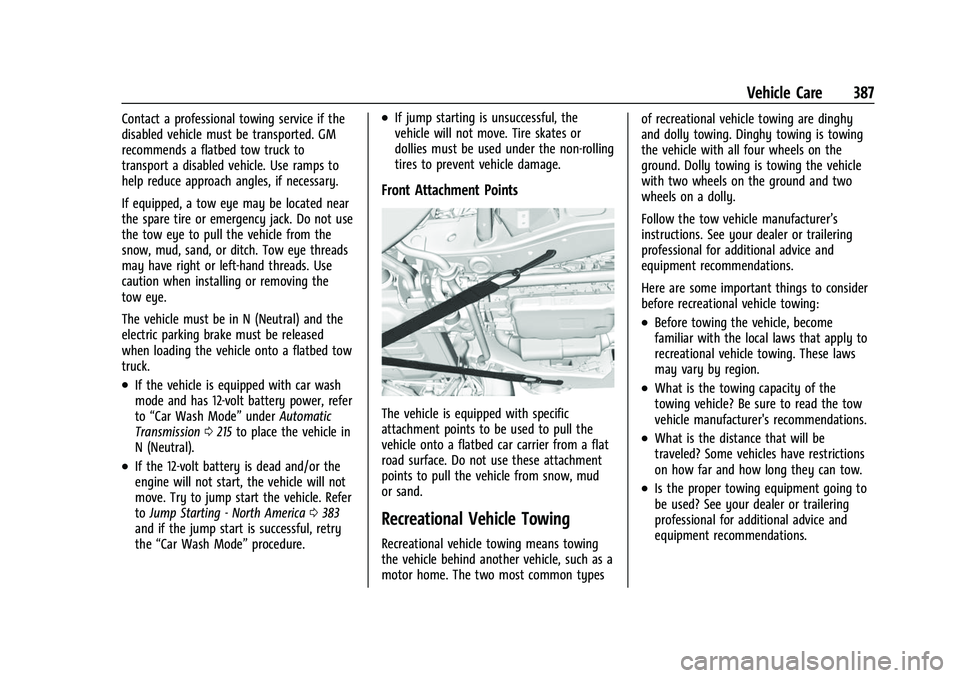
Front Attachment Points
The vehicle is equipped with specific
attachment points to be used to pull the
vehicle onto a flatbed car carrier from a flat
road surface. Do not use these attachment
points to pull the vehicle from snow, mud
or sand.
Recreational Vehicle Towing
Recreational vehicle towing means towing
the vehicle behind another vehicle, such as a
motor home. The two most common types of recreational vehicle towing are dinghy
and dolly towing. Dinghy towing is towing
the vehicle with all four wheels on the
ground. Dolly towing is towing the vehicle
with two wheels on the ground and two
wheels on a dolly.
Follow the tow vehicle manufacturer’s
instructions. See your dealer or trailering
professional for additional advice and
equipment recommendations.
Here are some important things to consider
before recreational vehicle towing:
.Before towing the vehicle, become
familiar with the local laws that apply to
recreational vehicle towing. These laws
may vary by region.
.What is the towing capacity of the
towing vehicle? Be sure to read the tow
vehicle manufacturer's recommendations.
.What is the distance that will be
traveled? Some vehicles have restrictions
on how far and how long they can tow.
.Is the proper towing equipment going to
be used? See your dealer or trailering
professional for additional advice and
equipment recommendations.
Page 408 of 443

Chevrolet Tahoe/Suburban Owner Manual (GMNA-Localizing-U.S./Canada/
Mexico-16416971) - 2023 - CRC - 4/25/22
Technical Data 407
Technical Data
Vehicle Identification
Vehicle Identification Number (VIN) . . . 407
Service Parts Identification . . . . . . . . . . . . 407
Vehicle Data
Capacities and Specifications . . . . . . . . . . 408
Engine Drive Belt Routing . . . . . . . . . . . . . 410
Vehicle Identification
Vehicle Identification
Number (VIN)
This legal identifier is in the front corner of
the instrument panel, on the driver side of
the vehicle. It can be seen through the
windshield from outside. The Vehicle
Identification Number (VIN) also appears on
the Vehicle Certification label and certificates
of title and registration.
Engine Identification
The eighth character in the VIN is the
engine code. This code identifies the
vehicle's engine, specifications, and
replacement parts. See“Engine
Specifications” underCapacities and
Specifications 0408 for the vehicle's
engine code.
Service Parts Identification
There may be a large barcode on the
certification label on the center pillar that
you can scan for the following information:
.Vehicle Identification Number (VIN)
.Model designation
.Paint information
.Production options
If there is not a large barcode on this label,
then you will find this same information on
a label inside of the glove box.
Page 415 of 443
Chevrolet Tahoe/Suburban Owner Manual (GMNA-Localizing-U.S./Canada/
Mexico-16416971) - 2023 - CRC - 4/25/22
414 Customer Information
H:Manage your profile and payment
information. View your GM Rewards Card
earnings and My Chevrolet Rewards points.
F: Chat with online help representatives.
Visit chevrolet.com and create an account
today.
Chevrolet Owner Centre (Canada)
mychevrolet.ca
Visit the Chevrolet Owner Centre at
mychevrolet.ca (English) or my.chevrolet.ca
(French) to access similar benefits to the
U.S. site.
GM Mobility Reimbursement
Program
This program is available to qualified
applicants for cost reimbursement, up to
certain limits, of eligible aftermarket adaptive equipment required for the vehicle,
such as hand controls or a wheelchair/
scooter lift for the vehicle.
To learn about the GM Mobility program,
see www.gmmobility.com or call the GM
Mobility Assistance Center at 1-800-323-9935.
Text Telephone (TTY) users, call
1-800-833-9935.
General Motors of Canada also has a
Mobility program. See www.gm.ca, or call
1-800-GM-DRIVE (800-463-7483) for details.
TTY users call 1-800-263-3830.
Roadside Assistance Program
For U.S.-purchased vehicles, call
1-800-243-8872. (Text Telephone (TTY):
1-888-889-2438.)
For Canadian-purchased vehicles, call
1-800-268-6800.
Service is available 24 hours a day, 365 days
a year.
Calling for Assistance
When calling Roadside Assistance, have the
following information ready:
.Your name, home address, and home
telephone number
.Telephone number of your location
.Location of the vehicle
.Model, year, color, and license plate
number of the vehicle
.Odometer reading, Vehicle Identification
Number (VIN), and delivery date of the
vehicle
.Description of the problem
Coverage
Services are provided for the duration of the
vehicle’s powertrain warranty.
In the U.S., anyone driving the vehicle is
covered. In Canada, a person driving the
vehicle without permission from the owner
is not covered.
Roadside Assistance is not a part of the New
Vehicle Limited Warranty. General Motors
North America and Chevrolet reserve the
right to make any changes or discontinue
the Roadside Assistance program at any
time without notification.
General Motors North America and Chevrolet
reserve the right to limit services or
payment to an owner or driver if they
decide the claims are made too often, or the
same type of claim is made many times.
Page 419 of 443
Chevrolet Tahoe/Suburban Owner Manual (GMNA-Localizing-U.S./Canada/
Mexico-16416971) - 2023 - CRC - 4/25/22
418 Customer Information
If a Crash Occurs
If there has been an injury, call emergency
services for help. Do not leave the scene of
a crash until all matters have been taken
care of. Move the vehicle only if its position
puts you in danger, or you are instructed to
move it by a police officer.
Give only the necessary information to
police and other parties involved in the
crash.
For emergency towing seeRoadside
Assistance Program 0414.
Gather the following information:
.Driver name, address, and telephone
number
.Driver license number
.Owner name, address, and telephone
number
.Vehicle license plate number
.Vehicle make, model, and model year
.Vehicle Identification Number (VIN)
.Insurance company and policy number
.General description of the damage to the
other vehicle Choose a reputable repair facility that uses
quality replacement parts. See
“Collision
Parts” earlier in this section.
If the airbag has inflated, see What Will You
See after an Airbag Inflates? 064.
Managing the Vehicle Damage Repair
Process
In the event that the vehicle requires
damage repairs, GM recommends that you
take an active role in its repair. If you have
a pre-determined repair facility of choice,
take the vehicle there, or have it towed
there. Specify to the facility that any
required replacement collision parts be
original equipment parts, either new
Genuine GM parts or recycled original GM
parts. Remember, recycled parts will not be
covered by the GM vehicle warranty.
Insurance pays the bill for the repair, but
you must live with the repair. Depending on
your policy limits, your insurance company
may initially value the repair using
aftermarket parts. Discuss this with the
repair professional, and insist on Genuine
GM parts. Remember, if the vehicle is
leased, you may be obligated to have the vehicle repaired with Genuine GM parts,
even if your insurance coverage does not
pay the full cost.
If another party's insurance company is
paying for the repairs, you are not obligated
to accept a repair valuation based on that
insurance company's collision policy repair
limits, as you have no contractual limits
with that company. In such cases, you can
have control of the repair and parts choices
as long as the cost stays within reasonable
limits.
Publication Ordering Information
Service Manuals
Service manuals have the diagnosis and
repair information on the engine/propulsion,
transmission, axle, suspension, brakes,
electrical system, steering system, body, etc.
Customer Literature
Owner’s manuals are written specifically for
owners and are intended to provide basic
operational information about the vehicle.
The owner’s manual includes the
Maintenance Schedule for all models.