audio CHEVROLET TRACKER 1994 User Guide
[x] Cancel search | Manufacturer: CHEVROLET, Model Year: 1994, Model line: TRACKER, Model: CHEVROLET TRACKER 1994Pages: 258, PDF Size: 14.43 MB
Page 93 of 258

Comfort Controls and Audio Systems
How to Shut Off the Theft-Deterrent
Feature
If your radio is secured (“SEC” shows on
the display) and you wish to disable
it,
enter your security code as follows,
pausing no more than 15 seconds between
steps:
1. Press the “1” and “4” buttons together.
Hold them down until “SEC” shows
on the display.
You are now ready to
enter your security code.
until the first digit
of your code
appears.
3. Press the “SEEK b” button and hold it
until the second digit
of your code
appears.
4. Press the “TUNE 4” button and hold
it until the third digit
of your code
appears.
2. Press the “SEEKA” button and hold it
5. Press the “TUNE b” button and hold
it until the fourth digit of your code
appears.
checked that the code you entered
matches the one you wrote down.
display.
6. Press “AM-F’”’ after you have
64 ---- ” should now appear in the
If the code is correct, the radio will now
operate.
If the code is wrong, “Err” will
appear in the display.
To Unlock the System After a Power
Loss
If power is disrupted to the radio while in
the “SEC” mode, the unit will not work
and
“LOC” will show on the display
whenever the ignition is on.
To unlock the
unit:
1. Press ‘‘4 SEEK F’’ and/or
‘‘4 TUNE by’ and “000.0” will appear
on the display.
2. Press the “SEEKd” button and hold it
until the first digit
of your code
appears.
3. Press the “SEEK b” button and hold it
until the second digit of your code
appears.
4. Press the “TUNE 4” button and hold
it until the third digit
of your code
appears.
5. Press the “TUNE b” button and hold
, it until the fourth digit of your code
appears.
checked that the code matches the one
you wrote down. Now
“SEC” will
appear on the display.
6. Press “AM-FM” after you have
... 92
ProCarManuals.com
Page 95 of 258

Comfort Controls and Audio Systems
Tone Select: Press “TONE SELECT” to
choose preset treble and bass equalization
settings designed for “ROCK,” “NEWS,”
“POP,” “JAZZ” and “CLASSICAL.”
“ROCK” will appear when you first press
“TONE SELECT.” Each time you press
it, another setting will appear
on the
display. Press
it after “CLASSICAL” and
tone control will be back to the treble and
bass knobs.
Adjusting the Speakers
Fade:
Turn the “FADE” knob to move the
sound between the front and rear
speakers.
Balance: Turn the “BAL” control behind
the “FADE’ knob to move the sound
between the right and left speakers.
Recall
Press “RCLVA” to see the station being
played for a moment. Or, press it if you
want to see the time when the ignition is
off.
To Play a Cassette Tape
Your tape player is built to work best with
tapes that are
30 to 45 minutes long on
:ach side. Tapes longer than that are so
:hin they may not work well in this player.
The longer side with the tape visible
;hould face to the right. If you hear
lothing or hear just a garbled sound, it
nay not be in squarely. Press “STOP’ or
‘EJECT” to remove the tape and start
mer.
Once the tape is playing, use
the knobs
For volume, fade and balance, just as you
io for radio. The lighted arrows show
which side of the tape is playing.
Metal Tapes: Your bias is set
automatically. When a metal or chrome
tape is inserted, “MTL” will appear on the
display.
Fast Forward: Press “FF” to advance
rapidly to another part of the tape. Press
“FF,” “RCLVA” or “STOP’ to return to
playing speed.
Rewind: Press “REW’ to reverse the tape
rapidly. Press “REW,” “RCL~A” or
“STOP’ to return to playing speed.
Next Selection: Press “NXT” to go
forward to the beginning of the next
selection. Press “NXT” again or press
“RCL
vA’’ or “STOP” to cancel this
function.
Previous Selection: Press “PRV” to go
lack to the beginning
of the selection.
?rem “PRV” again or press “RCL
VA” or
‘STOP’ to cancel this function.
Por “NXT” and “PRV” to work properly,
your tape must have at least three or four
seconds of silence between each
selection.
Repeat: Press “RPT” to go to the
beginning of the selection and play
it
3gain. Press “RPT” again to cancel this
Function.
Noise Reduction: Press 00 to remove
noise from Dolby@
B NR-encoded tapes.
Dolby@
B Noise Reduction manufactured
under license from Dolby Laboratories
Licensing Corporation.
“Dolbya7’ and the
00 symbol are
trademarks of Dolby Laboratories
Licensing Corporation.
Radio Monitor: When playing a tape,
press “RDM” during
“FF” or“REW’ to
hear
the radio. Press “RDM’ again to turn
the radio off. During “RDM’ operation,
only “TUNE,” “SEEK’ and “PSCAN’
will work.
Tape Sides: Press “RCL VA” to switch
from one side of the tape to the other.
... 94
ProCarManuals.com
Page 96 of 258

Stop: Press “STOP” to stop the tape and
switch to radio.
Eject: Press “EJECT” to remove the tape
and switch
to radio.
To Play a Compact Disc
Don’t use the mini-discs (3” singles).
They won’t eject. Use full-size compact
discs.
Insert your disc into the CD slot on your
audio system.
If the disc comes back out, it could be
that:
0 The disc is upside down.
0 It is dirty, scratched, or wet.
There is too much moisture in the air.
(If there is, wait about one hour and
try again.)
If you see “Err” on the display, the disc
player is too
hot to play the disc. Press
“RCL
VA’’ to take “Err” off the display.
Track Number and Playing Time: Press
“RCL
VA” to see which track is playing.
Press it again
within five seconds to see
how long it has been playing. The
track number also appears when the
disc is inserted or you change the volume.
Previous Track: Press “PRV” to hear a
track again.
If you hold this button, or
press it more than once, the disc will
return to previous tracks.
Next Track: Press ”NXT” to hear the
next track now (instead
of waiting until
the present track is finished).
If you hold this button, or press it more
than once, the disc will advance further.
Rewind: Press and hold “REW” to return
rapidly to a favorite passage. Release
it to
play the passage.
Fast Forward: Press and hold “FF” to
advance quickly
within a track. Release it
to resume playing.
Compression: Press “COMP’ to make
soft and loud passages more nearly equal
in volume.
Repeat: Press “RPT” once to hear a
selection over again.
Rasdom: Pressing “RDM” will cause the
CD player to play the tracks back in
random order. To cancel the random
feature, press
“RDM,” “STOP” or “RPT.”
Stop: Press “STOP” to stop playing the
disc and switch to radio. Press “STOP”
again
to restart the disc at the point where
it stopped. Press “AM-FM” to cancel CD
operation and listen to the radio.
CD-Tape: Press “CD-TP” to switch
between playing a tape
and a CD when
both are inserted.
Eject: Press “EJECT” to eject the disc
and the radio will play. The disc
will start
playing at track
1 when you reinsert it.
Special Eject
If you choose, you can eject only the tape
or CD when you have both a CD and a
tape
in your audio system.
CD Only: To eject only the CD, press
“EJECT” and then press “REW.”
Tape Only: To eject only the tape,
press “EJECT” and then press
“PRV.”
95 ...
ProCarManuals.com
Page 97 of 258

Comfort Controls and Audio Systems
Theft Deterrent Feature
The theft deterrent feature for the AMEM
stereo with cassette tape and compact disc
player can be used or ignored. If ignored,
the system plays normally. If it is used,
your system won’t be usable if it’s ever
stolen.
Setting Your Security Code
The instructions below tell you how to
enter a security code into the system. If
your vehicle loses battery power for any
reason, you must enter the security code
again before the system will turn on.
1. Write down any four-digit number and
keep it in a safe place.
2. Turn on the ignition switch to the
“ACC” or “ON’ position.
3. Turn the audio system off.
4. Press the “1” and “4” buttons together.
Hold them down until
“- - - -” shows
on the display.
You are now ready to enter your security
code. Don’t wait more than 15 seconds
between steps.
5. Press “4 SEEK b” and/or
“4 TUNE b” and “0000” will appear
on the display.
first digit of your code appears.
Release the button.
6. Press “SEEKI” and hold it until the
7. Press “SEEK b” and hold it until the
second digit of your code appears.
Release the button.
8. Press “TUNE 4” and hold it until the
third digit
of your code appears.
Release the button.
9. Press “TUNE b” and hold it until the
fourth digit of your code appears.
Release the button.
checked that the code you entered is
the one you wrote down. “rEP’ will
appear
in the display, which means
you need to repeat steps
5 through 9.
11. Press “AM-FM” again and the
display will now show
“SEC.”
1 p. Press “AM-FM’ after you have
How to Shut Off the Theft-Deterrent
Feature
If your radio is secured (“SEC” shows on
the display) and you wish to disable it,
enter your security code as follows,
pausing no more than
15 seconds between
steps:
1. Press the “1” and “4” buttons together.
Hold them down until
“SEC” shows
on the display. You are now ready to
enter your security code.
until the fist digit of your code
appears.
3. Press the “SEEK b” button and hold it
until the second digit
of your code
appears.
4. Press the “TUNE 4” button and hold
it until the third digit of your code
appears.
5. Press the “TUNE b” button and hold
it until the fourth digit
of your code
appears.
checked that the code you entered
matches the one you wrote down.
display.
2. Press the “SEEKI” button and hold it
6. Press “AM-F’”’ after you have
LL ---- ” should now appear in the
... 96
ProCarManuals.com
Page 99 of 258
Comfort Controls and Audio Systems
Clean your tape player with a
wiping-action, non-abrasive cleaning
cassette, and
follow the directions
provided
with it.
Cassettes are subject to wear and the
sound quality may degrade over time.
Always make sure that the cassette tape is
in good condition before you have your
tape player serviced.
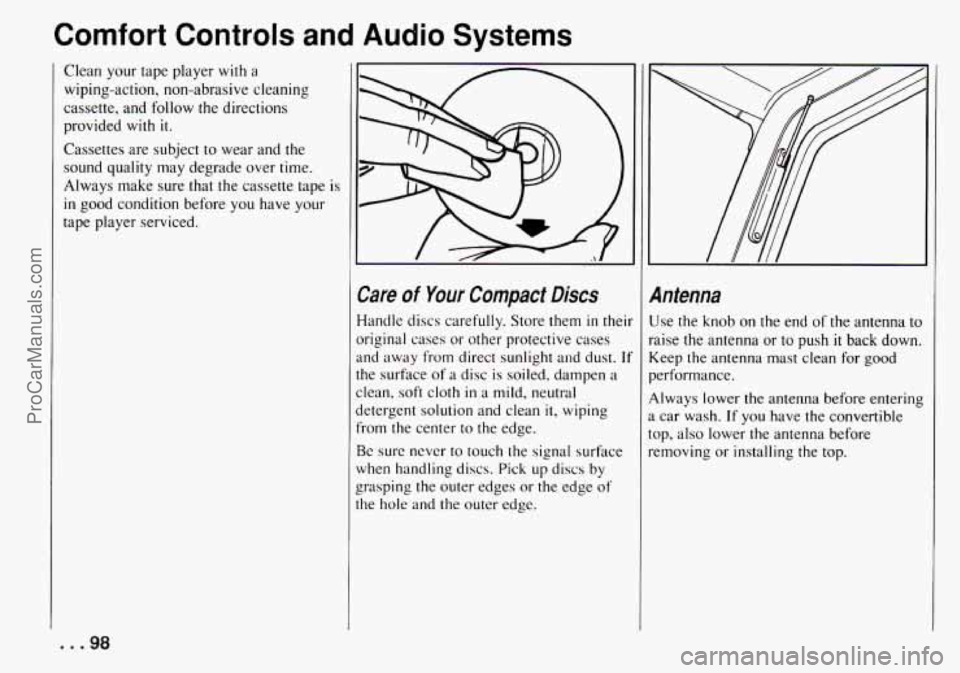
Care of Your Compact Discs
Handle discs carefully. Store them in thei
original cases or other protective cases
and away from direct sunlight and dust.
11
the surface of a disc is soiled, dampen a
clean, soft cloth
in a mild, neutral
detergent solution and clean
it, wiping
from the center to the edge.
Be sure never to touch the signal surface
when handling discs. Pick up discs
by
the hole and the outer edge.
c grasping the outer edges or the edge of
InteQna
Jse the knob on the end of the antenna to
aise the antenna or to push
it back down.
:eep the antenna mast clean
for good
erformance.
dways lower the antenna before entering
car wash. If you have the convertible
~p, also lower the antenna before
:moving or installing the top.
... 98
ProCarManuals.com
Page 220 of 258
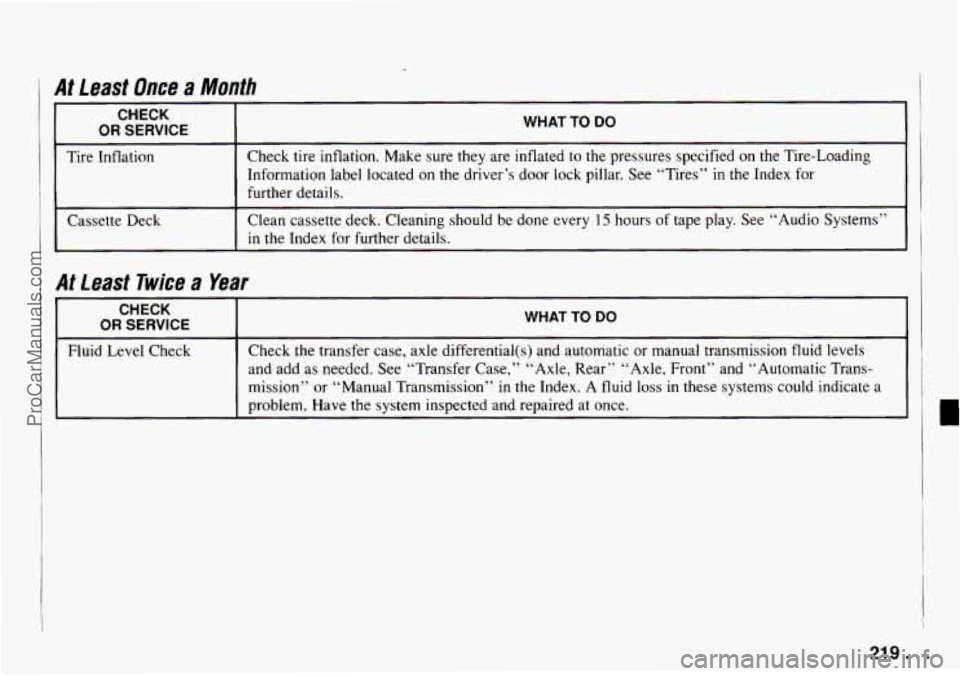
At Least Once a Month
r
CHECK
OR SERVICE I
I
WHAT TO DO
Tire Inflation Check tire inflation. Make sure they are
inflated to the pressures specified on the Tire-Loading
Information label located on
the driver’s door lock pillar. See “Tires” in the Index for
further details.
Cassette Deck Clean cassette
deck. Cleaning should be done every
15 hours of tape play. See “Audio Systems”
in the Index for further details.
I At least Twice a Year
CHECK
OR SERVICE WHAT TO DO
Fluid Level Check Check
the transfer case, axle differential(s) and automatic or manual transmission fluid levels
and. add as needed. See “Transfer Case,” “Axle, Rear” “Axle, Front” and “Automatic Trans-
mission” or “Manual Transmission”
in the Index. A fluid loss in these systems could indicate a
problem. Have the system inspected and repaired
at once.
219 ...
ProCarManuals.com
Page 244 of 258
A bout Driving Your Tracker ..... 3
ABS ......................... 103
Adding Coolant ................ 171
Additives. Engine
Oil ............ 165
Adjustment. Clutch
............. 169
Air Cleaner .................... 165
Air Conditioner Controls
......... 85
Air Filter Replacement
........... 166
Air Intake Lever ................ 84
Airflow Lever
.................. 84
Alignment and Tire Balance
.
Wheel ...................... 187
Aluminum Wheels
.............. 193
AM/FM Stereo
................ 88
With Cassette Tape and Compact
Disc Player
................ 93
With Cassette Tape Player ...... 89
Antenna
...................... 98
Anti-Lock Brakes
.............. 103
To Use ..................... 103
Appearance Care ............... I89
Appearance Care and Materials
.... 195
Appearance Care. Service and
..... 155
Approaching
a Hill .............. 1 10
Ashtrays and Lighter ............ 62
Ashtray. Front
................. 63
Ashtray. Rear .................. 63
Assist Grips. Passenger .......... 62
Add-on
Electrical Equipment
..... 196
Adjustable Steering Column
...... 53
Audio Systems ................. 87
Audio Systems. Comfort
Controls and
................. 83
Automatic
Freewheeling Hubs
........... 47
Transmission
................ 42
Transmission Fluid ............ 167
Axle. Front
.................... 170
Axle
. Rear .................... 169
Babies. Smaller Children
and (Safety Belts)
............. 26
Balance. Wheel Alignment
and Tire
.................... 187
Battery
....................... 176
BBB Auto Line
- Alternative Dispute
Resolution Program. GM
Participation
in ............. 235
Before Leaving
on a Long Trip .... 120
Belt. Lap-Shoulder .............. 20
Bi-Level ...................... 84
Bin. Coinholder and ............. 61
Bins. Instrument Panel ........... 61
Blizzard. If You’re Caught in a ... 124
Box. Glove
.................... 60
Brakes
Adjustment
.................. 176
Anti-Lock (ABS)
............. 103
Fluid ....................... 1 74
Master Cylinder
.......... 174
Parking
......... 48 Brakes
Pedal Travel
................. i76
System Parts. Replacing ........ 176
System Warning Light
......... 69
Trailer ...................... i27
Wear ...................... 175
Braking (Control of
a Vehicle) ..... 102
Braking
in Emergencies .......... 104
“Break.In. .. New Vehicle ........ 39
Bright Metal Parts. Protecting
Exterior
.................... 192
Brightness Control
.............. 57
Bulb Replacement .............. 177
Stoplight .................. 181
Headlights .................. 177
Rear Combination
............ 180
Rear Sidemarker
.............. 179
Sidemarker ......... . .179
Bulbs. Halogen
............... 177
Bulbs. Replacement
............. 199
Canadian Roadside Assistance ... 237
Canvas Top
Preparing for Storage
.......... 80
Special Care for
.............. 193
Capacities and Specifications
...... 200
Carbon Monoxide .............. 51
Center High-Mounted
Front Parking and Turn Signal
... 178
Removing and Installing Your
... 76
243 ...
ProCarManuals.com
Page 245 of 258
Index
Care Appearance
................. 189
Canvas Top
.................. 193
Cassette Tape Player .......... 97
Compact Discs
............... 98
Safety Belts
................. 191
Case. Transfer ................. 47
Case. Transfer (Service)
.......... 170
and Cornpact Disc Player
..... 94
Player
.................... 90
AM/FM Stereo with ........... 93
Stereo with ................ 89
ofYour
..................... 97
Certification/Tire Label .......... 18 1
Chains. Tire ................... 188
Changing a Flat Tire
............. 146
Charging System Light
.......... 70
Check Engine Light
............. 71
Cassette
Tape. To Play a
AM/FM Stereo with Cassette Tape
AM/FM Stereo with Cassette Tape
Cassette Tape and Compact Disc Player.
Cassette Tape Player. AM/FM
Cassette Tape Player. Care
Checking Things under the
Hood
....................... 159
Checking Your Restraint Systems . . 33
Chemical Paint Spotting
.......... 194
Chevrolet/Geo Roadside Assistance Program
.................... 237
... 244
Chevrolet/Geo Service Publications
(Ordering Information)
........ 240
Child Restraints
.............. 27
Rear Seat
.............. . 28
Right Front Seat
............ 30
Top Strap
................... 28
Where to Put the
.............. 27
Children (Safety Belts)
........... 26
Children. Larger (Safely Belts)
.... 32
Cigarette Lighter ............... 62
Circuit Breakers. Fuses and ....... 196
City Driving ................... I19
Cleaner. Air ................. 165
Cleaning
Aluminum Wheels
........ 193
Canvas Top
.................. 193
Fabric
...................... I90
Glass
....................... 191
Inside of Your Geo ............ 189
Instrument Panel. Top of
....... 19 1
Leather ..................... 19 1
Outside of Your Geo .......... 192
Problems. Special
............. 190
Vinyl
...................... 191
Clock. Setting the ............... 88
Clutch Adjustment
.............. I69
Coinholder and Bin ............. 61
Comfort Controls
............... 84
Comfort Controls and Audio Systems
.................... 83
Windshield and Wiper Blades ... 192 Compact
Disc.
To Play a ......... 95
with Cassette Tape and
......... 93
Compact Disc Player. AM/FM Stereo
Compact Discs. Care
of Your ...... 98
Compartments. Door Storage ...... 60
Compartments. Storage and ....... 60
Control of a Vehicle ............. 102
Control.
Loss of ................ 107
Controls Air Conditioner
.............. 85
Brightness .................. 57
Comfort
.................... 84
Features and
................. 35
Heater ...................... 84
Seat ........................ 10
Convertible Top
................ 72
Convex Outside Mirror
..... 59
Coolant Adding
..................... 171
Heater. Engine ............... 41
Recovery Tank
............. 142
Cooling
....................... 85
Cooling System ................ 141
Courtesy Transportation .......... 237
Cupholder
..................... 61
Curves. Driving on .............. 104
Engine
..................... 170
How to Add
to the Coolant
How to Add
to the Radiator ..... 144
Temperature Gage. Engine ...... 70
ProCarManuals.com