ignition CHEVROLET TRACKER 1994 User Guide
[x] Cancel search | Manufacturer: CHEVROLET, Model Year: 1994, Model line: TRACKER, Model: CHEVROLET TRACKER 1994Pages: 258, PDF Size: 14.43 MB
Page 69 of 258

Features and Controls
Tachometer
The tachometer shows engine speed in
thousands of revolutions per minute
(rpm).
You can use it while driving to
select correct shift points. The tachometel
may not return to zero when the engine
is
not running.
NOTICE:
Do not operate the engine with the
tachometer in
the red area, or engine
damage may occur.
r
I:
!
1
1
1
... 68
and Indicators
This section describes the warning lights
and gages that may be on your vehicle.
The pictures will help you locate them.
Warning lights and gages can signal that
something
is wrong before it becomes
serious enough to cause
an expensive
repair or replacement. Paying attention to
your warning lights and gages could also
save you or others from injury.
Warning lights go
on when there may be
or is a problem with one
of your vehicle’s
functions.
As you will see in the details
on the next few pages, some warning
lights come
on briefly when you turn the
ignition key just to let you know they’re
working. If you are familiar with this
section, you should not be alarmed when
this happens.
Gages can indicate when there may be or
is a problem with one of your vehicle’s
functions. Often gages and warning lights
work together to
let you know when
there’s a problem with your vehicle.
When one of the warning lights comes
on
and stays on when you are driving, or
when one
of the gages shows there may be
a problem, check the section that
tells
you what to do about it. Please follow the
manual’s advice. Waiting to
do repairs
can be costly
- and even dangerous. So
please get to know your warning lights
and gages. They’re a big help.
ProCarManuals.com
Page 71 of 258

Features and Controls
If the light comes on while you are
driving,
pull off the road and stop
carefully. You may notice that the pedal is
harder
to push. Or, the pedal may go
closer to the floor. It may take longer to
stop. If the light is still on. have the
vehicle towed for service. (See “Towing
Your Vehicle“
in the Index.)
p CAUTION:
Your brake system may not be work-
ing properly if the brake system
warning light is on, Driving with the
brake system warning light on can
lead
to an accident. If the light is still
on after you’ve pulled off the road
and stopped carefully, have the
vehicle towed
for service.
The brake system warning light will also
come
on when you set your parking
brake, and
it will stay on if your parking
brake doesn’t release
fully. If it stays on
after your parking brake is fully released.
it means you have a brake problem.
‘ngine Coolant Temperature Gage
rhis gage shows the engine coolanl
emperature.
If the gage pointer moves to
he
”H” (red) side. your engine is too hot!
t means that your engine coolant has
)verheatcd and you should
stop your
ehicle and
turn off the engine HS soo~
Iossible.
1 as
HOT COOLANT CAN BURN YOU
BADLY!
In “Problems on the Road.” this manual
shows what to do. See ”Engine
Overheating”
in the Index.
Charging System Light
This light will come on briefly when you
turn on the ignition, but the engine is not
running, as
a check to show you it is
working. Then
it should go out when the
engine starts. If it stays on or comes on
while you are driving, you may have a
problem with the electrical charging
system.
It could indicate that you have a
loose generator drive
belt or another
electrical problem. Have
it checked right
away. Driving while this light is on could
drain
your battery.
If you must drive a short distance with
this light on,
be certain to turn off all your
accessories. such as
the radio and air
conditioner.
. . .70
ProCarManuals.com
Page 72 of 258
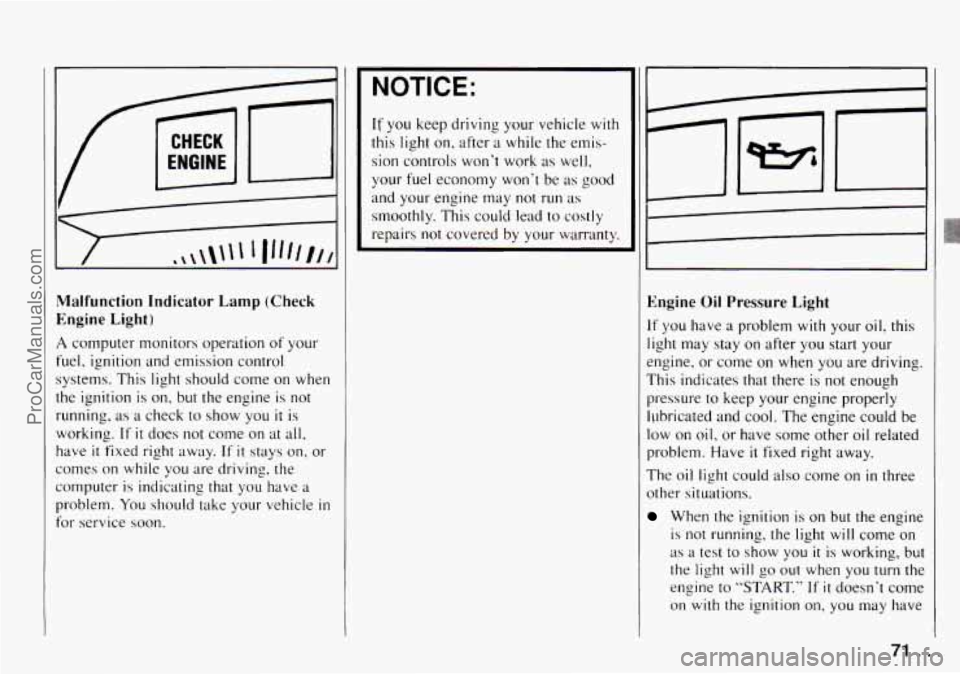
I1 1
Malfunction Indicator Lamp (Check
Engine Light)
A computer monitors operation of your
fuel, ignition and emission control
1 systems. This light should come on when
the ignition is
on, but the engine is not
running, as a check to show you it is
working.
If it does not come on at all,
have it fixed right away. If it stays on. or
comes on while
you are driving, the
computer
is indicating that you have a
problem.
You should take your vehicle in
for service soon.
NOTICE:
If you keep driving your vehicle with
this light on. after
a while the ernis-
sion controls won't work as well,
your
fuel economy won't be as good
and your engine may
not run as
smoothly. This could lead to costly
repairs
not covered by your warranty.
Engine Oil Pressure Light
If you have a problem with your oil? this
light may stay
on after you start your
engine, or come
on when you are driving.
This indicates that there is not enough
pressure
to keep your engine properly
ILJbricated and
cool. The engine could be
low on oil, or have some other oil related
problem. Have
it fixed right away.
The oil light could also come
on in three
other situations.
When the ignition is on but the engine
is not running, the light will come on
as a test to show you it is working, but
the light will
go out when you turn the
engine to
"START." If it doesn't come
on with the ignition
on, you may have
71
ProCarManuals.com
Page 87 of 258

Comfort Controls and Audio Systems
?ear Window Defogger
’he rear window defogger uses a
varrning grid to remove fog from the rear
.vindow.
’ress the switch
to turn on the defogger.
9n indicator light n,ill come on below the
;witch
to remind you that the defogger is
m. Press the switch again
to turn the
jefogger off. The rear window defogger
vi11 also turn off if you turn the ignition
;witch
to ”ACC” or “LOCK.”
lo not attach anything like a temporary
xhicle license
or a decal across the
lefogger grid on the rear window.
NOTICE:
Don‘t use a razor blade or something
else sharp on the inside
of the rear
window.
If you do, you could cut or
damage the warming
grid. and the
repairs wouldn‘t
be covcrcd by your
warranty.
Vow- Through Ventilation
system
’our Geo‘s flow-through ventilation
,ystem supplies
outside air into the
whicle when
it is moving. Outside air
vill also enter the vehicle when the heater
)r the ilir conditioning flln is running.
. .86
ProCarManuals.com
Page 90 of 258

Pushbuttons: The six pushbuttons let
you return to your favorite stations. To
set
the pushbuttons for up to 12 stations
(6 AM and 6 FM), just:
1. Tune in the station.
2. Press and hold one of the
pushbuttons for at least two seconds.
The sound will go away for a second
and will return when
the station is
stored.
Repeat these steps for each pushbutton.
Setting the Tone
Treble:
Turn the “TREB” knob to the
right to hear more treble.
Bass: Turn the “BASS” control behind
the “TREB” knob to the right to hear
more bass.
Adjusting the Speakers
Fade:
Turn the “FADE’ knob to move
the sound between the front and rear
speakers.
Balance: Turn the “BAL” conrrol
behind the “FADE’ knob to move the
sound between the left and right
speakers.
Recall
Press “RCL” to see the station being
played for a moment. Or, press
it if you
want to see the time when
the ignition is
off.
AM!FM Stereo with Cassette
Tape Player
To Play the Radio
Turn the “ON/VOL” knob to turn the
system on or off.
Volume: Turn the “ON/VOL” knob to
adjust the volume.
Finding a Station
Band:
Press “AM-FM” to get AM, FM1
or
FM2. The lighted display shows your
selection.
Tune: Press and hold “TUNE b’, or
“TUNE
4’’ to go to higher or lower
stations. Release when you find your
station. The display
will show the
frequency of each station tuned.
Seek: Press “SEEK b” or “SEEK 4’’
and the radio will tune to the next
higher or lower station and stay there.
89. ..
ProCarManuals.com
Page 91 of 258

Comfort Controls and Audio Systems
Pushbuttons: The six pushbuttons let you
return to your favorite stations. To set
the
pushbuttons for up to 18 stations (6 AM,
6 FM1 and 6 FM2), jus#:
1. Tune in the station.
2. Press and hold one of the pushbuttons
for more than two seconds. The sound
will go away for a second and will
return when the station is stored.
Repeat these steps for each pushbutton.
Preset Scan: Press the “PRESET SCAN’
button
to hear each of your preset stations
for a few seconds. When you want to stop
at a Chosen statioq, press “PRESET
SCAN” again.
Setting the Tone
Treble:
Turn the “TREB” knob to the
right to hear more treble.
Bass: Turn the“BASS” control behind
the “TREB” knpb to the right to hear
more bass.
Treble and bass cannot be adjusted
manually when “TONE SELECT” is on.
Loud: To increase the bass tone at low
volumes, press the
“LOUD” button.
Tone Select: Press “TONE SELECT” to
choose preset treble and bass equalization settings designed
for “ROCK,”
“NEWS,”
”POP,” “JAZZ’ and “CLASSICAL.”
“ROCK” will appear when you first press
“TONE SELECT.” Each time you press
it, another setting will appear on the
display. Press
it after “CLASSICAL” and
tone control will be back to the treble and
bass knobs.
Adjusting the Speakers
Fade:
Turn the “FADE’ knob to move the
sound between the front and rear
speakers.
Balance: Turn the “BAL” control behind
the “FADE” knob to move the sound
between the
right and left speakers.
Recall
Press “RCL” to see the station being
played for a moment. Or, press it if you
want to see the time when the ignition is
off.
To Play a Cassette Tape
Your tape player is built to work best with
tapes that are
30 to 45 minutes long on
each side. Tapes longer than that are
so
thin they may not work well in this player. The
longer side with the tape visible
should face to the right.
If you hear
nothing or hear just a garbled sound, it
may not be in squarely. Press
“MA” to
remove the tape and start over.
Once the tape is playing, use the knobs
for volume, fade and balance, just as you
do for radio. The lighted arrows show
which side of the tape is playing.
Metal Tapes: Your bias is set
automatically. When a metal or chrome
tape
is inserted, “MTL” will appear on the
display.
Fast Forward: Press “FF” to advance
rapidly to another part of the tape. Press
“FF,” “RCL/PROG’ or “HA” to return to
playing speed.
Rewind: Press “REV to reverse the tape
rapidly. Press
“RW,” “RCL/PROG” or
“.A” to return to playing speed.
Next Selection: Press “NEXT” to go
forward to the beginning of the next
selection. Press
“NEXT” again or press
“RCLPROG’ or
‘,.A’’ to cancel this
function.
For “NEXT” to work properly, your tape
must have
at least three or four seconds of
silence between each selection.
... 90
ProCarManuals.com
Page 92 of 258

Previous Selection: Press “PREV” to go
back
to the beginning of the last selection.
Press “PREV” again or press
“RCL/PROG” or
“HA’, to cancel this
function.
Program: Press “RCL/PROG” to switch
from one side of the tape
to the other.
Your cassette tape player can play
continuously because the player has
an
auto-reverse feature.
Noise Reduction: Press 00 @to remove
noise from Dolby@
B NR-encoded tapes.
Dolby@
B Noise Reduction manufactured
under license from Dolby Laboratories
Licensing Corporation.
“Dolby@” and the
00 @symbol are
trademarks of Dol by Laboratories
Licensing Corporation.
Eject: Press “HA’, to remove the tape
and
switch to radio.
Radio Monitor: Press the “RADIO
MNTR” button to hear the radio when
you are fast forwarding or reversing
a
cassette tape. You can use the “TUNE,“
“SEEK” and “PRESET-SCAN?’ buttons
while
in the radio monitor mode.
rheft Deterrent Feature
The theft deterrent feature for the AM/FM
;tereo
with cassette tape player can be
lsed or ignored. If ignored, the system
Aays normally.
If it is used, your system
won‘t be usable
if it’s ever stolen.
Setting Your Security Code
The instructions below tell you how to
mter a security code into the system. If
qour vehicle loses battery power for any
-eason, you must enter the security code
lgain before
the system will turn on.
1. Write down any four-digit number and
keep
it in a safe place.
2. Turn on the ignition switch to the
“ACC” or “ON” position.
3. Turn the audio system off.
4. Press the “1” and “4” buttons together.
Hold them down
until “- - - -” shows
on the display. You
are now ready
to enter your security
code. Don’t wait more than 15 seconds
between steps.
5. Press “4 SEEK b’’ and/or
“+ TUNE ,’’ and “0000” will appear
on the display.
first digit of your code appears.
Release the button.
6. Press “SEEK+” and hold it until the
7. Press “SEEK F” and hold it until the
second digit of your code appears.
Release the button.
8. Press “TUNE +” and hold it until the
third digit
of your code appears.
Release the button.
9. Press “TUNE F” and hold it until the
fourth digit of your code appears.
Release the button.
10. Press “AM-FM” after you have
checked that the code you entered is
the one you wrote down. “rEP” will
appear
in the display, which means
you need
to repeat steps 5 through 9.
will now show “SEC.”
11. Press “AM-FM” again and the displaJ
91 ...
ProCarManuals.com
Page 93 of 258

Comfort Controls and Audio Systems
How to Shut Off the Theft-Deterrent
Feature
If your radio is secured (“SEC” shows on
the display) and you wish to disable
it,
enter your security code as follows,
pausing no more than 15 seconds between
steps:
1. Press the “1” and “4” buttons together.
Hold them down until “SEC” shows
on the display.
You are now ready to
enter your security code.
until the first digit
of your code
appears.
3. Press the “SEEK b” button and hold it
until the second digit
of your code
appears.
4. Press the “TUNE 4” button and hold
it until the third digit
of your code
appears.
2. Press the “SEEKA” button and hold it
5. Press the “TUNE b” button and hold
it until the fourth digit of your code
appears.
checked that the code you entered
matches the one you wrote down.
display.
6. Press “AM-F’”’ after you have
64 ---- ” should now appear in the
If the code is correct, the radio will now
operate.
If the code is wrong, “Err” will
appear in the display.
To Unlock the System After a Power
Loss
If power is disrupted to the radio while in
the “SEC” mode, the unit will not work
and
“LOC” will show on the display
whenever the ignition is on.
To unlock the
unit:
1. Press ‘‘4 SEEK F’’ and/or
‘‘4 TUNE by’ and “000.0” will appear
on the display.
2. Press the “SEEKd” button and hold it
until the first digit
of your code
appears.
3. Press the “SEEK b” button and hold it
until the second digit of your code
appears.
4. Press the “TUNE 4” button and hold
it until the third digit
of your code
appears.
5. Press the “TUNE b” button and hold
, it until the fourth digit of your code
appears.
checked that the code matches the one
you wrote down. Now
“SEC” will
appear on the display.
6. Press “AM-FM” after you have
... 92
ProCarManuals.com
Page 95 of 258

Comfort Controls and Audio Systems
Tone Select: Press “TONE SELECT” to
choose preset treble and bass equalization
settings designed for “ROCK,” “NEWS,”
“POP,” “JAZZ” and “CLASSICAL.”
“ROCK” will appear when you first press
“TONE SELECT.” Each time you press
it, another setting will appear
on the
display. Press
it after “CLASSICAL” and
tone control will be back to the treble and
bass knobs.
Adjusting the Speakers
Fade:
Turn the “FADE” knob to move the
sound between the front and rear
speakers.
Balance: Turn the “BAL” control behind
the “FADE’ knob to move the sound
between the right and left speakers.
Recall
Press “RCLVA” to see the station being
played for a moment. Or, press it if you
want to see the time when the ignition is
off.
To Play a Cassette Tape
Your tape player is built to work best with
tapes that are
30 to 45 minutes long on
:ach side. Tapes longer than that are so
:hin they may not work well in this player.
The longer side with the tape visible
;hould face to the right. If you hear
lothing or hear just a garbled sound, it
nay not be in squarely. Press “STOP’ or
‘EJECT” to remove the tape and start
mer.
Once the tape is playing, use
the knobs
For volume, fade and balance, just as you
io for radio. The lighted arrows show
which side of the tape is playing.
Metal Tapes: Your bias is set
automatically. When a metal or chrome
tape is inserted, “MTL” will appear on the
display.
Fast Forward: Press “FF” to advance
rapidly to another part of the tape. Press
“FF,” “RCLVA” or “STOP’ to return to
playing speed.
Rewind: Press “REW’ to reverse the tape
rapidly. Press “REW,” “RCL~A” or
“STOP’ to return to playing speed.
Next Selection: Press “NXT” to go
forward to the beginning of the next
selection. Press “NXT” again or press
“RCL
vA’’ or “STOP” to cancel this
function.
Previous Selection: Press “PRV” to go
lack to the beginning
of the selection.
?rem “PRV” again or press “RCL
VA” or
‘STOP’ to cancel this function.
Por “NXT” and “PRV” to work properly,
your tape must have at least three or four
seconds of silence between each
selection.
Repeat: Press “RPT” to go to the
beginning of the selection and play
it
3gain. Press “RPT” again to cancel this
Function.
Noise Reduction: Press 00 to remove
noise from Dolby@
B NR-encoded tapes.
Dolby@
B Noise Reduction manufactured
under license from Dolby Laboratories
Licensing Corporation.
“Dolbya7’ and the
00 symbol are
trademarks of Dolby Laboratories
Licensing Corporation.
Radio Monitor: When playing a tape,
press “RDM” during
“FF” or“REW’ to
hear
the radio. Press “RDM’ again to turn
the radio off. During “RDM’ operation,
only “TUNE,” “SEEK’ and “PSCAN’
will work.
Tape Sides: Press “RCL VA” to switch
from one side of the tape to the other.
... 94
ProCarManuals.com
Page 97 of 258

Comfort Controls and Audio Systems
Theft Deterrent Feature
The theft deterrent feature for the AMEM
stereo with cassette tape and compact disc
player can be used or ignored. If ignored,
the system plays normally. If it is used,
your system won’t be usable if it’s ever
stolen.
Setting Your Security Code
The instructions below tell you how to
enter a security code into the system. If
your vehicle loses battery power for any
reason, you must enter the security code
again before the system will turn on.
1. Write down any four-digit number and
keep it in a safe place.
2. Turn on the ignition switch to the
“ACC” or “ON’ position.
3. Turn the audio system off.
4. Press the “1” and “4” buttons together.
Hold them down until
“- - - -” shows
on the display.
You are now ready to enter your security
code. Don’t wait more than 15 seconds
between steps.
5. Press “4 SEEK b” and/or
“4 TUNE b” and “0000” will appear
on the display.
first digit of your code appears.
Release the button.
6. Press “SEEKI” and hold it until the
7. Press “SEEK b” and hold it until the
second digit of your code appears.
Release the button.
8. Press “TUNE 4” and hold it until the
third digit
of your code appears.
Release the button.
9. Press “TUNE b” and hold it until the
fourth digit of your code appears.
Release the button.
checked that the code you entered is
the one you wrote down. “rEP’ will
appear
in the display, which means
you need to repeat steps
5 through 9.
11. Press “AM-FM” again and the
display will now show
“SEC.”
1 p. Press “AM-FM’ after you have
How to Shut Off the Theft-Deterrent
Feature
If your radio is secured (“SEC” shows on
the display) and you wish to disable it,
enter your security code as follows,
pausing no more than
15 seconds between
steps:
1. Press the “1” and “4” buttons together.
Hold them down until
“SEC” shows
on the display. You are now ready to
enter your security code.
until the fist digit of your code
appears.
3. Press the “SEEK b” button and hold it
until the second digit
of your code
appears.
4. Press the “TUNE 4” button and hold
it until the third digit of your code
appears.
5. Press the “TUNE b” button and hold
it until the fourth digit
of your code
appears.
checked that the code you entered
matches the one you wrote down.
display.
2. Press the “SEEKI” button and hold it
6. Press “AM-F’”’ after you have
LL ---- ” should now appear in the
... 96
ProCarManuals.com