door lock CHEVROLET TRACKER 2003 2.G User Guide
[x] Cancel search | Manufacturer: CHEVROLET, Model Year: 2003, Model line: TRACKER, Model: CHEVROLET TRACKER 2003 2.GPages: 372, PDF Size: 2.65 MB
Page 79 of 372

Leaving Your Vehicle
If you are leaving the vehicle, take your keys, open your
door and set the locks from inside. Then get out and
close the door.
Tailgate
{CAUTION:
It can be dangerous to drive with the tailgate
open because carbon monoxide (CO) gas can
come into your vehicle. You can't see or smell
CO. It can cause unconsciousness and even
death. If you must drive with the tailgate open or
if electrical wiring or other cable connections
CAUTION: (Continued)
CAUTION: (Continued)
must pass through the seal between the body
and the tailgate:
·Make sure all other windows are shut.
·Turn the fan on your heating or cooling
system to its highest speed and select the
control setting that will force outside air
into your vehicle. See²Climate Control
System²in the Index.
·If you have air outlets on or under the
instrument panel, open them all the way.
See²Engine Exhaust²in the Index.
Tailgate Lock Release
Use your key to lock or unlock your tailgate.
If you have a convertible, you can still open or close the
tailgate with the rear window closed.
2-11
Page 82 of 372

Window Lock
On four-door models, press the right side of the switch
to activate the lock feature. The passenger windows
will not operate while this feature is active. Press the left
side of the switch to return to normal window operation.
On two-door models, press the WINDOW LOCK
button to activate the lock feature. The passenger
window will not operate while this feature is active.
Press the button again to return to normal window
operation.
On both models, while the window lock switch is
engaged, the driver's window will still operate but all
passenger window switches will not operate.
Sun Visors
To block out glare, you can swing down the visors.
You can also swing them to the side. The visors may
have extensions to give additional sun blockage.
Visor Vanity Mirror
If your vehicle has this feature, pull down the visor to
expose the passenger's side vanity mirror.
Starting and Operating Your
Vehicle
New Vehicle Break-In
Notice:Your vehicle does not need an elaborate
ªbreak-in.º But it will perform better in the long run
if you follow these guidelines:
·Keep your speed at 55 mph (88 km/h) or less
for the ®rst 500 miles (805 km).
·Do not drive at any one speed Ð fast or
slow Ð for the ®rst 500 miles (805 km).
Do not make full-throttle starts.
·Avoid making hard stops for the ®rst 200 miles
(322 km) or so. During this time your new brake
linings are not yet broken in. Hard stops with new
linings can mean premature wear and earlier
replacement. Follow this breaking-in guideline
every time you get new brake linings.
·Do not tow a trailer during break-in. SeeTowing a
Trailer on page 4-53
for more information.
2-14
Page 84 of 372

ON (C):This is the position that the switch returns to
after you start your engine and release the switch.
The switch stays in ON when the engine is running.
But even when the engine is not running, you can use
ON to operate your electrical accessories and to
display some instrument panel cluster warning and
indicator lights.
START (D):This is the position that starts the engine.
When the engine starts, release the key. The ignition
switch will return to ON for normal driving.
When the engine is not running, ACC and ON allow you
to operate your electrical accessories, such as the
radio or items plugged into the accessory power outlets.
A warning tone will sound if you open the driver's
door when the ignition is in ACC or LOCK and the key
is in the ignition.Starting Your Engine
Automatic Transmission
Move your shift lever to PARK (P) or NEUTRAL (N).
Your engine won't start in any other position Ð that's a
safety feature. To restart when you're already moving,
use NEUTRAL (N) only.
Notice:Do not try to shift to PARK (P) if your
vehicle is moving. If you do, you could damage the
transmission. Shift to PARK (P) only when your
vehicle is stopped.
Manual Transmission
The gear selector should be in NEUTRAL and the parking
brake engaged. Hold the clutch pedal to the ¯oor and
start the engine. Your vehicle won't start if the clutch
pedal is not all the way down ± that's a safety feature.
1. With your foot off the accelerator pedal, turn your
ignition key to START. When the engine starts,
let go of the key.
2-16
Page 103 of 372

To adjust the mirrors do the following:
1. Move the selector switch to the L (left) or R (right)
to select the mirror you wish to adjust.
2. Press the outer part of the four-way control pad,
located below the selector switch, that coincides
with the direction you want the mirror to go.
3. Return the selector switch to the center position to
help prevent moving the mirror accidentally.
Outside Convex Mirror
Your passenger's side mirror is convex. A convex
mirror's surface is curved so you can see more from the
driver's seat.
{CAUTION:
A convex mirror can make things (like other
vehicles) look farther away than they really are.
If you cut too sharply into the right lane, you
could hit a vehicle on your right. Check your
inside mirror or glance over your shoulder
before changing lanes.
Storage Areas
Glove Box
Use your key to lock and unlock the glove box. To open
the glove box, pull the latch toward you.
The glove box may have a two-position detent for
opening the door. Lower the door to the ®rst detent for
access to the glove box. Pull it to the next detent
for further access.
Cupholder(s)
Two cupholders are on the center console next to the
parking brake lever.
Coinholder(s)
Your instrument panel may have two coinholders
located to the left of the steering wheel.
2-35
Page 128 of 372

Entry Lighting
If your vehicle has remote keyless entry, it is equipped
with an entry lighting feature that controls your dome
lamp (and cargo lamp, if equipped). For the dome lamp
to operate as described below, the switch must be in
the middle position:
Your interior lamps will come on and stay on for a set
time whenever you press the UNLOCK button on
the remote keyless entry transmitter.
If you open any door, the lamps will stay on while
the door is open, then turn off automatically about
40 seconds after the last door is closed. If you press the
UNLOCK button on the remote keyless entry transmitter
and don't open a door, the lamps will come on and
then turn off after about 40 seconds.
The lamps will turn off immediately if you turn the
ignition key to ON. When the ignition is on, the entry
lighting feature is inactive. The interior lamps will come
on only if they are turned on by the dome lamp
switch or one of the doors is opened.
When you press the LOCK button on the remote keyless
entry transmitter, the interior lamps will come on for about
three seconds, and then shut off.
Reading Lamps
Your vehicle's inside rearview mirror may have reading
lamps.
Push the buttons on the bottom of the mirror to turn the
reading lamps on and off.
Cargo Lamp
Some four-door models are equipped with a cargo
lamp. The cargo lamp comes on when any door
is opened, and goes off when all doors are shut.
3-16
Page 129 of 372

Accessory Power Outlets
If your vehicle has an accessory power outlet, you can
plug in auxiliary electrical equipment.
The accessory power outlet is located in the center
console near the parking brake.
To use the outlet, open the cover. When not using it,
always cover the outlet with the protective cap.
These circuits are protected by a fuse and have
maximum current levels.
Notice:Leaving electrical equipment on for
extended periods will drain the battery. Always turn
off electrical equipment when not in use and do
not plug in equipment that exceeds the maximum
amperage rating.
Certain power accessory plugs may not be compatible
to the power accessory outlet and could result in
blown vehicle or adapter fuses.
If you experience a problem see your dealer for
additional information on the power accessory plugs.
When adding electrical equipment, be sure to follow the
proper installation instructions included with the
equipment.
Notice:Adding any electrical equipment to your
vehicle may damage it or keep other components
from working as they should. The repairs would not
be covered by your warranty. Check with your
dealer before adding electrical equipment.
Notice:Improper use of the power outlet can cause
damage not covered by your warranty. Do not
hang any type of accessory or accessory bracket
from the plug because the power outlets are
designed for accessory power plugs only.
Ashtrays and Cigarette Lighter
To use the lighter, if equipped, the ignition key must be
in ON or ACC. Push the lighter in all the way and let
go. When it's ready, it will pop back out by itself.
Pull the door to open the ashtray. To remove it, press
down on the tab and pull the ashtray out. To reinstall the
ashtray, push it in until the tab latches.
The rear ashtray, if equipped, is on the back of the
center console. Push on the left side of the ashtray.
The ashtray will turn clockwise for usage. To remove the
rear ashtray, press down on the tab and pull it out.
Notice:If you put papers or other ¯ammable items
in the ashtray, hot cigarettes or other smoking
materials could ignite them and possibly damage
your vehicle. Never put ¯ammable items in the
ashtray.
3-17
Page 207 of 372

Loading Your Vehicle
Two labels on your vehicle show how much weight it
may properly carry. The tire-loading information
label found on the driver's door lock pillar tells you the
proper size and recommended in¯ation pressures for the
tires on your vehicle.The other label is the certi®cation label, also found on
the driver's door lock pillar. It tells you the gross weight
capacity of your vehicle, called the Gross Vehicle
Weight Rating (GVWR). The GVWR includes the weight
of the vehicle, all occupants, fuel and cargo. Never
exceed the GVWR for your vehicle, or the Gross Axle
Weight Rating (GAWR) for either the front or rear axle.
4-51
Page 223 of 372
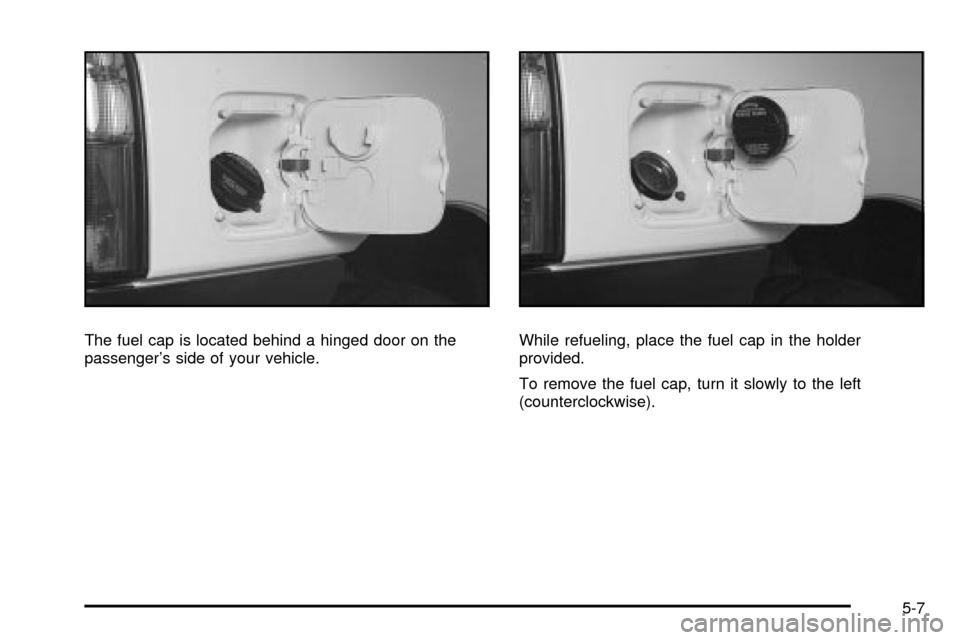
The fuel cap is located behind a hinged door on the
passenger's side of your vehicle.While refueling, place the fuel cap in the holder
provided.
To remove the fuel cap, turn it slowly to the left
(counterclockwise).
5-7
Page 276 of 372

In¯ation - Tire Pressure
The Tire-Loading Information label, which is on the
driver's door lock pillar, shows the correct in¯ation
pressures for your tires when they're cold. ªColdº means
your vehicle has been sitting for at least three hours
or driven no more than 1 mile (1.6 km).
Notice:Don't let anyone tell you that underin¯ation
or overin¯ation is all right. It's not. If your tires
don't have enough air (underin¯ation), you can get
the following:
·Too much ¯exing
·Too much heat
·Tire overloading
·Bad wear
·Bad handling
·Bad fuel economy
If your tires have too much air (overin¯ation),
you can get the following:
·Unusual wear
·Bad handling
·Rough ride
·Needless damage from road hazards
When to Check
Check your tires once a month or more.
Also, check the tire pressure of the spare tire.
How to Check
Use a good quality pocket-type gage to check tire
pressure. You can't tell if your tires are properly in¯ated
simply by looking at them. Radial tires may look
properly in¯ated even when they're underin¯ated.
Be sure to put the valve caps back on the valve stems.
They help prevent leaks by keeping out dirt and moisture.
Tire Inspection and Rotation
Tires should be rotated every 6,000 to 8,000 miles
(10 000 to 13 000 km).
Any time you notice unusual wear, rotate your tires as
soon as possible and check wheel alignment. Also check
for damaged tires or wheels. See
When It Is Time for
New Tires on page 5-62andWheel Replacement on
page 5-64for more information.
The purpose of regular rotation is to achieve more
uniform wear for all tires on the vehicle. The ®rst rotation
is the most important. See ªPart A: Scheduled
Maintenance Services,º in Section 6, for scheduled
rotation intervals.
5-60
Page 307 of 372
Fuses Usage
CIGCigar/Cigarette Lighter, Radio,
Power Mirror
D/L Door Locks
STPBrake Light, Horn, Center
High-Mounted Stop Lamp,
Cruise Control
FOG Not Used
DEFRear Window Defogger, DRL,
Heater, Air Conditioning
S/H Not Used
TRNTurn Signal, Back-Up Light,
Hazard Lights
WIPWindshield Wiper/Washer,
Rear Window Wiper/Washer
Fuses for the air bags and the heater/air conditioning
system are located next to the instrument panel
fuse block.Engine Compartment Fuse Block
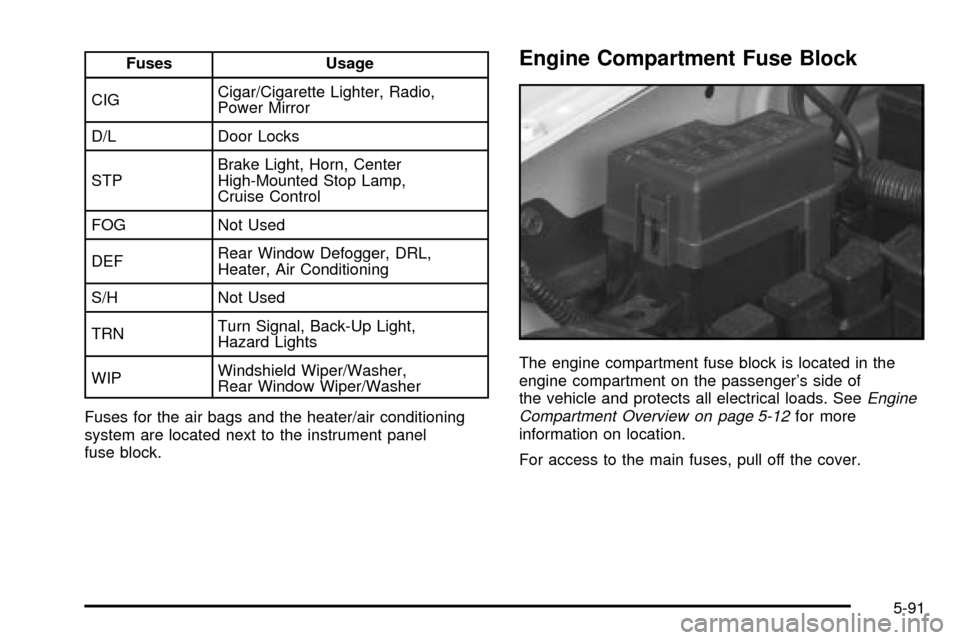
The engine compartment fuse block is located in the
engine compartment on the passenger's side of
the vehicle and protects all electrical loads. See
Engine
Compartment Overview on page 5-12for more
information on location.
For access to the main fuses, pull off the cover.
5-91