four wheel drive CHEVROLET TRACKER 2003 2.G User Guide
[x] Cancel search | Manufacturer: CHEVROLET, Model Year: 2003, Model line: TRACKER, Model: CHEVROLET TRACKER 2003 2.GPages: 372, PDF Size: 2.65 MB
Page 99 of 372
5. Inside, you'll see the return plate. Using your ®nger,
move the return plate toward the rear of the vehicle
until it stops.
6. Move the shift lever into the gear you want while,
while holding the return plate in the most rearward
position.
7. Have the vehicle ®xed as soon as possible.
Parking Your Vehicle
Before you get out of your manual transmission vehicle,
put your shift lever in REVERSE (R) and ®rmly apply
the parking brake. Once the shift lever has been placed
into REVERSE (R) with the clutch pedal pressed in,
you can turn the ignition key to LOCK, remove the key
and release the clutch.
If you have four-wheel drive, be sure your transfer case
is in a drive gear. Your vehicle could roll if it isn't.
If you are towing a trailer, see
Towing a Trailer on
page 4-53.
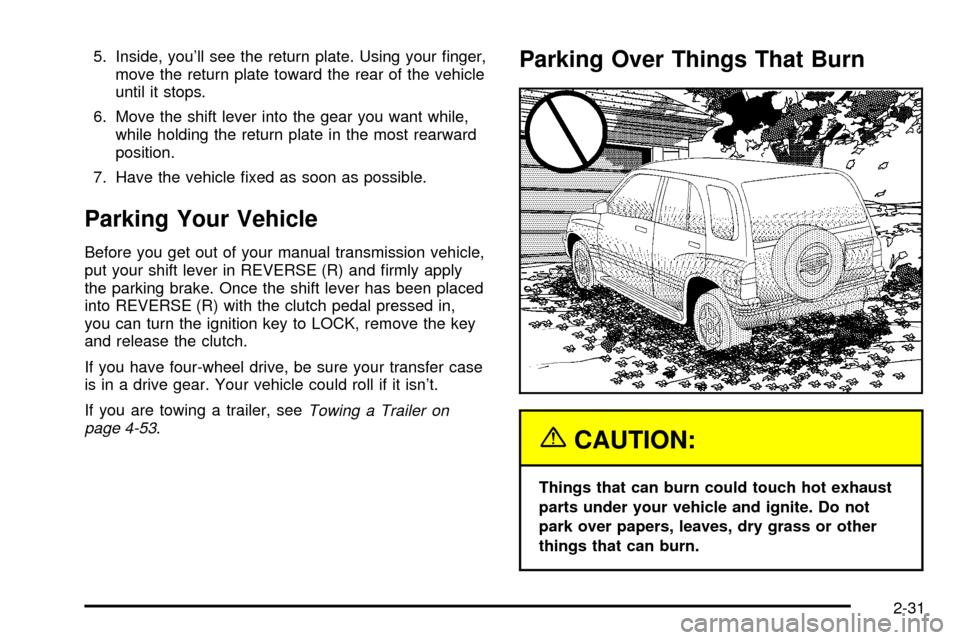
Parking Over Things That Burn
{CAUTION:
Things that can burn could touch hot exhaust
parts under your vehicle and ignite. Do not
park over papers, leaves, dry grass or other
things that can burn.
2-31
Page 101 of 372

{CAUTION:
It can be dangerous to get out of your vehicle
if the shift lever is not fully in PARK (P) with
the parking brake ®rmly set. Your vehicle can
roll. Do not leave your vehicle when the engine
is running unless you have to. If you have left
the engine running, the vehicle can move
suddenly. You or others could be injured.
To be sure your vehicle will not move, even
when you are on fairly level ground, always set
your parking brake and move the shift lever to
PARK (P).
{CAUTION:
Four-wheel drive vehicles with the transfer
case in NEUTRAL will allow the vehicle to roll,
even if your shift lever is in PARK (P). So, be
sure the transfer case is in a drive gear Ð not
in NEUTRAL. Always set your parking brake.
Follow the proper steps to be sure your vehicle will not
move. See
Shifting Into Park (P) on page 2-28.
If you are pulling a trailer, see
Towing a Trailer on
page 4-53.
2-33
Page 103 of 372

To adjust the mirrors do the following:
1. Move the selector switch to the L (left) or R (right)
to select the mirror you wish to adjust.
2. Press the outer part of the four-way control pad,
located below the selector switch, that coincides
with the direction you want the mirror to go.
3. Return the selector switch to the center position to
help prevent moving the mirror accidentally.
Outside Convex Mirror
Your passenger's side mirror is convex. A convex
mirror's surface is curved so you can see more from the
driver's seat.
{CAUTION:
A convex mirror can make things (like other
vehicles) look farther away than they really are.
If you cut too sharply into the right lane, you
could hit a vehicle on your right. Check your
inside mirror or glance over your shoulder
before changing lanes.
Storage Areas
Glove Box
Use your key to lock and unlock the glove box. To open
the glove box, pull the latch toward you.
The glove box may have a two-position detent for
opening the door. Lower the door to the ®rst detent for
access to the glove box. Pull it to the next detent
for further access.
Cupholder(s)
Two cupholders are on the center console next to the
parking brake lever.
Coinholder(s)
Your instrument panel may have two coinholders
located to the left of the steering wheel.
2-35
Page 113 of 372

Instrument Panel Overview...............................3-2
Hazard Warning Flashers................................3-4
Other Warning Devices...................................3-4
Horn.............................................................3-4
Tilt Wheel.....................................................3-5
Turn Signal/Multifunction Lever.........................3-5
Exterior Lamps.............................................3-12
Interior Lamps..............................................3-15
Accessory Power Outlets...............................3-17
Ashtrays and Cigarette Lighter........................3-17
Climate Controls............................................3-18
Climate Control System.................................3-18
Outlet Adjustment.........................................3-21
Passenger Compartment Air Filter...................3-22
Warning Lights, Gages and Indicators.............3-24
Instrument Panel Cluster................................3-25
Speedometer and Odometer...........................3-26
Tachometer.................................................3-26
Safety Belt Reminder Light.............................3-26Air Bag Readiness Light................................3-27
Charging System Light..................................3-28
Brake System Warning Light..........................3-28
Anti-Lock Brake System Warning Light.............3-30
Engine Coolant Temperature Gage..................3-31
Malfunction Indicator Lamp.............................3-31
Oil Pressure Light.........................................3-34
Overdrive Off Light........................................3-35
Four-Wheel-Drive Light..................................3-35
Power Indicator Light.....................................3-36
Fuel Gage...................................................3-36
Audio System(s).............................................3-37
Setting the Time...........................................3-37
Radio with CD..............................................3-38
Understanding Radio Reception......................3-42
Care of Your CDs.........................................3-43
Care of Your CD Player................................3-43
Fixed Mast Antenna......................................3-43
Section 3 Instrument Panel
3-1
Page 147 of 372

·Sometimes when the engine is idling at a stop, the
light may blink on and off. This is normal.
·If you make a hard stop, the light may come on for
a moment. This is normal.
{CAUTION:
Do not keep driving if the oil pressure is low.
If you do, your engine can become so hot that
it catches ®re. You or others could be burned.
Check your oil as soon as possible and have
your vehicle serviced.
Notice:Damage to your engine from neglected oil
problems can be costly and is not covered by
your warranty.
Overdrive Off Light
This light comes on when
the automatic four-speed
transmission, if equipped,
has been converted to the
three-speed mode and the
overdrive is turned off.
This light also comes on as a check for about ®ve
seconds when the ignition key is turned to ON or
START.
Four-Wheel-Drive Light
If you have four-wheel
drive, this light comes on
when the ignition switch
is on and the transfer case
lever is in one of the
four-wheel drive positions.
See
Four-Wheel Drive on page 5-53.
3-35
Page 157 of 372

Your Driving, the Road, and Your Vehicle..........4-2
Driver Behavior..............................................4-2
Driving Environment........................................4-2
Vehicle Design...............................................4-3
Defensive Driving...........................................4-3
Drunken Driving.............................................4-4
Control of a Vehicle........................................4-7
Braking.........................................................4-7
Steering......................................................4-11
Off-Road Recovery.......................................4-13
Passing.......................................................4-13
Loss of Control.............................................4-15
Off-Road Driving with Your
Four-Wheel-Drive Vehicle...........................4-16
Driving at Night............................................4-30Driving in Rain and on Wet Roads..................4-32
City Driving..................................................4-35
Freeway Driving...........................................4-36
Before Leaving on a Long Trip.......................4-37
Highway Hypnosis........................................4-38
Hill and Mountain Roads................................4-38
Winter Driving..............................................4-40
If You Are Stuck: In Sand, Mud,
Ice or Snow..............................................4-44
Towing..........................................................4-47
Towing Your Vehicle.....................................4-47
Recreational Vehicle Towing...........................4-47
Loading Your Vehicle....................................4-51
Towing a Trailer...........................................4-53
Section 4 Driving Your Vehicle
4-1
Page 167 of 372

Steering
Power Steering
If you lose power steering assist because the engine
stops or the system is not functioning, you can steer but
it will take much more effort.
Steering Tips
Driving on Curves
It is important to take curves at a reasonable speed.
A lot of the ªdriver lost controlº accidents mentioned on
the news happen on curves.
Here is why:
Experienced driver or beginner, each of us is subject
to the same laws of physics when driving on curves.
The traction of the tires against the road surface makes
it possible for the vehicle to change its path when
you turn the front wheels. If there is no traction, inertia
will keep the vehicle going in the same direction.
If you have ever tried to steer a vehicle on wet ice,
you will understand this.
The traction you can get in a curve depends on the
condition of your tires and the road surface, the angle
at which the curve is banked, and your speed.
While you are in a curve, speed is the one factor you
can control.Suppose you are steering through a sharp curve.
Then you suddenly apply the brakes. Both control
systems Ð steering and braking Ð have to do their
work where the tires meet the road. Unless you have
four-wheel anti-lock brakes, adding the hard braking can
demand too much of those places. You can lose control.
The same thing can happen if you are steering through
a sharp curve and you suddenly accelerate. Those
two control systems Ð steering and acceleration Ð can
overwhelm those places where the tires meet the road
and make you lose control.
What should you do if this ever happens? Ease up on
the brake or accelerator pedal, steer the vehicle the way
you want it to go, and slow down.
Speed limit signs near curves warn that you should adjust
your speed. Of course, the posted speeds are based on
good weather and road conditions. Under less favorable
conditions you will want to go slower.
If you need to reduce your speed as you approach a
curve, do it before you enter the curve, while your front
wheels are straight ahead.
Try to adjust your speed so you can ªdriveº through the
curve. Maintain a reasonable, steady speed. Wait to
accelerate until you are out of the curve, and then
accelerate gently into the straightaway.
4-11
Page 172 of 372

Off-Road Driving with Your
Four-Wheel-Drive Vehicle
This off-road guide is for vehicles that have
four-wheel drive.
Also, see
Braking on page 4-7.
If your vehicle doesn't have four-wheel drive, you
shouldn't drive off-road unless you're on a level,
solid surface.
Off-road driving can be great fun. But it does have
some de®nite hazards. The greatest of these is
the terrain itself.
ªOff-roadingº means you've left the great North American
road system behind. Traffic lanes aren't marked.
Curves aren't banked. There are no road signs.
Surfaces can be slippery, rough, uphill or downhill.
In short, you've gone right back to nature.
Off-road driving involves some new skills. And that's
why it's very important that you read this guide.
You'll ®nd many driving tips and suggestions.
These will help make your off-road driving safer and
more enjoyable.
Before You Go Off-Roading
There are some things to do before you go out.
For example, be sure to have all necessary maintenance
and service work done. Check to make sure all
underbody shields (if so equipped) are properly
attached. Be sure you read all the information about
your four-wheel-drive vehicle in this manual. Is there
enough fuel? Is the spare tire fully in¯ated? Are the ¯uid
levels up where they should be? What are the local
laws that apply to off-roading where you'll be driving?
If you don't know, you should check with law
enforcement people in the area. Will you be on
someone's private land? If so, be sure to get the
necessary permission.
Loading Your Vehicle for
Off-Road Driving
There are some important things to remember about
how to load your vehicle.
·The heaviest things should be on the load ¯oor and
forward of your rear axle. Put heavier items as far
forward as you can.
·Be sure the load is secured properly, so driving on
the off-road terrain doesn't toss things around.
4-16
Page 195 of 372

If you drive regularly in steep country, or if you're
planning to visit there, here are some tips that can make
your trips safer and more enjoyable. See
Off-Road
Driving with Your Four-Wheel-Drive Vehicle on
page 4-16
for information about driving off-road.
·Keep your vehicle in good shape. Check all ¯uid
levels and also the brakes, tires, cooling system
and transmission. These parts can work hard
on mountain roads.
·Know how to go down hills. The most important
thing to know is this: let your engine do some of
the slowing down. Shift to a lower gear when you go
down a steep or long hill.
{CAUTION:
If you do not shift down, your brakes could get
so hot that they would not work well. You
would then have poor braking or even none
going down a hill. You could crash. Shift down
to let your engine assist your brakes on a
steep downhill slope.
{CAUTION:
Coasting downhill in NEUTRAL (N) or with the
ignition off is dangerous. Your brakes will have
to do all the work of slowing down. They could
get so hot that they would not work well. You
would then have poor braking or even none
going down a hill. You could crash. Always
have your engine running and your vehicle in
gear when you go downhill.
·Know how to go uphill. You may want to shift down to
a lower gear. The lower gears help cool your engine
and transmission, and you can climb the hill better.
·Stay in your own lane when driving on two-lane
roads in hills or mountains. Don't swing wide or cut
across the center of the road. Drive at speeds that let
you stay in your own lane.
·As you go over the top of a hill, be alert. There could
be something in your lane, like a stalled car or an
accident.
·You may see highway signs on mountains that warn
of special problems. Examples are long grades,
passing or no-passing zones, a falling rocks area or
winding roads. Be alert to these and take appropriate
action.
4-39
Page 201 of 372
Rocking Your Vehicle To Get It Out
First, turn your steering wheel left and right. That will
clear the area around your front wheels. If you have the
four-speed automatic, see ªPower Mode Selector
Switchº under
Automatic Transmission Operation on
page 2-19for information on traction. If you have
a four-wheel-drive vehicle, shift into 4HI. Then shift back
and forth between REVERSE (R) and a forward gear
(or with a manual transmission, between FIRST (1)
or SECOND (2) and REVERSE (R)), spinning the
wheels as little as possible. Release the accelerator
pedal while you shift, and press lightly on the accelerator
pedal when the transmission is in gear. By slowly
spinning your wheels in the forward and reverse
directions, you will cause a rocking motion that may free
your vehicle. If that doesn't get you out after a few
tries, you may need to be towed out. Or, you can use
your recovery hooks. If you do need to be towed
out, see
Towing Your Vehicle on page 4-47.
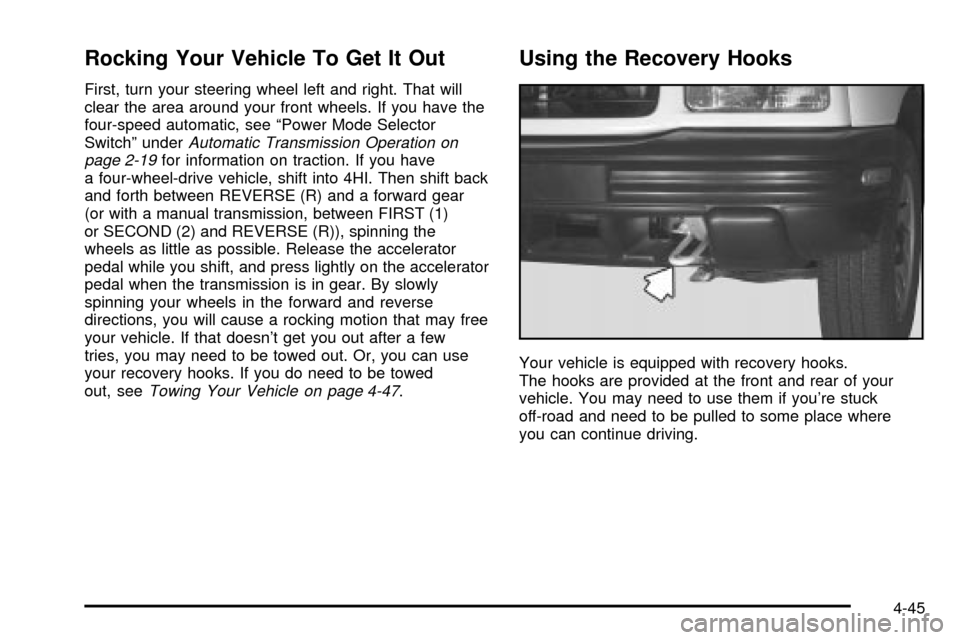
Using the Recovery Hooks
Your vehicle is equipped with recovery hooks.
The hooks are provided at the front and rear of your
vehicle. You may need to use them if you're stuck
off-road and need to be pulled to some place where
you can continue driving.
4-45