lock CHEVROLET TRACKER 2004 2.G Owner's Manual
[x] Cancel search | Manufacturer: CHEVROLET, Model Year: 2004, Model line: TRACKER, Model: CHEVROLET TRACKER 2004 2.GPages: 374, PDF Size: 2.57 MB
Page 77 of 374
Manual Windows
Use the window crank to open and close each window.
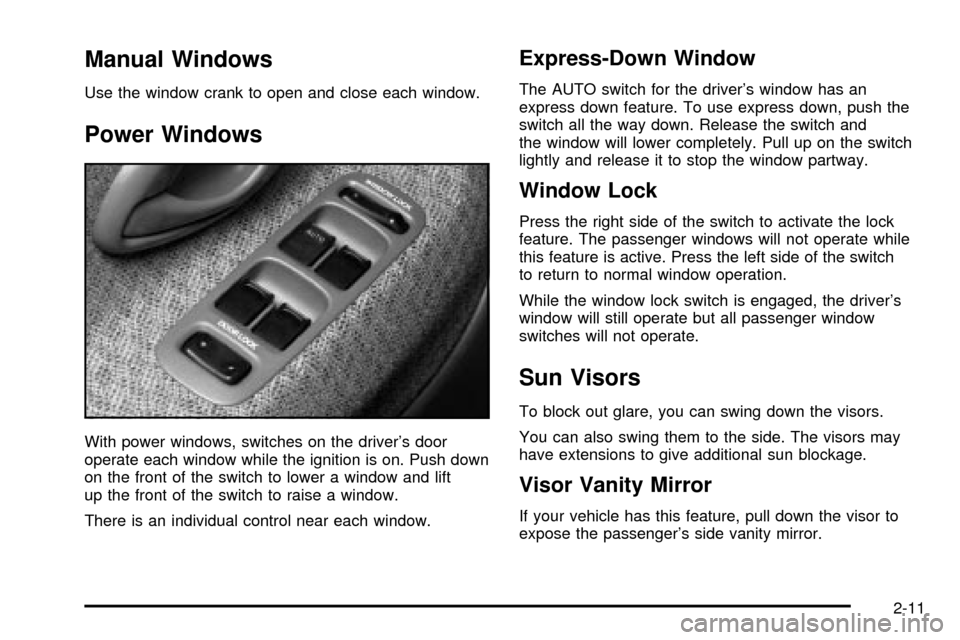
Power Windows
With power windows, switches on the driver's door
operate each window while the ignition is on. Push down
on the front of the switch to lower a window and lift
up the front of the switch to raise a window.
There is an individual control near each window.
Express-Down Window
The AUTO switch for the driver's window has an
express down feature. To use express down, push the
switch all the way down. Release the switch and
the window will lower completely. Pull up on the switch
lightly and release it to stop the window partway.
Window Lock
Press the right side of the switch to activate the lock
feature. The passenger windows will not operate while
this feature is active. Press the left side of the switch
to return to normal window operation.
While the window lock switch is engaged, the driver's
window will still operate but all passenger window
switches will not operate.
Sun Visors
To block out glare, you can swing down the visors.
You can also swing them to the side. The visors may
have extensions to give additional sun blockage.
Visor Vanity Mirror
If your vehicle has this feature, pull down the visor to
expose the passenger's side vanity mirror.
2-11
Page 78 of 374

Starting and Operating Your
Vehicle
New Vehicle Break-In
Notice:Your vehicle does not need an elaborate
ªbreak-in.º But it will perform better in the long run
if you follow these guidelines:
·Keep your speed at 55 mph (88 km/h) or less for
the ®rst 500 miles (805 km).
·Do not drive at any one speed Ð fast or
slow Ð for the ®rst 500 miles (805 km). Do not
make full-throttle starts.
·Avoid making hard stops for the ®rst 200 miles
(322 km) or so. During this time your new
brake linings are not yet broken in. Hard stops
with new linings can mean premature wear
and earlier replacement. Follow this breaking-in
guideline every time you get new brake
linings.
·Do not tow a trailer during break-in. SeeTowing
a Trailer on page 4-57
for more information.
Ignition Positions
With the key in the ignition
switch, you can turn it to
four different positions.
LOCK (A):This is the only position from which you can
remove the key. This position locks your steering
wheel, ignition and automatic transmission.
If you have an automatic transmission, the ignition
switch can't be turned to LOCK unless the shift lever is
in PARK (P).
2-12
Page 79 of 374

{CAUTION:
On manual transmission vehicles, turning the
key to LOCK will lock the steering column and
result in a loss of ability to steer the vehicle.
This could cause a collision. If you need to
turn the engine off while the vehicle is moving,
turn the key only to ACC. Do not push the key
in while the vehicle is moving.
Notice:Using a tool to force the key from the
ignition switch could cause damage or break the
key. Use the correct key and turn the key only with
your hand. Make sure the key is all the way in. If
it is, turn the steering wheel left and right while you
turn the key hard. If none of this works, then
your vehicle needs service.ACC (ACCESSORY) (B):This is the position in which
you can operate your electrical accessories or items
plugged into the accessory power outlets. It also unlocks
the steering wheel and ignition. Use this position if
your vehicle must be pushed or towed.
ON (C):This is the position that the switch returns to
after you start your engine and release the switch.
The switch stays in ON while the engine is running. But
even while the engine is not running, you can use
ON to operate your electrical accessories and to display
some instrument panel cluster warning and indicator
lights.
START (D):This is the position that starts the engine.
When the engine starts, release the key. The ignition
switch will return to ON for normal driving.
When the engine is not running, ACC and ON allow you
to operate your electrical accessories, such as the
radio or items plugged into the accessory power outlets.
A warning tone will sound if you open the driver's
door while the ignition is in ACC or LOCK and the key
is in the ignition.
2-13
Page 82 of 374

How long should you keep the coolant heater plugged
in? The answer depends on the outside temperature, the
kind of oil you have, and some other things. Instead
of trying to list everything here, we ask that you contact
your dealer in the area where you'll be parking your
vehicle. The dealer can give you the best advice for that
particular area.
Automatic Transmission Operation
There are several different positions for your shift lever.PARK (P):This position locks your rear wheels. It's the
best position to use when you start your engine
because your vehicle can't move easily.
{CAUTION:
It is dangerous to get out of your vehicle if the
shift lever is not fully in PARK (P) with the
parking brake ®rmly set. Your vehicle can roll.
Do not leave your vehicle when the engine is
running unless you have to. If you have left the
engine running, the vehicle can move
suddenly. You or others could be injured. To
be sure your vehicle will not move, even when
you are on fairly level ground, always set your
parking brake and move the shift lever to
PARK (P). See
Shifting Into Park (P) on
page 2-25
. If you are pulling a trailer, see
Towing a Trailer on page 4-57.
2-16
Page 83 of 374

{CAUTION:
If you have four-wheel drive, your vehicle will
be free to roll Ð even if your shift lever is in
PARK (P) Ð if your transfer case is in
NEUTRAL. So, be sure the transfer case is in a
drive gear, two-wheel high (2H) or four-wheel
high (4H) or four-wheel low (4L) Ð not in
NEUTRAL. See
Shifting Into Park (P) on
page 2-25
Ensure the shift lever is fully in PARK (P) before starting
the engine. Your vehicle has an automatic transmission
shift lock control system. You have to fully apply
your regular brakes before you can shift from PARK (P)
while the ignition key is in ON. If you cannot shift out
of PARK (P), ease pressure on the shift lever, then push
the shift lever all the way into PARK (P) and release
the shift lever button as you maintain brake application.
Then press the shift lever button and move the shift
lever into the gear you wish. See
Shifting Out of Park (P)
on page 2-27.REVERSE (R):Use this gear to back up.
Notice:Shifting to REVERSE (R) while your vehicle
is moving forward could damage the transmission.
The repairs would not be covered by your warranty.
Shift to REVERSE (R) only after your vehicle is
stopped.
To rock your vehicle back and forth to get out of snow,
ice or sand without damaging your transmission,
see If You Are Stuck: In Sand, Mud, Ice or Snow on
page 4-44.
NEUTRAL (N):In this position, your engine doesn't
connect with the wheels. To restart when you're already
moving, use NEUTRAL (N) only. Also, use
NEUTRAL (N) when your vehicle is being towed.
{CAUTION:
Shifting into a drive gear while your engine is
running at high speed is dangerous. Unless
your foot is ®rmly on the brake pedal, your
vehicle could move very rapidly. You could
lose control and hit people or objects. Do not
shift into a drive gear while your engine is
running at high speed.
2-17
Page 87 of 374

THIRD (3), FOURTH (4), FIFTH (5):Shift into
THIRD (3), FOURTH (4) and FIFTH (5) the same way
you do for SECOND (2). Slowly let up on the clutch
pedal as you press the accelerator pedal.
To stop, let up on the accelerator pedal and press the
brake pedal. Just before the vehicle stops, press
the clutch pedal and the brake pedal, and shift to
NEUTRAL.
NEUTRAL:Use this position when you start or idle
your engine.
REVERSE (R):To back up, press down the clutch
pedal and shift into REVERSE (R). Let up on the clutch
pedal slowly while pressing the accelerator pedal.
You cannot go from FIFTH (5) into REVERSE (R). If
you try, you will be locked out. You must ®rst shift into
NEUTRAL, move the shift lever to the left, back to
the right, and then shift into REVERSE (R). This is a
safety feature.
Notice:Shifting to REVERSE (R) while your vehicle
is moving forward could damage the transmission.
The repairs would not be covered by your warranty.
Shift to REVERSE (R) only after your vehicle is
stopped.
Also, use REVERSE (R) along with the parking brake
for parking your vehicle.
Shift Speeds
{CAUTION:
If you skip a gear when you downshift, you
could lose control of your vehicle. You could
injure yourself or others. Don't shift down
more than one gear at a time when you
downshift.
If your speed drops below 20 mph (32 km/h), or if the
engine is not running smoothly, you should downshift to
the next lower gear. You may have to downshift two
or more gears to keep the engine running smoothly or
for good performance.
2-21
Page 91 of 374

Shifting Into Park (P)
{CAUTION:
It can be dangerous to get out of your vehicle
if the shift lever is not fully in PARK (P) with
the parking brake ®rmly set. Your vehicle can
roll. If you have left the engine running, the
vehicle can move suddenly. You or others
could be injured. To be sure your vehicle will
not move, even when you are on fairly level
ground, use the steps that follow. With
four-wheel drive, if your transfer case is in
NEUTRAL, your vehicle will be free to roll,
even if your shift lever is in PARK (P). So, be
sure the transfer case is in a drive gear Ð not
in NEUTRAL. If you are pulling a trailer, see
Towing a Trailer on page 4-57.
1. Hold the brake pedal down with your right foot and
set the parking brake.2. Move the shift lever into PARK (P) by holding in the
button on the lever and pushing the lever all the
way toward the front of your vehicle.
3. If you have four-wheel drive, be sure the transfer
case is in a drive gear Ð not in NEUTRAL (N).
4. Move the key to LOCK.
5. Remove the key and take it with you. If you can
leave your vehicle with the key in your hand, your
vehicle is in PARK (P).
2-25
Page 92 of 374

Leaving Your Vehicle With the Engine
Running
{CAUTION:
It can be dangerous to leave your vehicle with
the engine running. Your vehicle could move
suddenly if the shift lever is not fully in
PARK (P) with the parking brake ®rmly set.
If you have four-wheel drive and your transfer
case is in NEUTRAL, your vehicle will be free
to roll, even if your shift lever is in PARK (P).
So be sure the transfer case is in a drive
gear ± not in NEUTRAL.
And, if you leave the vehicle with the engine
running, it could overheat and even catch ®re.
You or others could be injured. Don't leave
your vehicle with the engine running unless
you have to.
Torque Lock
If you are parking on a hill and you don't shift your
automatic transmission into PARK (P) properly,
the weight of the vehicle may put too much force on the
parking pawl in the transmission. You may ®nd it
difficult to pull the shift lever out of PARK (P). This is
called ªtorque lock.º To prevent torque lock, set
the parking brake and then shift into PARK (P) properly
before you leave the driver's seat. To ®nd out how,
see
Shifting Into Park (P) on page 2-25.
When you are ready to drive, move the shift lever out of
PARK (P)
beforeyou release the parking brake.
If torque lock does occur, you may need to have another
vehicle push yours a little uphill to take some of the
pressure from the parking pawl in the transmission, so
you can pull the shift lever out of PARK (P).
2-26
Page 93 of 374

Shifting Out of Park (P)
Your vehicle has an automatic transmission shift lock
control system. You have to fully apply your regular
brakes before you can shift from PARK (P) when the
ignition is in the ON position. See
Automatic
Transmission Operation on page 2-16.
If you cannot shift out of PARK (P), ease pressure on
the shift lever Ð push the shift lever all the way
into PARK (P) and release the shift lever button as you
maintain brake application. Then press the shift lever
button and move the shift lever into the gear you wish to
be in.
If you ever hold the brake pedal down but still can't shift
out of PARK (P), try this:
1. Apply the parking brake until the end of Step 6.
2. If the engine is running, turn it off. Turn the key to
ON or ACC.
2-27
Page 94 of 374

3. Find the access hole cover on the driver's side of
the console, near the shift lever.
4. Remove the screw and cover.
5. Inside, you'll see the return plate. Using your ®nger,
move the return plate toward the rear of the vehicle
until it stops.
6. Move the shift lever into the gear you want while,
while holding the return plate in the most rearward
position.
7. Have the vehicle ®xed as soon as possible.
Parking Your Vehicle
Before you get out of your manual transmission vehicle,
put your shift lever in REVERSE (R) and ®rmly apply
the parking brake. Once the shift lever has been placed
into REVERSE (R) with the clutch pedal pressed in,
you can turn the ignition key to LOCK, remove the key
and release the clutch.
If you have four-wheel drive, be sure your transfer case
is in a drive gear. Your vehicle could roll if it isn't.
If you are towing a trailer, see
Towing a Trailer on
page 4-57.
Parking Over Things That Burn
{CAUTION:
Things that can burn could touch hot exhaust
parts under your vehicle and ignite. Do not
park over papers, leaves, dry grass or other
things that can burn.
2-28