buttons CHEVROLET TRAIL BLAZER 2003 1.G Owner's Manual
[x] Cancel search | Manufacturer: CHEVROLET, Model Year: 2003, Model line: TRAIL BLAZER, Model: CHEVROLET TRAIL BLAZER 2003 1.GPages: 436, PDF Size: 2.98 MB
Page 215 of 436

Stopping and Resume Playback
To stop a disc, press and release the stop/eject button
on the DVD player or the stop button on the remote.
To resume playback, press the play/pause button on the
DVD player or the remote. As long as the disc has
not been ejected and the stop button has not been
pressed twice on the remote control, the movie should
resume play from where it was last stopped. If the
disc has been ejected or if the stop button on the remote
has been pressed twice, the disc will resume play at
the beginning.
Parental Control Button:This button is located on the
front of the DVD console which is mounted vertically
above the driver's right shoulder. Press this button while
a DVD is playing to freeze the video and mute the
audio to the headphones. It will also disable all other
button operations from the remote and DVD player. The
driver will then be able to gain the attention of the
rear seat passengers. Press this button again to restore
normal play of the DVD.
Ejecting a Disc
Press the stop/eject button on the DVD player once to
stop and a second time to eject the disc.
If a disc is ejected from the player, but not removed, the
DVD player will reload the disc after approximately
10 to 20 seconds.
DVD Messages
The following errors may be displayed:
·Disc Format Error:This message will be displayed
if a disc is inserted upside down, if the disc is not
able to be read or if the disc format is not
compatible.
·Disc Play Error:This message will be displayed if
the mechanism can not play the disc. Severely
scratched discs will cause this error.
·Region Code Error:This message will be
displayed for all non Region 1 discs (DVDs sold
outside of North America).
·Load/Eject Error:This message will be displayed if
the disc is not properly lined up in the mechanism.
·Disc Not Present:This message will be displayed
if the PLAY, EJECT or DVD AUX buttons are
pressed and no disc is in the player.
3-97
Page 216 of 436
Remote Control
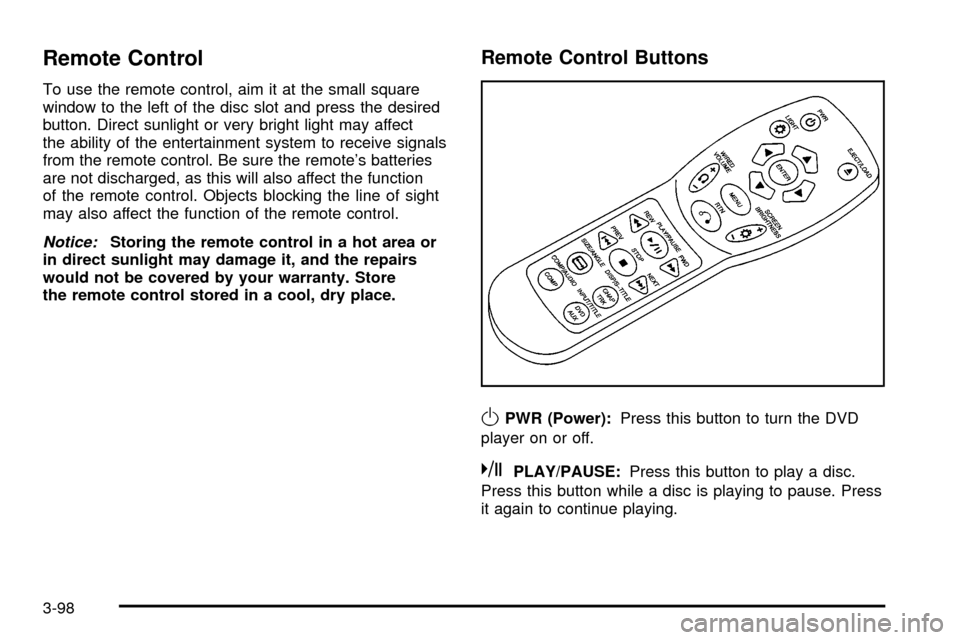
To use the remote control, aim it at the small square
window to the left of the disc slot and press the desired
button. Direct sunlight or very bright light may affect
the ability of the entertainment system to receive signals
from the remote control. Be sure the remote's batteries
are not discharged, as this will also affect the function
of the remote control. Objects blocking the line of sight
may also affect the function of the remote control.
Notice:Storing the remote control in a hot area or
in direct sunlight may damage it, and the repairs
would not be covered by your warranty. Store
the remote control stored in a cool, dry place.
Remote Control Buttons
OPWR (Power):Press this button to turn the DVD
player on or off.
kPLAY/PAUSE:Press this button to play a disc.
Press this button while a disc is playing to pause. Press
it again to continue playing.
3-98
Page 217 of 436

cSTOP:Press this button to stop playing, reversing
or fast forwarding the DVD.
XEJECT/LOAD:Press this button to eject a DVD
while it is playing. If the disc has been ejected and not
removed from the player, pressing this button will
load the disc. The stop/eject button on the DVD player
will also load the disc if the disc is ejected and not
removed.
rREW (Rewind):Press this button to reverse the
DVD at 5x speed. To stop reversing, press this
button again. This button may not work when the DVD
is playing the copyright or the previews.
[FWD (Fast Forward):Press this button to fast
forward the DVD at 5x speed. To stop fast forwarding,
press this button again. This button may not work
when the DVD is playing the copyright or the previews.
gPREV (Previous):Press this button to return to
the start of the current chapter. Press this button again
to return to the previous chapter. This button may
not work when the DVD is playing the copyright or the
previews.
lNEXT:Press this button to jump to the beginning
of the next chapter. This button may not work when
the DVD is playing the copyright or the previews.MENU:Press this button to view the media menu. The
media menu is different on every disc. Use the up
and down and the right and the left arrow buttons to
move the cursor around the media menu. After making
your selection, press the ENTER button. Some discs
may contain a short skit leading up to the media menu.
~WIRED VOLUME:Press the plus or the minus
symbol to increase or to decrease the volume of
the wired headphones. You can press repeatedly or
press and hold the plus or the minus symbol to increase
or to decrease the volume in large amounts.
bSIZE/ANGLE:This button controls the screen
ratio of the video display. Press and release this
button to stretch a 4:3 picture to ®t the wide aspect
ratio 16:9 screen.
Press and release this button to choose different angles
of the same scene. Press and hold this button again
to change angles. This feature is not available on
all DVD discs.
DISP/S-TITLE (Display Subtitle) CHAP TRK (Chapter
Track):Press and release this button to display the
title, chapter and elapsed time of the current video
segment or the track and time if a CD is being played.
Press and hold this button to see the DVDs subtitle
language. Press and release this button again to change
it. This feature is not available on all DVD discs.
3-99
Page 218 of 436

COMP/AUDIO (Compression) COMP:Press and
release this button to display the current compression
displayed on the screen. Press this button again to
select the next compression state. Three compression
states are available including minimum, standard
and off. The compression feature only functions on AC3
(Dolby
žDigital Surround) encoded DVD video discs.
Press and hold this button to see if the DVD playing has
optional audio tracks, such as different languages or
commentaries. Press and release to change selections.
INPUT/TITLE DVD AUX (Auxiliary):Press and
release this button to switch between the auxiliary input
device and the DVD player.
Press and hold this button to see a display of the DVD's
titles. Press and release to change the titles available.
qRTN (Return):When a DVD menu is active
and this button is pressed, the selected option will be
disabled. This button could have different functions with
different discs.
ESCREEN BRIGHTNESS:Press the plus or the
minus symbol to increase or to decrease the brightness
of the screen. This button can also be found on the
video screen.
OLIGHT:Press this button to illuminate the keypad
for about eight seconds.
Setup Menu
To access the setup menu, ensure a DVD is in the
player and the video is in stop mode. Press the menu
key. Once the menu is activated, use the UP, DOWN,
RIGHT, LEFT, and Enter buttons to navigate the screen.
The setup menu allows the use to select default
preferences for Menu Language, Subtitle Language,
Audio Language, TV Aspect, TV Mode, and Dynamic
Range Compression.
Not all DVDs support all the feature defaults in the
setup menus. In the event a particular feature is
not supported, defaults will be provided by the DVD
media.
Exit the setup menu by pressing the RETURN button on
the remote control. If you make changes to the system
setup defaults, the disc will resume play from the
beginning and not where it previously left off.
Battery Replacement
To change the batteries, do the following:
1. Unclip the battery door located on the back of the
remote control.
2. Replace the two AAA batteries in the compartment.
Make sure that they are installed correctly.
3. Close the battery door securely.
If the remote control is to be stored for a long period of
time, remove the batteries and keep them in a cool,
dry place.
3-100
Page 220 of 436
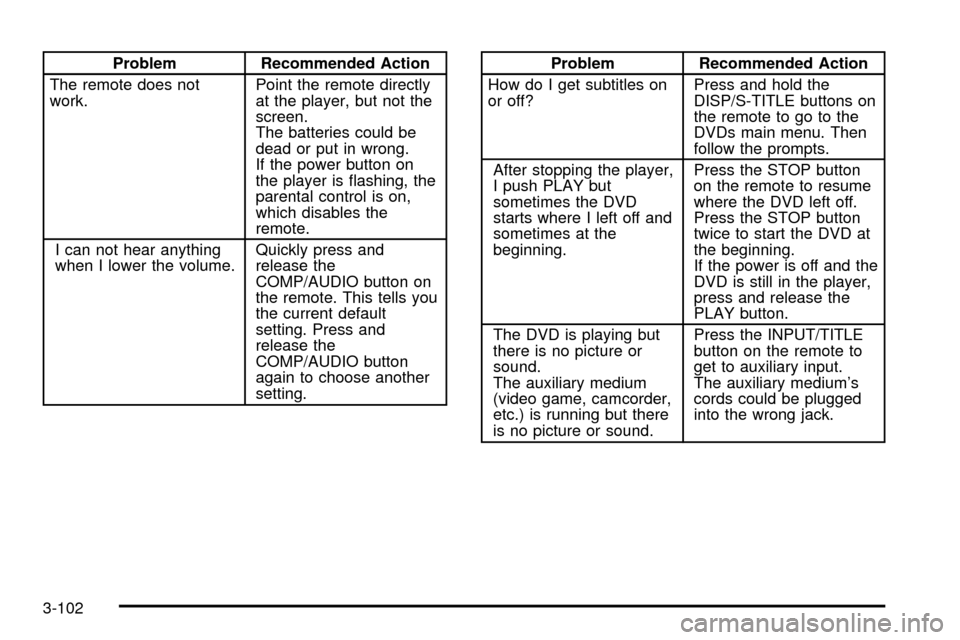
Problem Recommended Action
The remote does not
work.Point the remote directly
at the player, but not the
screen.
The batteries could be
dead or put in wrong.
If the power button on
the player is ¯ashing, the
parental control is on,
which disables the
remote.
I can not hear anything
when I lower the volume.Quickly press and
release the
COMP/AUDIO button on
the remote. This tells you
the current default
setting. Press and
release the
COMP/AUDIO button
again to choose another
setting.Problem Recommended Action
How do I get subtitles on
or off?Press and hold the
DISP/S-TITLE buttons on
the remote to go to the
DVDs main menu. Then
follow the prompts.
After stopping the player,
I push PLAY but
sometimes the DVD
starts where I left off and
sometimes at the
beginning.Press the STOP button
on the remote to resume
where the DVD left off.
Press the STOP button
twice to start the DVD at
the beginning.
If the power is off and the
DVD is still in the player,
press and release the
PLAY button.
The DVD is playing but
there is no picture or
sound.
The auxiliary medium
(video game, camcorder,
etc.) is running but there
is no picture or sound.Press the INPUT/TITLE
button on the remote to
get to auxiliary input.
The auxiliary medium's
cords could be plugged
into the wrong jack.
3-102
Page 425 of 436

Driving (cont.)
In Rain and on Wet Roads...........................4-30
Winter........................................................4-38
Dual Automatic Climate Control System.............3-24
Dual Climate Control System............................3-21
DVD Player....................................................3-96
DVD ............................................................3-108
Cleaning the Video Screen..........................3-108
Distortion..................................................3-106
Rear Seat Entertainment System...................3-93
E
Electrical System............................................5-88
Add-On Equipment......................................5-88
Fuses and Circuit Breakers...........................5-89
Headlamps.................................................5-88
Power Windows and Other Power Options......5-88
Windshield Wiper Fuses...............................5-88
Emergency Release for Opening Liftgate............2-13
Emissions Inspection and Maintenance
Programs...................................................3-45
Engine..........................................................5-20
Air Cleaner/Filter.........................................5-20
Battery.......................................................5-41
Change Engine Oil Light...............................3-47
Check and Service Engine Soon Light............3-43Engine (cont.)
Compartment Overview................................5-12
Coolant Heater............................................2-21
Coolant Temperature Gage...........................3-42
Coolant......................................................5-24
Cooling System Inspection............................6-16
Exhaust.....................................................2-32
Fan Noise..................................................5-35
Oil .............................................................5-16
Overheating................................................5-27
Reduced Power Light...................................3-48
Starting......................................................2-20
Engine Compartment Fuse Block......................5-89
ENGINE COOLANT HOT/IDLE ENGINE.............3-61
Engine Coolant Level Check.............................6-11
Engine Oil Additives........................................5-19
Engine Oil Level Check...................................6-11
Engine Oil Scheduled Maintenance..................... 6-5
Entertainment System....................................3-108
Cleaning the Video Screen..........................3-108
DVD Distortion..........................................3-106
Entry Lighting.................................................3-19
Environmental Concerns..................................4-17
Erasing HomeLink
žButtons..............................2-42
Exit Lighting...................................................3-19
Express±Down Window....................................2-15
Extender, Safety Belt.......................................1-27
Exterior Lamps...............................................3-15
5