lock CHEVROLET TRAIL BLAZER 2003 1.G Service Manual
[x] Cancel search | Manufacturer: CHEVROLET, Model Year: 2003, Model line: TRAIL BLAZER, Model: CHEVROLET TRAIL BLAZER 2003 1.GPages: 436, PDF Size: 2.98 MB
Page 117 of 436

If you use the unlock button on the remote keyless entry
transmitter to enter your vehicle, the preset driver's
seat and mirror positions will be recalled if programmed
to do so through the Driver Information Center (DIC).
The numbers on the back of the transmitters,
1 or 2, correspond to the numbers on the memory
controls.
The seat and mirror positions can also be recalled by
placing the key in the ignition if programmed to do
so through the Driver Information Center (DIC).
To stop recall movement of the memory feature at any
time, press one of the power seat controls or memory
buttons.
Two personalized exit positions can be set by ®rst
recalling the driver's position (by pressing 1 or 2), then
positioning the seat in the desired exit position for
that driver. Press and hold the button with the exit
symbol for three seconds. A double chime will sound to
let you know that the position has been stored.With the vehicle in PARK (P), the exit position for that
driver can be recalled by pressing the exit button.
The mirrors, power lumbar and recline positions will not
be stored or recalled for the exit positions. If no exit
position is stored, the default is all the way rearward.
Further programming for automatic seat and mirror
movement can be done through the Driver Information
Center (DIC). You may choose to either select or
not select the following:
·Automatic seat and mirror movement when the
vehicle is unlocked with the remote keyless entry,
·automatic seat and mirror movement when a key is
placed in the ignition, and
·automatic seat movement to the exit position when
the vehicle is in PARK (P).
2-51
Page 119 of 436

Instrument Panel Overview...............................3-4
Hazard Warning Flashers................................3-6
Other Warning Devices...................................3-6
Horn.............................................................3-7
Tilt Wheel.....................................................3-7
Turn Signal/Multifunction Lever.........................3-7
Exterior Lamps.............................................3-15
Interior Lamps..............................................3-18
Accessory Power Outlets...............................3-20
Ashtrays and Cigarette Lighter........................3-20
Climate Controls............................................3-21
Dual Climate Control System..........................3-21
Dual Automatic Climate Control System...........3-24
Rear Climate Control System.........................3-30
Steering Wheel Climate Controls.....................3-34
Climate Controls Personalization.....................3-34Warning Lights, Gages and Indicators.............3-35
Instrument Panel Cluster................................3-36
Speedometer and Odometer...........................3-37
Tachometer.................................................3-38
Safety Belt Reminder Light.............................3-38
Air Bag Readiness Light................................3-38
Charging System Light..................................3-39
Voltmeter Gage............................................3-40
Brake System Warning Light..........................3-41
Anti-Lock Brake System Warning Light.............3-42
Engine Coolant Temperature Gage..................3-42
Malfunction Indicator Lamp.............................3-43
Oil Pressure Gage........................................3-46
Change Engine Oil Light................................3-47
Security Light...............................................3-47
Cruise Control Light......................................3-48
Reduced Engine Power Light.........................3-48
Service Four-Wheel Drive Warning Light..........3-49
Check Gages Warning Light...........................3-49
Gate Ajar Light.............................................3-50
Fuel Gage...................................................3-50
Low Fuel Warning Light.................................3-51
Section 3 Instrument Panel
3-1
Page 125 of 436
Horn
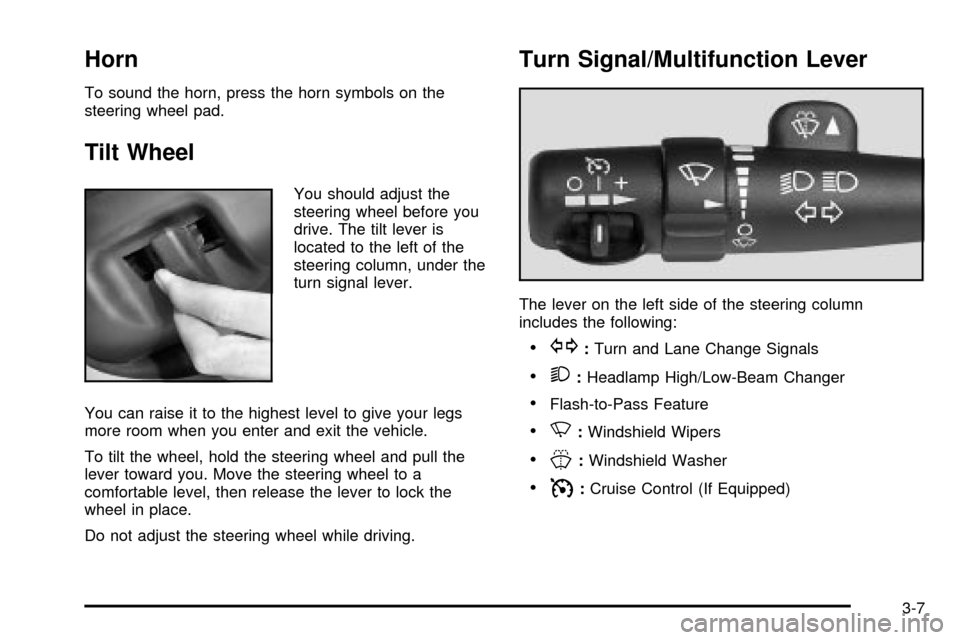
To sound the horn, press the horn symbols on the
steering wheel pad.
Tilt Wheel
You should adjust the
steering wheel before you
drive. The tilt lever is
located to the left of the
steering column, under the
turn signal lever.
You can raise it to the highest level to give your legs
more room when you enter and exit the vehicle.
To tilt the wheel, hold the steering wheel and pull the
lever toward you. Move the steering wheel to a
comfortable level, then release the lever to lock the
wheel in place.
Do not adjust the steering wheel while driving.
Turn Signal/Multifunction Lever
The lever on the left side of the steering column
includes the following:
·G:Turn and Lane Change Signals
·2:Headlamp High/Low-Beam Changer
·Flash-to-Pass Feature
·N:Windshield Wipers
·J:Windshield Washer
·I:Cruise Control (If Equipped)
3-7
Page 128 of 436
RainsenseŸ Wipers
Your vehicle may be equipped with
RainsenseŸ windshield wipers. When active, these
wipers are able to detect moisture on the windshield and
automatically turn on the wipers.
The moisture sensor is located next to the inside
rearview mirror and is mounted on the windshield.
To turn on the RainsenseŸ feature, the wipers must be
set to one of the ®ve delay settings on the multifunction
lever. Each of the ®ve settings adjusts the sensitivity
of the rainsensor. For more wipes, select the higher
settings; for fewer wipes, select the lower settings
located closer to off on the multifunction lever.
The rainsensor will automatically control the frequency
of the wipes from off to high speed according to the
weather conditions. The wipers can be left in a
rainsense mode even when it is not raining.
Notice:If you do not turn off the windshield wipers
when driving through an automatic car wash, you
could damage the wipers. Always turn off the
windshield wipers before entering an automatic
car wash.
Windshield Washer
L
(Windshield Washer):To spray washer ¯uid on the
windshield, press the windshield washer paddle. The
wipers will clear the window and then either stop
or return to your preset speed.
{CAUTION:
In freezing weather, do not use your washer
until the windshield is warmed. Otherwise the
washer ¯uid can form ice on the windshield,
blocking your vision.
3-10
Page 134 of 436

Automatic Headlamp System
When it is dark enough outside, your Automatic
Headlamp System will turn on your headlamps at the
normal brightness along with other lamps such as
the taillamps, sidemarker, parking lamps and the
instrument panel lights. The radio lights will also be on.
Your vehicle is equipped with a light sensor on the
top of the instrument panel. Be sure it is not covered or
the system will be on whenever the ignition is on.
The system may also turn on your lights when driving
through a parking garage, heavy overcast weather
or a tunnel. This is normal.
There is a delay in the transition between the daytime
and nighttime operation of the Daytime Running
Lamps (DRL) and the automatic headlamp systems, so
that driving under bridges or bright overhead street
lights does not affect the system. The DRL and
automatic headlamp system will only be affected when
the light sensor sees a change in lighting lasting
longer than the delay.If you start your vehicle in a dark garage, the automatic
headlamp system will come on immediately. Once
you leave the garage, it will take about one minute for
the automatic headlamp system to change to DRL if it is
light outside. During that delay, your instrument panel
cluster may not be as bright as usual. Make sure
your instrument panel brightness control is in the full
bright position.
To idle your vehicle with the automatic headlamp
system off, set the parking brake while the ignition is off.
Then start your vehicle. The automatic headlamp
system will stay off until you release the parking brake,
shift out of park or turn the exterior lamp control to
the off position as described in ªExterior Lampsº listed
previously.
Lamps On Reminder
A reminder tone will sound when your headlamps or
parking lamps are manually turned on, the driver's door
is open and your ignition is in LOCK or ACCESSORY.
To turn the tone off, turn the knob all the way
counterclockwise. In the automatic mode, the headlamps
turn off once the ignition key is in LOCK.
3-16
Page 136 of 436
Interior Lamps
Instrument Panel Brightness
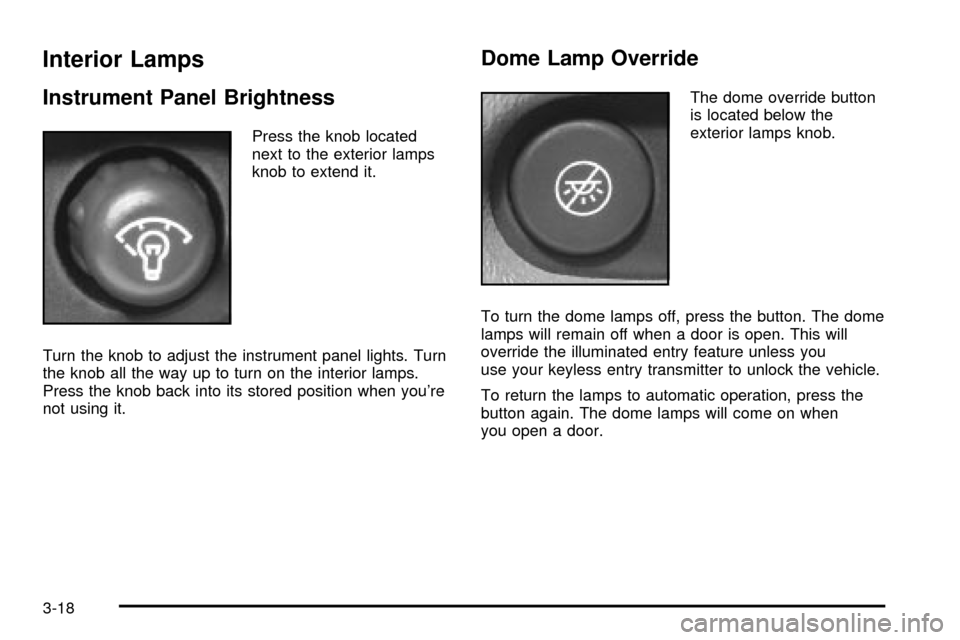
Press the knob located
next to the exterior lamps
knob to extend it.
Turn the knob to adjust the instrument panel lights. Turn
the knob all the way up to turn on the interior lamps.
Press the knob back into its stored position when you're
not using it.
Dome Lamp Override
The dome override button
is located below the
exterior lamps knob.
To turn the dome lamps off, press the button. The dome
lamps will remain off when a door is open. This will
override the illuminated entry feature unless you
use your keyless entry transmitter to unlock the vehicle.
To return the lamps to automatic operation, press the
button again. The dome lamps will come on when
you open a door.
3-18
Page 137 of 436
Entry Lighting
Your vehicle is equipped with entry lighting.
When a door is opened, the dome lamps will come on if
the dome override button is in the ªoutº position.
When all the doors are closed, the lamps will stay on for
a short period of time and will then turn off automatically.
If you use your keyless entry transmitter to unlock the
vehicle, the interior lights will come on for a short
time whether or not the dome override is on.
Exit Lighting
With exit lighting, the interior lamps will come on when
you remove the key from the ignition to help you
see while exiting the vehicle. With the dome override
button in the ªoutº position, these lights will stay on for a
short period of time and then will go out.
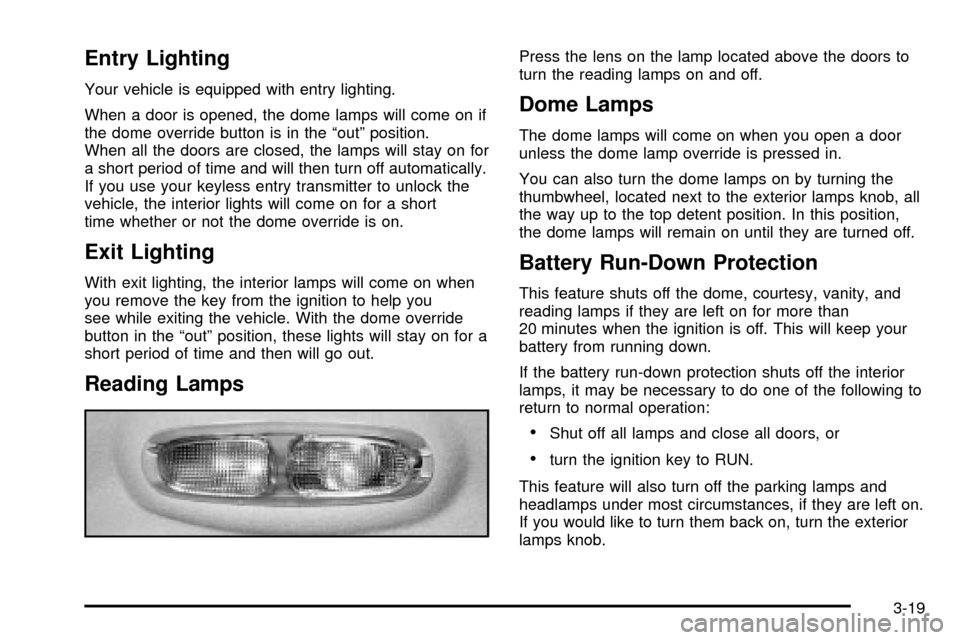
Reading Lamps
Press the lens on the lamp located above the doors to
turn the reading lamps on and off.
Dome Lamps
The dome lamps will come on when you open a door
unless the dome lamp override is pressed in.
You can also turn the dome lamps on by turning the
thumbwheel, located next to the exterior lamps knob, all
the way up to the top detent position. In this position,
the dome lamps will remain on until they are turned off.
Battery Run-Down Protection
This feature shuts off the dome, courtesy, vanity, and
reading lamps if they are left on for more than
20 minutes when the ignition is off. This will keep your
battery from running down.
If the battery run-down protection shuts off the interior
lamps, it may be necessary to do one of the following to
return to normal operation:
·Shut off all lamps and close all doors, or
·turn the ignition key to RUN.
This feature will also turn off the parking lamps and
headlamps under most circumstances, if they are left on.
If you would like to turn them back on, turn the exterior
lamps knob.
3-19
Page 139 of 436
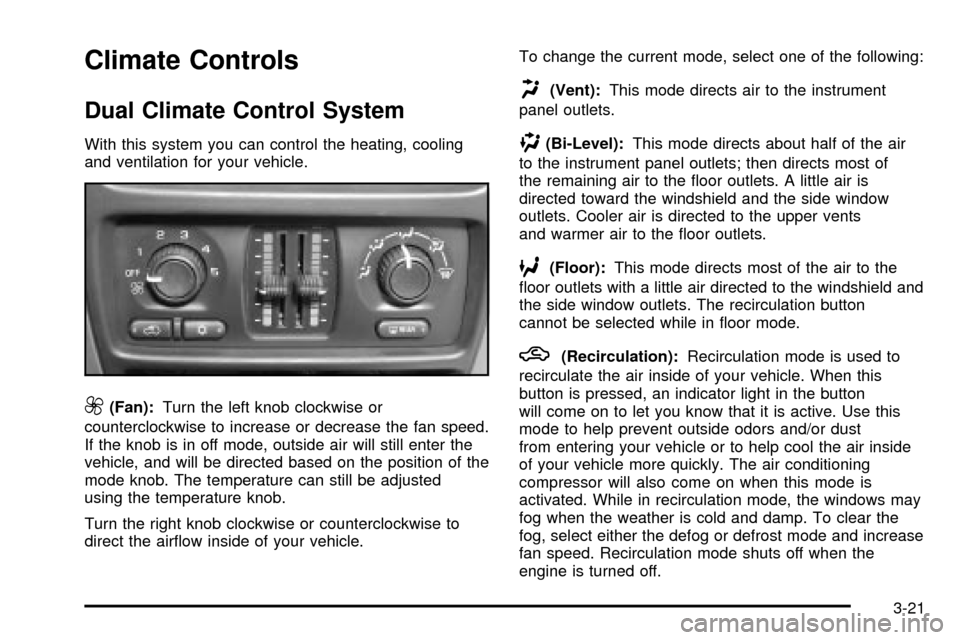
Climate Controls
Dual Climate Control System
With this system you can control the heating, cooling
and ventilation for your vehicle.
9(Fan):Turn the left knob clockwise or
counterclockwise to increase or decrease the fan speed.
If the knob is in off mode, outside air will still enter the
vehicle, and will be directed based on the position of the
mode knob. The temperature can still be adjusted
using the temperature knob.
Turn the right knob clockwise or counterclockwise to
direct the air¯ow inside of your vehicle.To change the current mode, select one of the following:
H(Vent):This mode directs air to the instrument
panel outlets.
)(Bi-Level):This mode directs about half of the air
to the instrument panel outlets; then directs most of
the remaining air to the ¯oor outlets. A little air is
directed toward the windshield and the side window
outlets. Cooler air is directed to the upper vents
and warmer air to the ¯oor outlets.
6(Floor):This mode directs most of the air to the
¯oor outlets with a little air directed to the windshield and
the side window outlets. The recirculation button
cannot be selected while in ¯oor mode.
h(Recirculation):Recirculation mode is used to
recirculate the air inside of your vehicle. When this
button is pressed, an indicator light in the button
will come on to let you know that it is active. Use this
mode to help prevent outside odors and/or dust
from entering your vehicle or to help cool the air inside
of your vehicle more quickly. The air conditioning
compressor will also come on when this mode is
activated. While in recirculation mode, the windows may
fog when the weather is cold and damp. To clear the
fog, select either the defog or defrost mode and increase
fan speed. Recirculation mode shuts off when the
engine is turned off.
3-21
Page 140 of 436

Temperature Control
Driver's Side:The lever on the left side of the climate
control panel is used to raise or lower the temperature
on the driver's side of the vehicle. Slide the lever
up or down to adjust the temperature.
Passenger's Side:The lever on the right side of the
climate control panel is used to raise or lower the
temperature on the passenger's side of the vehicle.
Slide the lever up or down to adjust the temperature.
This lever also adjusts the temperature to the rear
seat outlets.
When the temperature outside is 0ÉF (-18ÉC) or lower,
use the engine coolant heater, if equipped, to provide
warmer air, faster to your vehicle.
#(Air Conditioning):Press this button to turn the
air-conditioning system on or off. When the button
is pressed, an indicator light will come on and the
system will begin to cool and dehumidify the air inside
of your vehicle. You may notice a slight change in
engine performance when the air conditioning
compressor shuts off and turns on again. This
is normal.
Defogging and Defrosting
Fog on the inside of windows is a result of high humidity
(moisture) condensing on the cool window glass. This
can be minimized if the climate control system is
used properly. There are two modes to choose from to
clear fog or frost from your windshield. Use the
defog mode to clear the windows of fog or moisture and
warm the passengers. Use the defrost mode to
remove fog or frost from the windshield more quickly.
Turn the right knob clockwise or counterclockwise
to select one of the following modes:
-(Defog):This mode directs the air to the ¯oor
outlets, windshield and side window outlets. The
recirculation button cannot be selected while in defog
mode.
1(Defrost):This mode directs most of the air to the
windshield and the side window outlets, with only a
little air directed to the ¯oor outlets. The air conditioning
compressor may run to dehumidify the air to prevent
window fogging. The recirculation button cannot
be selected while in defrost mode. Do not drive the
vehicle until all the windows are clear.
3-22
Page 143 of 436

MODE:Press this button to manually select the air
delivery mode to the ¯oor, instrument panel, or
windshield outlets. The system will stay in the selected
mode until the mode button is pressed again or the
AUTO button is pressed.
Driver's Side Temperature Knob:Turn this knob
clockwise or counterclockwise to manually raise or lower
the temperature on the driver's side of the vehicle.
The display will show the temperature setting decreasing
or increasing and the word DRIVER will appear on
the display. This knob can also adjust the passenger's
side temperature setting simultaneously if the
two zones are linked. The words DRIVER and PASS
will then appear on the display.Passenger's Side Temperature Knob:Turn this knob
clockwise or counterclockwise to manually raise or
lower the temperature on the passenger's side of the
vehicle. The display will show the temperature
setting decreasing or increasing and the word PASS will
appear on the display. The passenger's temperature
setting can be set to match and link to the driver's
temperature setting by pressing and holding the AUTO
button for three seconds. Now, by adjusting the
driver's side temperature setting, the passenger's side
temperature setting will follow and both DRIVER
and PASS will appear on the display. The passenger's
side temperature setting also resets and relinks to
the driver's side temperature setting if the vehicle has
been off for more than two hours.
3-25