ESP CHEVROLET TRAIL BLAZER 2007 1.G User Guide
[x] Cancel search | Manufacturer: CHEVROLET, Model Year: 2007, Model line: TRAIL BLAZER, Model: CHEVROLET TRAIL BLAZER 2007 1.GPages: 574, PDF Size: 2.94 MB
Page 237 of 574
Language
Press the customization button until LANGUAGE:
ENGLISH appears in the display. To select
your preference for display language, press
the select button while LANGUAGE: ENGLISH
is displayed on the DIC. Pressing the select
button will scroll through the following languages:
ENGLISH (default)
FRANCAIS (French)
ESPANOL (Spanish)
Choose one of the available options and press the
customization button while it is displayed on the
DIC to select it and move on to the next feature.
If you accidentally choose a language that you
do not want or understand, press and hold the
customization button and the trip information button
at the same time. The DIC will begin scrolling
through the languages in their particular language.
English will be in English, Francais will be in
French, and Espanol will be in Spanish. When you
see the language that you would like, release both
buttons. The DIC will then display the information
in the language you chose.You can also scroll through the different languages
by pressing and holding the trip reset stem
for four seconds, as long as you are in the
odometer mode.
Units
Press the customization button until UNITS:
U.S. (ENGLISH) appears in the display. To select
English or metric, press the select button while
UNITS: U.S. (ENGLISH) is displayed on the DIC.
Pressing the select button will scroll through
the following choices:
UNITS: U.S. (ENGLISH) (default)
UNITS: METRIC (km/L)
UNITS: METRIC (L/100 km)
If U.S. (ENGLISH) is chosen, all information will
be displayed in English units.
If METRIC (km/L) or METRIC (L/100 km) is chosen,
all information will be displayed in metric units.
Choose one of the available options and press
the customization button while it is displayed
on the DIC to select it and exit out of the
customizable options.
237
Page 268 of 574
To insert multiple CDs, do the following:
1. Turn the ignition on.
2. Press and hold the LOAD button for
two seconds.
A beep sounds and the indicator light, located
to the right of the slot, begins to ash and
MULTI LOAD # displays.
3. Once the light stops ashing and turns green,
INSERT CD # displays, load a CD. Insert the
CD part way into the slot, label side up.
The player pulls the CD in.
Once the CD is loaded, the indicator light
begins ashing again. Once the light stops
ashing and turns green, you can load another
CD. The CD player takes up to six CDs.
Do not try to load more than six.
To load more than one CD but less than six,
complete Steps 1 through 3. When nished
loading CDs, press the LOAD button to cancel
the loading function. The radio begins to play
the last CD loaded.
If more than one CD has been loaded,
a number for each CD displays.Playing a Specic Loaded CD
For every CD loaded, a number displays. To play
a specic CD, rst press the CD AUX button
(if not already in CD mode), then press the
numbered pushbutton that corresponds to the CD.
A small bar displays under the CD number that
is playing and the track number displays.
If an error displays, see “CD Messages” later in
this section.
CD
Z(Eject):Press theZbutton to eject CD(s).
To eject the CD that is currently playing, press
and release this button.
To eject multiple CDs, do the following:
1. Press and hold the CD
Zbutton for
two seconds.
A beep sounds and the indicator light, located
to the right of the slot, begins to ash and
EJECT ALL displays.
2. Once the light stops ashing, REMOVE CD #
displays. The CD ejects and can be removed.
Once the CD is removed, the indicator light
begins ashing again and another CD ejects.
To stop ejecting the CDs, press the
Zbutton.
268
Page 301 of 574
PROG (Program):Press this button to play
a station you have programmed on the radio
preset pushbuttons. The radio seeks preset
stations only with a strong signal that are in
the selected band.
When a CD is playing in the CD changer ,
press this button to go to the next available CD,
if multiple CDs are loaded.
QSOURCER:Press theQSOURCER
arrows to switch between FM1, FM2, AM, or
XM1 or XM2 (if equipped), or a CD. If a CD
is loaded the CD symbol displays.
QSEEKR:Press theQSEEKRarrows
to go to the previous or the next radio station
and stay there. The radio seeks stations only
with a strong signal that are in the selected band.
When a CD is playing, press the
QSEEKR
arrows to fast forward or reverse.
QVOLR(Volume):Press theQVOLR
arrows to increase or to decrease the volume.
Radio Reception
Frequency interference and static during normal
radio reception can occur if items such as
cellphone chargers, vehicle convenience
accessories, and external electronic devices
are plugged into the accessory power outlet.
If there is interference or static, unplug the item
from the accessory power outlet.
AM
The range for most AM stations is greater than
for FM, especially at night. The longer range
can cause station frequencies to interfere with
each other. For better radio reception, most
AM radio stations boost the power levels during
the day, and then reduce these levels during
the night. Static can also occur when things
like storms and power lines interfere with radio
reception. When this happens, try reducing
the treble on your radio.
301
Page 309 of 574
But the ability to drive is affected well below a
BAC of 0.10 percent. Research shows that
the driving skills of many people are impaired
at a BAC approaching 0.05 percent, and that
the effects are worse at night. All drivers
are impaired at BAC levels above 0.05 percent.
Statistics show that the chance of being in a
collision increases sharply for drivers who have a
BAC of 0.05 percent or above. A driver with a
BAC level of 0.06 percent has doubled his or her
chance of having a collision. At a BAC level of
0.10 percent, the chance of this driver having
a collision is 12 times greater; at a level of
0.15 percent, the chance is 25 times greater!
The body takes about an hour to rid itself of the
alcohol in one drink. No amount of coffee or number
of cold showers will speed that up. “I will be careful”
is not the right answer. What if there is an
emergency, a need to take sudden action, as when
a child darts into the street? A person with even a
moderate BAC might not be able to react quickly
enough to avoid the collision.
There is something else about drinking and
driving that many people do not know. Medical
research shows that alcohol in a person’s systemcan make crash injuries worse, especially injuries to
the brain, spinal cord, or heart. This means that
when anyone who has been drinking — driver or
passenger — is in a crash, that person’s chance of
being killed or permanently disabled is higher than if
the person had not been drinking.
{CAUTION:
Drinking and then driving is very
dangerous. Your reexes, perceptions,
attentiveness, and judgment can be
affected by even a small amount of
alcohol. You can have a serious — or
even fatal — collision if you drive after
drinking. Please do not drink and drive
or ride with a driver who has been
drinking. Ride home in a cab; or if you
are with a group, designate a driver
who will not drink.
309
Page 316 of 574
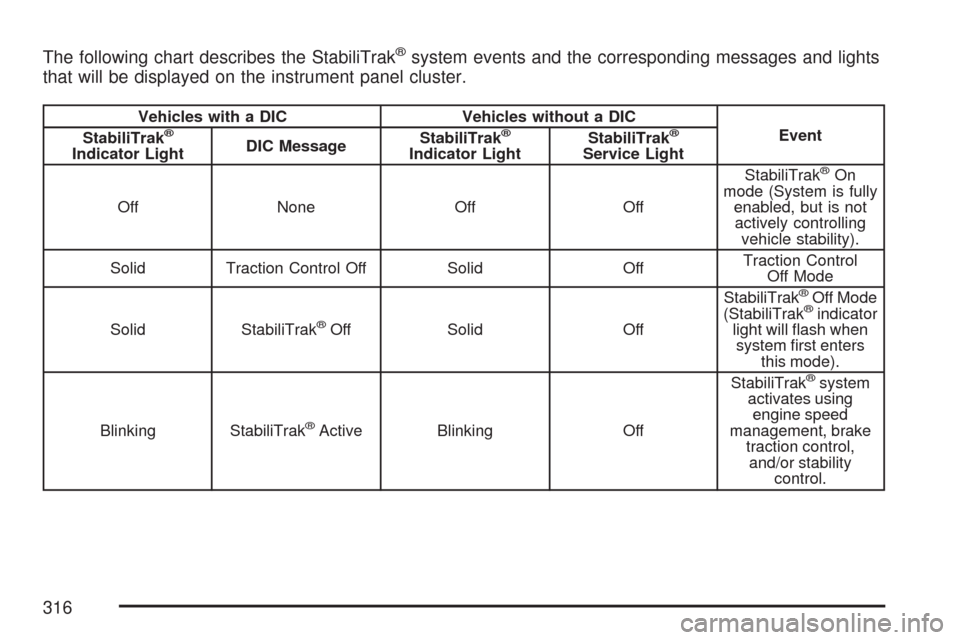
The following chart describes the StabiliTrak®system events and the corresponding messages and lights
that will be displayed on the instrument panel cluster.
Vehicles with a DIC Vehicles without a DIC
Event
StabiliTrak®
Indicator LightDIC MessageStabiliTrak
®
Indicator LightStabiliTrak
®
Service Light
Off None Off OffStabiliTrak®On
mode (System is fully
enabled, but is not
actively controlling
vehicle stability).
Solid Traction Control Off Solid OffTraction Control
Off Mode
Solid StabiliTrak
®Off Solid OffStabiliTrak
®Off Mode
(StabiliTrak®indicator
light will ash when
system rst enters
this mode).
Blinking StabiliTrak
®Active Blinking OffStabiliTrak
®system
activates using
engine speed
management, brake
traction control,
and/or stability
control.
316
Page 321 of 574
Passing
The driver of a vehicle about to pass another on a
two-lane highway waits for just the right moment,
accelerates, moves around the vehicle ahead, then
goes back into the right lane again. A simple
maneuver?
Not necessarily! Passing another vehicle on a
two-lane highway is a potentially dangerous move,
since the passing vehicle occupies the same lane
as oncoming traffic for several seconds. A
miscalculation, an error in judgment, or a brief
surrender to frustration or anger can suddenly put
the passing driver face to face with the worst of all
traffic accidents — the head-on collision.
So here are some tips for passing:
Drive ahead. Look down the road, to the
sides, and to crossroads for situations
that might affect your passing patterns. If you
have any doubt whatsoever about making
a successful pass, wait for a better time.
Watch for traffic signs, pavement markings,
and lines. If you can see a sign up ahead
that might indicate a turn or an intersection,delay your pass. A broken center line usually
indicates it is all right to pass, providing
the road ahead is clear. Never cross a solid
line on your side of the lane or a double solid
line, even if the road seems empty of
approaching traffic.
Do not get too close to the vehicle you want
to pass while you are awaiting an opportunity.
For one thing, following too closely reduces
your area of vision, especially if you are
following a larger vehicle. Also, you will not
have adequate space if the vehicle ahead
suddenly slows or stops. Keep back a
reasonable distance.
When it looks like a chance to pass is coming
up, start to accelerate but stay in the right
lane and do not get too close. Time your move
so you will be increasing speed as the time
comes to move into the other lane. If the way
is clear to pass, you will have a running
start that more than makes up for the distance
you would lose by dropping back. And if
something happens to cause you to cancel
your pass, you need only slow down and drop
back again and wait for another opportunity.
321
Page 322 of 574
If other vehicles are lined up to pass a slow
vehicle, wait your turn. But take care that
someone is not trying to pass you as you
pull out to pass the slow vehicle. Remember
to glance over your shoulder and check the
blind spot.
Check your vehicle’s mirrors, glance over your
shoulder, and start your left lane change signal
before moving out of the right lane to pass.
When you are far enough ahead of the passed
vehicle to see its front in your vehicle’s inside
mirror, activate the right lane change signal
and move back into the right lane. Remember
that an outside convex mirror makes the vehicle
you just passed seem farther away from you
than it really is.
Try not to pass more than one vehicle at a time
on two-lane roads. Reconsider before passing
the next vehicle.
Do not overtake a slowly moving vehicle
too rapidly. Even though the brake lamps
are not ashing, it might be slowing down or
starting to turn.
If you are being passed, make it easy for the
following driver to get ahead of you. Perhaps
you can ease a little to the right.
Loss of Control
Let us review what driving experts say about what
happens when the three control systems — brakes,
steering, and acceleration — do not have enough
friction where the tires meet the road to do what the
driver has asked.
In any emergency, do not give up. Keep trying to
steer and constantly seek an escape route or
area of less danger.
Skidding
In a skid, a driver can lose control of the vehicle.
Defensive drivers avoid most skids by taking
reasonable care suited to existing conditions, and
by not overdriving those conditions. But skids
are always possible.
The three types of skids correspond to your
vehicle’s three control systems. In the braking skid,
the wheels are not rolling. In the steering or
cornering skid, too much speed or steering in a
curve causes tires to slip and lose cornering force.
And in the acceleration skid, too much throttle
causes the driving wheels to spin.
A cornering skid is best handled by easing your
foot off the accelerator pedal.
322
Page 324 of 574
The airbag system is designed to work properly
under a wide range of conditions, including off-road
usage. Observe safe driving speeds, especially
on rough terrain. As always, wear your safety belt.
Off-road driving can be great fun. But it does
have some denite hazards. The greatest of these
is the terrain itself.
“Off-roading” means you have left the great North
American road system behind. Traffic lanes
are not marked. Curves are not banked. There are
no road signs. Surfaces can be slippery, rough,
uphill, or downhill. In short, you have gone
right back to nature.
Off-road driving involves some new skills. And that
is why it is very important that you read this
guide. You will nd many driving tips and
suggestions. These will help make your off-road
driving safer and more enjoyable.Before You Go Off-Roading
There are some things to do before you go out.
For example, be sure to have all necessary
maintenance and service work done. Check to
make sure all underbody shields, if the vehicle has
them, are properly attached.
Be sure you read all the information about your
four-wheel-drive vehicle in this manual.
Is there enough fuel? Is the spare tire fully
inated? Are the uid levels up where they should
be? What are the local laws that apply to
off-roading where you will be driving? If you do not
know, you should check with law enforcement
people in the area. Will you be on someone’s
private land? If so, be sure to get the necessary
permission.
324
Page 326 of 574
Environmental Concerns
Off-road driving can provide wholesome and
satisfying recreation. However, it also raises
environmental concerns. We recognize these
concerns and urge every off-roader to follow these
basic rules for protecting the environment:
Always use established trails, roads, and areas
that have been specially set aside for public
off-road recreational driving; obey all
posted regulations.
Avoid any driving practice that could damage
the environment — shrubs, owers, trees,
grasses — or disturb wildlife. This includes
wheel-spinning, breaking down trees, or
unnecessary driving through streams or over
soft ground.
Always carry a litter bag — make sure all
refuse is removed from any campsite
before leaving.
Take extreme care with open res where
permitted, camp stoves, and lanterns.
Never park your vehicle over dry grass or
other combustible materials that could
catch re from the heat of the vehicle’s
exhaust system.
Traveling to Remote Areas
It makes sense to plan your trip, especially when
going to a remote area. Know the terrain and plan
your route. You are much less likely to get bad
surprises. Get accurate maps of trails and terrain.
Try to learn of any blocked or closed roads.
It is also a good idea to travel with at least one
other vehicle. If something happens to one
of them, the other can help quickly.
Does your vehicle have a winch? If so, be sure to
read the winch instructions. In a remote area, a
winch can be handy if you get stuck. But you will
want to know how to use it properly.
Getting Familiar with Off-Road Driving
It is a good idea to practice in an area that is
safe and close to home before you go into
the wilderness. Off-road driving does require some
new and different skills. Here is what we mean.
Tune your senses to different kinds of signals. Your
eyes, for example, need to constantly sweep the
terrain for unexpected obstacles. Your ears need to
listen for unusual tire or engine sounds. With your
arms, hands, feet, and body, you will need to
respond to vibrations and vehicle bounce.
326
Page 327 of 574
Controlling your vehicle is the key to successful
off-road driving. One of the best ways to control
your vehicle is to control your speed. Here are
some things to keep in mind. At higher speeds:
You approach things faster and you have less
time to scan the terrain for obstacles.
You have less time to react.
You have more vehicle bounce when you drive
over obstacles.
You will need more distance for braking,
especially since you are on an unpaved
surface.
{CAUTION:
When you are driving off-road, bouncing
and quick changes in direction can easily
throw you out of position. This could
cause you to lose control and crash. So,
whether you are driving on or off the road,
you and your passengers should wear
safety belts.
Scanning the Terrain
Off-road driving can take you over many different
kinds of terrain. You need to be familiar with
the terrain and its many different features. Here
are some things to consider.
Surface Conditions:Off-roading can take you
over hard-packed dirt, gravel, rocks, grass, sand,
mud, snow, or ice. Each of these surfaces
affects the steering, acceleration, and braking of
your vehicle in different ways. Depending upon the
kind of surface you are on, you may experience
slipping, sliding, wheel spinning, delayed
acceleration, poor traction, and longer braking
distances.
327