remote control CHEVROLET TRAIL BLAZER 2007 1.G Owner's Manual
[x] Cancel search | Manufacturer: CHEVROLET, Model Year: 2007, Model line: TRAIL BLAZER, Model: CHEVROLET TRAIL BLAZER 2007 1.GPages: 574, PDF Size: 2.94 MB
Page 297 of 574
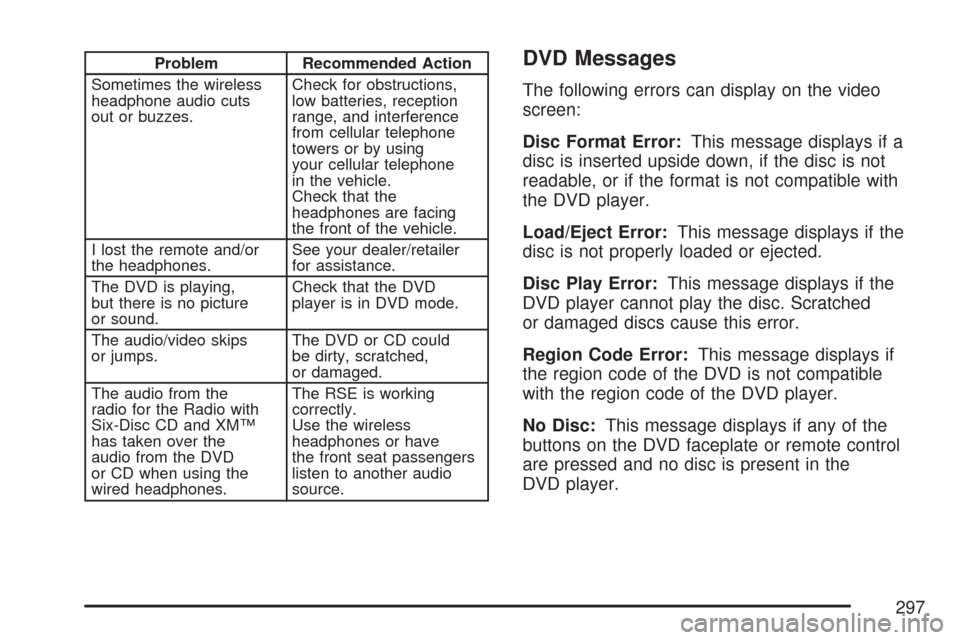
Problem Recommended Action
Sometimes the wireless
headphone audio cuts
out or buzzes.Check for obstructions,
low batteries, reception
range, and interference
from cellular telephone
towers or by using
your cellular telephone
in the vehicle.
Check that the
headphones are facing
the front of the vehicle.
I lost the remote and/or
the headphones.See your dealer/retailer
for assistance.
The DVD is playing,
but there is no picture
or sound.Check that the DVD
player is in DVD mode.
The audio/video skips
or jumps.The DVD or CD could
be dirty, scratched,
or damaged.
The audio from the
radio for the Radio with
Six-Disc CD and XM™
has taken over the
audio from the DVD
or CD when using the
wired headphones.The RSE is working
correctly.
Use the wireless
headphones or have
the front seat passengers
listen to another audio
source.DVD Messages
The following errors can display on the video
screen:
Disc Format Error:This message displays if a
disc is inserted upside down, if the disc is not
readable, or if the format is not compatible with
the DVD player.
Load/Eject Error:This message displays if the
disc is not properly loaded or ejected.
Disc Play Error:This message displays if the
DVD player cannot play the disc. Scratched
or damaged discs cause this error.
Region Code Error:This message displays if
the region code of the DVD is not compatible
with the region code of the DVD player.
No Disc:This message displays if any of the
buttons on the DVD faceplate or remote control
are pressed and no disc is present in the
DVD player.
297
Page 298 of 574
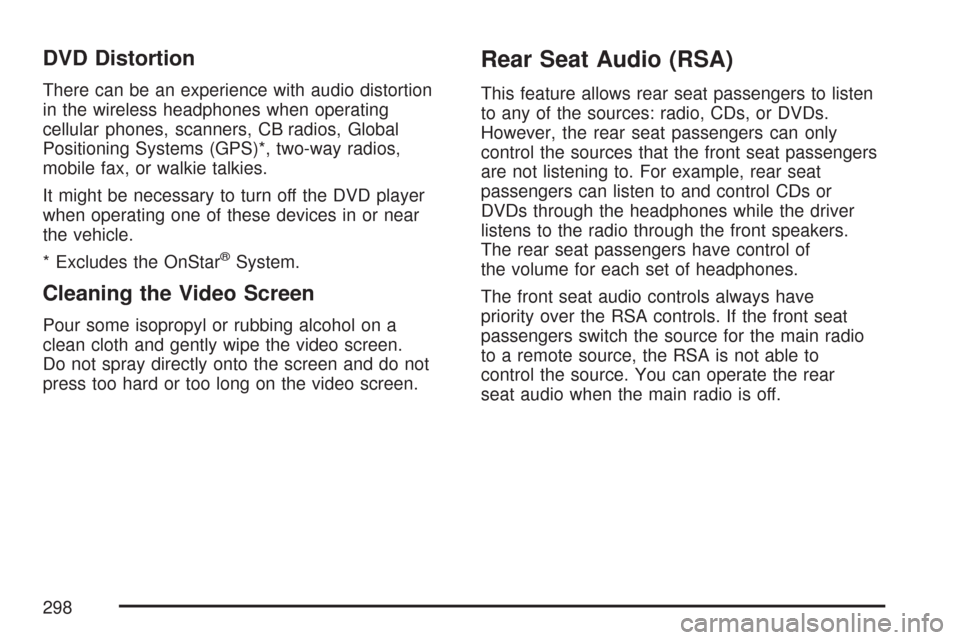
DVD Distortion
There can be an experience with audio distortion
in the wireless headphones when operating
cellular phones, scanners, CB radios, Global
Positioning Systems (GPS)*, two-way radios,
mobile fax, or walkie talkies.
It might be necessary to turn off the DVD player
when operating one of these devices in or near
the vehicle.
* Excludes the OnStar
®System.
Cleaning the Video Screen
Pour some isopropyl or rubbing alcohol on a
clean cloth and gently wipe the video screen.
Do not spray directly onto the screen and do not
press too hard or too long on the video screen.
Rear Seat Audio (RSA)
This feature allows rear seat passengers to listen
to any of the sources: radio, CDs, or DVDs.
However, the rear seat passengers can only
control the sources that the front seat passengers
are not listening to. For example, rear seat
passengers can listen to and control CDs or
DVDs through the headphones while the driver
listens to the radio through the front speakers.
The rear seat passengers have control of
the volume for each set of headphones.
The front seat audio controls always have
priority over the RSA controls. If the front seat
passengers switch the source for the main radio
to a remote source, the RSA is not able to
control the source. You can operate the rear
seat audio when the main radio is off.
298
Page 573 of 574
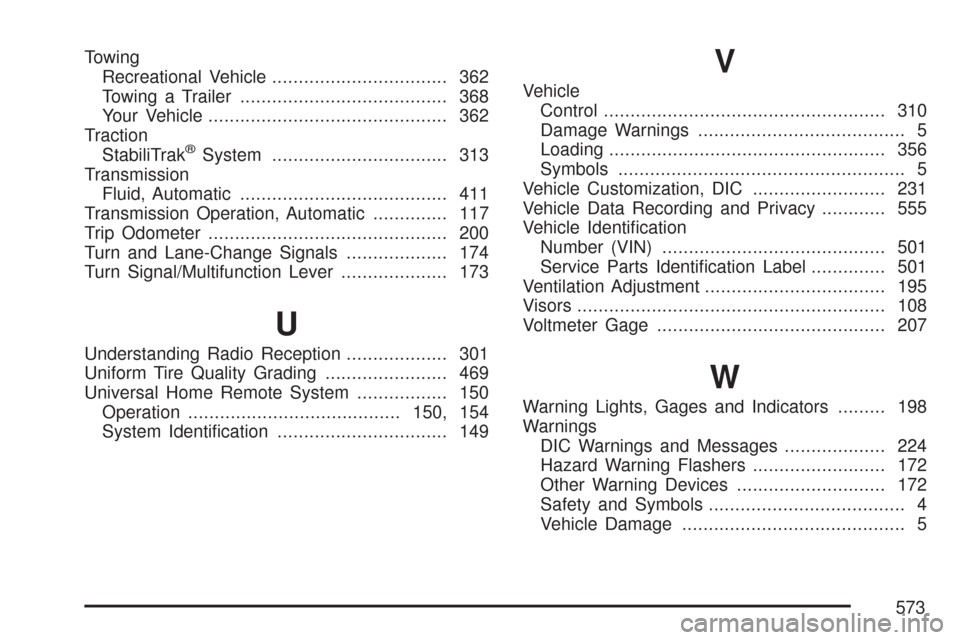
Towing
Recreational Vehicle................................. 362
Towing a Trailer....................................... 368
Your Vehicle............................................. 362
Traction
StabiliTrak
®System................................. 313
Transmission
Fluid, Automatic....................................... 411
Transmission Operation, Automatic.............. 117
Trip Odometer............................................. 200
Turn and Lane-Change Signals................... 174
Turn Signal/Multifunction Lever.................... 173
U
Understanding Radio Reception................... 301
Uniform Tire Quality Grading....................... 469
Universal Home Remote System................. 150
Operation........................................150, 154
System Identication................................ 149
V
Vehicle
Control..................................................... 310
Damage Warnings....................................... 5
Loading.................................................... 356
Symbols...................................................... 5
Vehicle Customization, DIC......................... 231
Vehicle Data Recording and Privacy............ 555
Vehicle Identication
Number (VIN).......................................... 501
Service Parts Identication Label.............. 501
Ventilation Adjustment.................................. 195
Visors.......................................................... 108
Voltmeter Gage........................................... 207
W
Warning Lights, Gages and Indicators......... 198
Warnings
DIC Warnings and Messages................... 224
Hazard Warning Flashers......................... 172
Other Warning Devices............................ 172
Safety and Symbols..................................... 4
Vehicle Damage.......................................... 5
573