engine CHEVROLET TRAIL BLAZER 2008 1.G Workshop Manual
[x] Cancel search | Manufacturer: CHEVROLET, Model Year: 2008, Model line: TRAIL BLAZER, Model: CHEVROLET TRAIL BLAZER 2008 1.GPages: 472, PDF Size: 2.57 MB
Page 187 of 472
if your vehicle gets stuck in sand, mud, ice, or snow and
you want to rock your vehicle to attempt to free it, or if you
are driving in extreme off-road conditions and require
more wheel spin. SeeIf Your Vehicle is Stuck in Sand,
Mud, Ice, or Snow on page 4-33. To turn the StabiliTrak
®
system back on, press the StabiliTrak®button again.
There are several conditions that can cause this
message to appear.
The message may display if the brake system
warning light is on. SeeBrake System Warning
Light on page 3-38.
The message displays if the vehicle is shifted
into 4LO.
The message turns off as soon as the conditions that
caused the message to be displayed are no longer
present.
TIGHTEN FUEL CAP
This message may display and a chime may sound
if the vehicle’s fuel cap is not tightened properly.
Fully reinstall the fuel cap. SeeFilling the Tank on
page 5-8. The diagnostic system can determine if the
fuel cap has been left off or improperly installed.A loose or missing fuel cap allows fuel to evaporate
into the atmosphere. This message remains on until
it is manually cleared from the DIC display. The DIC
message is also cancelled if the ignition is turned off.
The DIC message and the Service Engine Soon
light may come on again during a second trip if the fuel
cap is still not tightened properly. SeeMalfunction
Indicator Lamp on page 3-41for more information.
TRACTION CONTROL OFF
This message displays when you momentarily press
the StabiliTrak®button located on the transmission
shift handle. In this mode, stability control and the
brake-traction control are functional. Engine speed
management will be modied and the driven wheels
can spin more freely. For more details on this mode,
seeStabiliTrak
®System on page 4-5.
TURN SIGNAL ON
This message displays and a chime sounds if a turn
signal is left on for 3/4 of a mile (1.2 km). Move the turn
signal/multifunction lever to the off position.
3-57
Page 195 of 472
While your vehicle is parked:
Familiarize yourself with all of its controls.
Familiarize yourself with its operation.
Set up your audio system by presetting your
favorite radio stations, setting the tone, and
adjusting the speakers. Then, when driving
conditions permit, you can tune to your favorite
radio stations using the presets and steering wheel
controls if the vehicle has them.
Notice:Before adding any sound equipment to
your vehicle, such as an audio system, CD player,
CB radio, mobile telephone, or two-way radio, make
sure that it can be added by checking with your
dealer/retailer. Also, check federal rules covering
mobile radio and telephone units. If sound
equipment can be added, it is very important to do
it properly. Added sound equipment may interfere
with the operation of your vehicle’s engine, radio,
or other systems, and even damage them.
Your vehicle’s systems may interfere with the
operation of sound equipment that has been added.Notice:The chime signals related to safety belts,
parking brake, and other functions of your vehicle
operate through the radio/entertainment system.
If that equipment is replaced or additional equipment
is added to your vehicle, the chimes may not
work. Make sure that replacement or additional
equipment is compatible with your vehicle before
installing it. SeeAccessories and Modifications
on page 5-3.
Your vehicle may have a feature called Retained
Accessory Power (RAP). With RAP, the audio system
can be played even after the ignition is turned off.
SeeRetained Accessory Power (RAP) on page 2-21
for more information.
3-65
Page 242 of 472
Avoid needless heavy braking. Some people drive
in spurts — heavy acceleration followed by heavy
braking — rather than keeping pace with traffic. This
is a mistake. The brakes might not have time to cool
between hard stops. The brakes will wear out much faster
if you do a lot of heavy braking. If you keep pace with the
traffic and allow realistic following distances, you will
eliminate a lot of unnecessary braking. That means better
braking and longer brake life.
If your vehicle’s engine ever stops while you are driving,
brake normally but do not pump the brakes. If you do,
the pedal could get harder to push down. If the
engine stops, you will still have some power brake
assist. But you will use it when you brake. Once the
power assist is used up, it can take longer to stop and
the brake pedal will be harder to push.
Adding non-dealer/non-retailer accessories can affect
your vehicle’s performance. SeeAccessories and
Modifications on page 5-3.
Antilock Brake System (ABS)
Your vehicle has the Antilock Brake System (ABS), an
advanced electronic braking system that will help
prevent a braking skid.
When you start the engine and begin to drive away, ABS
will check itself. You might hear a momentary motor or
clicking noise while this test is going on. This is normal.If there is a problem with
ABS, this warning light will
stay on. SeeAnti-lock
Brake System (ABS)
Warning Light on
page 3-39.
Along with ABS, your vehicle has a Dynamic Rear
Proportioning (DRP) system. If there is a DRP problem,
both the brake and ABS warning lights come on
accompanied by a 10-second chime. The lights and
chime will come on each time the ignition is turned on
until the problem is repaired. See your dealer/retailer for
service.
Let us say the road is wet and you are driving safely.
Suddenly, an animal jumps out in front of you. You slam
on the brakes and continue braking. Here is what
happens with ABS:
A computer senses that wheels are slowing down. If
one of the wheels is about to stop rolling, the computer
will separately work the brakes at each front wheel
and at both rear wheels.
ABS can change the brake pressure faster than any
driver could. The computer is programmed to make the
most of available tire and road conditions. This can
help you steer around the obstacle while braking hard.
4-4
Page 243 of 472
As you brake, the computer keeps receiving updates on
wheel speed and controls braking pressure accordingly.
Remember: ABS does not change the time you need
to get your foot up to the brake pedal or always
decrease stopping distance. If you get too close to the
vehicle in front of you, you will not have time to
apply the brakes if that vehicle suddenly slows or stops.
Always leave enough room up ahead to stop, even
though you have ABS.
Using ABS
Do not pump the brakes. Just hold the brake pedal down
rmly and let antilock work for you. You might feel the
brakes vibrate or notice some noise, but this is normal.
Braking in Emergencies
With ABS, you can steer and brake at the same time. In
many emergencies, steering can help you more than
even the very best braking.
Locking Rear Axle
If your vehicle has this feature, your locking rear axle
can give you additional traction on snow, mud, ice, sand
or gravel. It works like a standard axle most of the
time, but when one of the rear wheels has no traction
and the other does, this feature will allow the wheel with
traction to move the vehicle.
StabiliTrak®System
Your vehicle is equipped with StabiliTrak®, Electronic
Stability Control (ESC) which combines antilock
brake, traction and stability control systems and helps
the driver maintain directional control of the vehicle
in most driving conditions.
Traction control activates when the controller senses
wheel spin. StabiliTrak
®will selectively apply the brakes
and reduce engine torque to help regain traction.
Stability control activates when the controller senses a
discrepancy between your intended path and the
direction the vehicle is travelling. StabiliTrak
®selectively
applies braking pressure at any one of the vehicle’s
brakes to help guide the vehicle in the direction which
you are steering.
When you rst start your vehicle and begin to drive
away, the system performs several diagnostic checks to
insure there are no problems. You may hear or feel
the system working. This is normal and does not mean
there is a problem with your vehicle. If driving
conditions delay system initialization, the STABILITRAK
NOT READY message may be displayed. If this is
the case, your vehicle does not need servicing.
For more information on the stability messages, see
DIC Warnings and Messages on page 3-53.
4-5
Page 244 of 472
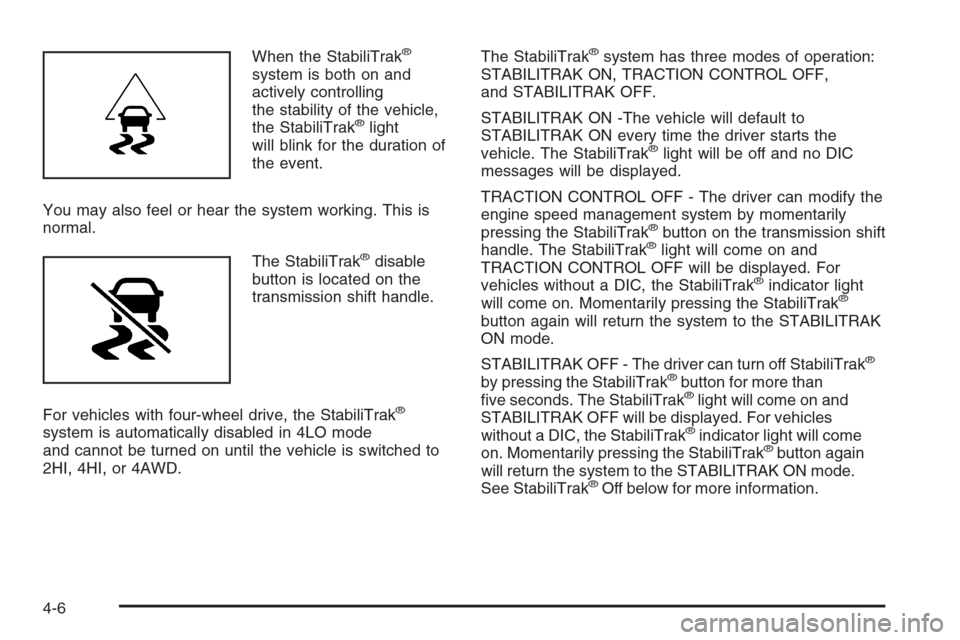
When the StabiliTrak®
system is both on and
actively controlling
the stability of the vehicle,
the StabiliTrak
®light
will blink for the duration of
the event.
You may also feel or hear the system working. This is
normal.
The StabiliTrak
®disable
button is located on the
transmission shift handle.
For vehicles with four-wheel drive, the StabiliTrak
®
system is automatically disabled in 4LO mode
and cannot be turned on until the vehicle is switched to
2HI, 4HI, or 4AWD.The StabiliTrak
®system has three modes of operation:
STABILITRAK ON, TRACTION CONTROL OFF,
and STABILITRAK OFF.
STABILITRAK ON -The vehicle will default to
STABILITRAK ON every time the driver starts the
vehicle. The StabiliTrak
®light will be off and no DIC
messages will be displayed.
TRACTION CONTROL OFF - The driver can modify the
engine speed management system by momentarily
pressing the StabiliTrak
®button on the transmission shift
handle. The StabiliTrak®light will come on and
TRACTION CONTROL OFF will be displayed. For
vehicles without a DIC, the StabiliTrak
®indicator light
will come on. Momentarily pressing the StabiliTrak®
button again will return the system to the STABILITRAK
ON mode.
STABILITRAK OFF - The driver can turn off StabiliTrak
®
by pressing the StabiliTrak®button for more than
ve seconds. The StabiliTrak®light will come on and
STABILITRAK OFF will be displayed. For vehicles
without a DIC, the StabiliTrak
®indicator light will come
on. Momentarily pressing the StabiliTrak®button again
will return the system to the STABILITRAK ON mode.
See StabiliTrak
®Off below for more information.
4-6
Page 245 of 472
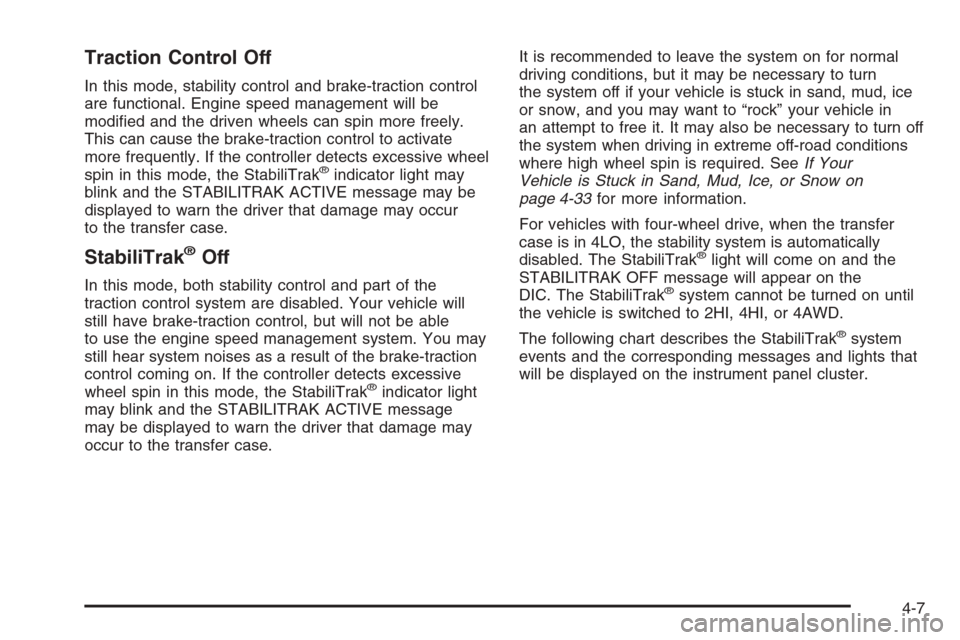
Traction Control Off
In this mode, stability control and brake-traction control
are functional. Engine speed management will be
modied and the driven wheels can spin more freely.
This can cause the brake-traction control to activate
more frequently. If the controller detects excessive wheel
spin in this mode, the StabiliTrak
®indicator light may
blink and the STABILITRAK ACTIVE message may be
displayed to warn the driver that damage may occur
to the transfer case.
StabiliTrak®Off
In this mode, both stability control and part of the
traction control system are disabled. Your vehicle will
still have brake-traction control, but will not be able
to use the engine speed management system. You may
still hear system noises as a result of the brake-traction
control coming on. If the controller detects excessive
wheel spin in this mode, the StabiliTrak
®indicator light
may blink and the STABILITRAK ACTIVE message
may be displayed to warn the driver that damage may
occur to the transfer case.It is recommended to leave the system on for normal
driving conditions, but it may be necessary to turn
the system off if your vehicle is stuck in sand, mud, ice
or snow, and you may want to “rock” your vehicle in
an attempt to free it. It may also be necessary to turn off
the system when driving in extreme off-road conditions
where high wheel spin is required. SeeIf Your
Vehicle is Stuck in Sand, Mud, Ice, or Snow on
page 4-33for more information.
For vehicles with four-wheel drive, when the transfer
case is in 4LO, the stability system is automatically
disabled. The StabiliTrak
®light will come on and the
STABILITRAK OFF message will appear on the
DIC. The StabiliTrak
®system cannot be turned on until
the vehicle is switched to 2HI, 4HI, or 4AWD.
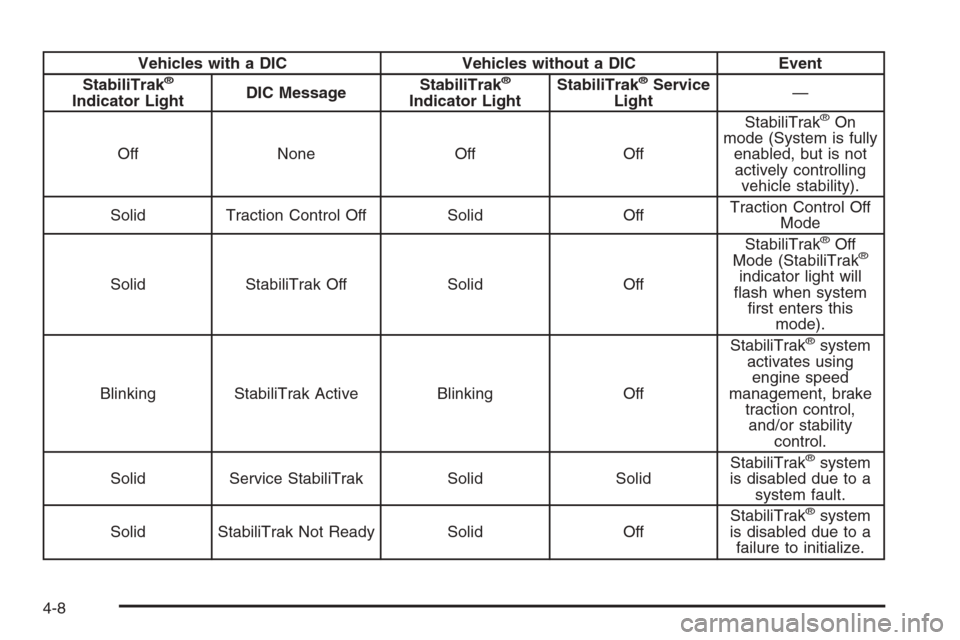
The following chart describes the StabiliTrak
®system
events and the corresponding messages and lights that
will be displayed on the instrument panel cluster.
4-7
Page 246 of 472
Vehicles with a DIC Vehicles without a DIC Event
StabiliTrak®
Indicator LightDIC MessageStabiliTrak
®
Indicator LightStabiliTrak
®Service
Light—
Off None Off OffStabiliTrak
®On
mode (System is fully
enabled, but is not
actively controlling
vehicle stability).
Solid Traction Control Off Solid OffTraction Control Off
Mode
Solid StabiliTrak Off Solid OffStabiliTrak
®Off
Mode (StabiliTrak®
indicator light will
ash when system
rst enters this
mode).
Blinking StabiliTrak Active Blinking OffStabiliTrak
®system
activates using
engine speed
management, brake
traction control,
and/or stability
control.
Solid Service StabiliTrak Solid SolidStabiliTrak
®system
is disabled due to a
system fault.
Solid StabiliTrak Not Ready Solid OffStabiliTrak
®system
is disabled due to a
failure to initialize.
4-8
Page 247 of 472
Notice:If the StabiliTrak®light comes on due to
heavy braking and/or because the traction control
system has been continuously active, do not allow
the wheel(s) of one axle to spin excessively. If you
do, you may be causing damage to the transfer case.
This could lead to costly repairs not covered by your
warranty.
Notice:If you allow the wheel(s) of one axle to spin
excessively while the StabiliTrak
®, ABS and brake
warning lights and the SERVICE STABILITRAK
message are displayed, you could damage the
transfer case. The repairs would not be covered by
your warranty. Reduce engine power and do not
spin the wheel(s) excessively while these lights and
this message are displayed.
StabiliTrak
®may activate on dry or rough roads or
under conditions such as heavy acceleration while
turning or abrupt upshifts/downshifts of the transmission.
When this happens, you may notice a reduction in
acceleration, or may hear a noise or vibration. This is
normal.If your vehicle is in cruise control when the system
activates, the StabiliTrak
®light will blink, and the cruise
control will automatically disengage. When road
conditions allow, you may re-engage the cruise control.
SeeCruise Control on page 3-10.
StabiliTrak
®will turn off automatically if a problem is
detected in the system. The StabiliTrak®light will come
on and SERVICE STABILITRAK will be displayed on
the DIC. For vehicles without a DIC, the StabiliTrak
®
light and the StabiliTrak®service light will both come on.
If the SERVICE STABILITRAK message (or StabiliTrak®
service light) does not clear itself after restarting the
vehicle, you should see your dealer for service.
Adding non-GM accessories can affect your vehicle’s
performance. SeeAccessories and Modifications
on page 5-3for more information.
4-9
Page 248 of 472
All-Wheel Drive (AWD) System
(TrailBlazer SS)
If your vehicle has this feature, engine power is sent to all
four wheels all the time.
This is like four-wheel drive, but there is no separate
lever or switch to engage or disengage the front axle. It is
fully automatic, and adjusts itself as needed for road
conditions.
Steering
Power Steering
If you lose power steering assist because the engine
stops or the system is not functioning, you can steer but it
will take much more effort.
Steering Tips
It is important to take curves at a reasonable speed.
A lot of the “driver lost control” accidents mentioned on
the news happen on curves. Here is why:
Experienced driver or beginner, each of us is subject to
the same laws of physics when driving on curves. The
traction of the tires against the road surface makes it
possible for the vehicle to change its path when you turn
the front wheels. If there is no traction, inertia will keep
the vehicle going in the same direction. If you have
ever tried to steer a vehicle on wet ice, you will
understand this.Traction in a curve depends on the condition of the tires
and the road surface, the angle at which the curve is
banked, and your speed. While in a curve, speed is the
one factor you can control.
Suppose you are steering through a sharp curve.
Then you suddenly accelerate. Both control
systems — steering and acceleration — have to
do their work where the tires meet the road. Adding the
sudden acceleration can demand too much of those
places. You can lose control.
What should you do if this ever happens? Ease up on
the accelerator pedal, steer the vehicle the way you
want it to go, and slow down.
Speed limit signs near curves warn that you should
adjust your speed. Of course, the posted speeds
are based on good weather and road conditions. Under
less favorable conditions you will want to go slower.
If you need to reduce speed when approaching a curve,
do it before you enter the curve, while the front
wheels are straight ahead.
Try to adjust the speed so you can drive through the
curve. Maintain a reasonable, steady speed. Wait
to accelerate until you are out of the curve, and then
accelerate gently into the straightaway.
Adding non-dealer/non-retailer accessories can affect
your vehicle’s performance. SeeAccessories and
Modifications on page 5-3.
4-10
Page 251 of 472
Skidding
In a skid, a driver can lose control of the vehicle.
Defensive drivers avoid most skids by taking reasonable
care suited to existing conditions, and by not overdriving
those conditions. But skids are always possible.
The three types of skids correspond to your vehicle’s
three control systems. In the braking skid, the wheels are
not rolling. In the steering or cornering skid, too much
speed or steering in a curve causes tires to slip and lose
cornering force. And in the acceleration skid, too much
throttle causes the driving wheels to spin.
A cornering skid is best handled by easing your foot off
the accelerator pedal.
If your vehicle starts to slide, ease your foot off the
accelerator pedal and quickly steer the way you want
the vehicle to go. If you start steering quickly enough,
your vehicle may straighten out. Always be ready
for a second skid if it occurs.
Of course, traction is reduced when water, snow, ice,
gravel, or other material is on the road. For safety, you
want to slow down and adjust your driving to these
conditions. It is important to slow down on slippery
surfaces because stopping distance is longer and
vehicle control more limited.While driving on a surface with reduced traction, try your
best to avoid sudden steering, acceleration, or braking,
including reducing vehicle speed by shifting to a lower
gear. Any sudden changes could cause the tires to
slide. You might not realize the surface is slippery until
your vehicle is skidding. Learn to recognize warning
clues — such as enough water, ice, or packed snow on
the road to make a mirrored surface — and slow down
when you have any doubt.
Remember: Any Antilock Brake System (ABS) helps
avoid only the braking skid.
Competitive Driving
See your warranty book before using your vehicle for
competitive driving. After reviewing your warranty book,
please see the GM Performance Parts website or catalog
for parts and equipment required for competitive driving.
Notice:If you use your vehicle for competitive
driving, the engine may use more oil than it would
with normal use. Low oil levels can damage the
engine. Be sure to check the oil level often during
competitive driving and keep the level at or near the
upper mark that shows the proper operating range
on the engine oil dipstick. For information on how to
add oil, seeEngine Oil on page 5-17.
4-13