lock CHEVROLET TRAIL BLAZER 2008 1.G Manual PDF
[x] Cancel search | Manufacturer: CHEVROLET, Model Year: 2008, Model line: TRAIL BLAZER, Model: CHEVROLET TRAIL BLAZER 2008 1.GPages: 472, PDF Size: 2.57 MB
Page 217 of 472
To change the default on the display, press the DISPL
knob until the desired display appears, then press and
hold this knob for two seconds. The radio produces one
beep and the selected display becomes the default.
INFO (Information):INFO displays when a current
track has ID3 tag information. Press this button
to display the artist name and album contained in the
tag. INFO disappears from the display when the
information in the ID3 tag has nished.
BAND:Press this button to listen to the radio when a
CD is playing. The inactive CD remains inside the radio
for future listening.
CD AUX (Auxiliary):Press this button to play a CD
when listening to the radio. The CD symbol displays
when a CD is loaded.
Z(Eject):Press this button to eject a CD. Eject can
activate while either the ignition or the radio is off.
CDs can be loaded while the ignition and the radio is
off if this button is pressed rst.
XM Radio Messages
If you have a Radio with CD or Radio with Six-Disc CD,
you can receive these radio display messages.
XL (Explicit Language Channels):These channels, or
any others, can be blocked at a customer’s request,
by calling 1-800-852-XMXM (9696).
Updating:The encryption code in the receiver is being
updated, and no action is required. This process
should take no longer than 30 seconds.
No Signal:The system is functioning correctly, but the
vehicle is in a location that is blocking the XM™
signal. When the vehicle is moved into an open area,
the signal should return.
Loading XM:The audio system is acquiring and
processing audio and text data. No action is needed.
This message should disappear shortly.
CH Off Air:This channel is not currently in service.
Tune to another channel.
CH Unavail:This previously assigned channel is no
longer assigned. Tune to another station. If this station
was one of the presets, choose another station for
that preset button.
3-87
Page 218 of 472
No Info:No artist, song title, category, or text
information is available at this time on this channel.
The system is working properly.
Not Found:There are no channels available for the
selected category. The system is working properly.
XM Locked:The XM™ receiver in the vehicle may
have previously been in another vehicle. For security
purposes, XM™ receivers cannot be swapped between
vehicles. If this message is received after having
your vehicle serviced, check with your dealer/retailer.
Radio ID:If tuned to channel 0, this message alternates
with the XM™ Radio 8 digit radio ID label. This label
is needed to activate the service.
Unknown:If this message is received when tuned to
channel 0, there could be a receiver fault. Consult
with your dealer/retailer.
Chk XMRcvr:If this message does not clear within a
short period of time, the receiver could have a fault.
Consult with your dealer/retailer.
If you have a Radio with CD (MP3), you can receive
these radio display messages.XL (Explicit Language Channels):These channels, or
any others, can be blocked at a customer’s request,
by calling 1-800-852-XMXM (9696).
Updating:The encryption code in the receiver is being
updated, and no action is required. This process
should take no longer than 30 seconds.
No Signl:The system is functioning correctly, but the
vehicle is in a location that is blocking the XM™ signal.
When the vehicle is moved into an open area, the signal
should return.
Loading:The radio system is acquiring and processing
audio and text data. No action is needed. This message
should disappear shortly.
Off Air:This channel is not currently in service.
Tune to another channel.
CH Unavl:This previously assigned channel is no
longer assigned. Tune to another station. If this station
was one of the presets, choose another station for
that preset button.
No Info:No artist, song title, category, or text
information is available at this time on this channel.
The system is working properly.
3-88
Page 219 of 472
NotFound:There are no channels available for the
selected category. The system is working properly.
XM Lock:The XM™ receiver in your vehicle may have
previously been in another vehicle. For security
purposes, XM™ receivers cannot be swapped between
vehicles. If this message is received after having
your vehicle serviced, check with your dealer/retailer.
Radio ID:If tuned to channel 0, this message will
alternate with the XM™ Radio eight digit radio ID label.
This label is needed to activate the service.
Unknown:If this message is received when tuned to
channel 0, there could be a receiver fault. Consult
with your dealer/retailer.
Check XM:If this message does not clear within a
short period of time, the receiver could have a
fault. Consult with your dealer/retailer.Navigation/Radio System
Your vehicle may have a navigation radio system.
The navigation system has built-in features intended to
minimize driver distraction. Technology alone, no
matter how advanced, can never replace your own
judgment. See the Navigation System manual for some
tips to help you reduce distractions while driving.
Rear Seat Entertainment (RSE)
System
Your vehicle may have the Digital Versatile Disc (DVD)
Rear Seat Entertainment (RSE) system. The RSE
system includes a DVD player, a video display screen,
two sets of wireless headphones, and a remote
control.
3-89
Page 223 of 472
Audio Output
Audio from the DVD player or auxiliary inputs can be
heard through the following possible sources:
Wireless Headphones
Vehicle Speakers
Vehicle wired headphone jacks on the Rear Seat
Audio system (if equipped)
The RSE system always transmits the audio signal to
the wireless headphones, if there is audio available.
See “Headphones” earlier in this section for more
information.
The RSE system is capable of outputting audio to the
vehicle speakers by using the radio. The RSE system can
be selected as an audio source on the radio if the RSE
system power is on. Once the RSE system is selected as
an audio source on the radio, adjust the speaker volume
on the radio, if necessary. If the RSE system power is not
on, the RSE system is not an available source on the
radio. See your vehicle’s radio information.
The RSE system is capable of outputting audio to the
wired headphone jacks on the rear seat audio system
(if equipped). The RSE system can be selected as
an audio source on the rear seat audio system if the
RSE system power is on. SeeRear Seat Audio (RSA)
on page 3-103for more information.
Video Screen
The video screen is located in the overhead console.
To use the video screen, do the following:
1. Push forward on the release button located on the
DVD display console.
2. Pull the screen down, away from you, and adjust its
position as desired.
When the video screen is not in use, push it up into its
locked position.
If a DVD is playing and the screen is raised to its locked
position, the screen shuts off, but the DVD continues
to play through the previous audio or video source.
The video screen contains the IR transmitters for the
wireless headphones and the IR receivers for the remote
control. If the screen is in the closed position, the
signals are not available for the operation of the
headphones or the remote control.
Notice:Avoid directly touching the video screen,
as damage may occur. See “Cleaning the Video
Screen” later in this section for more information.
3-93
Page 227 of 472
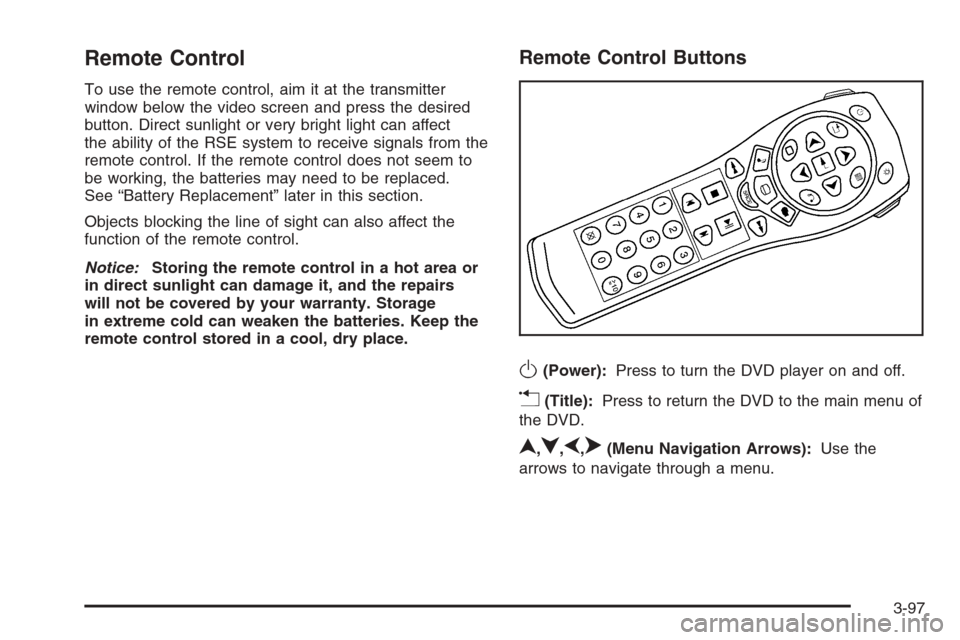
Remote Control
To use the remote control, aim it at the transmitter
window below the video screen and press the desired
button. Direct sunlight or very bright light can affect
the ability of the RSE system to receive signals from the
remote control. If the remote control does not seem to
be working, the batteries may need to be replaced.
See “Battery Replacement” later in this section.
Objects blocking the line of sight can also affect the
function of the remote control.
Notice:Storing the remote control in a hot area or
in direct sunlight can damage it, and the repairs
will not be covered by your warranty. Storage
in extreme cold can weaken the batteries. Keep the
remote control stored in a cool, dry place.
Remote Control Buttons
O(Power):Press to turn the DVD player on and off.
v(Title):Press to return the DVD to the main menu of
the DVD.
n,q,p,o(Menu Navigation Arrows):Use the
arrows to navigate through a menu.
3-97
Page 234 of 472
SEEK:Press this button to advance to the next station
or track and stay there. The display shows the
selection. This function is inactive if the front seat
passengers are listening to the same audio source.
To scan preset stations, press and hold the SEEK button
for two seconds and the radio advances to the next
preset station. If the button continues to be held down,
the radio advances through the available
preset stations. The display shows the selections.
This function is inactive if the front seat passengers
are listing to the radio.
While a CD is playing, press the SEEK button to go to
the next track on the CD. This function is inactive if
the front seat passengers are listening to a CD.
While a CD is playing in the six-disc CD player, press and
hold the SEEK button for two seconds to go you to the
next CD, if multiple CDs are loaded. This function is
inactive if the front seat passengers are listening to a CD.Theft-Deterrent Feature
THEFTLOCK®is designed to discourage theft of your
vehicle’s radio. The feature works automatically by
learning a portion of the Vehicle Identication Number
(VIN). If the radio is moved to a different vehicle, it does
not operate and LOCKED displays.
When the radio and vehicle are turned off, the blinking
red light indicates that THEFTLOCK
®is armed.
With THEFTLOCK
®activated, the radio does not
operate if stolen.
3-104
Page 239 of 472
Your Driving, the Road, and Your Vehicle..........4-2
Defensive Driving...........................................4-2
Drunk Driving.................................................4-2
Control of a Vehicle........................................4-3
Braking.........................................................4-3
Antilock Brake System (ABS)...........................4-4
Braking in Emergencies...................................4-5
Locking Rear Axle..........................................4-5
StabiliTrak
®System........................................4-5
All-Wheel Drive (AWD) System
(TrailBlazer SS).........................................4-10
Steering......................................................4-10
Off-Road Recovery.......................................4-12
Passing.......................................................4-12
Loss of Control.............................................4-12
Competitive Driving.......................................4-13
Off-Road Driving (Except SS).........................4-14
Driving at Night............................................4-26Driving in Rain and on Wet Roads..................4-26
Before Leaving on a Long Trip.......................4-27
Highway Hypnosis........................................4-28
Hill and Mountain Roads................................4-28
Winter Driving..............................................4-29
If Your Vehicle is Stuck in Sand, Mud, Ice,
or Snow...................................................4-33
Rocking Your Vehicle to Get It Out.................4-34
Recovery Hooks...........................................4-34
Loading Your Vehicle....................................4-35
Adding a Snow Plow or Similar Equipment.......4-41
Towing..........................................................4-41
Towing Your Vehicle.....................................4-41
Recreational Vehicle Towing...........................4-42
Electronically Controlled Air Suspension
System....................................................4-47
Towing a Trailer...........................................4-48
Section 4 Driving Your Vehicle
4-1
Page 242 of 472
Avoid needless heavy braking. Some people drive
in spurts — heavy acceleration followed by heavy
braking — rather than keeping pace with traffic. This
is a mistake. The brakes might not have time to cool
between hard stops. The brakes will wear out much faster
if you do a lot of heavy braking. If you keep pace with the
traffic and allow realistic following distances, you will
eliminate a lot of unnecessary braking. That means better
braking and longer brake life.
If your vehicle’s engine ever stops while you are driving,
brake normally but do not pump the brakes. If you do,
the pedal could get harder to push down. If the
engine stops, you will still have some power brake
assist. But you will use it when you brake. Once the
power assist is used up, it can take longer to stop and
the brake pedal will be harder to push.
Adding non-dealer/non-retailer accessories can affect
your vehicle’s performance. SeeAccessories and
Modifications on page 5-3.
Antilock Brake System (ABS)
Your vehicle has the Antilock Brake System (ABS), an
advanced electronic braking system that will help
prevent a braking skid.
When you start the engine and begin to drive away, ABS
will check itself. You might hear a momentary motor or
clicking noise while this test is going on. This is normal.If there is a problem with
ABS, this warning light will
stay on. SeeAnti-lock
Brake System (ABS)
Warning Light on
page 3-39.
Along with ABS, your vehicle has a Dynamic Rear
Proportioning (DRP) system. If there is a DRP problem,
both the brake and ABS warning lights come on
accompanied by a 10-second chime. The lights and
chime will come on each time the ignition is turned on
until the problem is repaired. See your dealer/retailer for
service.
Let us say the road is wet and you are driving safely.
Suddenly, an animal jumps out in front of you. You slam
on the brakes and continue braking. Here is what
happens with ABS:
A computer senses that wheels are slowing down. If
one of the wheels is about to stop rolling, the computer
will separately work the brakes at each front wheel
and at both rear wheels.
ABS can change the brake pressure faster than any
driver could. The computer is programmed to make the
most of available tire and road conditions. This can
help you steer around the obstacle while braking hard.
4-4
Page 243 of 472
As you brake, the computer keeps receiving updates on
wheel speed and controls braking pressure accordingly.
Remember: ABS does not change the time you need
to get your foot up to the brake pedal or always
decrease stopping distance. If you get too close to the
vehicle in front of you, you will not have time to
apply the brakes if that vehicle suddenly slows or stops.
Always leave enough room up ahead to stop, even
though you have ABS.
Using ABS
Do not pump the brakes. Just hold the brake pedal down
rmly and let antilock work for you. You might feel the
brakes vibrate or notice some noise, but this is normal.
Braking in Emergencies
With ABS, you can steer and brake at the same time. In
many emergencies, steering can help you more than
even the very best braking.
Locking Rear Axle
If your vehicle has this feature, your locking rear axle
can give you additional traction on snow, mud, ice, sand
or gravel. It works like a standard axle most of the
time, but when one of the rear wheels has no traction
and the other does, this feature will allow the wheel with
traction to move the vehicle.
StabiliTrak®System
Your vehicle is equipped with StabiliTrak®, Electronic
Stability Control (ESC) which combines antilock
brake, traction and stability control systems and helps
the driver maintain directional control of the vehicle
in most driving conditions.
Traction control activates when the controller senses
wheel spin. StabiliTrak
®will selectively apply the brakes
and reduce engine torque to help regain traction.
Stability control activates when the controller senses a
discrepancy between your intended path and the
direction the vehicle is travelling. StabiliTrak
®selectively
applies braking pressure at any one of the vehicle’s
brakes to help guide the vehicle in the direction which
you are steering.
When you rst start your vehicle and begin to drive
away, the system performs several diagnostic checks to
insure there are no problems. You may hear or feel
the system working. This is normal and does not mean
there is a problem with your vehicle. If driving
conditions delay system initialization, the STABILITRAK
NOT READY message may be displayed. If this is
the case, your vehicle does not need servicing.
For more information on the stability messages, see
DIC Warnings and Messages on page 3-53.
4-5
Page 249 of 472
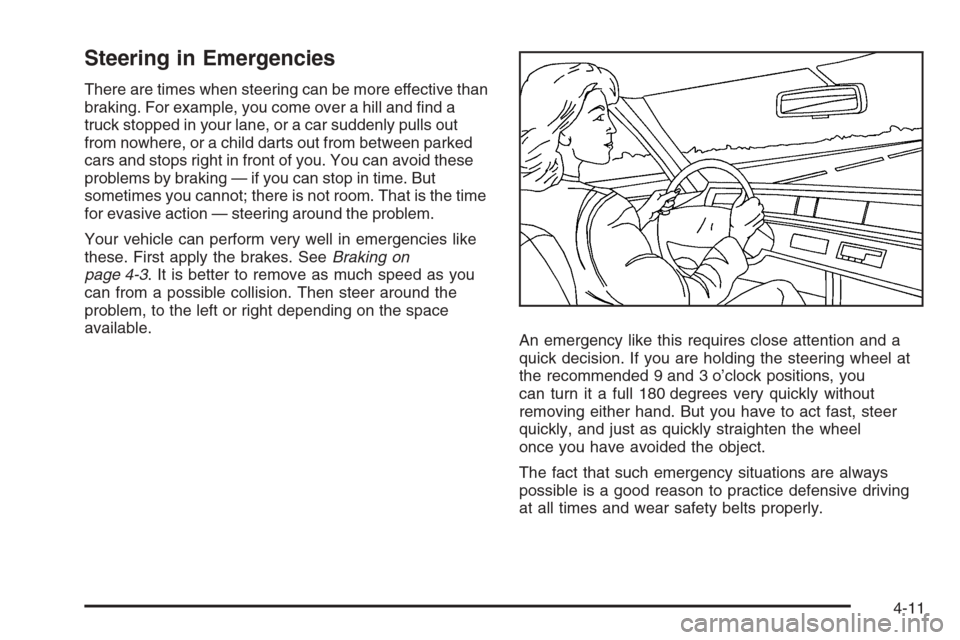
Steering in Emergencies
There are times when steering can be more effective than
braking. For example, you come over a hill and nd a
truck stopped in your lane, or a car suddenly pulls out
from nowhere, or a child darts out from between parked
cars and stops right in front of you. You can avoid these
problems by braking — if you can stop in time. But
sometimes you cannot; there is not room. That is the time
for evasive action — steering around the problem.
Your vehicle can perform very well in emergencies like
these. First apply the brakes. SeeBraking on
page 4-3. It is better to remove as much speed as you
can from a possible collision. Then steer around the
problem, to the left or right depending on the space
available.
An emergency like this requires close attention and a
quick decision. If you are holding the steering wheel at
the recommended 9 and 3 o’clock positions, you
can turn it a full 180 degrees very quickly without
removing either hand. But you have to act fast, steer
quickly, and just as quickly straighten the wheel
once you have avoided the object.
The fact that such emergency situations are always
possible is a good reason to practice defensive driving
at all times and wear safety belts properly.
4-11