remote control CHEVROLET TRAIL BLAZER 2009 1.G Owner's Manual
[x] Cancel search | Manufacturer: CHEVROLET, Model Year: 2009, Model line: TRAIL BLAZER, Model: CHEVROLET TRAIL BLAZER 2009 1.GPages: 484, PDF Size: 2.61 MB
Page 241 of 484
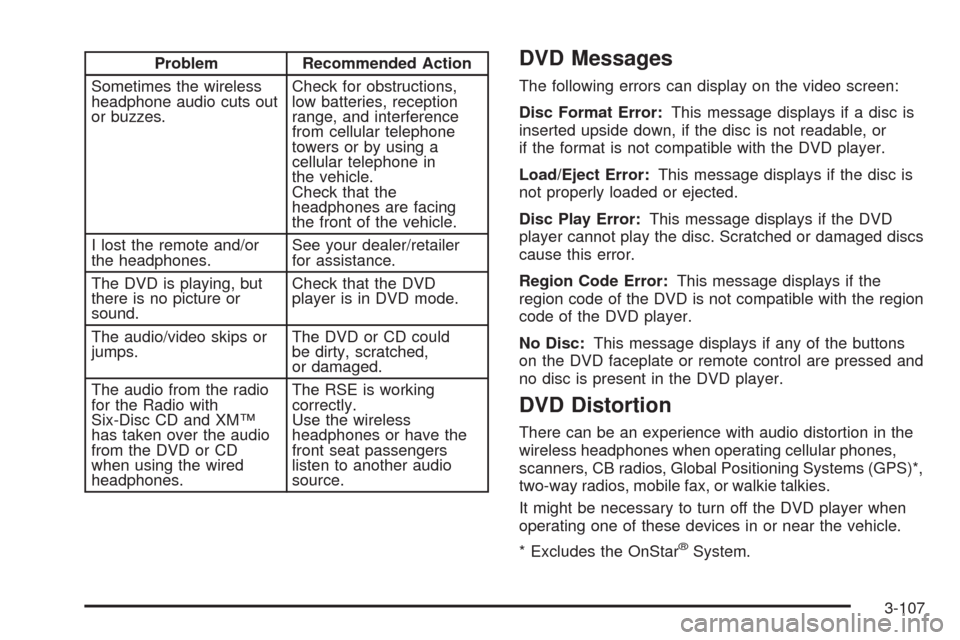
Problem Recommended Action
Sometimes the wireless
headphone audio cuts out
or buzzes.Check for obstructions,
low batteries, reception
range, and interference
from cellular telephone
towers or by using a
cellular telephone in
the vehicle.
Check that the
headphones are facing
the front of the vehicle.
I lost the remote and/or
the headphones.See your dealer/retailer
for assistance.
The DVD is playing, but
there is no picture or
sound.Check that the DVD
player is in DVD mode.
The audio/video skips or
jumps.The DVD or CD could
be dirty, scratched,
or damaged.
The audio from the radio
for the Radio with
Six-Disc CD and XM™
has taken over the audio
from the DVD or CD
when using the wired
headphones.The RSE is working
correctly.
Use the wireless
headphones or have the
front seat passengers
listen to another audio
source.DVD Messages
The following errors can display on the video screen:
Disc Format Error:This message displays if a disc is
inserted upside down, if the disc is not readable, or
if the format is not compatible with the DVD player.
Load/Eject Error:This message displays if the disc is
not properly loaded or ejected.
Disc Play Error:This message displays if the DVD
player cannot play the disc. Scratched or damaged discs
cause this error.
Region Code Error:This message displays if the
region code of the DVD is not compatible with the region
code of the DVD player.
No Disc:This message displays if any of the buttons
on the DVD faceplate or remote control are pressed and
no disc is present in the DVD player.
DVD Distortion
There can be an experience with audio distortion in the
wireless headphones when operating cellular phones,
scanners, CB radios, Global Positioning Systems (GPS)*,
two-way radios, mobile fax, or walkie talkies.
It might be necessary to turn off the DVD player when
operating one of these devices in or near the vehicle.
* Excludes the OnStar
®System.
3-107
Page 242 of 484
Cleaning the Video Screen
Use isopropyl or rubbing alcohol on a clean cloth and
gently wipe the video screen. Do not spray directly onto
the screen and do not press too hard or too long on
the video screen.
Rear Seat Audio (RSA)
This feature allows rear seat passengers to listen to any
of the sources: radio, CDs, or DVDs. However, the rear
seat passengers can only control the sources that are not
being listened by the front seat passengers. For example,
rear seat passengers can listen to and control CDs or
DVDs through the headphones while the driver listens
to the radio through the front speakers. The rear seat
passengers have control of the volume for each set
of headphones.
The front seat audio controls always have priority over
the RSA controls. If the front seat passengers switch the
source for the main radio to a remote source, the RSA is
not able to control the source. The rear seat audio can be
operated while the main radio is off.
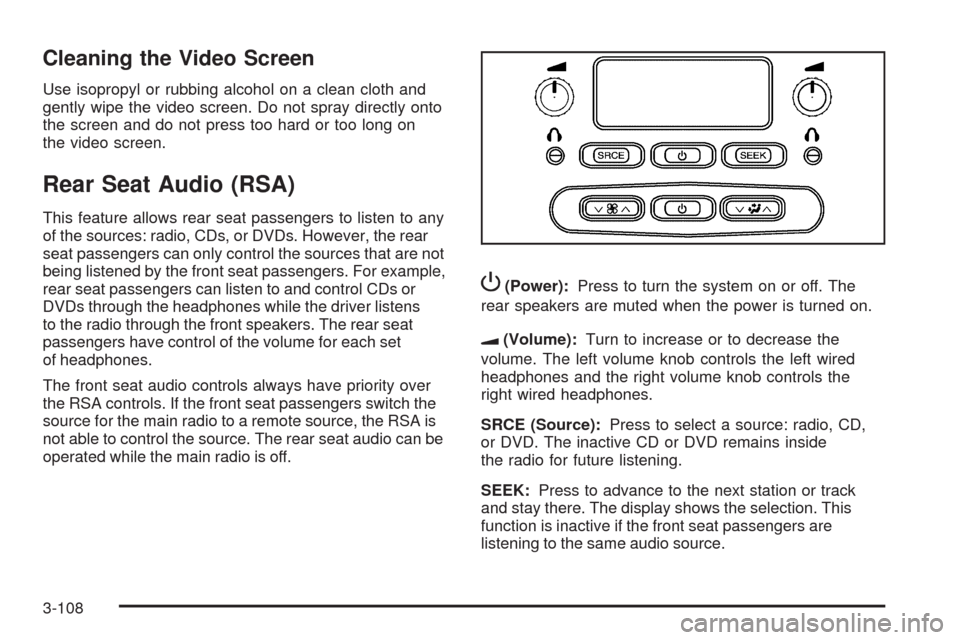
P(Power):Press to turn the system on or off. The
rear speakers are muted when the power is turned on.
u(Volume):Turn to increase or to decrease the
volume. The left volume knob controls the left wired
headphones and the right volume knob controls the
right wired headphones.
SRCE (Source):Press to select a source: radio, CD,
or DVD. The inactive CD or DVD remains inside
the radio for future listening.
SEEK:Press to advance to the next station or track
and stay there. The display shows the selection. This
function is inactive if the front seat passengers are
listening to the same audio source.
3-108
Page 305 of 484
The seven-wire harness contains the following trailer
circuits:
Yellow: Left Stop/Turn Signal
Dark Green: Right Stop/Turn Signal
Brown: Running Lamps
White: Ground
Light Green: Back-up Lamps
Dark Blue: Electric Brakes
Red: Battery Feed (The chassis wiring ring terminal
must be fastened to a stud on the underhood
electrical center before the trailer feed will become
active.)
If towing a light-duty trailer with a standard four-way
round pin connector, an adapter connector is available
from your dealer/retailer.
If charging a remote (non-vehicle) battery, turn on the
headlamps to boost the vehicle system voltage and
properly charge the battery.
The vehicle is also equipped with wiring for an electric
trailer brake controller. These wires are located inside the
vehicle on the driver side under the instrument panel.
These wires should be connected to an electric trailer
brake controller by your dealer/retailer or a qualied
service center.The vehicle may be equipped with a four-pin trailer
towing harness. This harness has a four-pin trailer
connector that contains the following trailer circuits:
Yellow: Left Stop/Turn Signal
Dark Green: Right Stop/Turn Signal
Brown: Running Lamps
White: Ground
This harness also contains the following trailer circuits
that are not connected to the four-pin trailer connector:
Light Green: Back-Up Lamps
Dark Blue: Electric Brakes
Red: Battery Feed
If the vehicle is a TrailBlazer SS, a trailer wiring harness
extension, and instructions for installing this extension,
were provided when the vehicle was delivered. This
extension will allow the vehicle’s trailer wiring harness to
be more easily accessible. There is a four-way connector
on the harness. A seven-way adapter plug is also
included if the trailer requires it.
4-59