Front end CHEVROLET TRAILBLAZER 2021 Owner's Guide
[x] Cancel search | Manufacturer: CHEVROLET, Model Year: 2021, Model line: TRAILBLAZER, Model: CHEVROLET TRAILBLAZER 2021Pages: 363, PDF Size: 6.75 MB
Page 153 of 363
Chevrolet Trailblazer Owner Manual (GMNA-Localizing-U.S./Canada-
14400528) - 2021 - CRC - 11/7/19
152 Infotainment System
.Placement and receipt of calls in a
hands-free mode.
.Sharing of the device’s address book or
contact list with the vehicle.
To minimize driver distraction, before
driving, and with the vehicle parked:
.Become familiar with the features of the
mobile device. Organize the phone book
and contact lists clearly and delete
duplicate or rarely used entries.
If possible, program speed dial or other
shortcuts.
.Review the controls and operation of the
infotainment system.
.Pair mobile device(s) to the vehicle. The
system may not work with all mobile
devices. See “Pairing”later in this section.
Vehicles with a Bluetooth system can use a
Bluetooth-capable mobile device with a
Hands-Free Profile to make and receive
phone calls. The infotainment system and
voice recognition are used to control the
system. The system can be used while the
ignition is on or in ACC/ACCESSORY. The
range of the Bluetooth system can be up to
9.1 m (30 ft). Not all mobile devices support
all functions and not all mobile devices work with the Bluetooth system. See
my.chevrolet.com for more information
about compatible mobile devices.
Controls
Use the controls on the center stack and the
steering wheel to operate the Bluetooth
system.
Steering Wheel Controls
g:
Press to answer incoming calls and start
voice recognition on your connected
Bluetooth mobile device.
i: Press to end a call, decline a call,
or cancel an operation. Press to mute or
unmute the infotainment system when not
on a call.
Infotainment System Controls
For information about how to navigate the
menu system using the infotainment
controls, see Using the System 0124.
Audio System
When using the Bluetooth mobile device
system, sound comes through the vehicle's
front audio system speakers and overrides
the audio system. The volume level while on
a mobile device call can be adjusted by
pressing the steering wheel controls or the volume control on the center stack. The
adjusted volume level remains in memory
for later calls. The volume cannot be
lowered beyond a certain level.
Bluetooth (Pairing and Using a
Phone)
Pairing
A Bluetooth-enabled mobile device must be
paired to the Bluetooth system and then
connected to the vehicle before it can be
used. See the mobile device manufacturer's
user guide for Bluetooth functions before
pairing the device.
Pairing Information
.If no mobile device has been connected,
the Phone main page on the infotainment
display will show the Connect Phone
option. Touch this option to connect.
Another way to connect is to touch the
Phones tab at the top right of the display
and then touch Add Phone.
.A Bluetooth smartphone with music
capability can be paired to the vehicle as
a smartphone and a music player at the
same time.
.Up to 10 devices can be paired to the
Bluetooth system.
Page 162 of 363
Chevrolet Trailblazer Owner Manual (GMNA-Localizing-U.S./Canada-
14400528) - 2021 - CRC - 11/7/19
Infotainment System 161
Touch the controls on the infotainment
display to disable or enable.
.About Apps: Touch to view the versions
of the apps software.
Audio
Depending on the current audio source,
different options will be available.
Touch and the following may display:
.Tone Settings: Touch to adjust Equalizer,
Fade/Balance, or Sound Mode. See
“Infotainment System Sound Menu” in
AM-FM Radio 0126.
.Auto Volume: This feature adjusts the
volume based on the vehicle speed.
Touch Off, Low, Medium-Low, Medium,
Medium-High, or High.
.Manage Favorites: Touch to display a list
of Audio, Mobile Devices, and Navigation
favorites.
Favorites can be moved, renamed,
or deleted.
To move, touch and hold the favorite, and
then drag up or down to rearrange the
position.
.Set Number of Audio Favorites: Touch to
select how many favorites pages can be
viewed from the audio application. The Auto setting will automatically adjust this
number based on the number of favorites
you have saved. Touch Auto, 5, 10, 15, 20,
25, 30, 35, or 40.
.RDS: This allows the Radio Data System
(RDS) to be turned on or off.
Touch the controls on the infotainment
display to disable or enable.
.HD Radio: This allows HD Radio reception
to be turned on or off.
Touch the controls on the infotainment
display to disable or enable.
.Explicit Content Filter: This setting allows
access to explicit content SiriusXM
channels.
Touch Off or On.
.Manage Devices: Select to connect to a
different phone source, disconnect a
phone, or delete a phone.
.Reset Music Index: This allows the music
index to be reset if you are having
difficulty accessing all of the media
content on your device.
Touch Yes or No.
Climate
If equipped, touch and the following may
display:
.Auto Fan Speed: This setting specifies the
amount of airflow when the climate
control fan setting is Auto Fan.
Touch Low, Medium, or High.
.Auto Defog: This setting automatically
turns the front defogger on when the
vehicle engine is started.
Touch the controls on the infotainment
display to disable or enable.
.Auto Rear Defog: This setting
automatically turns the rear window
defogger on when the vehicle engine is
started.
Touch the controls on the infotainment
display to disable or enable.
Navigation
Touch and the following may display:
.Set Up My Places
.Map Preferences
.Route Preferences
.Navigation Voice Control
.Traffic Preferences
.Alert Preferences
.Manage History
.About
See Using the Navigation System 0134.
Page 181 of 363
Chevrolet Trailblazer Owner Manual (GMNA-Localizing-U.S./Canada-
14400528) - 2021 - CRC - 11/7/19
180 Driving and Operating
Driving and Operating
Driving Information
Driver Behavior . . . . . . . . . . . . . . . . . . . . . . . . 181
Driving Environment . . . . . . . . . . . . . . . . . . . 181
Vehicle Design . . . . . . . . . . . . . . . . . . . . . . . . . 181
Driving for Better Fuel Economy . . . . . . . 181
Distracted Driving . . . . . . . . . . . . . . . . . . . . . 182
Defensive Driving . . . . . . . . . . . . . . . . . . . . . . 182
Impaired Driving . . . . . . . . . . . . . . . . . . . . . . . 182
Control of a Vehicle . . . . . . . . . . . . . . . . . . . 183
Braking . . . . . . . . . . . . . . . . . . . . . . . . . . . . . . . . 183
Steering . . . . . . . . . . . . . . . . . . . . . . . . . . . . . . . 183
Off-Road Recovery . . . . . . . . . . . . . . . . . . . . . 184
Loss of Control . . . . . . . . . . . . . . . . . . . . . . . . 184
Driving on Wet Roads . . . . . . . . . . . . . . . . . 185
Hill and Mountain Roads . . . . . . . . . . . . . . 185
Winter Driving . . . . . . . . . . . . . . . . . . . . . . . . 186
If the Vehicle Is Stuck . . . . . . . . . . . . . . . . . 187
Vehicle Load Limits . . . . . . . . . . . . . . . . . . . . 187
Starting and Operating
New Vehicle Break-In . . . . . . . . . . . . . . . . . . 190
Ignition Positions (Key Access) . . . . . . . . . 191
Ignition Positions (Keyless Access) . . . . . 192
Starting the Engine . . . . . . . . . . . . . . . . . . . . 194
Stop/Start System . . . . . . . . . . . . . . . . . . . . . 195
Winter Cover . . . . . . . . . . . . . . . . . . . . . . . . . . 196Engine Heater . . . . . . . . . . . . . . . . . . . . . . . . . 198
Retained Accessory Power (RAP) . . . . . . . 199
Shifting Into Park . . . . . . . . . . . . . . . . . . . . . 199
Shifting out of Park . . . . . . . . . . . . . . . . . . . 200
Parking over Things That Burn . . . . . . . . 200
Extended Parking . . . . . . . . . . . . . . . . . . . . . 200
Engine Exhaust
Engine Exhaust . . . . . . . . . . . . . . . . . . . . . . . . 200
Running the Vehicle While Parked . . . . . 201
Automatic Transmission
Automatic Transmission . . . . . . . . . . . . . . . 201
Manual Mode . . . . . . . . . . . . . . . . . . . . . . . . . 203
Drive Systems
All-Wheel Drive . . . . . . . . . . . . . . . . . . . . . . . . 203
Brakes
Electric Brake Boost . . . . . . . . . . . . . . . . . . . 204
Antilock Brake System (ABS) . . . . . . . . . . 204
Electric Parking Brake . . . . . . . . . . . . . . . . . 205
Brake Assist . . . . . . . . . . . . . . . . . . . . . . . . . . . 206
Hill Start Assist (HSA) . . . . . . . . . . . . . . . . . 206
Ride Control Systems
Traction Control/Electronic Stability
Control . . . . . . . . . . . . . . . . . . . . . . . . . . . . . . 206
Driver Mode Control . . . . . . . . . . . . . . . . . . 208
Cruise Control
Cruise Control . . . . . . . . . . . . . . . . . . . . . . . . . 209
Adaptive Cruise Control (Camera) . . . . . . 211
Driver Assistance Systems
Driver Assistance Systems . . . . . . . . . . . . . 219
Assistance Systems for Parking or Backing . . . . . . . . . . . . . . . . . . . . . . . . . . . . . . 221
Assistance Systems for Driving . . . . . . . . 222
Forward Collision Alert (FCA) System . . . . . . . . . . . . . . . . . . . . . . . . . . . . . . 223
Automatic Emergency Braking (AEB) . . . . . . . . . . . . . . . . . . . . . . . . 224
Front Pedestrian Braking (FPB) System . . . . . . . . . . . . . . . . . . . . . . . . . . . . . . 226
Side Blind Zone Alert (SBZA) . . . . . . . . . . . 227
Lane Change Alert (LCA) . . . . . . . . . . . . . . . 228
Lane Keep Assist (LKA) . . . . . . . . . . . . . . . . 229
Fuel
Top Tier Fuel . . . . . . . . . . . . . . . . . . . . . . . . . . 231
Recommended Fuel . . . . . . . . . . . . . . . . . . . . 231
Prohibited Fuels . . . . . . . . . . . . . . . . . . . . . . . . 231
Fuels in Foreign Countries . . . . . . . . . . . . . 232
Fuel Additives . . . . . . . . . . . . . . . . . . . . . . . . . 232
Filling the Tank . . . . . . . . . . . . . . . . . . . . . . . . 232
Filling a Portable Fuel Container . . . . . . . 233
Page 183 of 363
Chevrolet Trailblazer Owner Manual (GMNA-Localizing-U.S./Canada-
14400528) - 2021 - CRC - 11/7/19
182 Driving and Operating
.On AWD vehicles, seeDriver Mode Control
0 208.
.Avoid fast starts and accelerate smoothly.
.Brake gradually and avoid abrupt stops.
.Avoid idling the engine for long periods
of time.
.When road and weather conditions are
appropriate, use cruise control.
.Always follow posted speed limits or
drive more slowly when conditions
require.
.Keep vehicle tires properly inflated.
.Combine several trips into a single trip.
.Replace the vehicle's tires with the same
TPC Spec number molded into the tire's
sidewall near the size.
.Follow recommended scheduled
maintenance.
Distracted Driving
Distraction comes in many forms and can
take your focus from the task of driving.
Exercise good judgment and do not let other
activities divert your attention away from
the road. Many local governments have
enacted laws regarding driver distraction.
Become familiar with the local laws in
your area. To avoid distracted driving, keep your eyes
on the road, keep your hands on the
steering wheel, and focus your attention on
driving.
.Do not use a phone in demanding driving
situations. Use a hands-free method to
place or receive necessary phone calls.
.Watch the road. Do not read, take notes,
or look up information on phones or
other electronic devices.
.Designate a front seat passenger to
handle potential distractions.
.Become familiar with vehicle features
before driving, such as programming
favorite radio stations and adjusting
climate control and seat settings. Program
all trip information into any navigation
device prior to driving.
.Wait until the vehicle is parked to
retrieve items that have fallen to the
floor.
.Stop or park the vehicle to tend to
children.
.Keep pets in an appropriate carrier or
restraint.
.Avoid stressful conversations while
driving, whether with a passenger or on a
cell phone.
{Warning
Taking your eyes off the road too long or
too often could cause a crash resulting in
injury or death. Focus your attention on
driving.
Refer to the infotainment section for more
information on using that system and the
navigation system, if equipped, including
pairing and using a cell phone.
Defensive Driving
Defensive driving means “always expect the
unexpected.” The first step in driving
defensively is to wear the seat belt. See
Seat Belts 044.
.Assume that other road users
(pedestrians, bicyclists, and other drivers)
are going to be careless and make
mistakes. Anticipate what they may do
and be ready.
.Allow enough following distance between
you and the driver in front of you.
.Focus on the task of driving.
Impaired Driving
Death and injury associated with impaired
driving is a global tragedy.
Page 184 of 363
Chevrolet Trailblazer Owner Manual (GMNA-Localizing-U.S./Canada-
14400528) - 2021 - CRC - 11/7/19
Driving and Operating 183
{Warning
Drinking alcohol or taking drugs and then
driving is very dangerous. Your reflexes,
perceptions, attentiveness, and judgment
can be affected by even a small amount
of alcohol or drugs. You can have a
serious—or even fatal —collision if you
drive after drinking or taking drugs.
Do not drive while under the influence of
alcohol or drugs, or ride with a driver
who has been drinking or is impaired by
drugs. Find alternate transportation
home; or if you are with a group,
designate a driver who will remain sober.
Control of a Vehicle
Braking, steering, and accelerating are
important factors in helping to control a
vehicle while driving.
Braking
Braking action involves perception time and
reaction time. Deciding to push the brake
pedal is perception time. Actually doing it is
reaction time. Average driver reaction time is about
three-quarters of a second. In that time, a
vehicle moving at 100 km/h (60 mph) travels
20 m (66 ft), which could be a lot of
distance in an emergency.
Helpful braking tips to keep in mind include:
.Keep enough distance between you and
the vehicle in front of you.
.Avoid needless heavy braking.
.Keep pace with traffic.
If the engine ever stops while the vehicle is
being driven, brake normally but do not
pump the brakes. Doing so could make the
pedal harder to push down. If the engine
stops, there will be some power brake assist
but it will be used when the brake is
applied. Once the power assist is used up, it
can take longer to stop and the brake pedal
will be harder to push.
Steering
Electric Power Steering
Caution
To avoid damage to the steering system,
do not drive over curbs, parking barriers,
or similar objects at speeds greater than
(Continued)
Caution (Continued)
3 km/h (1 mph). Use care when driving
over other objects such as lane dividers
and speed bumps. Damage caused by
misuse of the vehicle is not covered by
the vehicle warranty.
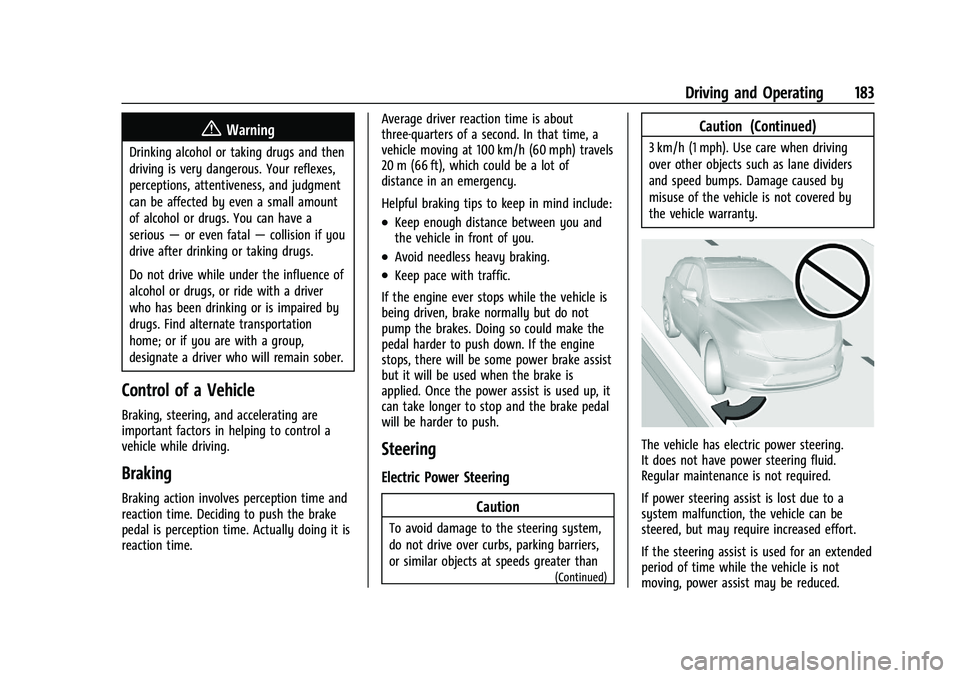
The vehicle has electric power steering.
It does not have power steering fluid.
Regular maintenance is not required.
If power steering assist is lost due to a
system malfunction, the vehicle can be
steered, but may require increased effort.
If the steering assist is used for an extended
period of time while the vehicle is not
moving, power assist may be reduced.
Page 185 of 363
Chevrolet Trailblazer Owner Manual (GMNA-Localizing-U.S./Canada-
14400528) - 2021 - CRC - 11/7/19
184 Driving and Operating
If the steering wheel is turned until it
reaches the end of its travel and is held
against that position for an extended period
of time, power steering assist may be
reduced.
Normal use of the power steering assist
should return when the system cools down.
See your dealer if there is a problem.
Curve Tips
.Take curves at a reasonable speed.
.Reduce speed before entering a curve.
.Maintain a reasonable steady speed
through the curve.
.Wait until the vehicle is out of the curve
before accelerating gently into the
straightaway.
Steering in Emergencies
.There are some situations when steering
around a problem may be more effective
than braking.
.Holding both sides of the steering wheel
allows you to turn 180 degrees without
removing a hand.
.The Antilock Brake System (ABS) allows
steering while braking.
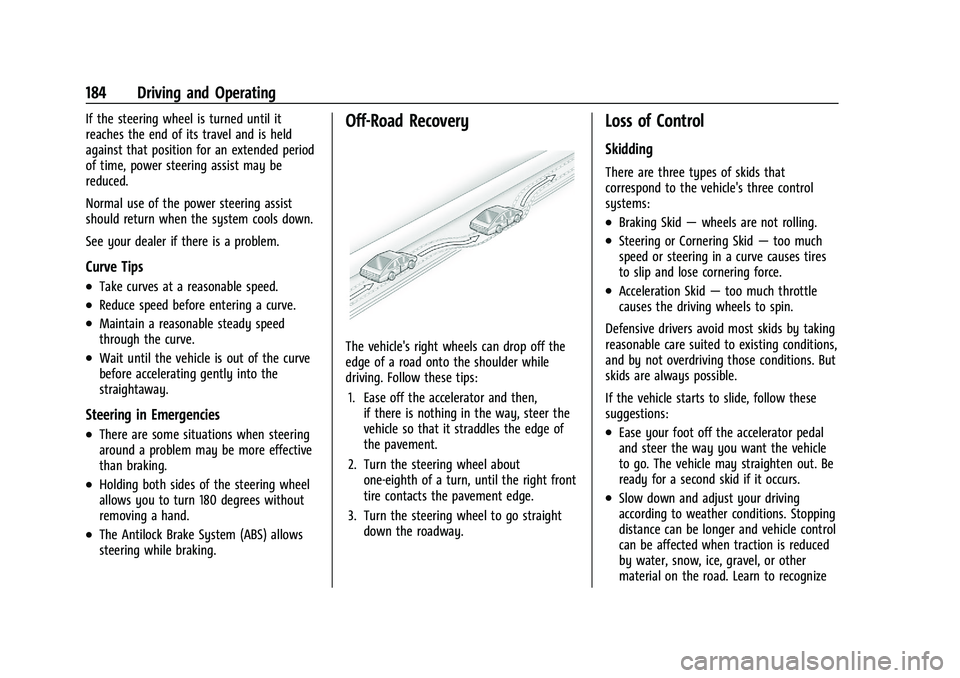
Off-Road Recovery
The vehicle's right wheels can drop off the
edge of a road onto the shoulder while
driving. Follow these tips:1. Ease off the accelerator and then, if there is nothing in the way, steer the
vehicle so that it straddles the edge of
the pavement.
2. Turn the steering wheel about one-eighth of a turn, until the right front
tire contacts the pavement edge.
3. Turn the steering wheel to go straight down the roadway.
Loss of Control
Skidding
There are three types of skids that
correspond to the vehicle's three control
systems:
.Braking Skid —wheels are not rolling.
.Steering or Cornering Skid —too much
speed or steering in a curve causes tires
to slip and lose cornering force.
.Acceleration Skid —too much throttle
causes the driving wheels to spin.
Defensive drivers avoid most skids by taking
reasonable care suited to existing conditions,
and by not overdriving those conditions. But
skids are always possible.
If the vehicle starts to slide, follow these
suggestions:
.Ease your foot off the accelerator pedal
and steer the way you want the vehicle
to go. The vehicle may straighten out. Be
ready for a second skid if it occurs.
.Slow down and adjust your driving
according to weather conditions. Stopping
distance can be longer and vehicle control
can be affected when traction is reduced
by water, snow, ice, gravel, or other
material on the road. Learn to recognize
Page 189 of 363
Chevrolet Trailblazer Owner Manual (GMNA-Localizing-U.S./Canada-
14400528) - 2021 - CRC - 11/7/19
188 Driving and Operating
{Warning
Do not load the vehicle any heavier than
the Gross Vehicle Weight Rating (GVWR),
or either the maximum front or rear
Gross Axle Weight Rating (GAWR). This
can cause systems to break and change
the way the vehicle handles. This could
cause loss of control and a crash.
Overloading can also reduce stopping
distance, damage the tires, and shorten
the life of the vehicle.
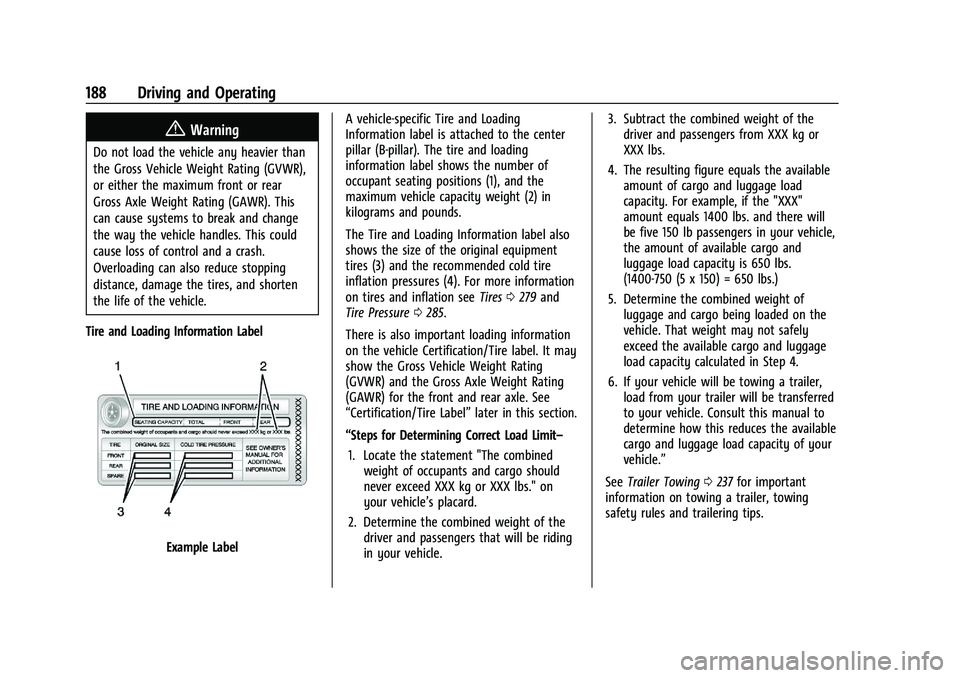
Tire and Loading Information Label
Example Label A vehicle-specific Tire and Loading
Information label is attached to the center
pillar (B-pillar). The tire and loading
information label shows the number of
occupant seating positions (1), and the
maximum vehicle capacity weight (2) in
kilograms and pounds.
The Tire and Loading Information label also
shows the size of the original equipment
tires (3) and the recommended cold tire
inflation pressures (4). For more information
on tires and inflation see
Tires0279 and
Tire Pressure 0285.
There is also important loading information
on the vehicle Certification/Tire label. It may
show the Gross Vehicle Weight Rating
(GVWR) and the Gross Axle Weight Rating
(GAWR) for the front and rear axle. See
“Certification/Tire Label” later in this section.
“Steps for Determining Correct Load Limit– 1. Locate the statement "The combined weight of occupants and cargo should
never exceed XXX kg or XXX lbs." on
your vehicle’s placard.
2. Determine the combined weight of the driver and passengers that will be riding
in your vehicle. 3. Subtract the combined weight of the
driver and passengers from XXX kg or
XXX lbs.
4. The resulting figure equals the available amount of cargo and luggage load
capacity. For example, if the "XXX"
amount equals 1400 lbs. and there will
be five 150 lb passengers in your vehicle,
the amount of available cargo and
luggage load capacity is 650 lbs.
(1400-750 (5 x 150) = 650 lbs.)
5. Determine the combined weight of luggage and cargo being loaded on the
vehicle. That weight may not safely
exceed the available cargo and luggage
load capacity calculated in Step 4.
6. If your vehicle will be towing a trailer, load from your trailer will be transferred
to your vehicle. Consult this manual to
determine how this reduces the available
cargo and luggage load capacity of your
vehicle.”
See Trailer Towing 0237 for important
information on towing a trailer, towing
safety rules and trailering tips.
Page 197 of 363
Chevrolet Trailblazer Owner Manual (GMNA-Localizing-U.S./Canada-
14400528) - 2021 - CRC - 11/7/19
196 Driving and Operating
.The vehicle is in any gear other than
D (Drive).
.Tow/Haul Mode or other driver modes
have been selected.
.The vehicle is on a steep hill or grade.
.The driver door has been opened or driver
seat belt has been unbuckled.
.The hood has been opened.
.The Auto Stop has reached the maximum
allowed time.
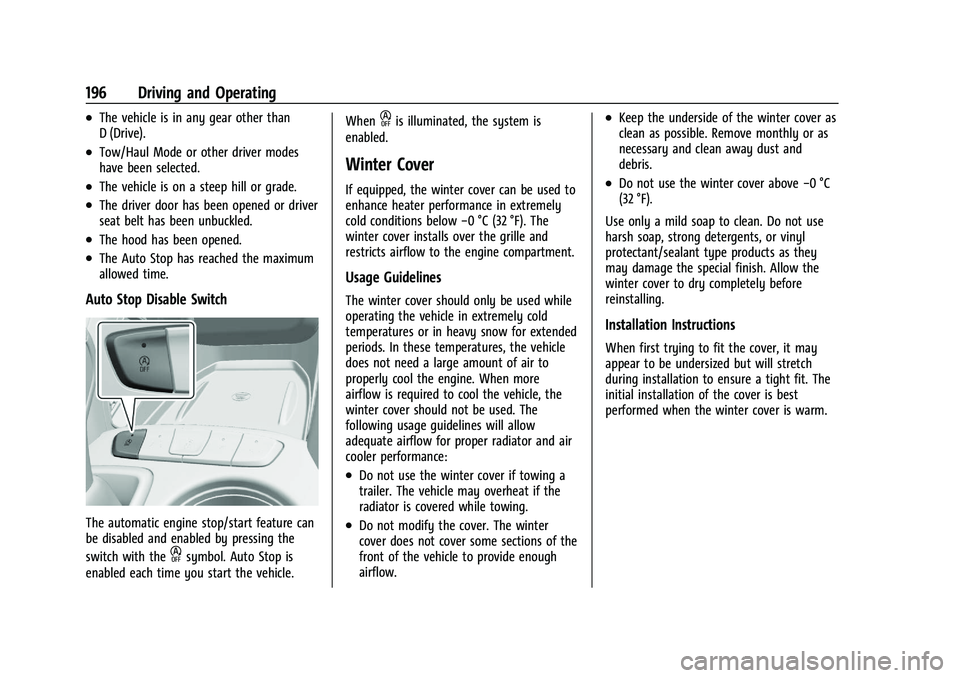
Auto Stop Disable Switch
The automatic engine stop/start feature can
be disabled and enabled by pressing the
switch with the
hsymbol. Auto Stop is
enabled each time you start the vehicle. When
his illuminated, the system is
enabled.
Winter Cover
If equipped, the winter cover can be used to
enhance heater performance in extremely
cold conditions below −0 °C (32 °F). The
winter cover installs over the grille and
restricts airflow to the engine compartment.
Usage Guidelines
The winter cover should only be used while
operating the vehicle in extremely cold
temperatures or in heavy snow for extended
periods. In these temperatures, the vehicle
does not need a large amount of air to
properly cool the engine. When more
airflow is required to cool the vehicle, the
winter cover should not be used. The
following usage guidelines will allow
adequate airflow for proper radiator and air
cooler performance:
.Do not use the winter cover if towing a
trailer. The vehicle may overheat if the
radiator is covered while towing.
.Do not modify the cover. The winter
cover does not cover some sections of the
front of the vehicle to provide enough
airflow.
.Keep the underside of the winter cover as
clean as possible. Remove monthly or as
necessary and clean away dust and
debris.
.Do not use the winter cover above −0 °C
(32 °F).
Use only a mild soap to clean. Do not use
harsh soap, strong detergents, or vinyl
protectant/sealant type products as they
may damage the special finish. Allow the
winter cover to dry completely before
reinstalling.
Installation Instructions
When first trying to fit the cover, it may
appear to be undersized but will stretch
during installation to ensure a tight fit. The
initial installation of the cover is best
performed when the winter cover is warm.
Page 199 of 363
Chevrolet Trailblazer Owner Manual (GMNA-Localizing-U.S./Canada-
14400528) - 2021 - CRC - 11/7/19
198 Driving and Operating
3. Repeat for all hooks to fully engagecover to grille.
4. Make sure all clips remain engaged during installation. Cover should be
stretched to a tight fit when properly
installed.
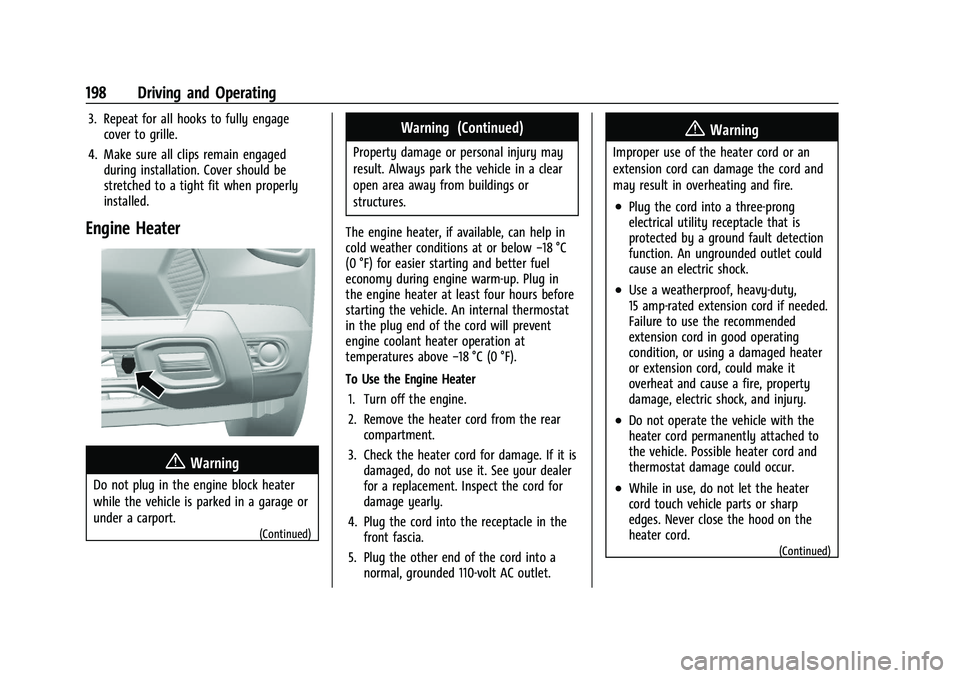
Engine Heater
{Warning
Do not plug in the engine block heater
while the vehicle is parked in a garage or
under a carport.
(Continued)
Warning (Continued)
Property damage or personal injury may
result. Always park the vehicle in a clear
open area away from buildings or
structures.
The engine heater, if available, can help in
cold weather conditions at or below −18 °C
(0 °F) for easier starting and better fuel
economy during engine warm-up. Plug in
the engine heater at least four hours before
starting the vehicle. An internal thermostat
in the plug end of the cord will prevent
engine coolant heater operation at
temperatures above −18 °C (0 °F).
To Use the Engine Heater 1. Turn off the engine.
2. Remove the heater cord from the rear compartment.
3. Check the heater cord for damage. If it is damaged, do not use it. See your dealer
for a replacement. Inspect the cord for
damage yearly.
4. Plug the cord into the receptacle in the front fascia.
5. Plug the other end of the cord into a normal, grounded 110-volt AC outlet.
{Warning
Improper use of the heater cord or an
extension cord can damage the cord and
may result in overheating and fire.
.Plug the cord into a three-prong
electrical utility receptacle that is
protected by a ground fault detection
function. An ungrounded outlet could
cause an electric shock.
.Use a weatherproof, heavy-duty,
15 amp-rated extension cord if needed.
Failure to use the recommended
extension cord in good operating
condition, or using a damaged heater
or extension cord, could make it
overheat and cause a fire, property
damage, electric shock, and injury.
.Do not operate the vehicle with the
heater cord permanently attached to
the vehicle. Possible heater cord and
thermostat damage could occur.
.While in use, do not let the heater
cord touch vehicle parts or sharp
edges. Never close the hood on the
heater cord.
(Continued)
Page 200 of 363
Chevrolet Trailblazer Owner Manual (GMNA-Localizing-U.S./Canada-
14400528) - 2021 - CRC - 11/7/19
Driving and Operating 199
Warning (Continued)
.Before starting the vehicle, unplug the
cord, reattach the cover to the plug,
and securely fasten the cord. Keep the
cord away from any moving parts.
The length of time the heater should remain
plugged in depends on several factors. Ask a
dealer in the area where you will be parking
the vehicle for the best advice on this.
Retained Accessory Power (RAP)
Some vehicle accessories may be used after
the ignition is turned off.
The power windows and sunroof,
if equipped, will continue to work for up to
10 minutes or until any door is opened.
The infotainment system will continue to
work for 10 minutes, until the driver door is
opened, or until the ignition is turned on or
placed in ACC/ACCESSORY.
Shifting Into Park
{Warning
It can be dangerous to get out of the
vehicle if the shift lever is not fully in
P (Park) with the parking brake firmly set.
The vehicle can roll. If you have left the
engine running, the vehicle can move
suddenly. You or others could be injured.
To be sure the vehicle will not move,
even when you are on fairly level ground,
use the steps that follow. If you are
pulling a trailer, see Driving
Characteristics and Towing Tips 0234
To shift into P (Park): 1. Hold the brake pedal down and set the parking brake. See Electric Parking Brake
0 205
2. Hold the button on the shift lever and push the lever toward the front of the
vehicle into P (Park).
3. Turn the ignition off.
Leaving the Vehicle with the Engine
Running
{Warning
It can be dangerous to leave the vehicle
with the engine running. It could
overheat and catch fire.
It is dangerous to get out of the vehicle
if the vehicle is not in P (Park) with the
parking brake set. The vehicle can roll.
Do not leave the vehicle when the engine
is running. If you have left the engine
running, the vehicle can move suddenly.
You or others could be injured. To be
sure the vehicle will not move, even
when you are on fairly level ground,
always set the parking brake and shift to
P (Park). See Shifting Into Park 0199.
If you are towing a trailer, see Driving
Characteristics and Towing Tips 0234.
If you have to leave the vehicle with the
engine running, the vehicle must be in
P (Park) and the parking brake set.
Release the button and check that the shift
lever cannot be moved out of P (Park).