remote control CHEVROLET TRAILBLAZER 2022 User Guide
[x] Cancel search | Manufacturer: CHEVROLET, Model Year: 2022, Model line: TRAILBLAZER, Model: CHEVROLET TRAILBLAZER 2022Pages: 363, PDF Size: 6.76 MB
Page 120 of 363
Chevrolet Trailblazer Owner Manual (GMNA-Localizing-U.S./Canada-
14400528) - 2021 - CRC - 11/7/19
Lighting 119
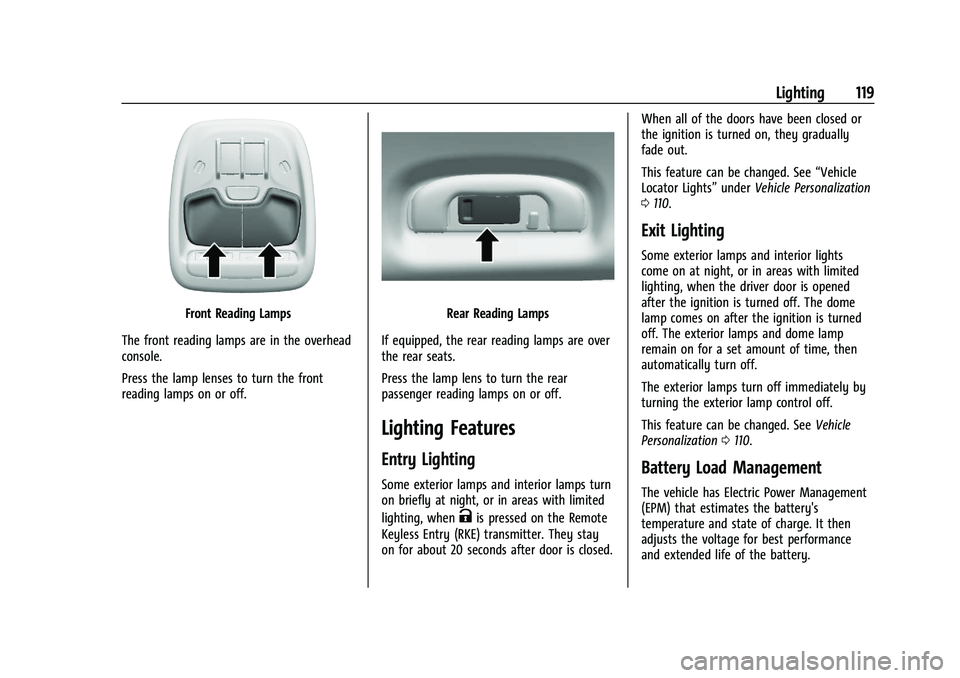
Front Reading Lamps
The front reading lamps are in the overhead
console.
Press the lamp lenses to turn the front
reading lamps on or off.Rear Reading Lamps
If equipped, the rear reading lamps are over
the rear seats.
Press the lamp lens to turn the rear
passenger reading lamps on or off.
Lighting Features
Entry Lighting
Some exterior lamps and interior lamps turn
on briefly at night, or in areas with limited
lighting, when
Kis pressed on the Remote
Keyless Entry (RKE) transmitter. They stay
on for about 20 seconds after door is closed. When all of the doors have been closed or
the ignition is turned on, they gradually
fade out.
This feature can be changed. See
“Vehicle
Locator Lights” underVehicle Personalization
0 110.
Exit Lighting
Some exterior lamps and interior lights
come on at night, or in areas with limited
lighting, when the driver door is opened
after the ignition is turned off. The dome
lamp comes on after the ignition is turned
off. The exterior lamps and dome lamp
remain on for a set amount of time, then
automatically turn off.
The exterior lamps turn off immediately by
turning the exterior lamp control off.
This feature can be changed. See Vehicle
Personalization 0110.
Battery Load Management
The vehicle has Electric Power Management
(EPM) that estimates the battery's
temperature and state of charge. It then
adjusts the voltage for best performance
and extended life of the battery.
Page 163 of 363
Chevrolet Trailblazer Owner Manual (GMNA-Localizing-U.S./Canada-
14400528) - 2021 - CRC - 11/7/19
162 Infotainment System
Phone
Touch and the following may display:
.My Number: Displays the cell phone
number of the Bluetooth connected
device.
.Active Call View: Shows active call display
when answering a call.
Touch the controls on the infotainment
display to disable or enable.
.Privacy : Only show call alerts in cluster.
.Sort Contacts: Touch to sort by first or
last name.
.Re-sync phone Contacts: This allows the
device contacts to re-sync if you are
having difficulty accessing all of the
contacts on your cell phone.
OnStar Phone TTY Mode: This enables
OnStar cell phone TTY mode.
Touch Disable or Enable.
Vehicle
This menu allows adjustment of different
vehicle features. SeeVehicle Personalization
0 110.
Personal
If equipped, this menu allows adjustment of
different user profile settings. See “Users”in
Using the System 0124 for information on
setting up user profiles.
The menu may contain the following:
Name
Touch to edit your user name that will be
displayed in the vehicle.
Vehicle Account Information
Touch to view the vehicle account
information and to change the account
password.
An “unverified user account” pop-up will
display until the account information
verification process has been completed on
the Internet. Check your registered e-mail
account for an activation e-mail to complete
the verification process.
Profile Picture
Touch to choose or change your profile
picture.
Profile Identifiers
Touch to have the vehicle recognize the
identifier you choose. Touch Vehicle Key 1 and/or Vehicle Key 2.
If the Remote Keyless Entry (RKE)
transmitter is lost or stolen, see your dealer.
Security
Touch to have your profile secured with
a PIN.
Touch No or Yes.
Vehicle Name
Touch to edit your vehicle name.
Vehicle Account
Touch to view the vehicle account
information and to change the account
password.
Remove Profile
Touch to remove the profile from the
vehicle.
Touch Remove or Cancel.
Teen Driver
If equipped, this allows multiple keys to be
registered for beginner drivers to encourage
safe driving habits. When the vehicle is
started with a Teen Driver key, it will
automatically activate certain safety
systems, allow setting of some features, and
Page 179 of 363
Chevrolet Trailblazer Owner Manual (GMNA-Localizing-U.S./Canada-
14400528) - 2021 - CRC - 11/7/19
178 Climate Controls
If the vehicle is equipped with heated
outside mirrors, they turn on when the rear
window defogger button is on and help to
clear fog or frost from the surface of the
mirror. SeeHeated Mirrors 031
Caution
Do not try to clear frost or other material
from the inside of the front windshield
and rear window with a razor blade or
anything else that is sharp. This may
damage the rear window defogger grid
and affect the radio's ability to pick up
stations clearly. The repairs would not be
covered by the vehicle warranty.
MorL:If equipped, pressMorLto
heat the driver or passenger seat. See
Heated Front Seats 040.
Remote Start Climate Control Operation (If
Equipped) : If the vehicle is equipped with
the remote start feature, the climate control
system may run when the vehicle is started
remotely. The system uses the driver’s
previous settings to heat or cool the inside
of the vehicle. The rear defog may come on
during remote start based on cold ambient
conditions. If the vehicle has heated seats, they may come on during a remote start.
See
Remote Vehicle Start 017 and
Heated Front Seats 040.
Sensors
The solar sensor on top of the instrument
panel near the windshield monitors the solar
heat. The climate control system uses the
sensor information to adjust the
temperature, fan speed, recirculation, and air
delivery mode for best comfort.
Do not cover the sensor; otherwise the
automatic climate control system may not
work properly.
Air Vents
Use the louvers located on the air vents to
change the direction of the airflow.
To open or close off the airflow:
.Move slider knobs away from the
occupant for shut off closing.
Operation Tips
.Clear away any ice, snow, or leaves from
air inlets at the base of the windshield
that could block the flow of air into the
vehicle.
.Clear snow off the hood to improve
visibility and help decrease moisture
drawn into the vehicle, which may
improve long term system performance.
.Keep the path under the front seats clear
of objects to help circulate the air inside
of the vehicle more effectively.
.Use of non-GM approved hood deflectors
can adversely affect the performance of
the system. Check with your dealer
before adding equipment to the outside
of the vehicle.
.Do not attach any devices to the air vent
slats. This restricts airflow and may cause
damage to the air vents.
Caution
Use of air fresheners may cause
permanent damage to plastics and
painted surfaces. If an air freshener
comes in contact with any plastic or
painted surface in the vehicle, blot
immediately and clean with a soft cloth
dampened with a mild soap solution.
Damage caused by air fresheners would
not be covered by the vehicle warranty.
Page 196 of 363
Chevrolet Trailblazer Owner Manual (GMNA-Localizing-U.S./Canada-
14400528) - 2021 - CRC - 11/7/19
Driving and Operating 195
The idle speed will go down as the
engine gets warm. Do not race the
engine immediately after starting it.
If the RKE transmitter is not in the
vehicle, if there is interference, or if the
RKE battery is low, a Driver Information
Center (DIC) will display a message. See
Remote Keyless Entry (RKE) System
Operation (Key Access)09or
Remote Keyless Entry (RKE) System
Operation (Keyless Access) 011
Caution
Cranking the engine for long periods of
time, by returning the ignition to the
START position immediately after
cranking has ended, can overheat and
damage the cranking motor, and drain
the battery. Wait at least 15 seconds
between each try, to let the cranking
motor cool down.
2. If the engine does not start after five to 10 seconds, especially in very cold
weather (below −18 °C or 0 °F), it could
be flooded with too much gasoline. Try
pushing the accelerator pedal all the way
to the floor and holding it there as you
press ENGINE START/ STOP. Wait at least 15 seconds between each try, to allow
the cranking motor to cool down. When
the engine starts, release the accelerator.
If the vehicle starts briefly but then
stops again, do the same thing. This
clears the extra gasoline from the
engine. Do not race the engine
immediately after starting it. Operate
the engine and transmission gently until
the oil warms up and lubricates all
moving parts.
Stop/Start System
The Stop/Start system will shut off the
engine to help conserve fuel. It has
components designed for the increased
number of starts.
{Warning
The automatic engine Stop/Start feature
causes the engine to shut off while the
vehicle is still on. Do not exit the vehicle
before shifting to P (Park). The vehicle
may restart and move unexpectedly.
Always shift to P (Park), and then turn
the ignition off before exiting the vehicle.
Auto Engine Stop/Start
When the brakes are applied and the vehicle
is at a complete stop, the engine may turn
off. When stopped, the tachometer displays
AUTO STOP. See
Tachometer093. When the
brake pedal is released or the accelerator
pedal is pressed, the engine will restart.
To maintain vehicle performance, other
conditions may cause the engine to
automatically restart before the brake pedal
is released.
Auto Stops may not occur and/or auto
restarts may occur because:
.The climate control settings require the
engine to be running to cool or heat the
vehicle interior.
.The vehicle battery charge is low.
.The vehicle battery has recently been
disconnected.
.Minimum vehicle speed has not been
reached since the last Auto Stop.
.The accelerator pedal is pressed.
.The engine or transmission is not at the
required operating temperature.
.The outside temperature is not in the
required operating range.
Page 246 of 363
Chevrolet Trailblazer Owner Manual (GMNA-Localizing-U.S./Canada-
14400528) - 2021 - CRC - 11/7/19
Vehicle Care 245
Accessories and Modifications
Adding non-dealer accessories or making
modifications to the vehicle can affect
vehicle performance and safety, including
such things as airbags, braking, stability,
ride and handling, emissions systems,
aerodynamics, durability, and electronic
systems like antilock brakes, traction control,
and stability control. These accessories or
modifications could even cause malfunction
or damage not covered by the vehicle
warranty.
Damage to suspension components caused
by modifying vehicle height outside of
factory settings will not be covered by the
vehicle warranty.
Damage to vehicle components resulting
from modifications or the installation or use
of non-GM certified parts, including control
module or software modifications, is not
covered under the terms of the vehicle
warranty and may affect remaining
warranty coverage for affected parts.
GM Accessories are designed to complement
and function with other systems on the
vehicle. See your dealer to accessorize the
vehicle using genuine GM Accessories
installed by a dealer technician.Also, see
Adding Equipment to the
Airbag-Equipped Vehicle 060.
Vehicle Checks
Doing Your Own Service Work
{Warning
It can be dangerous to work on your
vehicle if you do not have the proper
knowledge, service manual, tools,
or parts. Always follow owner’s manual
procedures and consult the service
manual for your vehicle before doing any
service work.
If doing some of your own service work, use
the proper service manual. It tells you much
more about how to service the vehicle than
this manual can. To order the proper service
manual, see Publication Ordering
Information 0339.
This vehicle has an airbag system. Before
attempting to do your own service work,
see Servicing the Airbag-Equipped Vehicle
0 59. If equipped with remote vehicle start, open
the hood before performing any service
work to prevent remote starting the vehicle
accidentally. See
Remote Vehicle Start 017.
Keep a record with all parts receipts and list
the mileage and the date of any service
work performed. See Maintenance Records
0 327.Caution
Even small amounts of contamination can
cause damage to vehicle systems. Do not
allow contaminants to contact the fluids,
reservoir caps, or dipsticks.
Hood
{Warning
For vehicles with auto engine stop/start,
turn the vehicle off before opening the
hood. If the vehicle is on, the engine will
start when the hood is opened. You or
others could be injured.
Page 346 of 363

Chevrolet Trailblazer Owner Manual (GMNA-Localizing-U.S./Canada-
14400528) - 2021 - CRC - 11/7/19
OnStar 345
Reactivation for Subsequent Owners
PressQand follow the prompts to speak to
an Advisor as soon as possible. The Advisor
will update vehicle records and explain
OnStar or connected service options.
How OnStar Service Works
Automatic Crash Response, Emergency
Services, Crisis Assist, Stolen Vehicle
Assistance, Remote Services, Roadside
Assistance are available on most vehicles.
Not all OnStar services are available
everywhere or on all vehicles. For more
information, a full description of OnStar
services, system limitations, and OnStar User
Terms, Privacy Statement, and Software
Terms:
.Call 1-888-4ONSTAR (1-888-466-7827).
.See www.onstar.com (U.S.).
.See www.onstar.ca (Canada).
.Call TTY 1-877-248-2080.
.PressQto speak with an Advisor.
OnStar or connected services cannot work
unless the vehicle is in a place where OnStar
has an agreement with a wireless service
provider for service in that area. The
wireless service provider must also have
coverage, network capacity, reception, and technology compatible with OnStar or
connected services. Service involving location
information about the vehicle cannot work
unless GPS signals are available,
unobstructed, and compatible with the
OnStar hardware. OnStar or connected
services may not work if the OnStar
equipment is not properly installed or it has
not been properly maintained. If equipment
or software is added, connected,
or modified, OnStar or connected services
may not work. Other problems beyond the
control of OnStar
—such as hills, tall
buildings, tunnels, weather, electrical system
design and architecture of the vehicle,
damage to the vehicle in a crash, or wireless
phone network congestion or jamming —
may prevent service.
See Radio Frequency Statement 0340.
Services for People with Disabilities
Advisors provide services to help with
physical disabilities and medical conditions.
Press
Qto help:
.Locate a gas station with an attendant to
pump gas.
.Find a hotel, restaurant, etc., that meets
accessibility needs.
.Provide directions to the closest hospital
or pharmacy in urgent situations.
TTY Users
OnStar has the ability to communicate to
deaf, hard-of-hearing, or speech-impaired
customers while in the vehicle. The available
dealer-installed TTY system can provide
in-vehicle access to all OnStar services,
except Virtual Advisor and OnStar
Turn-by-Turn Navigation. If equipped, TTY
mode can be turned on or off by touching
Settings, then Apps, and then Phone. When
TTY mode is on, phone calls can be made or
received with OnStar using the infotainment
display.
OnStar Personal Identification
Number (PIN)
A PIN is needed to access some OnStar
services. The PIN will need to be changed
the first time when speaking with an
Advisor. To change the OnStar PIN, contact
an OnStar Advisor by pressing
Qor calling
1-888-4ONSTAR.
Warranty
OnStar equipment may be warranted as part
of the vehicle warranty.
Page 350 of 363
Chevrolet Trailblazer Owner Manual (GMNA-Localizing-U.S./Canada-
14400528) - 2021 - CRC - 11/7/19
Connected Services 349
PressQ, then ask the Advisor to download
directions to the vehicle’s navigation system,
if equipped. After the call ends, the
navigation screen will provide prompts to
begin driving directions. Routes that are sent
to the navigation screen can only be
canceled through the navigation system.
See www.onstar.com (U.S.) or www.onstar.ca
(Canada).
Connections
The following services help with staying
connected.
For coverage maps, see www.onstar.com
(U.S.) or www.onstar.ca (Canada).
Ensuring Security
.Change the default passwords for the
Wi-Fi hotspot and myChevrolet mobile
application. Make these passwords
different from each other and use a
combination of letters and numbers to
increase the security.
.Change the default name of the SSID
(Service Set Identifier). This is your
network’s name that is visible to other
wireless devices. Choose a unique name
and avoid family names or vehicle
descriptions. Wi-Fi Hotspot (If Equipped)
The vehicle may have a built-in Wi-Fi
hotspot that provides access to the Internet
and web content at 4G LTE speed. Up to
seven mobile devices can be connected.
A data plan is required. Use the in-vehicle
controls only when it is safe to do so.
1. To retrieve Wi-Fi hotspot information, press
=to open the OnStar app on the
infotainment display, then select Wi-Fi
Hotspot. On some vehicles, touch Wi-Fi
or Wi-Fi Settings on the screen.
2. The Wi-Fi settings will display the Wi-Fi hotspot name (SSID), password, and on
some vehicles, the connection type (no
Internet connection, 3G, 4G, 4G LTE), and
signal quality (poor, good, excellent).
3. To change the SSID or password, press
Qor call 1-888-4ONSTAR to connect
with an Advisor. On some vehicles, the
SSID and password can be changed in
the Wi-Fi Hotspot menu.
After initial set-up, your vehicle’s Wi-Fi
hotspot will connect automatically to your
mobile devices. Manage data usage by
turning Wi-Fi on or off on your mobile
device, by using the myChevrolet mobile app, or by contacting an OnStar Advisor. On
some vehicles, Wi-Fi can also be managed
from the Wi-Fi Hotspot menu.
MyChevrolet Mobile App (If Available)
Download the myChevrolet mobile app to
compatible Apple and Android smartphones.
Chevrolet users can access the following
services from a smartphone:
.Remotely start/stop the vehicle,
if factory-equipped.
.Lock/unlock doors, if equipped with
automatic locks.
.Activate the horn and lamps.
.Check the vehicle’s fuel level, oil life,
or tire pressure, if factory-equipped with
the Tire Pressure Monitor System.
.Send destinations to the vehicle.
.Locate the vehicle on a map (U.S.
market only).
.Turn the vehicle's Wi-Fi hotspot on/off,
manage settings, and monitor data
consumption, if equipped.
.Locate a dealer and schedule service.
.Request roadside assistance.
.Set a parking reminder with pin drop,
take a photo, make a note, and set a
timer.
Page 357 of 363
Chevrolet Trailblazer Owner Manual (GMNA-Localizing-U.S./Canada-
14400528) - 2021 - CRC - 11/7/19
356 Index
Introduction . . . . . . . . . . . . . . . . . . . . . . . . . . . . 1, 121
J
JackAuxiliary . . . . . . . . . . . . . . . . . . . . . . . . . . . . . . . . 132
Jump Starting - North America . . . . . . . . . . . 302
K
Keyless Entry Remote (RKE) System . . . . . . . . . . . . . . . . . .9, 11
Keys . . . . . . . . . . . . . . . . . . . . . . . . . . . . . . . . . . . . . 6, 8
L
Labeling, Tire Sidewall . . . . . . . . . . . . . . . . . . . .281
Lamps Courtesy . . . . . . . . . . . . . . . . . . . . . . . . . . . . . . . . 118
Daytime Running (DRL) . . . . . . . . . . . . . . . . . 116
Dome . . . . . . . . . . . . . . . . . . . . . . . . . . . . . . . . . . . 118
Exterior Controls . . . . . . . . . . . . . . . . . . . . . . . . 114
Exterior Lighting Battery Saver . . . . . . . . .120
Malfunction Indicator (Check Engine) . . . 96
On Reminder . . . . . . . . . . . . . . . . . . . . . . . . . . .103
Reading . . . . . . . . . . . . . . . . . . . . . . . . . . . . . . . . . 118
Lane Change Alert (LCA) . . . . . . . . . . . . . . . . . 228
Lane Keep Assist (LKA) . . . . . . . . . . . . . . . . . . . 229
Lane Keep Assist Light . . . . . . . . . . . . . . . . . . . 100
Lap-Shoulder Belt . . . . . . . . . . . . . . . . . . . . . . . . . 46
LATCH System Replacing Parts after a Crash . . . . . . . . . . . . 72 LATCH, Lower Anchors and Tethers for
Children . . . . . . . . . . . . . . . . . . . . . . . . . . . . . . . . . 67
LED Lighting . . . . . . . . . . . . . . . . . . . . . . . . . . . . . 267
Liftgate . . . . . . . . . . . . . . . . . . . . . . . . . . . . . . . . . . . .22
Lighting Entry . . . . . . . . . . . . . . . . . . . . . . . . . . . . . . . . . . . 119
Exit . . . . . . . . . . . . . . . . . . . . . . . . . . . . . . . . . . . . . 119
Illumination Control . . . . . . . . . . . . . . . . . . . . 118
LED . . . . . . . . . . . . . . . . . . . . . . . . . . . . . . . . . . . . 267
Lights Airbag Readiness . . . . . . . . . . . . . . . . . . . . . . . .95
All-Wheel Drive . . . . . . . . . . . . . . . . . . . . . . . . . 99
Antilock Brake System (ABS)
Warning . . . . . . . . . . . . . . . . . . . . . . . . . . . . . . 99
Brake System Warning . . . . . . . . . . . . . . . . . 98
Charging System . . . . . . . . . . . . . . . . . . . . . . . 96
Check Engine (Malfunction Indicator) . . . 96
Cruise Control . . . . . . . . . . . . . . . . . . . . . . . . . .103
Door Ajar . . . . . . . . . . . . . . . . . . . . . . . . . . . . . . 104
Electric Parking Brake . . . . . . . . . . . . . . . . . . . 98
Engine Oil Pressure . . . . . . . . . . . . . . . . . . . . .102
Flash-to-Pass . . . . . . . . . . . . . . . . . . . . . . . . . . . . 116
Front Fog Lamp . . . . . . . . . . . . . . . . . . . . . . . . .103
High-Beam On . . . . . . . . . . . . . . . . . . . . . . . . . .103
High/Low Beam Changer . . . . . . . . . . . . . . . 115
Lane Keep Assist . . . . . . . . . . . . . . . . . . . . . . . 100
Low Fuel Warning . . . . . . . . . . . . . . . . . . . . . .102
Seat Belt Reminders . . . . . . . . . . . . . . . . . . . . 94 Lights (cont'd)
Security . . . . . . . . . . . . . . . . . . . . . . . . . . . . . . . . .102
Service Electric Parking Brake . . . . . . . . . . . 99
Sport Mode . . . . . . . . . . . . . . . . . . . . . . . . . . . . 100
StabiliTrak OFF . . . . . . . . . . . . . . . . . . . . . . . . . . 101
Tire Pressure . . . . . . . . . . . . . . . . . . . . . . . . . . . . 101
Traction Control System
(TCS)/StabiliTrak . . . . . . . . . . . . . . . . . . . . . . 101
Traction Off . . . . . . . . . . . . . . . . . . . . . . . . . . . . 100
Locks Automatic Door . . . . . . . . . . . . . . . . . . . . . . . . . . 21
Delayed Locking . . . . . . . . . . . . . . . . . . . . . . . . . 21
Door . . . . . . . . . . . . . . . . . . . . . . . . . . . . . . . . . . . . . 19
Lockout Protection . . . . . . . . . . . . . . . . . . . . . . . 21
Power Door . . . . . . . . . . . . . . . . . . . . . . . . . . . . . 20
Safety . . . . . . . . . . . . . . . . . . . . . . . . . . . . . . . . . . . 21
Loss of Control . . . . . . . . . . . . . . . . . . . . . . . . . . 184
Low Fuel Warning Light . . . . . . . . . . . . . . . . . 102
Lower Anchors and Tethers for Children (LATCH System) . . . . . . . . . . . . . . . . 67
Lumbar Adjustment . . . . . . . . . . . . . . . . . . . . . . . 39
Front Seats . . . . . . . . . . . . . . . . . . . . . . . . . . . . . .39
M
MaintenanceRecords . . . . . . . . . . . . . . . . . . . . . . . . . . . . . . . . . 327
Page 360 of 363
Chevrolet Trailblazer Owner Manual (GMNA-Localizing-U.S./Canada-
14400528) - 2021 - CRC - 11/7/19
Index 359
S
Safety Defects ReportingCanadian Government . . . . . . . . . . . . . . . . . 340
General Motors . . . . . . . . . . . . . . . . . . . . . . . . . 341
U.S. Government . . . . . . . . . . . . . . . . . . . . . . . 340
Safety Locks . . . . . . . . . . . . . . . . . . . . . . . . . . . . . . . 21
Safety System Check . . . . . . . . . . . . . . . . . . . . . 50
Satellite Radio . . . . . . . . . . . . . . . . . . . . . . . . . . . 129
Scheduling Appointments . . . . . . . . . . . . . . . . 336
Seat Belts . . . . . . . . . . . . . . . . . . . . . . . . . . . . . . . . . 44 Care . . . . . . . . . . . . . . . . . . . . . . . . . . . . . . . . . . . . 50
Extender . . . . . . . . . . . . . . . . . . . . . . . . . . . . . . . . 49
How to Wear Seat Belts Properly . . . . . . . .45
Lap-Shoulder Belt . . . . . . . . . . . . . . . . . . . . . . . 46
Reminders . . . . . . . . . . . . . . . . . . . . . . . . . . . . . . 94
Replacing after a Crash . . . . . . . . . . . . . . . . . 50
Use During Pregnancy . . . . . . . . . . . . . . . . . . 49
Seats Adjustment, Front . . . . . . . . . . . . . . . . . . . . . . .38
Folding Seatback . . . . . . . . . . . . . . . . . . . . . . . . . 41
Head Restraints . . . . . . . . . . . . . . . . . . . . . . . . . .36
Heated Front . . . . . . . . . . . . . . . . . . . . . . . . . . . 40
Lumbar Adjustment, Front . . . . . . . . . . . . . . .39
Power Adjustment, Front . . . . . . . . . . . . . . . .38
Rear . . . . . . . . . . . . . . . . . . . . . . . . . . . . . . . . . . . . .42
Reclining Seatbacks . . . . . . . . . . . . . . . . . . . . . .39
Securing Child Restraints . . . . . . . . . . . . . . . 73, 74 Security
Light . . . . . . . . . . . . . . . . . . . . . . . . . . . . . . . . . . . .102
OnStar . . . . . . . . . . . . . . . . . . . . . . . . . . . . . . . . . 344
Vehicle . . . . . . . . . . . . . . . . . . . . . . . . . . . . . . . . . .29
Vehicle Alarm . . . . . . . . . . . . . . . . . . . . . . . . . . . .29
Service . . . . . . . . . . . . . . . . . . . . . . . . . . . . . . . . . . . 179 Accessories and Modifications . . . . . . . . . 245
Climate Control System . . . . . . . . . . . . . . . . . 174
Doing Your Own Work . . . . . . . . . . . . . . . . . 245
Maintenance Records . . . . . . . . . . . . . . . . . . . 327
Maintenance, General Information . . . . . . 315
Parts Identification . . . . . . . . . . . . . . . . . . . . . 328
Scheduling Appointments . . . . . . . . . . . . . . 336
Service Electric Parking Brake Light . . . . . . . 99
Services Special Application . . . . . . . . . . . . . . . . . . . . . .322
Servicing System . . . . . . . . . . . . . . . . . . . . . . . . 146
Servicing the Airbag . . . . . . . . . . . . . . . . . . . . . . 59
Settings . . . . . . . . . . . . . . . . . . . . . . . . . . . . . . . . . . . 157
Shift Lock Control Function Check, Automatic Transmission . . . . . . . . . . . . . . . . 263
Shifting Into Park . . . . . . . . . . . . . . . . . . . . . . . . . . . . . . 199
Out of Park . . . . . . . . . . . . . . . . . . . . . . . . . . . . 200
Side Blind Zone Alert (SBZA) . . . . . . . . . . . . . 227
Sidemarker
Bulb Replacement . . . . . . . . . . . . . . . . . . 269, 271
Signals, Turn and Lane-Change . . . . . . . . . . . . 117 Software Updates . . . . . . . . . . . . . . . . . . . . . . . . 126
Spare Tire
Compact . . . . . . . . . . . . . . . . . . . . . . . . . . . . . . . .301
Special Application Services . . . . . . . . . . . . . . 322
Specifications and Capacities . . . . . . . . . . . . . 329
Speedometer . . . . . . . . . . . . . . . . . . . . . . . . . . . . . 92
Sport Mode Light . . . . . . . . . . . . . . . . . . . . . . . . 100
StabiliTrak OFF Light . . . . . . . . . . . . . . . . . . . . . . . . . . . . . . . 101
Start Assist, Hill . . . . . . . . . . . . . . . . . . . . . . . . . . 206
Start Vehicle, Remote . . . . . . . . . . . . . . . . . . . . . . 17
Starter Switch Check . . . . . . . . . . . . . . . . . . . . . 263
Starting the Engine . . . . . . . . . . . . . . . . . . . . . . 194
Steering . . . . . . . . . . . . . . . . . . . . . . . . . . . . . . . . . .183 Wheel Adjustment . . . . . . . . . . . . . . . . . . . . . . .83
Wheel Controls . . . . . . . . . . . . . . . . . . . . . . . . . .83
Steering Wheel Controls . . . . . . . . . . . . . . . . . . 123
Stop/Start System . . . . . . . . . . . . . . . . . . . . . . . 195
Stoplamps and Back-Up Lamps Bulb Replacement . . . . . . . . . . . . . . . . . . 269, 271
Storage Areas
Cargo Management System . . . . . . . . . . . . 80
Center Console . . . . . . . . . . . . . . . . . . . . . . . . . .79
Glove Box . . . . . . . . . . . . . . . . . . . . . . . . . . . . . . .78
Instrument Panel . . . . . . . . . . . . . . . . . . . . . . . .78
Rear Compartment/Storage PanelCover . . . . . . . . . . . . . . . . . . . . . . . . . . . . . . . . . .79
Roof Rack System . . . . . . . . . . . . . . . . . . . . . . . 80
Page 362 of 363
Chevrolet Trailblazer Owner Manual (GMNA-Localizing-U.S./Canada-
14400528) - 2021 - CRC - 11/7/19
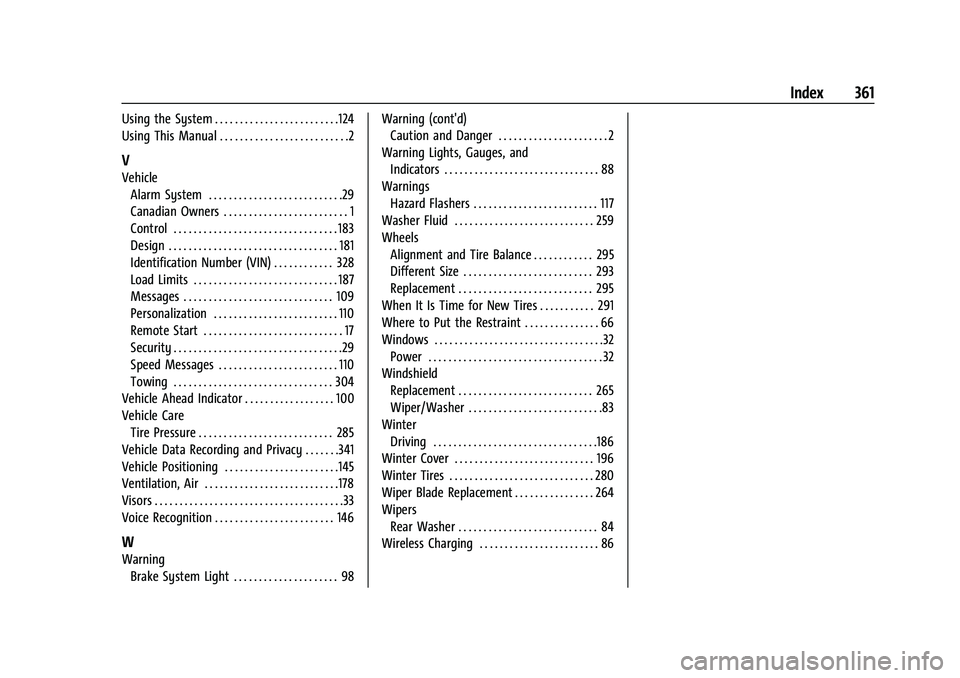
Index 361
Using the System . . . . . . . . . . . . . . . . . . . . . . . . .124
Using This Manual . . . . . . . . . . . . . . . . . . . . . . . . . .2
V
VehicleAlarm System . . . . . . . . . . . . . . . . . . . . . . . . . . .29
Canadian Owners . . . . . . . . . . . . . . . . . . . . . . . . . 1
Control . . . . . . . . . . . . . . . . . . . . . . . . . . . . . . . . . 183
Design . . . . . . . . . . . . . . . . . . . . . . . . . . . . . . . . . . 181
Identification Number (VIN) . . . . . . . . . . . . 328
Load Limits . . . . . . . . . . . . . . . . . . . . . . . . . . . . . 187
Messages . . . . . . . . . . . . . . . . . . . . . . . . . . . . . . 109
Personalization . . . . . . . . . . . . . . . . . . . . . . . . . 110
Remote Start . . . . . . . . . . . . . . . . . . . . . . . . . . . . 17
Security . . . . . . . . . . . . . . . . . . . . . . . . . . . . . . . . . .29
Speed Messages . . . . . . . . . . . . . . . . . . . . . . . . 110
Towing . . . . . . . . . . . . . . . . . . . . . . . . . . . . . . . . 304
Vehicle Ahead Indicator . . . . . . . . . . . . . . . . . . 100
Vehicle Care Tire Pressure . . . . . . . . . . . . . . . . . . . . . . . . . . . 285
Vehicle Data Recording and Privacy . . . . . . .341
Vehicle Positioning . . . . . . . . . . . . . . . . . . . . . . .145
Ventilation, Air . . . . . . . . . . . . . . . . . . . . . . . . . . .178
Visors . . . . . . . . . . . . . . . . . . . . . . . . . . . . . . . . . . . . . .33
Voice Recognition . . . . . . . . . . . . . . . . . . . . . . . . 146
W
Warning
Brake System Light . . . . . . . . . . . . . . . . . . . . . 98 Warning (cont'd)
Caution and Danger . . . . . . . . . . . . . . . . . . . . . . 2
Warning Lights, Gauges, and Indicators . . . . . . . . . . . . . . . . . . . . . . . . . . . . . . . 88
Warnings Hazard Flashers . . . . . . . . . . . . . . . . . . . . . . . . . 117
Washer Fluid . . . . . . . . . . . . . . . . . . . . . . . . . . . . 259
Wheels
Alignment and Tire Balance . . . . . . . . . . . . 295
Different Size . . . . . . . . . . . . . . . . . . . . . . . . . . 293
Replacement . . . . . . . . . . . . . . . . . . . . . . . . . . . 295
When It Is Time for New Tires . . . . . . . . . . . 291
Where to Put the Restraint . . . . . . . . . . . . . . . 66
Windows . . . . . . . . . . . . . . . . . . . . . . . . . . . . . . . . . .32
Power . . . . . . . . . . . . . . . . . . . . . . . . . . . . . . . . . . . 32
Windshield
Replacement . . . . . . . . . . . . . . . . . . . . . . . . . . . 265
Wiper/Washer . . . . . . . . . . . . . . . . . . . . . . . . . . .83
Winter Driving . . . . . . . . . . . . . . . . . . . . . . . . . . . . . . . . .186
Winter Cover . . . . . . . . . . . . . . . . . . . . . . . . . . . . 196
Winter Tires . . . . . . . . . . . . . . . . . . . . . . . . . . . . . 280
Wiper Blade Replacement . . . . . . . . . . . . . . . . 264
Wipers
Rear Washer . . . . . . . . . . . . . . . . . . . . . . . . . . . . 84
Wireless Charging . . . . . . . . . . . . . . . . . . . . . . . . 86