odometer CHEVROLET TRAVERSE 2009 1.G User Guide
[x] Cancel search | Manufacturer: CHEVROLET, Model Year: 2009, Model line: TRAVERSE, Model: CHEVROLET TRAVERSE 2009 1.GPages: 422, PDF Size: 2.06 MB
Page 177 of 422
BATTERY SAVER ACTIVE
This message displays when the
system detects that the battery
voltage is dropping below expected
levels. The battery saver system
starts reducing certain features of
the vehicle that you may be able to
notice. At the point that the features
are disabled, this message is
displayed. It means that the vehicle
is trying to save the charge in the
battery.
Turn off all unnecessary accessories
to allow the battery to recharge.
The normal battery voltage
range is 11.5 to 15.5 volts.
CHANGE ENGINE OIL SOON
This message displays when the
engine oil needs to be changed.
When you change the engine oil, be
sure to reset the CHANGE ENGINE
OIL SOON message. SeeEngine
Oil Life System on page 5-13for
information on how to reset the
message. SeeEngine Oil on
page 5-11andScheduled
Maintenance on page 6-3for
more information.
CHECK TIRE PRESSURE
On vehicles with the Tire Pressure
Monitor System (TPMS), this
message displays when the pressure
in one or more of the vehicle’s tires
needs to be checked. This message
also displays LEFT FRONT, RIGHT
FRONT, LEFT REAR, or RIGHT
REAR to indicate which tire needs to
be checked. You can receive more
than one tire pressure message at
a time. To read the other messagesthat may have been sent at the same
time, press the set/reset button or
the trip odometer reset stem. If a tire
pressure message appears on the
DIC, stop as soon as you can. Have
the tire pressures checked and set
to those shown on the Tire Loading
Information label. SeeTires on
page 5-36,Loading the Vehicle
on page 4-16, andInflation - Tire
Pressure on page 5-42. The DIC
also shows the tire pressure values.
See “DIC Operation and Displays
(With DIC Buttons)” earlier in this
section. If the tire pressure is low,
the low tire pressure warning light
comes on. SeeTire Pressure Light
on page 3-39.
CRUISE SET TO XXX
This message displays whenever
the cruise control is set. SeeCruise
Control on page 3-9for more
information.
Instrument Panel 3-57
Page 180 of 422
LEFT REAR DOOR OPEN
This message displays and a chime
sounds if the driver side rear door
is not fully closed and the vehicle is
shifted out of P (Park). Stop and turn
off the vehicle, check the door for
obstructions, and close the door
again. Check to see if the message
still appears on the DIC.
LIFTGATE OPEN
This message displays and a chime
sounds if the liftgate is open while
the ignition is in ON/RUN. Turn off
the vehicle and check the liftgate.
Restart the vehicle and check for
the message on the DIC display.
OIL PRESSURE LOW STOP
ENGINE
Notice:If you drive your vehicle
while the engine oil pressure is
low, severe engine damage may
occur. If a low oil pressure
warning appears on the Driver
Information Center (DIC), stop
the vehicle as soon as possible.
Do not drive the vehicle until the
cause of the low oil pressure is
corrected. SeeEngine Oil on
page 5-11for more information.
This message displays if low oil
pressure levels occur. Stop the
vehicle as soon as safely possible
and do not operate it until the cause
of the low oil pressure has been
corrected. Check the oil as soon
as possible and have your vehicle
serviced by your dealer/retailer.
SeeEngine Oil on page 5-11.
PARK ASSIST OFF
If your vehicle has the Ultrasonic
Rear Parking Assist (URPA) system,
after the vehicle has been started
and shifted out of P (Park), this
message displays to remind
the driver that the URPA system
has been turned off. Press the
set/reset button or the trip odometer
reset stem to acknowledge this
message and clear it from the DIC
display. To turn the URPA system
back on, seeUltrasonic Rear
Parking Assist (URPA) on
page 2-36.
PASSENGER DOOR OPEN
This message displays and a chime
sounds if the passenger door is
not fully closed and the vehicle is
shifted out of P (Park). Stop and turn
off the vehicle, check the door for
obstructions, and close the door
again. Check to see if the message
still appears on the DIC.
3-60 Instrument Panel
Page 186 of 422
Feature Settings Menu Items
The following are customization
features that allow you to program
settings to the vehicle:
DISPLAY IN ENGLISH
This feature will only display if a
language other than English has
been set. This feature allows you to
change the language in which the
DIC messages appear to English.
Press the customization button until
the PRESS
VTO DISPLAY IN
ENGLISH screen appears on the
DIC display. Press the set/reset
button once to display all DIC
messages in English.
DISPLAY LANGUAGE
This feature allows you to select
the language in which the DIC
messages will appear.
Press the customization button until
the DISPLAY LANGUAGE screen
appears on the DIC display.Press the set/reset button once to
access the settings for this feature.
Then press the customization button
to scroll through the following
settings:
ENGLISH (default):All messages
will appear in English.
FRANCAIS:All messages will
appear in French.
ESPANOL:All messages will
appear in Spanish.
NO CHANGE:No change will be
made to this feature. The current
setting will remain.
To select a setting, press the
set/reset button while the desired
setting is displayed on the DIC.
You can also change the language
by pressing the trip odometer reset
stem. See “Language” under DIC
Operation and Displays (Without DIC
Buttons) earlier in this section for
more information.AUTO DOOR LOCK
This feature allows you to
select when the vehicle’s
doors will automatically lock.
SeeProgrammable Automatic
Door Locks on page 2-9for more
information.
Press the customization button until
AUTO DOOR LOCK appears on
the DIC display. Press the set/reset
button once to access the settings
for this feature. Then press the
customization button to scroll
through the following settings:
SHIFT OUT OF PARK (default):
The doors will automatically lock
when the vehicle is shifted out of
P (Park).
AT VEHICLE SPEED:The doors
will automatically lock when the
vehicle speed is above 8 mph
(13 km/h) for three seconds.
NO CHANGE:No change will be
made to this feature. The current
setting will remain.
3-66 Instrument Panel
Page 296 of 422
When the system has calculated
that oil life has been diminished,
it indicates that an oil change is
necessary. A CHANGE ENGINE OIL
SOON message comes on. Change
the oil as soon as possible within
the next 600 miles (1 000 km). It is
possible that, if driving under the best
conditions, the oil life system might
not indicate that an oil change is
necessary for over a year. However,
the engine oil and lter must be
changed at least once a year and at
this time the system must be reset.
Your dealer/retailer has trained
service people who will perform this
work using genuine parts and reset
the system. It is also important to
check the oil regularly and keep it at
the proper level.If the system is ever reset
accidentally, the oil must be
changed at 3,000 miles (5 000 km)
since the last oil change. Remember
to reset the oil life system whenever
the oil is changed.
How to Reset the Engine Oil
Life System
The Engine Oil Life System
calculates when to change the
engine oil and lter based on vehicle
use. Whenever the oil is changed,
reset the system so it can calculate
when the next oil change is required.
If a situation occurs where the oil
is changed prior to a CHANGE
ENGINE OIL SOON message being
turned on, reset the system.If the vehicle does not have Driver
Information Center (DIC) buttons:
1. Turn the ignition to ON/RUN, with
the engine off. The vehicle must
be in P (Park) to access this
display. Press the trip odometer
reset stem until OIL LIFE
REMAINING displays.
2. Press and hold the trip
odometer reset stem until OIL
LIFE REMAINING shows 100%.
Three chimes sound and the
CHANGE ENGINE OIL SOON
message goes off.
3. Turn the key to LOCK/OFF.
If the CHANGE ENGINE OIL
SOON message comes back on
when the vehicle is started, the
engine oil life system has not
reset. Repeat the procedure.
5-14 Service and Appearance Care
Page 337 of 422
Notice:The wrong wheel can
also cause problems with bearing
life, brake cooling, speedometer
or odometer calibration, headlamp
aim, bumper height, vehicle
ground clearance, and tire or tire
chain clearance to the body and
chassis.
SeeChanging a Flat Tire on
page 5-65for more information.
Used Replacement Wheels
{CAUTION
Putting a used wheel on the
vehicle is dangerous. You cannot
know how it has been used or
how far it has been driven. It
could fail suddenly and cause a
crash. If you have to replace a
wheel, use a new GM original
equipment wheel.
Tire Chains
{CAUTION
Do not use tire chains. There is not
enough clearance. Tire chains
used on a vehicle without the
proper amount of clearance can
cause damage to the brakes,
suspension or other vehicle parts.
The area damaged by the tire
chains could cause you to lose
control of the vehicle and you or
others may be injured in a crash.
(Continued)
CAUTION (Continued)
Use another type of traction
device only if its manufacturer
recommends it for use on the
vehicle and tire size combination
and road conditions. Follow that
manufacturer’s instructions. To
help avoid damage to the vehicle,
drive slowly, readjust or remove
the device if it is contacting the
vehicle, and do not spin the
vehicle’s wheels. If you do nd
traction devices that will t, install
them on the front tires.
Service and Appearance Care 5-55
Page 390 of 422
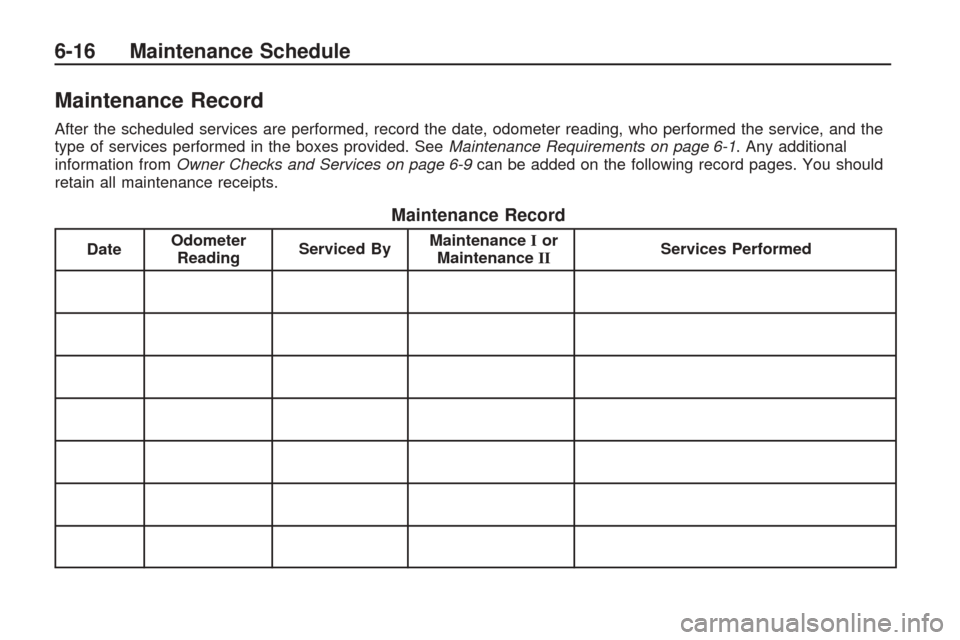
Maintenance Record
After the scheduled services are performed, record the date, odometer reading, who performed the service, and the
type of services performed in the boxes provided. SeeMaintenance Requirements on page 6-1. Any additional
information from Owner Checks and Services on page 6-9 can be added on the following record pages. You should
retain all maintenance receipts.
Maintenance Record
Date Odometer
Reading Serviced By Maintenance
Ior
Maintenance II Services Performed
6-16 Maintenance Schedule
Page 391 of 422
Maintenance Record (cont’d)
DateOdometer
Reading Serviced By Maintenance
Ior
Maintenance II Services Performed
Maintenance Schedule 6-17
Page 392 of 422
Maintenance Record (cont’d)
DateOdometer
Reading Serviced By Maintenance
Ior
Maintenance II Services Performed
6-18 Maintenance Schedule
Page 398 of 422
GM Mobility
Reimbursement Program
This program, available to qualied
applicants, can reimburse you
up to $1,000 of the cost of eligible
aftermarket adaptive equipment
required for your vehicle, such as
hand controls or a wheelchair/
scooter lift.
The offer is available for a very
limited period of time from the date
of vehicle purchase/lease. For more
details, or to determine your vehicle’s
eligibility, visit gmmobility.com or call
the GM Mobility Assistance Center at
1-800-323-9935. Text telephone
(TTY) users, call 1-800-833-9935.General Motors of Canada
also has a Mobility Program.
Call 1-800-GM-DRIVE (463-7483)
for details. TTY users call
1-800-263-3830.
Roadside Assistance
Program
For U.S. purchased vehicles,
call1-800-CHEV-USA
(1-800-243-8872); (Text telephone
(TTY): 1-888-889-2438).
For Canadian purchased vehicles,
call1-800-268-6800.
Service is available 24 hours a day,
365 days a year.
Calling for Assistance
When calling Roadside Assistance,
have the following information ready:
Your name, home address, and
home telephone number
Telephone number of your
location
Location of the vehicle
Model, year, color, and license
plate number of the vehicle
Odometer reading, Vehicle
Identication Number (VIN), and
delivery date of the vehicle
Description of the problem
7-6 Customer Assistance Information
Page 417 of 422
Locks (cont.)
Power Door ....................... 2-8
Programmable Automatic
Door Locks.................... 2-9
Rear Door Security Locks.... 2-9
Loss of Control....................4-10
Lower Anchors and Tethers
for Children......................1-35
Luggage Carrier...................2-54
Lumbar
Manual Controls................. 1-4
Power Controls.................. 1-5
M
Maintenance
Footnotes.......................... 6-7
Maintenance Schedule
Additional Required
Services........................ 6-6
At Each Fuel Fill................ 6-9
At Least Once a Month....... 6-9
At Least Once a Year.......6-10
Maintenance Record.........6-16
Maintenance Replacement
Parts...........................6-14
Maintenance Requirements . . . 6-1Maintenance Schedule (cont.)
Owner Checks and
Services........................ 6-9
Recommended Fluids and
Lubricants....................6-12
Scheduled Maintenance....... 6-3
Using............................... 6-2
Your Vehicle and the
Environment................... 6-1
Malfunction Indicator Lamp....3-39
Manual Lumbar Controls......... 1-4
Manual Seats........................ 1-3
Memory Seat and Mirrors....... 1-6
Message
DIC Warnings and
Messages....................3-56
Mirrors
Automatic Dimming
Rearview......................2-31
Blind Spot.......................2-34
Manual Rearview Mirror.....2-31
Outside Convex Mirror.......2-35
Outside Heated Mirrors......2-35
Outside Power Foldaway
Mirrors.........................2-33
Outside Power Mirrors.......2-32
Park Tilt..........................2-35
MP3 ...........................3-92, 3-96
N
Navigation System, Privacy....7-17
Navigation/Radio System,
see Navigation Manual....3-103
Net
Convenience....................2-55
New Vehicle Break-In...........2-20
O
Odometer...........................3-32
Off-Road
Recovery.......................... 4-9
Oil
Engine............................5-11
Engine Oil Life System......5-13
Pressure Light..................3-42
Older Children, Restraints......1-27
Online Owner Center.............. 7-3
OnStar, Privacy....................7-17
OnStar
®System, see
OnStar®Manual...............2-43
Operation, Universal Home
Remote System................2-47
Outlet Adjustment.................3-27
Outlets
Accessory Power..............3-17
INDEX i-7