lock CHEVROLET TRAVERSE 2009 1.G Workshop Manual
[x] Cancel search | Manufacturer: CHEVROLET, Model Year: 2009, Model line: TRAVERSE, Model: CHEVROLET TRAVERSE 2009 1.GPages: 422, PDF Size: 2.06 MB
Page 133 of 422
When the DRL are on, the regular
headlamps, taillamps, sidemarker,
and other lamps are not on.
The instrument panel and cluster
are also not on.
The headlamps automatically
change from DRL to the regular
headlamps depending on the
darkness of the surroundings.
The other lamps that come on with
the headlamps will also come on.
When it is bright enough outside,
the headlamps go off and the
DRL come on.
The regular headlamp system
should be turned on when needed.
Do not cover the light sensor on
top of the instrument panel because
it works with the DRL.Fog Lamps
#
(Fog Lamps):For vehicles
with fog lamps, the button is located
on the exterior lamps control.
The exterior lamps control is located
on the instrument panel to the left
of the steering column.
The ignition must be in the
ON/RUN position for the fog lamps
to come on.
Press
#to turn the fog lamps
on or off. A light will come on in
the instrument panel cluster.
When the headlamps are changed
to high-beam, the fog lamps also
go off.
Some localities have laws that
require the headlamps to be
on along with the fog lamps.
Instrument Panel
Brightness
D
(Instrument Panel Brightness):
The knob with this symbol on it is
located next to the exterior lamps
control to the left of the steering
wheel. Push the knob in all the way
until it extends out and then turn the
knob clockwise or counterclockwise
to brighten or dim the lights. Push the
knob back in when nished.
Instrument Panel 3-13
Page 134 of 422
Courtesy Lamps
When a door is opened, the
courtesy lamps automatically
come on. They make it easier
when entering and exiting the
vehicle. The lamps can also be
turned on manually by fully turning
the instrument panel brightness
control clockwise.
The reading lamps, located on the
headliner above the rearview mirror,
can be turned on or off independent
of the automatic courtesy lamps,
when the doors are closed.
Dome Lamps
The dome lamps automatically
come on when a door is opened,
unless the dome lamp override
button is pressed in.
The lamps can also be turned on
and off by turning the instrument
panel brightness control clockwise
to the farthest position.
Dome Lamp Override
The dome lamp override button is
located next to the exterior lamps
control.
The dome lamp override sets the
dome lamps to remain off or come on
automatically when a door is opened.
E(Dome Lamp Override):Press
the button in and the dome lamps
remain off when a door is opened.
Press the button again to return it
to the extended position so that
the dome lamps come on when
a door is opened.
Entry Lighting
For vehicles with courtesy lamps,
they come on and stay on for a set
time whenever the unlock symbol
is pressed on the Remote Keyless
Entry (RKE) transmitter, if the
vehicle has one.If a door is opened, the lamps stay
on while it is open and then turn off
automatically about 20 seconds after
the door is closed. If the unlock
symbol is pressed and no door is
opened, the lamps turn off after
about 20 seconds.
Entry lighting includes a feature
called theater dimming. With theater
dimming, the lamps do not turn off
at the end of the delay time. Instead,
they slowly dim and then go out.
The delay time is canceled if the
ignition key is turned to ON/RUN
or the power door lock switch is
pressed. The lamps will dim
right away.
When the ignition is on, illuminated
entry is inactive, which means the
courtesy lamps will not come on
unless a door is opened.
3-14 Instrument Panel
Page 135 of 422
Delayed Entry Lighting
Delayed entry lighting illuminates
the interior for a period of time after
all the doors have been closed.
The ignition must be off for delayed
entry lighting to work. Immediately
after all the doors have been closed,
the delayed entry lighting feature
continues to work until one of
the following occurs:
The ignition is in ON/RUN.
The doors are locked.
An illumination period of about
25 seconds has elapsed.
If during the illumination period
a door is opened, the timed
illumination period is canceled
and the interior lamps remain on.
Delayed Exit Lighting
This feature illuminates the interior
for a period of time after the key
is removed from the ignition.
The ignition must be off for delayed
exit lighting to work. When the key
is removed, interior illumination
activates and remains on until one
of the following occurs:
The ignition is in ON/RUN.
The power door locks are
activated.
An illumination period of
20 seconds has elapsed.
If during the illumination period
a door is opened, the timed
illumination period will be canceled
and the interior lamps will remain
on because a door is open.
Parade Dimming
Parade mode automatically prohibits
the dimming of the instrument panel
displays during the daylight while
the headlamps are on so that the
displays are still able to be seen.
Reading Lamps
The vehicle has reading lamps that
also act as the dome lamp. Press
the button to turn them on and off.
Electric Power
Management
The vehicle has Electric Power
Management (EPM) that estimates
the battery’s temperature and state
of charge. It then adjusts the voltage
for best performance and extended
life of the battery.
Instrument Panel 3-15
Page 138 of 422
Power Outlet 115 Volt
Alternating Current
For vehicles with this power outlet,
it can be used to plug in electrical
equipment that uses a maximum
limit of 150 watts.
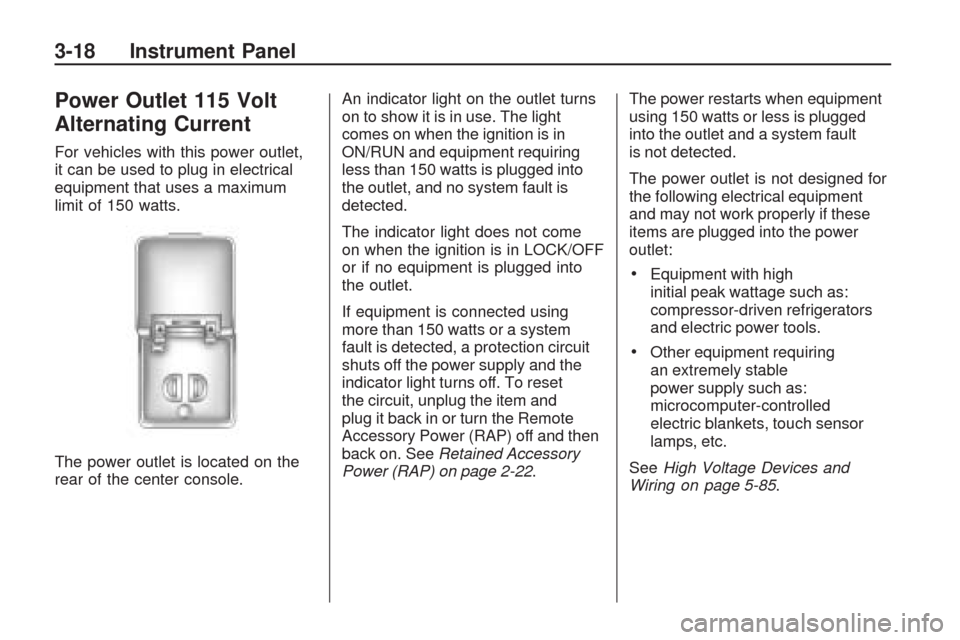
The power outlet is located on the
rear of the center console.An indicator light on the outlet turns
on to show it is in use. The light
comes on when the ignition is in
ON/RUN and equipment requiring
less than 150 watts is plugged into
the outlet, and no system fault is
detected.
The indicator light does not come
on when the ignition is in LOCK/OFF
or if no equipment is plugged into
the outlet.
If equipment is connected using
more than 150 watts or a system
fault is detected, a protection circuit
shuts off the power supply and the
indicator light turns off. To reset
the circuit, unplug the item and
plug it back in or turn the Remote
Accessory Power (RAP) off and then
back on. SeeRetained Accessory
Power (RAP) on page 2-22.The power restarts when equipment
using 150 watts or less is plugged
into the outlet and a system fault
is not detected.
The power outlet is not designed for
the following electrical equipment
and may not work properly if these
items are plugged into the power
outlet:
Equipment with high
initial peak wattage such as:
compressor-driven refrigerators
and electric power tools.
Other equipment requiring
an extremely stable
power supply such as:
microcomputer-controlled
electric blankets, touch sensor
lamps, etc.
SeeHigh Voltage Devices and
Wiring on page 5-85.
3-18 Instrument Panel
Page 139 of 422
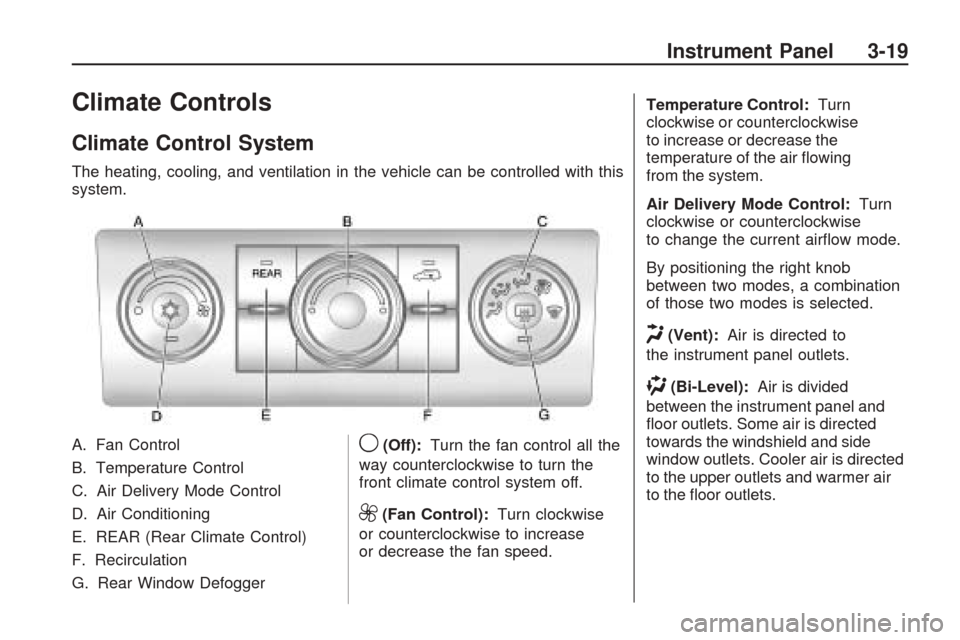
Climate Controls
Climate Control System
The heating, cooling, and ventilation in the vehicle can be controlled with this
system.
A. Fan Control
B. Temperature Control
C. Air Delivery Mode Control
D. Air Conditioning
E. REAR (Rear Climate Control)
F. Recirculation
G. Rear Window Defogger
9(Off):Turn the fan control all the
way counterclockwise to turn the
front climate control system off.
9(Fan Control): Turn clockwise
or counterclockwise to increase
or decrease the fan speed. Temperature Control:
Turn
clockwise or counterclockwise
to increase or decrease the
temperature of the air owing
from the system.
Air Delivery Mode Control: Turn
clockwise or counterclockwise
to change the current airow mode.
By positioning the right knob
between two modes, a combination
of those two modes is selected.
H(Vent): Air is directed to
the instrument panel outlets.
)(Bi-Level): Air is divided
between the instrument panel and
oor outlets. Some air is directed
towards the windshield and side
window outlets. Cooler air is directed
to the upper outlets and warmer air
to the oor outlets.
Instrument Panel 3-19
Page 147 of 422
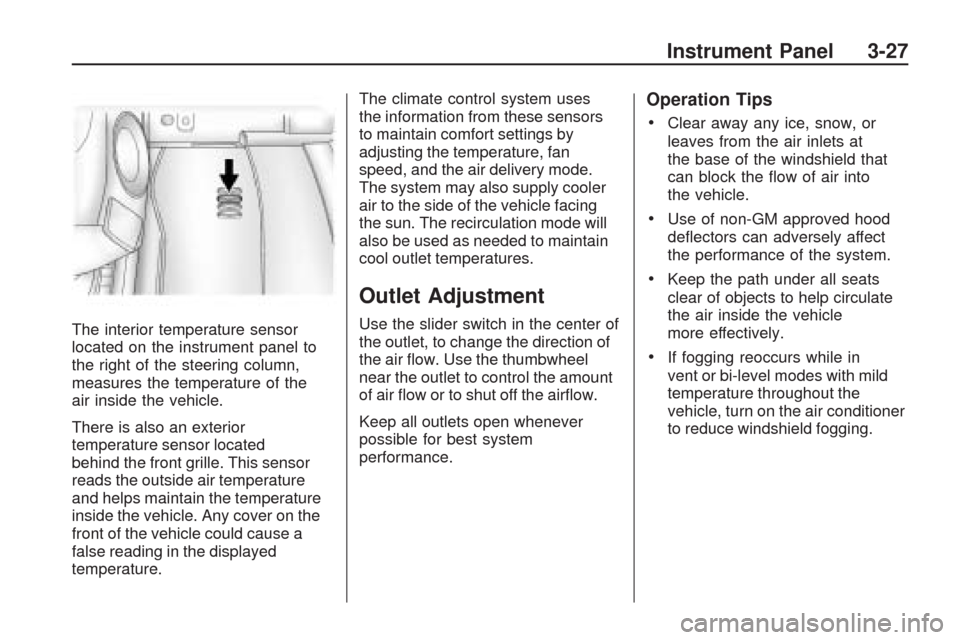
The interior temperature sensor
located on the instrument panel to
the right of the steering column,
measures the temperature of the
air inside the vehicle.
There is also an exterior
temperature sensor located
behind the front grille. This sensor
reads the outside air temperature
and helps maintain the temperature
inside the vehicle. Any cover on the
front of the vehicle could cause a
false reading in the displayed
temperature.The climate control system uses
the information from these sensors
to maintain comfort settings by
adjusting the temperature, fan
speed, and the air delivery mode.
The system may also supply cooler
air to the side of the vehicle facing
the sun. The recirculation mode will
also be used as needed to maintain
cool outlet temperatures.
Outlet Adjustment
Use the slider switch in the center of
the outlet, to change the direction of
the air ow. Use the thumbwheel
near the outlet to control the amount
of air ow or to shut off the airow.
Keep all outlets open whenever
possible for best system
performance.
Operation Tips
Clear away any ice, snow, or
leaves from the air inlets at
the base of the windshield that
can block the ow of air into
the vehicle.
Use of non-GM approved hood
deectors can adversely affect
the performance of the system.
Keep the path under all seats
clear of objects to help circulate
the air inside the vehicle
more effectively.
If fogging reoccurs while in
vent or bi-level modes with mild
temperature throughout the
vehicle, turn on the air conditioner
to reduce windshield fogging.
Instrument Panel 3-27
Page 148 of 422
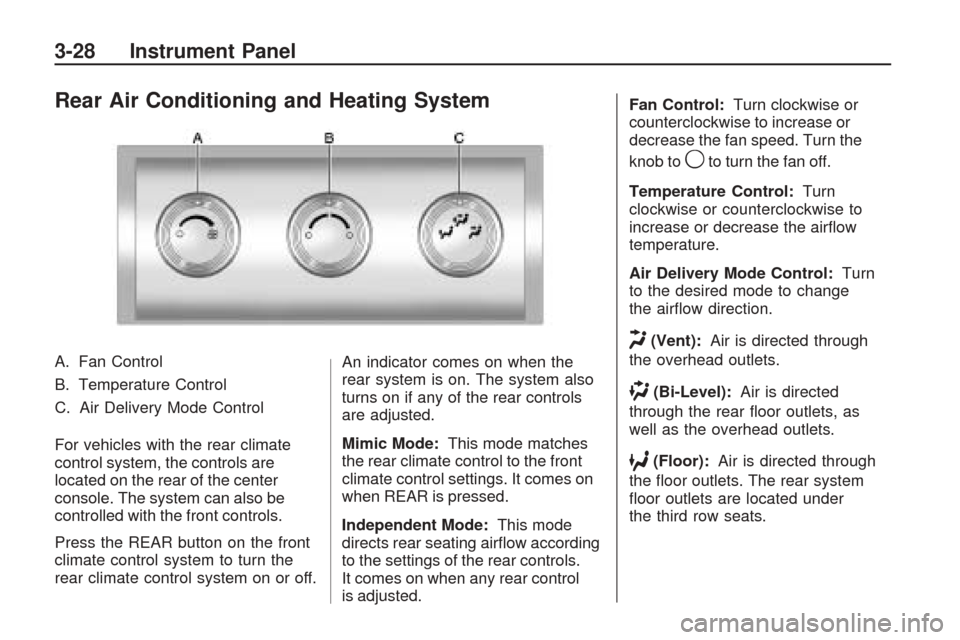
Rear Air Conditioning and Heating System
A. Fan Control
B. Temperature Control
C. Air Delivery Mode Control
For vehicles with the rear climate
control system, the controls are
located on the rear of the center
console. The system can also be
controlled with the front controls.
Press the REAR button on the front
climate control system to turn the
rear climate control system on or off.An indicator comes on when the
rear system is on. The system also
turns on if any of the rear controls
are adjusted.
Mimic Mode:
This mode matches
the rear climate control to the front
climate control settings. It comes on
when REAR is pressed.
Independent Mode: This mode
directs rear seating airow according
to the settings of the rear controls.
It comes on when any rear control
is adjusted. Fan Control:
Turn clockwise or
counterclockwise to increase or
decrease the fan speed. Turn the
knob to
9to turn the fan off.
Temperature Control: Turn
clockwise or counterclockwise to
increase or decrease the airow
temperature.
Air Delivery Mode Control: Turn
to the desired mode to change
the airow direction.
H(Vent): Air is directed through
the overhead outlets.
)(Bi-Level): Air is directed
through the rear oor outlets, as
well as the overhead outlets.
6(Floor): Air is directed through
the oor outlets. The rear system
oor outlets are located under
the third row seats.
3-28 Instrument Panel
Page 157 of 422
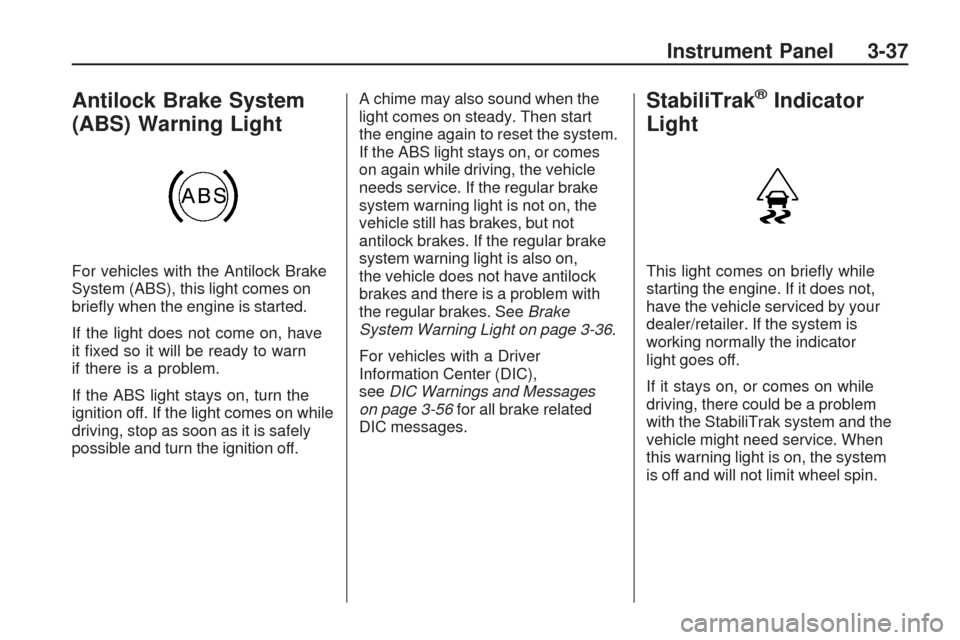
Antilock Brake System
(ABS) Warning Light
For vehicles with the Antilock Brake
System (ABS), this light comes on
briey when the engine is started.
If the light does not come on, have
it xed so it will be ready to warn
if there is a problem.
If the ABS light stays on, turn the
ignition off. If the light comes on while
driving, stop as soon as it is safely
possible and turn the ignition off.A chime may also sound when the
light comes on steady. Then start
the engine again to reset the system.
If the ABS light stays on, or comes
on again while driving, the vehicle
needs service. If the regular brake
system warning light is not on, the
vehicle still has brakes, but not
antilock brakes. If the regular brake
system warning light is also on,
the vehicle does not have antilock
brakes and there is a problem with
the regular brakes. SeeBrake
System Warning Light on page 3-36.
For vehicles with a Driver
Information Center (DIC),
seeDIC Warnings and Messages
on page 3-56for all brake related
DIC messages.
StabiliTrak®Indicator
Light
This light comes on briey while
starting the engine. If it does not,
have the vehicle serviced by your
dealer/retailer. If the system is
working normally the indicator
light goes off.
If it stays on, or comes on while
driving, there could be a problem
with the StabiliTrak system and the
vehicle might need service. When
this warning light is on, the system
is off and will not limit wheel spin.
Instrument Panel 3-37
Page 167 of 422
FRONT TIRES or REAR TIRES
On vehicles with the Tire Pressure
Monitor System (TPMS), the
pressure for each tire can be viewed
in the DIC. The tire pressure will be
shown in either pounds per square
inch (psi) or kilopascals (kPa). Press
the vehicle information button until
the DIC displays FRONT TIRES
PSI (kPa) LEFT ## RIGHT ##. Press
the vehicle information button again
until the DIC displays REAR TIRES
PSI (kPa) LEFT ## RIGHT ##.
If a low or high tire pressure
condition is detected by the system
while driving, a message advising
you to check the pressure in a
specic tire will appear in the display.
SeeInflation - Tire Pressure on
page 5-42andDIC Warnings and
Messages on page 3-56for more
information.If the tire pressure display shows
dashes instead of a value, there
may be a problem with your vehicle.
If this consistently occurs, see
your dealer/retailer for service.
RELEARN REMOTE KEY
This display allows you to match
Remote Keyless Entry (RKE)
transmitters to your vehicle.
This procedure will erase all
previously learned transmitters.
Therefore, they must be relearned
as additional transmitters.
To match an RKE transmitter to
your vehicle:
1. Press the vehicle information
button until PRESS
VTO
RELEARN REMOTE KEY
displays.
2. Press the set/reset button until
REMOTE KEY LEARNING
ACTIVE is displayed.3. Press and hold the lock and
unlock buttons on the rst
transmitter at the same time
for about 15 seconds.
On vehicles with memory
recall seats, the rst transmitter
learned will match driver 1
and the second will match
driver 2.
A chime will sound indicating
that the transmitter is matched.
4. To match additional transmitters
at this time, repeat Step 3.
Each vehicle can have a
maximum of eight transmitters
matched to it.
5. To exit the programming mode,
you must cycle the key to
LOCK/OFF.
Instrument Panel 3-47
Page 173 of 422
PARK ASSIST
To access this display, the vehicle
must be in P (Park). If your vehicle
has the Ultrasonic Rear Parking
Assist (URPA) system, press the trip
odometer reset stem until PARK
ASSIST displays. This display allows
the system to be turned on or off.
Once in this display, press and hold
the trip odometer reset stem to select
between ON or OFF. If you choose
ON, the system will be turned on.
If you choose OFF, the system will
be turned off. The URPA system
automatically turns back on after
each vehicle start. When the URPA
system is turned off and the vehicle
is shifted out of P (Park), the DIC
will display the PARK ASSIST OFF
message as a reminder that the
system has been turned off.
SeeDIC Warnings and Messages
on page 3-56andUltrasonic Rear
Parking Assist (URPA) on page 2-36
for more information.RELEARN REMOTE KEY
To access this display, the vehicle
must be in P (Park). This display
allows you to match Remote Keyless
Entry (RKE) transmitters to your
vehicle. This procedure will erase
all previously learned transmitters.
Therefore, they must be relearned
as additional transmitters.
To match an RKE transmitter to
your vehicle:
1. Press the trip odometer reset
stem until RELEARN REMOTE
KEY displays.
2. Press and hold the trip odometer
reset stem until REMOTE KEY
LEARNING ACTIVE is displayed.
3. Press and hold the lock and
unlock buttons on the rst
transmitter at the same time
for about 15 seconds.
On vehicles with memory recall
seats, the rst transmitter learned
will match driver 1 and the
second will match driver 2.A chime will sound indicating
that the transmitter is matched.
4. To match additional transmitters
at this time, repeat Step 3.
Each vehicle can have a
maximum of eight transmitters
matched to it.
5. To exit the programming mode,
you must cycle the key to
LOCK/OFF.
UNITS
To access this display, the vehicle
must be in P (Park). Press the trip
odometer reset stem until UNITS
displays. This display allows you to
select between English or Metric
units of measurement. Once in
this display, press and hold the
trip odometer reset stem to select
between ENGLISH or METRIC units.
All of the vehicle information will
then be displayed in the unit of
measurement selected.
Instrument Panel 3-53