buttons CHEVROLET TRAVERSE 2010 1.G Owners Manual
[x] Cancel search | Manufacturer: CHEVROLET, Model Year: 2010, Model line: TRAVERSE, Model: CHEVROLET TRAVERSE 2010 1.GPages: 448, PDF Size: 6.96 MB
Page 7 of 448
In Brief 1-1
In Brief
Instrument Panel
Instrument Panel . . . . . . . . . . . . . . 1-2
Initial Drive Information
Initial Drive Information . . . . . . . . 1-4
Remote Keyless Entry (RKE)System . . . . . . . . . . . . . . . . . . . . . . 1-4
Remote Vehicle Start . . . . . . . . . 1-4
Door Locks . . . . . . . . . . . . . . . . . . . 1-5
Liftgate . . . . . . . . . . . . . . . . . . . . . . . . 1-5
Windows . . . . . . . . . . . . . . . . . . . . . . 1-6
Seat Adjustment . . . . . . . . . . . . . . 1-6
Second Row Seats . . . . . . . . . . . 1-7
Third Row Seats . . . . . . . . . . . . . . 1-7
Heated Seats . . . . . . . . . . . . . . . . . 1-8
Heated and Ventilated Seats . . . . . . . . . . . . . . . . . . . . . . . . 1-8
Head Restraint Adjustment . . . . 1-8
Safety Belt . . . . . . . . . . . . . . . . . . . . 1-8
Sensing System for Passenger Airbag . . . . . . . . . . . . . . . . . . . . . . . 1-9
Mirror Adjustment . . . . . . . . . . . . . 1-9
Steering Wheel Adjustment . . . . . . . . . . . . . . . . . 1-10
Interior Lighting . . . . . . . . . . . . . . 1-11 Exterior Lighting . . . . . . . . . . . . . 1-12
Windshield Wiper/Washer . . . . 1-12
Climate Controls . . . . . . . . . . . . . 1-13
Vehicle Features
Radio(s) . . . . . . . . . . . . . . . . . . . . . 1-15
Satellite Radio . . . . . . . . . . . . . . . 1-16
Portable Audio Devices . . . . . . 1-16
Bluetooth
®. . . . . . . . . . . . . . . . . . . 1-16
Steering Wheel Controls . . . . . 1-17
Navigation System . . . . . . . . . . . 1-17
Driver Information Center (DIC) (With DIC Buttons) . . . 1-18
Cruise Control . . . . . . . . . . . . . . . 1-18
Storage Compartments . . . . . . 1-19
Power Outlets . . . . . . . . . . . . . . . 1-19
Sunroof . . . . . . . . . . . . . . . . . . . . . . 1-20
Performance and Maintenance
StabiliTrak®. . . . . . . . . . . . . . . . . . 1-20
Tire Pressure Monitor . . . . . . . . 1-21
Tire Sealant and Compressor Kit . . . . . . . . . . . . . 1-21
Engine Oil Life System . . . . . . 1-21
Driving for Better Fuel Economy . . . . . . . . . . . . . . . . . . . 1-22
Roadside Assistance Program . . . . . . . . . . . . . . . . . . . . 1-23
OnStar
®. . . . . . . . . . . . . . . . . . . . . 1-23
Page 9 of 448

In Brief 1-3
A.Windshield Wiper/Washeron
page 5‑5.
B. Instrument Cluster
on
page 5‑11.
C. Steering Wheel Controls
on
page 5‑3.
D. Instrument Panel Storage
on
page 4‑1.
E. AM-FM Radio on page 7‑6.
F. Air Vents on page 8‑12.
G. Exterior Lamp Controls
on
page 6‑1.
H. Instrument Panel Illumination
Control on page 6‑4.
I. Cruise Control on page 9‑31.
J. Steering Wheel Adjustment
on
page 5‑2.
K. Horn on page 5‑5. L. Driver Information Center (DIC)
Buttons. See Driver Information
Center (DIC) (With DIC Buttons)
on page 5‑22or Driver
Information Center (DIC)
(Without DIC Buttons)
on
page 5‑28.
M. Climate Control Systems
on
page 8‑1or Dual Automatic
Climate Control Systemon
page 8‑4.
N. Shift Lever. See Shifting Into
Park on page 9‑20.
O. Power Outlets on page 5‑9.
P. Rear Window Wiper/Washer
on
page 5‑6. Traction Control
System (TCS) Disable Button.
See StabiliTrak System
on
page 9‑29. Tow/Haul Modeon
page 9‑26(If Equipped) . Power
Liftgate. See Liftgateon
page 2‑9(If Equipped). Q.
Heated Front Seats
on
page 3‑8.
R. Hazard Warning Flashers
on
page 6‑3.
S. Passenger Airbag Status
Indicator
on page 5‑15(If Equipped).
T. Glove Box on page 4‑1.
Page 24 of 448
1-18 In Brief
Driver Information Center
(DIC) (With DIC Buttons)
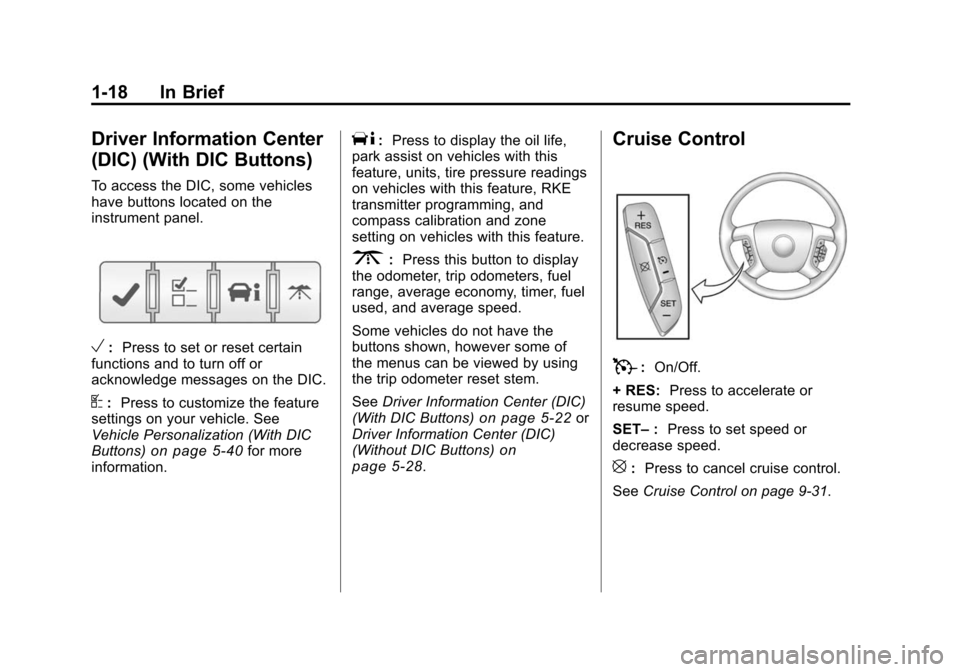
To access the DIC, some vehicles
have buttons located on the
instrument panel.
V:Press to set or reset certain
functions and to turn off or
acknowledge messages on the DIC.
U: Press to customize the feature
settings on your vehicle. See
Vehicle Personalization (With DIC
Buttons)
on page 5‑40for more
information.
T: Press to display the oil life,
park assist on vehicles with this
feature, units, tire pressure readings
on vehicles with this feature, RKE
transmitter programming, and
compass calibration and zone
setting on vehicles with this feature.
3: Press this button to display
the odometer, trip odometers, fuel
range, average economy, timer, fuel
used, and average speed.
Some vehicles do not have the
buttons shown, however some of
the menus can be viewed by using
the trip odometer reset stem.
See Driver Information Center (DIC)
(With DIC Buttons)
on page 5‑22or
Driver Information Center (DIC)
(Without DIC Buttons)
on
page 5‑28.
Cruise Control
T: On/Off.
+ RES: Press to accelerate or
resume speed.
SET– :Press to set speed or
decrease speed.
[: Press to cancel cruise control.
See Cruise Control on page 9‑31.
Page 25 of 448
In Brief 1-19
Storage Compartments
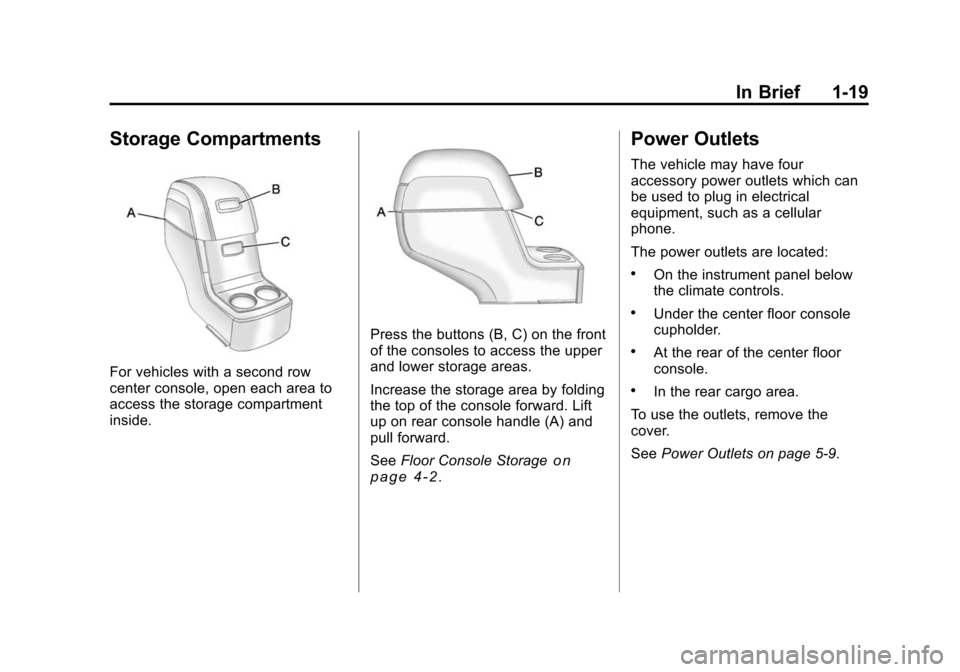
For vehicles with a second row
center console, open each area to
access the storage compartment
inside.
Press the buttons (B, C) on the front
of the consoles to access the upper
and lower storage areas.
Increase the storage area by folding
the top of the console forward. Lift
up on rear console handle (A) and
pull forward.
SeeFloor Console Storage
on
page 4‑2.
Power Outlets
The vehicle may have four
accessory power outlets which can
be used to plug in electrical
equipment, such as a cellular
phone.
The power outlets are located:
.On the instrument panel below
the climate controls.
.Under the center floor console
cupholder.
.At the rear of the center floor
console.
.In the rear cargo area.
To use the outlets, remove the
cover.
See Power Outlets on page 5‑9.
Page 28 of 448
1-22 In Brief
Resetting the Oil Life System
1. Turn the ignition to ON/RUN,with the engine off.
2. If the vehicle has Driver Information Center (DIC)
buttons: Press the vehicle
information button until OIL LIFE
REMAINING displays.
If the vehicle does not have
Driver Information Center (DIC)
buttons: The vehicle must be in
P (Park) to access this display.
Press the trip odometer reset
stem until OIL LIFE REMAINING
displays.
3. If the vehicle has Driver Information Center (DIC)
buttons: Press and hold the set/
reset button until “100%”is
displayed. Three chimes sound
and the CHANGE ENGINE OIL
SOON message goes off. If the vehicle does not have
Driver Information Center (DIC)
buttons: Press and hold the trip
odometer reset stem until OIL
LIFE REMAINING shows
“100%.”
Three chimes sound
and the CHANGE ENGINE OIL
SOON message goes off.
4. Turn the key to LOCK/OFF.
See Engine Oil Life System
on
page 10‑10.
Driving for Better Fuel
Economy
Driving habits can affect fuel
mileage. Here are some driving tips
to get the best fuel economy
possible.
.Avoid fast starts and accelerate
smoothly.
.Brake gradually and avoid
abrupt stops.
.Avoid idling the engine for long
periods of time.
.When road and weather
conditions are appropriate, use
cruise control, if equipped.
.Always follow posted speed
limits or drive more slowly when
conditions require.
.Keep vehicle tires properly
inflated.
.Combine several trips into a
single trip.
.Replace the vehicle's tires with
the same TPC Spec number
molded into the tire's sidewall
near the size.
.Follow recommended scheduled
maintenance.
Page 31 of 448
In Brief 1-25
OnStar Steering Wheel
Controls
This vehicle may have a Talk/Mute
button that can be used to interact
with OnStar hands-free calling. See
Steering Wheel Controls
on
page 5‑3for more information.
On some vehicles, the mute button
can be used to dial numbers into
voice mail systems, or to dial phone
extensions. See the OnStar Owner's
Guide for more information.
Your Responsibility
Increase the volume of the radio if
the OnStar advisor cannot be heard.
If the light next to the OnStar
buttons is red, the system may not
be functioning properly. Press
Q
and request a vehicle diagnostic.
If the light appears clear (no light is
appearing), your OnStar
subscription has expired and all
services have been deactivated.
Press
Qto confirm that the OnStar
equipment is active.
Page 35 of 448
Keys, Doors and Windows 2-3
If there is a decrease in the RKE
operating range:
.Check the distance. The
transmitter may be too far from
the vehicle.
.Check the location. Other
vehicles or objects may be
blocking the signal.
.Check the transmitter's battery.
See“Battery Replacement” later
in this section.
.If the transmitter is still not
working correctly, see your
dealer or a qualified technician
for service.
Remote Keyless Entry
(RKE) System Operation
The Remote Keyless Entry (RKE)
transmitter functions work up to
60 m (195 feet) away from the
vehicle. There are other conditions which
can affect the performance of the
transmitter. See
Remote Keyless
Entry (RKE) System on page 2‑2.
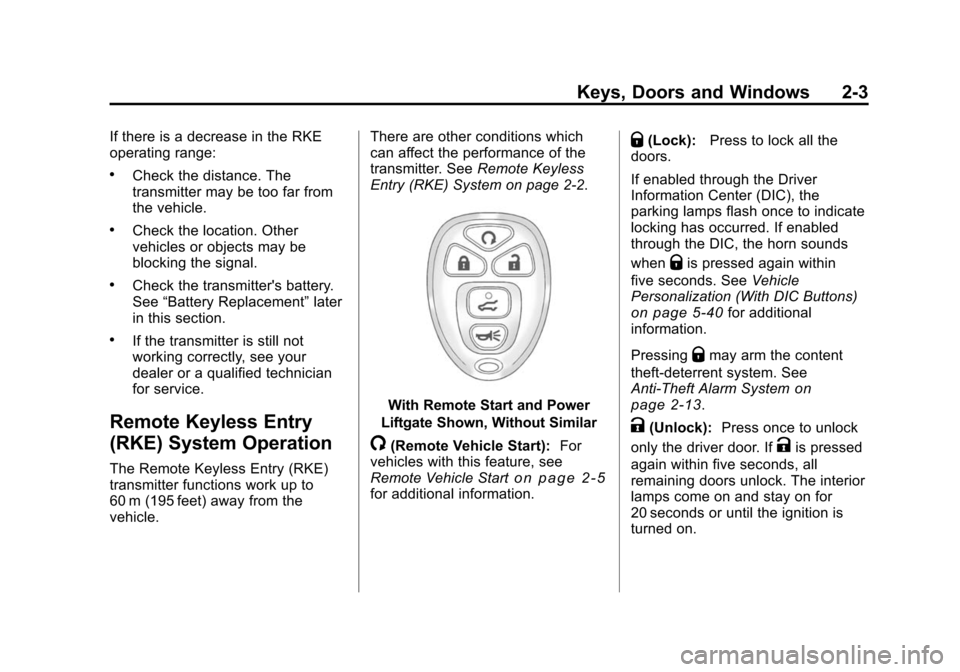
With Remote Start and Power
Liftgate Shown, Without Similar
/(Remote Vehicle Start): For
vehicles with this feature, see
Remote Vehicle Start
on page 2‑5for additional information.
Q(Lock): Press to lock all the
doors.
If enabled through the Driver
Information Center (DIC), the
parking lamps flash once to indicate
locking has occurred. If enabled
through the DIC, the horn sounds
when
Qis pressed again within
five seconds. See Vehicle
Personalization (With DIC Buttons)
on page 5‑40for additional
information.
Pressing
Qmay arm the content
theft‐deterrent system. See
Anti-Theft Alarm System
on
page 2‑13.
K(Unlock): Press once to unlock
only the driver door. If
Kis pressed
again within five seconds, all
remaining doors unlock. The interior
lamps come on and stay on for
20 seconds or until the ignition is
turned on.
Page 36 of 448
2-4 Keys, Doors and Windows
If enabled through the DIC, the
parking lamps flash twice to indicate
unlocking has occurred. SeeVehicle
Personalization (With DIC Buttons)
on page 5‑40.
Pressing
Kon the RKE transmitter
disarms the content theft‐deterrent
system. See Anti-Theft Alarm
System on page 2‑13.
&(Power Liftgate): Press and
hold until the liftgate begins to move
to open or close the liftgate. The
taillamps flash and a chime sounds
to indicate when the liftgate is
opening or closing.
L(Vehicle Locator/Panic
Alarm): Press and release to
locate the vehicle. The parking
lamps flash and the horn sounds
three times.
Press and hold
Lfor more than
two seconds to activate the panic
alarm. The parking lamps flash and
the horn sounds repeatedly for
30 seconds. The alarm turns off
when the ignition is moved to ON/RUN or
Lis pressed again.
The ignition must be in LOCK/OFF
for the panic alarm to work.
The vehicle comes with two
transmitters. Each transmitter will
have a number on it, "1" or "2".
These numbers correspond to the
driver of the vehicle. For example,
the memory seat position for driver
1 will be recalled when using the
transmitter labeled "1", if enabled
through the vehicle personalization.
See “Memory Seat and Mirrors”
under Power Seat Adjustment
on
page 3‑3and “Memory Seat
Recall” underVehicle
Personalization (With DIC Buttons)
on page 5‑40for more information.
Programming Transmitters to
the Vehicle
Only RKE transmitters programmed
to this vehicle will work. If a
transmitter is lost or stolen, a
replacement can be purchased and
programmed through your dealer.
When the replacement transmitter is
programmed to this vehicle using the DIC, all remaining transmitters
must also be reprogrammed. Any
lost or stolen transmitters will no
longer work once the new
transmitter is programmed. Each
vehicle can have up to eight
transmitters programmed to it. See
“Relearn Remote Key”
underDriver
Information Center (DIC) (With DIC
Buttons)
on page 5‑22or Driver
Information Center (DIC) (Without
DIC Buttons)
on page 5‑28for
instructions on how to program
transmitters to this vehicle.
Battery Replacement
Replace the battery if the REPLACE
BATTERY IN REMOTE KEY
message displays in the DIC.
Notice: When replacing the
battery, do not touch any of the
circuitry on the transmitter. Static
from your body could damage the
transmitter.
Page 38 of 448
2-6 Keys, Doors and Windows
When the vehicle starts the parking
lamps will turn on and remain on as
long as the engine is running. The
doors will be locked and the climate
control system will operate
automatically if the vehicle has the
automatic system, or at the same
setting as when the vehicle was last
turned off.
If the vehicle has an automatic
climate control system and heated
seats, the heated seats turn on
during colder outside temperatures
and shut off when the key is turned
to ON/RUN. SeeHeated Front
Seats
on page 3‑8or Heated and
Ventilated Front Seatson
page 3‑9for more information.
The rear window defogger and
heated mirrors, if the vehicle has
them, turn on during colder outside
temperatures and turn off when the
key is turned to ON/RUN.
After entering the vehicle during a
remote start, insert and turn the key
to the ON/RUN position to drive the
vehicle. If the vehicle is left running it
automatically shuts off after
10 minutes unless a time extension
has been done.
Extending Engine Run Time
To extend the engine run time by
10 minutes, repeat Steps 1 though 3
while the engine is still running. The
engine run time can only be
extended if it is the first remote start
since the vehicle has been driven.
Remote start can be extended
one time.
If the remote start procedure is used
again before the first 10 minute time
frame has ended, the first
10 minutes will immediately expire
and the second 10 minute time
frame will start.
For example, if the lock button and
then the remote start buttons are
pressed again after the vehicle has
been running for five minutes,
10 minutes are added, allowing the
engine to run for a total of
15 minutes.
A maximum of two remote starts or
remote start attempts are allowed
between ignition cycles.
After the vehicle's engine has been
started two times using the remote
start button, the ignition must be
turned on and then back off before
the remote start procedure can be
used again.
Shutting the Engine Off After a
Remote Start
To manually shut off a remote start:
.Aim the RKE transmitter at the
vehicle and press
/until the
parking lamps turn off.
.Turn on the hazard warning
flashers.
.Turn the ignition switch on and
then off.
Page 39 of 448
Keys, Doors and Windows 2-7
Conditions in Which the
Remote Start Will Not Work
The vehicle cannot be started using
the remote start feature if the key is
in the ignition, the hood is open, or if
there is an emission control system
malfunction.
The engine turns off during a remote
start if the coolant temperature gets
too high or if the oil pressure
gets low.
Vehicles that have the remote
vehicle start feature are shipped
from the factory with the remote
vehicle start system enabled. The
system may be enabled or disabled
through the DIC if the vehicle has
DIC buttons. See“REMOTE
START” underVehicle
Personalization (With DIC Buttons)
on page 5‑40for additional
information. If the vehicle does not
have DIC buttons, see your dealer
to enable or disable the remote start
system.
Door Locks
{WARNING
Unlocked doors can be
dangerous.
.Passengers, especially
children, can easily open the
doors and fall out of a moving
vehicle. When a door is
locked, the handle will not
open it. The chance of being
thrown out of the vehicle in a
crash is increased if the
doors are not locked. So, all
passengers should wear
safety belts properly and the
doors should be locked
whenever the vehicle is
driven.
(Continued)
WARNING (Continued)
.Young children who get into
unlocked vehicles may be
unable to get out. A child can
be overcome by extreme heat
and can suffer permanent
injuries or even death from
heat stroke. Always lock the
vehicle whenever leaving it.
.Outsiders can easily enter
through an unlocked door
when you slow down or stop
your vehicle. Locking your
doors can help prevent this
from happening.
To lock or unlock a door, use the
key from the outside or the door
lock from the inside.