navigation CHEVROLET TRAVERSE 2011 1.G User Guide
[x] Cancel search | Manufacturer: CHEVROLET, Model Year: 2011, Model line: TRAVERSE, Model: CHEVROLET TRAVERSE 2011 1.GPages: 454, PDF Size: 6.56 MB
Page 289 of 454
Black plate (37,1)Chevrolet Traverse Owner Manual - 2011
Driving and Operating 9-37
Turning the Rear Vision Camera
System Off or On
To turn off the rear vision camera
system, press and hold
z, located
on the inside rearview mirror, until
the left indicator light turns off. The
rear vision camera display is now
disabled.
To turn the rear vision camera
system on again, press and
hold
zuntil the left indicator light
illuminates. The rear vision camera
system display is now enabled and
the display will appear in the mirror
normally.
Vehicles With Navigation
System
The rear vision camera system is
designed to help the driver when
backing up by displaying a view
of the area behind the vehicle.
When the driver shifts the
vehicle into R (Reverse), the
video image automatically
appears on the navigation screen. Once the driver shifts out of
R (Reverse), the navigation screen
will go back to the last screen that
had been displayed, after a delay.
Turning the Rear Vision Camera
System On or Off
To turn the rear vision camera
system on or off:
1. Shift into P (Park).
2. Press the MENU button to enter
the configure menu options, then
press the MENU hard key to
select Display or touch the
Display screen button.
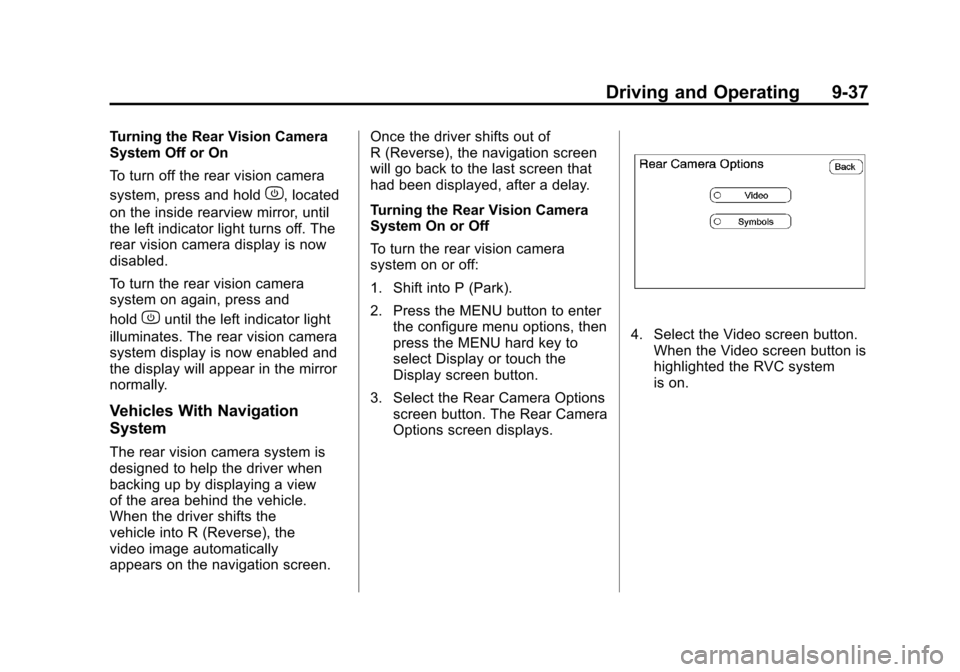
3. Select the Rear Camera Options screen button. The Rear Camera
Options screen displays.
4. Select the Video screen button.When the Video screen button is
highlighted the RVC system
is on.
Page 290 of 454
Black plate (38,1)Chevrolet Traverse Owner Manual - 2011
9-38 Driving and Operating
The delay that is received
after shifting out of R (Reverse)
is approximately 10 seconds.
The delay can be cancelled by
performing one of the following:
.Pressing a hard key on the
navigation system.
.Shifting in to P (Park).
.Reach a vehicle speed of
5 mph (8 km/h).
There is a message on the rear
vision camera screen that states
“Check Surroundings for Safety”.
Adjusting the Brightness and
Contrast of the Screen
To adjust the brightness and
contrast of the screen, press the
MENU button while the rear vision
camera image is on the display. Any
adjustments made will only affect
the rear vision camera screen.
](Brightness) : Touch the
+ (plus) or –(minus) screen buttons
to increase or decrease the
brightness of the screen.
_(Contrast) : Touch the + (plus)
or –(minus) screen buttons to
increase or decrease the contrast of
the screen.
Symbols
The navigation system may have a
feature that lets the driver view
symbols on the navigation screen
while using the rear vision camera.
The Ultrasonic Rear Park Assist
(URPA) system must not be
disabled to use the caution symbols.
If URPA has been disabled and the
symbols have been turned on, the
Rear Parking Assist Symbols
Unavailable error message may
display. See Ultrasonic Parking
Assist on page 9‑34.
The symbols appear when an object
has been detected by the URPA
system. The symbol may cover the
object when viewing the navigation
screen. To turn the symbols on or off:
1. Make sure that URPA has not
been disabled.
2. Shift into P (Park).
3. Press the MENU hard key to enter the configure menu
options, then press the MENU
hard key repeatedly until Display
is selected or touch the Display
screen button.
4. Select the Rear Camera Options screen button. The Rear Camera
Options screen will display.
5. Touch the Symbols screen button. The screen button will be
highlighted when on.
Rear Vision Camera Error
Messages
Service Rear Vision Camera
System: This message can display
when the system is not receiving
information it requires from other
vehicle systems.
If any other problem occurs or if a
problem persists, see your dealer.
Page 423 of 454
Black plate (1,1)Chevrolet Traverse Owner Manual - 2011
Customer Information 13-1
Customer
Information
Customer Information
Customer SatisfactionProcedure (United States
and Canada) . . . . . . . . . . . . . . . 13-1
Customer Satisfaction Procedure (Mexico) . . . . . . . . 13-4
Customer Assistance Offices (United States and
Canada) . . . . . . . . . . . . . . . . . . . . 13-5
Customer Assistance Offices (Mexico) . . . . . . . . . . . . . . . . . . . . 13-6
Customer Assistance for Text Telephone (TTY) Users . . . . . 13-6
Online Owner Center . . . . . . . . 13-7
GM Mobility Reimbursement Program . . . . . . . . . . . . . . . . . . . . 13-8
Roadside Assistance Program (United States and
Canada) . . . . . . . . . . . . . . . . . . . . 13-8
Roadside Assistance Program (Mexico) . . . . . . . . . 13-10
Scheduling Service Appointments . . . . . . . . . . . . . 13-10 Courtesy Transportation
Program . . . . . . . . . . . . . . . . . . . 13-11
Collision Damage Repair . . . 13-12
Service Publications Ordering Information . . . . . . 13-15Reporting Safety Defects
Reporting Safety Defects to
the United States
Government . . . . . . . . . . . . . . . 13-16
Reporting Safety Defects to the Canadian
Government . . . . . . . . . . . . . . . 13-16
Reporting Safety Defects to General Motors . . . . . . . . . . . 13-17
Vehicle Data Recording and
Privacy
Vehicle Data Recording andPrivacy . . . . . . . . . . . . . . . . . . . . 13-17
Event Data Recorders . . . . . . 13-17
OnStar
®. . . . . . . . . . . . . . . . . . . . 13-18
Navigation System . . . . . . . . . 13-19
Radio Frequency Identification (RFID) . . . . . . . 13-19
Radio Frequency Statement . . . . . . . . . . . . . . . . . 13-19
Customer Information
Customer Satisfaction
Procedure (United States
and Canada)
Your satisfaction and goodwill are
important to your dealer and to
Chevrolet. Normally, any concerns
with the sales transaction or the
operation of the vehicle will be
resolved by the dealer's sales or
service departments. Sometimes,
however, despite the best intentions
of all concerned, misunderstandings
can occur. If your concern has not
been resolved to your satisfaction,
the following steps should be taken:
STEP ONE: Discuss your concern
with a member of dealership
management. Normally, concerns
can be quickly resolved at that level.
If the matter has already been
reviewed with the sales, service,
or parts manager, contact the owner
of the dealership or the general
manager.
Page 441 of 454
Black plate (19,1)Chevrolet Traverse Owner Manual - 2011
Customer Information 13-19
Navigation System
If the vehicle has a navigation
system, use of the system may
result in the storage of destinations,
addresses, telephone numbers,
and other trip information.
Refer to the navigation system
operating manual for information
on stored data and for deletion
instructions.
Radio Frequency
Identification (RFID)
RFID technology is used in some
vehicles for functions such as tire
pressure monitoring and ignition
system security, as well as in
connection with conveniences such
as key fobs for remote door locking/
unlocking and starting, and
in-vehicle transmitters for garage
door openers. RFID technology in
GM vehicles does not use or record
personal information or link with any
other GM system containing
personal information.
Radio Frequency
Statement
This vehicle has systems that
operate on a radio frequency that
comply with Part 15 of the Federal
Communications Commission (FCC)
rules and with Industry Canada
Standards RSS‐210/220/310.
Operation is subject to the following
two conditions:
1. The device may not causeinterference.
2. The device must accept any interference received, including
interference that may cause
undesired operation of
the device.
Changes or modifications to any of
these systems by other than an
authorized service facility could void
authorization to use this equipment.
Page 449 of 454

Black plate (7,1)Chevrolet Traverse Owner Manual - 2011
INDEX i-7
LocksAutomatic Door . . . . . . . . . . . . . . . . 2-8
Delayed Locking . . . . . . . . . . . . . . . 2-8
Door . . . . . . . . . . . . . . . . . . . . . . . . . . . 2-7
Lockout Protection . . . . . . . . . . . . . 2-8
Power Door . . . . . . . . . . . . . . . . . . . . 2-8
Safety . . . . . . . . . . . . . . . . . . . . . . . . . 2-8
Loss of Control . . . . . . . . . . . . . . . . . 9-5
Lower Anchors and Tethers for Children (LATCH
SYSTEM) . . . . . . . . . . . . . . . . . . . . 3-56
Lumbar Adjustment . . . . . . . . . . . . . 3-6 Front Seats . . . . . . . . . . . . . . . . . . . . 3-6
M
MaintenanceRecords . . . . . . . . . . . . . . . . . . . . . . 11-9
Maintenance Schedule
Recommended Fluids andLubricants . . . . . . . . . . . . . . . . . . . 11-6
Scheduled Maintenance . . . . . . 11-2
Malfunction Indicator Lamp . . . . 5-16
Manual Mode . . . . . . . . . . . . . . . . . . 9-26
Memory Features . . . . . . . . . . . . . . . 1-7 Messages
Airbag System . . . . . . . . . . . . . . . . 5-37
Anti-Theft Alarm System . . . . . . 5-37
Battery Voltage and
Charging . . . . . . . . . . . . . . . . . . . . 5-32
Brake System . . . . . . . . . . . . . . . . 5-32
Door Ajar . . . . . . . . . . . . . . . . . . . . . 5-32
Engine Cooling System . . . . . . . 5-33
Engine Oil . . . . . . . . . . . . . . . . . . . . 5-34
Engine Power . . . . . . . . . . . . . . . . 5-35
Fuel System . . . . . . . . . . . . . . . . . . 5-35
Key and Lock . . . . . . . . . . . . . . . . . 5-36
Lamp . . . . . . . . . . . . . . . . . . . . . . . . . 5-36
Object Detection System . . . . . 5-36
Ride Control System . . . . . . . . . . 5-37
Service Vehicle . . . . . . . . . . . . . . . 5-38
Tire . . . . . . . . . . . . . . . . . . . . . . . . . . . 5-38
Transmission . . . . . . . . . . . . . . . . . 5-39
Vehicle . . . . . . . . . . . . . . . . . . . . . . . 5-31
Vehicle Reminder . . . . . . . . . . . . . 5-40
Vehicle Speed . . . . . . . . . . . . . . . . 5-40
Washer Fluid . . . . . . . . . . . . . . . . . 5-40 Mirrors
Automatic Dimming
Rearview . . . . . . . . . . . . . . . . . . . . 2-18
Blind Spot . . . . . . . . . . . . . . . . . . . . 2-16
Convex . . . . . . . . . . . . . . . . . . . . . . . 2-16
Folding . . . . . . . . . . . . . . . . . . . . . . . 2-16
Heated . . . . . . . . . . . . . . . . . . . . . . . 2-16
Manual Rearview . . . . . . . . . . . . . 2-18
Park Tilt . . . . . . . . . . . . . . . . . . . . . . 2-17
Power . . . . . . . . . . . . . . . . . . . . . . . . 2-16
Monitor System, Tire
Pressure . . . . . . . . . . . . . . . . . . . . 10-45
MP3 . . . . . . . . . . . . . . . . . . . . . 7-21, 7-27
Multi-Band Antenna . . . . . . . . . . . . 7-12N
Navigation System Vehicle Data Recording
and Privacy . . . . . . . . . . . . . . . 13-19
Net, Convenience . . . . . . . . . . . . . . 4-4
New Vehicle Break-In . . . . . . . . . . 9-16