radio controls CHEVROLET TRAVERSE 2017 1.G Owner's Manual
[x] Cancel search | Manufacturer: CHEVROLET, Model Year: 2017, Model line: TRAVERSE, Model: CHEVROLET TRAVERSE 2017 1.GPages: 394, PDF Size: 6.47 MB
Page 179 of 394
Chevrolet Traverse Owner Manual (GMNA-Localizing-U.S./Canada/Mexico-
9955676) - 2017 - crc - 4/4/16
178 Infotainment System
The radio only seeks and scans
stations with a strong signal that are
in the selected band.
Finding a Category (CAT)
Station
CAT (Category) :Press to find
SiriusXM stations when the radio is
in the SXM mode. To find SiriusXM
channels within a desired category:
1. Press BAND until the SiriusXM frequency displays.
2. Press CAT to display the category tabs.
3. Continue pressing CAT until the desired category name
displays.
.Radios with CD can also
navigate the category list by
pressing
sREV or
\FWD.
4. Press either of the two buttons below the desired category tab
to immediately tune to the first
SiriusXM station associated
with that category. 5. To go to the next or previous
SiriusXM station within the
selected category, do one of
the following:
.Turn
f.
. Press the buttons below the
right or left arrows on the
display.
. Press either SEEK arrow.
6. To exit the category search mode, press the FAV button or
BAND button to display the
favorites again.
Undesired SiriusXM categories can
be removed through the setup
menu. To remove an undesired
category, perform the following: 1. Press MENU to display the radio setup menu.
2. Press the softkey below the SXM CAT tab.
3. Turn
fto display the category
to be removed. 4. Press the softkey under the
Remove tab until the category
name along with the word
Removed displays.
5. Repeat the steps to remove more categories.
Removed categories can be
restored by pressing the softkey
under the Add tab when a removed
category is displayed or by pressing
the softkey under the Restore
All tab.
Categories cannot be removed or
added while the vehicle is moving
faster than 8 km/h (5 mph).
Storing a Radio Station as a
Favorite
Drivers are encouraged to set up
their radio station favorites while the
vehicle is in P (Park). Tune to
favorite stations using the presets,
favorites button, and steering wheel
controls. See Steering Wheel
Controls (Radio with Touchscreen)
0 110 orSteering Wheel Controls
(Radio without Touchscreen) 0109.
Page 196 of 394
Chevrolet Traverse Owner Manual (GMNA-Localizing-U.S./Canada/Mexico-
9955676) - 2017 - crc - 4/4/16
Infotainment System 195
The RSA functions operate even
when the main radio is off. The front
audio system displays
Xwhen the
RSA is on, and disappears from the
display when it is off.
Audio can be heard through wired
headphones (not included) plugged
into the jacks on the RSA. If the
vehicle has this feature, audio can
also be heard on Channel 2 of the
wireless headphones.
The audio system mutes the rear
speakers when the RSA audio is
active through the headphones.
To listen to an iPod or portable
audio device through the RSA,
attach the iPod or portable audio
device to the front auxiliary input (if
available), located on the front audio
system. Turn the iPod on, then
choose the front auxiliary input with
the RSA SRCE button.
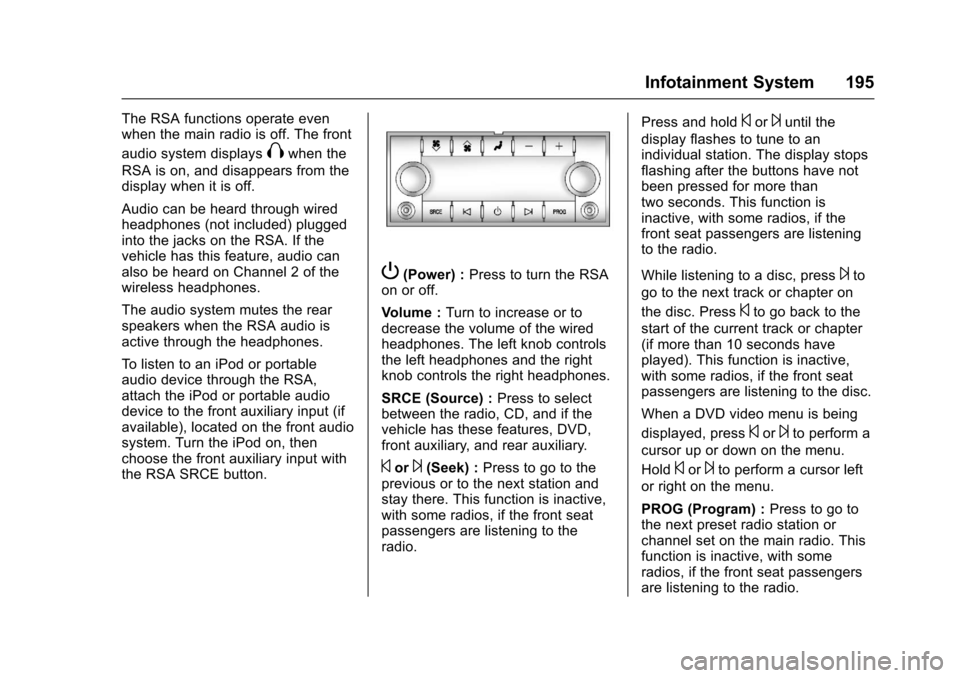
P(Power) : Press to turn the RSA
on or off.
Volume : Turn to increase or to
decrease the volume of the wired
headphones. The left knob controls
the left headphones and the right
knob controls the right headphones.
SRCE (Source) : Press to select
between the radio, CD, and if the
vehicle has these features, DVD,
front auxiliary, and rear auxiliary.
©or¨(Seek) : Press to go to the
previous or to the next station and
stay there. This function is inactive,
with some radios, if the front seat
passengers are listening to the
radio. Press and hold
©or¨until the
display flashes to tune to an
individual station. The display stops
flashing after the buttons have not
been pressed for more than
two seconds. This function is
inactive, with some radios, if the
front seat passengers are listening
to the radio.
While listening to a disc, press
¨to
go to the next track or chapter on
the disc. Press
©to go back to the
start of the current track or chapter
(if more than 10 seconds have
played). This function is inactive,
with some radios, if the front seat
passengers are listening to the disc.
When a DVD video menu is being
displayed, press
©or¨to perform a
cursor up or down on the menu.
Hold
©or¨to perform a cursor left
or right on the menu.
PROG (Program) : Press to go to
the next preset radio station or
channel set on the main radio. This
function is inactive, with some
radios, if the front seat passengers
are listening to the radio.
Page 197 of 394
Chevrolet Traverse Owner Manual (GMNA-Localizing-U.S./Canada/Mexico-
9955676) - 2017 - crc - 4/4/16
196 Infotainment System
When a CD or DVD audio disc is
playing, press PROG to go to the
beginning of the CD or DVD audio.
This function is inactive, with some
radios, if the front seat passengers
are listening to the disc.
When a disc is playing in the CD or
DVD changer, press PROG to
select the next disc if multiple discs
are loaded. This function is inactive,
with some radios, if the front seat
passengers are listening to the disc.
When a DVD video menu is being
displayed, press PROG to perform
the ENTER menu function.Phone
Bluetooth
For vehicles equipped with
Bluetooth capability, the system can
interact with many cell phones,
allowing:
.Placement and receipt of calls in
a hands-free mode.
. Sharing of the cell phone’s
address book or contact list with
the vehicle.
To minimize driver distraction,
before driving, and with the vehicle
parked:
. Become familiar with the
features of the cell phone.
Organize the phone book and
contact lists clearly and delete
duplicate or rarely used entries.
If possible, program speed dial
or other shortcuts.
. Review the controls and
operation of the infotainment
system. .
Pair cell phone(s) to the vehicle.
The system may not work with
all cell phones. See “Pairing”in
this section.
. If the cell phone has voice
dialing capability, learn to use
that feature to access the
address book or contact list. See
“Voice Pass-Thru” in this
section.
. See “Storing and Deleting Phone
Numbers” in this section.
{Warning
When using a cell phone, it can
be distracting to look too long or
too often at the screen of the
phone or the infotainment system.
Taking your eyes off the road too
long or too often could cause a
crash resulting in injury or death.
Focus your attention on driving.
A Bluetooth system can use a
Bluetooth-capable cell phone with a
Hands-Free Profile to make and
receive phone calls. The system
can be used while the key is in the
Page 198 of 394
Chevrolet Traverse Owner Manual (GMNA-Localizing-U.S./Canada/Mexico-
9955676) - 2017 - crc - 4/4/16
Infotainment System 197
ON/RUN or ACC/ACCESSORY
position. The range of the Bluetooth
system can be up to 9.1 m (30 ft).
Not all phones support all functions,
and not all phones work with the
in-vehicle Bluetooth system. See
www.gm.com/bluetooth for more
information on compatible phones.
Voice Recognition
The Bluetooth system uses voice
recognition to interpret voice
commands to dial phone numbers
and name tags.
For additional information, say
“Help”while you are in a voice
recognition menu.
Noise : Keep interior noise levels to
a minimum. The system may not
recognize voice commands if there
is too much background noise.
When to Speak : A short tone
sounds after the system responds
indicating when it is waiting for a
voice command. Wait until the tone
and then speak.
How to Speak : Speak clearly in a
calm and natural voice.
Audio System
When using the in-vehicle Bluetooth
system, sound comes through the
vehicle's front audio system
speakers and overrides the audio
system. Use the audio system
volume knob, during a call, to
change the volume level. The
adjusted volume level remains in
memory for later calls. To prevent
missed calls, a minimum volume
level is used if the volume is turned
down too low.
Bluetooth Controls
Use the buttons located on the
steering wheel to operate the
in-vehicle Bluetooth system. See
Steering Wheel Controls (Radio with
Touchscreen) 0110 orSteering
Wheel Controls (Radio without
Touchscreen) 0109.
b/g:Press to answer incoming
calls, confirm system information,
and start speech recognition.
c/x: Press to end a call, reject
a call, or cancel an operation.
Pairing
A Bluetooth enabled cell phone
must be paired to the Bluetooth
system and then connected to the
vehicle before it can be used. See
the cell phone manufacturer's user
guide for Bluetooth functions before
pairing the cell phone. If a Bluetooth
phone is not connected, calls will be
made using OnStar Hands-Free
Calling, if equipped. See “OnStar”if
equipped.
Pairing Information
. A Bluetooth phone with MP3
capability cannot be paired to
the vehicle as a phone and an
MP3 player at the same time.
. Up to five cell phones can be
paired to the Bluetooth system.
. The pairing process is disabled
when the vehicle is moving.
. Pairing only needs to be
completed once, unless the
pairing information on the cell
phone changes or the cell phone
is deleted from the system.
Page 387 of 394

Chevrolet Traverse Owner Manual (GMNA-Localizing-U.S./Canada/Mexico-
9955676) - 2017 - crc - 3/29/16
386 Index
Driving (cont'd)Drunk . . . . . . . . . . . . . . . . . . . . . . . . . 218
For Better Fuel Economy . . . . . . . 30
Hill and Mountain Roads . . . . . . 221
If the Vehicle is Stuck . . . . . . . . . 223
Loss of Control . . . . . . . . . . . . . . . 219
Off-Road Recovery . . . . . . . . . . . 219
Vehicle Load Limits . . . . . . . . . . . 223
Wet Roads . . . . . . . . . . . . . . . . . . . 220
Winter . . . . . . . . . . . . . . . . . . . . . . . . 221
Dual Automatic Climate Control System . . . . . . . . . . . . . . . . 208
E
Electrical Equipment,Add-On . . . . . . . . . . . . . . . . . . . . . . . 264
Electrical System Engine Compartment FuseBlock . . . . . . . . . . . . . . . . . . . . . . . . 291
Fuses and Circuit Breakers . . . 291
Instrument Panel Fuse Block . . . . . . . . . . . . . . . . . . . . . . . . 294
Overload . . . . . . . . . . . . . . . . . . . . . 290
Emergency
OnStar
®. . . . . . . . . . . . . . . . . . . . . . 374
Engine Air Cleaner/Filter . . . . . . . . . . . . . 274
Check and Service EngineSoon Light . . . . . . . . . . . . . . . . . . 124 Engine (cont'd)
Compartment Overview . . . . . . . 269
Coolant . . . . . . . . . . . . . . . . . . . . . . . 276
Coolant Temperature
Gauge . . . . . . . . . . . . . . . . . . . . . . 120
Coolant Temperature Warning Light . . . . . . . . . . . . . . . 128
Cooling System . . . . . . . . . . . . . . . 275
Cooling System Messages . . . 139
Cover . . . . . . . . . . . . . . . . . . . . . . . . . 270
Drive Belt Routing . . . . . . . . . . . . 358
Exhaust . . . . . . . . . . . . . . . . . . . . . . 234
Heater . . . . . . . . . . . . . . . . . . . . . . . . 230
Oil Life System . . . . . . . . . . . . . . . 273
Oil Messages . . . . . . . . . . . . . . . . . 140
Oil Pressure Light . . . . . . . . . . . . 128
Overheated Protection Operating Mode . . . . . . . . . . . . . 281
Overheating . . . . . . . . . . . . . . . . . . 279
Power Messages . . . . . . . . . . . . . 140
Running While Parked . . . . . . . . 234
Starting . . . . . . . . . . . . . . . . . . . . . . . 229
Entry Lighting . . . . . . . . . . . . . . . . . . . 161
Equipment, Towing . . . . . . . . . . . . . 262
Event Data Recorders . . . . . . . . . . 371
Extender, Safety Belt . . . . . . . . . . . . 70
Exterior Lamp Controls . . . . . . . . . 157
F
Features
Memory . . . . . . . . . . . . . . . . . . . . . . . . . 11
Filter, Engine Air Cleaner . . . . . . . . . . . 274
Flash-to-Pass . . . . . . . . . . . . . . . . . . . 158
Flashers, Hazard Warning . . . . . . 159
Flat Tire . . . . . . . . . . . . . . . . . . . . . . . . 316 Changing . . . . . . . . . . . . . . . . . . . . . 317
Floor Mats . . . . . . . . . . . . . . . . . . . . . . 341
Fluid
Automatic Transmission . . . . . . 274
Brakes . . . . . . . . . . . . . . . . . . . . . . . . 283
Power Steering . . . . . . . . . . . . . . . 281
Washer . . . . . . . . . . . . . . . . . . . . . . . 282
Fog Lamps . . . . . . . . . . . . . . . . . . . . . 159
Folding Mirrors . . . . . . . . . . . . . . . . . . 46
Forward Collision Alert (FCA) System . . . . . . . . . . . . . . . . . 248
Frequency Statement Radio . . . . . . . . . . . . . . . . . . . . . . . . . 369
Front Seats Adjustment . . . . . . . . . . . . . . . . . . . . . 54
Heated and Cooled . . . . . . . . . . . . . 58
Fuel . . . . . . . . . . . . . . . . . . . . . . . . . . . . 253 Additives . . . . . . . . . . . . . . . . . . . . . 254
Economy Driving . . . . . . . . . . . . . . . 30