AUX CHEVROLET TRAVERSE 2018 Owner's Manual
[x] Cancel search | Manufacturer: CHEVROLET, Model Year: 2018, Model line: TRAVERSE, Model: CHEVROLET TRAVERSE 2018Pages: 419, PDF Size: 5.92 MB
Page 8 of 419

Chevrolet Traverse Owner Manual (GMNA-Localizing-U.S./Canada/Mexico-
10603118) - 2018 - CRC - 1/29/18
In Brief 7
1.Air Vents 0205.
2. Turn Signal Lever. See Turn
and Lane-Change Signals
0 170.
IntelliBeam
®System Button (If
Equipped). See Exterior Lamp
Controls 0166.
3. Instrument Cluster 0134.
Driver Information Center (DIC)
Display. See Driver Information
Center (DIC) 0150.
4. Windshield Wiper/Washer
0125.
Rear Window Wiper/Washer
0 126.
5. ENGINE START/STOP Button. See Ignition Positions 0224.
6. Hazard Warning Flashers
0170.
7. Light Sensor. See Automatic
Headlamp System 0169.
8. Infotainment 0175.
9. Dual Automatic Climate Control
System 0200. 10.
Heated and Ventilated Front
Seats 070 (If Equipped).
11. Power Outlets 0129.
12. Wireless Charging 0131 (If
Equipped).
13. USB Port 0184.
Auxiliary Jack. See Auxiliary
Devices 0190.
14. Traction Control/Electronic
Stability Control 0239.
Driver Mode Control Knob. See
Driver Mode Control 0241 (If
Equipped).
Lane Keep Assist (LKA) 0267
(If Equipped).
15. Electric Parking Brake 0237.
16. Shift Lever. See Automatic
Transmission 0232.
Manual Mode 0234.
17. Steering Wheel Controls 0124.
18. Horn 0125.
19. Steering Wheel Adjustment
0124 (Out of View). 20.
Cruise Control 0244.
Adaptive Cruise Control 0246
(If Equipped).
Heated Steering Wheel 0125
(If Equipped).
Forward Collision Alert (FCA)
System 0259 (If Equipped).
21. Hood Release. See Hood
0 285.
22. Fog Lamps 0170 (If
Equipped).
23. Data Link Connector (DLC) (Out of View). See Malfunction
Indicator Lamp (Check Engine
Light) 0141.
24. Exterior Lamp Controls 0166.
25. Instrument Panel Illumination
Control 0171.
Page 176 of 419
Chevrolet Traverse Owner Manual (GMNA-Localizing-U.S./Canada/Mexico-
10603118) - 2018 - CRC - 1/29/18
Infotainment System 175
Infotainment
System
Introduction
Infotainment . . . . . . . . . . . . . . . . . . 175
Theft-Deterrent Feature . . . . . . 176
Overview . . . . . . . . . . . . . . . . . . . . . 177
Home Page . . . . . . . . . . . . . . . . . . 178
Operation . . . . . . . . . . . . . . . . . . . . . 178
Software Updates . . . . . . . . . . . . 179
Radio
AM-FM Radio . . . . . . . . . . . . . . . . 180
Satellite Radio . . . . . . . . . . . . . . . . 181
Radio Reception . . . . . . . . . . . . . . 183
Antenna . . . . . . . . . . . . . . . . . . . . . . 184
Multi-Band Antenna . . . . . . . . . . 184
Audio Players
Avoiding Untrusted MediaDevices . . . . . . . . . . . . . . . . . . . . . 184
USB Port . . . . . . . . . . . . . . . . . . . . . 184
Auxiliary Devices . . . . . . . . . . . . . 190
Phone
Bluetooth (Overview) . . . . . . . . . 191
Bluetooth (Infotainment
Controls) . . . . . . . . . . . . . . . . . . . . 192
Apple CarPlay and Android Auto . . . . . . . . . . . . . . . . 196
Hands-Free Phone . . . . . . . . . . . 197
Trademarks and License
Agreements
Trademarks and License Agreements . . . . . . . . . . . . . . . . . 199
Introduction
Infotainment
Base radio information is included in
this manual. See the infotainment
manual for information on other
available infotainment systems.
Read the following pages to
become familiar with these features.
{Warning
Taking your eyes off the road for
too long or too often while using
any infotainment feature can
cause a crash. You or others
could be injured or killed. Do not
give extended attention to
infotainment tasks while driving.
Limit your glances at the vehicle
displays and focus your attention
on driving. Use voice commands
whenever possible.
Page 179 of 419
Chevrolet Traverse Owner Manual (GMNA-Localizing-U.S./Canada/Mexico-
10603118) - 2018 - CRC - 1/29/18
178 Infotainment System
.Turn to decrease or
increase the volume.
4.
d
. Radio: Press and release to
go to the next strongest
station or channel. Press
and hold to fast seek the
next strongest station or
channel.
. USB/Bluetooth Music/
Pictures: Press to go to the
next content. Press and
hold to fast forward.
5.
5
. Press and release to
access the phone screen,
answer an incoming call,
or access the device home
screen.
Home Page
Infotainment Display Controls
Controls show on the infotainment
display when available. When a
function is unavailable, the item may
gray out. When a function is selected, the item may highlight.
Press and hold to rearrange icons
on the screen.
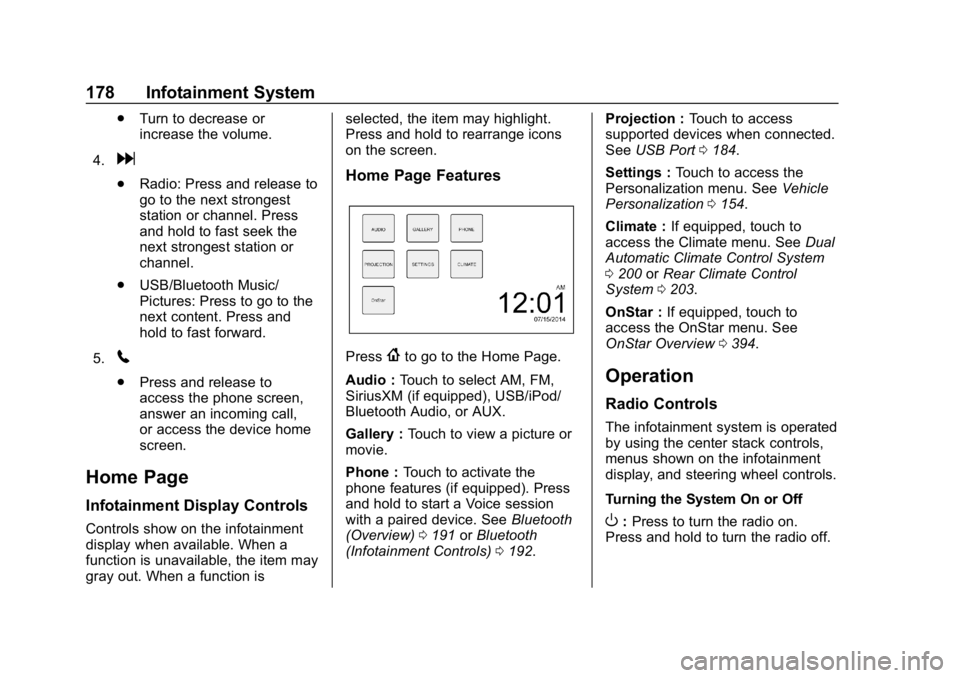
Home Page Features
Press{to go to the Home Page.
Audio : Touch to select AM, FM,
SiriusXM (if equipped), USB/iPod/
Bluetooth Audio, or AUX.
Gallery : Touch to view a picture or
movie.
Phone : Touch to activate the
phone features (if equipped). Press
and hold to start a Voice session
with a paired device. See Bluetooth
(Overview) 0191 orBluetooth
(Infotainment Controls) 0192. Projection :
Touch to access
supported devices when connected.
See USB Port 0184.
Settings : Touch to access the
Personalization menu. See Vehicle
Personalization 0154.
Climate : If equipped, touch to
access the Climate menu. See Dual
Automatic Climate Control System
0 200 orRear Climate Control
System 0203.
OnStar : If equipped, touch to
access the OnStar menu. See
OnStar Overview 0394.
Operation
Radio Controls
The infotainment system is operated
by using the center stack controls,
menus shown on the infotainment
display, and steering wheel controls.
Turning the System On or Off
O:Press to turn the radio on.
Press and hold to turn the radio off.
Page 185 of 419
Chevrolet Traverse Owner Manual (GMNA-Localizing-U.S./Canada/Mexico-
10603118) - 2018 - CRC - 1/29/18
184 Infotainment System
Antenna
The AM-FM antenna is integrated in
the liftgate spoiler and the liftgate
window defogger.
No maintenance or adjustments are
needed. Do not place loads on the
spoiler.
If the spoiler is replaced, be sure it
is replaced with the correct GM
parts for the best AM and FM
reception.
Do not scratch the inside surface or
damage the lines in the glass. If the
inside surface is damaged, it could
interfere with radio reception.
If attaching a cell phone antenna to
the glass, attach it between the grid
lines.
Multi-Band Antenna
The multi-band antenna is on the
roof of the vehicle. The antenna is
used for OnStar, the SiriusXM
Satellite Radio Service System, and
GPS (Global Positioning System),
if the vehicle has these features.
Keep the antenna clear of
obstructions for clear reception.
If the vehicle has a sunroof, and it is
open, reception can also be
affected.
Audio Players
Avoiding Untrusted Media
Devices
When using media devices such as
CDs, DVDs, Blu-ray Discs, SD
cards, USB devices, and mobile
devices, consider the source.
Untrusted media devices could
contain files that affect system
operation or performance. Avoid use
if the content or origin cannot be
trusted.
USB Port
Using the USB Port
The infotainment system can play
music by connecting an auxiliary
device to the USB port.
USB Support
The USB ports are on the center
stack, and use the USB 2.0
standard. There is also a USB port
in the storage area behind the radio
(if equipped). There are also
Page 191 of 419
Chevrolet Traverse Owner Manual (GMNA-Localizing-U.S./Canada/Mexico-
10603118) - 2018 - CRC - 1/29/18
190 Infotainment System
Picture System Information
The infotainment system can view
picture files stored on a USB
storage device and devices that
support Media Transfer
Protocol (MTP).
.Supported file extensions: .jpg,
.bmp, .png, .gif.
. Animated GIF files are not
supported.
. Some files may not operate due
to a different recording format or
the condition of the file.
Viewing Pictures 1. Connect the USB device to the USB port.
2. Touch the infotainment display to open to full screen. Touch
the infotainment display again
to return to the previous
screen.
If the USB device is already
connected:
1. Press
{.
2. Touch GALLERY. Some features are disabled while
the vehicle is in motion.
Viewing a Slide Show
1. Touch
zfrom the picture
screen.
2. Touch the screen to cancel the slide show during the slide
show playback.
Viewing a Previous or Next
Picture
Touch
SorTfrom the picture
screen.
Rotating a Picture
Touch
wfrom the picture screen.
Enlarging a Picture
Touch
xfrom the picture screen.
Using the USB Picture Menu 1. Touch MENU from the picture screen.
2. Touch the appropriate menu: .Slide Show Time: Allows
selection of the slide show
interval. .
Clock, Temp. Display:
Allows selection of On or
Off to show the clock and
temperature on the full
screen.
. Display Settings: Adjusts
for Brightness and Contrast.
3. Touch Back on the infotainment display to exit.
Auxiliary Devices
Using the Auxiliary Input Jack
Settings menus and functions may
vary depending on vehicle options.
The auxiliary input jack can be used
to connect external audio devices
such as an iPod, iPhone, MP3
player, CD player, and other
supported devices for use as
another source for audio listening.
This input jack is not an audio
output; do not plug headphones into
the front auxiliary input jack.
Page 192 of 419
Chevrolet Traverse Owner Manual (GMNA-Localizing-U.S./Canada/Mexico-
10603118) - 2018 - CRC - 1/29/18
Infotainment System 191
The auxiliary input jack is in the
center stack. The infotainment
system can play music connected
by the auxiliary device.
Play will begin when the system has
finished reading the information on
the device.
Playing Music
To play music from the device, if the
device is already connected:1. Press
{.
2. Touch AUDIO.
3. Touch Source.
4. Touch AUX.
To adjust the tone settings, see
“Tone Settings” inOperation 0178.
Phone
Bluetooth (Overview)
If equipped with Bluetooth capability,
the system can interact with many
Bluetooth phones, PDAs, or other
devices to:
.
Place and receive hands-free
calls.
. Transmit hands-free data.
. Play audio streaming files.
The device must be paired first. See
“Pairing” later in this section.
To minimize driver distraction,
before driving, and with the vehicle
parked:
. Become familiar with the
features of the cell phone.
Organize the phone book and
contact lists clearly and delete
duplicate or rarely used entries.
If possible, program speed dial
or other shortcuts.
. Review the controls and
operation of the infotainment
system. .
Pair cell phone(s) to the vehicle.
The system may not work with
all cell phones. See “Pairing”
later in this section.
{Warning
When using a cell phone, it can
be distracting to look too long or
too often at the screen of the
phone or the infotainment system.
Taking your eyes off the road too
long or too often could cause a
crash resulting in injury or death.
Focus your attention on driving.
Vehicles with a Bluetooth system
can use a Bluetooth-capable cell
phone with a Hands-Free Profile to
make and receive phone calls. The
infotainment system is used to
control the system. The system can
be used while ignition is on or in
ACC/ACCESSORY. See Ignition
Positions 0224. Not all phones
support all functions and not all
phones work with the Bluetooth
system. See www.gm.com/bluetooth
Page 316 of 419
Chevrolet Traverse Owner Manual (GMNA-Localizing-U.S./Canada/Mexico-
10603118) - 2018 - CRC - 1/29/18
Vehicle Care 315
FusesUsage
F14 Left front heated seat
F15 –
F16 Sunroof
F17 Communication gateway module (if
equipped)
F18 Instrument cluster
F19 Body control module 1
F20 Wireless charger module
F21 Body control module 4
F22 Infotainment
F23 Body control module 2
F24 –
F25 Parking assist
F26 Communications integration module
F27 Video Fuses
Usage
F28 Radio/Heating, ventilation, and air
conditioning
display
F29 Radio
F30 Steering wheel controls
F31 Front blower
F32 DC AC inverter
F33 Driver power seat
F34 Passenger power seat
F35 Feed/Body control module 4
F36 Electric power steering
F37 Power outlet/ Wireless charger/
Accessory
F38 Body control module 8 Fuses
Usage
F39 Steering wheel controls
backlighting
Circuit
Breakers Usage
F40 –
F41 –
F42 Auxiliary power outlet/Lighter
Page 319 of 419
Chevrolet Traverse Owner Manual (GMNA-Localizing-U.S./Canada/Mexico-
10603118) - 2018 - CRC - 1/29/18
318 Vehicle Care
FusesUsage
F55 –
F56 Universal garage door opener/
Overhead console
F57 Hands free closure release
Circuit
Breakers Usage
CB1 –
CB2 –
CB3 Rear auxiliary power outlet
Relays Usage
K1 –
K2 –Wheels and Tires
Tires
Every new GM vehicle has
high-quality tires made by a
leading tire manufacturer. See
the warranty manual for
information regarding the tire
warranty and where to get
service. For additional
information refer to the tire
manufacturer.
{Warning
.Poorly maintained and
improperly used tires are
dangerous.
.Overloading the tires can
cause overheating as a
result of too much
flexing. There could be a
blowout and a serious
crash. See Vehicle Load
Limits 0219.
(Continued)
Warning (Continued)
.Underinflated tires pose
the same danger as
overloaded tires. The
resulting crash could
cause serious injury.
Check all tires frequently
to maintain the
recommended pressure.
Tire pressure should be
checked when the tires
are cold.
.Overinflated tires are
more likely to be cut,
punctured, or broken by
a sudden impact —such
as when hitting a pothole.
Keep tires at the
recommended pressure.
.Worn or old tires can
cause a crash. If the
tread is badly worn,
replace them.
(Continued)
Page 408 of 419

Chevrolet Traverse Owner Manual (GMNA-Localizing-U.S./Canada/Mexico-
10603118) - 2018 - CRC - 1/29/18
Index 407
Apple CarPlay andAndroid Auto . . . . . . . . . . . . . . . . . . 196
Assistance Program, Roadside . . . . . . . . . . . . . . . . . . . . . . 384
Assistance Systems for Driving . . . . . . . . . . . . . . . . . . . . . . . . 259
Assistance Systems for
Parking and Backing . . . . . . . . . . 256
Audio Theft-Deterrent Feature . . . . . . . 176
Automatic
Dimming Mirrors . . . . . . . . . . . . . . . . 54
Door Locks . . . . . . . . . . . . . . . . . . . . . 42
Forward Braking . . . . . . . . . . . . . . 261
Headlamp System . . . . . . . . . . . . 169
Transmission . . . . . . . . . . . . . . . . . 232
Transmission Fluid . . . . . . . . . . . 292
Automatic Transmission Manual Mode . . . . . . . . . . . . . . . . . 234
Shift Lock Control FunctionCheck . . . . . . . . . . . . . . . . . . . . . . . 303
Auxiliary Devices . . . . . . . . . . . . . . . . . . . . . . . 190
Avoiding Untrusted Media Devices . . . . . . . . . . . . . . . . . . . . . . . 184B
Battery
Exterior Lighting BatterySaver . . . . . . . . . . . . . . . . . . . . . . . 174
Load Management . . . . . . . . . . . . 173
Power Protection . . . . . . . . . . . . . 174
Battery - North America . . . . 302, 348
Blade Replacement, Wiper . . . . . 304
Bluetooth Overview . . . . . . . . . . . . . . . . 191, 192
Brake Parking, Electric . . . . . . . . . . . . . . 237
System Warning Light . . . . . . . . 143
Brakes . . . . . . . . . . . . . . . . . . . . . . . . . . 300
Antilock . . . . . . . . . . . . . . . . . . . . . . . 236
Assist . . . . . . . . . . . . . . . . . . . . . . . . . 238
Fluid . . . . . . . . . . . . . . . . . . . . . . . . . . 301
Braking . . . . . . . . . . . . . . . . . . . . . . . . . 209 Automatic Forward . . . . . . . . . . . 261
Braking System Front Pedestrian (FPB) . . . . . . . 263
Break-In, New Vehicle . . . . . . . . . . 223
Bulb Replacement Headlamp Aiming . . . . . . . . . . . . . 307
Headlamps . . . . . . . . . . . . . . . . . . . 307
Headlamps, Front Turn
Signal, and Sidemarker . . . . . 308 Bulb Replacement (cont'd)
High Intensity Discharge
(HID) Lighting . . . . . . . . . . . . . . . 307
License Plate Lamps . . . . . . . . . 308
Buying New Tires . . . . . . . . . . . . . . . 334
C
Calibration . . . . . . . . . . . . . . . . . . . . . . 127
California Fuel Requirements . . . . . . . . . . . 270
Perchlorate Materials
Requirements . . . . . . . . . . . . . . . 284
California Proposition
65 Warning . . . . . . . . . .283, 302, 348,
Back Cover
Canadian Vehicle Owners . . . . . . . . 2
Capacities and Specifications . . . . . . . . . . . . . . . . . 377
Carbon Monoxide Engine Exhaust . . . . . . . . . . . . . . . 231
Liftgate . . . . . . . . . . . . . . . . . . . . . . . . . 44
Winter Driving . . . . . . . . . . . . . . . . 217
Cargo
Management System . . . . . . . . . .119
Caution, Danger, and Warning . . . . 3
Center Console Storage . . . . . . . . 119
Chains, Tire . . . . . . . . . . . . . . . . . . . . 339
Page 409 of 419

Chevrolet Traverse Owner Manual (GMNA-Localizing-U.S./Canada/Mexico-
10603118) - 2018 - CRC - 1/29/18
408 Index
ChargingWireless . . . . . . . . . . . . . . . . . . . . . . 131
Charging System Light . . . . . . . . . 141
Check Engine Light (MalfunctionIndicator) . . . . . . . . . . . . . . . . . . . . 141
Child Restraints
Infants and Young Children . . . . . 99
Lower Anchors and Tethersfor Children . . . . . . . . . . . . . . . . . 104
Older Children . . . . . . . . . . . . . . . . . . 97
Securing . . . . . . . . . . . . . . . . . .112, 114
Systems . . . . . . . . . . . . . . . . . . . . . . 101
Circuit Breakers . . . . . . . . . . . . . . . . 310
Cleaning Exterior Care . . . . . . . . . . . . . . . . . 353
Interior Care . . . . . . . . . . . . . . . . . . 358
Climate Control Systems Dual Automatic . . . . . . . . . . . . . . . 200
Rear . . . . . . . . . . . . . . . . . . . . . . . . . . 203
Clock . . . . . . . . . . . . . . . . . . . . . . . . . . . 128
Cluster, Instrument . . . . . . . . . . . . . 134
Collision Damage Repair . . . . . . . 387
Compact Spare Tire . . . . . . . . . . . . 347
Compartments
Storage . . . . . . . . . . . . . . . . . . . . . . . .118
Compass . . . . . . . . . . . . . . . . . . . . . . . 127 Connections
OnStar . . . . . . . . . . . . . . . . . . . . . . . 397
Control Traction and ElectronicStability . . . . . . . . . . . . . . . . . . . . . 239
Control of a Vehicle . . . . . . . . . . . . . 209
Convex Mirrors . . . . . . . . . . . . . . . . . . 53
Coolant Engine Temperature Gauge . . 138
Cooling . . . . . . . . . . . . . . . . . . . . 200, 203
Cooling System . . . . . . . . . . . . . . . . . 294
Courtesy Lamps . . . . . . . . . . . . . . . . 171
Courtesy Transportation Program . . . . . . . . . . . . . . . . . . . . . . . 386
Cruise Control . . . . . . . . . . . . . . . . . . 244 Light . . . . . . . . . . . . . . . . . . . . . . . . . . 149
Cruise Control, Adaptive . . . . . . . . 246
Customer Assistance . . . . . . . . . . . 383 Offices . . . . . . . . . . . . . . . . . . . . . . . . 382
Text Telephone (TTY)Users . . . . . . . . . . . . . . . . . . . . . . . 383
Customer Information Service PublicationsOrdering Information . . . . . . . . 389
Customer Satisfaction
Procedure . . . . . . . . . . . . . . . . . . . . . 380D
Damage Repair, Collision . . . . . . . 387
Danger, Warning, and Caution . . . . 3
Data CollectionInfotainment System . . . . . . . . . . 393
OnStar . . . . . . . . . . . . . . . . . . . . . . . 393
Data Recorders, Event . . . . . . . . . 392
Daytime Running Lamps (DRL) . . . . . . . . . . . . . . . . . . 168
Defensive Driving . . . . . . . . . . . . . . . 209
Delayed Locking . . . . . . . . . . . . . . . . . 42
Devices
Auxiliary . . . . . . . . . . . . . . . . . . . . . . 190
Diagnostics
OnStar . . . . . . . . . . . . . . . . . . . . . . . 399
Distracted Driving . . . . . . . . . . . . . . . 208
Dome Lamps . . . . . . . . . . . . . . . . . . . 171
Door Ajar Light . . . . . . . . . . . . . . . . . . . . . 149
Delayed Locking . . . . . . . . . . . . . . . . 42
Locks . . . . . . . . . . . . . . . . . . . . . . . . . . . 40
Power Locks . . . . . . . . . . . . . . . . . . . . 42
Drive Belt Routing, Engine . . . . . . 379
Drive Systems All-Wheel Drive . . . . . . . . . . 235, 303
Driver Assistance Systems . . . . . 255
Driver Information Center (DIC) . . . . . . . . . . . . . . . . . . 150