park assist CHEVROLET TRAVERSE 2018 Owner's Manual
[x] Cancel search | Manufacturer: CHEVROLET, Model Year: 2018, Model line: TRAVERSE, Model: CHEVROLET TRAVERSE 2018Pages: 419, PDF Size: 5.92 MB
Page 6 of 419
Chevrolet Traverse Owner Manual (GMNA-Localizing-U.S./Canada/Mexico-
10603118) - 2018 - CRC - 1/29/18
In Brief 5
In Brief
Instrument Panel
Instrument Panel . . . . . . . . . . . . . . . . 6
Initial Drive Information
Initial Drive Information . . . . . . . . . . 8
Stop/Start System . . . . . . . . . . . . . . . 8
Remote Keyless Entry (RKE)System . . . . . . . . . . . . . . . . . . . . . . . . 8
Remote Vehicle Start . . . . . . . . . . . 8
Door Locks . . . . . . . . . . . . . . . . . . . . . 9
Liftgate . . . . . . . . . . . . . . . . . . . . . . . . 10
Windows . . . . . . . . . . . . . . . . . . . . . . . 10
Seat Adjustment . . . . . . . . . . . . . . . 11
Memory Features . . . . . . . . . . . . . . 12
Second Row Seats . . . . . . . . . . . . 12
Third Row Seats . . . . . . . . . . . . . . . 13
Heated and Ventilated Seats . . . 15
Head Restraint Adjustment . . . . 15
Seat Belts . . . . . . . . . . . . . . . . . . . . . 15
Passenger Sensing System . . . 16
Mirror Adjustment . . . . . . . . . . . . . . 16
Steering Wheel Adjustment . . . . 17
Interior Lighting . . . . . . . . . . . . . . . . 17
Exterior Lighting . . . . . . . . . . . . . . . 18
Windshield Wiper/Washer . . . . . . 19
Climate Controls . . . . . . . . . . . . . . . 20
Transmission . . . . . . . . . . . . . . . . . . 20
Vehicle Features
Infotainment System . . . . . . . . . . . 21
Radio(s) . . . . . . . . . . . . . . . . . . . . . . . 21
Satellite Radio . . . . . . . . . . . . . . . . . 22
Portable Audio Devices . . . . . . . . 22
Bluetooth . . . . . . . . . . . . . . . . . . . . . . 22
Steering Wheel Controls . . . . . . . 22
Cruise Control . . . . . . . . . . . . . . . . . 23
Driver Information Center (DIC) . . . . . . . . . . . . . . . . . 24
Forward Collision Alert (FCA) System . . . . . . . . . . . . . . . . . . . . . . . 24
Forward Automatic Braking (FAB) . . . . . . . . . . . . . . . . 24
Front Pedestrian Braking (FPB) System . . . . . . . . . . . . . . . . . . . . . . . 25
Lane Keep Assist (LKA) . . . . . . . 25
Lane Change Alert (LCA) . . . . . . 25
Surround Vision . . . . . . . . . . . . . . . 25
Rear Vision Camera (RVC) . . . . 26
Rear Cross Traffic Alert (RCTA) System . . . . . . . . . . . . . . . . . . . . . . . 26
Parking Assist . . . . . . . . . . . . . . . . . 26
Power Outlets . . . . . . . . . . . . . . . . . 26
Universal Remote System . . . . . 26
Sunroof . . . . . . . . . . . . . . . . . . . . . . . . 27
Performance and Maintenance
Traction Control/Electronic Stability Control . . . . . . . . . . . . . . 27
Tire Pressure Monitor . . . . . . . . . . 28
Fuel (2.0L L4 Engine) . . . . . . . . . . 28
Fuel (3.6L V6 Engine) . . . . . . . . . . 29
E85 or FlexFuel . . . . . . . . . . . . . . . . 29
Engine Oil Life System . . . . . . . . 29
Driving for Better Fuel Economy . . . . . . . . . . . . . . . . . . . . . 29
Roadside Assistance Program . . . . . . . . . . . . . . . . . . . . . . 30
Page 8 of 419

Chevrolet Traverse Owner Manual (GMNA-Localizing-U.S./Canada/Mexico-
10603118) - 2018 - CRC - 1/29/18
In Brief 7
1.Air Vents 0205.
2. Turn Signal Lever. See Turn
and Lane-Change Signals
0 170.
IntelliBeam
®System Button (If
Equipped). See Exterior Lamp
Controls 0166.
3. Instrument Cluster 0134.
Driver Information Center (DIC)
Display. See Driver Information
Center (DIC) 0150.
4. Windshield Wiper/Washer
0125.
Rear Window Wiper/Washer
0 126.
5. ENGINE START/STOP Button. See Ignition Positions 0224.
6. Hazard Warning Flashers
0170.
7. Light Sensor. See Automatic
Headlamp System 0169.
8. Infotainment 0175.
9. Dual Automatic Climate Control
System 0200. 10.
Heated and Ventilated Front
Seats 070 (If Equipped).
11. Power Outlets 0129.
12. Wireless Charging 0131 (If
Equipped).
13. USB Port 0184.
Auxiliary Jack. See Auxiliary
Devices 0190.
14. Traction Control/Electronic
Stability Control 0239.
Driver Mode Control Knob. See
Driver Mode Control 0241 (If
Equipped).
Lane Keep Assist (LKA) 0267
(If Equipped).
15. Electric Parking Brake 0237.
16. Shift Lever. See Automatic
Transmission 0232.
Manual Mode 0234.
17. Steering Wheel Controls 0124.
18. Horn 0125.
19. Steering Wheel Adjustment
0124 (Out of View). 20.
Cruise Control 0244.
Adaptive Cruise Control 0246
(If Equipped).
Heated Steering Wheel 0125
(If Equipped).
Forward Collision Alert (FCA)
System 0259 (If Equipped).
21. Hood Release. See Hood
0 285.
22. Fog Lamps 0170 (If
Equipped).
23. Data Link Connector (DLC) (Out of View). See Malfunction
Indicator Lamp (Check Engine
Light) 0141.
24. Exterior Lamp Controls 0166.
25. Instrument Panel Illumination
Control 0171.
Page 26 of 419
Chevrolet Traverse Owner Manual (GMNA-Localizing-U.S./Canada/Mexico-
10603118) - 2018 - CRC - 1/29/18
In Brief 25
vehicle. This can help avoid or
lessen the severity of crashes when
driving in a forward gear.
SeeForward Automatic Braking
(FAB) 0261.
Front Pedestrian Braking
(FPB) System
If equipped, the FPB system may
help avoid or reduce the harm
caused by front-end crashes with
nearby pedestrians when driving in
a forward gear. FPB displays an
amber indicator,
~, when a nearby
pedestrian is detected directly
ahead. When approaching a
detected pedestrian too quickly,
FPB provides a red flashing alert on
the windshield and rapidly beeps.
FPB can provide a boost to braking
or automatically brake the vehicle.
See Front Pedestrian Braking (FPB)
System 0263.
Lane Keep Assist (LKA)
If equipped, LKA may help avoid
crashes due to unintentional lane
departures. It may assist by gently
turning the steering wheel if the
vehicle approaches a detected lane
marking without using a turn signal
in that direction. It may also provide
a Lane Departure Warning (LDW)
alert as the lane marking is crossed.
The system will not assist or alert if
it detects that you are actively
steering. Override LKA by turning
the steering wheel. LKA uses a
camera to detect lane markings
between 60 km/h (37 mph) and
180 km/h (112 mph).
See Lane Departure Warning (LDW)
0 267 andLane Keep Assist (LKA)
0 267.
Lane Change Alert (LCA)
If equipped, the LCA system is a
lane-changing aid that assists
drivers with avoiding lane change
crashes that occur with moving
vehicles in the side blind zone (or
spot) areas or with vehicles rapidly approaching these areas from
behind. The LCA warning display
will light up in the corresponding
outside mirror and will flash if the
turn signal is on. The Side Blind
Zone Alert (SBZA) system is
included as part of the LCA system.
See
Side Blind Zone Alert (SBZA)
0 265 andLane Change Alert (LCA)
0 265.
Surround Vision
If equipped, views around the
vehicle appear in the infotainment
display to aid with parking and
low-speed maneuvers.
See “Surround Vision” under
Assistance Systems for Parking or
Backing 0256.
Front Vision Camera
If equipped, a view of the area in
front of the vehicle appears on the
infotainment display to aid with
parking and low-speed maneuvers.
See “Front Vision Camera” under
Assistance Systems for Parking or
Backing 0256.
Page 27 of 419
Chevrolet Traverse Owner Manual (GMNA-Localizing-U.S./Canada/Mexico-
10603118) - 2018 - CRC - 1/29/18
26 In Brief
Rear Vision
Camera (RVC)
The RVC displays a view of the
area behind the vehicle on the
infotainment display when the
vehicle is shifted into R (Reverse) to
aid with parking and low-speed
backing maneuvers.
SeeAssistance Systems for Parking
or Backing 0256.
Rear Cross Traffic Alert
(RCTA) System
If equipped, the RCTA system
shows a triangle with an arrow on
the infotainment display to warn of
traffic behind your vehicle that may
cross your vehicle's path while in
R (Reverse). In addition, beeps will
sound, or the driver seat will pulse.
See Assistance Systems for Parking
or Backing 0256.
Parking Assist
If equipped, Rear Parking
Assist (RPA) uses sensors on the
rear bumper to assist with parking
and avoiding objects while in
R (Reverse). It operates at speeds
less than 8 km/h (5 mph). RPA may
show a warning triangle on the
infotainment display and a graphic
on the instrument cluster to provide
the object distance. In addition,
multiple beeps or seat pulses may
occur if very close to an object.
The vehicle may also have the Front
Parking Assist system.
See Assistance Systems for Parking
or Backing 0256.
Power Outlets
The vehicle has two 12-volt
accessory power outlets, which can
be used to plug in electrical
equipment, such as a cell phone or
MP3 player.
The power outlets are located:
.
On the center stack below the
climate controls. .
In the rear cargo area.
To use the outlets, remove the
cover.
See Power Outlets 0129.
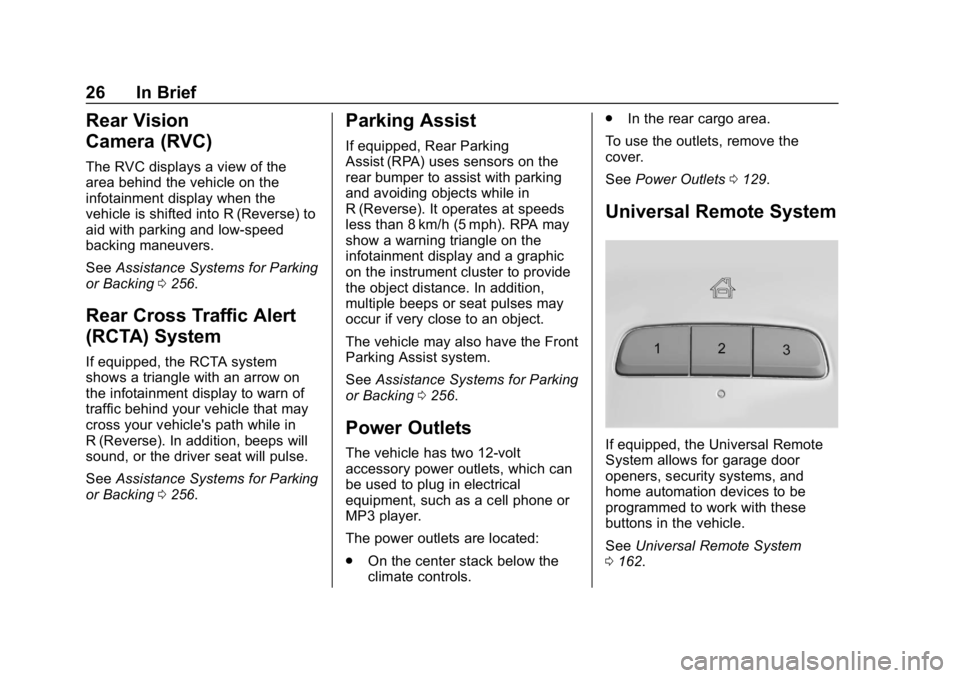
Universal Remote System
If equipped, the Universal Remote
System allows for garage door
openers, security systems, and
home automation devices to be
programmed to work with these
buttons in the vehicle.
See Universal Remote System
0 162.
Page 124 of 419
Chevrolet Traverse Owner Manual (GMNA-Localizing-U.S./Canada/Mexico-
10603118) - 2018 - CRC - 1/29/18
Instruments and Controls 123
Instruments and
Controls
Controls
Steering Wheel Adjustment . . . 124
Steering Wheel Controls . . . . . . 124
Heated Steering Wheel . . . . . . . 125
Horn . . . . . . . . . . . . . . . . . . . . . . . . . . 125
Windshield Wiper/Washer . . . . 125
Rear Window Wiper/Washer . . . . . . . . . . . . . . . . . . . . . 126
Compass . . . . . . . . . . . . . . . . . . . . . 127
Clock . . . . . . . . . . . . . . . . . . . . . . . . . 128
Power Outlets . . . . . . . . . . . . . . . . 129
Wireless Charging . . . . . . . . . . . . 131
Warning Lights, Gauges, and
Indicators
Warning Lights, Gauges, and Indicators . . . . . . . . . . . . . . . . . . . 133
Instrument Cluster . . . . . . . . . . . . 134
Speedometer . . . . . . . . . . . . . . . . . 137
Odometer . . . . . . . . . . . . . . . . . . . . . 137
Trip Odometer . . . . . . . . . . . . . . . . 137
Tachometer . . . . . . . . . . . . . . . . . . . 137
Fuel Gauge . . . . . . . . . . . . . . . . . . . 138
Engine Coolant Temperature
Gauge . . . . . . . . . . . . . . . . . . . . . . 138 Seat Belt Reminders . . . . . . . . . 139
Airbag Readiness Light . . . . . . . 140
Passenger Airbag Status
Indicator . . . . . . . . . . . . . . . . . . . . 140
Charging System Light . . . . . . . 141
Malfunction Indicator Lamp
(Check Engine Light) . . . . . . . . 141
Brake System Warning Light . . . . . . . . . . . . . . . . . . . . . . . . 143
Electric Parking Brake Light . . . . . . . . . . . . . . . . . . . . . . . . 144
Service Electric Parking Brake Light (Uplevel Only) . . . . . . . . . 144
Antilock Brake System (ABS) Warning Light . . . . . . . . . . . . . . . 144
Lane Keep Assist (LKA) Light . . . . . . . . . . . . . . . . . . . . . . . . 145
Vehicle Ahead Indicator . . . . . . 145
Pedestrian Ahead Indicator . . . 145
Traction Off Light . . . . . . . . . . . . . 145
StabiliTrak OFF Light . . . . . . . . . 146
Traction Control System (TCS)/ StabiliTrak Light . . . . . . . . . . . . . 146
Tire Pressure Light . . . . . . . . . . . 146
Engine Oil Pressure Light . . . . 147
Low Fuel Warning Light (Base Level) . . . . . . . . . . . . . . . . . . . . . . . 148
Low Fuel Warning Light (Uplevel) . . . . . . . . . . . . . . . . . . . . 148
Security Light . . . . . . . . . . . . . . . . . 148 High-Beam On Light . . . . . . . . . . 148
Front Fog Lamp Light . . . . . . . . . 149
Lamps On Reminder . . . . . . . . . 149
Cruise Control Light . . . . . . . . . . 149
Door Ajar Light . . . . . . . . . . . . . . . 149
Information Displays
Driver Information
Center (DIC) . . . . . . . . . . . . . . . . 150
Vehicle Messages
Vehicle Messages . . . . . . . . . . . . 153
Engine Power Messages . . . . . 153
Vehicle Speed Messages . . . . . 153
Vehicle Personalization
Vehicle Personalization . . . . . . . 154
Universal Remote System
Universal Remote System . . . . 162
Universal Remote SystemProgramming . . . . . . . . . . . . . . . 162
Universal Remote System Operation . . . . . . . . . . . . . . . . . . . 165
Page 157 of 419
Chevrolet Traverse Owner Manual (GMNA-Localizing-U.S./Canada/Mexico-
10603118) - 2018 - CRC - 1/29/18
156 Instruments and Controls
.Auto Rear Defog
Auto Fan Speed
This setting specifies the amount of
airflow when the climate control fan
setting is Auto Fan.
Select Low, Medium, or High.
Auto Defog
When set to On, the front defog will
automatically react to temperature
and humidity conditions that may
cause fogging.
Select Off or On.
Auto Rear Defog
If equipped, this allows the Auto
Rear Defog to be turned on or off.
This feature will automatically turn
on the rear window defogger when it
is cold outside.
Select Off or On.
Collision/Detection Systems
Select the Collision/Detection
Systems menu and the following
may be displayed if equipped:
. Alert Type .
Forward Collision System
. Front Pedestrian Detection
. Park Assist
. Rear Cross Traffic Alert
. Adaptive Cruise Go Notifier
. Lane Change Alert
Alert Type
This feature will set crash alerts to
beeps or seat vibrations. This
setting affects all crash alerts
including Forward Collision, Lane
Departure Warning, Adaptive Cruise
Control, Parking Assist, and
Backing Warning alerts.
Select Beeps or Safety Alert Seat.
Forward Collision System
This feature will turn on or off the
Forward Collision Alert (FCA) and
Forward Automatic Braking (FAB).
The Off setting disables all FCA and
FAB functions. With the Alert and
Brake setting, both FCA and FAB
are available. The Alert setting
disables FAB. See Forward
Automatic Braking (FAB) 0261. Select Off, Alert, or Alert and Brake.
Front Pedestrian Detection
This feature may help avoid or
reduce the harm caused by
front-end crashes with nearby
pedestrians.
See
Front Pedestrian Braking (FPB)
System 0263.
Select Off, Alert, or Alert and Brake.
Park Assist
If equipped, this allows the feature
to be turned on or off. See
Assistance Systems for Parking or
Backing 0256.
Select Off or On.
Rear Cross Traffic Alert
This allows the Rear Cross Traffic
Alert feature to be turned on or off.
Select Off or On.
Adaptive Cruise Go Notifier
This feature will give a reminder that
Adaptive Cruise Control provides
when it has brought the vehicle to a
Page 162 of 419
Chevrolet Traverse Owner Manual (GMNA-Localizing-U.S./Canada/Mexico-
10603118) - 2018 - CRC - 1/29/18
Instruments and Controls 161
Audio Feedback Speed
This feature adjusts the audio
feedback speed.
Select Slow, Medium, or Fast.
Display“What Can I Say?” Tips
This feature gives voice
command tips.
Select Off or On.
Display
Select and the following may
display:
. Mode
. Calibrate Touchscreen
. Turn Display Off
Mode
Select to change the display screen
for day or night driving.
Select Auto, Day, or Night. Calibrate Touchscreen
Select to calibrate the touchscreen,
then follow the prompts.
Turn Display Off
Select to turn the display off. Touch
anywhere on the infotainment
display area or press any controls
on the radio center stack to turn the
display on.
Rear Camera
This allows for Rear Parking Assist
Symbols and Guidance Lines to be
turned off or on.
Select Off or On for the desired
feature.
See
Assistance Systems for Parking
or Backing 0256.
Return to Factory Settings
Select and the following may
display:
.
Restore Vehicle Settings
. Clear All Private Data
. Restore Radio Settings
Restore Vehicle Settings
This allows selection of restoring
vehicle settings.
Select Restore or Cancel.
Clear All Private Data
This allows selection to clear all
private information from the vehicle.
Select Delete or Cancel.
Restore Radio Settings
This allows selection to restore
radio settings.
Select Restore or Cancel.
Page 163 of 419
Chevrolet Traverse Owner Manual (GMNA-Localizing-U.S./Canada/Mexico-
10603118) - 2018 - CRC - 1/29/18
162 Instruments and Controls
Software Information
Touch to view or update the version
of the infotainment system software.
Wi-Fi
Select and the following may
display:
.Wi-Fi
. Manage Wi-Fi Networks
Wi-Fi
This feature allows Wi-Fi networks
to be turned of or on.
Select Off or On.
Manage Wi-Fi Networks
Select to manage Wi-Fi networks.
Wi-Fi must be on for this feature to
be accessed.
Universal Remote
System
See Radio Frequency Statement
0 390.
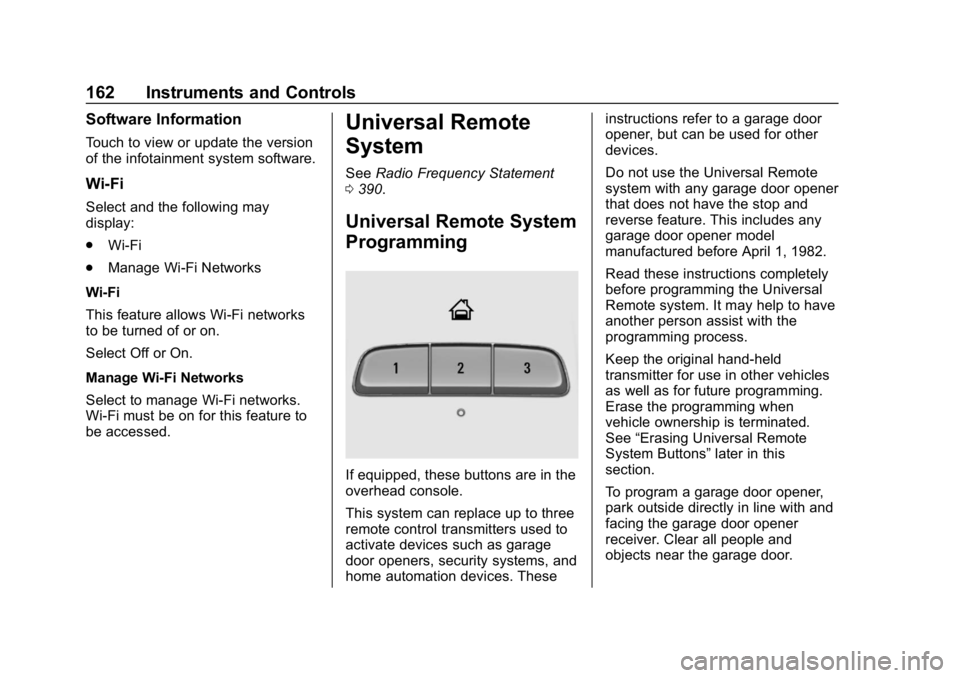
Universal Remote System
Programming
If equipped, these buttons are in the
overhead console.
This system can replace up to three
remote control transmitters used to
activate devices such as garage
door openers, security systems, and
home automation devices. These instructions refer to a garage door
opener, but can be used for other
devices.
Do not use the Universal Remote
system with any garage door opener
that does not have the stop and
reverse feature. This includes any
garage door opener model
manufactured before April 1, 1982.
Read these instructions completely
before programming the Universal
Remote system. It may help to have
another person assist with the
programming process.
Keep the original hand-held
transmitter for use in other vehicles
as well as for future programming.
Erase the programming when
vehicle ownership is terminated.
See
“Erasing Universal Remote
System Buttons” later in this
section.
To program a garage door opener,
park outside directly in line with and
facing the garage door opener
receiver. Clear all people and
objects near the garage door.
Page 208 of 419
Chevrolet Traverse Owner Manual (GMNA-Localizing-U.S./Canada/Mexico-
10603118) - 2018 - CRC - 1/29/18
Driving and Operating 207
Driving and
Operating
Driving Information
Distracted Driving . . . . . . . . . . . . 208
Defensive Driving . . . . . . . . . . . . . 209
Drunk Driving . . . . . . . . . . . . . . . . . 209
Control of a Vehicle . . . . . . . . . . . 209
Braking . . . . . . . . . . . . . . . . . . . . . . . 209
Steering . . . . . . . . . . . . . . . . . . . . . . 210
Off-Road Recovery . . . . . . . . . . . 210
Loss of Control . . . . . . . . . . . . . . . 211
Off-Road Driving . . . . . . . . . . . . . . 211
Driving on Wet Roads . . . . . . . . 216
Hill and Mountain Roads . . . . . 217
Winter Driving . . . . . . . . . . . . . . . . 217
If the Vehicle Is Stuck . . . . . . . . 219
Vehicle Load Limits . . . . . . . . . . . 219
Starting and Operating
New Vehicle Break-In . . . . . . . . . 223
Ignition Positions . . . . . . . . . . . . . 224
Starting the Engine . . . . . . . . . . . 225
Engine Heater . . . . . . . . . . . . . . . . 227
Retained AccessoryPower (RAP) . . . . . . . . . . . . . . . . 228
Shifting Into Park . . . . . . . . . . . . . 229
Shifting out of Park . . . . . . . . . . . 229 Parking over Things
That Burn . . . . . . . . . . . . . . . . . . . 230
Extended Parking . . . . . . . . . . . . 230
Engine Exhaust
Engine Exhaust . . . . . . . . . . . . . . 231
Running the Vehicle While Parked . . . . . . . . . . . . . . . . . . . . . . 231
Automatic Transmission
Automatic Transmission . . . . . . 232
Manual Mode . . . . . . . . . . . . . . . . . 234
Tow/Haul Mode . . . . . . . . . . . . . . . 235
Drive Systems
All-Wheel Drive . . . . . . . . . . . . . . . 235
Brakes
Antilock BrakeSystem (ABS) . . . . . . . . . . . . . . . 236
Electric Parking Brake . . . . . . . . 237
Brake Assist . . . . . . . . . . . . . . . . . . 238
Hill Start Assist (HSA) . . . . . . . . 239
Ride Control Systems
Traction Control/Electronic Stability Control . . . . . . . . . . . . . 239
Driver Mode Control . . . . . . . . . . 241
Cruise Control
Cruise Control . . . . . . . . . . . . . . . . 244
Adaptive Cruise Control . . . . . . 246
Driver Assistance Systems
Driver Assistance Systems . . . 255
Assistance Systems for Parking or Backing . . . . . . . . . . 256
Assistance Systems for Driving . . . . . . . . . . . . . . . . . . . . . . 259
Forward Collision Alert (FCA) System . . . . . . . . . . . . . . . . . . . . . . 259
Forward Automatic Braking (FAB) . . . . . . . . . . . . . . . 261
Front Pedestrian Braking (FPB) System . . . . . . . . . . . . . . . 263
Side Blind Zone Alert (SBZA) . . . . . . . . . . . . . . . . 265
Lane Change Alert (LCA) . . . . . 265
Lane Departure Warning (LDW) . . . . . . . . . . . . . 267
Lane Keep Assist (LKA) . . . . . . 267
Fuel
Fuel . . . . . . . . . . . . . . . . . . . . . . . . . . 269
California Fuel Requirements . . . . . . . . . . . . . . . 270
Fuels in Foreign Countries . . . 270
Fuel Additives . . . . . . . . . . . . . . . . 270
Filling the Tank . . . . . . . . . . . . . . . 271
Filling a Portable Fuel Container . . . . . . . . . . . . . . . . . . . 272
Page 225 of 419
Chevrolet Traverse Owner Manual (GMNA-Localizing-U.S./Canada/Mexico-
10603118) - 2018 - CRC - 1/29/18
224 Driving and Operating
Caution (Continued)
breaking-in guideline every
time you get new brake
linings.
Following break-in, engine speed
and load can be gradually
increased.
Ignition Positions
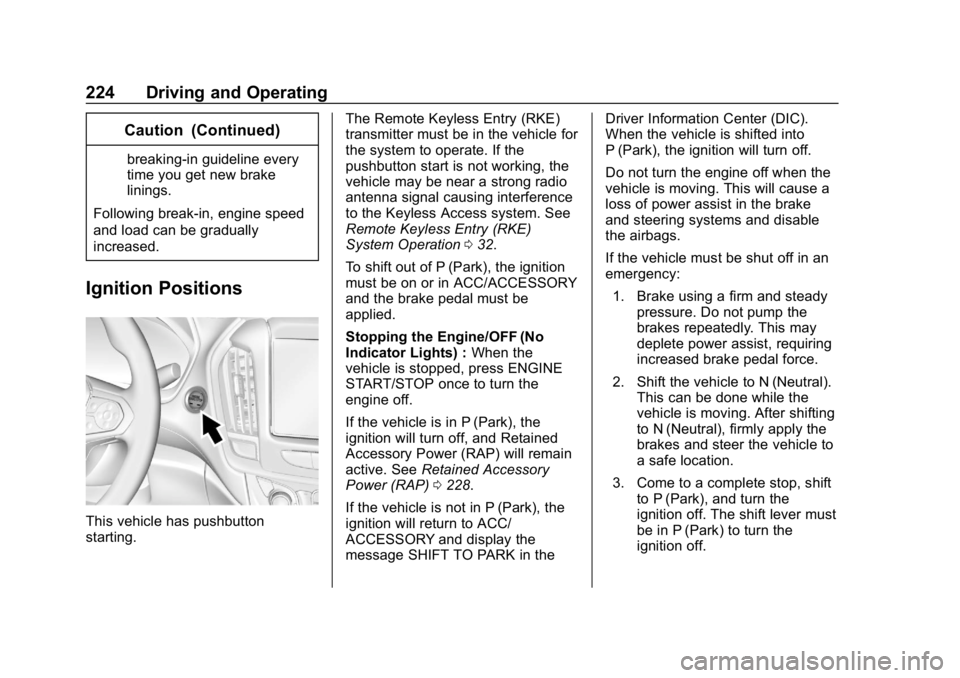
This vehicle has pushbutton
starting. The Remote Keyless Entry (RKE)
transmitter must be in the vehicle for
the system to operate. If the
pushbutton start is not working, the
vehicle may be near a strong radio
antenna signal causing interference
to the Keyless Access system. See
Remote Keyless Entry (RKE)
System Operation
032.
To shift out of P (Park), the ignition
must be on or in ACC/ACCESSORY
and the brake pedal must be
applied.
Stopping the Engine/OFF (No
Indicator Lights) : When the
vehicle is stopped, press ENGINE
START/STOP once to turn the
engine off.
If the vehicle is in P (Park), the
ignition will turn off, and Retained
Accessory Power (RAP) will remain
active. See Retained Accessory
Power (RAP) 0228.
If the vehicle is not in P (Park), the
ignition will return to ACC/
ACCESSORY and display the
message SHIFT TO PARK in the Driver Information Center (DIC).
When the vehicle is shifted into
P (Park), the ignition will turn off.
Do not turn the engine off when the
vehicle is moving. This will cause a
loss of power assist in the brake
and steering systems and disable
the airbags.
If the vehicle must be shut off in an
emergency:
1. Brake using a firm and steady pressure. Do not pump the
brakes repeatedly. This may
deplete power assist, requiring
increased brake pedal force.
2. Shift the vehicle to N (Neutral). This can be done while the
vehicle is moving. After shifting
to N (Neutral), firmly apply the
brakes and steer the vehicle to
a safe location.
3. Come to a complete stop, shift to P (Park), and turn the
ignition off. The shift lever must
be in P (Park) to turn the
ignition off.