seats CHEVROLET TRAVERSE 2018 Owner's Manual
[x] Cancel search | Manufacturer: CHEVROLET, Model Year: 2018, Model line: TRAVERSE, Model: CHEVROLET TRAVERSE 2018Pages: 419, PDF Size: 5.92 MB
Page 2 of 419
Chevrolet Traverse Owner Manual (GMNA-Localizing-U.S./Canada/Mexico-
10603118) - 2018 - CRC - 1/29/18
ContentsIntroduction . . . . . . . . . . . . . . . . . . . . . . 2
In Brief . . . . . . . . . . . . . . . . . . . . . . . . . . . 5
Keys, Doors, and Windows . . . . . 31
Seats and Restraints . . . . . . . . . . . 61
Storage . . . . . . . . . . . . . . . . . . . . . . . 118
Instruments and Controls . . . . . . 123
Lighting . . . . . . . . . . . . . . . . . . . . . . . 166
Infotainment System . . . . . . . . . . 175
Climate Controls . . . . . . . . . . . . . . 200
Driving and Operating . . . . . . . . . 207
Vehicle Care . . . . . . . . . . . . . . . . . . 282
Service and Maintenance . . . . . 363
Technical Data . . . . . . . . . . . . . . . . 376
Customer Information . . . . . . . . . 380
Reporting Safety Defects . . . . . . 391
OnStar . . . . . . . . . . . . . . . . . . . . . . . . 394
Index . . . . . . . . . . . . . . . . . . . . 406
Page 6 of 419
Chevrolet Traverse Owner Manual (GMNA-Localizing-U.S./Canada/Mexico-
10603118) - 2018 - CRC - 1/29/18
In Brief 5
In Brief
Instrument Panel
Instrument Panel . . . . . . . . . . . . . . . . 6
Initial Drive Information
Initial Drive Information . . . . . . . . . . 8
Stop/Start System . . . . . . . . . . . . . . . 8
Remote Keyless Entry (RKE)System . . . . . . . . . . . . . . . . . . . . . . . . 8
Remote Vehicle Start . . . . . . . . . . . 8
Door Locks . . . . . . . . . . . . . . . . . . . . . 9
Liftgate . . . . . . . . . . . . . . . . . . . . . . . . 10
Windows . . . . . . . . . . . . . . . . . . . . . . . 10
Seat Adjustment . . . . . . . . . . . . . . . 11
Memory Features . . . . . . . . . . . . . . 12
Second Row Seats . . . . . . . . . . . . 12
Third Row Seats . . . . . . . . . . . . . . . 13
Heated and Ventilated Seats . . . 15
Head Restraint Adjustment . . . . 15
Seat Belts . . . . . . . . . . . . . . . . . . . . . 15
Passenger Sensing System . . . 16
Mirror Adjustment . . . . . . . . . . . . . . 16
Steering Wheel Adjustment . . . . 17
Interior Lighting . . . . . . . . . . . . . . . . 17
Exterior Lighting . . . . . . . . . . . . . . . 18
Windshield Wiper/Washer . . . . . . 19
Climate Controls . . . . . . . . . . . . . . . 20
Transmission . . . . . . . . . . . . . . . . . . 20
Vehicle Features
Infotainment System . . . . . . . . . . . 21
Radio(s) . . . . . . . . . . . . . . . . . . . . . . . 21
Satellite Radio . . . . . . . . . . . . . . . . . 22
Portable Audio Devices . . . . . . . . 22
Bluetooth . . . . . . . . . . . . . . . . . . . . . . 22
Steering Wheel Controls . . . . . . . 22
Cruise Control . . . . . . . . . . . . . . . . . 23
Driver Information Center (DIC) . . . . . . . . . . . . . . . . . 24
Forward Collision Alert (FCA) System . . . . . . . . . . . . . . . . . . . . . . . 24
Forward Automatic Braking (FAB) . . . . . . . . . . . . . . . . 24
Front Pedestrian Braking (FPB) System . . . . . . . . . . . . . . . . . . . . . . . 25
Lane Keep Assist (LKA) . . . . . . . 25
Lane Change Alert (LCA) . . . . . . 25
Surround Vision . . . . . . . . . . . . . . . 25
Rear Vision Camera (RVC) . . . . 26
Rear Cross Traffic Alert (RCTA) System . . . . . . . . . . . . . . . . . . . . . . . 26
Parking Assist . . . . . . . . . . . . . . . . . 26
Power Outlets . . . . . . . . . . . . . . . . . 26
Universal Remote System . . . . . 26
Sunroof . . . . . . . . . . . . . . . . . . . . . . . . 27
Performance and Maintenance
Traction Control/Electronic Stability Control . . . . . . . . . . . . . . 27
Tire Pressure Monitor . . . . . . . . . . 28
Fuel (2.0L L4 Engine) . . . . . . . . . . 28
Fuel (3.6L V6 Engine) . . . . . . . . . . 29
E85 or FlexFuel . . . . . . . . . . . . . . . . 29
Engine Oil Life System . . . . . . . . 29
Driving for Better Fuel Economy . . . . . . . . . . . . . . . . . . . . . 29
Roadside Assistance Program . . . . . . . . . . . . . . . . . . . . . . 30
Page 8 of 419

Chevrolet Traverse Owner Manual (GMNA-Localizing-U.S./Canada/Mexico-
10603118) - 2018 - CRC - 1/29/18
In Brief 7
1.Air Vents 0205.
2. Turn Signal Lever. See Turn
and Lane-Change Signals
0 170.
IntelliBeam
®System Button (If
Equipped). See Exterior Lamp
Controls 0166.
3. Instrument Cluster 0134.
Driver Information Center (DIC)
Display. See Driver Information
Center (DIC) 0150.
4. Windshield Wiper/Washer
0125.
Rear Window Wiper/Washer
0 126.
5. ENGINE START/STOP Button. See Ignition Positions 0224.
6. Hazard Warning Flashers
0170.
7. Light Sensor. See Automatic
Headlamp System 0169.
8. Infotainment 0175.
9. Dual Automatic Climate Control
System 0200. 10.
Heated and Ventilated Front
Seats 070 (If Equipped).
11. Power Outlets 0129.
12. Wireless Charging 0131 (If
Equipped).
13. USB Port 0184.
Auxiliary Jack. See Auxiliary
Devices 0190.
14. Traction Control/Electronic
Stability Control 0239.
Driver Mode Control Knob. See
Driver Mode Control 0241 (If
Equipped).
Lane Keep Assist (LKA) 0267
(If Equipped).
15. Electric Parking Brake 0237.
16. Shift Lever. See Automatic
Transmission 0232.
Manual Mode 0234.
17. Steering Wheel Controls 0124.
18. Horn 0125.
19. Steering Wheel Adjustment
0124 (Out of View). 20.
Cruise Control 0244.
Adaptive Cruise Control 0246
(If Equipped).
Heated Steering Wheel 0125
(If Equipped).
Forward Collision Alert (FCA)
System 0259 (If Equipped).
21. Hood Release. See Hood
0 285.
22. Fog Lamps 0170 (If
Equipped).
23. Data Link Connector (DLC) (Out of View). See Malfunction
Indicator Lamp (Check Engine
Light) 0141.
24. Exterior Lamp Controls 0166.
25. Instrument Panel Illumination
Control 0171.
Page 12 of 419
Chevrolet Traverse Owner Manual (GMNA-Localizing-U.S./Canada/Mexico-
10603118) - 2018 - CRC - 1/29/18
In Brief 11
Seat Adjustment
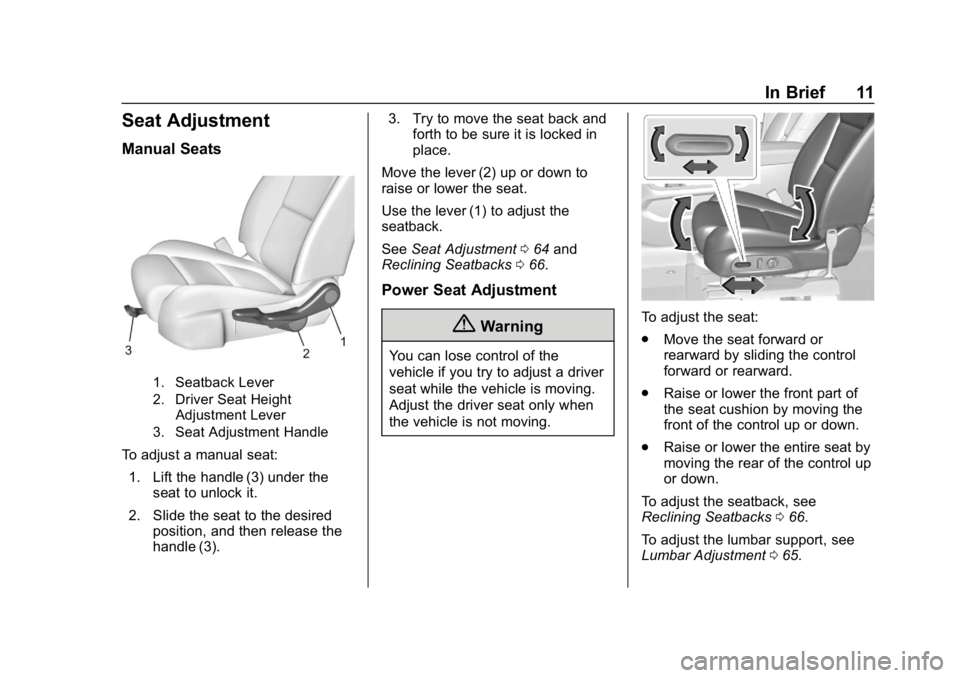
Manual Seats
1. Seatback Lever
2. Driver Seat HeightAdjustment Lever
3. Seat Adjustment Handle
To adjust a manual seat:
1. Lift the handle (3) under the seat to unlock it.
2. Slide the seat to the desired position, and then release the
handle (3). 3. Try to move the seat back and
forth to be sure it is locked in
place.
Move the lever (2) up or down to
raise or lower the seat.
Use the lever (1) to adjust the
seatback.
See Seat Adjustment 064 and
Reclining Seatbacks 066.
Power Seat Adjustment
{Warning
You can lose control of the
vehicle if you try to adjust a driver
seat while the vehicle is moving.
Adjust the driver seat only when
the vehicle is not moving.
To adjust the seat:
.
Move the seat forward or
rearward by sliding the control
forward or rearward.
. Raise or lower the front part of
the seat cushion by moving the
front of the control up or down.
. Raise or lower the entire seat by
moving the rear of the control up
or down.
To adjust the seatback, see
Reclining Seatbacks 066.
To adjust the lumbar support, see
Lumbar Adjustment 065.
Page 13 of 419
Chevrolet Traverse Owner Manual (GMNA-Localizing-U.S./Canada/Mexico-
10603118) - 2018 - CRC - 1/29/18
12 In Brief
Memory Features
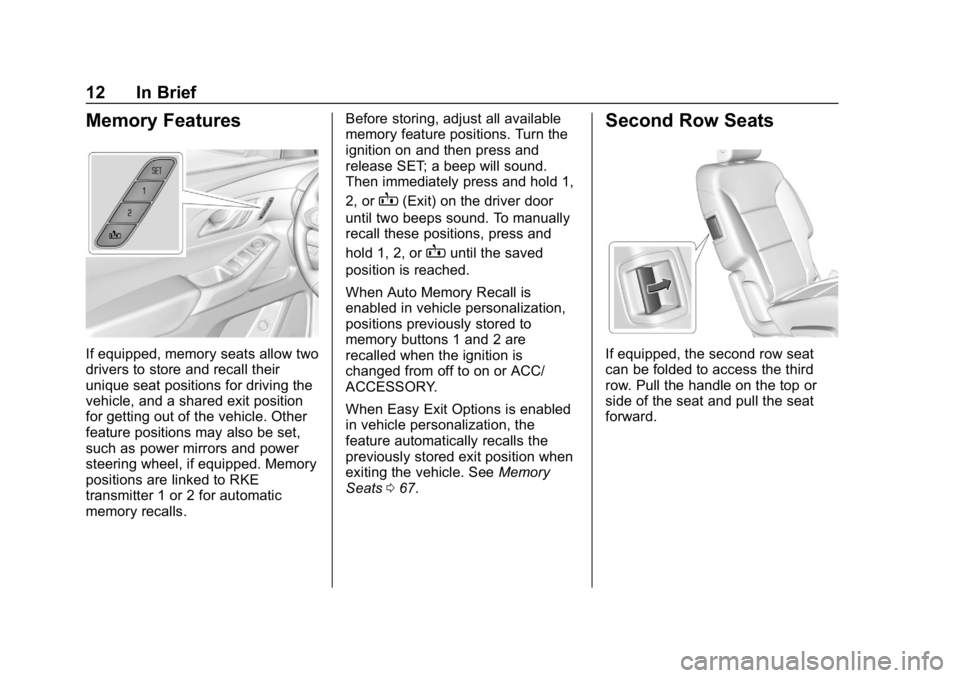
If equipped, memory seats allow two
drivers to store and recall their
unique seat positions for driving the
vehicle, and a shared exit position
for getting out of the vehicle. Other
feature positions may also be set,
such as power mirrors and power
steering wheel, if equipped. Memory
positions are linked to RKE
transmitter 1 or 2 for automatic
memory recalls.Before storing, adjust all available
memory feature positions. Turn the
ignition on and then press and
release SET; a beep will sound.
Then immediately press and hold 1,
2, or
B(Exit) on the driver door
until two beeps sound. To manually
recall these positions, press and
hold 1, 2, or
Buntil the saved
position is reached.
When Auto Memory Recall is
enabled in vehicle personalization,
positions previously stored to
memory buttons 1 and 2 are
recalled when the ignition is
changed from off to on or ACC/
ACCESSORY.
When Easy Exit Options is enabled
in vehicle personalization, the
feature automatically recalls the
previously stored exit position when
exiting the vehicle. See Memory
Seats 067.
Second Row Seats
If equipped, the second row seat
can be folded to access the third
row. Pull the handle on the top or
side of the seat and pull the seat
forward.
Page 14 of 419
Chevrolet Traverse Owner Manual (GMNA-Localizing-U.S./Canada/Mexico-
10603118) - 2018 - CRC - 1/29/18
In Brief 13
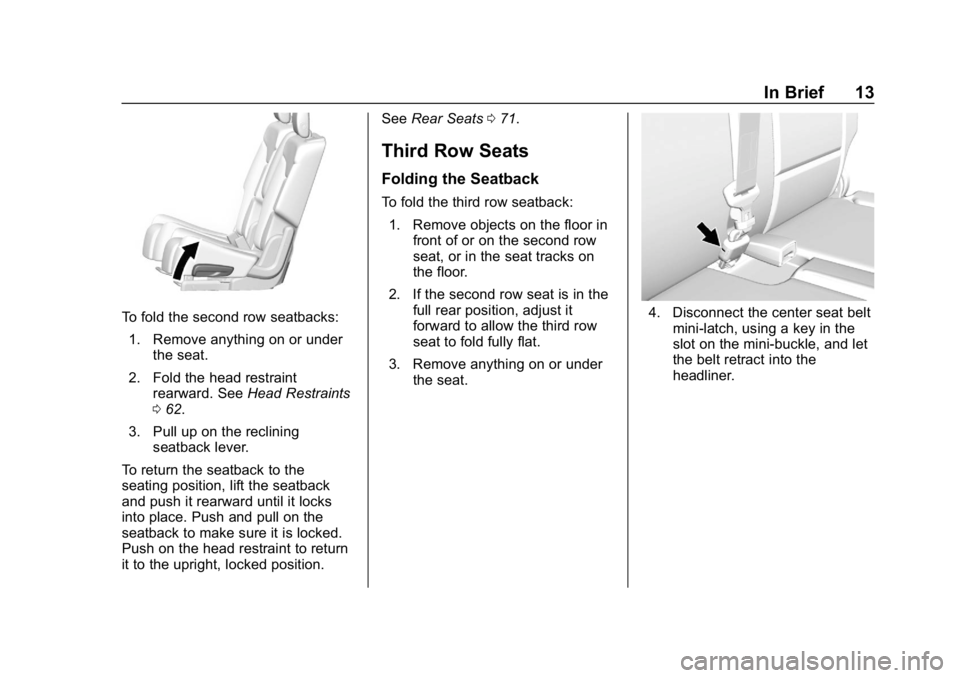
To fold the second row seatbacks:1. Remove anything on or under the seat.
2. Fold the head restraint rearward. See Head Restraints
0 62.
3. Pull up on the reclining seatback lever.
To return the seatback to the
seating position, lift the seatback
and push it rearward until it locks
into place. Push and pull on the
seatback to make sure it is locked.
Push on the head restraint to return
it to the upright, locked position. See
Rear Seats 071.
Third Row Seats
Folding the Seatback
To fold the third row seatback:
1. Remove objects on the floor in front of or on the second row
seat, or in the seat tracks on
the floor.
2. If the second row seat is in the full rear position, adjust it
forward to allow the third row
seat to fold fully flat.
3. Remove anything on or under the seat.
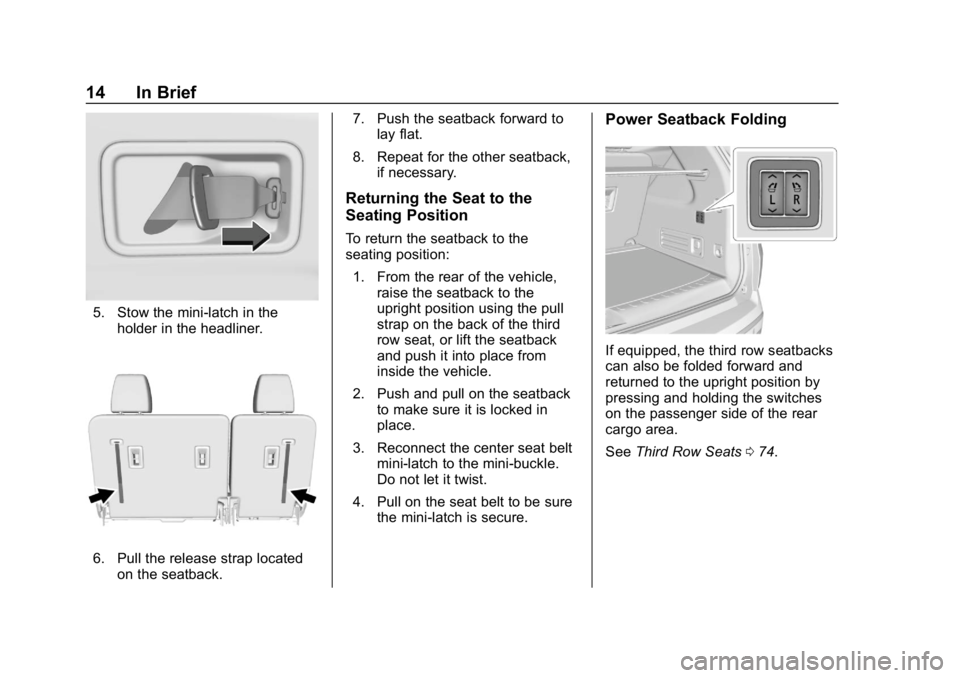
4. Disconnect the center seat belt
mini-latch, using a key in the
slot on the mini-buckle, and let
the belt retract into the
headliner.
Page 15 of 419
Chevrolet Traverse Owner Manual (GMNA-Localizing-U.S./Canada/Mexico-
10603118) - 2018 - CRC - 1/29/18
14 In Brief
5. Stow the mini-latch in theholder in the headliner.
6. Pull the release strap locatedon the seatback. 7. Push the seatback forward to
lay flat.
8. Repeat for the other seatback, if necessary.
Returning the Seat to the
Seating Position
To return the seatback to the
seating position:
1. From the rear of the vehicle, raise the seatback to the
upright position using the pull
strap on the back of the third
row seat, or lift the seatback
and push it into place from
inside the vehicle.
2. Push and pull on the seatback to make sure it is locked in
place.
3. Reconnect the center seat belt mini-latch to the mini-buckle.
Do not let it twist.
4. Pull on the seat belt to be sure the mini-latch is secure.
Power Seatback Folding
If equipped, the third row seatbacks
can also be folded forward and
returned to the upright position by
pressing and holding the switches
on the passenger side of the rear
cargo area.
See Third Row Seats 074.
Page 16 of 419
Chevrolet Traverse Owner Manual (GMNA-Localizing-U.S./Canada/Mexico-
10603118) - 2018 - CRC - 1/29/18
In Brief 15
Heated and Ventilated
Seats
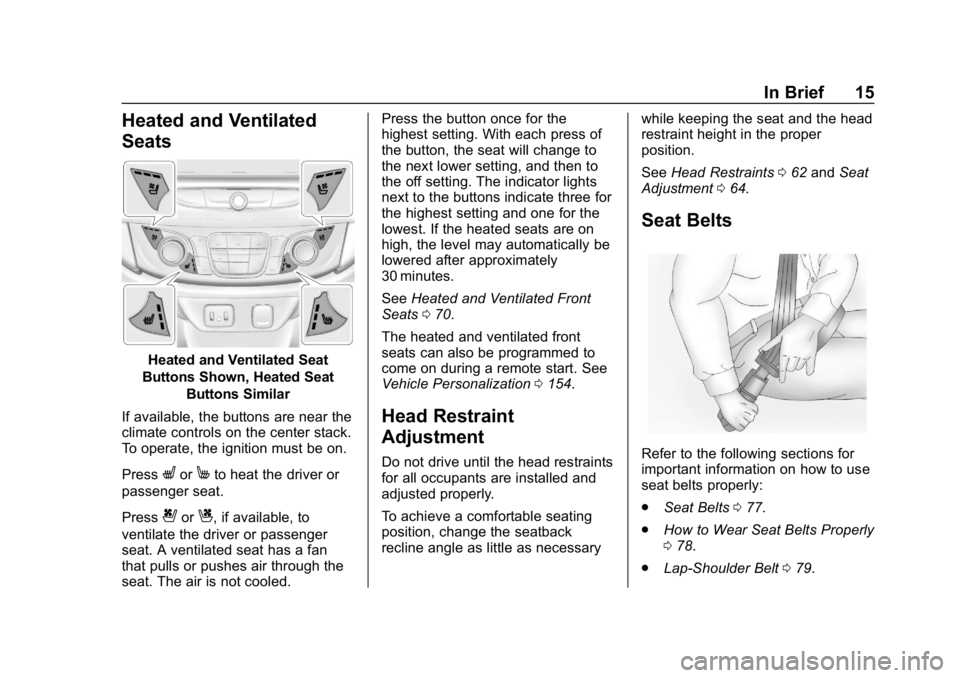
Heated and Ventilated Seat
Buttons Shown, Heated Seat Buttons Similar
If available, the buttons are near the
climate controls on the center stack.
To operate, the ignition must be on.
Press
LorMto heat the driver or
passenger seat.
Press
{orC, if available, to
ventilate the driver or passenger
seat. A ventilated seat has a fan
that pulls or pushes air through the
seat. The air is not cooled. Press the button once for the
highest setting. With each press of
the button, the seat will change to
the next lower setting, and then to
the off setting. The indicator lights
next to the buttons indicate three for
the highest setting and one for the
lowest. If the heated seats are on
high, the level may automatically be
lowered after approximately
30 minutes.
See
Heated and Ventilated Front
Seats 070.
The heated and ventilated front
seats can also be programmed to
come on during a remote start. See
Vehicle Personalization 0154.
Head Restraint
Adjustment
Do not drive until the head restraints
for all occupants are installed and
adjusted properly.
To achieve a comfortable seating
position, change the seatback
recline angle as little as necessary while keeping the seat and the head
restraint height in the proper
position.
See
Head Restraints 062 and Seat
Adjustment 064.
Seat Belts
Refer to the following sections for
important information on how to use
seat belts properly:
.
Seat Belts 077.
. How to Wear Seat Belts Properly
078.
. Lap-Shoulder Belt 079.
Page 19 of 419
Chevrolet Traverse Owner Manual (GMNA-Localizing-U.S./Canada/Mexico-
10603118) - 2018 - CRC - 1/29/18
18 In Brief
and the indicator light will turn off.
The dome lamps will come on when
doors are opened.
+ON/OFF : Press to turn the dome
lamps on manually. Press again to
turn the dome lamps off.
Reading Lamps
There are reading lamps on the
overhead console and over the rear
seats. These lamps come on when
any door is opened.
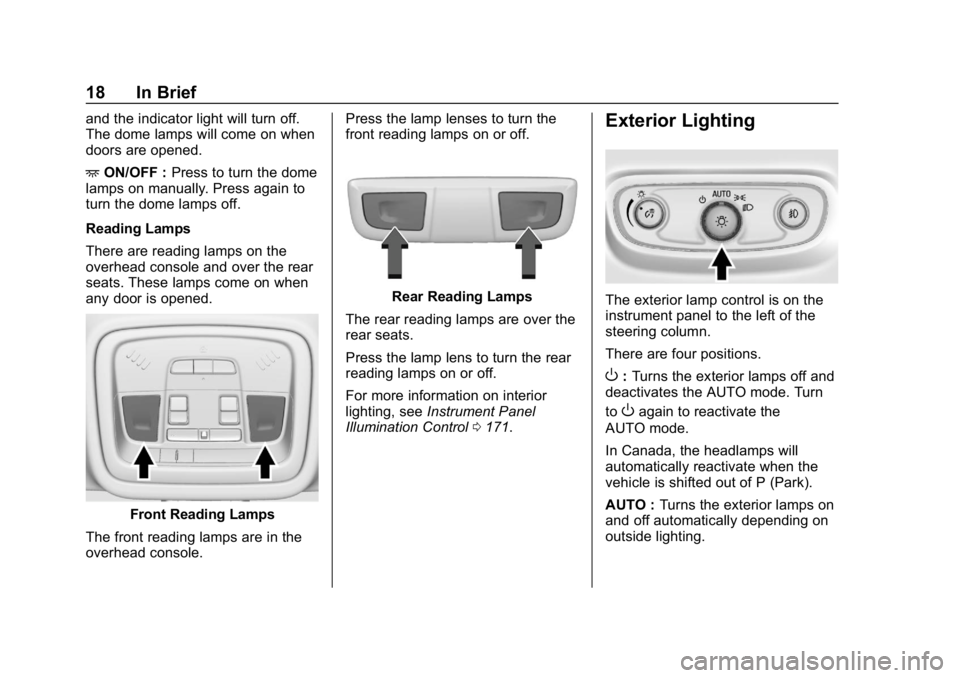
Front Reading Lamps
The front reading lamps are in the
overhead console. Press the lamp lenses to turn the
front reading lamps on or off.
Rear Reading Lamps
The rear reading lamps are over the
rear seats.
Press the lamp lens to turn the rear
reading lamps on or off.
For more information on interior
lighting, see Instrument Panel
Illumination Control 0171.
Exterior Lighting
The exterior lamp control is on the
instrument panel to the left of the
steering column.
There are four positions.
O:Turns the exterior lamps off and
deactivates the AUTO mode. Turn
to
Oagain to reactivate the
AUTO mode.
In Canada, the headlamps will
automatically reactivate when the
vehicle is shifted out of P (Park).
AUTO : Turns the exterior lamps on
and off automatically depending on
outside lighting.
Page 21 of 419
Chevrolet Traverse Owner Manual (GMNA-Localizing-U.S./Canada/Mexico-
10603118) - 2018 - CRC - 1/29/18
20 In Brief
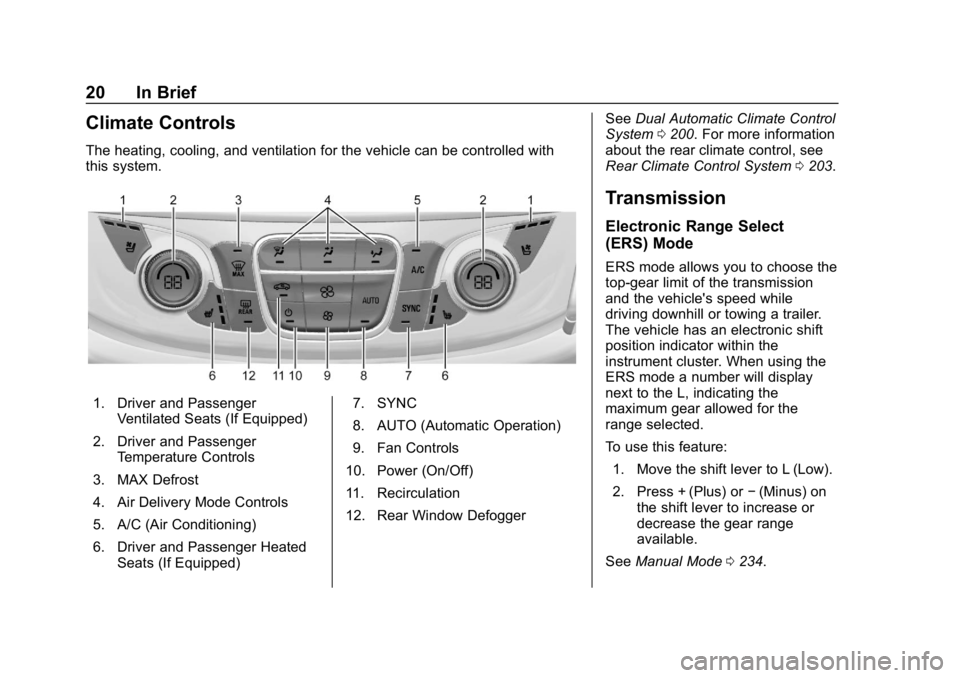
Climate Controls
The heating, cooling, and ventilation for the vehicle can be controlled with
this system.
1. Driver and PassengerVentilated Seats (If Equipped)
2. Driver and Passenger Temperature Controls
3. MAX Defrost
4. Air Delivery Mode Controls
5. A/C (Air Conditioning)
6. Driver and Passenger Heated Seats (If Equipped) 7. SYNC
8. AUTO (Automatic Operation)
9. Fan Controls
10. Power (On/Off)
11. Recirculation
12. Rear Window Defogger See
Dual Automatic Climate Control
System 0200. For more information
about the rear climate control, see
Rear Climate Control System 0203.
Transmission
Electronic Range Select
(ERS) Mode
ERS mode allows you to choose the
top-gear limit of the transmission
and the vehicle's speed while
driving downhill or towing a trailer.
The vehicle has an electronic shift
position indicator within the
instrument cluster. When using the
ERS mode a number will display
next to the L, indicating the
maximum gear allowed for the
range selected.
To use this feature:
1. Move the shift lever to L (Low).
2. Press + (Plus) or −(Minus) on
the shift lever to increase or
decrease the gear range
available.
See Manual Mode 0234.