Dome CHEVROLET TRAVERSE 2019 User Guide
[x] Cancel search | Manufacturer: CHEVROLET, Model Year: 2019, Model line: TRAVERSE, Model: CHEVROLET TRAVERSE 2019Pages: 428, PDF Size: 6.28 MB
Page 173 of 428
Chevrolet Traverse Owner Manual (GMNA-Localizing-U.S./Canada/Mexico-
12146157) - 2019 - CRC - 10/31/18
172 Lighting
Fog Lamps
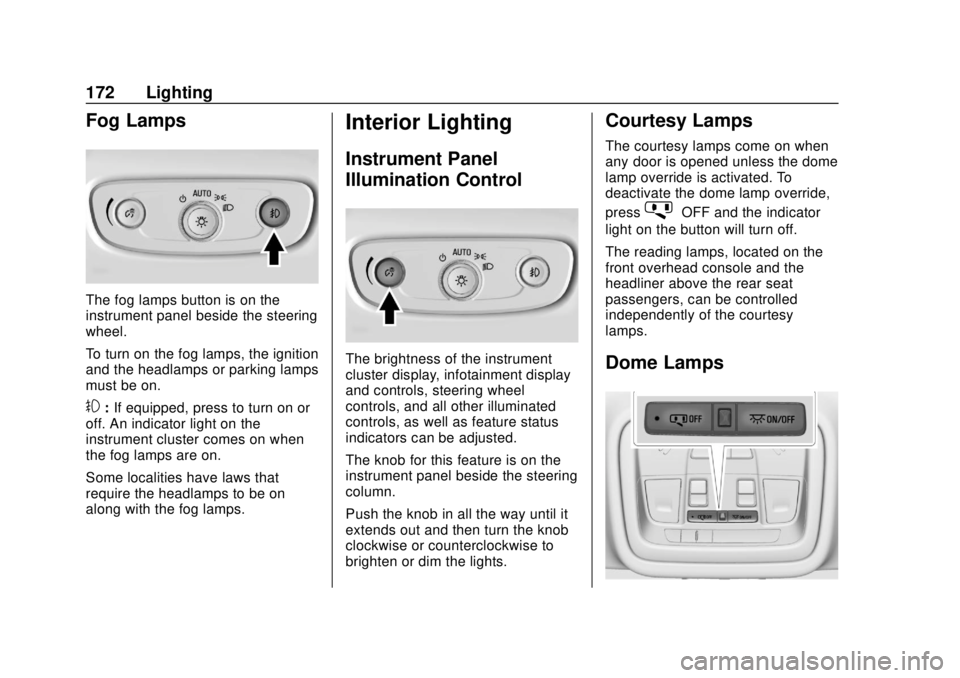
The fog lamps button is on the
instrument panel beside the steering
wheel.
To turn on the fog lamps, the ignition
and the headlamps or parking lamps
must be on.
#:If equipped, press to turn on or
off. An indicator light on the
instrument cluster comes on when
the fog lamps are on.
Some localities have laws that
require the headlamps to be on
along with the fog lamps.
Interior Lighting
Instrument Panel
Illumination Control
The brightness of the instrument
cluster display, infotainment display
and controls, steering wheel
controls, and all other illuminated
controls, as well as feature status
indicators can be adjusted.
The knob for this feature is on the
instrument panel beside the steering
column.
Push the knob in all the way until it
extends out and then turn the knob
clockwise or counterclockwise to
brighten or dim the lights.
Courtesy Lamps
The courtesy lamps come on when
any door is opened unless the dome
lamp override is activated. To
deactivate the dome lamp override,
press
jOFF and the indicator
light on the button will turn off.
The reading lamps, located on the
front overhead console and the
headliner above the rear seat
passengers, can be controlled
independently of the courtesy
lamps.
Dome Lamps
Page 174 of 428
Chevrolet Traverse Owner Manual (GMNA-Localizing-U.S./Canada/Mexico-
12146157) - 2019 - CRC - 10/31/18
Lighting 173
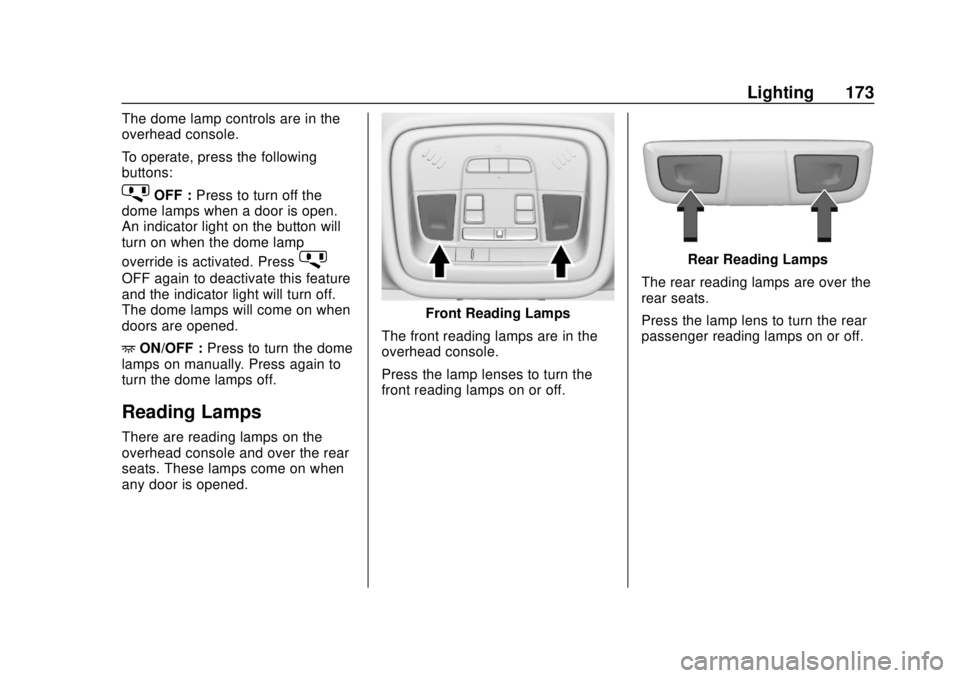
The dome lamp controls are in the
overhead console.
To operate, press the following
buttons:
jOFF :Press to turn off the
dome lamps when a door is open.
An indicator light on the button will
turn on when the dome lamp
override is activated. Press
j
OFF again to deactivate this feature
and the indicator light will turn off.
The dome lamps will come on when
doors are opened.
+ ON/OFF : Press to turn the dome
lamps on manually. Press again to
turn the dome lamps off.
Reading Lamps
There are reading lamps on the
overhead console and over the rear
seats. These lamps come on when
any door is opened.
Front Reading Lamps
The front reading lamps are in the
overhead console.
Press the lamp lenses to turn the
front reading lamps on or off.
Rear Reading Lamps
The rear reading lamps are over the
rear seats.
Press the lamp lens to turn the rear
passenger reading lamps on or off.
Page 175 of 428
Chevrolet Traverse Owner Manual (GMNA-Localizing-U.S./Canada/Mexico-
12146157) - 2019 - CRC - 10/31/18
174 Lighting
Lighting Features
Entry Lighting
Some exterior lamps and most of
the interior lights turn on briefly at
night, or in areas of limited lighting
when
Kis pressed on the Remote
Keyless Entry (RKE) transmitter.
See Remote Keyless Entry (RKE)
System Operation 030. When the
driver door is opened, all control
lights, Driver Information Center
(DIC) lights, and door pocket lights
turn on. After about 30 seconds the
exterior lamps turn off, then the
remaining interior lights dim to off.
Entry lighting can be disabled
manually by turning the ignition on
or to ACC/ACCESSORY, or by
pressing
Qon the RKE transmitter.
This feature can be changed. See
“Vehicle Locator Lights” under
Vehicle Personalization 0155.
Exit Lighting
Some exterior lamps and interior
lights come on at night, or in areas
with limited lighting, when the driver
door is opened after the ignition is
turned off. The dome lamp comes
on after the ignition is turned off.
The exterior lamps and dome lamp
remain on for a set amount of time,
then automatically turn off.
The exterior lamps turn off
immediately by turning the exterior
lamp control off.
This feature can be changed. See
Vehicle Personalization 0155.
Battery Load
Management
The vehicle has Electric Power
Management (EPM) that estimates
the battery's temperature and state
of charge. It then adjusts the voltage
for best performance and extended
life of the battery.
When the battery's state of charge
is low, the voltage is raised slightly
to quickly bring the charge back up. When the state of charge is high,
the voltage is lowered slightly to
prevent overcharging. If the vehicle
has a voltmeter gauge or a voltage
display on the Driver Information
Center (DIC), you may see the
voltage move up or down. This is
normal. If there is a problem, an
alert will be displayed.
The battery can be discharged at
idle if the electrical loads are very
high. This is true for all vehicles.
This is because the generator
(alternator) may not be spinning fast
enough at idle to produce all of the
power needed for very high
electrical loads.
A high electrical load occurs when
several of the following are on, such
as: headlamps, high beams, rear
window defogger, climate control fan
at high speed, heated seats, engine
cooling fans, trailer loads, and loads
plugged into accessory power
outlets.
EPM works to prevent excessive
discharge of the battery. It does this
by balancing the generator's output
and the vehicle's electrical needs.
Page 248 of 428
Chevrolet Traverse Owner Manual (GMNA-Localizing-U.S./Canada/Mexico-
12146157) - 2019 - CRC - 10/31/18
Driving and Operating 247
*:Press to disengage cruise
control without erasing the set
speed from memory.
Setting Cruise Control
If
Jis on when not in use, SET− or
RES+ could get pressed and go into
cruise when not desired. Keep
J
off when cruise is not being used.
1. Press
J.
2. Get up to the desired speed.
3. Press and release SET−. The desired set speed briefly
appears in the instrument
cluster.
4. Remove your foot from the accelerator.
When the cruise control has been
set to the desired speed, a green
cruise control indicator appears on
the instrument cluster. Resuming a Set Speed
If the cruise control is set at a
desired speed and then the brakes
are applied or
*is pressed, the
cruise control is disengaged without
erasing the set speed from memory.
Once the vehicle speed reaches
about 40 km/h (25 mph) or more,
press RES+ briefly. The vehicle
returns to the previous set speed.
Increasing Speed While Using
Cruise Control
If the cruise control system is
already activated:
. Press and hold RES+ up until
the desired speed is reached,
then release it.
. To increase vehicle speed in
small increments, briefly press
RES+. For each press, the
vehicle goes about 1 km/h
(1 mph) faster.
The speedometer reading can be
displayed in either English or metric
units. See Instrument Cluster 0135.
The increment value used depends
on the units displayed. Reducing Speed While Using
Cruise Control
If the cruise control system is
already activated:
.
Press and hold SET− until the
desired lower speed is reached,
then release it.
. To decrease the vehicle speed in
small increments, briefly press
SET−. For each press, the
vehicle goes about 1 km/h
(1 mph) slower.
The speedometer reading can be
displayed in either English or metric
units. See Instrument Cluster 0135.
The increment value used depends
on the units displayed.
Passing Another Vehicle While
Using Cruise Control
Use the accelerator pedal to
increase the vehicle speed. When
you take your foot off the pedal, the
vehicle will slow down to the
previous set cruise speed.
Page 250 of 428
Chevrolet Traverse Owner Manual (GMNA-Localizing-U.S./Canada/Mexico-
12146157) - 2019 - CRC - 10/31/18
Driving and Operating 249
Warning (Continued)
this section. Complete attention is
always required while driving and
you should be ready to take
action and apply the brakes. See
Defensive Driving0210.
{Warning
ACC will not detect or brake for
children, pedestrians, animals,
or other objects.
Do not use ACC when:
. On winding and hilly roads
or when the sensors are
blocked by snow, ice, or dirt.
The system may not detect
a vehicle ahead. Keep the
entire front of the vehicle
clean.
(Continued)
Warning (Continued)
.Visibility is low, such as in
fog, rain, or snow
conditions. ACC
performance is limited under
these conditions.
. On slippery roads where
fast changes in tire traction
can cause excessive
wheel slip.
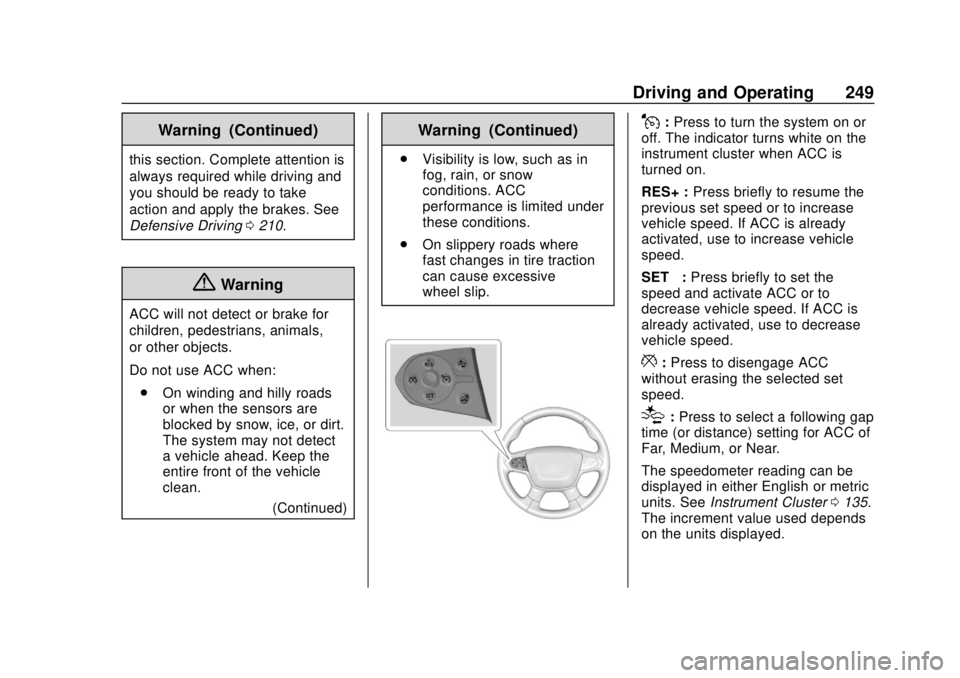
J:Press to turn the system on or
off. The indicator turns white on the
instrument cluster when ACC is
turned on.
RES+ : Press briefly to resume the
previous set speed or to increase
vehicle speed. If ACC is already
activated, use to increase vehicle
speed.
SET– :Press briefly to set the
speed and activate ACC or to
decrease vehicle speed. If ACC is
already activated, use to decrease
vehicle speed.
*: Press to disengage ACC
without erasing the selected set
speed.
[: Press to select a following gap
time (or distance) setting for ACC of
Far, Medium, or Near.
The speedometer reading can be
displayed in either English or metric
units. See Instrument Cluster 0135.
The increment value used depends
on the units displayed.
Page 347 of 428
Chevrolet Traverse Owner Manual (GMNA-Localizing-U.S./Canada/Mexico-
12146157) - 2019 - CRC - 11/1/18
346 Vehicle Care
Some aluminum wheels can be
repaired. See your dealer if any of
these conditions exist.
Your dealer will know the kind of
wheel that is needed.
Each new wheel should have the
same load-carrying capacity,
diameter, width, offset, and be
mounted the same way as the one it
replaces.
Replace wheels, wheel bolts, wheel
nuts, or Tire Pressure Monitor
System (TPMS) sensors with new
GM original equipment parts.
{Warning
Using the wrong replacement
wheels, wheel bolts, or wheel
nuts can be dangerous. It could
affect the braking and handling of
the vehicle. Tires can lose air,
and cause loss of control, causing
a crash. Always use the correct
wheel, wheel bolts, and wheel
nuts for replacement.
Caution
The wrong wheel can also cause
problems with bearing life, brake
cooling, speedometer or
odometer calibration, headlamp
aim, bumper height, vehicle
ground clearance, and tire or tire
chain clearance to the body and
chassis.
Used Replacement Wheels
{Warning
Replacing a wheel with a used
one is dangerous. How it has
been used or how far it has been
driven may be unknown. It could
fail suddenly and cause a crash.
When replacing wheels, use a
new GM original equipment
wheel.
Tire Chains
{Warning
If the vehicle has a tire size other
than 255/65R18, do not use tire
chains. There is not enough
clearance. Tire chains used on a
vehicle without the proper amount
of clearance can cause damage
to the brakes, suspension,
or other vehicle parts. The area
damaged by the tire chains could
cause loss of control and a crash.
Use another type of traction
device only if its manufacturer
recommends it for the vehicle's
tire size combination and road
conditions. Follow that
manufacturer's instructions. To
avoid vehicle damage, drive slow
and readjust or remove the
traction device if it contacts the
vehicle. Do not spin the wheels. If
traction devices are used, install
them on the front tires.
Page 385 of 428
Chevrolet Traverse Owner Manual (GMNA-Localizing-U.S./Canada/Mexico-
12146157) - 2019 - CRC - 10/31/18
384 Service and Maintenance
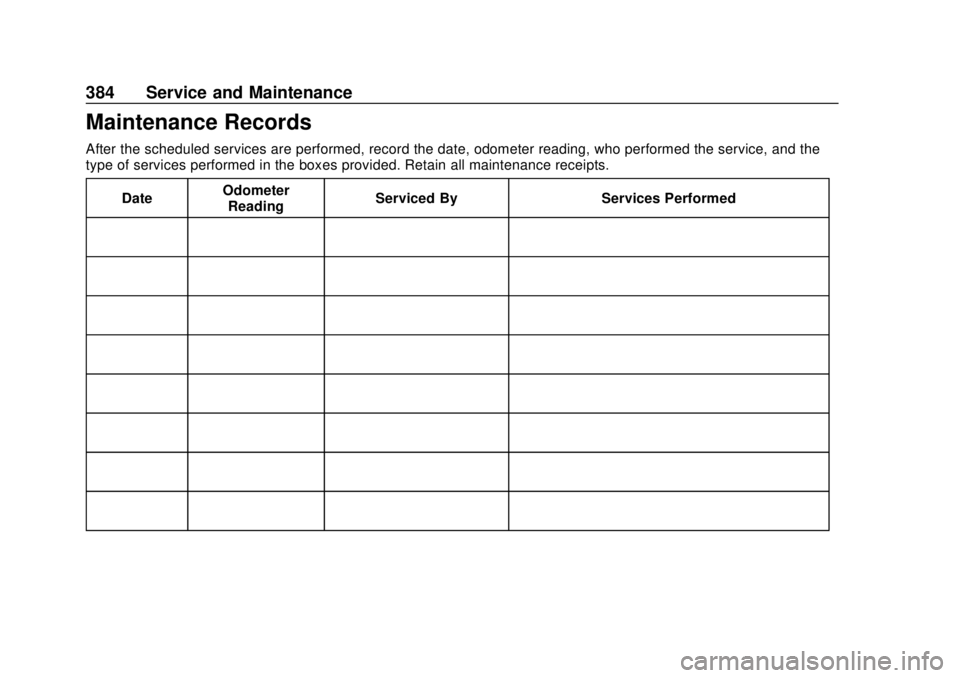
Maintenance Records
After the scheduled services are performed, record the date, odometer reading, who performed the service, and the
type of services performed in the boxes provided. Retain all maintenance receipts.Date Odometer
Reading Serviced By Services Performed
Page 394 of 428
Chevrolet Traverse Owner Manual (GMNA-Localizing-U.S./Canada/Mexico-
12146157) - 2019 - CRC - 10/31/18
Customer Information 393
.Download owner ’s manuals.
. Find the
Chevrolet-recommended
maintenance services.
GM Mobility
Reimbursement Program
This program is available to
qualified applicants for cost
reimbursement, up to certain limits,
of eligible aftermarket adaptive
equipment required for the vehicle,
such as hand controls or a
wheelchair/scooter lift for the
vehicle.
To learn about the GM Mobility
program, see www.gmmobility.com
or call the GM Mobility Assistance
Center at 1-800-323-9935. Text
Telephone (TTY) users, call
1-800-833-9935. General Motors of Canada also has
a Mobility program. See www.gm.ca
or call 1-800-GM-DRIVE
(800-463-7483) for details. TTY
users call 1-800-263-3830.
Roadside Assistance
Program
For U.S.-purchased vehicles, call
1-800-243-8872. (Text Telephone
(TTY): 1-888-889-2438.)
For Canadian-purchased vehicles,
call 1-800-268-6800.
Service is available 24 hours a day,
365 days a year.
Calling for Assistance
When calling Roadside Assistance,
have the following information
ready:
.
Your name, home address, and
home telephone number
. Telephone number of your
location
. Location of the vehicle .
Model, year, color, and license
plate number of the vehicle
. Odometer reading, Vehicle
Identification Number (VIN), and
delivery date of the vehicle
. Description of the problem
Coverage
Services are provided for the
duration of the vehicle’s powertrain
warranty.
In the U.S., anyone driving the
vehicle is covered. In Canada, a
person driving the vehicle without
permission from the owner is not
covered.
Roadside Assistance is not a part of
the New Vehicle Limited Warranty.
General Motors North America and
Chevrolet reserve the right to make
any changes or discontinue the
Roadside Assistance program at
any time without notification.
General Motors North America and
Chevrolet reserve the right to limit
services or payment to an owner or
Page 418 of 428

Chevrolet Traverse Owner Manual (GMNA-Localizing-U.S./Canada/Mexico-
12146157) - 2019 - CRC - 10/31/18
Index 417
ChargingWireless . . . . . . . . . . . . . . . . . . . . . . 132
Charging System Light . . . . . . . . . 142
Check Engine Light (MalfunctionIndicator) . . . . . . . . . . . . . . . . . . . . 142
Child Restraints
Infants and Young Children . . . . . 99
Lower Anchors and Tethersfor Children . . . . . . . . . . . . . . . . . 105
Older Children . . . . . . . . . . . . . . . . . . 98
Securing . . . . . . . . . . . . . . . . . .113, 115
Systems . . . . . . . . . . . . . . . . . . . . . . 102
Circuit Breakers . . . . . . . . . . . . . . . . 317
Cleaning Exterior Care . . . . . . . . . . . . . . . . . 362
Interior Care . . . . . . . . . . . . . . . . . . 366
Climate Control Systems Dual Automatic . . . . . . . . . . . . . . . 201
Rear . . . . . . . . . . . . . . . . . . . . . . . . . . 204
Clock . . . . . . . . . . . . . . . . . . . . . . . . . . . 129
Cluster, Instrument . . . . . . . . . . . . . 135
Collision Damage Repair . . . . . . . 396
Compact Spare Tire . . . . . . . . . . . . 354
Compartments
Storage . . . . . . . . . . . . . . . . . . . . . . . .119
Compass . . . . . . . . . . . . . . . . . . . . . . . 128 Connected Services
Connections . . . . . . . . . . . . . . . . . . 412
Diagnostics . . . . . . . . . . . . . . . . . . . 414
Navigation . . . . . . . . . . . . . . . . . . . . .411
Connections Connected Services . . . . . . . . . . 412
Control
Traction and ElectronicStability . . . . . . . . . . . . . . . . . . . . . 241
Control of a Vehicle . . . . . . . . . . . . . 210
Convex Mirrors . . . . . . . . . . . . . . . . . . 52
Coolant Engine Temperature Gauge . . 139
Cooling . . . . . . . . . . . . . . . . . . . . 201, 204
Cooling System . . . . . . . . . . . . . . . . . 301
Courtesy Lamps . . . . . . . . . . . . . . . . 172
Courtesy Transportation Program . . . . . . . . . . . . . . . . . . . . . . . 395
Cruise Control . . . . . . . . . . . . . . . . . . 246 Light . . . . . . . . . . . . . . . . . . . . . . . . . . 150
Cruise Control, Adaptive . . . . . . . . 248
Customer Assistance . . . . . . . . . . . 392
Offices . . . . . . . . . . . . . . . . . . . . . . . . 391
Text Telephone (TTY)Users . . . . . . . . . . . . . . . . . . . . . . . 392
Customer Information Publications OrderingInformation . . . . . . . . . . . . . . . . . . 398 Customer Satisfaction
Procedure . . . . . . . . . . . . . . . . . . . . . 389
D
Damage Repair, Collision . . . . . . . 396
Danger, Warning, and Caution . . . . 3
Data Collection
Infotainment System . . . . . . . . . . 402
OnStar . . . . . . . . . . . . . . . . . . . . . . . 402
Data Recorders, Event . . . . . . . . . 401
Daytime Running Lamps (DRL) . . . . . . . . . . . . . . . . . . 169
Defensive Driving . . . . . . . . . . . . . . . 210
Delayed Locking . . . . . . . . . . . . . . . . . 41
Devices Auxiliary . . . . . . . . . . . . . . . . . . . . . . 191
Diagnostics
Connected Services . . . . . . . . . . 414
Distracted Driving . . . . . . . . . . . . . . . 209
Dome Lamps . . . . . . . . . . . . . . . . . . . 172
Door Ajar Light . . . . . . . . . . . . . . . . . . . . . 151
Delayed Locking . . . . . . . . . . . . . . . . 41
Locks . . . . . . . . . . . . . . . . . . . . . . . . . . . 38
Power Locks . . . . . . . . . . . . . . . . . . . . 41
Drive Belt Routing, Engine . . . . . . 388
Drive Systems
All-Wheel Drive . . . . . . . . . . 237, 310
Page 420 of 428

Chevrolet Traverse Owner Manual (GMNA-Localizing-U.S./Canada/Mexico-
12146157) - 2019 - CRC - 10/31/18
Index 419
Forward Collision Alert(FCA) System . . . . . . . . . . . . . . . . . 261
Frequency Statement Radio . . . . . . . . . . . . . . . . . . . . . . . . . 399
Front Fog Lamp Light . . . . . . . . . . . . . . . . . . . . . . . . . . 150
Front Pedestrian Braking
(FPB) System . . . . . . . . . . . . . . . . . 265
Front Seats Adjustment . . . . . . . . . . . . . . . . . . . . . 63
Heated and Ventilated . . . . . . . . . . 69
Fuel Additives . . . . . . . . . . . . . . . . . . . . . 273
Economy Driving . . . . . . . . . . . . . . . 27
Filling a Portable FuelContainer . . . . . . . . . . . . . . . . . . . 274
Filling the Tank . . . . . . . . . . . . . . . 273
Foreign Countries . . . . . . . . . . . . 273
Gauge . . . . . . . . . . . . . . . . . . . . . . . . 139
Low Fuel Warning Light . . . . . . . 149
Prohibited Fuels . . . . . . . . . . . . . . 272
Recommended . . . . . . . . . . . . . . . 272
Top Tier . . . . . . . . . . . . . . . . . . . . . . 271
Fuses Engine Compartment Fuse
Block . . . . . . . . . . . . . . . . . . . . . . . . 318
Fuses and Circuit Breakers . . . 317 Fuses (cont'd)
Instrument Panel Fuse
Block . . . . . . . . . . . . . . . . . . . . . . . . 321
Rear Compartment Fuse
Block . . . . . . . . . . . . . . . . . . . . . . . . 323
G
Garage Door Opener . . . . . . . . . . . 164Programming . . . . . . . . . . . . . . . . . 164
Gas Strut(s) . . . . . . . . . . . . . . . . . . . . 313
Gauges
Engine CoolantTemperature . . . . . . . . . . . . . . . . 139
Fuel . . . . . . . . . . . . . . . . . . . . . . . . . . 139
Odometer . . . . . . . . . . . . . . . . . . . . . 138
Speedometer . . . . . . . . . . . . . . . . . 138
Tachometer . . . . . . . . . . . . . . . . . . . 138
Trip Odometer . . . . . . . . . . . . . . . . 138
Warning Lights and
Indicators . . . . . . . . . . . . . . . . . . . 134
General Information Service and Maintenance . . . . . 371
Towing . . . . . . . . . . . . . . . . . . . . . . . . 275
Vehicle Care . . . . . . . . . . . . . . . . . . 290
Glove Box . . . . . . . . . . . . . . . . . . . . . . 119
GM Mobility Reimbursement Program . . . . . . . . . . . . . . . . . . . . . . . 393
H
Hands-Free Phone . . . . . . . . . . . . . 198
Hazard Warning Flashers . . . . . . . 171
Head Restraints . . . . . . . . . . . . . . . . . 61
HeadlampsAiming . . . . . . . . . . . . . . . . . . . . . . . . 314
Automatic . . . . . . . . . . . . . . . . . . . . . 170
Bulb Replacement . . . . . . . 314, 315
Daytime RunningLamps (DRL) . . . . . . . . . . . . . . . . 169
Flash-to-Pass . . . . . . . . . . . . . . . . . 169
High Intensity Discharge (HID) Lighting . . . . . . . . . . . . . . . 314
High-Beam On Light . . . . . . . . . . 150
High/Low Beam Changer . . . . . 169
Lamps On Reminder . . . . . . . . . 150
Heated Rear Seats . . . . . . . . . . . . . . . . . . . . . 73
Steering Wheel . . . . . . . . . . . . . . . 126
Heated and Ventilated Front Seats . . . . . . . . . . . . . . . . . . . . . . . . . . 69
Heated Mirrors . . . . . . . . . . . . . . . . . . . 53
Heater Engine . . . . . . . . . . . . . . . . . . . . . . . . 228
Heating . . . . . . . . . . . . . . . . . . . . 201, 204
High Voltage Devices and Wiring . . . . . . . . . . . . . . . . . . . . . . . . . 316
High-Beam On Light . . . . . . . . . . . . 150