warning CHEVROLET TRAVERSE 2020 Workshop Manual
[x] Cancel search | Manufacturer: CHEVROLET, Model Year: 2020, Model line: TRAVERSE, Model: CHEVROLET TRAVERSE 2020Pages: 382, PDF Size: 5.87 MB
Page 97 of 382
Chevrolet Traverse Owner Manual (GMNA-Localizing-U.S./Canada/Mexico-
13527526) - 2020 - CRC - 9/5/19
96 Seats and Restraints
6. If the child restraint has a toptether, follow the child restraint
manufacturer's instructions
regarding the use of the top
tether. See Lower Anchors and
Tethers for Children (LATCH
System) 084.
7. Before placing a child in the child restraint, make sure it is
securely held in place. To
check, grasp the child restraint
at the seat belt path and
attempt to move it side to side
and back and forth. When the
child restraint is properly
installed, there should be no
more than 2.5 cm (1 in) of
movement.
To remove the child restraint,
unbuckle the vehicle seat belt and
let it return to the stowed position.
If the top tether is attached to a top
tether anchor, disconnect it. If the head restraint was removed,
reinstall it before the seating
position is used. See "Head
Restraint Removal and
Reinstallation" underLower Anchors
and Tethers for Children (LATCH
System)
084 for additional
information on installing the head
restraint properly.
Securing Child Restraints
(With the Seat Belt in the
Front Seat)
This vehicle has airbags. A rear
seat is a safer place to secure a
forward-facing child restraint. See
Where to Put the Restraint 083.
In addition, the vehicle has a
passenger sensing system which is
designed to turn off the front
outboard passenger frontal airbag
under certain conditions. See
Passenger Sensing System 071
and
Passenger Airbag Status Indicator
0 123 for more information,
including important safety
information. Never put a rear-facing child seat in
the front. This is because the risk to
the rear-facing child is so great,
if the airbag deploys.
{Warning
A child in a rear-facing child
restraint can be seriously injured
or killed if the front outboard
passenger frontal airbag inflates.
This is because the back of the
rear-facing child restraint would
be very close to the inflating
airbag. A child in a forward-facing
child restraint can be seriously
injured or killed if the front
outboard passenger frontal airbag
inflates and the passenger seat is
in a forward position.
Even if the passenger sensing
system has turned off the front
outboard passenger frontal
airbag, no system is fail-safe. No
one can guarantee that an airbag
(Continued)
Page 98 of 382
Chevrolet Traverse Owner Manual (GMNA-Localizing-U.S./Canada/Mexico-
13527526) - 2020 - CRC - 9/5/19
Seats and Restraints 97
Warning (Continued)
will not deploy under some
unusual circumstance, even
though it is turned off.
Secure rear-facing child restraints
in a rear seat, even if the airbag
is off. If you secure a
forward-facing child restraint in
the front outboard passenger
seat, always move the seat as far
back as it will go. It is better to
secure the child restraint in a
rear seat.
SeePassenger Sensing System
0 71 for additional information.
If the child restraint uses a top
tether, see Lower Anchors and
Tethers for Children (LATCH
System) 084 for top tether anchor
locations.
Do not secure a child seat in a
position without a top tether anchor
if a national or local law requires
that the top tether be anchored, or if the instructions that come with the
child restraint say that the top tether
must be anchored.
In Canada, the law requires that
forward-facing child restraints have
a top tether, and that the tether be
attached.
When using the lap-shoulder belt to
secure the child restraint in this
position, follow the instructions that
came with the child restraint and the
following instructions:
1. Move the seat as far back as it will go before securing the
forward-facing child restraint.
Move the seat upward or the
seatback to an upright position,
if needed, to get a tight
installation of the child
restraint.
When the passenger sensing
system has turned off the front
outboard passenger frontal
airbag, the OFF indicator on
the passenger airbag status
indicator should light and stay lit when you start the vehicle.
See
Passenger Airbag Status
Indicator 0123.
2. Put the child restraint on the seat.
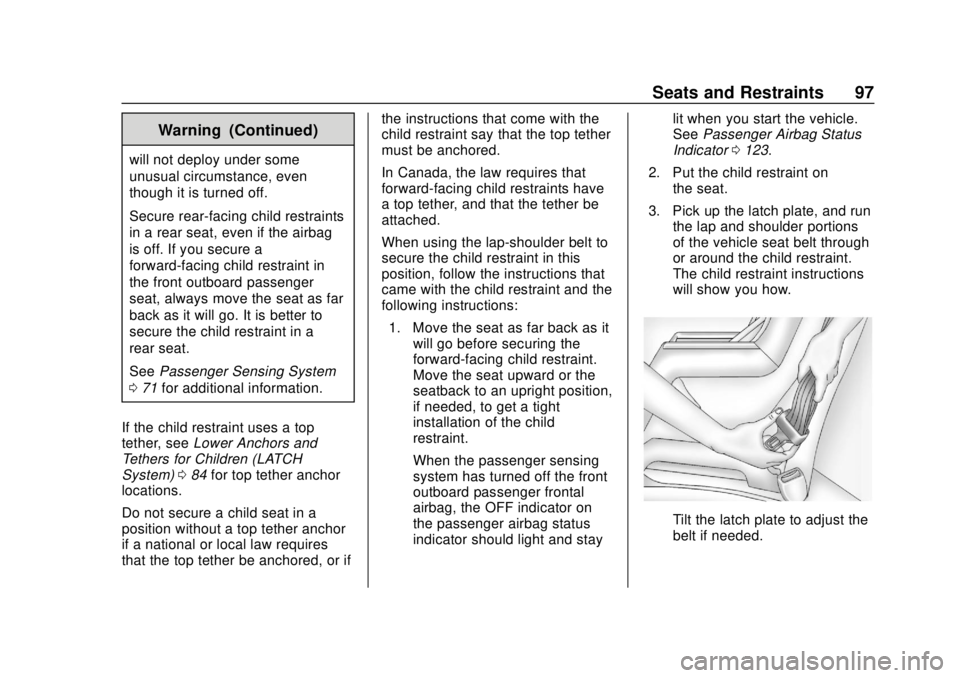
3. Pick up the latch plate, and run the lap and shoulder portions
of the vehicle seat belt through
or around the child restraint.
The child restraint instructions
will show you how.
Tilt the latch plate to adjust the
belt if needed.
Page 101 of 382
Chevrolet Traverse Owner Manual (GMNA-Localizing-U.S./Canada/Mexico-
13527526) - 2020 - CRC - 9/5/19
100 Storage
Storage
Storage Compartments
Storage Compartments . . . . . . . 100
Instrument Panel Storage . . . . 100
Glove Box . . . . . . . . . . . . . . . . . . . . 100
Center Console Storage . . . . . . 101
Additional Storage Features
Cargo ManagementSystem . . . . . . . . . . . . . . . . . . . . . . 101
Roof Rack System
Roof Rack System . . . . . . . . . . . 103
Storage
Compartments
{Warning
Do not store heavy or sharp
objects in storage compartments.
In a crash, these objects may
cause the cover to open and
could result in injury.
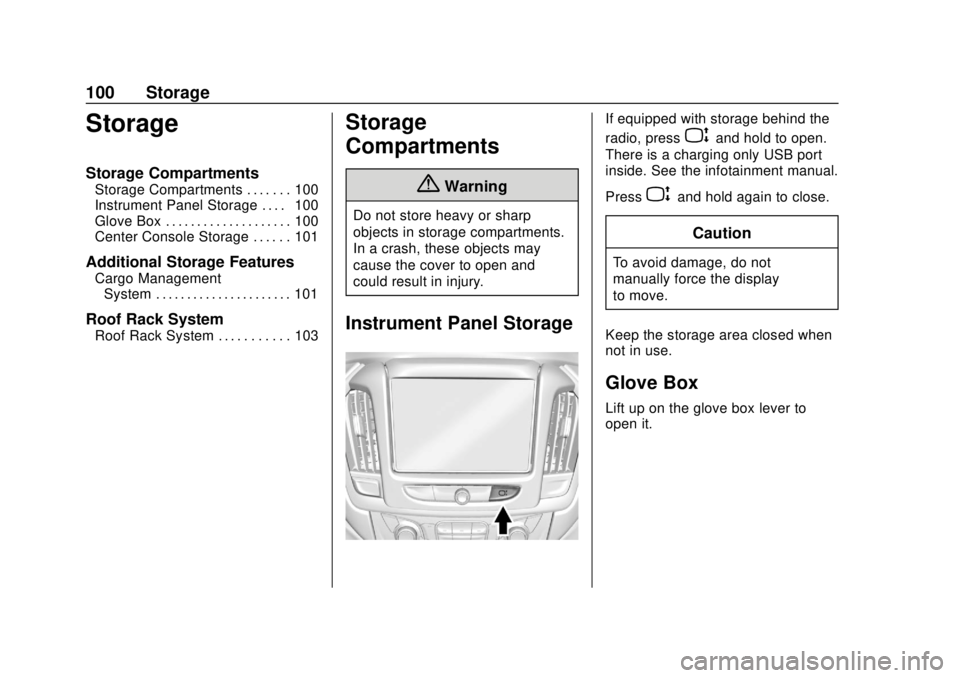
Instrument Panel Storage
If equipped with storage behind the
radio, press
Pand hold to open.
There is a charging only USB port
inside. See the infotainment manual.
Press
Pand hold again to close.
Caution
To avoid damage, do not
manually force the display
to move.
Keep the storage area closed when
not in use.
Glove Box
Lift up on the glove box lever to
open it.
Page 104 of 382
Chevrolet Traverse Owner Manual (GMNA-Localizing-U.S./Canada/Mexico-
13527526) - 2020 - CRC - 9/5/19
Storage 103
4. The storage bin can be placedon the lowered third row seats
while accessing the spare tire.
Installation Procedure
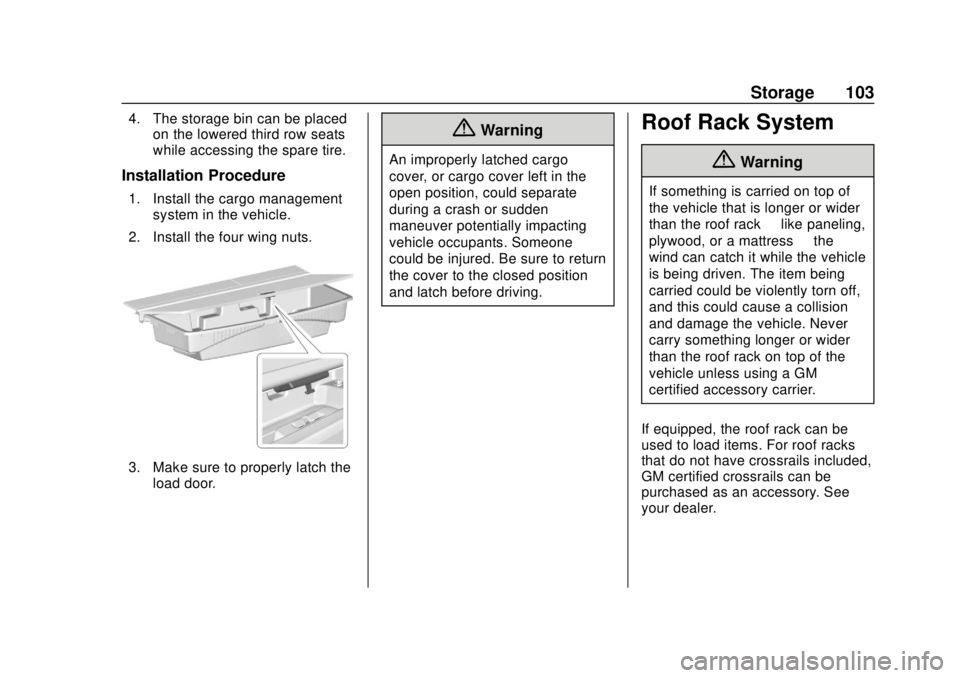
1. Install the cargo management
system in the vehicle.
2. Install the four wing nuts.
3. Make sure to properly latch the load door.
{Warning
An improperly latched cargo
cover, or cargo cover left in the
open position, could separate
during a crash or sudden
maneuver potentially impacting
vehicle occupants. Someone
could be injured. Be sure to return
the cover to the closed position
and latch before driving.
Roof Rack System
{Warning
If something is carried on top of
the vehicle that is longer or wider
than the roof rack —like paneling,
plywood, or a mattress —the
wind can catch it while the vehicle
is being driven. The item being
carried could be violently torn off,
and this could cause a collision
and damage the vehicle. Never
carry something longer or wider
than the roof rack on top of the
vehicle unless using a GM
certified accessory carrier.
If equipped, the roof rack can be
used to load items. For roof racks
that do not have crossrails included,
GM certified crossrails can be
purchased as an accessory. See
your dealer.
Page 106 of 382
Chevrolet Traverse Owner Manual (GMNA-Localizing-U.S./Canada/Mexico-
13527526) - 2020 - CRC - 9/5/19
Instruments and Controls 105
Instruments and
Controls
Controls
Steering Wheel Adjustment . . . 106
Steering Wheel Controls . . . . . . 106
Heated Steering Wheel . . . . . . . 106
Horn . . . . . . . . . . . . . . . . . . . . . . . . . . 107
Windshield Wiper/Washer . . . . 107
Rear Window Wiper/Washer . . . . . . . . . . . . . . . . . . . . . 108
Compass . . . . . . . . . . . . . . . . . . . . . 109
Clock . . . . . . . . . . . . . . . . . . . . . . . . . 110
Power Outlets . . . . . . . . . . . . . . . . 110
Wireless Charging . . . . . . . . . . . . 111
Warning Lights, Gauges, and
Indicators
Warning Lights, Gauges, and Indicators . . . . . . . . . . . . . . . . . . . 114
Instrument Cluster
(Uplevel) . . . . . . . . . . . . . . . . . . . . 115
Instrument Cluster (Base Level) . . . . . . . . . . . . . . . . . . . . . . . 118
Speedometer . . . . . . . . . . . . . . . . . 120
Odometer . . . . . . . . . . . . . . . . . . . . . 120
Trip Odometer . . . . . . . . . . . . . . . . 120
Tachometer . . . . . . . . . . . . . . . . . . . 120 Fuel Gauge . . . . . . . . . . . . . . . . . . . 121
Engine Coolant Temperature
Gauge . . . . . . . . . . . . . . . . . . . . . . 122
Seat Belt Reminders . . . . . . . . . 122
Airbag Readiness Light . . . . . . . 123
Passenger Airbag Status Indicator . . . . . . . . . . . . . . . . . . . . 123
Charging System Light . . . . . . . 124
Malfunction Indicator Lamp (Check Engine Light) . . . . . . . . 125
Brake System Warning Light . . . . . . . . . . . . . . . . . . . . . . . . 127
Electric Parking Brake Light . . . . . . . . . . . . . . . . . . . . . . . . 127
Service Electric Parking Brake Light . . . . . . . . . . . . . . . . . . . . . . . . 127
Antilock Brake System (ABS) Warning Light . . . . . . . . . . . . . . . 128
Tow/Haul Mode Light . . . . . . . . . 128
Lane Keep Assist (LKA) Light . . . . . . . . . . . . . . . . . . . . . . . . 128
Vehicle Ahead Indicator . . . . . . 129
Pedestrian Ahead Indicator . . . 129
Traction Off Light . . . . . . . . . . . . . 129
StabiliTrak OFF Light . . . . . . . . . 129
Traction Control System (TCS)/ StabiliTrak Light . . . . . . . . . . . . . 130
Tire Pressure Light . . . . . . . . . . . 130
Engine Oil Pressure Light . . . . 131 Low Fuel Warning Light (Base
Level) . . . . . . . . . . . . . . . . . . . . . . . 131
Low Fuel Warning Light (Uplevel) . . . . . . . . . . . . . . . . . . . . 132
Security Light . . . . . . . . . . . . . . . . . 132
High-Beam On Light . . . . . . . . . . 132
Front Fog Lamp Light . . . . . . . . . 132
Lamps On Reminder . . . . . . . . . 133
Cruise Control Light . . . . . . . . . . 133
Door Ajar Light . . . . . . . . . . . . . . . 133
Information Displays
Driver Information
Center (DIC) . . . . . . . . . . . . . . . . 134
Vehicle Messages
Vehicle Messages . . . . . . . . . . . . 137
Engine Power Messages . . . . . 137
Vehicle Speed Messages . . . . . 138
Vehicle Personalization
Vehicle Personalization . . . . . . . 138
Universal Remote System
Universal Remote System . . . . 143
Universal Remote SystemProgramming . . . . . . . . . . . . . . . 143
Universal Remote System Operation . . . . . . . . . . . . . . . . . . . 146
Page 109 of 382
Chevrolet Traverse Owner Manual (GMNA-Localizing-U.S./Canada/Mexico-
13527526) - 2020 - CRC - 9/5/19
108 Instruments and Controls
{Warning
In freezing weather, do not use
the washer until the windshield is
warmed. Otherwise the washer
fluid can form ice on the
windshield, blocking your vision.
{Warning
Before driving the vehicle, always
clear snow and ice from the hood,
windshield, roof, and rear of the
vehicle, including all lamps and
windows. Reduced visibility from
snow and ice buildup could lead
to a crash.
Clear snow and ice from the wiper
blades and windshield before using
them. If frozen to the windshield,
carefully loosen or thaw them.
Damaged blades should be
replaced. See Wiper Blade
Replacement 0268. Heavy snow or ice can overload the
wiper motor. See
Electrical System
Overload 0273.
Wiper Parking
If the ignition is turned off while the
wipers are on LO, HI, or INT, they
will immediately stop.
If the windshield wiper lever is then
moved to OFF before the driver
door is opened or within 10 minutes,
the wipers will restart and move to
the base of the windshield.
If the ignition is turned off while the
wipers are performing wipes due to
windshield washing, the wipers
continue to run until they reach the
base of the windshield.
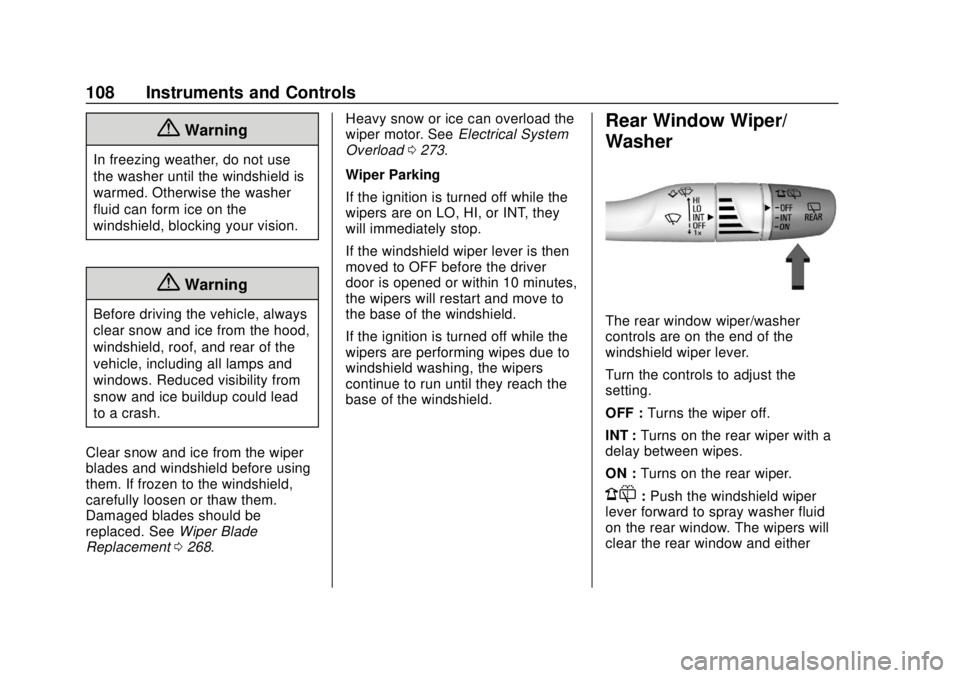
Rear Window Wiper/
Washer
The rear window wiper/washer
controls are on the end of the
windshield wiper lever.
Turn the controls to adjust the
setting.
OFF : Turns the wiper off.
INT : Turns on the rear wiper with a
delay between wipes.
ON : Turns on the rear wiper.
1:Push the windshield wiper
lever forward to spray washer fluid
on the rear window. The wipers will
clear the rear window and either
Page 111 of 382
Chevrolet Traverse Owner Manual (GMNA-Localizing-U.S./Canada/Mexico-
13527526) - 2020 - CRC - 9/5/19
110 Instruments and Controls
Clock
The time and date for the clock can
be set using the infotainment
system. See“Time/Date”in
“System” under“Settings” in the
infotainment manual.
Power Outlets
Power Outlets 12-Volt Direct
Current
The vehicle has two 12-volt outlets
that can be used to plug in electrical
equipment, such as a cell phone or
MP3 player.
The power outlets are located:
. On the center stack below the
climate controls.
. In the rear cargo area.
Lift the cover to access the outlet
and replace when not in use.
There are also charging only USB
ports on the rear of the center
console and in the third row
seating area.
{Warning
Power is always supplied to the
rear cargo power outlet. Do not
leave electrical equipment
plugged in when the vehicle is not
in use because the vehicle could
catch fire and cause injury or
death.
Caution
Leaving electrical equipment
plugged in for an extended period
of time while the ignition is in
LOCK/OFF will drain the battery.
Always unplug electrical
equipment when not in use and
do not plug in equipment that
exceeds the maximum 15 ampere
rating.
Certain accessory plugs may not be
compatible with the accessory
power outlet and could overload vehicle and adapter fuses. If a
problem is experienced, see your
dealer.
When adding electrical equipment,
be sure to follow the proper
installation instructions included with
the equipment. See
Add-On
Electrical Equipment 0246.
Caution
Hanging heavy equipment from
the power outlet can cause
damage not covered by the
vehicle warranty. The power
outlets are designed for
accessory power plugs only, such
as cell phone charge cords.
Power Outlet 110V/120V
Alternating Current
If equipped with this power outlet it
can be used to plug in electrical
equipment that uses a maximum
limit of 150 watts.
Page 112 of 382
Chevrolet Traverse Owner Manual (GMNA-Localizing-U.S./Canada/Mexico-
13527526) - 2020 - CRC - 9/5/19
Instruments and Controls 111
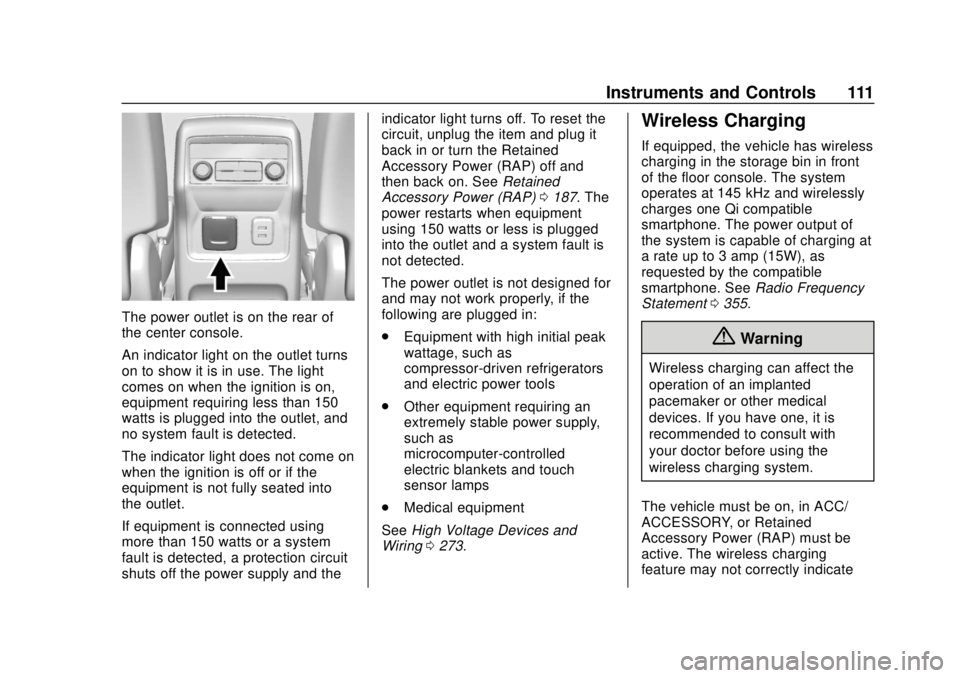
The power outlet is on the rear of
the center console.
An indicator light on the outlet turns
on to show it is in use. The light
comes on when the ignition is on,
equipment requiring less than 150
watts is plugged into the outlet, and
no system fault is detected.
The indicator light does not come on
when the ignition is off or if the
equipment is not fully seated into
the outlet.
If equipment is connected using
more than 150 watts or a system
fault is detected, a protection circuit
shuts off the power supply and theindicator light turns off. To reset the
circuit, unplug the item and plug it
back in or turn the Retained
Accessory Power (RAP) off and
then back on. See
Retained
Accessory Power (RAP) 0187. The
power restarts when equipment
using 150 watts or less is plugged
into the outlet and a system fault is
not detected.
The power outlet is not designed for
and may not work properly, if the
following are plugged in:
. Equipment with high initial peak
wattage, such as
compressor-driven refrigerators
and electric power tools
. Other equipment requiring an
extremely stable power supply,
such as
microcomputer-controlled
electric blankets and touch
sensor lamps
. Medical equipment
See High Voltage Devices and
Wiring 0273.
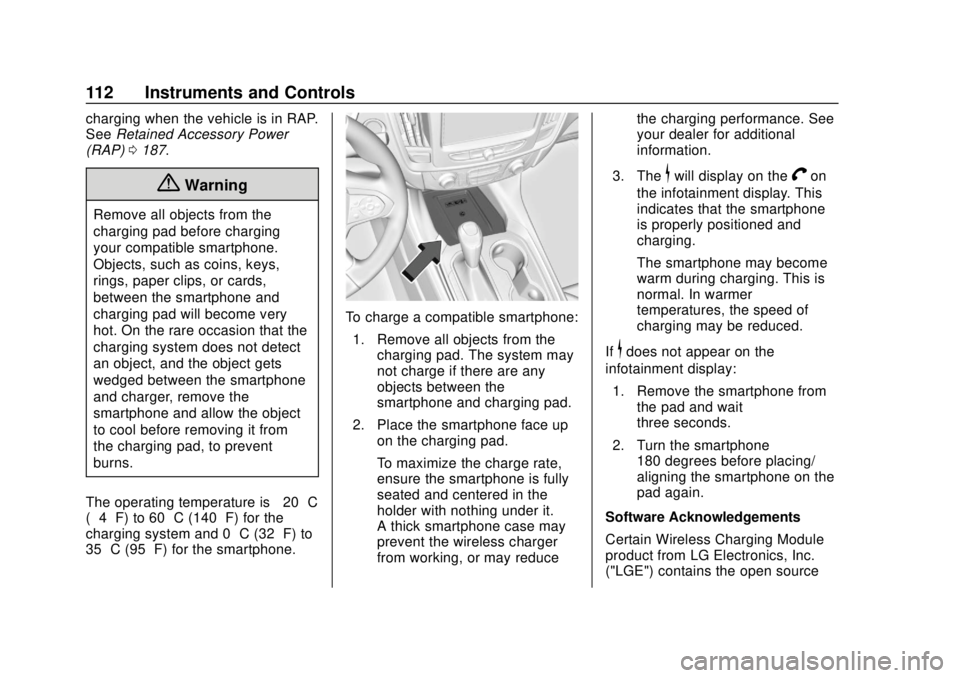
Wireless Charging
If equipped, the vehicle has wireless
charging in the storage bin in front
of the floor console. The system
operates at 145 kHz and wirelessly
charges one Qi compatible
smartphone. The power output of
the system is capable of charging at
a rate up to 3 amp (15W), as
requested by the compatible
smartphone. See Radio Frequency
Statement 0355.
{Warning
Wireless charging can affect the
operation of an implanted
pacemaker or other medical
devices. If you have one, it is
recommended to consult with
your doctor before using the
wireless charging system.
The vehicle must be on, in ACC/
ACCESSORY, or Retained
Accessory Power (RAP) must be
active. The wireless charging
feature may not correctly indicate
Page 113 of 382
Chevrolet Traverse Owner Manual (GMNA-Localizing-U.S./Canada/Mexico-
13527526) - 2020 - CRC - 9/5/19
112 Instruments and Controls
charging when the vehicle is in RAP.
SeeRetained Accessory Power
(RAP) 0187.
{Warning
Remove all objects from the
charging pad before charging
your compatible smartphone.
Objects, such as coins, keys,
rings, paper clips, or cards,
between the smartphone and
charging pad will become very
hot. On the rare occasion that the
charging system does not detect
an object, and the object gets
wedged between the smartphone
and charger, remove the
smartphone and allow the object
to cool before removing it from
the charging pad, to prevent
burns.
The operating temperature is −20 °C
(−4 °F) to 60 °C (140 °F) for the
charging system and 0 °C (32 °F) to
35 °C (95 °F) for the smartphone.
To charge a compatible smartphone:
1. Remove all objects from the charging pad. The system may
not charge if there are any
objects between the
smartphone and charging pad.
2. Place the smartphone face up on the charging pad.
To maximize the charge rate,
ensure the smartphone is fully
seated and centered in the
holder with nothing under it.
A thick smartphone case may
prevent the wireless charger
from working, or may reduce the charging performance. See
your dealer for additional
information.
3. The
$will display on theVon
the infotainment display. This
indicates that the smartphone
is properly positioned and
charging.
The smartphone may become
warm during charging. This is
normal. In warmer
temperatures, the speed of
charging may be reduced.
If
$does not appear on the
infotainment display:
1. Remove the smartphone from the pad and wait
three seconds.
2. Turn the smartphone 180 degrees before placing/
aligning the smartphone on the
pad again.
Software Acknowledgements
Certain Wireless Charging Module
product from LG Electronics, Inc.
("LGE") contains the open source
Page 115 of 382
Chevrolet Traverse Owner Manual (GMNA-Localizing-U.S./Canada/Mexico-
13527526) - 2020 - CRC - 9/5/19
114 Instruments and Controls
Warning Lights,
Gauges, and
Indicators
Warning lights and gauges can
signal that something is wrong
before it becomes serious enough
to cause an expensive repair or
replacement. Paying attention to the
warning lights and gauges could
prevent injury.
Some warning lights come on briefly
when the engine is started to
indicate they are working. When
one of the warning lights comes on
and stays on while driving, or when
one of the gauges shows there may
be a problem, check the section that
explains what to do. Waiting to do
repairs can be costly and even
dangerous.