traction control CHEVROLET TRAVERSE 2021 Owner's Manual
[x] Cancel search | Manufacturer: CHEVROLET, Model Year: 2021, Model line: TRAVERSE, Model: CHEVROLET TRAVERSE 2021Pages: 369, PDF Size: 8.12 MB
Page 4 of 369
Chevrolet Traverse Owner Manual (GMNA-Localizing-U.S./Canada/Mexico-
14637844) - 2021 - CRC - 3/26/21
Introduction 3
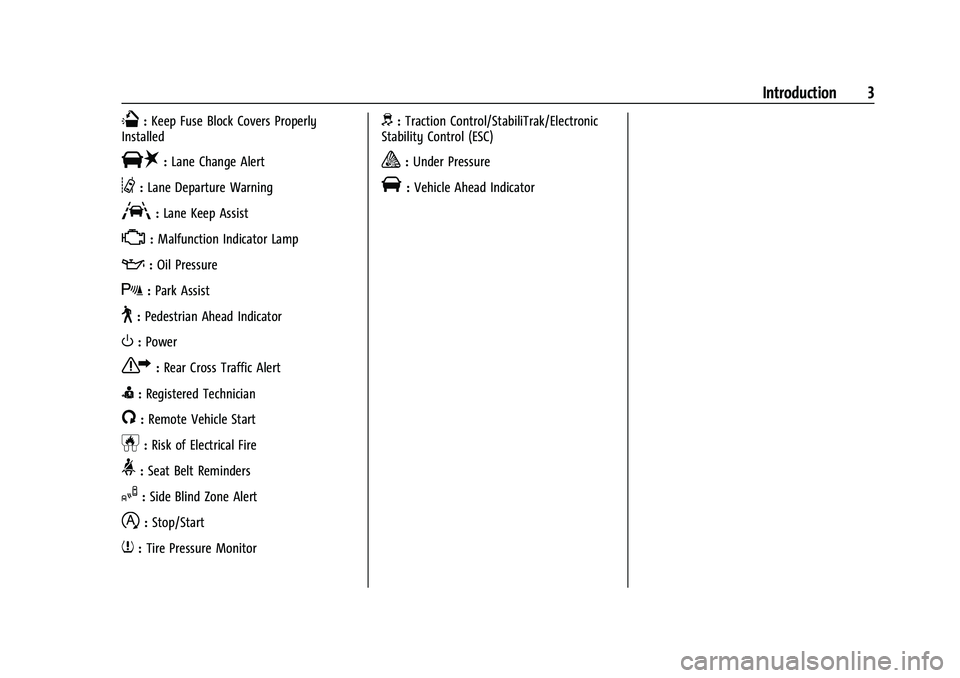
Q:Keep Fuse Block Covers Properly
Installed
|: Lane Change Alert
@:Lane Departure Warning
A:Lane Keep Assist
*: Malfunction Indicator Lamp
::Oil Pressure
X:Park Assist
~:Pedestrian Ahead Indicator
O:Power
7:Rear Cross Traffic Alert
I:Registered Technician
/:Remote Vehicle Start
h:Risk of Electrical Fire
>:Seat Belt Reminders
I:Side Blind Zone Alert
h:Stop/Start
7:Tire Pressure Monitor
d:Traction Control/StabiliTrak/Electronic
Stability Control (ESC)
a: Under Pressure
V: Vehicle Ahead Indicator
Page 6 of 369
Chevrolet Traverse Owner Manual (GMNA-Localizing-U.S./Canada/Mexico-
14637844) - 2021 - CRC - 3/26/21
Introduction 5
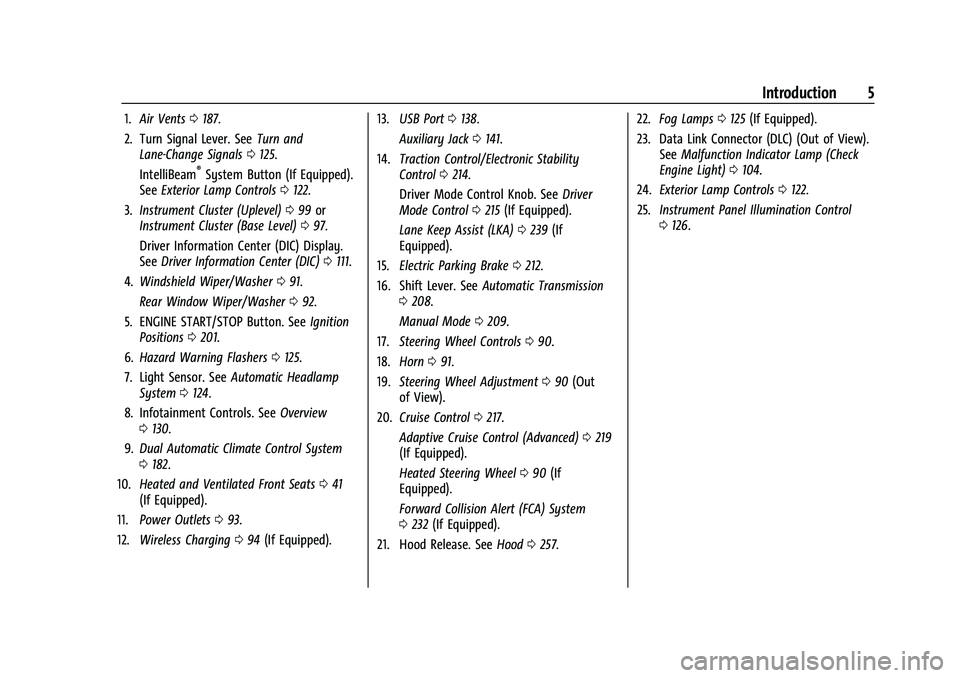
1.Air Vents 0187.
2. Turn Signal Lever. See Turn and
Lane-Change Signals 0125.
IntelliBeam
®System Button (If Equipped).
See Exterior Lamp Controls 0122.
3. Instrument Cluster (Uplevel) 099 or
Instrument Cluster (Base Level) 097.
Driver Information Center (DIC) Display.
See Driver Information Center (DIC) 0111.
4. Windshield Wiper/Washer 091.
Rear Window Wiper/Washer 092.
5. ENGINE START/STOP Button. See Ignition
Positions 0201.
6. Hazard Warning Flashers 0125.
7. Light Sensor. See Automatic Headlamp
System 0124.
8. Infotainment Controls. See Overview
0 130.
9. Dual Automatic Climate Control System
0182.
10. Heated and Ventilated Front Seats 041
(If Equipped).
11. Power Outlets 093.
12. Wireless Charging 094 (If Equipped). 13.
USB Port 0138.
Auxiliary Jack 0141.
14. Traction Control/Electronic Stability
Control 0214.
Driver Mode Control Knob. See Driver
Mode Control 0215 (If Equipped).
Lane Keep Assist (LKA) 0239 (If
Equipped).
15. Electric Parking Brake 0212.
16. Shift Lever. See Automatic Transmission
0 208.
Manual Mode 0209.
17. Steering Wheel Controls 090.
18. Horn 091.
19. Steering Wheel Adjustment 090 (Out
of View).
20. Cruise Control 0217.
Adaptive Cruise Control (Advanced) 0219
(If Equipped).
Heated Steering Wheel 090 (If
Equipped).
Forward Collision Alert (FCA) System
0 232 (If Equipped).
21. Hood Release. See Hood0257. 22.
Fog Lamps 0125 (If Equipped).
23. Data Link Connector (DLC) (Out of View). SeeMalfunction Indicator Lamp (Check
Engine Light) 0104.
24. Exterior Lamp Controls 0122.
25. Instrument Panel Illumination Control
0126.
Page 90 of 369
Chevrolet Traverse Owner Manual (GMNA-Localizing-U.S./Canada/Mexico-
14637844) - 2021 - CRC - 3/26/21
Instruments and Controls 89
Instruments and Controls
Controls
Steering Wheel Adjustment . . . . . . . . . . . . 90
Steering Wheel Controls . . . . . . . . . . . . . . . 90
Heated Steering Wheel . . . . . . . . . . . . . . . . 90
Horn . . . . . . . . . . . . . . . . . . . . . . . . . . . . . . . . . . . . 91
Windshield Wiper/Washer . . . . . . . . . . . . . . 91
Rear Window Wiper/Washer . . . . . . . . . . . 92
Compass . . . . . . . . . . . . . . . . . . . . . . . . . . . . . . . 93
Clock . . . . . . . . . . . . . . . . . . . . . . . . . . . . . . . . . . . 93
Power Outlets . . . . . . . . . . . . . . . . . . . . . . . . . . 93
Wireless Charging . . . . . . . . . . . . . . . . . . . . . . 94
Warning Lights, Gauges, and Indicators
Warning Lights, Gauges, andIndicators . . . . . . . . . . . . . . . . . . . . . . . . . . . . 96
Instrument Cluster (Base Level) . . . . . . . . . 97
Instrument Cluster (Uplevel) . . . . . . . . . . . 99
Speedometer . . . . . . . . . . . . . . . . . . . . . . . . . . 101
Odometer . . . . . . . . . . . . . . . . . . . . . . . . . . . . . . 101
Trip Odometer . . . . . . . . . . . . . . . . . . . . . . . . . 101
Tachometer . . . . . . . . . . . . . . . . . . . . . . . . . . . . 101
Fuel Gauge . . . . . . . . . . . . . . . . . . . . . . . . . . . . 101
Engine Coolant Temperature Gauge . . . 102
Seat Belt Reminders . . . . . . . . . . . . . . . . . . . 102
Airbag Readiness Light . . . . . . . . . . . . . . . . 103
Passenger Airbag Status Indicator . . . . . 103
Charging System Light . . . . . . . . . . . . . . . . 104 Malfunction Indicator Lamp (Check
Engine Light) . . . . . . . . . . . . . . . . . . . . . . . . 104
Brake System Warning Light . . . . . . . . . . 106
Electric Parking Brake Light . . . . . . . . . . . . 106
Service Electric Parking Brake Light . . . . 106
Antilock Brake System (ABS) Warning Light . . . . . . . . . . . . . . . . . . . . . . . . . . . . . . . . . 107
Tow/Haul Mode Light . . . . . . . . . . . . . . . . . 107
Lane Keep Assist (LKA) Light . . . . . . . . . . . 107
Vehicle Ahead Indicator . . . . . . . . . . . . . . . 107
Pedestrian Ahead Indicator . . . . . . . . . . . . 108
Traction Off Light . . . . . . . . . . . . . . . . . . . . . 108
StabiliTrak OFF Light . . . . . . . . . . . . . . . . . . 108
Traction Control System (TCS)/ StabiliTrak Light . . . . . . . . . . . . . . . . . . . . . 108
Tire Pressure Light . . . . . . . . . . . . . . . . . . . . 109
Engine Oil Pressure Light . . . . . . . . . . . . . . 109
Low Fuel Warning Light (Base Level) . . . 110
Low Fuel Warning Light (Uplevel) . . . . . . 110
Security Light . . . . . . . . . . . . . . . . . . . . . . . . . . 110
High-Beam On Light . . . . . . . . . . . . . . . . . . . 110
Front Fog Lamp Light . . . . . . . . . . . . . . . . . . . 111
Lamps On Reminder . . . . . . . . . . . . . . . . . . . . 111
Cruise Control Light . . . . . . . . . . . . . . . . . . . . 111
Door Ajar Light . . . . . . . . . . . . . . . . . . . . . . . . . 111
Information Displays
Driver Information Center (DIC) . . . . . . . . 111
Vehicle Messages
Vehicle Messages . . . . . . . . . . . . . . . . . . . . . . 114 Engine Power Messages . . . . . . . . . . . . . . . 114
Vehicle Speed Messages . . . . . . . . . . . . . . . 115
Vehicle Personalization
Vehicle Personalization . . . . . . . . . . . . . . . . . 115
Universal Remote System
Universal Remote System . . . . . . . . . . . . . . 119
Universal Remote System
Programming . . . . . . . . . . . . . . . . . . . . . . . . 119
Universal Remote System Operation . . . 121
Page 109 of 369

Chevrolet Traverse Owner Manual (GMNA-Localizing-U.S./Canada/Mexico-
14637844) - 2021 - CRC - 3/26/21
108 Instruments and Controls
Pedestrian Ahead Indicator
If equipped, this indicator will display amber
when a nearby pedestrian is detected in
front of the vehicle.
SeeFront Pedestrian Braking (FPB) System
0 236.
Traction Off Light
This light comes on briefly when the vehicle
is turned on. If it does not, have the vehicle
serviced by your dealer. If the system is
working normally, the indicator light then
turns off. The traction off light comes on when the
Traction Control System (TCS) has been
turned off. If StabiliTrak/Electronic Stability
Control (ESC) is turned off, TCS is also
turned off. To turn TCS and ESC off and on,
see
Traction Control/Electronic Stability
Control 0214.
If TCS is off, wheel spin is not limited unless
necessary to help protect the driveline from
damage. Adjust driving accordingly.
StabiliTrak OFF Light
This light comes on briefly when the vehicle
is turned on. If the light does not come on,
have the vehicle serviced by your dealer.
If the system is working normally, the
indicator light then turns off.
This light comes on when the StabiliTrak/
Electronic Stability Control (ESC) system is
turned off. If StabiliTrak/ESC is off, the
Traction Control System (TCS) is also off. To
turn ESC off and on, see Traction Control/
Electronic Stability Control 0214. If ESC and TCS are off, the systems do not
assist in controlling the vehicle. Adjust
driving accordingly.
Traction Control System (TCS)/
StabiliTrak Light
This light comes on briefly when the vehicle
is turned on.
If the light does not come on, have the
vehicle serviced by your dealer. If the
system is working normally, the indicator
light turns off.
If the light is on and not flashing, the TCS
and potentially the StabiliTrak/ESC system
are not fully operational and may not assist
in maintaining control. Adjust driving
accordingly. If the condition persists, see
your dealer as soon as possible. A Driver
Information Center (DIC) message may
display.
The light flashes when the TCS and/or the
StabiliTrak/ESC system is actively working.
Page 110 of 369
Chevrolet Traverse Owner Manual (GMNA-Localizing-U.S./Canada/Mexico-
14637844) - 2021 - CRC - 3/26/21
Instruments and Controls 109
SeeTraction Control/Electronic Stability
Control 0214.
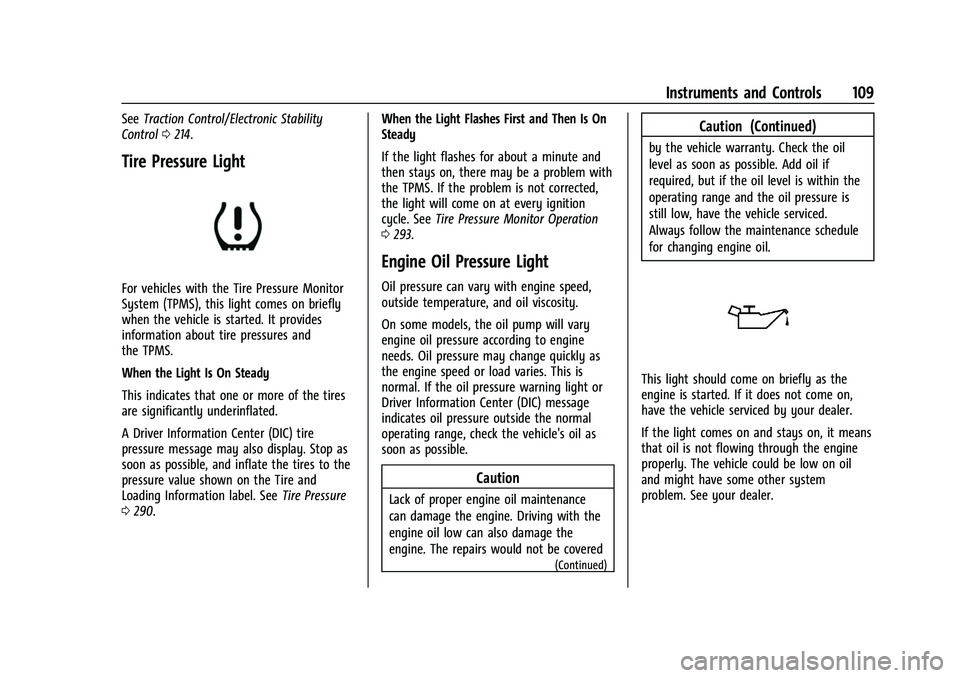
Tire Pressure Light
For vehicles with the Tire Pressure Monitor
System (TPMS), this light comes on briefly
when the vehicle is started. It provides
information about tire pressures and
the TPMS.
When the Light Is On Steady
This indicates that one or more of the tires
are significantly underinflated.
A Driver Information Center (DIC) tire
pressure message may also display. Stop as
soon as possible, and inflate the tires to the
pressure value shown on the Tire and
Loading Information label. See Tire Pressure
0 290. When the Light Flashes First and Then Is On
Steady
If the light flashes for about a minute and
then stays on, there may be a problem with
the TPMS. If the problem is not corrected,
the light will come on at every ignition
cycle. See
Tire Pressure Monitor Operation
0 293.
Engine Oil Pressure Light
Oil pressure can vary with engine speed,
outside temperature, and oil viscosity.
On some models, the oil pump will vary
engine oil pressure according to engine
needs. Oil pressure may change quickly as
the engine speed or load varies. This is
normal. If the oil pressure warning light or
Driver Information Center (DIC) message
indicates oil pressure outside the normal
operating range, check the vehicle's oil as
soon as possible.
Caution
Lack of proper engine oil maintenance
can damage the engine. Driving with the
engine oil low can also damage the
engine. The repairs would not be covered
(Continued)
Caution (Continued)
by the vehicle warranty. Check the oil
level as soon as possible. Add oil if
required, but if the oil level is within the
operating range and the oil pressure is
still low, have the vehicle serviced.
Always follow the maintenance schedule
for changing engine oil.
This light should come on briefly as the
engine is started. If it does not come on,
have the vehicle serviced by your dealer.
If the light comes on and stays on, it means
that oil is not flowing through the engine
properly. The vehicle could be low on oil
and might have some other system
problem. See your dealer.
Page 115 of 369
Chevrolet Traverse Owner Manual (GMNA-Localizing-U.S./Canada/Mexico-
14637844) - 2021 - CRC - 3/26/21
114 Instruments and Controls
Timer :This display can be used as a timer.
To start the timer, press
Vwhile this
display is active. The display will show the
amount of time that has passed since the
timer was last reset. To stop the timer,
press
Vbriefly while this display is active
and the timer is running. To reset the timer
to zero, press and hold
Vwhile this display
is active, or press
pand select reset.
Battery Voltage : Displays the current
battery voltage, if equipped. Battery voltage
changes are normal while driving. See
Charging System Light 0104. If there is a
problem with the battery charging system,
the DIC will display a message.
Transmission Fluid Temperature : Shows the
temperature of the automatic transmission
fluid in either degrees Celsius (°C) or degrees
Fahrenheit (°F).
Off Road Page : This page shows the
traction, four wheel drive, and steering
angle states. When the front or rear axles
are locked, a lock icon is displayed.
Blank Page : Shows no information.
Vehicle Messages
Messages displayed on the DIC indicate the
status of the vehicle or some action that
may be needed to correct a condition.
Multiple messages may appear one after
another.
The messages that do not require
immediate action can be acknowledged and
cleared by pressing
V. The messages that
require immediate action cannot be cleared
until that action is performed.
All messages should be taken seriously;
clearing the message does not correct the
problem.
If a SERVICE message appears, see your
dealer.
Follow the instructions given in the
messages. The system displays messages
regarding the following topics:
.Service Messages
.Fluid Levels
.Vehicle Security
.Brakes
.Steering
.Ride Control Systems
.Driver Assistance Systems
.Cruise Control
.Lighting and Bulb Replacement
.Wiper/Washer Systems
.Doors and Windows
.Seat Belts
.Airbag Systems
.Engine and Transmission
.Tire Pressure
.Battery
Engine Power Messages
ENGINE POWER IS REDUCED
This message displays when the vehicle's
propulsion power is reduced. A reduction in
propulsion power can affect the vehicle's
ability to accelerate. If this message is on,
but there is no observed reduction in
performance, proceed to your destination.
Under certain conditions the performance
may be reduced the next time the vehicle is
driven. The vehicle may be driven while this
message is on, but maximum acceleration
and speed may be reduced. Anytime this
message stays on, or displays repeatedly,
the vehicle should be taken to your dealer
for service as soon as possible.
Page 130 of 369
Chevrolet Traverse Owner Manual (GMNA-Localizing-U.S./Canada/Mexico-
14637844) - 2021 - CRC - 3/26/21
Infotainment System 129
Infotainment System
Introduction
Introduction . . . . . . . . . . . . . . . . . . . . . . . . . . . 129
Overview . . . . . . . . . . . . . . . . . . . . . . . . . . . . . . 130
Steering Wheel Controls . . . . . . . . . . . . . . . 131
Using the System . . . . . . . . . . . . . . . . . . . . . . 132
Software Updates . . . . . . . . . . . . . . . . . . . . . . 135
Radio
AM-FM Radio . . . . . . . . . . . . . . . . . . . . . . . . . . 135
Radio Data System (RDS) . . . . . . . . . . . . . . 136
Satellite Radio . . . . . . . . . . . . . . . . . . . . . . . . . 137
Radio Reception . . . . . . . . . . . . . . . . . . . . . . . . 137
Multi-Band Antenna . . . . . . . . . . . . . . . . . . . 138
Audio Players
Avoiding Untrusted Media Devices . . . . . 138
USB Port . . . . . . . . . . . . . . . . . . . . . . . . . . . . . . . 138
Auxiliary Jack . . . . . . . . . . . . . . . . . . . . . . . . . . 141
Bluetooth Audio . . . . . . . . . . . . . . . . . . . . . . . 141
OnStar System
OnStar System . . . . . . . . . . . . . . . . . . . . . . . . 142
Navigation
Using the Navigation System . . . . . . . . . . 142
Maps . . . . . . . . . . . . . . . . . . . . . . . . . . . . . . . . . . 145
Navigation Symbols . . . . . . . . . . . . . . . . . . . 146
Destination . . . . . . . . . . . . . . . . . . . . . . . . . . . . 147
OnStar System . . . . . . . . . . . . . . . . . . . . . . . . . 152Global Positioning System (GPS) . . . . . . . 153
Vehicle Positioning . . . . . . . . . . . . . . . . . . . . . 153
Problems with Route Guidance . . . . . . . . 153
If the System Needs Service . . . . . . . . . . . 154
Map Data Updates . . . . . . . . . . . . . . . . . . . . 154
Database Coverage Explanations . . . . . . . 154
Voice Recognition
Voice Recognition . . . . . . . . . . . . . . . . . . . . . . 154
Phone
Bluetooth (Overview) . . . . . . . . . . . . . . . . . . 160
Bluetooth (Pairing and Using a
Phone) . . . . . . . . . . . . . . . . . . . . . . . . . . . . . . 160
Apple CarPlay and Android Auto . . . . . . 164
Settings
Settings . . . . . . . . . . . . . . . . . . . . . . . . . . . . . . . 165
Teen Driver . . . . . . . . . . . . . . . . . . . . . . . . . . . . 171
Trademarks and License Agreements
Trademarks and License Agreements . . . . . . . . . . . . . . . . . . . . . . . . . . 174
Introduction
Read the following pages to become familiar
with the features.
{Warning
Taking your eyes off the road for too
long or too often while using any
infotainment feature can cause a crash.
You or others could be injured or killed.
Do not give extended attention to
infotainment tasks while driving. Limit
your glances at the vehicle displays and
focus your attention on driving. Use voice
commands whenever possible.
The infotainment system has built-in
features intended to help avoid distraction
by disabling some features when driving.
These features may gray out when they are
unavailable. Many infotainment features are
also available through the instrument cluster
and steering wheel controls.
Before driving:
.Become familiar with the operation,
center stack controls, steering wheel
controls, and infotainment display.
Page 149 of 369
Chevrolet Traverse Owner Manual (GMNA-Localizing-U.S./Canada/Mexico-
14637844) - 2021 - CRC - 3/26/21
148 Infotainment System
names, street addresses, and turn
restrictions. A detailed area includes all
major highways, service roads, and
residential roads. The detailed areas include
Places of Interest (POIs) such as restaurants,
airports, banks, hospitals, police stations, gas
stations, tourist attractions, and historical
monuments.
If the vehicle does not have an applicable
service plan, the map database may not
include data for newly constructed areas or
map database corrections that are
completed after production. The navigation
system provides full route guidance in the
detailed map areas.
Zoom Control
The zoom control display is shown on the
map view. A few ways to zoom in or
out are:
.Touch + or–to zoom in or out on
the map.
.Double tap with one finger to zoom in or
single tap with two fingers to zoom out
on the map.
.Use the index finger and thumb to zoom
out by pinching and then zoom in by
spreading those two fingers on the map.
Map Gestures and Map Scale
Use the following gestures on the
infotainment display to adjust the map scale
and display options.
.Pinch to zoom in or out.
.Pan the map.
.Use two fingers to tilt down and change
from 2D to 3D. Tilt up to change back
to 2D.
.Rotate the map.
See Using the System 0132.
Mute
When in active guidance, the audio prompts
while using navigation can be muted. Touch
the speaker icon on the right side of the
upper bar. A slash will appear on the
speaker to indicate voice guidance is muted.
Active Guidance View
When a destination is chosen and a
navigation session is active, the navigation
system enters into an Active Guidance
View (AGV). Map Orientation
Touch
Aon the map to access map
orientation settings. Map orientation is 3D
Heading Up by default.
Available settings are:
.3D Heading Up (Default): 3D map with
the vehicle pointing up. In this mode, the
current location icon will always head up
and the map will rotate around it.
.2D Heading Up: 2D map with the vehicle
pointing up. In this mode, the current
location icon will always head up and the
map will rotate around it.
.2D North Up: 2D map with North pointing
up. In this mode, the current location icon
will shift as the vehicle turns left and
right.
Touch the icon to change the map type. The
icon and label will also update accordingly.
Depending on the zoom level of the 2D
Heading Up and 3D Heading Up maps, the
system may automatically switch to the 2D
North Up map.
When in AGV, the entire route can be
viewed in 2D North Up by touching the
traffic bar. The map will zoom out and
readjust to display the full route. When in
Page 161 of 369

Chevrolet Traverse Owner Manual (GMNA-Localizing-U.S./Canada/Mexico-
14637844) - 2021 - CRC - 3/26/21
160 Infotainment System
Phone
Bluetooth (Overview)
The Bluetooth-capable system can interact
with many mobile devices, allowing:
.Placement and receipt of calls in a
hands-free mode.
.Sharing of the device’s address book or
contact list with the vehicle.
To minimize driver distraction, before
driving, and with the vehicle parked:
.Become familiar with the features of the
mobile device. Organize the phone book
and contact lists clearly and delete
duplicate or rarely used entries.
If possible, program speed dial or other
shortcuts.
.Review the controls and operation of the
infotainment system.
.Pair mobile device(s) to the vehicle. The
system may not work with all mobile
devices. See “Pairing”later in this section.
Vehicles with a Bluetooth system can use a
Bluetooth-capable mobile device with a
Hands-Free Profile to make and receive
phone calls. The infotainment system and
voice recognition are used to control the
system. The system can be used while the ignition is on or in ACC/ACCESSORY. The
range of the Bluetooth system can be up to
9.1 m (30 ft). Not all mobile devices support
all functions and not all mobile devices work
with the Bluetooth system. See
my.chevrolet.com for more information
about compatible mobile devices.
Controls
Use the controls on the center stack and the
steering wheel to operate the Bluetooth
system.
Steering Wheel Controls
g:
Press to answer incoming calls and start
voice recognition on your connected
Bluetooth mobile device.
i: Press to end a call, decline a call,
or cancel an operation. Press to mute or
unmute the infotainment system when not
on a call.
Infotainment System Controls
For information about how to navigate the
menu system using the infotainment
controls, see Using the System 0132.
Audio System
When using the Bluetooth mobile device
system, sound comes through the vehicle's
front audio system speakers and overrides
the audio system. The volume level while on
a mobile device call can be adjusted by
pressing the steering wheel controls or the
volume control on the center stack. The
adjusted volume level remains in memory
for later calls. The volume cannot be
lowered beyond a certain level.
Bluetooth (Pairing and Using a
Phone)
Pairing
A Bluetooth-enabled mobile device must be
paired to the Bluetooth system and then
connected to the vehicle before it can be
used. See the mobile device manufacturer's
user guide for Bluetooth functions before
pairing the device.
Pairing Information
.If no mobile device has been connected,
the Phone main page on the infotainment
display will show the Connect Phone
option. Touch this option to connect.
Page 174 of 369

Chevrolet Traverse Owner Manual (GMNA-Localizing-U.S./Canada/Mexico-
14637844) - 2021 - CRC - 3/26/21
Infotainment System 173
to listen to SiriusXM stations that contain
explicit content, and the Explicit Content
Filter selection in the Audio Settings will be
unavailable for change.
When Teen Driver is Active:
.If equipped with Buckle to Drive, shifting
out of P (Park) will be prevented if the
driver seat belt, and in some vehicles the
front passenger seat belt, is not buckled.
.The radio will mute when the driver seat
belt, and in some vehicles the front
passenger seat belt, is not buckled. The
audio from any device paired to the
vehicle will also be muted.
.An object placed on the front passenger
seat, such as a briefcase, handbag,
grocery bag, laptop, or other electronic
device, could cause the passenger sensing
system to falsely sense an unbuckled
front passenger and mute the radio.
If this happens, remove the object from
the seat. SeePassenger Sensing System
0 61.
.Some safety systems, such as Forward
Collision Alert, if equipped, cannot be
turned off.
.The gap setting for the Forward Collision
Alert and Adaptive Cruise Control,
if equipped, cannot be changed.
.When trying to change a safety feature
that is not configurable in Teen Driver,
the DIC displays a message indicating
that Teen Driver is active and the action
is not available.
.Super Cruise, if equipped, is not available.
.Enhanced Low Fuel Warning (if equipped)
–When the vehicle is low on fuel, the
low fuel light on the instrument cluster
flashes and the DIC low fuel warning
cannot be dismissed.
.Do not tow a trailer.
Report Card
The vehicle owner must secure the driver’s
consent to record certain vehicle data when
the vehicle is driven with a registered Teen
Driver key. There is one Report Card per
vehicle. Data is only recorded when a
registered Teen Driver key is used to
operate the vehicle.
The Report Card data is collected from the
time Teen Driver is activated or the last
time the Report Card was reset. The
following items may be recorded:
.Distance Driven –the total distance
driven.
.Maximum Speed –the maximum vehicle
speed detected.
.Overspeed Warnings –the number of
times the speed warning setting was
exceeded.
.Wide Open Throttle –the number of
times the accelerator pedal was pressed
nearly all the way down.
.Forward Collision Alerts –the number of
times the driver was notified when
approaching a vehicle ahead too quickly
and at potential risk for a crash.
.Forward Automatic Braking, also called
Automatic Emergency Braking (if
equipped) –the number of times the
vehicle detected that a forward collision
was imminent and applied the brakes.
.Reverse Automatic Braking (if equipped) –
the number of times the vehicle detected
that a rearward collision was imminent
and applied the brakes.
.Traction Control –the number of times
the Traction Control System activated to
reduce wheel spin or loss of traction.
.Stability Control –the number of events
which required the use of electronic
stability control.
.Antilock Braking System Active –The
number of Antilock Brake System
activations.