transmission CHEVROLET TRAVERSE 2022 Owner's Manual
[x] Cancel search | Manufacturer: CHEVROLET, Model Year: 2022, Model line: TRAVERSE, Model: CHEVROLET TRAVERSE 2022Pages: 382, PDF Size: 5.87 MB
Page 193 of 382
Chevrolet Traverse Owner Manual (GMNA-Localizing-U.S./Canada/Mexico-
13527526) - 2020 - CRC - 9/5/19
192 Driving and Operating
{Warning
Shifting into a drive gear while the
engine is running at high speed is
dangerous. Unless your foot is
firmly on the brake pedal, the
vehicle could move very rapidly.
You could lose control and hit
people or objects. Do not shift
into a drive gear while the engine
is running at high speed.
Caution
Shifting out of P (Park) or
N (Neutral) with the engine
running at high speed may
damage the transmission. The
repairs would not be covered by
the vehicle warranty. Be sure the
engine is not running at high
speed when shifting the vehicle.
Caution
A transmission hot message may
display if the automatic
transmission fluid is too hot.
Driving under this condition can
damage the vehicle. Stop and idle
the engine to cool the automatic
transmission fluid. This message
clears when the transmission fluid
has cooled sufficiently.
D : This position is for normal
driving. If more power is needed for
passing, press the accelerator
pedal down.
Caution
If the vehicle does not shift gears,
the transmission could be
damaged. Have the vehicle
serviced right away.
If the vehicle is stopped on a hill,
with your foot off the brake pedal,
the vehicle may roll. This is normal
and is due to the torque converter designed to improve fuel economy
and performance. Use the brake to
hold the vehicle on a hill. Do not use
the accelerator pedal.
L :
This position gives you access
to gear ranges. This provides more
engine braking but lower fuel
economy than D (Drive). You can
use it on very steep hills, or in deep
snow or mud. See Manual Mode
0 193.
Operating Modes : The
transmission may operate in a lower
gear than normal to improve vehicle
performance. The engine speed
may be higher and there may be an
increase in noise during the
following conditions:
. When climbing a grade.
. When driving downhill.
. When driving in hot
temperatures, or at high altitude.
Page 194 of 382
Chevrolet Traverse Owner Manual (GMNA-Localizing-U.S./Canada/Mexico-
13527526) - 2020 - CRC - 9/5/19
Driving and Operating 193
Manual Mode
Electronic Range Select
(ERS) Mode
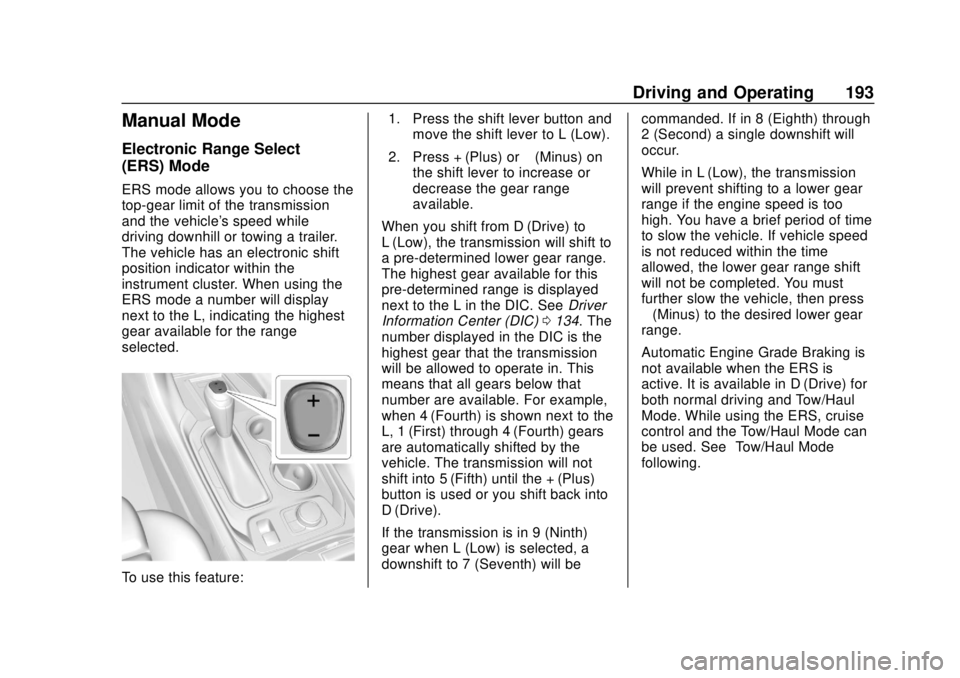
ERS mode allows you to choose the
top-gear limit of the transmission
and the vehicle's speed while
driving downhill or towing a trailer.
The vehicle has an electronic shift
position indicator within the
instrument cluster. When using the
ERS mode a number will display
next to the L, indicating the highest
gear available for the range
selected.
To use this feature:1. Press the shift lever button and
move the shift lever to L (Low).
2. Press + (Plus) or −(Minus) on
the shift lever to increase or
decrease the gear range
available.
When you shift from D (Drive) to
L (Low), the transmission will shift to
a pre-determined lower gear range.
The highest gear available for this
pre-determined range is displayed
next to the L in the DIC. See Driver
Information Center (DIC) 0134. The
number displayed in the DIC is the
highest gear that the transmission
will be allowed to operate in. This
means that all gears below that
number are available. For example,
when 4 (Fourth) is shown next to the
L, 1 (First) through 4 (Fourth) gears
are automatically shifted by the
vehicle. The transmission will not
shift into 5 (Fifth) until the + (Plus)
button is used or you shift back into
D (Drive).
If the transmission is in 9 (Ninth)
gear when L (Low) is selected, a
downshift to 7 (Seventh) will be commanded. If in 8 (Eighth) through
2 (Second) a single downshift will
occur.
While in L (Low), the transmission
will prevent shifting to a lower gear
range if the engine speed is too
high. You have a brief period of time
to slow the vehicle. If vehicle speed
is not reduced within the time
allowed, the lower gear range shift
will not be completed. You must
further slow the vehicle, then press
−
(Minus) to the desired lower gear
range.
Automatic Engine Grade Braking is
not available when the ERS is
active. It is available in D (Drive) for
both normal driving and Tow/Haul
Mode. While using the ERS, cruise
control and the Tow/Haul Mode can
be used. See “Tow/Haul Mode”
following.
Page 195 of 382
Chevrolet Traverse Owner Manual (GMNA-Localizing-U.S./Canada/Mexico-
13527526) - 2020 - CRC - 9/5/19
194 Driving and Operating
Tow/Haul Mode
This feature can assist when towing
or hauling a heavy load.
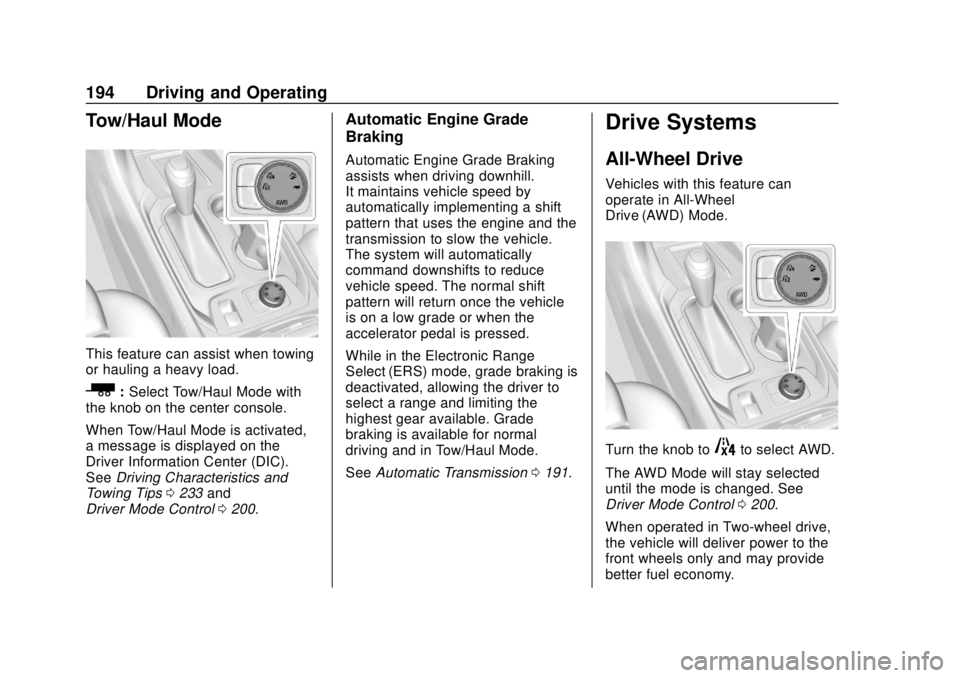
_:Select Tow/Haul Mode with
the knob on the center console.
When Tow/Haul Mode is activated,
a message is displayed on the
Driver Information Center (DIC).
See Driving Characteristics and
Towing Tips 0233 and
Driver Mode Control 0200.
Automatic Engine Grade
Braking
Automatic Engine Grade Braking
assists when driving downhill.
It maintains vehicle speed by
automatically implementing a shift
pattern that uses the engine and the
transmission to slow the vehicle.
The system will automatically
command downshifts to reduce
vehicle speed. The normal shift
pattern will return once the vehicle
is on a low grade or when the
accelerator pedal is pressed.
While in the Electronic Range
Select (ERS) mode, grade braking is
deactivated, allowing the driver to
select a range and limiting the
highest gear available. Grade
braking is available for normal
driving and in Tow/Haul Mode.
See Automatic Transmission 0191.
Drive Systems
All-Wheel Drive
Vehicles with this feature can
operate in All-Wheel
Drive (AWD) Mode.
Turn the knob to4to select AWD.
The AWD Mode will stay selected
until the mode is changed. See
Driver Mode Control 0200.
When operated in Two-wheel drive,
the vehicle will deliver power to the
front wheels only and may provide
better fuel economy.
Page 202 of 382
Chevrolet Traverse Owner Manual (GMNA-Localizing-U.S./Canada/Mexico-
13527526) - 2020 - CRC - 9/5/19
Driving and Operating 201
covered roads. The accelerator
pedal will be more sensitive to
provide finer control of the torque at
the wheels in slippery conditions.
7(AWD Only) :Vehicle is in
Off-Road Mode. This mode will not
remain active through future ignition
cycles. The vehicle will be in
Two-Wheel Drive when the engine
is restarted. This mode will
automatically activate AWD. The
accelerator pedal will be more
sensitive to provide finer control of
the torque at the wheels.
StabiliTrak/ESC, ABS, and TCS will
change for optimal off-road
performance. Use this mode for
public off-road recreational driving.
See Off-Road Driving 0170.
_Tow/Haul : Vehicle is in Tow/
Haul Mode. This mode will not
remain active through future ignition
cycles. The vehicle will be in
Front-Wheel Drive or Two-Wheel
Drive when the engine is restarted.
This mode will automatically
activate AWD. See All-Wheel Drive
0 194. The transmission holds lower
gears longer before shifting to provide more torque necessary
when towing heavy loads. This will
also increase fuel consumption. Use
this mode to assist in maintaining
desired vehicle speeds when driving
on downhill grades by using the
engine and transmission to slow the
vehicle. This helps prevent the
brakes from overheating. For more
information, see
Tow/Haul Mode
0 194.
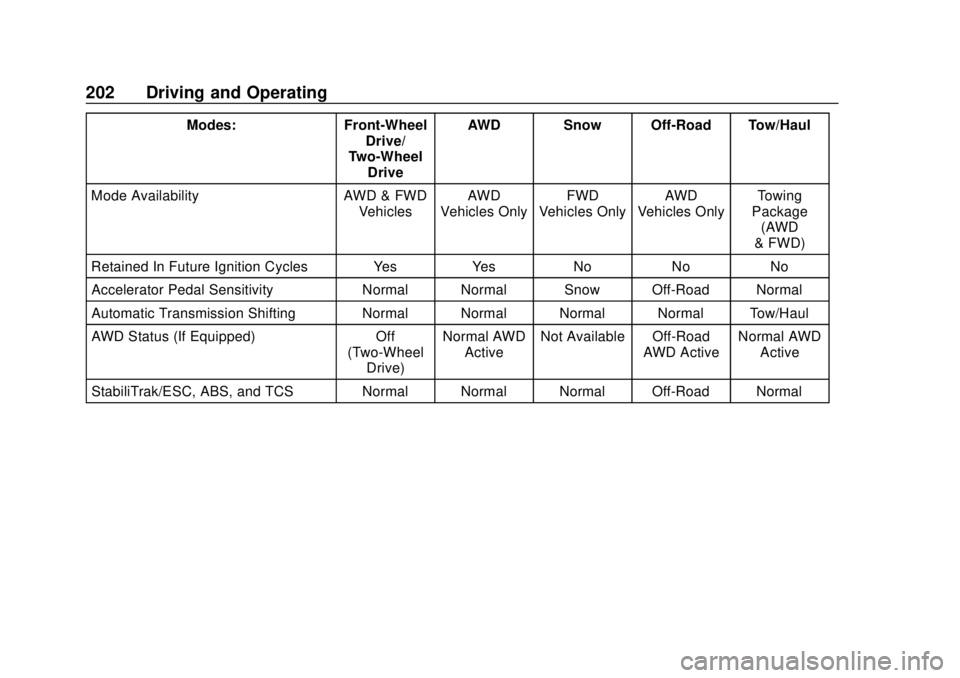
The following table shows how the
different modes affect the various
subsystem functions that may be on
the vehicle.
Page 203 of 382
Chevrolet Traverse Owner Manual (GMNA-Localizing-U.S./Canada/Mexico-
13527526) - 2020 - CRC - 9/5/19
202 Driving and Operating
Modes:Front-Wheel
Drive/
Two-Wheel
Drive AWD Snow Off-Road Tow/Haul
Mode Availability AWD & FWD
Vehicles AWD
Vehicles Only FWD
Vehicles Only AWD
Vehicles Only Towing
Package
(AWD
& FWD)
Retained In Future Ignition Cycles Yes YesNoNoNo
Accelerator Pedal Sensitivity Normal Normal Snow Off-Road Normal
Automatic Transmission Shifting Normal Normal Normal Normal Tow/Haul
AWD Status (If Equipped) Off
(Two-Wheel Drive) Normal AWD
Active Not Available Off-Road
AWD ActiveNormal AWD
Active
StabiliTrak/ESC, ABS, and TCS Normal Normal Normal Off-Road Normal
Page 205 of 382
Chevrolet Traverse Owner Manual (GMNA-Localizing-U.S./Canada/Mexico-
13527526) - 2020 - CRC - 9/5/19
204 Driving and Operating
3. Press and release SET−. Thedesired set speed briefly
appears in the instrument
cluster.
4. Remove your foot from the accelerator.
When the cruise control has been
set to the desired speed, a green
cruise control indicator appears on
the instrument cluster.
Resuming a Set Speed
If the cruise control is set at a
desired speed and then the brakes
are applied or
*is pressed, the
cruise control is disengaged without
erasing the set speed from memory.
Once the vehicle speed reaches
about 40 km/h (25 mph) or more,
press RES+ briefly. The vehicle
returns to the previous set speed.
Increasing Speed While Using
Cruise Control
If the cruise control system is
already activated: .
Press and hold RES+ up until
the desired speed is reached,
then release it.
. To increase vehicle speed in
small increments, briefly press
RES+. For each press, the
vehicle goes about 1 km/h
(1 mph) faster.
The speedometer reading can be
displayed in either English or metric
units. See Instrument Cluster
(Uplevel) 0115 or
Instrument Cluster (Base Level)
0 118. The increment value used
depends on the units displayed.
Reducing Speed While Using
Cruise Control
If the cruise control system is
already activated:
. Press and hold SET− until the
desired lower speed is reached,
then release it.
. To decrease the vehicle speed in
small increments, briefly press
SET−. For each press, the
vehicle goes about 1 km/h
(1 mph) slower. The speedometer reading can be
displayed in either English or metric
units. See
Instrument Cluster
(Uplevel) 0115 or
Instrument Cluster (Base Level)
0 118. The increment value used
depends on the units displayed.
Passing Another Vehicle While
Using Cruise Control
Use the accelerator pedal to
increase the vehicle speed. When
you take your foot off the pedal, the
vehicle will slow down to the
previous set cruise speed.
While pressing the accelerator pedal
or shortly following the release to
override cruise, briefly applying SET
− will result in cruise set to the
current vehicle speed.
Using Cruise Control on Hills
How well the cruise control will work
on hills depends upon the vehicle
speed, load, and the steepness of
the hills. When going up steep hills,
you might have to step on the
accelerator pedal to maintain your
speed. While on a hill, the
transmission may downshift in order
Page 206 of 382
Chevrolet Traverse Owner Manual (GMNA-Localizing-U.S./Canada/Mexico-
13527526) - 2020 - CRC - 9/5/19
Driving and Operating 205
to use engine braking to slow the
vehicle and maintain the set speed.
Also, you may have to brake or shift
to a lower gear to keep your speed
down. If the brake pedal is applied,
cruise control disengages.
Ending Cruise Control
There are four ways to end cruise
control:
.Step lightly on the brake pedal.
. Press
*.
. Shift the transmission to
N (Neutral).
. Press
J.
Erasing Speed Memory
The cruise control set speed is
erased from memory if
Jis
pressed or if the ignition is
turned off.
Adaptive Cruise Control
If equipped with Adaptive Cruise
Control (ACC), it allows the driver to
select the cruise control set speed
and following gap. Read this entire section before using this system.
The following gap is the following
time between your vehicle and a
vehicle detected directly ahead in
your path, moving in the same
direction. If no vehicle is detected in
your path, ACC works like regular
cruise control. ACC uses camera
and radar sensors. See
Radio
Frequency Statement 0355.
If a vehicle is detected in your path,
ACC can apply acceleration or
limited, moderate braking to
maintain the selected following gap.
To disengage ACC, apply the brake.
If ACC is controlling your vehicle
speed when the Traction Control
System (TCS) or StabiliTrak/
Electronic Stability Control (ESC)
system activates, the ACC may
automatically disengage. See
Traction Control/Electronic Stability
Control 0198. When road
conditions allow ACC to be safely
used, the ACC can be turned
back on.
Turning off the TCS or StabiliTrak/
ESC system will disengage the
cruise control.
{Warning
ACC has limited braking ability
and may not have time to slow
the vehicle down enough to avoid
a collision with another vehicle
you are following. This can occur
when vehicles suddenly slow or
stop ahead, or enter your lane.
Also see “Alerting the Driver” in
this section. Complete attention is
always required while driving and
you should be ready to take
action and apply the brakes. See
Defensive Driving 0167.
{Warning
ACC will not detect or brake for
children, pedestrians, animals,
or other objects.
Do not use ACC when:
(Continued)
Page 235 of 382
Chevrolet Traverse Owner Manual (GMNA-Localizing-U.S./Canada/Mexico-
13527526) - 2020 - CRC - 9/5/19
234 Driving and Operating
important for your safety and that of
your passengers. Read this section
carefully before pulling a trailer.
When towing a trailer:
.Become familiar with and follow
all state and local laws that
apply to trailer towing. These
requirements vary from state to
state.
. State laws may require the use
of extended side view mirrors.
Even if not required, you should
install extended side view
mirrors if your visibility is limited
or restricted while towing.
. Do not tow a trailer during the
first 800 km (500 mi) of vehicle
use to prevent damage to the
engine, axle, or other parts.
. It is recommended to perform
the first oil change before heavy
towing.
. During the first 800 km (500 mi)
of trailer towing, do not drive
over 80 km/h (50 mph) and do
not make starts at full throttle. .
Vehicles can tow in D (Drive).
Tow/Haul Mode is recommended
for heavier trailers. See Tow/
Haul Mode 0194. If the
transmission downshifts too
often, a lower gear may be
selected using Manual Mode
See Manual Mode 0193.
If equipped, the following driver
assistance features should be
turned off when towing a trailer:
. Adaptive Cruise Control (ACC)
. Super Cruise Control
. Lane Keep Assist (LKA)
. Park Assist
. Automatic Parking Assist (APA)
. Reverse Automatic
Braking (RAB)
If equipped, the following driver
assistance features should be
turned to alert or off when towing a
trailer:
. Automatic Emergency
Braking (AEB)
. Intelligent Brake Assist (IBA) .
Front Pedestrian Braking (FPB)
If equipped with Lane Change Alert
(LCA), the LCA detection zones that
extend back from the side of the
vehicle do not move further back
when a trailer is towed. Use caution
while changing lanes when towing a
trailer.
If equipped with Rear Cross Traffic
Alert (RCTA), use caution while
backing up when towing a trailer, as
the RCTA detection zones that
extend out from the back of the
vehicle do not move further back
when a trailer is towed.
{Warning
To prevent serious injury or death
from carbon monoxide (CO),
when towing a trailer: . Do not drive with the
liftgate, trunk/hatch,
or rear-most window open.
(Continued)
Page 237 of 382
Chevrolet Traverse Owner Manual (GMNA-Localizing-U.S./Canada/Mexico-
13527526) - 2020 - CRC - 9/5/19
236 Driving and Operating
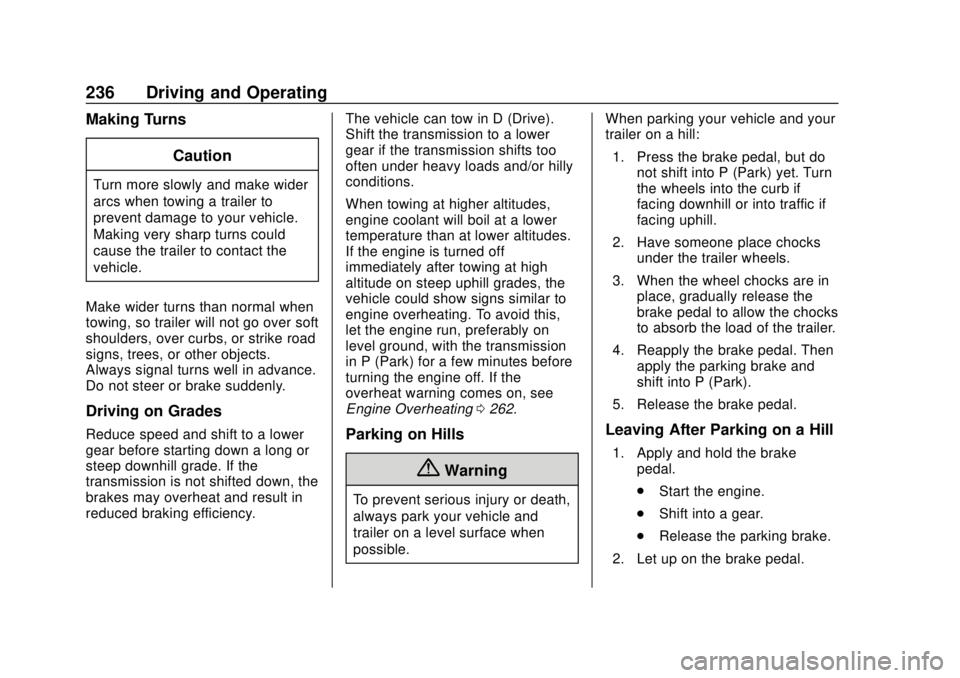
Making TurnsCaution
Turn more slowly and make wider
arcs when towing a trailer to
prevent damage to your vehicle.
Making very sharp turns could
cause the trailer to contact the
vehicle.
Make wider turns than normal when
towing, so trailer will not go over soft
shoulders, over curbs, or strike road
signs, trees, or other objects.
Always signal turns well in advance.
Do not steer or brake suddenly.
Driving on Grades
Reduce speed and shift to a lower
gear before starting down a long or
steep downhill grade. If the
transmission is not shifted down, the
brakes may overheat and result in
reduced braking efficiency. The vehicle can tow in D (Drive).
Shift the transmission to a lower
gear if the transmission shifts too
often under heavy loads and/or hilly
conditions.
When towing at higher altitudes,
engine coolant will boil at a lower
temperature than at lower altitudes.
If the engine is turned off
immediately after towing at high
altitude on steep uphill grades, the
vehicle could show signs similar to
engine overheating. To avoid this,
let the engine run, preferably on
level ground, with the transmission
in P (Park) for a few minutes before
turning the engine off. If the
overheat warning comes on, see
Engine Overheating
0262.Parking on Hills
{Warning
To prevent serious injury or death,
always park your vehicle and
trailer on a level surface when
possible. When parking your vehicle and your
trailer on a hill:
1. Press the brake pedal, but do not shift into P (Park) yet. Turn
the wheels into the curb if
facing downhill or into traffic if
facing uphill.
2. Have someone place chocks under the trailer wheels.
3. When the wheel chocks are in place, gradually release the
brake pedal to allow the chocks
to absorb the load of the trailer.
4. Reapply the brake pedal. Then apply the parking brake and
shift into P (Park).
5. Release the brake pedal.
Leaving After Parking on a Hill
1. Apply and hold the brake pedal.
.Start the engine.
. Shift into a gear.
. Release the parking brake.
2. Let up on the brake pedal.
Page 245 of 382
Chevrolet Traverse Owner Manual (GMNA-Localizing-U.S./Canada/Mexico-
13527526) - 2020 - CRC - 9/5/19
244 Driving and Operating
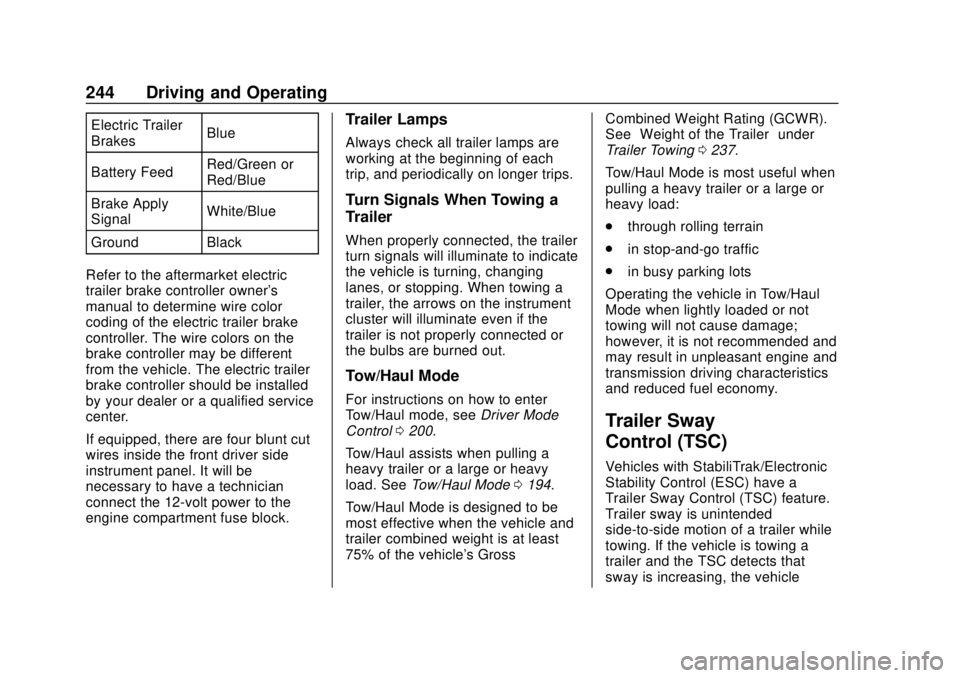
Electric Trailer
BrakesBlue
Battery Feed Red/Green or
Red/Blue
Brake Apply
Signal White/Blue
Ground Black
Refer to the aftermarket electric
trailer brake controller owner's
manual to determine wire color
coding of the electric trailer brake
controller. The wire colors on the
brake controller may be different
from the vehicle. The electric trailer
brake controller should be installed
by your dealer or a qualified service
center.
If equipped, there are four blunt cut
wires inside the front driver side
instrument panel. It will be
necessary to have a technician
connect the 12-volt power to the
engine compartment fuse block.Trailer Lamps
Always check all trailer lamps are
working at the beginning of each
trip, and periodically on longer trips.
Turn Signals When Towing a
Trailer
When properly connected, the trailer
turn signals will illuminate to indicate
the vehicle is turning, changing
lanes, or stopping. When towing a
trailer, the arrows on the instrument
cluster will illuminate even if the
trailer is not properly connected or
the bulbs are burned out.
Tow/Haul Mode
For instructions on how to enter
Tow/Haul mode, see Driver Mode
Control 0200.
Tow/Haul assists when pulling a
heavy trailer or a large or heavy
load. See Tow/Haul Mode 0194.
Tow/Haul Mode is designed to be
most effective when the vehicle and
trailer combined weight is at least
75% of the vehicle's Gross Combined Weight Rating (GCWR).
See
“Weight of the Trailer” under
Trailer Towing 0237.
Tow/Haul Mode is most useful when
pulling a heavy trailer or a large or
heavy load:
. through rolling terrain
. in stop-and-go traffic
. in busy parking lots
Operating the vehicle in Tow/Haul
Mode when lightly loaded or not
towing will not cause damage;
however, it is not recommended and
may result in unpleasant engine and
transmission driving characteristics
and reduced fuel economy.
Trailer Sway
Control (TSC)
Vehicles with StabiliTrak/Electronic
Stability Control (ESC) have a
Trailer Sway Control (TSC) feature.
Trailer sway is unintended
side-to-side motion of a trailer while
towing. If the vehicle is towing a
trailer and the TSC detects that
sway is increasing, the vehicle