Lane CHEVROLET TRAVERSE 2023 Owners Manual
[x] Cancel search | Manufacturer: CHEVROLET, Model Year: 2023, Model line: TRAVERSE, Model: CHEVROLET TRAVERSE 2023Pages: 369, PDF Size: 16.89 MB
Page 4 of 369
Chevrolet Traverse Owner Manual (GMNA-Localizing-U.S./Canada/Mexico-
16411537) - 2023 - CRC - 3/28/22
Introduction 3
A circle with a slash through it is a safety
symbol which means“Do not,” “Do not do
this,” or“Do not let this happen.”
Symbols
The vehicle has components and labels that
use symbols instead of text. Symbols are
shown along with the text describing the
operation or information relating to a
specific component, control, message, gauge,
or indicator.
M:Shown when the owner’s manual has
additional instructions or information.
*: Shown when the service manual has
additional instructions or information.
0: Shown when there is more information
on another page — “see page.”
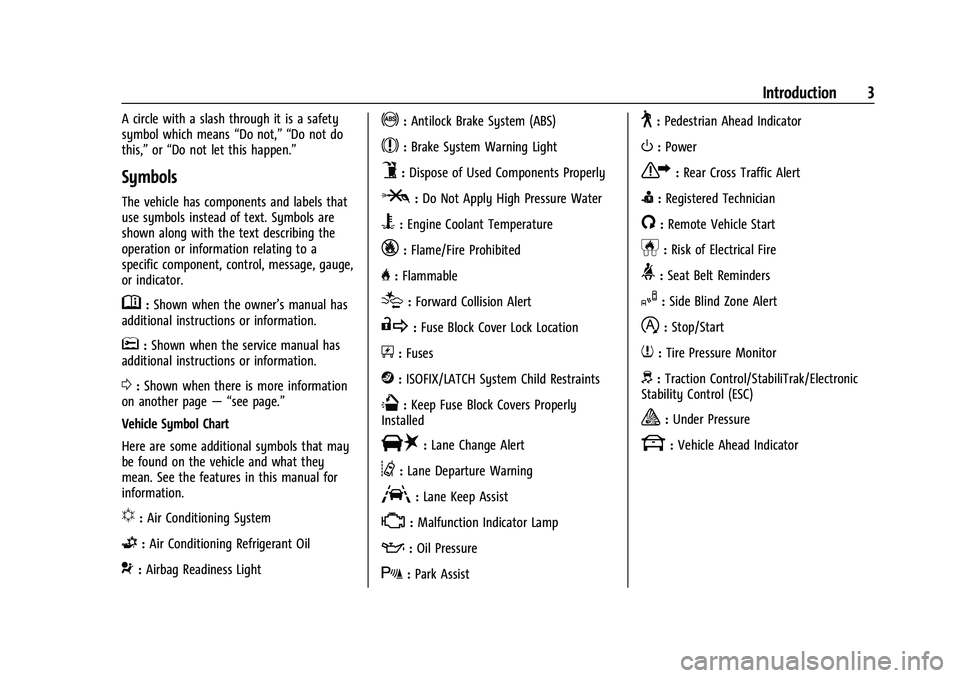
Vehicle Symbol Chart
Here are some additional symbols that may
be found on the vehicle and what they
mean. See the features in this manual for
information.
u: Air Conditioning System
G:Air Conditioning Refrigerant Oil
9:Airbag Readiness Light
!:Antilock Brake System (ABS)
$:Brake System Warning Light
9:Dispose of Used Components Properly
P:Do Not Apply High Pressure Water
B:Engine Coolant Temperature
_:Flame/Fire Prohibited
H: Flammable
[:Forward Collision Alert
R:Fuse Block Cover Lock Location
+:Fuses
j:ISOFIX/LATCH System Child Restraints
Q:Keep Fuse Block Covers Properly
Installed
|: Lane Change Alert
@:Lane Departure Warning
A:Lane Keep Assist
*: Malfunction Indicator Lamp
::Oil Pressure
X:Park Assist
~:Pedestrian Ahead Indicator
O:Power
7:Rear Cross Traffic Alert
I:Registered Technician
/:Remote Vehicle Start
h:Risk of Electrical Fire
>:Seat Belt Reminders
I:Side Blind Zone Alert
h:Stop/Start
7:Tire Pressure Monitor
d:Traction Control/StabiliTrak/Electronic
Stability Control (ESC)
a: Under Pressure
k: Vehicle Ahead Indicator
Page 6 of 369
Chevrolet Traverse Owner Manual (GMNA-Localizing-U.S./Canada/Mexico-
16411537) - 2023 - CRC - 3/28/22
Introduction 5
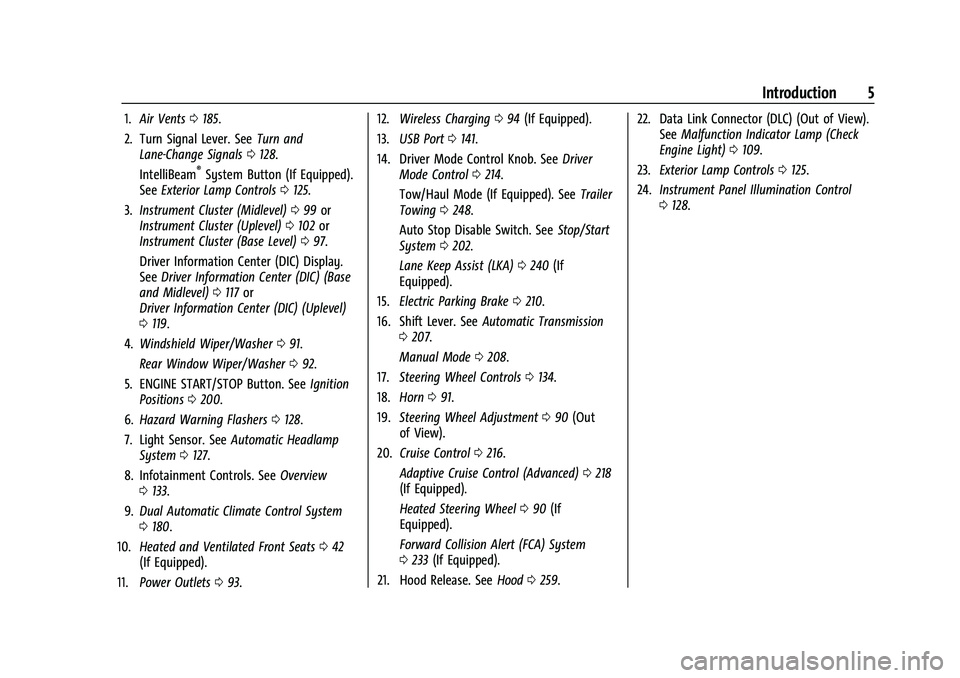
1.Air Vents 0185.
2. Turn Signal Lever. See Turn and
Lane-Change Signals 0128.
IntelliBeam
®System Button (If Equipped).
See Exterior Lamp Controls 0125.
3. Instrument Cluster (Midlevel) 099 or
Instrument Cluster (Uplevel) 0102 or
Instrument Cluster (Base Level) 097.
Driver Information Center (DIC) Display.
See Driver Information Center (DIC) (Base
and Midlevel) 0117 or
Driver Information Center (DIC) (Uplevel)
0 119.
4. Windshield Wiper/Washer 091.
Rear Window Wiper/Washer 092.
5. ENGINE START/STOP Button. See Ignition
Positions 0200.
6. Hazard Warning Flashers 0128.
7. Light Sensor. See Automatic Headlamp
System 0127.
8. Infotainment Controls. See Overview
0 133.
9. Dual Automatic Climate Control System
0180.
10. Heated and Ventilated Front Seats 042
(If Equipped).
11. Power Outlets 093. 12.
Wireless Charging 094 (If Equipped).
13. USB Port 0141.
14. Driver Mode Control Knob. See Driver
Mode Control 0214.
Tow/Haul Mode (If Equipped). See Trailer
Towing 0248.
Auto Stop Disable Switch. See Stop/Start
System 0202.
Lane Keep Assist (LKA) 0240 (If
Equipped).
15. Electric Parking Brake 0210.
16. Shift Lever. See Automatic Transmission
0 207.
Manual Mode 0208.
17. Steering Wheel Controls 0134.
18. Horn 091.
19. Steering Wheel Adjustment 090 (Out
of View).
20. Cruise Control 0216.
Adaptive Cruise Control (Advanced) 0218
(If Equipped).
Heated Steering Wheel 090 (If
Equipped).
Forward Collision Alert (FCA) System
0 233 (If Equipped).
21. Hood Release. See Hood0259. 22. Data Link Connector (DLC) (Out of View).
SeeMalfunction Indicator Lamp (Check
Engine Light) 0109.
23. Exterior Lamp Controls 0125.
24. Instrument Panel Illumination Control
0128.
Page 27 of 369
Chevrolet Traverse Owner Manual (GMNA-Localizing-U.S./Canada/Mexico-
16411537) - 2023 - CRC - 3/28/22
26 Keys, Doors, and Windows
How to Detect a Tamper Condition
IfKis pressed and the horn chirps and the
lights flash three times, the alarm was
activated while the alarm system was
armed.
If the alarm system has been activated, a
message will appear on the Driver
Information Center (DIC).
Immobilizer
See Radio Frequency Statement 0346.
Immobilizer Operation
This vehicle has a passive theft-deterrent
system.
The system does not have to be manually
armed or disarmed.
The vehicle is automatically immobilized
when the remote key leaves the vehicle.
The immobilization system is disarmed
when the ignition is turned on or in
accessory mode and a valid remote key is in
the vehicle.
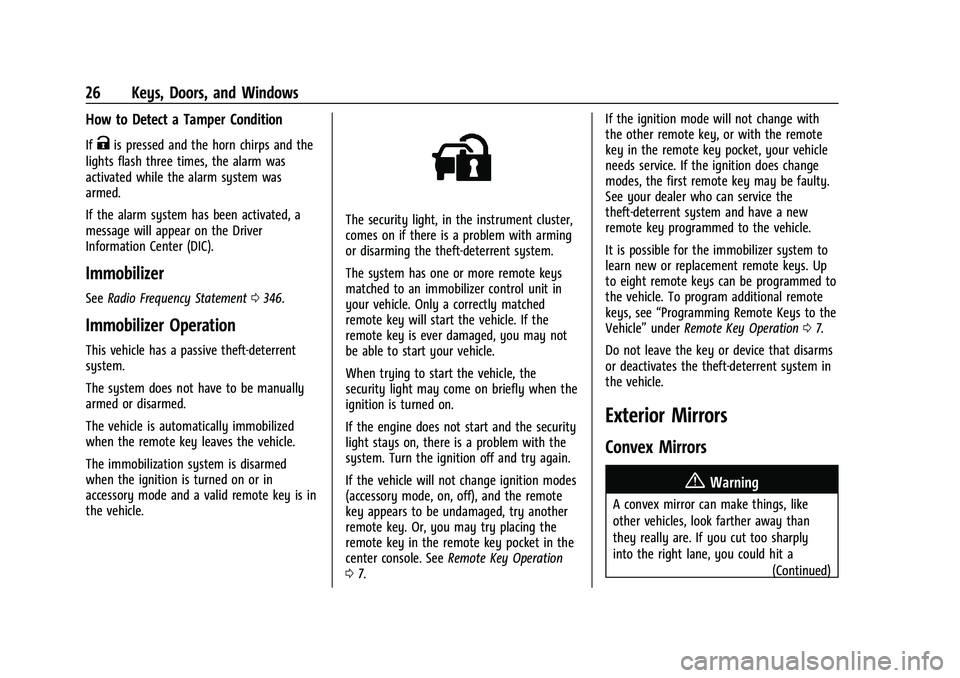
The security light, in the instrument cluster,
comes on if there is a problem with arming
or disarming the theft-deterrent system.
The system has one or more remote keys
matched to an immobilizer control unit in
your vehicle. Only a correctly matched
remote key will start the vehicle. If the
remote key is ever damaged, you may not
be able to start your vehicle.
When trying to start the vehicle, the
security light may come on briefly when the
ignition is turned on.
If the engine does not start and the security
light stays on, there is a problem with the
system. Turn the ignition off and try again.
If the vehicle will not change ignition modes
(accessory mode, on, off), and the remote
key appears to be undamaged, try another
remote key. Or, you may try placing the
remote key in the remote key pocket in the
center console. See Remote Key Operation
0 7. If the ignition mode will not change with
the other remote key, or with the remote
key in the remote key pocket, your vehicle
needs service. If the ignition does change
modes, the first remote key may be faulty.
See your dealer who can service the
theft-deterrent system and have a new
remote key programmed to the vehicle.
It is possible for the immobilizer system to
learn new or replacement remote keys. Up
to eight remote keys can be programmed to
the vehicle. To program additional remote
keys, see
“Programming Remote Keys to the
Vehicle” underRemote Key Operation 07.
Do not leave the key or device that disarms
or deactivates the theft-deterrent system in
the vehicle.
Exterior Mirrors
Convex Mirrors
{Warning
A convex mirror can make things, like
other vehicles, look farther away than
they really are. If you cut too sharply
into the right lane, you could hit a (Continued)
Page 28 of 369
Chevrolet Traverse Owner Manual (GMNA-Localizing-U.S./Canada/Mexico-
16411537) - 2023 - CRC - 3/28/22
Keys, Doors, and Windows 27
Warning (Continued)
vehicle on the right. Check the inside
mirror or glance over your shoulder
before changing lanes.
The passenger side mirror is convex shaped.
A convex mirror surface is curved so more
can be seen from the driver seat.
Power Mirrors
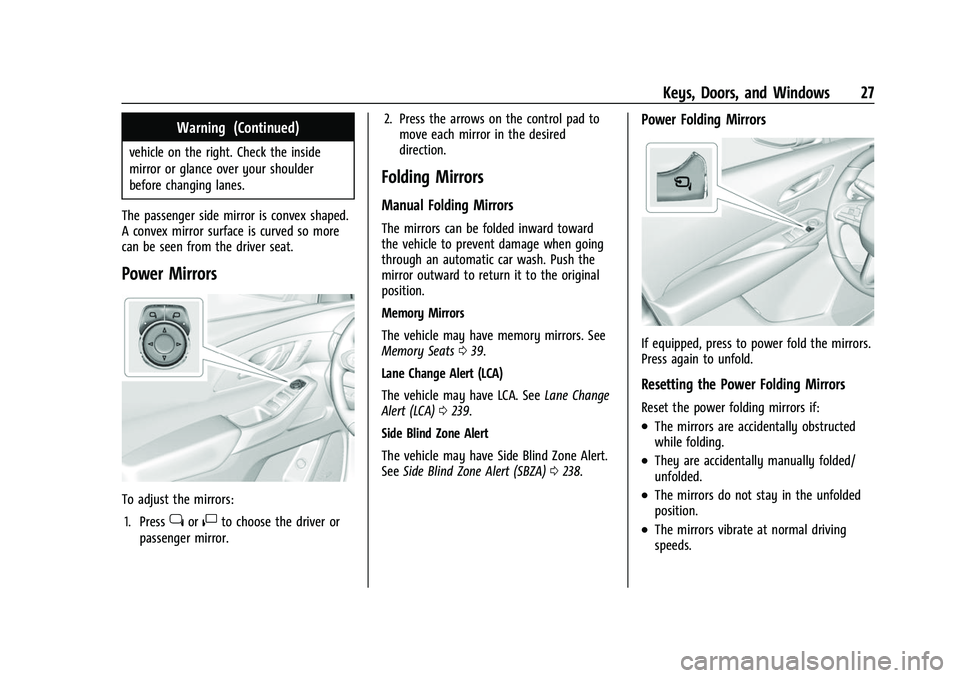
To adjust the mirrors: 1. Press
jor|to choose the driver or
passenger mirror. 2. Press the arrows on the control pad to
move each mirror in the desired
direction.
Folding Mirrors
Manual Folding Mirrors
The mirrors can be folded inward toward
the vehicle to prevent damage when going
through an automatic car wash. Push the
mirror outward to return it to the original
position.
Memory Mirrors
The vehicle may have memory mirrors. See
Memory Seats 039.
Lane Change Alert (LCA)
The vehicle may have LCA. See Lane Change
Alert (LCA) 0239.
Side Blind Zone Alert
The vehicle may have Side Blind Zone Alert.
See Side Blind Zone Alert (SBZA) 0238.
Power Folding Mirrors
If equipped, press to power fold the mirrors.
Press again to unfold.
Resetting the Power Folding Mirrors
Reset the power folding mirrors if:
.The mirrors are accidentally obstructed
while folding.
.They are accidentally manually folded/
unfolded.
.The mirrors do not stay in the unfolded
position.
.The mirrors vibrate at normal driving
speeds.
Page 31 of 369
Chevrolet Traverse Owner Manual (GMNA-Localizing-U.S./Canada/Mexico-
16411537) - 2023 - CRC - 3/28/22
30 Keys, Doors, and Windows
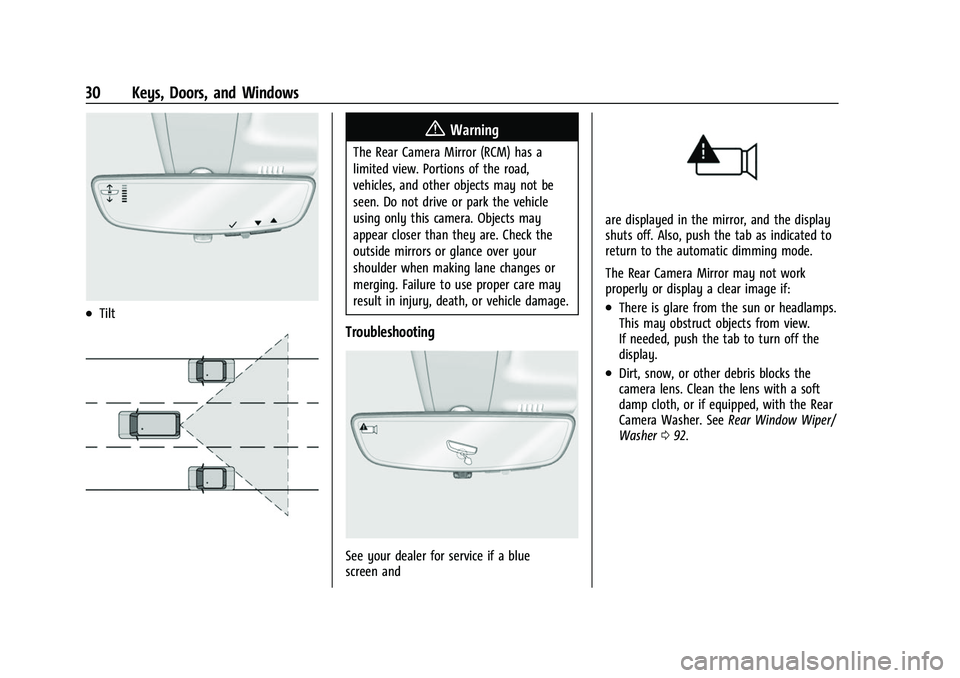
.Tilt
{Warning
The Rear Camera Mirror (RCM) has a
limited view. Portions of the road,
vehicles, and other objects may not be
seen. Do not drive or park the vehicle
using only this camera. Objects may
appear closer than they are. Check the
outside mirrors or glance over your
shoulder when making lane changes or
merging. Failure to use proper care may
result in injury, death, or vehicle damage.
Troubleshooting
See your dealer for service if a blue
screen and
are displayed in the mirror, and the display
shuts off. Also, push the tab as indicated to
return to the automatic dimming mode.
The Rear Camera Mirror may not work
properly or display a clear image if:
.There is glare from the sun or headlamps.
This may obstruct objects from view.
If needed, push the tab to turn off the
display.
.Dirt, snow, or other debris blocks the
camera lens. Clean the lens with a soft
damp cloth, or if equipped, with the Rear
Camera Washer. SeeRear Window Wiper/
Washer 092.
Page 90 of 369
Chevrolet Traverse Owner Manual (GMNA-Localizing-U.S./Canada/Mexico-
16411537) - 2023 - CRC - 3/28/22
Instruments and Controls 89
Instruments and Controls
Controls
Steering Wheel Adjustment . . . . . . . . . . . . 90
Heated Steering Wheel . . . . . . . . . . . . . . . . 90
Horn . . . . . . . . . . . . . . . . . . . . . . . . . . . . . . . . . . . . 91
Windshield Wiper/Washer . . . . . . . . . . . . . . 91
Rear Window Wiper/Washer . . . . . . . . . . . 92
Compass . . . . . . . . . . . . . . . . . . . . . . . . . . . . . . . 93
Clock . . . . . . . . . . . . . . . . . . . . . . . . . . . . . . . . . . . 93
Power Outlets . . . . . . . . . . . . . . . . . . . . . . . . . . 93
Wireless Charging . . . . . . . . . . . . . . . . . . . . . . 94
Warning Lights, Gauges, and Indicators
Warning Lights, Gauges, andIndicators . . . . . . . . . . . . . . . . . . . . . . . . . . . . . 97
Instrument Cluster (Base Level) . . . . . . . . . 97
Instrument Cluster (Midlevel) . . . . . . . . . . 99
Instrument Cluster (Uplevel) . . . . . . . . . . . 102
Speedometer . . . . . . . . . . . . . . . . . . . . . . . . . . 104
Odometer . . . . . . . . . . . . . . . . . . . . . . . . . . . . . 104
Trip Odometer . . . . . . . . . . . . . . . . . . . . . . . . 104
Tachometer . . . . . . . . . . . . . . . . . . . . . . . . . . . 104
Fuel Gauge . . . . . . . . . . . . . . . . . . . . . . . . . . . . 104
Engine Oil Temperature Gauge (Uplevel Only) . . . . . . . . . . . . . . . . . . . . . . . 105
Engine Coolant Temperature Gauge . . . 106
Voltmeter Gauge (Uplevel Only) . . . . . . . 106
Seat Belt Reminders . . . . . . . . . . . . . . . . . . . 107
Airbag Readiness Light . . . . . . . . . . . . . . . . . 107 Passenger Airbag Status Indicator . . . . . 108
Charging System Light . . . . . . . . . . . . . . . . 109
Malfunction Indicator Lamp (Check
Engine Light) . . . . . . . . . . . . . . . . . . . . . . . . 109
Brake System Warning Light . . . . . . . . . . . 110
Electric Parking Brake Light . . . . . . . . . . . . . 111
Service Electric Parking Brake Light . . . . . 111
Antilock Brake System (ABS) Warning
Light . . . . . . . . . . . . . . . . . . . . . . . . . . . . . . . . . 112
Lane Keep Assist (LKA) Light . . . . . . . . . . . 112
Vehicle Ahead Indicator . . . . . . . . . . . . . . . . 112
Pedestrian Ahead Indicator . . . . . . . . . . . . . 112
Traction Off Light . . . . . . . . . . . . . . . . . . . . . . 113
StabiliTrak OFF Light . . . . . . . . . . . . . . . . . . . 113
Traction Control System (TCS)/ StabiliTrak Light . . . . . . . . . . . . . . . . . . . . . . 113
Driver Mode Control Light . . . . . . . . . . . . . 114
Tire Pressure Light . . . . . . . . . . . . . . . . . . . . . 114
Engine Oil Pressure Light . . . . . . . . . . . . . . 114
Low Fuel Warning Light . . . . . . . . . . . . . . . . 115
Security Light . . . . . . . . . . . . . . . . . . . . . . . . . . 115
High-Beam On Light . . . . . . . . . . . . . . . . . . . 116
Lamps On Reminder . . . . . . . . . . . . . . . . . . . 116
Cruise Control Light . . . . . . . . . . . . . . . . . . . . 116
Door Ajar Light . . . . . . . . . . . . . . . . . . . . . . . . 116
Information Displays
Driver Information Center (DIC) (Base and Midlevel) . . . . . . . . . . . . . . . . . . . . . . . . 117
Driver Information Center (DIC) (Uplevel) . . . . . . . . . . . . . . . . . . . . . . . . . . . . . 119
Vehicle Messages
Vehicle Messages . . . . . . . . . . . . . . . . . . . . . . 121
Engine Power Messages . . . . . . . . . . . . . . . 122
Vehicle Speed Messages . . . . . . . . . . . . . . . 122
Universal Remote System
Universal Remote System . . . . . . . . . . . . . . 122
Universal Remote SystemProgramming . . . . . . . . . . . . . . . . . . . . . . . . 122
Universal Remote System Operation . . . 124
Page 113 of 369
Chevrolet Traverse Owner Manual (GMNA-Localizing-U.S./Canada/Mexico-
16411537) - 2023 - CRC - 3/28/22
112 Instruments and Controls
Antilock Brake System (ABS)
Warning Light
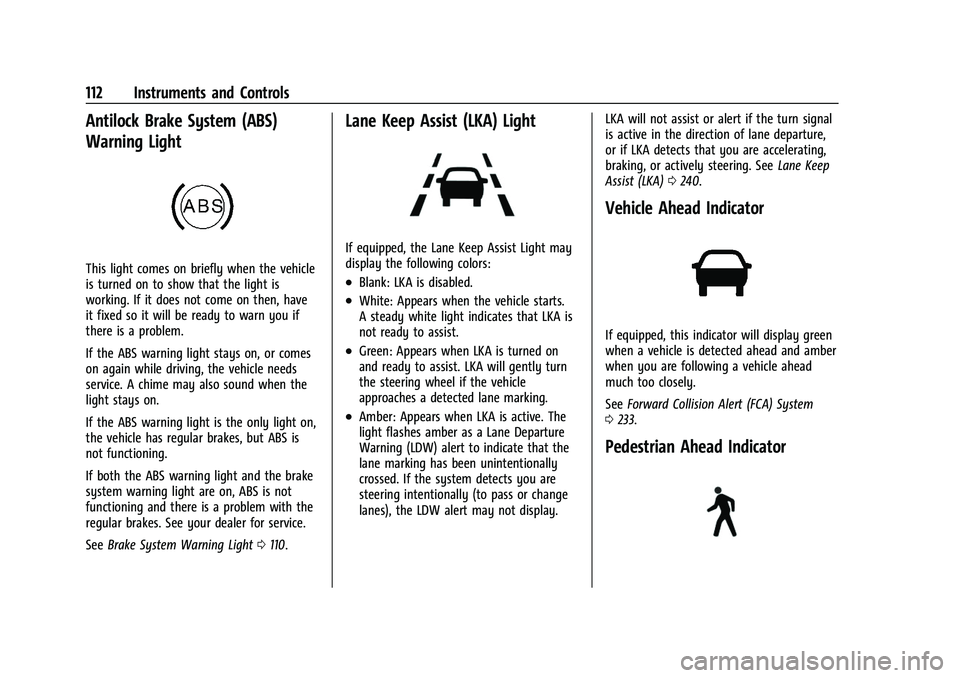
This light comes on briefly when the vehicle
is turned on to show that the light is
working. If it does not come on then, have
it fixed so it will be ready to warn you if
there is a problem.
If the ABS warning light stays on, or comes
on again while driving, the vehicle needs
service. A chime may also sound when the
light stays on.
If the ABS warning light is the only light on,
the vehicle has regular brakes, but ABS is
not functioning.
If both the ABS warning light and the brake
system warning light are on, ABS is not
functioning and there is a problem with the
regular brakes. See your dealer for service.
SeeBrake System Warning Light 0110.
Lane Keep Assist (LKA) Light
If equipped, the Lane Keep Assist Light may
display the following colors:
.Blank: LKA is disabled.
.White: Appears when the vehicle starts.
A steady white light indicates that LKA is
not ready to assist.
.Green: Appears when LKA is turned on
and ready to assist. LKA will gently turn
the steering wheel if the vehicle
approaches a detected lane marking.
.Amber: Appears when LKA is active. The
light flashes amber as a Lane Departure
Warning (LDW) alert to indicate that the
lane marking has been unintentionally
crossed. If the system detects you are
steering intentionally (to pass or change
lanes), the LDW alert may not display. LKA will not assist or alert if the turn signal
is active in the direction of lane departure,
or if LKA detects that you are accelerating,
braking, or actively steering. See
Lane Keep
Assist (LKA) 0240.
Vehicle Ahead Indicator
If equipped, this indicator will display green
when a vehicle is detected ahead and amber
when you are following a vehicle ahead
much too closely.
See Forward Collision Alert (FCA) System
0 233.
Pedestrian Ahead Indicator
Page 122 of 369
Chevrolet Traverse Owner Manual (GMNA-Localizing-U.S./Canada/Mexico-
16411537) - 2023 - CRC - 3/28/22
Instruments and Controls 121
system. When the REPLACE AT NEXT OIL
CHANGE message displays, the engine air
filter should be replaced at the time of the
next oil change. When the REPLACE SOON
message displays, the engine air filter
should be replaced at the earliest
convenience.
The Air Filter Life display must be reset after
the engine air filter replacement. To reset,
seeEngine Air Filter Life System 0264.
Fuel Economy : Displays average fuel
economy, the best fuel economy over the
selected distance, and a bar graph showing
instantaneous fuel economy.
Press
pto change the selected distance.
Press and hold
Vwhile this display is active
to reset the best fuel economy and average
fuel economy. This display can also be reset
by selecting reset in the menu.
Timer and Fuel Used : Can be used as a
timer. To start the timer, press
Vwhile this
display is active. The display will show the
amount of time that has passed since the
timer was last reset. To stop the timer,
press
Vbriefly while this display is active and the timer is running. To reset the timer
to zero, press and hold
Vwhile this display
is active.
This also shows the number of liters (L) or
gallons (gal) of fuel used since the last reset
of this menu item.
Driver Assistance : If equipped, shows
information for Lane Keep Assist (LKA), Lane
Departure Warning (LDW), and Forward
Collision Alert (FCA).
Following Distance : The following distance
to a moving vehicle ahead is displayed as a
time value on this page. See Forward
Collision Alert (FCA) System 0233.
Economy Trend : Shows history of the
Average Fuel Economy from the last 50 km
(30 mi). Each bar represents about 5 km
(3 mi) of driving. During driving the bars will
shift to always reflect the most recent
distance on the right side. Press and hold
V
to clear the graph or presspto reset
through the menu.
Oil Temperature : Shows the engine oil
temperature in either degrees Celsius (°C) or
degrees Fahrenheit (°F).
Blank Page : Shows no information.
Vehicle Messages
Messages displayed on the DIC indicate the
status of the vehicle or some action that
may be needed to correct a condition.
Multiple messages may appear one after
another.
The messages that do not require
immediate action can be acknowledged and
cleared by pressing
V. The messages that
require immediate action cannot be cleared
until that action is performed.
All messages should be taken seriously;
clearing the message does not correct the
problem.
If a SERVICE message appears, see your
dealer.
Follow the instructions given in the
messages. The system displays messages
regarding the following topics:
.Service Messages
.Fluid Levels
.Vehicle Security
.Brakes
.Steering
.Ride Control Systems
.Driver Assistance Systems
Page 126 of 369
Chevrolet Traverse Owner Manual (GMNA-Localizing-U.S./Canada/Mexico-
16411537) - 2023 - CRC - 3/28/22
Lighting 125
Lighting
Exterior Lighting
Exterior Lamp Controls . . . . . . . . . . . . . . . . . 125
Headlamp High/Low-Beam Changer . . . 126
Flash-to-Pass . . . . . . . . . . . . . . . . . . . . . . . . . . . 126
Daytime Running Lamps (DRL) . . . . . . . . . 127
Daytime Running Lamps (DRL) . . . . . . . . . 127
Automatic Headlamp System . . . . . . . . . . 127
Hazard Warning Flashers . . . . . . . . . . . . . . 128
Turn and Lane-Change Signals . . . . . . . . . 128
Interior Lighting
Instrument Panel IlluminationControl . . . . . . . . . . . . . . . . . . . . . . . . . . . . . . 128
Courtesy Lamps . . . . . . . . . . . . . . . . . . . . . . . 129
Dome Lamps . . . . . . . . . . . . . . . . . . . . . . . . . . 129
Reading Lamps . . . . . . . . . . . . . . . . . . . . . . . . 129
Lighting Features
Entry Lighting . . . . . . . . . . . . . . . . . . . . . . . . . 130
Exit Lighting . . . . . . . . . . . . . . . . . . . . . . . . . . . 130
Battery Load Management . . . . . . . . . . . . 130
Battery Power Protection . . . . . . . . . . . . . . 131
Exterior Lighting Battery Saver . . . . . . . . . 131
Exterior Lighting
Exterior Lamp Controls
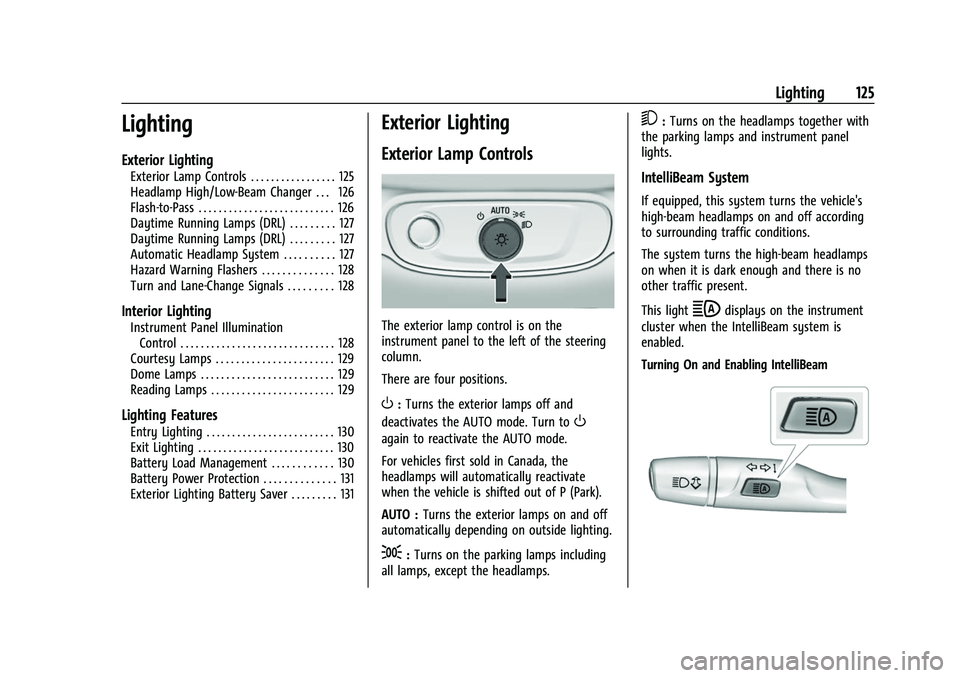
The exterior lamp control is on the
instrument panel to the left of the steering
column.
There are four positions.
O: Turns the exterior lamps off and
deactivates the AUTO mode. Turn to
O
again to reactivate the AUTO mode.
For vehicles first sold in Canada, the
headlamps will automatically reactivate
when the vehicle is shifted out of P (Park).
AUTO : Turns the exterior lamps on and off
automatically depending on outside lighting.
;: Turns on the parking lamps including
all lamps, except the headlamps.
5: Turns on the headlamps together with
the parking lamps and instrument panel
lights.
IntelliBeam System
If equipped, this system turns the vehicle's
high-beam headlamps on and off according
to surrounding traffic conditions.
The system turns the high-beam headlamps
on when it is dark enough and there is no
other traffic present.
This light
bdisplays on the instrument
cluster when the IntelliBeam system is
enabled.
Turning On and Enabling IntelliBeam
Page 129 of 369
Chevrolet Traverse Owner Manual (GMNA-Localizing-U.S./Canada/Mexico-
16411537) - 2023 - CRC - 3/28/22
128 Lighting
Lights On with Wipers
If the windshield wipers are activated in
daylight with the engine on, and the
exterior lamp control is in AUTO, the
headlamps, parking lamps, and other
exterior lamps come on. The transition time
for the lamps coming on varies based on
wiper speed. When the wipers are not
operating, these lamps turn off. Move the
exterior lamp control to
Oor;to disable
this feature.
Hazard Warning Flashers
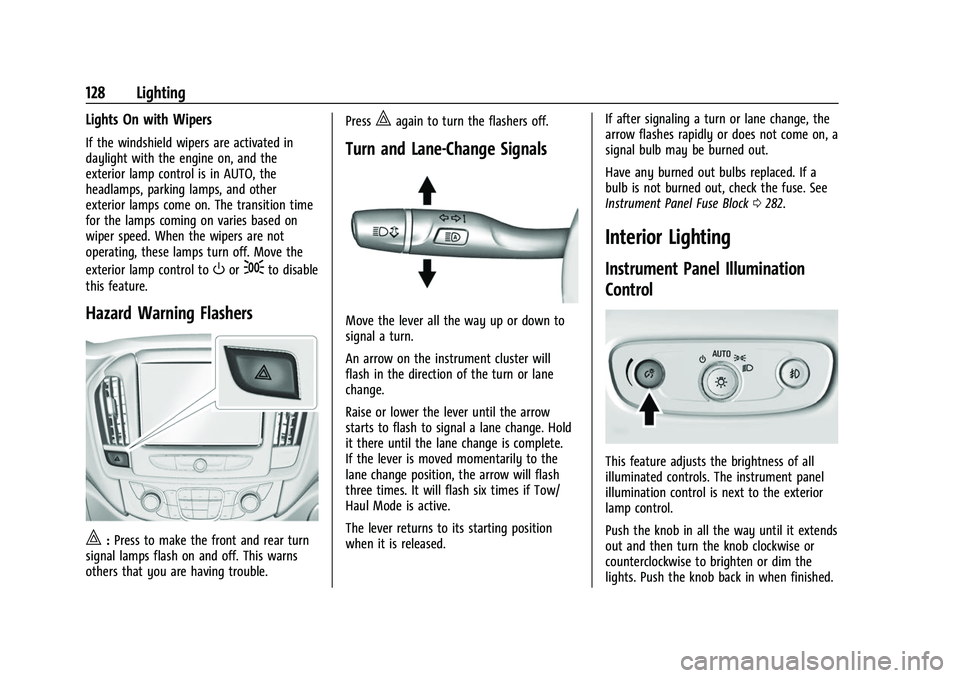
|: Press to make the front and rear turn
signal lamps flash on and off. This warns
others that you are having trouble. Press
|again to turn the flashers off.
Turn and Lane-Change Signals
Move the lever all the way up or down to
signal a turn.
An arrow on the instrument cluster will
flash in the direction of the turn or lane
change.
Raise or lower the lever until the arrow
starts to flash to signal a lane change. Hold
it there until the lane change is complete.
If the lever is moved momentarily to the
lane change position, the arrow will flash
three times. It will flash six times if Tow/
Haul Mode is active.
The lever returns to its starting position
when it is released.
If after signaling a turn or lane change, the
arrow flashes rapidly or does not come on, a
signal bulb may be burned out.
Have any burned out bulbs replaced. If a
bulb is not burned out, check the fuse. See
Instrument Panel Fuse Block
0282.
Interior Lighting
Instrument Panel Illumination
Control
This feature adjusts the brightness of all
illuminated controls. The instrument panel
illumination control is next to the exterior
lamp control.
Push the knob in all the way until it extends
out and then turn the knob clockwise or
counterclockwise to brighten or dim the
lights. Push the knob back in when finished.