child seat CHEVROLET TRAVERSE 2023 Owners Manual
[x] Cancel search | Manufacturer: CHEVROLET, Model Year: 2023, Model line: TRAVERSE, Model: CHEVROLET TRAVERSE 2023Pages: 369, PDF Size: 16.89 MB
Page 4 of 369
Chevrolet Traverse Owner Manual (GMNA-Localizing-U.S./Canada/Mexico-
16411537) - 2023 - CRC - 3/28/22
Introduction 3
A circle with a slash through it is a safety
symbol which means“Do not,” “Do not do
this,” or“Do not let this happen.”
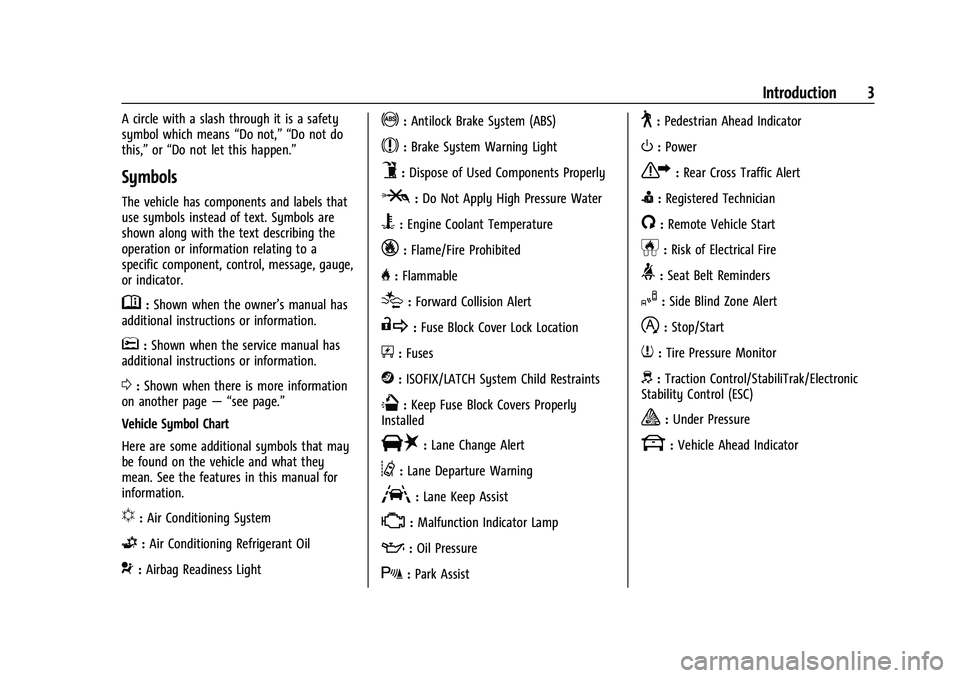
Symbols
The vehicle has components and labels that
use symbols instead of text. Symbols are
shown along with the text describing the
operation or information relating to a
specific component, control, message, gauge,
or indicator.
M:Shown when the owner’s manual has
additional instructions or information.
*: Shown when the service manual has
additional instructions or information.
0: Shown when there is more information
on another page — “see page.”
Vehicle Symbol Chart
Here are some additional symbols that may
be found on the vehicle and what they
mean. See the features in this manual for
information.
u: Air Conditioning System
G:Air Conditioning Refrigerant Oil
9:Airbag Readiness Light
!:Antilock Brake System (ABS)
$:Brake System Warning Light
9:Dispose of Used Components Properly
P:Do Not Apply High Pressure Water
B:Engine Coolant Temperature
_:Flame/Fire Prohibited
H: Flammable
[:Forward Collision Alert
R:Fuse Block Cover Lock Location
+:Fuses
j:ISOFIX/LATCH System Child Restraints
Q:Keep Fuse Block Covers Properly
Installed
|: Lane Change Alert
@:Lane Departure Warning
A:Lane Keep Assist
*: Malfunction Indicator Lamp
::Oil Pressure
X:Park Assist
~:Pedestrian Ahead Indicator
O:Power
7:Rear Cross Traffic Alert
I:Registered Technician
/:Remote Vehicle Start
h:Risk of Electrical Fire
>:Seat Belt Reminders
I:Side Blind Zone Alert
h:Stop/Start
7:Tire Pressure Monitor
d:Traction Control/StabiliTrak/Electronic
Stability Control (ESC)
a: Under Pressure
k: Vehicle Ahead Indicator
Page 13 of 369

Chevrolet Traverse Owner Manual (GMNA-Localizing-U.S./Canada/Mexico-
16411537) - 2023 - CRC - 3/28/22
12 Keys, Doors, and Windows
5. Place the new remote key into theremote key pocket. The remote key
pocket is inside the center console
storage area between the driver and
front passenger seats, underneath the
liner.
6. Press ENGINE START/STOP. When the remote key is learned the DIC display
will show that it is ready to program the
next remote key.
7. Remove the remote key from the remote key pocket and press the remote key
K
orQbutton.
To program additional remote keys,
repeat Steps 4–6.
When all additional remote keys are
programmed, press and hold ENGINE
START/STOP for 12 seconds to exit
programming mode.
8. Put the key back into the remote key.
9. Replace the key lock cylinder cap. See Door Locks 015.
Starting the Vehicle with a Low Remote
Key Battery
When starting the vehicle, if the remote key
battery is depleted, there is signal
interference, or the remote key has been idle for a while, the DIC may display NO
REMOTE DETECTED or NO REMOTE KEY WAS
DETECTED PLACE KEY IN TRANSMITTER
POCKET THEN START YOUR VEHICLE. For
improved vehicle security, the remote key is
equipped with a motion sensor. Move the
remote key slightly and try starting the
vehicle. If the vehicle still does not start,
and the DIC displays the same warnings
above, follow the steps shown below.
To start the vehicle:
1. Open the center console storage area by opening the armrest.2. Place the remote key in the remote keypocket. 3. With the vehicle in P (Park) or
N (Neutral), press the brake pedal and
ENGINE START/STOP.
Replace the remote key battery as soon
as possible.
Battery Replacement
{Warning
Never allow children to play with the
remote key. The remote key contains a
small battery, which can be a choking
hazard. If swallowed, internal burns can
occur, resulting in severe injury or death.
Seek medical attention immediately if a
battery is swallowed.
{Warning
To avoid personal injury, do not touch
metal surfaces on the remote key when
it has been exposed to extreme heat.
These surfaces can be hot to the touch at
temperatures above 59 °C (138 °F).
Page 16 of 369
Chevrolet Traverse Owner Manual (GMNA-Localizing-U.S./Canada/Mexico-
16411537) - 2023 - CRC - 3/28/22
Keys, Doors, and Windows 15
Conditions in Which Remote Start Will
Not Work
The remote start will not operate if any of
the following occur:
.An remote key is in the vehicle.
.The hood is not closed.
.The ignition is in any mode other
than off.
.The hazard warning flashers are on.
.There is an emission control system
malfunction.
.The engine coolant temperature is
too high.
.The oil pressure is low.
.Two remote vehicle starts or a start with
an extension have already been used.
.The vehicle is not in P (Park).
Door Locks
{Warning
Unlocked doors can be dangerous.
.Passengers, especially children, can
easily open the doors and fall out of a
moving vehicle. The doors can be
unlocked and opened while the vehicle(Continued)
Warning (Continued)
is moving. The chance of being thrown
out of the vehicle in a crash is
increased if the doors are not locked.
So, all passengers should wear seat
belts properly and the doors should be
locked whenever the vehicle is driven.
.Young children who get into unlocked
vehicles may be unable to get out.
A child can be overcome by extreme
heat and can suffer permanent injuries
or even death from heat stroke.
Always lock the vehicle whenever
leaving it.
.Outsiders can easily enter through an
unlocked door when you slow down
or stop the vehicle. Locking the doors
can help prevent this from happening.
To lock or unlock the doors from the
outside:
.PressQorKon the remote key. See
Remote Key Operation 07.
.Use the key in the driver door. The key
lock cylinder is covered with a cap. To lock or unlock the doors from the inside:
.PressQorKon the power door lock
switch.
.Push down on a door lock knob to lock
a door.
.Pull the door handle once to unlock the
door. Pull the handle again to unlatch it.
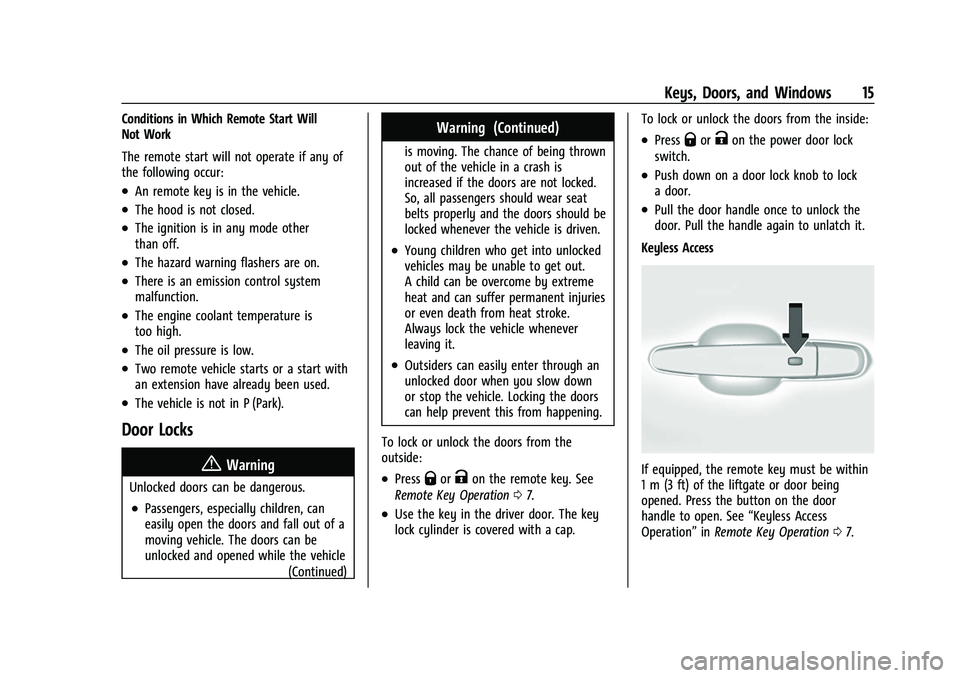
Keyless Access
If equipped, the remote key must be within
1 m (3 ft) of the liftgate or door being
opened. Press the button on the door
handle to open. See “Keyless Access
Operation” inRemote Key Operation 07.
Page 32 of 369
Chevrolet Traverse Owner Manual (GMNA-Localizing-U.S./Canada/Mexico-
16411537) - 2023 - CRC - 3/28/22
Keys, Doors, and Windows 31
.The camera’s mounting on the vehicle has
been damaged, and/or the position or the
mounting angle of the camera has
changed.
Windows{
Warning
Never leave a child, a helpless adult, or a
pet alone in a vehicle, especially with the
windows closed in warm or hot weather.
They can be overcome by the extreme
heat and suffer permanent injuries or
even death from heat stroke.
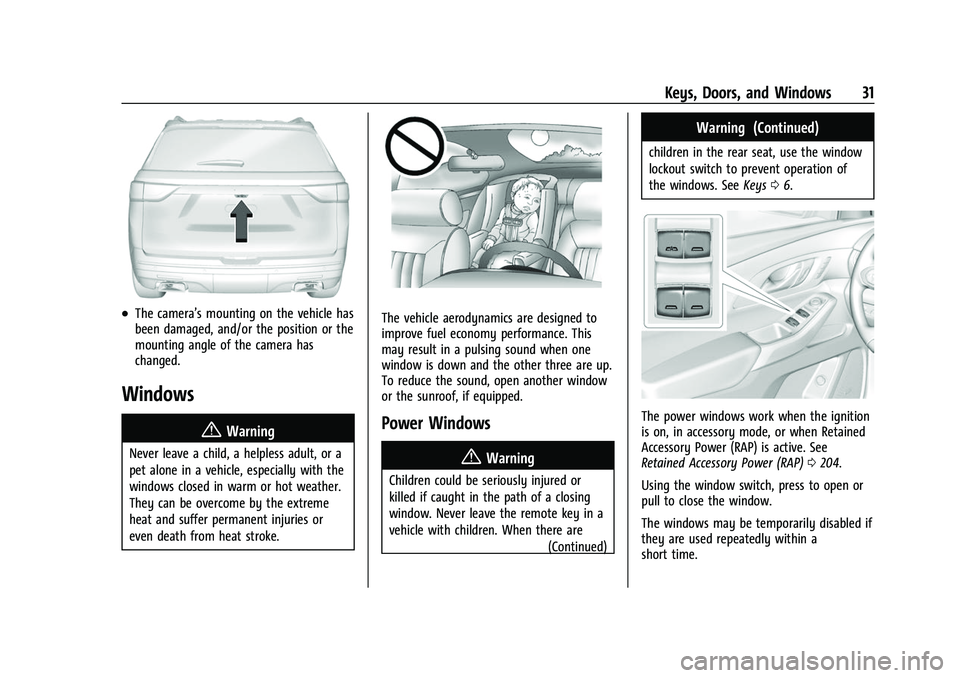
The vehicle aerodynamics are designed to
improve fuel economy performance. This
may result in a pulsing sound when one
window is down and the other three are up.
To reduce the sound, open another window
or the sunroof, if equipped.
Power Windows
{Warning
Children could be seriously injured or
killed if caught in the path of a closing
window. Never leave the remote key in a
vehicle with children. When there are (Continued)
Warning (Continued)
children in the rear seat, use the window
lockout switch to prevent operation of
the windows. SeeKeys06.
The power windows work when the ignition
is on, in accessory mode, or when Retained
Accessory Power (RAP) is active. See
Retained Accessory Power (RAP) 0204.
Using the window switch, press to open or
pull to close the window.
The windows may be temporarily disabled if
they are used repeatedly within a
short time.
Page 36 of 369
Chevrolet Traverse Owner Manual (GMNA-Localizing-U.S./Canada/Mexico-
16411537) - 2023 - CRC - 3/28/22
Seats and Restraints 35
Seats and Restraints
Head Restraints
Head Restraints . . . . . . . . . . . . . . . . . . . . . . . . . 35
Front Seats
Seat Adjustment . . . . . . . . . . . . . . . . . . . . . . . . 37
Power Seat Adjustment . . . . . . . . . . . . . . . . . 37
Reclining Seatbacks . . . . . . . . . . . . . . . . . . . . . 38
Lumbar Adjustment . . . . . . . . . . . . . . . . . . . . 39
Memory Seats . . . . . . . . . . . . . . . . . . . . . . . . . . 39
Heated and Ventilated Front Seats . . . . . 42
Rear Seats
Rear Seats . . . . . . . . . . . . . . . . . . . . . . . . . . . . . . 43
Heated Rear Seats . . . . . . . . . . . . . . . . . . . . . . 46
Third Row Seats . . . . . . . . . . . . . . . . . . . . . . . . 46
Seat Belts
Seat Belts . . . . . . . . . . . . . . . . . . . . . . . . . . . . . . 48
Buckle To Drive . . . . . . . . . . . . . . . . . . . . . . . . 49
How to Wear Seat Belts Properly . . . . . . 49
Lap-Shoulder Belt . . . . . . . . . . . . . . . . . . . . . . . 51
Seat Belt Use During Pregnancy . . . . . . . . 54
Seat Belt Extender . . . . . . . . . . . . . . . . . . . . . . 54
Safety System Check . . . . . . . . . . . . . . . . . . . 54
Seat Belt Care . . . . . . . . . . . . . . . . . . . . . . . . . . 55
Replacing Seat Belt System Parts after aCrash . . . . . . . . . . . . . . . . . . . . . . . . . . . . . . . . . 55
Airbag System
Airbag System . . . . . . . . . . . . . . . . . . . . . . . . . . 55
Where Are the Airbags? . . . . . . . . . . . . . . . . 57
When Should an Airbag Inflate? . . . . . . . . 58
What Makes an Airbag Inflate? . . . . . . . . . 59
How Does an Airbag Restrain? . . . . . . . . . 59
What Will You See after an AirbagInflates? . . . . . . . . . . . . . . . . . . . . . . . . . . . . . . 59
Passenger Sensing System . . . . . . . . . . . . . . 61
Servicing the Airbag-Equipped Vehicle . . . . . . . . . . . . . . . . . . . . . . . . . . . . . . . 64
Adding Equipment to the Airbag-Equipped Vehicle . . . . . . . . . . . . . . 64
Airbag System Check . . . . . . . . . . . . . . . . . . . 65
Replacing Airbag System Parts after a Crash . . . . . . . . . . . . . . . . . . . . . . . . . . . . . . . . . 65
Child Restraints
Older Children . . . . . . . . . . . . . . . . . . . . . . . . . . 65
Infants and Young Children . . . . . . . . . . . . . 67
Child Restraint Systems . . . . . . . . . . . . . . . . 69
Where to Put the Restraint . . . . . . . . . . . . . 70
Lower Anchors and Tethers for Children(LATCH System) . . . . . . . . . . . . . . . . . . . . . . . 72
Replacing LATCH System Parts After a Crash . . . . . . . . . . . . . . . . . . . . . . . . . . . . . . . . . 79
Securing Child Restraints (With the Seat Belt in the Rear Seat) . . . . . . . . . . . . . . . . . 79
Securing Child Restraints (With the Seat Belt in the Front Seat) . . . . . . . . . . . . . . . . 81
Head Restraints
Front Seats
{Warning
With head restraints that are not
installed and adjusted properly, there is a
greater chance that occupants will suffer
a neck/spinal injury in a crash. Do not
drive until the head restraints for all
occupants are installed and adjusted
properly.
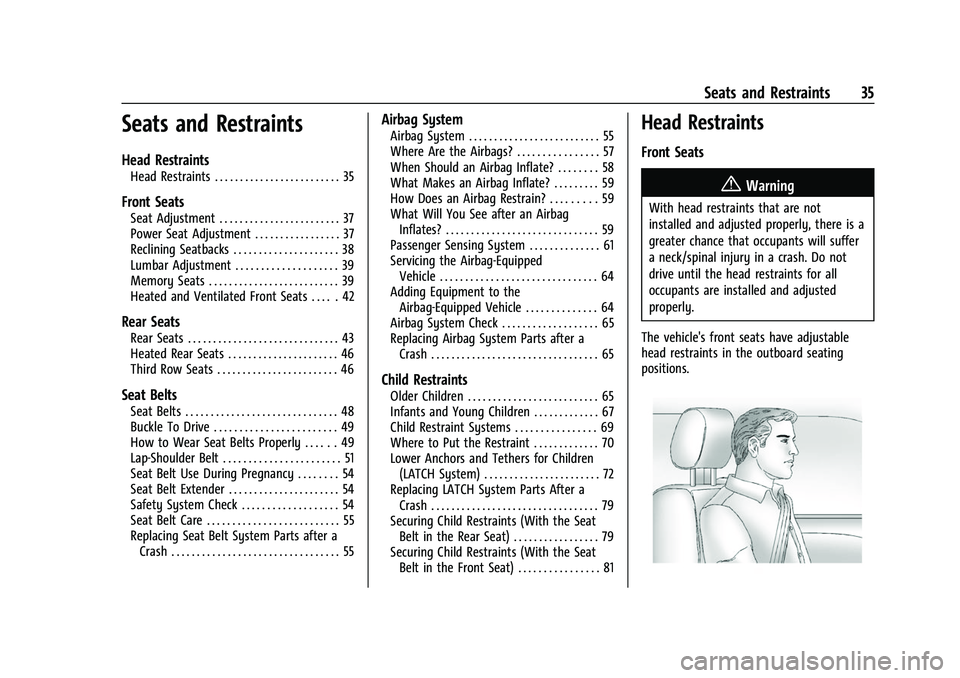
The vehicle's front seats have adjustable
head restraints in the outboard seating
positions.
Page 38 of 369
Chevrolet Traverse Owner Manual (GMNA-Localizing-U.S./Canada/Mexico-
16411537) - 2023 - CRC - 3/28/22
Seats and Restraints 37
it rearward until it locks into place. Push and
pull on the head restraint to make sure that
it is locked.
Front Seats
Seat Adjustment
{Warning
You can lose control of the vehicle if you
try to adjust a driver seat while the
vehicle is moving. Adjust the driver seat
only when the vehicle is not moving.
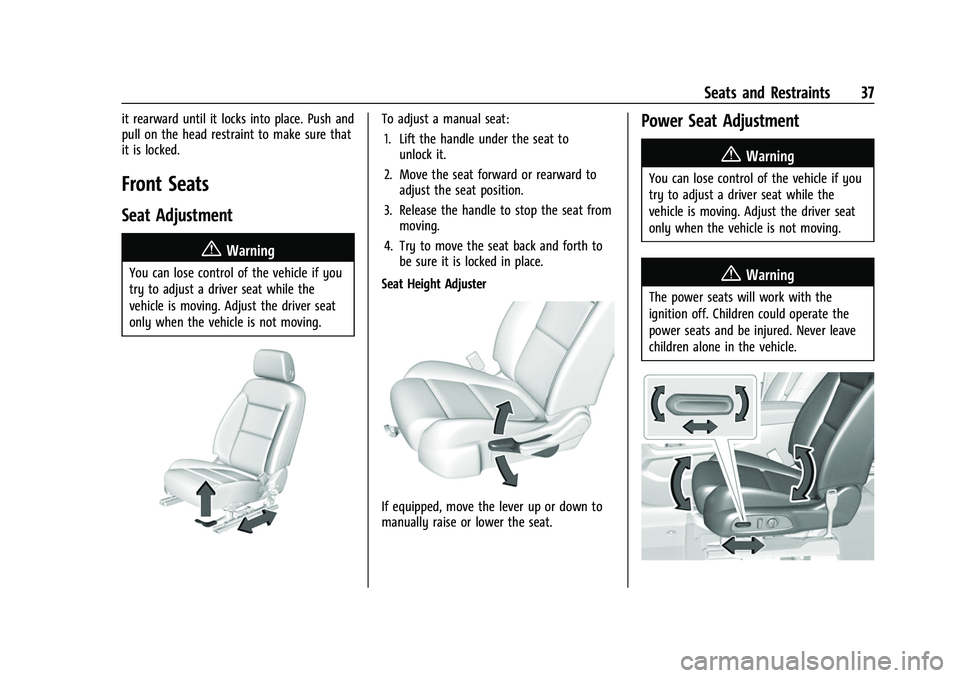
To adjust a manual seat:1. Lift the handle under the seat to unlock it.
2. Move the seat forward or rearward to adjust the seat position.
3. Release the handle to stop the seat from moving.
4. Try to move the seat back and forth to be sure it is locked in place.
Seat Height Adjuster
If equipped, move the lever up or down to
manually raise or lower the seat.
Power Seat Adjustment
{Warning
You can lose control of the vehicle if you
try to adjust a driver seat while the
vehicle is moving. Adjust the driver seat
only when the vehicle is not moving.
{Warning
The power seats will work with the
ignition off. Children could operate the
power seats and be injured. Never leave
children alone in the vehicle.
Page 44 of 369
Chevrolet Traverse Owner Manual (GMNA-Localizing-U.S./Canada/Mexico-
16411537) - 2023 - CRC - 3/28/22
Seats and Restraints 43
Remote Start Heated and Ventilated Seats
During a remote start, the heated or
ventilated seats, if equipped, can be turned
on automatically. When it is cold outside,
the heated seats will turn on followed by
the heated steering wheel, if equipped.
When it is hot outside, the ventilated seats
turn on. The remote start heated or
ventilated seats may be canceled when the
vehicle is turned on. Press the heated or
ventilated seat button to use the heated or
ventilated seats after the vehicle is started.
The heated or ventilated seat indicator lights
may not turn on during a remote start.
The temperature performance of an
unoccupied seat may be reduced. This is
normal.
To enable or disable remote start heated or
ventilated seats, select Settings > Vehicle >
Remote Lock, Unlock, and Start > Remote
Start Auto Heat Seats or Remote Start Auto
Cool Seats > ON or OFF. SeeRemote Vehicle
Start 014.Rear Seats
Rear Seat Reminder
If equipped, the message REAR SEAT
REMINDER LOOK IN REAR SEAT displays
under certain conditions indicating there
may be an item or passenger in the rear
seat. Check before exiting the vehicle.
This feature will activate when a second row
door is opened while the vehicle is on or up
to 10 minutes before the vehicle is turned
on. There will be an alert when the vehicle
is turned off. The alert does not directly
detect objects in the rear seat; instead,
under certain conditions, it detects when a
rear door is opened and closed, indicating
that there may be something in the
rear seat.
The feature is active only once each time
the vehicle is turned on and off, and will
require reactivation by opening and closing
the second row doors. There may be an
alert even when there is nothing in the rear
seat; for example, if a child entered the
vehicle through the rear door and left the
vehicle without the vehicle being shut off.
The feature can be turned on or off. Select
Settings > Rear Seat Reminder > ON or OFF.
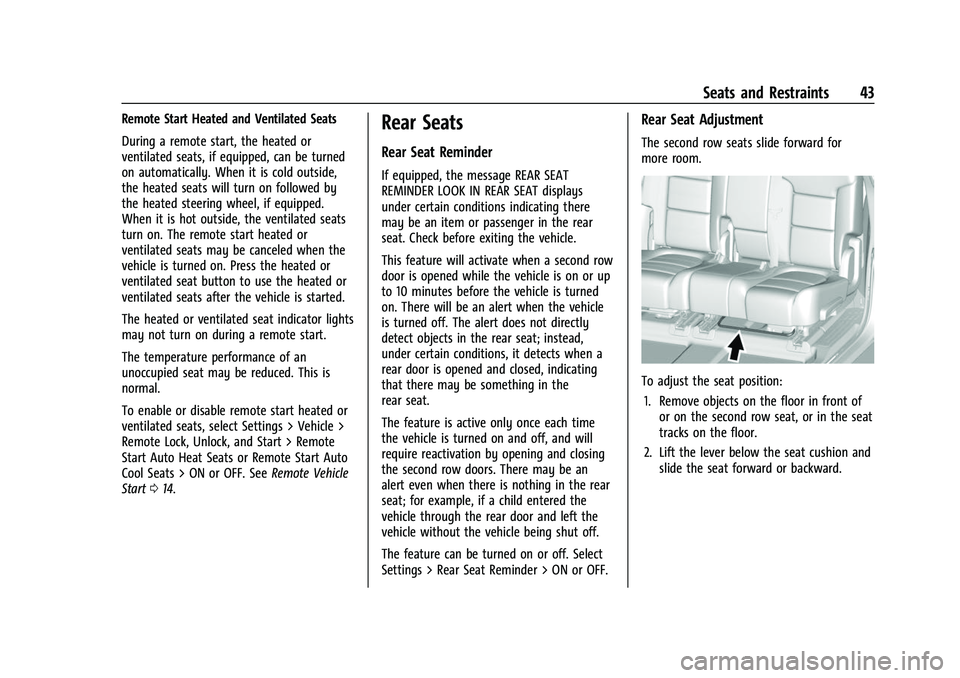
Rear Seat Adjustment
The second row seats slide forward for
more room.
To adjust the seat position:
1. Remove objects on the floor in front of or on the second row seat, or in the seat
tracks on the floor.
2. Lift the lever below the seat cushion and slide the seat forward or backward.
Page 45 of 369
Chevrolet Traverse Owner Manual (GMNA-Localizing-U.S./Canada/Mexico-
16411537) - 2023 - CRC - 3/28/22
44 Seats and Restraints
Entering and Exiting the Third Row
{Warning
Using the third row seating position
while the second row is folded could
cause injury in a sudden stop or crash. Be
sure to return the seat to the passenger
seating position. Push and pull on the
seat to make sure it is locked into place.
{Warning
If the seatback and seat base are not
locked, the seat could move forward in a
sudden stop or crash and injure the
occupant. Always push and pull on the
seatbacks to be sure the seatback and
seat base are locked.
Caution
Folding a rear seat with the seat belts
still fastened may cause damage to the
seat or the seat belts. Always unbuckle
the seat belts and return them to their
normal stowed position before folding a
rear seat.
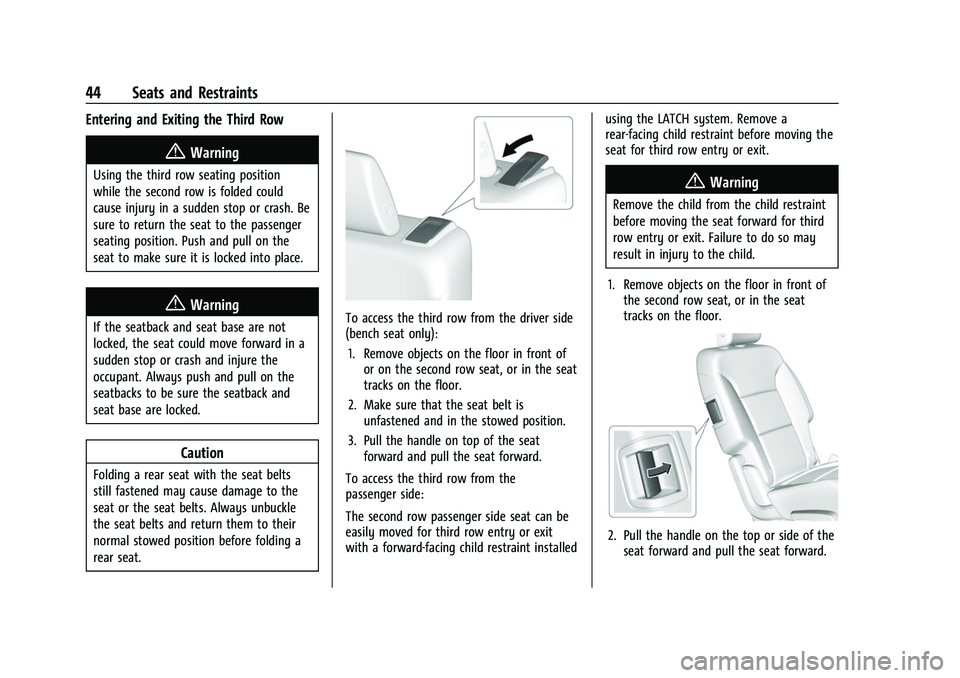
To access the third row from the driver side
(bench seat only):1. Remove objects on the floor in front of or on the second row seat, or in the seat
tracks on the floor.
2. Make sure that the seat belt is unfastened and in the stowed position.
3. Pull the handle on top of the seat forward and pull the seat forward.
To access the third row from the
passenger side:
The second row passenger side seat can be
easily moved for third row entry or exit
with a forward-facing child restraint installed using the LATCH system. Remove a
rear-facing child restraint before moving the
seat for third row entry or exit.
{Warning
Remove the child from the child restraint
before moving the seat forward for third
row entry or exit. Failure to do so may
result in injury to the child.
1. Remove objects on the floor in front of the second row seat, or in the seat
tracks on the floor.
2. Pull the handle on the top or side of theseat forward and pull the seat forward.
Page 50 of 369
Chevrolet Traverse Owner Manual (GMNA-Localizing-U.S./Canada/Mexico-
16411537) - 2023 - CRC - 3/28/22
Seats and Restraints 49
Questions and Answers About Seat Belts
Q: Will I be trapped in the vehicle after acrash if I am wearing a seat belt?
A: You could be— whether you are
wearing a seat belt or not. Your chance
of being conscious during and after a
crash, so you canunbuckle and get out,
is much greater if you are belted.
Q: If my vehicle has airbags, why should I have to wear seat belts?
A: Airbags are supplemental systems only.
They work withseat belts —not instead
of them. Whether or not an airbag is
provided, all occupants still have to
buckle up to get the most protection.
Also, in nearly all states and in all
Canadian provinces, the law requires
wearing seat belts.
Buckle To Drive
If equipped, this feature delays the vehicle
from shifting out of P (Park) when the driver
seat belt is not buckled. The Buckle to Drive
feature must be turned ON in the
infotainment system to work. To turn the
Buckle to Drive feature on or off, select
Settings > Vehicle > Buckle to Drive. See
Teen Driver 0170, if equipped. If the vehicle is on and the brake pedal is
pressed with the vehicle in P (Park) but the
driver seat belt is not buckled, a message
displays in the Driver Information
Center (DIC) and the vehicle will be delayed
from shifting out of P (Park). Buckle the
driver seat belt to clear the message and
shift out of P (Park). Shifting from P (Park)
will be delayed once for each time the
vehicle is started.
For some fleet vehicles, the feature is
always ON and cannot be turned OFF in the
infotainment system. The vehicle will be
delayed from shifting from P (Park) each
time the driver attempts to do so while the
driver seat belt is not buckled. Turning the
vehicle off then on will not change this
condition.
On some models, Buckle to Drive may also
delay shifting out of P (Park) if a front
passenger seat belt is unbuckled. A message
displays in the DIC. Buckle the front
passenger seat belt to shift out of P (Park).
This feature may delay the vehicle from
shifting out of P (Park) if an object, such as
a briefcase, handbag, grocery bag, laptop,
or other electronic device, is on the front
passenger seat. If this happens, remove the
object from the seat or buckle the seat belt
to shift out of P (Park).
If the driver, or on some vehicles, the
present front passenger remains unbuckled,
the DIC message will turn off after several
seconds and the vehicle can be shifted out
of P (Park). See
“Seat Belts”and“Child
Restraints” in the Index for information
about the importance of proper
restraint use.
If the driver seat belt or the front passenger
seat belt is unbuckled when driving, the seat
belt reminder chime and light(s) will come
on. See Seat Belt Reminders 0107. This
feature may not function properly if the
airbag readiness light is on. See Airbag
Readiness Light 0107.
How to Wear Seat Belts Properly
Follow these rules for everyone's protection.
There are additional things to know about
seat belts and children, including smaller
children and infants. If a child will be riding
in the vehicle, see Older Children065 or
Infants and Young Children 067. Review
and follow the rules for children in addition
to the following rules.
Page 53 of 369
Chevrolet Traverse Owner Manual (GMNA-Localizing-U.S./Canada/Mexico-
16411537) - 2023 - CRC - 3/28/22
52 Seats and Restraints
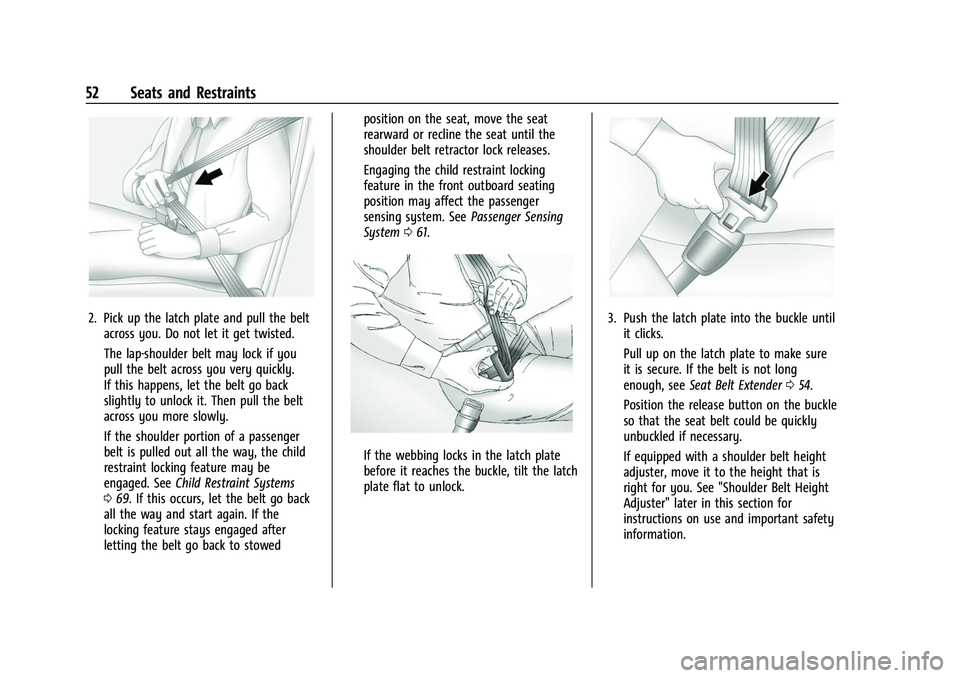
2. Pick up the latch plate and pull the beltacross you. Do not let it get twisted.
The lap-shoulder belt may lock if you
pull the belt across you very quickly.
If this happens, let the belt go back
slightly to unlock it. Then pull the belt
across you more slowly.
If the shoulder portion of a passenger
belt is pulled out all the way, the child
restraint locking feature may be
engaged. See Child Restraint Systems
0 69. If this occurs, let the belt go back
all the way and start again. If the
locking feature stays engaged after
letting the belt go back to stowed position on the seat, move the seat
rearward or recline the seat until the
shoulder belt retractor lock releases.
Engaging the child restraint locking
feature in the front outboard seating
position may affect the passenger
sensing system. See
Passenger Sensing
System 061.
If the webbing locks in the latch plate
before it reaches the buckle, tilt the latch
plate flat to unlock.
3. Push the latch plate into the buckle until
it clicks.
Pull up on the latch plate to make sure
it is secure. If the belt is not long
enough, see Seat Belt Extender 054.
Position the release button on the buckle
so that the seat belt could be quickly
unbuckled if necessary.
If equipped with a shoulder belt height
adjuster, move it to the height that is
right for you. See "Shoulder Belt Height
Adjuster" later in this section for
instructions on use and important safety
information.