intellibeam CHEVROLET TRAVERSE 2023 Owners Manual
[x] Cancel search | Manufacturer: CHEVROLET, Model Year: 2023, Model line: TRAVERSE, Model: CHEVROLET TRAVERSE 2023Pages: 369, PDF Size: 16.89 MB
Page 6 of 369
Chevrolet Traverse Owner Manual (GMNA-Localizing-U.S./Canada/Mexico-
16411537) - 2023 - CRC - 3/28/22
Introduction 5
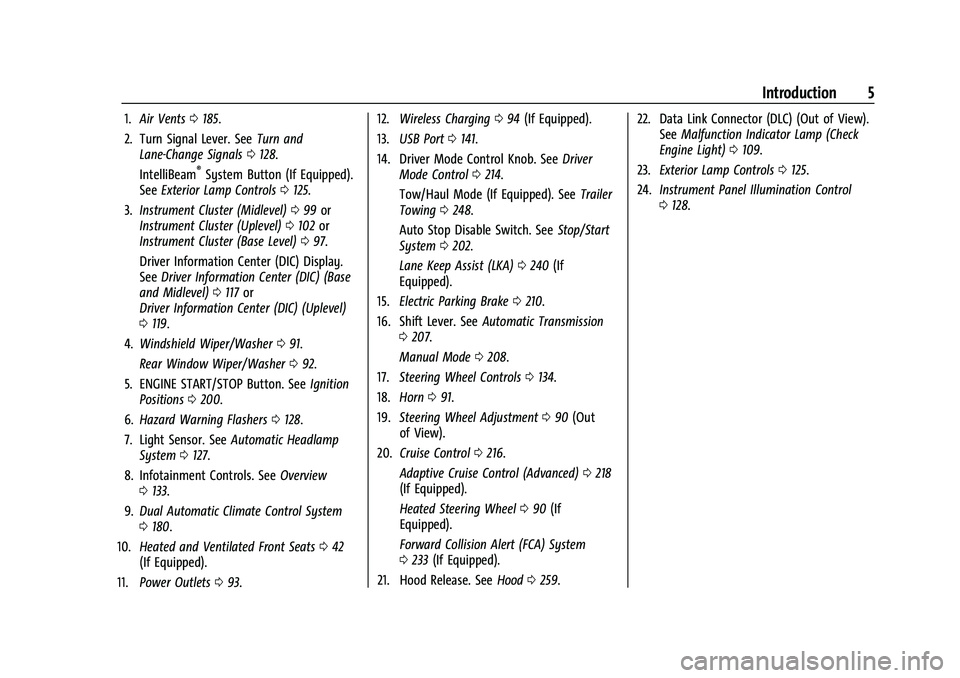
1.Air Vents 0185.
2. Turn Signal Lever. See Turn and
Lane-Change Signals 0128.
IntelliBeam
®System Button (If Equipped).
See Exterior Lamp Controls 0125.
3. Instrument Cluster (Midlevel) 099 or
Instrument Cluster (Uplevel) 0102 or
Instrument Cluster (Base Level) 097.
Driver Information Center (DIC) Display.
See Driver Information Center (DIC) (Base
and Midlevel) 0117 or
Driver Information Center (DIC) (Uplevel)
0 119.
4. Windshield Wiper/Washer 091.
Rear Window Wiper/Washer 092.
5. ENGINE START/STOP Button. See Ignition
Positions 0200.
6. Hazard Warning Flashers 0128.
7. Light Sensor. See Automatic Headlamp
System 0127.
8. Infotainment Controls. See Overview
0 133.
9. Dual Automatic Climate Control System
0180.
10. Heated and Ventilated Front Seats 042
(If Equipped).
11. Power Outlets 093. 12.
Wireless Charging 094 (If Equipped).
13. USB Port 0141.
14. Driver Mode Control Knob. See Driver
Mode Control 0214.
Tow/Haul Mode (If Equipped). See Trailer
Towing 0248.
Auto Stop Disable Switch. See Stop/Start
System 0202.
Lane Keep Assist (LKA) 0240 (If
Equipped).
15. Electric Parking Brake 0210.
16. Shift Lever. See Automatic Transmission
0 207.
Manual Mode 0208.
17. Steering Wheel Controls 0134.
18. Horn 091.
19. Steering Wheel Adjustment 090 (Out
of View).
20. Cruise Control 0216.
Adaptive Cruise Control (Advanced) 0218
(If Equipped).
Heated Steering Wheel 090 (If
Equipped).
Forward Collision Alert (FCA) System
0 233 (If Equipped).
21. Hood Release. See Hood0259. 22. Data Link Connector (DLC) (Out of View).
SeeMalfunction Indicator Lamp (Check
Engine Light) 0109.
23. Exterior Lamp Controls 0125.
24. Instrument Panel Illumination Control
0128.
Page 117 of 369
Chevrolet Traverse Owner Manual (GMNA-Localizing-U.S./Canada/Mexico-
16411537) - 2023 - CRC - 3/28/22
116 Instruments and Controls
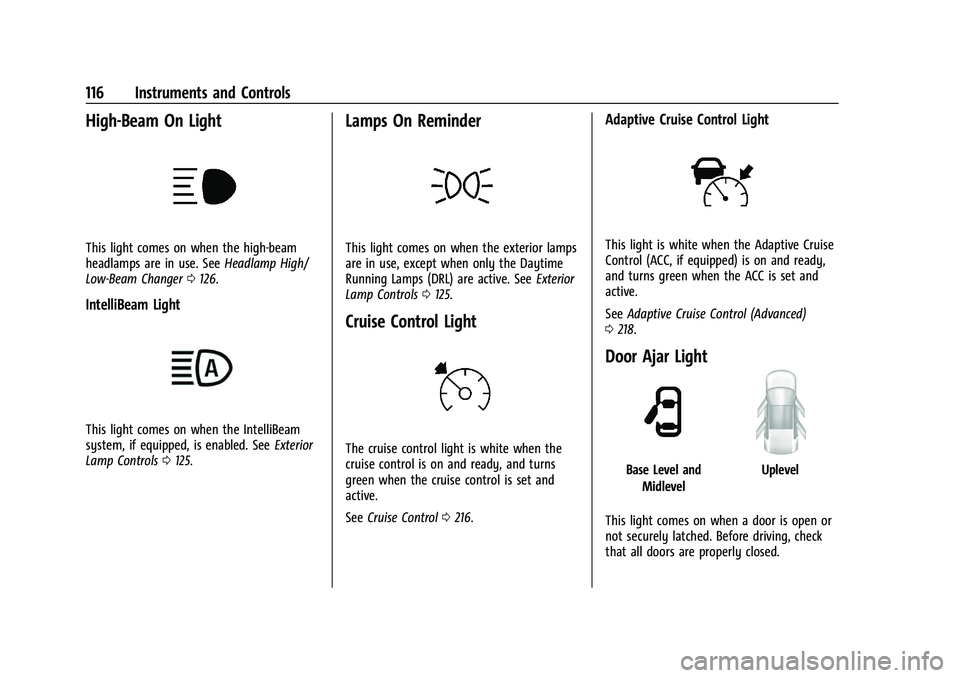
High-Beam On Light
This light comes on when the high-beam
headlamps are in use. SeeHeadlamp High/
Low-Beam Changer 0126.
IntelliBeam Light
This light comes on when the IntelliBeam
system, if equipped, is enabled. See Exterior
Lamp Controls 0125.
Lamps On Reminder
This light comes on when the exterior lamps
are in use, except when only the Daytime
Running Lamps (DRL) are active. See Exterior
Lamp Controls 0125.
Cruise Control Light
The cruise control light is white when the
cruise control is on and ready, and turns
green when the cruise control is set and
active.
See Cruise Control 0216.
Adaptive Cruise Control Light
This light is white when the Adaptive Cruise
Control (ACC, if equipped) is on and ready,
and turns green when the ACC is set and
active.
See Adaptive Cruise Control (Advanced)
0 218.
Door Ajar Light
Base Level and
MidlevelUplevel
This light comes on when a door is open or
not securely latched. Before driving, check
that all doors are properly closed.
Page 126 of 369
Chevrolet Traverse Owner Manual (GMNA-Localizing-U.S./Canada/Mexico-
16411537) - 2023 - CRC - 3/28/22
Lighting 125
Lighting
Exterior Lighting
Exterior Lamp Controls . . . . . . . . . . . . . . . . . 125
Headlamp High/Low-Beam Changer . . . 126
Flash-to-Pass . . . . . . . . . . . . . . . . . . . . . . . . . . . 126
Daytime Running Lamps (DRL) . . . . . . . . . 127
Daytime Running Lamps (DRL) . . . . . . . . . 127
Automatic Headlamp System . . . . . . . . . . 127
Hazard Warning Flashers . . . . . . . . . . . . . . 128
Turn and Lane-Change Signals . . . . . . . . . 128
Interior Lighting
Instrument Panel IlluminationControl . . . . . . . . . . . . . . . . . . . . . . . . . . . . . . 128
Courtesy Lamps . . . . . . . . . . . . . . . . . . . . . . . 129
Dome Lamps . . . . . . . . . . . . . . . . . . . . . . . . . . 129
Reading Lamps . . . . . . . . . . . . . . . . . . . . . . . . 129
Lighting Features
Entry Lighting . . . . . . . . . . . . . . . . . . . . . . . . . 130
Exit Lighting . . . . . . . . . . . . . . . . . . . . . . . . . . . 130
Battery Load Management . . . . . . . . . . . . 130
Battery Power Protection . . . . . . . . . . . . . . 131
Exterior Lighting Battery Saver . . . . . . . . . 131
Exterior Lighting
Exterior Lamp Controls
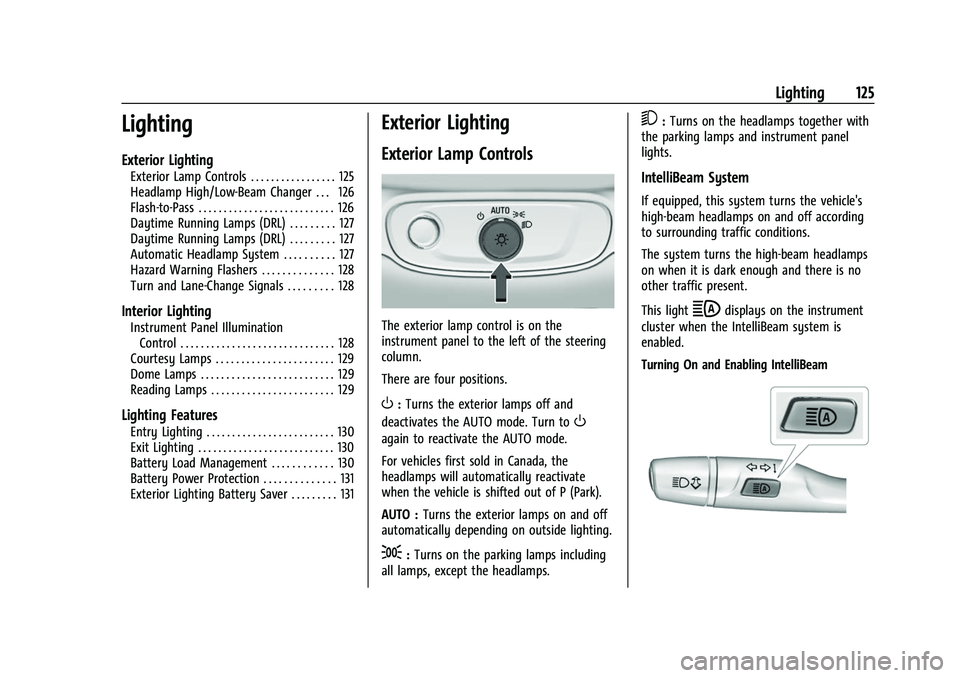
The exterior lamp control is on the
instrument panel to the left of the steering
column.
There are four positions.
O: Turns the exterior lamps off and
deactivates the AUTO mode. Turn to
O
again to reactivate the AUTO mode.
For vehicles first sold in Canada, the
headlamps will automatically reactivate
when the vehicle is shifted out of P (Park).
AUTO : Turns the exterior lamps on and off
automatically depending on outside lighting.
;: Turns on the parking lamps including
all lamps, except the headlamps.
5: Turns on the headlamps together with
the parking lamps and instrument panel
lights.
IntelliBeam System
If equipped, this system turns the vehicle's
high-beam headlamps on and off according
to surrounding traffic conditions.
The system turns the high-beam headlamps
on when it is dark enough and there is no
other traffic present.
This light
bdisplays on the instrument
cluster when the IntelliBeam system is
enabled.
Turning On and Enabling IntelliBeam
Page 127 of 369
Chevrolet Traverse Owner Manual (GMNA-Localizing-U.S./Canada/Mexico-
16411537) - 2023 - CRC - 3/28/22
126 Lighting
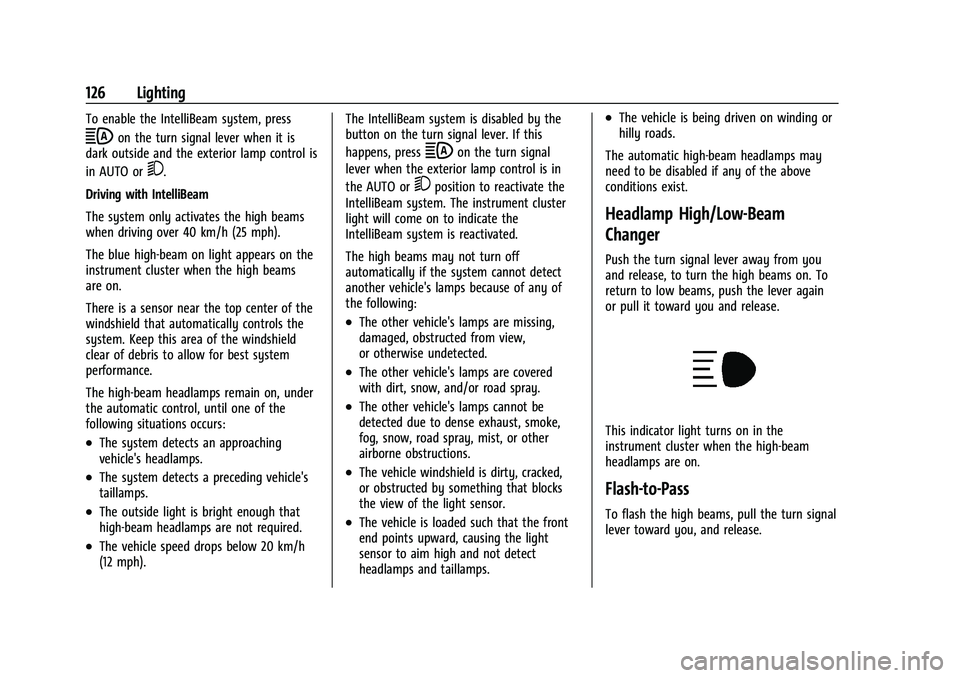
To enable the IntelliBeam system, press
bon the turn signal lever when it is
dark outside and the exterior lamp control is
in AUTO or
5.
Driving with IntelliBeam
The system only activates the high beams
when driving over 40 km/h (25 mph).
The blue high-beam on light appears on the
instrument cluster when the high beams
are on.
There is a sensor near the top center of the
windshield that automatically controls the
system. Keep this area of the windshield
clear of debris to allow for best system
performance.
The high-beam headlamps remain on, under
the automatic control, until one of the
following situations occurs:
.The system detects an approaching
vehicle's headlamps.
.The system detects a preceding vehicle's
taillamps.
.The outside light is bright enough that
high-beam headlamps are not required.
.The vehicle speed drops below 20 km/h
(12 mph). The IntelliBeam system is disabled by the
button on the turn signal lever. If this
happens, press
bon the turn signal
lever when the exterior lamp control is in
the AUTO or
5position to reactivate the
IntelliBeam system. The instrument cluster
light will come on to indicate the
IntelliBeam system is reactivated.
The high beams may not turn off
automatically if the system cannot detect
another vehicle's lamps because of any of
the following:
.The other vehicle's lamps are missing,
damaged, obstructed from view,
or otherwise undetected.
.The other vehicle's lamps are covered
with dirt, snow, and/or road spray.
.The other vehicle's lamps cannot be
detected due to dense exhaust, smoke,
fog, snow, road spray, mist, or other
airborne obstructions.
.The vehicle windshield is dirty, cracked,
or obstructed by something that blocks
the view of the light sensor.
.The vehicle is loaded such that the front
end points upward, causing the light
sensor to aim high and not detect
headlamps and taillamps.
.The vehicle is being driven on winding or
hilly roads.
The automatic high-beam headlamps may
need to be disabled if any of the above
conditions exist.
Headlamp High/Low-Beam
Changer
Push the turn signal lever away from you
and release, to turn the high beams on. To
return to low beams, push the lever again
or pull it toward you and release.
This indicator light turns on in the
instrument cluster when the high-beam
headlamps are on.
Flash-to-Pass
To flash the high beams, pull the turn signal
lever toward you, and release.