crui CHEVROLET TRAX 2013 1.G User Guide
[x] Cancel search | Manufacturer: CHEVROLET, Model Year: 2013, Model line: TRAX, Model: CHEVROLET TRAX 2013 1.GPages: 408, PDF Size: 6.59 MB
Page 251 of 408
Black plate (31,1)Chevrolet TRAX Owner Manual - 2013 - CRC - 3/6/13
Driving and Operating 9-31
Ifdstill comes on and stays on at a
speed above 20 km/h (13 mph), see
your dealer for service.
A chime may also sound when the
light comes on steady.
Notice: Do not repeatedly brake
or accelerate heavily when TCS is
off. The vehicle's driveline could
be damaged.
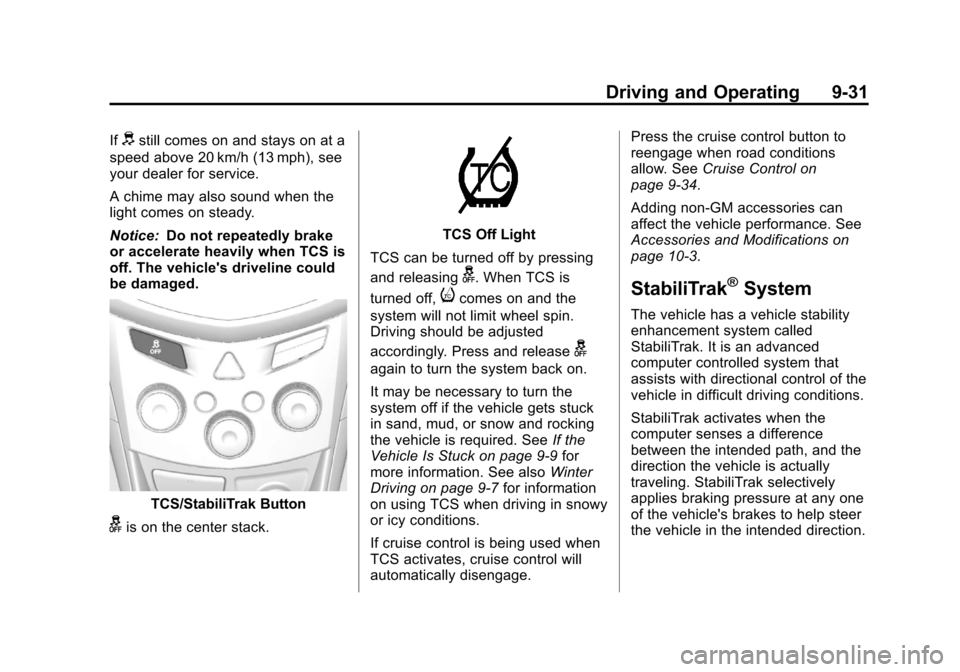
TCS/StabiliTrak Button
gis on the center stack.
TCS Off Light
TCS can be turned off by pressing
and releasing
g. When TCS is
turned off,
icomes on and the
system will not limit wheel spin.
Driving should be adjusted
accordingly. Press and release
g
again to turn the system back on.
It may be necessary to turn the
system off if the vehicle gets stuck
in sand, mud, or snow and rocking
the vehicle is required. See If the
Vehicle Is Stuck on page 9‑9 for
more information. See also Winter
Driving on page 9‑7 for information
on using TCS when driving in snowy
or icy conditions.
If cruise control is being used when
TCS activates, cruise control will
automatically disengage. Press the cruise control button to
reengage when road conditions
allow. See
Cruise Control on
page 9‑34.
Adding non-GM accessories can
affect the vehicle performance. See
Accessories and Modifications on
page 10‑3.
StabiliTrak®System
The vehicle has a vehicle stability
enhancement system called
StabiliTrak. It is an advanced
computer controlled system that
assists with directional control of the
vehicle in difficult driving conditions.
StabiliTrak activates when the
computer senses a difference
between the intended path, and the
direction the vehicle is actually
traveling. StabiliTrak selectively
applies braking pressure at any one
of the vehicle's brakes to help steer
the vehicle in the intended direction.
Page 253 of 408
Black plate (33,1)Chevrolet TRAX Owner Manual - 2013 - CRC - 3/6/13
Driving and Operating 9-33
If cruise control is being used when
StabiliTrak activates, cruise control
will automatically disengage. Press
the cruise control button to
reengage when road conditions
allow. SeeCruise Control on
page 9‑34.
Descent Control
System (DCS)
The Descent Control System (DCS)
allows the vehicle to travel at a low
speed without applying the brake.
The vehicle will automatically
decelerate to a low speed and
remain there when DCS is
turned on.
Use only when descending steep
grades while driving off-road. Do not
use when driving on normal road
surfaces.
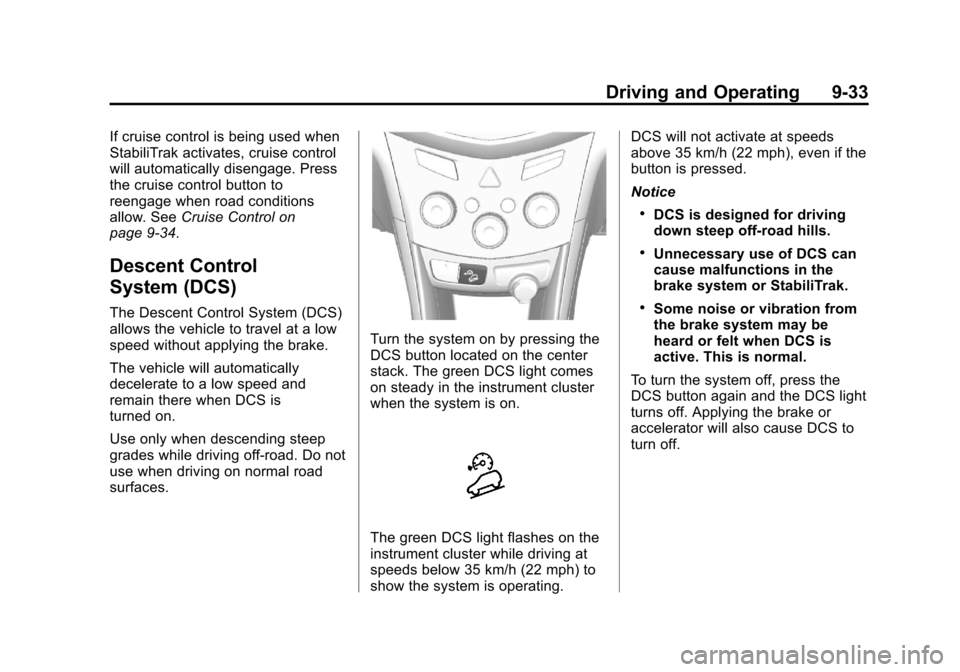
Turn the system on by pressing the
DCS button located on the center
stack. The green DCS light comes
on steady in the instrument cluster
when the system is on.
The green DCS light flashes on the
instrument cluster while driving at
speeds below 35 km/h (22 mph) to
show the system is operating. DCS will not activate at speeds
above 35 km/h (22 mph), even if the
button is pressed.
Notice
.DCS is designed for driving
down steep off-road hills.
.Unnecessary use of DCS can
cause malfunctions in the
brake system or StabiliTrak.
.Some noise or vibration from
the brake system may be
heard or felt when DCS is
active. This is normal.
To turn the system off, press the
DCS button again and the DCS light
turns off. Applying the brake or
accelerator will also cause DCS to
turn off.
Page 254 of 408
Black plate (34,1)Chevrolet TRAX Owner Manual - 2013 - CRC - 3/6/13
9-34 Driving and Operating
Cruise Control
For vehicles with cruise control, the
vehicle can maintain a speed of
about 40 km/h (25 mph) or more
without keeping your foot on the
accelerator. Cruise control does not
work at speeds below 40 km/h
(25 mph).
If the brakes are applied, the cruise
control shuts off.
If the vehicle's Traction Control
System (TCS) or StabiliTrak system
begins to limit wheel spin while
using cruise control, the cruise
control will automatically disengage.
SeeTraction Control System (TCS)
on page 9‑30 orStabiliTrak
®System
on page 9‑31. When road conditions
allow you to safely use it again, the
cruise control can be turned
back on.
{WARNING
Cruise control can be dangerous
where you cannot drive safely at
a steady speed. So, do not use
the cruise control on winding
roads or in heavy traffic.
Cruise control can be dangerous
on slippery roads. On such roads,
fast changes in tire traction can
cause excessive wheel slip, and
you could lose control. Do not use
cruise control on slippery roads.
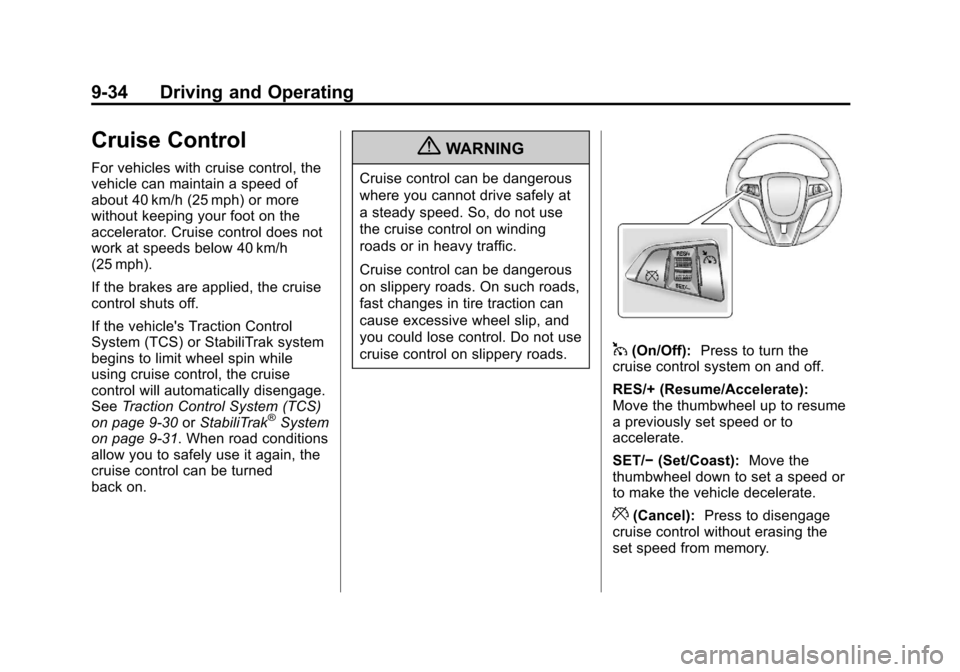
1(On/Off): Press to turn the
cruise control system on and off.
RES/+ (Resume/Accelerate):
Move the thumbwheel up to resume
a previously set speed or to
accelerate.
SET/− (Set/Coast): Move the
thumbwheel down to set a speed or
to make the vehicle decelerate.
*(Cancel): Press to disengage
cruise control without erasing the
set speed from memory.
Page 255 of 408
Black plate (35,1)Chevrolet TRAX Owner Manual - 2013 - CRC - 3/6/13
Driving and Operating 9-35
Setting Cruise Control
If
1is on when not in use, it could
get bumped and go into cruise when
not desired. Keep
1off when cruise
control is not being used.
To set cruise control:
1. Press
1.
2. Get to the speed desired.
3. Move the thumbwheel down to SET/- and release it.
4. Take your foot off the accelerator pedal.
Resuming a Set Speed
If the cruise control is set at a
desired speed and then the brakes
or clutch for manual transmissions
are applied, the cruise control is
disengaged without erasing the set
speed from memory.
Once the vehicle reaches about
40 km/h (25 mph) or more, move the
thumbwheel up toward RES/+ briefly. The vehicle returns to the
speed selected previously and
stays there.
Increasing Speed While Using
Cruise Control
If the cruise control system is
already activated:.Move the thumbwheel up toward
RES/+ and hold it until the
desired speed is reached, then
release it.
.To increase the speed in small
amounts, move the thumbwheel
up toward RES/+ briefly and
then release it. Each time this is
done, the vehicle goes about
1.6 km/h (1 mph) faster.
Reducing Speed While Using
Cruise Control
If the cruise control system is
already activated:
.Move the thumbwheel toward
SET/− and hold until the desired
lower speed is reached, then
release it.
.To slow down in small amounts,
move the thumbwheel toward
SET/− briefly. Each time this is
done, the vehicle goes about
1.6 km/h (1 mph) slower.
Passing Another Vehicle While
Using Cruise Control
Use the accelerator pedal to
increase the vehicle speed. When
you take your foot off the pedal, the
vehicle slows down to the previous
set cruise control speed.
Using Cruise Control on Hills
How well cruise control works on
hills depends on the vehicle speed,
load, and the steepness of the hills.
When going up steep hills, you
might have to step on the
accelerator pedal to maintain the
vehicle speed. When going
downhill, you might have to brake or
shift to a lower gear to maintain the
vehicle speed. When the brakes are
applied, cruise control is
disengaged.
Page 256 of 408
Black plate (36,1)Chevrolet TRAX Owner Manual - 2013 - CRC - 3/6/13
9-36 Driving and Operating
Ending Cruise Control
There are three ways to end cruise
control:
.To disengage cruise control,
step lightly on the brake pedal or
clutch for manual transmission.
.Press*on the steering wheel.
.To turn off cruise control, press1on the steering wheel.
Erasing Speed Memory
The cruise control set speed is
erased from memory if the
1button
is pressed or if the ignition is
turned off.
Object Detection
Systems
Ultrasonic Parking Assist
For vehicles with the Ultrasonic
Rear Parking Assist (URPA) system,
it assists the driver with parking and
avoiding objects while in
R (Reverse). URPA operates at
speeds less than 8 km/h (5 mph),
and the sensors on the rear bumper
detect objects up to 2.5 m (8 ft)
behind the vehicle, and at least
20 cm (8 in) off the ground.
{WARNING
The URPA system does not
detect children, pedestrians,
bicyclists, animals, or objects
below the bumper or that are too
close or too far from the vehicle.
It is not available at speeds
greater than 8 km/h (5 mph). To
prevent injury, death, or vehicle
(Continued)
WARNING (Continued)
damage, even with URPA, always
check the area around the vehicle
and check all mirrors before
backing.
How the System Works
URPA comes on automatically when
the shift lever is moved into
R (Reverse).
URPA operates only at speeds less
than 8 km/h (5 mph).
An obstacle is indicated by audible
beeps. The interval between the
beeps becomes shorter as the
vehicle gets closer to the obstacle.
When the distance is less than
40 cm (16 in) the beeping is a
continuous tone for five seconds.
To be detected, objects must be at
least 20 cm (8 in) off the ground and
below liftgate level. Objects must
also be within 2.5 m (8 ft) from the
Page 399 of 408

Black plate (3,1)Chevrolet TRAX Owner Manual - 2013 - CRC - 3/6/13
INDEX i-3
Climate Control Systems . . . . . . . 8-1Air Conditioning . . . . . . . . . . . . . . . 8-1
Heating . . . . . . . . . . . . . . . . . . . . . . . . 8-1
Clock . . . . . . . . . . . . . . . . . . . . . . . . . . . 5-5
Cluster, Instrument . . . . . . . . . . . . . 5-9
Clutch, Hydraulic . . . . . . . . . . . . . 10-13
Collision Damage Repair . . . . . 13-12
Compact Spare Tire . . . . . . . . . . 10-67
Compass . . . . . . . . . . . . . . . . . . . . . . . 5-4
Connections OnStar
®. . . . . . . . . . . . . . . . . . . . . . 14-4
Control of a Vehicle . . . . . . . . . . . . . 9-3
Convenience Net . . . . . . . . . . . . . . . 4-3
Convex Mirrors . . . . . . . . . . . . . . . . 2-11
Coolant Engine . . . . . . . . . . . . . . . . . . . . . . 10-16
Engine Temperature
Warning Light . . . . . . . . . . . . . . . 5-19
Cooling System . . . . . . . . . . . . . . . 10-15
Courtesy Lamps . . . . . . . . . . . . . . . . 6-5
Courtesy Transportation Program . . . . . . . . . . . . . . . . . . . . . 13-11
Cruise Control . . . . . . . . . . . . . . . . . 9-34 Light . . . . . . . . . . . . . . . . . . . . . . . . . . 5-23
Cupholders . . . . . . . . . . . . . . . . . . . . . 4-2 Customer Assistance . . . . . . . . . . 13-4
Offices . . . . . . . . . . . . . . . . . . . . . . . . 13-4
Text Telephone (TTY)
Users . . . . . . . . . . . . . . . . . . . . . . . 13-4
Customer Information Service PublicationsOrdering Information . . . . . . 13-15
Customer Satisfaction Procedure . . . . . . . . . . . . . . 13-1, 13-3D
Damage Repair, Collision . . . . . 13-12
Danger, Warnings, andCautions . . . . . . . . . . . . . . . . . . . . . . . . iv
Data Recorders, Event . . . . . . . 13-17
Daytime Running Lamps (DRL) . . . . . . . . . . . . . . . . . . 6-2
Indicator Light . . . . . . . . . . . . . . . . 5-22
Defensive Driving . . . . . . . . . . . . . . . 9-3
Descent Control System (DCS) . . . . . . . . . . . . . . . . 9-33
Descent Control System Light . . . . . . . . . . . . . . . . . . . . . . . . . 5-17
Devices Auxiliary . . . . . . . . . . . . . . . . . . . . . . 7-24 Diagnostics
OnStar
®. . . . . . . . . . . . . . . . . . . . . . 14-5
Distracted Driving . . . . . . . . . . . . . . . 9-2
Dome Lamps . . . . . . . . . . . . . . . . . . . 6-6
Door Ajar Light . . . . . . . . . . . . . . . . . . . . . 5-23
Locks . . . . . . . . . . . . . . . . . . . . . . . . . . 2-6
Power Locks . . . . . . . . . . . . . . . . . . . 2-7
Drive Belt Routing, Engine . . . . . 12-4
Drive Systems All-Wheel Drive . . . . . . . 10-24, 9-27
Driver Information Center (DIC) . . . . . . . . . . . . . . . . . 5-24
Driving Defensive . . . . . . . . . . . . . . . . . . . . . . 9-3
Drunk . . . . . . . . . . . . . . . . . . . . . . . . . . 9-3
For Better Fuel Economy . . . . . 1-20
Highway Hypnosis . . . . . . . . . . . . . 9-6
Hill and Mountain Roads . . . . . . . 9-7
If the Vehicle is Stuck . . . . . . . . . . 9-9
Loss of Control . . . . . . . . . . . . . . . . 9-5
Off-Road Recovery . . . . . . . . . . . . 9-5
Vehicle Load Limits . . . . . . . . . . . 9-10
Wet Roads . . . . . . . . . . . . . . . . . . . . 9-6
Winter . . . . . . . . . . . . . . . . . . . . . . . . . 9-7
Page 402 of 408

Black plate (6,1)Chevrolet TRAX Owner Manual - 2013 - CRC - 3/6/13
i-6 INDEX
Instrument PanelStorage Area . . . . . . . . . . . . . . . . . . 4-1
Introduction . . . . . . . . . . . . . . . . . . . . . . . iii
J
Jump Starting . . . . . . . . . . . . . . . . . 10-68
K
Keyless Entry Remote (RKE) System . . . . . . . . 2-3
Keys . . . . . . . . . . . . . . . . . . . . . . . . . . . . 2-1
L
Labeling, Tire Sidewall . . . . . . . . 10-42
Lamps
Courtesy . . . . . . . . . . . . . . . . . . . . . . . 6-5
Daytime Running (DRL) . . . . . . . 6-2
Dome . . . . . . . . . . . . . . . . . . . . . . . . . . 6-6
Exterior Controls . . . . . . . . . . . . . . . 6-1
Front Fog . . . . . . . . . . . . . . . . . . . . . . 6-4
Headlamps, Front TurnSignal, and Parking
Lamps . . . . . . . . . . . . . . . . . . . . 10-28
License Plate . . . . . . . . . . . . . . . 10-31 Lamps (cont'd)
Malfunction Indicator . . . . . . . . . 5-13
On Reminder . . . . . . . . . . . . . . . . . 5-23
Reading . . . . . . . . . . . . . . . . . . . . . . . 6-6
Lap-Shoulder Belt . . . . . . . . . . . . . 3-15
LATCH System Replacing Parts after aCrash . . . . . . . . . . . . . . . . . . . . . . . 3-51
LATCH, Lower Anchors and
Tethers for Children . . . . . . . . . . 3-45
Liftgate Carbon Monoxide . . . . . . . . . . . . . . 2-8
Lighter, Cigarette . . . . . . . . . . . . . . . 5-7
Lighting Illumination Control . . . . . . . . . . . . 6-5
Lights Airbag Readiness . . . . . . . . . . . . . 5-12
Antilock Brake System(ABS) Warning . . . . . . . . . . . . . . 5-17
Brake System Warning . . . . . . . 5-16
Charging System . . . . . . . . . . . . . 5-13
Cruise Control . . . . . . . . . . . . . . . . 5-23
Daytime Running Lamps (DRL) . . . . . . . . . . . . . . . . 5-22
Descent Control System . . . . . . 5-17
Door Ajar . . . . . . . . . . . . . . . . . . . . . 5-23 Lights (cont'd)
Engine Coolant
Temperature Warning . . . . . . . 5-19
Engine Oil Pressure . . . . . . . . . . 5-20
Flash-to-Pass . . . . . . . . . . . . . . . . . . 6-2
Front Fog Lamp . . . . . . . . . . . . . . 5-22
High-Beam On . . . . . . . . . . . . . . . . 5-22
High/Low Beam Changer . . . . . . 6-2
Immobilizer . . . . . . . . . . . . . . . . . . . 5-21
Low Fuel Warning . . . . . . . . . . . . 5-21
Reduced Engine Power . . . . . . 5-22
Safety Belt Reminders . . . . . . . . 5-11
Service Vehicle Soon . . . . . . . . . 5-16
StabiliTrak
®OFF . . . . . . . . . . . . . 5-19
Tire Pressure . . . . . . . . . . . . . . . . . 5-20
Traction Control System (TCS)/StabiliTrak
®. . . . . . . . . . 5-19
Traction Off . . . . . . . . . . . . . . . . . . . 5-18
Ultrasonic Parking Sensor . . . . 5-18
Up-Shift . . . . . . . . . . . . . . . . . . . . . . 5-17
Warning, Power Steering . . . . . 5-18
Link Smartphone . . . . . . 7-47, 7-49, 7-51