info CHEVROLET TRAX 2013 1.G Workshop Manual
[x] Cancel search | Manufacturer: CHEVROLET, Model Year: 2013, Model line: TRAX, Model: CHEVROLET TRAX 2013 1.GPages: 408, PDF Size: 6.59 MB
Page 143 of 408
Black plate (39,1)Chevrolet TRAX Owner Manual - 2013 - CRC - 3/6/13
Instruments and Controls 5-39
All Wheel Drive Steering
This feature will turn on the all
wheel drive steering feature.
Press All Wheel Drive Steering
when highlighted. Select On or Off.
Press
4.
Instrument Lighting
This feature will turn on the
instrument lighting feature.
Press Instrument Lighting when
highlighted. Select On or Off.
Press
4.
Language
Select the Language menu and the
following may be displayed:
.English
.French
.Spanish
Press Language when highlighted.
Select the language desired.
Press
4.
Text Scroll
This allows the Text Scroll feature to
be turned on or off.
When on, if there is long text
displayed on the audio screen, the
text is scrolled. When off, the text is
scrolled once and displayed in
truncated form.
Press Text Scroll when highlighted.
Select On or Off. Press
4.
Touch Beep Volume
This allows the Touch Beep Volume
feature to be turned on or off.
When on, a beep will be heard
when pressing the screen. When
off, the beep is canceled.
Press Touch Beep Volume when
highlighted. Select On or Off.
Press
4.
Max Startup Volume
This allows the startup volume of
the infotainment system to be set.
Press Max Startup Volume when
highlighted. Press
SorTselect the
desired volume between 9-21.
Press
4.
About
Select the About menu and the
following will be displayed:
.System Version
.Legal Information
System Version
Press System Version when
highlighted to view the version of
the infotainment system. Press
4.
Page 144 of 408
Black plate (40,1)Chevrolet TRAX Owner Manual - 2013 - CRC - 3/6/13
5-40 Instruments and Controls
Legal Information
Press Legal Information when
highlighted to view the Open source
information. Press
4.
DivX VOD
Press DivX VOD when highlighted.
.DIVX VIDEO: DivX is a digital
video format created by DivX,
LLC, a subsidiary of Rovi
Corporation. This is an official
DivX Certified
®device that plays
DivX video. See divx.com for
more information and software
tools on how to convert files into
DivX videos.
.DIVX VIDEO-ON DEMAND: This
DivX Certified device must be
registered in order to play
purchased DivX
Video-on-Demand (VOD)
movies. To obtain a registration
code, locate the DivX VOD
section in the device setup
menu. See vod.divx.com for
more information on how to
complete the registration.
Press
4.
Page 149 of 408
Black plate (5,1)Chevrolet TRAX Owner Manual - 2013 - CRC - 3/6/13
Lighting 6-5
#(Front Fog Lamps):Press to
turn the fog lamps on or off. An
indicator light on the instrument
cluster comes on when the fog
lamps are on.
The fog lamps come on together
with the parking lamps.
If the high-beam headlamps are
turned on, the fog lamps will turn off.
If the high-beam headlamps are
turned off, the fog lamps will turn
back on again.
Some localities have laws that
require the headlamps to be on
along with the fog lamps.Interior Lighting
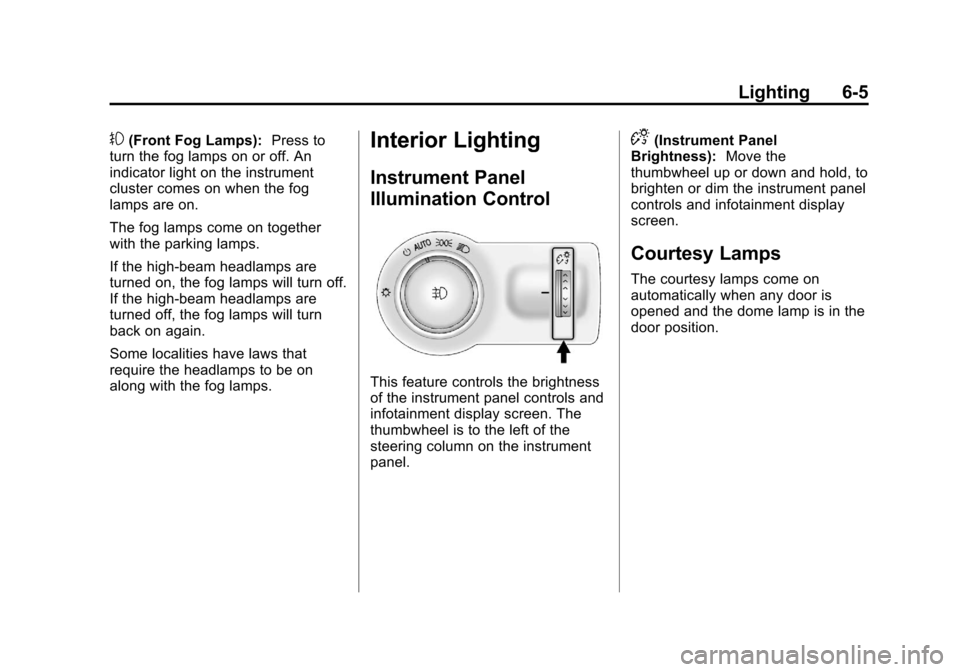
Instrument Panel
Illumination Control
This feature controls the brightness
of the instrument panel controls and
infotainment display screen. The
thumbwheel is to the left of the
steering column on the instrument
panel.
D(Instrument Panel
Brightness): Move the
thumbwheel up or down and hold, to
brighten or dim the instrument panel
controls and infotainment display
screen.
Courtesy Lamps
The courtesy lamps come on
automatically when any door is
opened and the dome lamp is in the
door position.
Page 150 of 408
Black plate (6,1)Chevrolet TRAX Owner Manual - 2013 - CRC - 3/6/13
6-6 Lighting
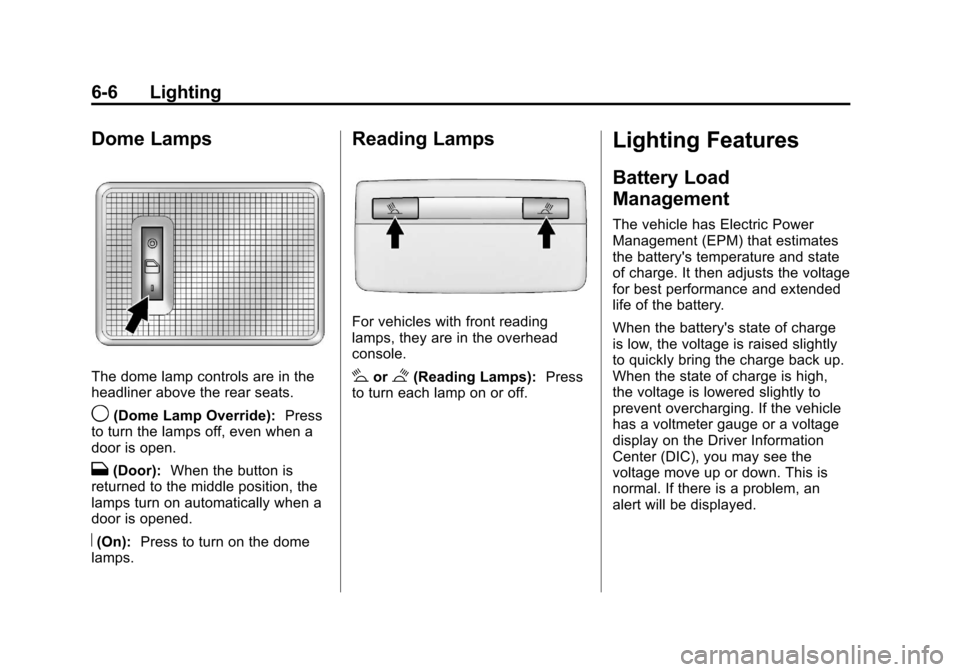
Dome Lamps
The dome lamp controls are in the
headliner above the rear seats.
9(Dome Lamp Override):Press
to turn the lamps off, even when a
door is open.
H(Door): When the button is
returned to the middle position, the
lamps turn on automatically when a
door is opened.
R(On): Press to turn on the dome
lamps.
Reading Lamps
For vehicles with front reading
lamps, they are in the overhead
console.
#or$(Reading Lamps): Press
to turn each lamp on or off.
Lighting Features
Battery Load
Management
The vehicle has Electric Power
Management (EPM) that estimates
the battery's temperature and state
of charge. It then adjusts the voltage
for best performance and extended
life of the battery.
When the battery's state of charge
is low, the voltage is raised slightly
to quickly bring the charge back up.
When the state of charge is high,
the voltage is lowered slightly to
prevent overcharging. If the vehicle
has a voltmeter gauge or a voltage
display on the Driver Information
Center (DIC), you may see the
voltage move up or down. This is
normal. If there is a problem, an
alert will be displayed.
Page 153 of 408
Black plate (1,1)Chevrolet TRAX Owner Manual - 2013 - CRC - 3/6/13
Infotainment System 7-1
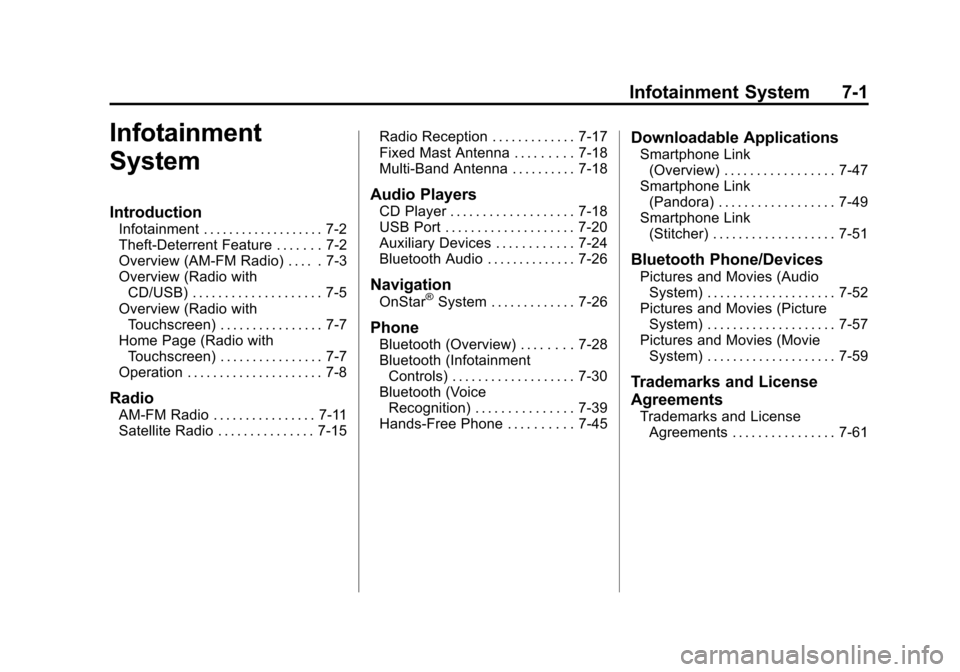
Infotainment
System
Introduction
Infotainment . . . . . . . . . . . . . . . . . . . 7-2
Theft-Deterrent Feature . . . . . . . 7-2
Overview (AM-FM Radio) . . . . . 7-3
Overview (Radio withCD/USB) . . . . . . . . . . . . . . . . . . . . 7-5
Overview (Radio with Touchscreen) . . . . . . . . . . . . . . . . 7-7
Home Page (Radio with Touchscreen) . . . . . . . . . . . . . . . . 7-7
Operation . . . . . . . . . . . . . . . . . . . . . 7-8
Radio
AM-FM Radio . . . . . . . . . . . . . . . . 7-11
Satellite Radio . . . . . . . . . . . . . . . 7-15 Radio Reception . . . . . . . . . . . . . 7-17
Fixed Mast Antenna . . . . . . . . . 7-18
Multi-Band Antenna . . . . . . . . . . 7-18
Audio Players
CD Player . . . . . . . . . . . . . . . . . . . 7-18
USB Port . . . . . . . . . . . . . . . . . . . . 7-20
Auxiliary Devices . . . . . . . . . . . . 7-24
Bluetooth Audio . . . . . . . . . . . . . . 7-26
Navigation
OnStar®System . . . . . . . . . . . . . 7-26
Phone
Bluetooth (Overview) . . . . . . . . 7-28
Bluetooth (Infotainment
Controls) . . . . . . . . . . . . . . . . . . . 7-30
Bluetooth (Voice Recognition) . . . . . . . . . . . . . . . 7-39
Hands-Free Phone . . . . . . . . . . 7-45
Downloadable Applications
Smartphone Link (Overview) . . . . . . . . . . . . . . . . . 7-47
Smartphone Link (Pandora) . . . . . . . . . . . . . . . . . . 7-49
Smartphone Link
(Stitcher) . . . . . . . . . . . . . . . . . . . 7-51
Bluetooth Phone/Devices
Pictures and Movies (AudioSystem) . . . . . . . . . . . . . . . . . . . . 7-52
Pictures and Movies (Picture System) . . . . . . . . . . . . . . . . . . . . 7-57
Pictures and Movies (Movie System) . . . . . . . . . . . . . . . . . . . . 7-59
Trademarks and License
Agreements
Trademarks and LicenseAgreements . . . . . . . . . . . . . . . . 7-61
Page 154 of 408
Black plate (2,1)Chevrolet TRAX Owner Manual - 2013 - CRC - 3/6/13
7-2 Infotainment System
Introduction
Infotainment
Determine which radio the vehicle
has and read the following pages to
become familiar with its features.
{WARNING
Taking your eyes off the road for
extended periods could cause a
crash resulting in injury or death
to you or others. Do not give
extended attention to infotainment
tasks while driving.
This system provides access to
many audio and non-audio listings.
To minimize taking your eyes off the
road while driving, do the following
while the vehicle is parked:
.Become familiar with the
operation and controls of the
audio system.
.Set up the tone, speaker
adjustments, and preset radio
stations.
See Defensive Driving on page 9‑3.
Notice: Contact your dealer
before adding any equipment.
Adding audio or communication
equipment could interfere with
the operation of the engine, radio,
or other systems, and could
damage them. Follow federal
rules covering mobile radio and
telephone equipment.
Customer Assistance
Assistance is available to help with
Bluetooth pairing, application
downloading and installation, other
mobile device interface, and
operation support of the
infotainment system. Specialists are
available when calling this
Customer Assistance number:
U.S. (855) 4 SUPPORT (478-7767).
Theft-Deterrent Feature
The infotainment system has an
electronic security system installed
to prevent theft.
The infotainment system only works
in the vehicle in which it was first
installed, and cannot be used in
another vehicle.
Page 155 of 408
Black plate (3,1)Chevrolet TRAX Owner Manual - 2013 - CRC - 3/6/13
Infotainment System 7-3
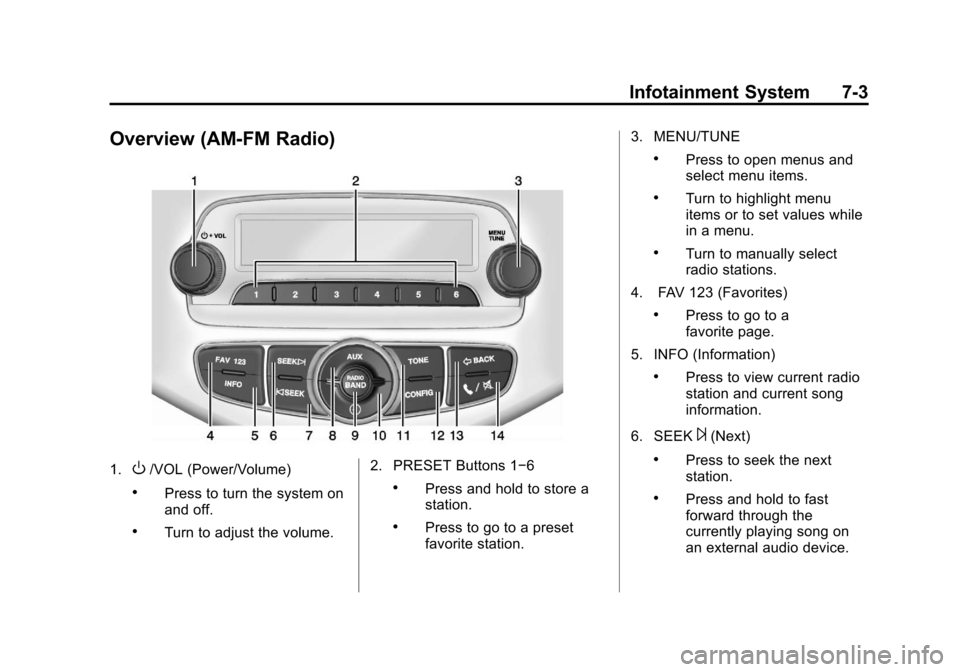
Overview (AM-FM Radio)
1.O/VOL (Power/Volume)
.Press to turn the system on
and off.
.Turn to adjust the volume.2. PRESET Buttons 1−6
.Press and hold to store a
station.
.Press to go to a preset
favorite station.3. MENU/TUNE
.Press to open menus and
select menu items.
.Turn to highlight menu
items or to set values while
in a menu.
.Turn to manually select
radio stations.
4. FAV 123 (Favorites)
.Press to go to a
favorite page.
5. INFO (Information)
.Press to view current radio
station and current song
information.
6. SEEK
¨(Next)
.Press to seek the next
station.
.Press and hold to fast
forward through the
currently playing song on
an external audio device.
Page 156 of 408

Black plate (4,1)Chevrolet TRAX Owner Manual - 2013 - CRC - 3/6/13
7-4 Infotainment System
7.©SEEK (Previous)
.Press to seek the previous
station.
.Press and hold to reverse
through the currently
playing song on an external
audio device.
8. AUX (Auxiliary)
.Press to access the
auxiliary input device.
9. RADIO/BAND
.Press to select AM, FM,
or band.
.Press to select the radio
when listening to a different
audio source. 10.
H(Clock)
.Press to enter the time
and date settings menu.
11. TONE
.Press to open the
tone menu.
12. CONFIG (Configuration)
.Press to open the System
Configuration menu.
13.
/BACK
.Press to go to the
previous screen.
.Press to cancel entered
content. 14.
5/>(Phone/Mute)
.Press to open the phone
main menu.
.Press to mute the audio
system.
Page 157 of 408
Black plate (5,1)Chevrolet TRAX Owner Manual - 2013 - CRC - 3/6/13
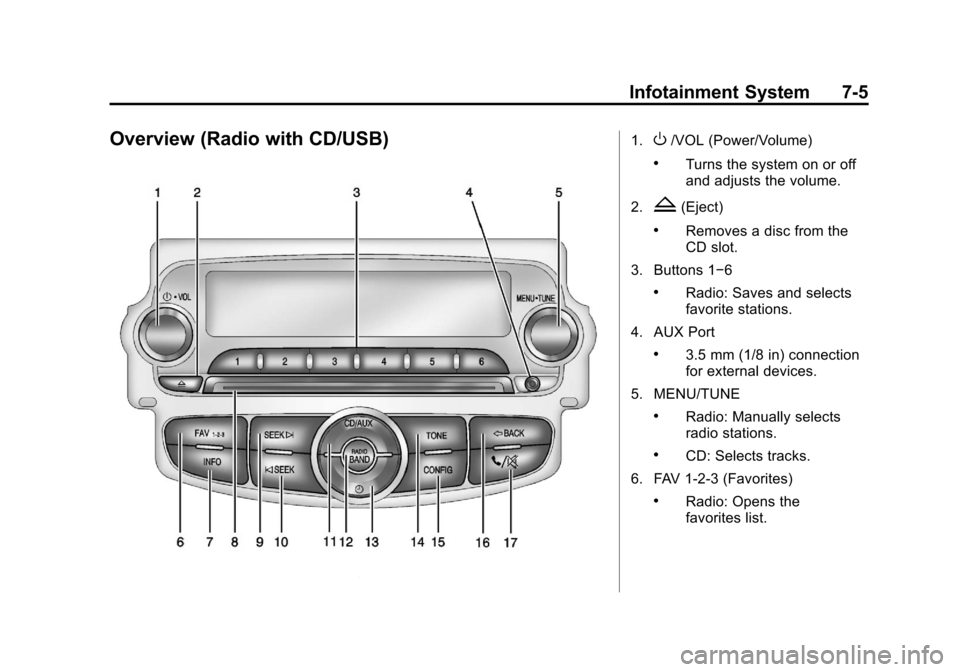
Infotainment System 7-5
Overview (Radio with CD/USB)1.O/VOL (Power/Volume)
.Turns the system on or off
and adjusts the volume.
2.
Z(Eject)
.Removes a disc from the
CD slot.
3. Buttons 1−6
.Radio: Saves and selects
favorite stations.
4. AUX Port
.3.5 mm (1/8 in) connection
for external devices.
5. MENU/TUNE
.Radio: Manually selects
radio stations.
.CD: Selects tracks.
6. FAV 1-2-3 (Favorites)
.Radio: Opens the
favorites list.
Page 158 of 408

Black plate (6,1)Chevrolet TRAX Owner Manual - 2013 - CRC - 3/6/13
7-6 Infotainment System
7. INFO (Information)
.Radio: Shows available
information about the
current station.
.CD: Shows available
information about the
current track.
8. CD Slot
9. SEEK
¨
.Radio: Seeks the next
station.
.CD: Selects the next track
or fast forwards within a
track.
10.
©SEEK
.Radio: Seeks the previous
station.
.CD: Selects the previous
track or rewinds within a
track. 11. CD/AUX
.Selects the CD player or
an external audio source.
12. RADIO/BAND
.Changes the band while
listening to the radio.
.Selects the radio when
listening to a different
audio source.
13.
H(Clock Menu)
.Opens the Clock menu.
14. TONE
.Opens the Tone menu.
15. CONFIG (Configuration)
.Opens the
Configuration menu. 16.
/BACK
.Menu: Moves one
level back.
.Character Input: Deletes
the last character.
17.
5/>(Phone/Mute)
.Opens the Phone menu.
.Mutes the audio system.