remote start CHEVROLET TRAX 2015 1.G User Guide
[x] Cancel search | Manufacturer: CHEVROLET, Model Year: 2015, Model line: TRAX, Model: CHEVROLET TRAX 2015 1.GPages: 409, PDF Size: 5.58 MB
Page 52 of 409
Black plate (7,1)Chevrolet TRAX Owner Manual (GMNA-Localizing-U.S./Canada/Mexico-
7576294) - 2015 - CRC - 2/6/15
Seats and Restraints 3-7
Heated Front Seats
{Warning
If you cannot feel temperature
change or pain to the skin, the
seat heater may cause burns. To
reduce the risk of burns, people
with such a condition should use
care when using the seat heater,
especially for long periods of
time. Do not place anything on
the seat that insulates against
heat, such as a blanket, cushion,
cover, or similar item. This may
cause the seat heater to
overheat. An overheated seat
heater may cause a burn or may
damage the seat.
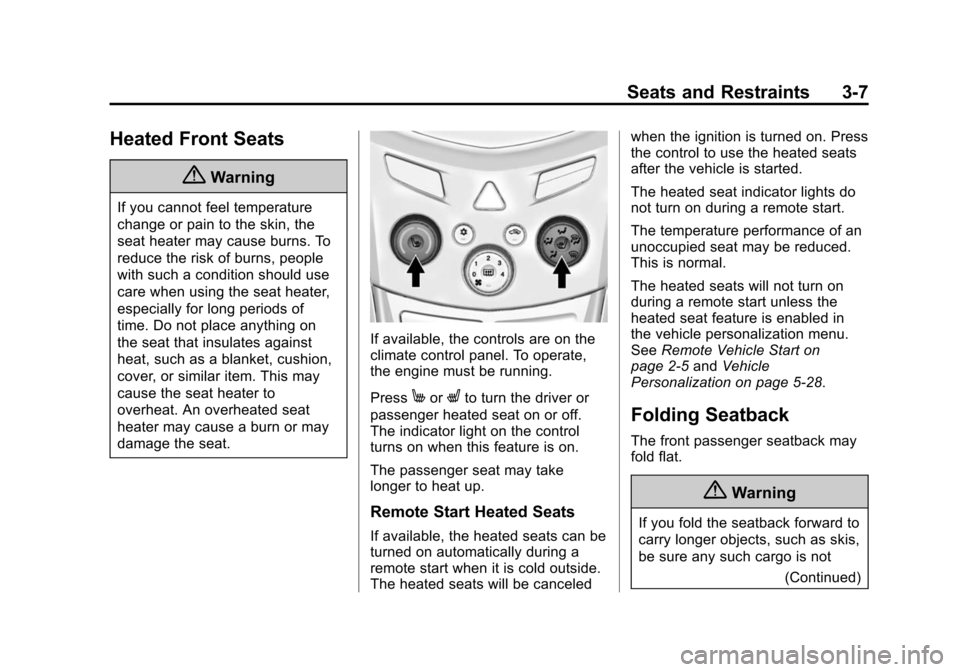
If available, the controls are on the
climate control panel. To operate,
the engine must be running.
Press
MorLto turn the driver or
passenger heated seat on or off.
The indicator light on the control
turns on when this feature is on.
The passenger seat may take
longer to heat up.
Remote Start Heated Seats
If available, the heated seats can be
turned on automatically during a
remote start when it is cold outside.
The heated seats will be canceled when the ignition is turned on. Press
the control to use the heated seats
after the vehicle is started.
The heated seat indicator lights do
not turn on during a remote start.
The temperature performance of an
unoccupied seat may be reduced.
This is normal.
The heated seats will not turn on
during a remote start unless the
heated seat feature is enabled in
the vehicle personalization menu.
See
Remote Vehicle Start on
page 2-5 andVehicle
Personalization on page 5-28.
Folding Seatback
The front passenger seatback may
fold flat.
{Warning
If you fold the seatback forward to
carry longer objects, such as skis,
be sure any such cargo is not
(Continued)
Page 145 of 409
Black plate (30,1)Chevrolet TRAX Owner Manual (GMNA-Localizing-U.S./Canada/Mexico-
7576294) - 2015 - CRC - 2/6/15
5-30 Instruments and Controls
Pair Device
This allows the pairing of a new
Bluetooth device. See“Infotainment
Controls” inBluetooth (Voice
Recognition) on page 7-36 or
Bluetooth (Infotainment Controls) on
page 7-27 orBluetooth (Overview)
on page 7-26.
Change Bluetooth Code
This allows the code to be manually
changed or set.
Return to Factory Settings
Select to return all of the vehicle
personalization to the default
settings.
Select Yes or No.
Vehicle Settings
Select and the following may
display:
.Comfort and Convenience
.Collision/Detection Systems
.Lighting
.Power Door Locks
.Remote Lock, Unlock, Start
.Return to Factory Settings
Comfort and Convenience
Select and the following may
display:
.Chime Volume
.Auto Wipe in Reverse Gear
Chime Volume
This allows this feature to be
changed.
Select Normal or High.
Auto Wipe in Reverse Gear
This allows this feature to be turned
on or off. When on, and the front
wipers are on, the rear window
wiper will turn on automatically
when the vehicle is shifted into
R (Reverse).
Select On or Off.
Collision/Detection Systems
If equipped, select and the following
may display:
.Park Assist
Park Assist
This allows this feature to be turned
on or off.
Select On or Off.
Lighting
Select and the following may
display:
.Exit Lighting
Exit Lighting
This allows the selection of how
long the exterior lamps stay on
when leaving the vehicle and it is
dark outside.
Select the desired time.
Page 146 of 409
Black plate (31,1)Chevrolet TRAX Owner Manual (GMNA-Localizing-U.S./Canada/Mexico-
7576294) - 2015 - CRC - 2/6/15
Instruments and Controls 5-31
Power Door Locks
Select and the following may
display:
.Auto Door Unlock
.Unlocked Door Anti Lock Out
.Delayed Door Lock
Auto Door Unlock
This allows selection of which of the
doors will automatically unlock when
the vehicle is shifted into P (Park).
Select All Doors, Driver Door, or Off.
Unlocked Door Anti Lock Out
When on, this feature will keep the
driver door from locking when the
door is open. If Off is selected, the
Delayed Door Lock menu will be
available and the door will lock as
programmed through this menu.
Select On or Off.
Delayed Door Lock
When on, this feature will delay the
locking of the doors after the last
door is closed. Select On or Off.
Remote Lock, Unlock, Start
Select and the following may
display:
.Remote Unlock Light Feedback
.Remote Lock Feedback
.Remote Door Unlock
Remote Unlock Light Feedback
When on, the exterior lamps will
flash when unlocking the vehicle
with the Remote Keyless Entry
(RKE) transmitter.
Select Flash Lights or Lights Off.
Remote Lock Feedback
This allows the selection of what
type of feedback is given when
pressing
Qon the RKE transmitter.
Select from Lights and Horn, Lights
Only, Horn Only, or Off. Remote Door Unlock
This allows selection of which doors
will unlock when pressing
Kon the
RKE transmitter.
When set to Driver Door, the driver
door will unlock the first time
Kis
pressed and all doors will unlock
when the button is pressed a
second time. When set to All Doors,
all of the doors will unlock at the first
press of
K.
Select from Driver Door or All
Doors.
Personalization Menu (Radio
with Touchscreen)
Settings can be made with the
ignition on and the vehicle not
moving.
The following are all possible
personalization features. Depending
on the vehicle, some may not be
available.
D(Home): Press to access the
Home Page Menu.
Page 148 of 409
Black plate (33,1)Chevrolet TRAX Owner Manual (GMNA-Localizing-U.S./Canada/Mexico-
7576294) - 2015 - CRC - 2/6/15
Instruments and Controls 5-33
Connection Settings
Select and the following may
display:
.Bluetooth Settings
.Change Ringtone
.Ringtone Volume
Bluetooth Settings
Select and the following may
display:
.Pair Device
.Change PIN Code
.Discoverable
.Device Info
Pair Device
This allows for a device to be
connected, disconnected,
or deleted.
Select the desire option.
Change PIN Code
This allows to manually change or
set a device Personal Identification
Number (PIN) code. Discoverable
This allows a connection from a
Bluetooth phone.
Select On or Off.
Device info
This allows the device information to
be checked.
Change Ringtone
This allows the selection of a
ringtone.
Select the desired ringtone.
Ringtone Volume
This allows the selection of a
ringtone volume.
Select the desired ringtone volume.
Vehicle Settings
Select and the following may
display:
.Climate & Air quality
.Comfort & Convenience
.Collision/Detection
.Lighting
.Power Door Locks
.Lock, Unlock Settings
.Rear Camera Option
.Vehicle Factory Settings
Climate & Air Quality
Select and the following may
display:
.Remote Start Heated Seats
Remote Start Heated Seats
When on, this feature will turn the
heated seats on when using the
remote start on cold days.
Select On or Off.
Comfort and Convenience
Select and the following may
display:
.Chime Volume
.Auto Wipe in Reverse Gear
Page 384 of 409
Black plate (11,1)Chevrolet TRAX Owner Manual (GMNA-Localizing-U.S./Canada/Mexico-
7576294) - 2015 - CRC - 2/6/15
Customer Information 13-11
Current and Past Models
Technical Service Bulletins and
Manuals are available for current
and past model GM vehicles.
ORDER TOLL FREE:
1-800-551-4123 Monday–Friday
8:00 AM –6:00 PM Eastern Time
For Credit Card Orders Only
(VISA-MasterCard-Discover), see
Helm, Inc. at: www.helminc.com.
Or write to:
Helm, Incorporated
Attention: Customer Service
47911 Halyard Drive
Plymouth, MI 48170
Prices are subject to change without
notice and without incurring
obligation. Allow ample time for
delivery.
All listed prices are quoted in U.S.
funds. Make checks payable in U.S.
funds.
Radio Frequency
Identification (RFID)
RFID technology is used in some
vehicles for functions such as tire
pressure monitoring and ignition
system security, as well as in
connection with conveniences such
as Remote Keyless Entry (RKE)
transmitters for remote door locking/
unlocking and starting, and
in-vehicle transmitters for garage
door openers. RFID technology in
GM vehicles does not use or record
personal information or link with any
other GM system containing
personal information.
Radio Frequency
Statement
This vehicle has systems that
operate on a radio frequency that
complies with Part 15/Part 18 of the
Federal Communications
Commission (FCC) rules and with
Industry Canada Standards
RSS-GEN/210/220/310, ICES‐001.
Operation is subject to the following
two conditions:
1. The device may not cause harmful interference.
2. The device must accept any interference received, including
interference that may cause
undesired operation of the
device.
Changes or modifications to any of
these systems by other than an
authorized service facility could void
authorization to use this equipment.
Page 391 of 409
Black plate (4,1)Chevrolet TRAX Owner Manual (GMNA-Localizing-U.S./Canada/Mexico-
7576294) - 2015 - CRC - 2/6/15
14-4 OnStar
Destination Download:PressQ,
then request the Advisor to
download directions to the
navigation system in the vehicle (if
equipped). After the call ends, press
the “Go” button on the navigation
screen to begin driving directions.
If directions are downloaded to the
navigation system, the route can
only be canceled through the
navigation system.
Destinations can also be
downloaded on the go. For
information about eNav or
Destination Download, see
www.onstar.com (U.S.) or
www.onstar.ca (Canada).
Connections
The required specific Onstar
subscription plan includes the
services that follow to help
customers stay connected.
For coverage maps, see
www.onstar.com (U.S.) or
www.onstar.ca (Canada). WiFi Connectivity (If Equipped)
The vehicle has a WiFi hotspot that
provides a high-speed, wireless
Internet connection to connect
multiple mobile devices (data plan
required).
1. To retrieve WiFi hotspot
information, press
=and select
or say “WiFi settings.”
2. The WiFi settings will display the WiFi network name/SSID,
passphrase, and level of
encryption.
3. To change the SSID or passphrase, press
Qor call
1-888-4-ONSTAR to connect
with an Advisor.
OnStar RemoteLink
®Mobile App
(If Equipped)
Download the OnStar RemoteLink
mobile app to select Apple
®,
Android™, and BlackBerry®or
Windows 7 or 8 mobile devices.
From the mobile device, check the
vehicle’s fuel level, oil life, or tire pressure (if the vehicle is equipped
with the tire pressure monitoring
system); or activate remote horn
and lights. Also remote start the
vehicle (if factory equipped) or
unlock the doors from anywhere
with a wireless connection (if
equipped with automatic locks).
With a required specific OnStar
subscription plan, a destination can
be sent to the vehicle. For OnStar
RemoteLink information and
compatibility, see www.onstar.com
(U.S.) or www.onstar.ca (Canada).
OnStar RemoteLink
®Key Fob
Services
This feature is included for five
years and allows for remote door
lock/unlock (if equipped with
automatic locks), remote start (if
factory equipped), or activation of
horn and lights from anywhere with
a wireless signal. Download the app
and start using it any time during the
trial period to get started.
Page 403 of 409

Black plate (6,1)Chevrolet TRAX Owner Manual (GMNA-Localizing-U.S./Canada/Mexico-
7576294) - 2015 - CRC - 2/6/15
i-6 INDEX
Instrument PanelStorage Area . . . . . . . . . . . . . . . . . . 4-1
Interior Rearview Mirrors . . . . . . . 2-13
Introduction . . . . . . . . . . . . . . . . . . . . . . . iii
J
Jump Starting . . . . . . . . . . . . . . . . . 10-69
K
Keyless Entry Remote (RKE) System . . . . . . . . 2-3
Keys . . . . . . . . . . . . . . . . . . . . . . . . . . . . 2-1
L
Labeling, Tire Sidewall . . . . . . . . 10-43
Lamps Courtesy . . . . . . . . . . . . . . . . . . . . . . . 6-5
Daytime Running (DRL) . . . . . . . 6-2
Dome . . . . . . . . . . . . . . . . . . . . . . . . . . 6-5
Exterior Controls . . . . . . . . . . . . . . . 6-1
Front Fog . . . . . . . . . . . . . . . . . . . . . . 6-4
Headlamps, Front TurnSignal, and Parking
Lamps . . . . . . . . . . . . . . . . . . . . 10-29 Lamps (cont'd)
License Plate . . . . . . . . . . . . . . . 10-31
Malfunction Indicator . . . . . . . . . 5-13
On Reminder . . . . . . . . . . . . . . . . . 5-22
Reading . . . . . . . . . . . . . . . . . . . . . . . 6-6
Lap-Shoulder Belt . . . . . . . 3-15, 3-20
LATCH System Replacing Parts after aCrash . . . . . . . . . . . . . . . . . . . . . . . 3-57
LATCH, Lower Anchors and Tethers for Children . . . . . . . . . . 3-50
Liftgate . . . . . . . . . . . . . . . . . . . . . . . . . 2-9
Lighting Illumination Control . . . . . . . . . . . . 6-5
Lights Airbag Readiness . . . . . . . . . . . . . 5-12
Antilock Brake System(ABS) Warning . . . . . . . . . . . . . . 5-17
Brake System Warning . . . . . . . 5-16
Charging System . . . . . . . . . . . . . 5-13
Cruise Control . . . . . . . . . . . . . . . . 5-22
Daytime Running Lamps (DRL) . . . . . . . . . . . . . . . . 5-22
Door Ajar . . . . . . . . . . . . . . . . . . . . . 5-23 Lights (cont'd)
Engine Coolant
Temperature Warning . . . . . . . 5-19
Engine Oil Pressure . . . . . . . . . . 5-20
Flash-to-Pass . . . . . . . . . . . . . . . . . . 6-2
Front Fog Lamp . . . . . . . . . . . . . . 5-22
High-Beam On . . . . . . . . . . . . . . . . 5-22
High/Low Beam Changer . . . . . . 6-2
Immobilizer . . . . . . . . . . . . . . . . . . . 5-21
Low Fuel Warning . . . . . . . . . . . . 5-21
Reduced Engine Power . . . . . . 5-21
Safety Belt Reminders . . . . . . . . 5-11
Service Vehicle Soon . . . . . . . . . 5-16
StabiliTrak
®OFF . . . . . . . . . . . . . 5-18
Tire Pressure . . . . . . . . . . . . . . . . . 5-20
Traction Control System (TCS)/StabiliTrak
®. . . . . . . . . . 5-19
Traction Off . . . . . . . . . . . . . . . . . . . 5-18
Ultrasonic Parking Sensor . . . . 5-18
Up-Shift . . . . . . . . . . . . . . . . . . . . . . 5-17
Warning, Power Steering . . . . . 5-18
Link Smartphone . . . . . . 7-45, 7-47, 7-49
Page 406 of 409

Black plate (9,1)Chevrolet TRAX Owner Manual (GMNA-Localizing-U.S./Canada/Mexico-
7576294) - 2015 - CRC - 2/6/15
INDEX i-9
RecordsMaintenance . . . . . . . . . . . . . . . . .11-14
Recreational Vehicle Towing . . . . . . . . . . . . . . . . . . . . . . 10-72
Reduced Engine Power Light . . . . . . . . . . . . . . . . . . . . . . . . . 5-21
Reimbursement Program,
GM Mobility . . . . . . . . . . . . . . . . . . 13-4
Remote Keyless Entry (RKE) System . . . . . . . . . . . . . 2-2, 2-3
Remote Vehicle Start . . . . . . . . . . . 2-5
Replacement Bulbs . . . . . . . . . . . 10-32
Replacement Parts
Airbags . . . . . . . . . . . . . . . . . . . . . . . 3-42
Maintenance . . . . . . . . . . . . . . . . .11-13
Replacing Airbag System . . . . . . 3-42
Replacing LATCH System
Parts after a Crash . . . . . . . . . . . 3-57
Replacing Safety Belt System Parts after a Crash . . . 3-25
Reporting Safety Defects
Canadian Government . . . . . . 13-12
General Motors . . . . . . . . . . . . . 13-13
U.S. Government . . . . . . . . . . . 13-12
Restraints
Where to Put . . . . . . . . . . . . . . . . . 3-49 Retained Accessory
Power (RAP) . . . . . . . . . . . . . . . . . 9-19
Roads Driving, Wet . . . . . . . . . . . . . . . . . . . 9-6
Roadside Assistance Program . . . . . . . . . . . . . . . . . . . . . . 13-5
Roof
Sunroof . . . . . . . . . . . . . . . . . . . . . . . 2-16
Roof Rack System . . . . . . . . . . . . . . 4-4
Rotation, Tires . . . . . . . . . . . . . . . . 10-54
Routing, Engine Drive Belt . . . . . 12-4
Running the Vehicle While Parked . . . . . . . . . . . . . . . . . . . . . . . 9-23
S
Safety Belts . . . . . . . . . . . . . . . . . . . 3-13Care . . . . . . . . . . . . . . . . . . . . . . . . . . 3-25
Extender . . . . . . . . . . . . . . . . . . . . . . 3-25
How to Wear Safety BeltsProperly . . . . . . . . . . . . . . . . . . . . . 3-14
Lap-Shoulder Belt . . . . . . 3-15, 3-20
Reminders . . . . . . . . . . . . . . . . . . . . 5-11
Replacing after a Crash . . . . . . 3-25
Use During Pregnancy . . . . . . . . 3-24 Safety Defects Reporting
Canadian Government . . . . . . 13-12
General Motors . . . . . . . . . . . . . 13-13
U.S. Government . . . . . . . . . . . 13-12
Safety Locks . . . . . . . . . . . . . . . . . . . . 2-8
Safety System Check . . . . . . . . . . 3-25
Satellite Radio . . . . . . . . . . . . . . . . . 7-15
Scheduling Appointments . . . . . . 13-6
Seats Adjustment, Front . . . . . . . . . . . . . . 3-4
Folding Seatback . . . . . . . . . . . . . . 3-7
Head Restraints . . . . . . . . . . . . . . . 3-2
Heated Front . . . . . . . . . . . . . . . . . . 3-7
Lumbar Adjustment, Front . . . . . 3-5
Power Adjustment, Front . . . . . . 3-4
Rear . . . . . . . . . . . . . . . . . . . . . . . . . . . 3-9
Reclining Seatbacks . . . . . . . . . . . 3-5
Underseat Storage . . . . . . . . . . . . 4-2
Securing Child Restraints . . . . . . . . 3-57, 3-59, 3-61, 3-64
Security
OnStar
®. . . . . . . . . . . . . . . . . . . . . . 14-3
Vehicle . . . . . . . . . . . . . . . . . . . . . . . 2-10
Vehicle Alarm . . . . . . . . . . . . . . . . . 2-10
Page 407 of 409

Black plate (10,1)Chevrolet TRAX Owner Manual (GMNA-Localizing-U.S./Canada/Mexico-
7576294) - 2015 - CRC - 2/6/15
i-10 INDEX
ServiceAccessories and
Modifications . . . . . . . . . . . . . . . . 10-3
Doing Your Own Work . . . . . . . . 10-4
Engine Soon Light . . . . . . . . . . . . 5-13
Maintenance Records . . . . . . .11-14
Maintenance, General Information . . . . . . . . . . . . . . . . . . 11-1
Parts Identification Label . . . . . 12-1
Publications Ordering Information . . . . . . . . . . . . . . . . 13-10
Scheduling Appointments . . . . . 13-6
Vehicle Soon Light . . . . . . . . . . . . 5-16
Services Special Application . . . . . . . . . . . 11-8
Servicing the Airbag . . . . . . . . . . . 3-40
Shift Lock Control Function
Check, Automatic
Transmission . . . . . . . . . . . . . . . . 10-26
Shifting Into Park . . . . . . . . . . . . . . . . . . . . . . 9-19
Out of Park . . . . . . . . . . . . . . . . . . . 9-20
Signals, Turn and Lane-Change . . . . . . . . . . . . . . . . . 6-4
Smartphone
Link . . . . . . . . . . . . . . 7-45, 7-47, 7-49 Spare Tire
Compact . . . . . . . . . . . . . . . . . . . . 10-67
Special Application Services . . . 11-8
Specifications and Capacities . . . . . . . . . . . . . . . . . . . . 12-2
Speedometer . . . . . . . . . . . . . . . . . . 5-10
StabiliTrak OFF Light . . . . . . . . . . . . . . . . . . . . . 5-18
Start Assist, Hills . . . . . . . . . . . . . . 9-31
Start Vehicle, Remote . . . . . . . . . . 2-5
Starter Switch Check . . . . . . . . . 10-25
Starting the Engine . . . . . . . . . . . . 9-16
Steering . . . . . . . . . . . . . . . . . . . . . . . . 9-4 Fluid, Power . . . . . . . . . . . . . . . . 10-20
Power, Warning Lights . . . . . . . . 5-18
Wheel Adjustment . . . . . . . . . . . . . 5-2
Wheel Controls . . . . . . . . . . . . . . . . 5-2
Storage Areas Cargo Management System . . . 4-2
Convenience Net . . . . . . . . . . . . . . 4-3
Instrument Panel . . . . . . . . . . . . . . 4-1
Roof Rack System . . . . . . . . . . . . . 4-4
Sunglasses . . . . . . . . . . . . . . . . . . . . 4-2
Underseat . . . . . . . . . . . . . . . . . . . . . 4-2
Storage Compartments . . . . . . . . . 4-1
Stuck Vehicle . . . . . . . . . . . . . . . . . . . 9-9 Summer Tires . . . . . . . . . . . . . . . . 10-42
Sun Visors . . . . . . . . . . . . . . . . . . . . . 2-16
Sunglass Storage . . . . . . . . . . . . . . . 4-2
Sunroof . . . . . . . . . . . . . . . . . . . . . . . . 2-16
Symbols . . . . . . . . . . . . . . . . . . . . . . . . . . iv
System
Infotainment . . . . . . . . . . . . 7-1, 13-14
Roof Rack . . . . . . . . . . . . . . . . . . . . . 4-4
T
Tachometer . . . . . . . . . . . . . . . . . . . . 5-10
Text Telephone (TTY) Users . . . 13-4
Theft-Deterrent Systems . . . . . . . 2-11
Immobilizer . . . . . . . . . . . . . . . . . . . 2-11
Time . . . . . . . . . . . . . . . . . . . . . . . . . . . . 5-5
Tires . . . . . . . . . . . . . . . . . . . . . . . . . . 10-41 All-Season . . . . . . . . . . . . . . . . . . 10-42
Buying New Tires . . . . . . . . . . . 10-56
Chains . . . . . . . . . . . . . . . . . . . . . . 10-61
Changing . . . . . . . . . . . . . . . . . . . 10-63
Compact Spare . . . . . . . . . . . . . 10-67
Designations . . . . . . . . . . . . . . . 10-45
Different Size . . . . . . . . . . . . . . . 10-58
Full-Size Spare . . . . . . . . . . . . . 10-68
If a Tire Goes Flat . . . . . . . . . . 10-61
Inflation Monitor System . . . . 10-51
Page 408 of 409

Black plate (11,1)Chevrolet TRAX Owner Manual (GMNA-Localizing-U.S./Canada/Mexico-
7576294) - 2015 - CRC - 2/6/15
INDEX i-11
Tires (cont'd)Inspection . . . . . . . . . . . . . . . . . . 10-54
Messages . . . . . . . . . . . . . . . . . . . . 5-26
Pressure Light . . . . . . . . . . . . . . . . 5-20
Pressure Monitor System . . . 10-50
Rotation . . . . . . . . . . . . . . . . . . . . 10-54
Sidewall Labeling . . . . . . . . . . . 10-43
Terminology and
Definitions . . . . . . . . . . . . . . . . . 10-46
Uniform Tire Quality Grading . . . . . . . . . . . . . . . . . . . 10-58
Wheel Alignment and Tire Balance . . . . . . . . . . . . . . . . . . . 10-60
Wheel Replacement . . . . . . . . 10-60
When It Is Time for New
Tires . . . . . . . . . . . . . . . . . . . . . . 10-56
Winter . . . . . . . . . . . . . . . . . . . . . . 10-42
Towing
General Information . . . . . . . . . . 9-44
Recreational Vehicle . . . . . . . . 10-72
Vehicle . . . . . . . . . . . . . . . . . . . . . 10-72
Traction Control System (TCS)/
StabiliTrak
®Light . . . . . . . . . . . . 5-19
Off Light . . . . . . . . . . . . . . . . . . . . . . 5-18 Traction Control/Electronic
Stability Control . . . . . . . . . . . . . . 9-31
Trademarks and License Agreements . . . . . . . . . . . . . . . . . . 7-59
Transmission Automatic . . . . . . . . . . . . . . . . . . . . . 9-23
Fluid, Automatic . . . . . . . . . . . . 10-13
Fluid, Manual . . . . . . . . . . . . . . . 10-13
Transportation Program, Courtesy . . . . . . . . . . . . . . . . . . . . . 13-7
Triangle, Warning . . . . . . . . . . . . . . . 4-3
Trip Computer . . . . . . . . . . . . . . . . . 5-26
Trip Odometer . . . . . . . . . . . . . . . . . 5-10
Turn and Lane-Change
Signals . . . . . . . . . . . . . . . . . . . . . . . . 6-4
U
Ultrasonic Parking SensorLight . . . . . . . . . . . . . . . . . . . . . . . . . 5-18
Underseat Storage . . . . . . . . . . . . . 4-2
Uniform Tire Quality Grading . . . . . . . . . . . . . . . . . . . . . 10-58
Up-Shift Light . . . . . . . . . . . . . . . . . . 5-17
USB Port . . . . . . . . . . . . . . . . . . . . . . 7-20
Using This Manual . . . . . . . . . . . . . . . . iii
V
Vehicle
Alarm System . . . . . . . . . . . . . . . . 2-10
Canadian Owners . . . . . . . . . . . . . . . iii
Control . . . . . . . . . . . . . . . . . . . . . . . . 9-4
Design . . . . . . . . . . . . . . . . . . . . . . . . . 9-2
IdentificationNumber (VIN) . . . . . . . . . . . . . . . 12-1
Load Limits . . . . . . . . . . . . . . . . . . . 9-10
Messages . . . . . . . . . . . . . . . . . . . . 5-25
Personalization . . . . . . . . . . . . . . . 5-28
Remote Start . . . . . . . . . . . . . . . . . . 2-5
Security . . . . . . . . . . . . . . . . . . . . . . 2-10
Service Soon Light . . . . . . . . . . . 5-16
Towing . . . . . . . . . . . . . . . . . . . . . . 10-72
Vehicle Care
Tire Pressure . . . . . . . . . . . . . . . 10-48
Vehicle Data Recording and Privacy . . . . . . . . . . . . . . . . . 13-13
Vehicle Diagnostics
OnStar
®. . . . . . . . . . . . . . . . . . . . . . 14-6
Ventilation, Air . . . . . . . . . . . . . . . . . . 8-4
Visors . . . . . . . . . . . . . . . . . . . . . . . . . 2-16