front CHEVROLET TRAX 2017 1.G User Guide
[x] Cancel search | Manufacturer: CHEVROLET, Model Year: 2017, Model line: TRAX, Model: CHEVROLET TRAX 2017 1.GPages: 373, PDF Size: 6.53 MB
Page 35 of 373
Chevrolet TRAX Owner Manual (GMNA-Localizing-U.S./Canada/Mexico-
10122735) - 2017 - crc - 7/12/16
34 Keys, Doors, and Windows
2. Insert the vehicle key of thenew transmitter into the key
lock cylinder on the outside of
the driver door and turn the key
to the unlock position five times
within 10 seconds.
The Driver Information Center
(DIC) displays READY FOR
REMOTE #2, 3, 4 or 5.
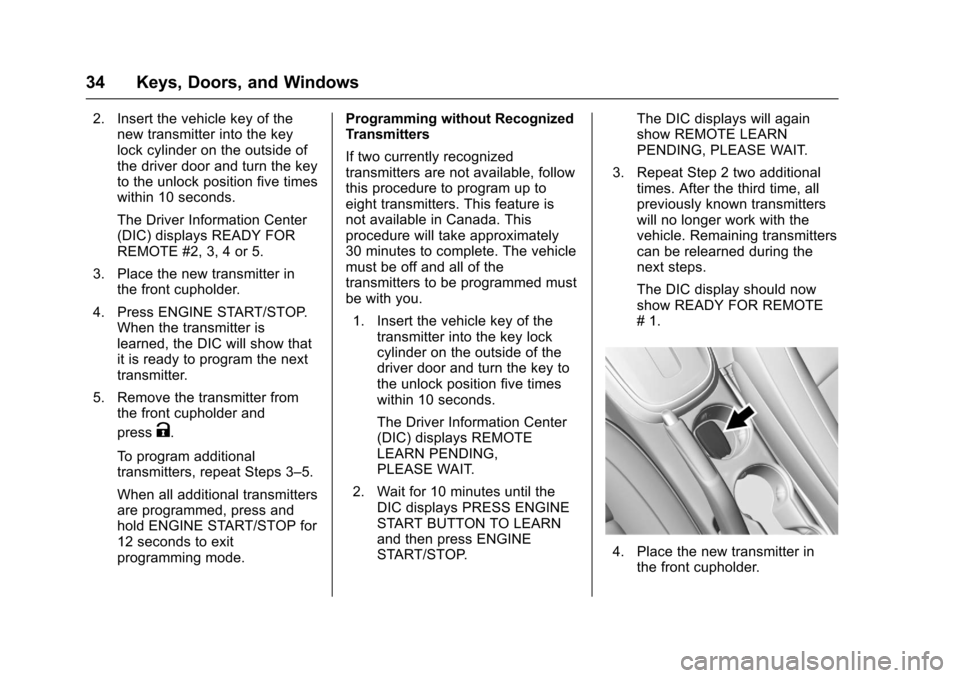
3. Place the new transmitter in the front cupholder.
4. Press ENGINE START/STOP. When the transmitter is
learned, the DIC will show that
it is ready to program the next
transmitter.
5. Remove the transmitter from the front cupholder and
press
K.
To program additional
transmitters, repeat Steps 3–5.
When all additional transmitters
are programmed, press and
hold ENGINE START/STOP for
12 seconds to exit
programming mode. Programming without Recognized
Transmitters
If two currently recognized
transmitters are not available, follow
this procedure to program up to
eight transmitters. This feature is
not available in Canada. This
procedure will take approximately
30 minutes to complete. The vehicle
must be off and all of the
transmitters to be programmed must
be with you.
1. Insert the vehicle key of the transmitter into the key lock
cylinder on the outside of the
driver door and turn the key to
the unlock position five times
within 10 seconds.
The Driver Information Center
(DIC) displays REMOTE
LEARN PENDING,
PLEASE WAIT.
2. Wait for 10 minutes until the DIC displays PRESS ENGINE
START BUTTON TO LEARN
and then press ENGINE
START/STOP. The DIC displays will again
show REMOTE LEARN
PENDING, PLEASE WAIT.
3. Repeat Step 2 two additional times. After the third time, all
previously known transmitters
will no longer work with the
vehicle. Remaining transmitters
can be relearned during the
next steps.
The DIC display should now
show READY FOR REMOTE
# 1.
4. Place the new transmitter inthe front cupholder.
Page 36 of 373
Chevrolet TRAX Owner Manual (GMNA-Localizing-U.S./Canada/Mexico-
10122735) - 2017 - crc - 7/12/16
Keys, Doors, and Windows 35
5. Press ENGINE START/STOP.When the transmitter is
learned, the DIC will show that
it is ready to program the next
transmitter.
6. Remove the transmitter from the cupholder and press
K.
To program additional
transmitters, repeat Steps 4–6.
When all additional transmitters
are programmed, press and
hold ENGINE START/STOP for
10 seconds to exit
programming mode.
Starting the Vehicle with a Low
Transmitter Battery
If the transmitter battery is weak or if
there is interference with the signal,
the DIC may display NO REMOTE
KEY WAS DETECTED PLACE KEY
IN TRANSMITTER POCKET THEN
START YOUR VEHICLE when
trying to start the vehicle. The
REPLACE BATTERY IN REMOTE
KEY message may also be
displayed at this time. See Key and
Lock Messages 0133. To start the vehicle:
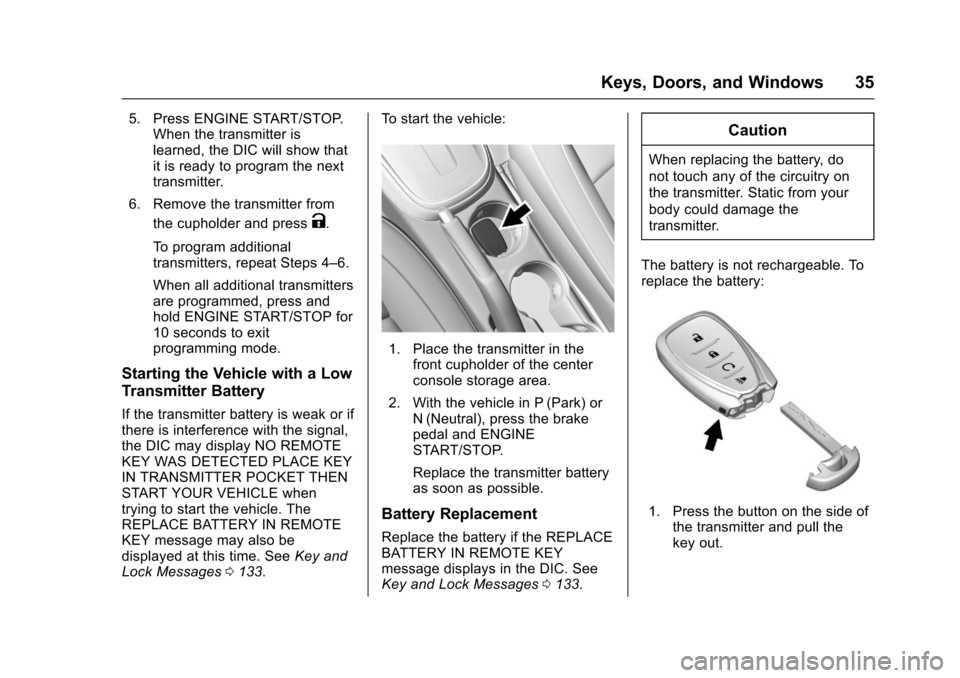
1. Place the transmitter in the
front cupholder of the center
console storage area.
2. With the vehicle in P (Park) or N (Neutral), press the brake
pedal and ENGINE
START/STOP.
Replace the transmitter battery
as soon as possible.
Battery Replacement
Replace the battery if the REPLACE
BATTERY IN REMOTE KEY
message displays in the DIC. See
Key and Lock Messages 0133.
Caution
When replacing the battery, do
not touch any of the circuitry on
the transmitter. Static from your
body could damage the
transmitter.
The battery is not rechargeable. To
replace the battery:
1. Press the button on the side of the transmitter and pull the
key out.
Page 37 of 373
Chevrolet TRAX Owner Manual (GMNA-Localizing-U.S./Canada/Mexico-
10122735) - 2017 - crc - 7/12/16
36 Keys, Doors, and Windows
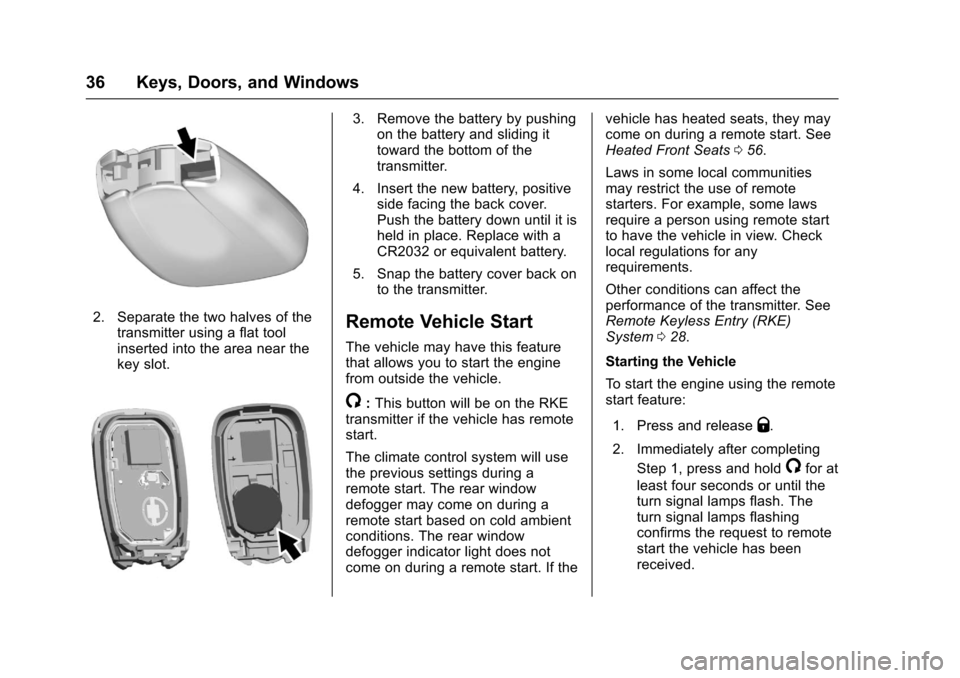
2. Separate the two halves of thetransmitter using a flat tool
inserted into the area near the
key slot.
3. Remove the battery by pushingon the battery and sliding it
toward the bottom of the
transmitter.
4. Insert the new battery, positive side facing the back cover.
Push the battery down until it is
held in place. Replace with a
CR2032 or equivalent battery.
5. Snap the battery cover back on to the transmitter.
Remote Vehicle Start
The vehicle may have this feature
that allows you to start the engine
from outside the vehicle.
/:This button will be on the RKE
transmitter if the vehicle has remote
start.
The climate control system will use
the previous settings during a
remote start. The rear window
defogger may come on during a
remote start based on cold ambient
conditions. The rear window
defogger indicator light does not
come on during a remote start. If the vehicle has heated seats, they may
come on during a remote start. See
Heated Front Seats
056.
Laws in some local communities
may restrict the use of remote
starters. For example, some laws
require a person using remote start
to have the vehicle in view. Check
local regulations for any
requirements.
Other conditions can affect the
performance of the transmitter. See
Remote Keyless Entry (RKE)
System 028.
Starting the Vehicle
To start the engine using the remote
start feature:
1. Press and release
Q.
2. Immediately after completing Step 1, press and hold
/for at
least four seconds or until the
turn signal lamps flash. The
turn signal lamps flashing
confirms the request to remote
start the vehicle has been
received.
Page 45 of 373
Chevrolet TRAX Owner Manual (GMNA-Localizing-U.S./Canada/Mexico-
10122735) - 2017 - crc - 7/12/16
44 Keys, Doors, and Windows
Immobilizer Operation
(Keyless Access)
This vehicle has a passive
theft-deterrent system.
The system does not have to be
manually armed or disarmed.
The vehicle is automatically
immobilized when the transmitter
leaves the vehicle.
The immobilization system is
disarmed when the ignition button is
pushed in and a valid transmitter is
found in the vehicle.
The security light in the instrument
cluster comes on when there is a
problem with arming or disarming
the theft-deterrent system.
The system has one or more
transmitters matched to an
immobilizer control unit in yourvehicle. Only a correctly matched
transmitter will start the vehicle.
If the transmitter is ever damaged,
you may not be able to start your
vehicle.
When trying to start the vehicle, the
security light comes on briefly when
the ignition is turned on.
If the engine does not start and the
security light stays on, there is a
problem with the system. Turn the
vehicle off and try again.
If the RKE transmitter appears to be
undamaged, try another transmitter.
Or, you may try placing the
transmitter in the front cupholder.
See
“Starting the Vehicle with a Low
Transmitter Battery” underRemote
Keyless Entry (RKE) System
Operation (Keyless Access) 031 or
Remote Keyless Entry (RKE)
System Operation (Key
Access) 028.
If the engine does not start with the
other transmitter or when the
transmitter in the front cupholder,
your vehicle needs service. See
your dealer who can service the theft-deterrent system and have a
new transmitter programmed to the
vehicle.
Do not leave the transmitter or
device that disarms or deactivates
the theft-deterrent system in the
vehicle.
Page 48 of 373
Chevrolet TRAX Owner Manual (GMNA-Localizing-U.S./Canada/Mexico-
10122735) - 2017 - crc - 7/12/16
Keys, Doors, and Windows 47
pulsing sound when either rear
window is down and the front
windows are up. To reduce the
sound, open either a front window
or the sunroof, if equipped.
Power Windows
{Warning
Children could be seriously
injured or killed if caught in the
path of a closing window. Never
leave keys in a vehicle with
children. When there are children
in the rear seat, use the window
lockout button to prevent
operation of the windows. See
Keys (Keyless Access)027 or
Keys (Key Access) 025.
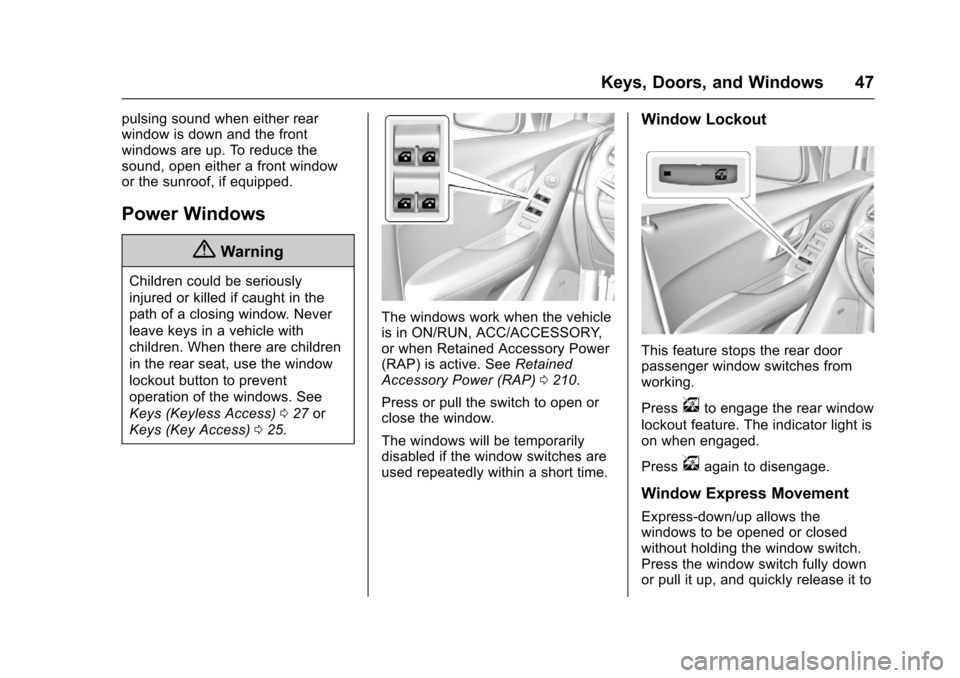
The windows work when the vehicle
is in ON/RUN, ACC/ACCESSORY,
or when Retained Accessory Power
(RAP) is active. See Retained
Accessory Power (RAP) 0210.
Press or pull the switch to open or
close the window.
The windows will be temporarily
disabled if the window switches are
used repeatedly within a short time.
Window Lockout
This feature stops the rear door
passenger window switches from
working.
Press
vto engage the rear window
lockout feature. The indicator light is
on when engaged.
Press
vagain to disengage.
Window Express Movement
Express-down/up allows the
windows to be opened or closed
without holding the window switch.
Press the window switch fully down
or pull it up, and quickly release it to
Page 52 of 373
Chevrolet TRAX Owner Manual (GMNA-Localizing-U.S./Canada/Mexico-
10122735) - 2017 - crc - 7/12/16
Seats and Restraints 51
Seats and
Restraints
Head Restraints
Head Restraints . . . . . . . . . . . . . . . 52
Front Seats
Seat Adjustment . . . . . . . . . . . . . . . 53
Power Seat Adjustment . . . . . . . . 54
Lumbar Adjustment . . . . . . . . . . . . 54
Reclining Seatbacks . . . . . . . . . . . 55
Front Seat Armrest . . . . . . . . . . . . 56
Heated Front Seats . . . . . . . . . . . . 56
Folding Seatback . . . . . . . . . . . . . . 57
Rear Seats
Rear Seats . . . . . . . . . . . . . . . . . . . . 58
Rear Seat Armrest . . . . . . . . . . . . . 61
Safety Belts
Safety Belts . . . . . . . . . . . . . . . . . . . . 61
How to Wear Safety BeltsProperly . . . . . . . . . . . . . . . . . . . . . . 62
Lap-Shoulder Belt . . . . . . . . . . . . . 63
Safety Belt Use During Pregnancy . . . . . . . . . . . . . . . . . . . . 66
Safety Belt Extender . . . . . . . . . . . 66
Safety System Check . . . . . . . . . . 66
Safety Belt Care . . . . . . . . . . . . . . . 67 Replacing Safety Belt System
Parts after a Crash . . . . . . . . . . . 67
Airbag System
Airbag System . . . . . . . . . . . . . . . . . 68
Where Are the Airbags? . . . . . . . 69
When Should an AirbagInflate? . . . . . . . . . . . . . . . . . . . . . . . 71
What Makes an Airbag Inflate? . . . . . . . . . . . . . . . . . . . . . . . 72
How Does an Airbag Restrain? . . . . . . . . . . . . . . . . . . . . . 72
What Will You See after an Airbag Inflates? . . . . . . . . . . . . . . 72
Passenger Sensing System . . . 74
Servicing the Airbag-Equipped Vehicle . . . . . . . . . . . . . . . . . . . . . . . 77
Adding Equipment to the Airbag-Equipped Vehicle . . . . . 78
Airbag System Check . . . . . . . . . . 79
Replacing Airbag System Parts after a Crash . . . . . . . . . . . . . . . . . 79
Child Restraints
Older Children . . . . . . . . . . . . . . . . . 79
Infants and Young Children . . . . 81
Child Restraint Systems . . . . . . . 83
Where to Put the Restraint . . . . . 85
Lower Anchors and Tethers forChildren (LATCH System) . . . . 86 Replacing LATCH System Parts
After a Crash . . . . . . . . . . . . . . . . . 93
Securing Child Restraints (With the Safety Belt in the
Rear Seat) . . . . . . . . . . . . . . . . . . . 93
Securing Child Restraints (With the Safety Belt in the
Front Seat) . . . . . . . . . . . . . . . . . . . 95
Page 53 of 373
Chevrolet TRAX Owner Manual (GMNA-Localizing-U.S./Canada/Mexico-
10122735) - 2017 - crc - 7/12/16
52 Seats and Restraints
Head Restraints
{Warning
With head restraints that are not
installed and adjusted properly,
there is a greater chance that
occupants will suffer a neck/
spinal injury in a crash. Do not
drive until the head restraints for
all occupants are installed and
adjusted properly.
Front Seats
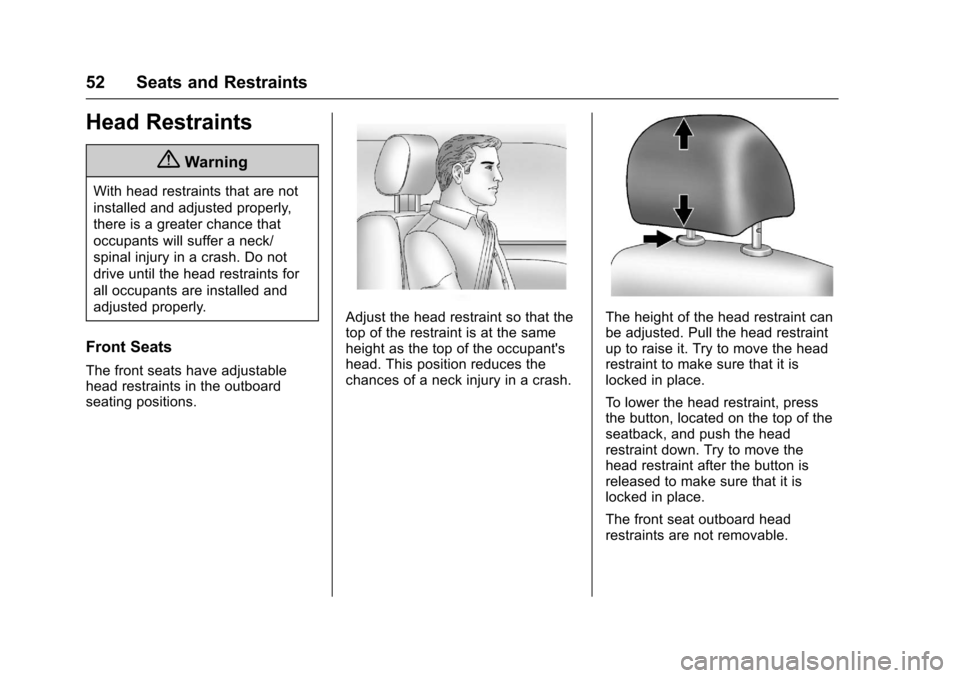
The front seats have adjustable
head restraints in the outboard
seating positions.
Adjust the head restraint so that the
top of the restraint is at the same
height as the top of the occupant's
head. This position reduces the
chances of a neck injury in a crash.The height of the head restraint can
be adjusted. Pull the head restraint
up to raise it. Try to move the head
restraint to make sure that it is
locked in place.
To lower the head restraint, press
the button, located on the top of the
seatback, and push the head
restraint down. Try to move the
head restraint after the button is
released to make sure that it is
locked in place.
The front seat outboard head
restraints are not removable.
Page 54 of 373
Chevrolet TRAX Owner Manual (GMNA-Localizing-U.S./Canada/Mexico-
10122735) - 2017 - crc - 7/12/16
Seats and Restraints 53
Rear Seats
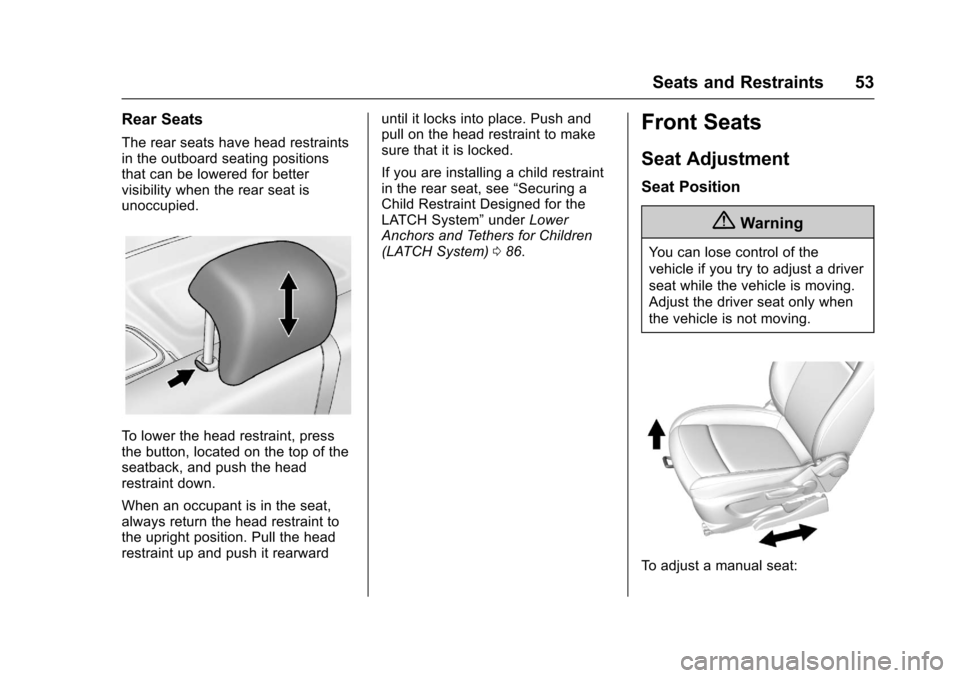
The rear seats have head restraints
in the outboard seating positions
that can be lowered for better
visibility when the rear seat is
unoccupied.
To lower the head restraint, press
the button, located on the top of the
seatback, and push the head
restraint down.
When an occupant is in the seat,
always return the head restraint to
the upright position. Pull the head
restraint up and push it rearwarduntil it locks into place. Push and
pull on the head restraint to make
sure that it is locked.
If you are installing a child restraint
in the rear seat, see
“Securing a
Child Restraint Designed for the
LATCH System” underLower
Anchors and Tethers for Children
(LATCH System) 086.
Front Seats
Seat Adjustment
Seat Position
{Warning
You can lose control of the
vehicle if you try to adjust a driver
seat while the vehicle is moving.
Adjust the driver seat only when
the vehicle is not moving.
To adjust a manual seat:
Page 55 of 373
Chevrolet TRAX Owner Manual (GMNA-Localizing-U.S./Canada/Mexico-
10122735) - 2017 - crc - 7/12/16
54 Seats and Restraints
1. Pull the handle at the front ofthe seat.
2. Slide the seat to the desired position and release the
handle.
3. Try to move the seat back and forth to be sure it is locked in
place.
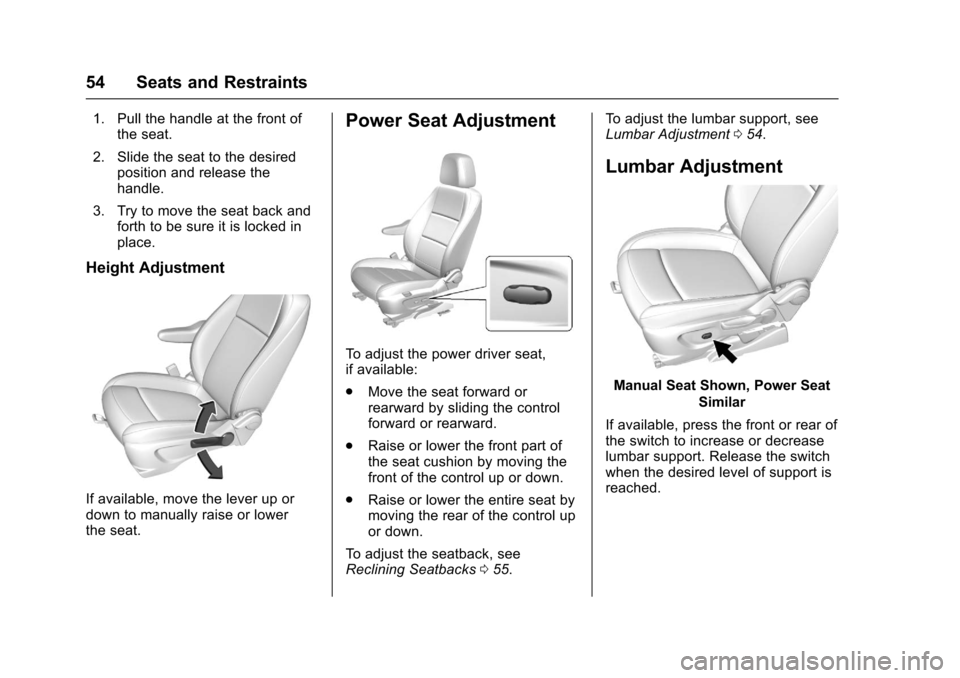
Height Adjustment
If available, move the lever up or
down to manually raise or lower
the seat.
Power Seat Adjustment
To adjust the power driver seat,
if available:
.Move the seat forward or
rearward by sliding the control
forward or rearward.
. Raise or lower the front part of
the seat cushion by moving the
front of the control up or down.
. Raise or lower the entire seat by
moving the rear of the control up
or down.
To adjust the seatback, see
Reclining Seatbacks 055. To adjust the lumbar support, see
Lumbar Adjustment
054.
Lumbar Adjustment
Manual Seat Shown, Power Seat
Similar
If available, press the front or rear of
the switch to increase or decrease
lumbar support. Release the switch
when the desired level of support is
reached.
Page 56 of 373
Chevrolet TRAX Owner Manual (GMNA-Localizing-U.S./Canada/Mexico-
10122735) - 2017 - crc - 7/12/16
Seats and Restraints 55
Reclining Seatbacks
{Warning
If either seatback is not locked, it
could move forward in a sudden
stop or crash. That could cause
injury to the person sitting there.
Always push and pull on the
seatbacks to be sure they are
locked.
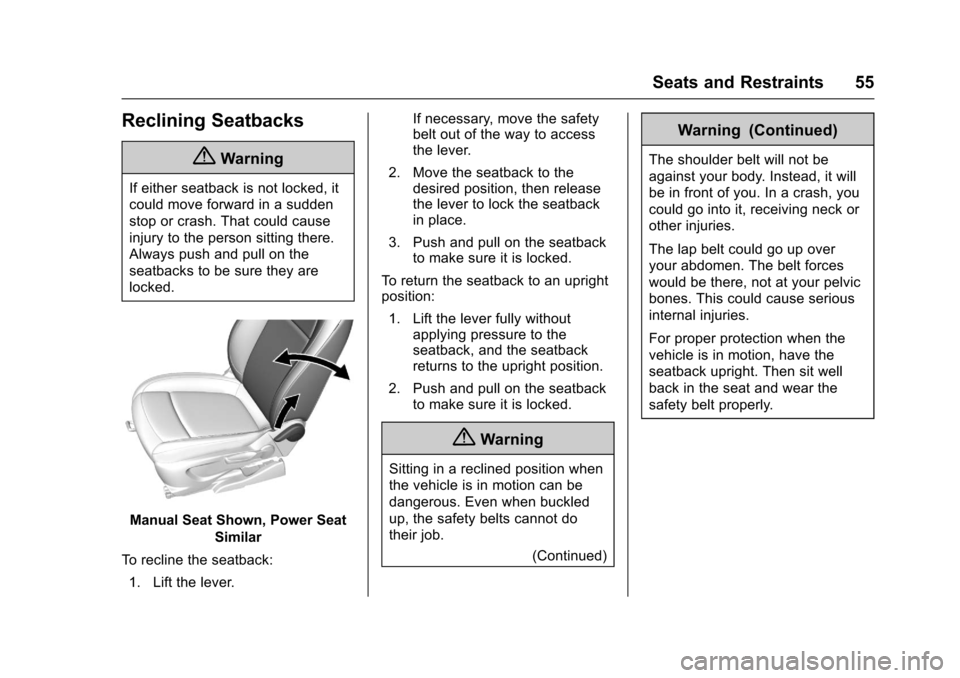
Manual Seat Shown, Power SeatSimilar
To recline the seatback: 1. Lift the lever. If necessary, move the safety
belt out of the way to access
the lever.
2. Move the seatback to the desired position, then release
the lever to lock the seatback
in place.
3. Push and pull on the seatback to make sure it is locked.
To return the seatback to an upright
position: 1. Lift the lever fully without applying pressure to the
seatback, and the seatback
returns to the upright position.
2. Push and pull on the seatback to make sure it is locked.
{Warning
Sitting in a reclined position when
the vehicle is in motion can be
dangerous. Even when buckled
up, the safety belts cannot do
their job.
(Continued)
Warning (Continued)
The shoulder belt will not be
against your body. Instead, it will
be in front of you. In a crash, you
could go into it, receiving neck or
other injuries.
The lap belt could go up over
your abdomen. The belt forces
would be there, not at your pelvic
bones. This could cause serious
internal injuries.
For proper protection when the
vehicle is in motion, have the
seatback upright. Then sit well
back in the seat and wear the
safety belt properly.