keyless entry CHEVROLET TRAX 2017 1.G User Guide
[x] Cancel search | Manufacturer: CHEVROLET, Model Year: 2017, Model line: TRAX, Model: CHEVROLET TRAX 2017 1.GPages: 373, PDF Size: 6.53 MB
Page 39 of 373
Chevrolet TRAX Owner Manual (GMNA-Localizing-U.S./Canada/Mexico-
10122735) - 2017 - crc - 7/12/16
38 Keys, Doors, and Windows
Warning (Continued)
doors should be locked
whenever the vehicle is
driven.
. Young children who get into
unlocked vehicles may be
unable to get out. A child
can be overcome by
extreme heat and can suffer
permanent injuries or even
death from heat stroke.
Always lock the vehicle
whenever leaving it.
. Outsiders can easily enter
through an unlocked door
when you slow down or stop
the vehicle. Locking the
doors can help prevent this
from happening.
To lock or unlock the doors from the
outside:
. Press
KorQon the Remote
Keyless Entry (RKE) transmitter. See
Remote Keyless Entry
(RKE) System Operation
(Keyless Access) 031 or
Remote Keyless Entry (RKE)
System Operation (Key
Access) 028.
. Use the key in the driver door.
Keyless Access
The RKE transmitter must be within
1 m (3 ft) of the door being opened.
Press the button on the door handle
to open. See “Keyless Access
Operation” underRemote Keyless
Entry (RKE) System Operation
(Keyless Access) 031 orRemote
Keyless Entry (RKE) System
Operation (Key Access) 028.
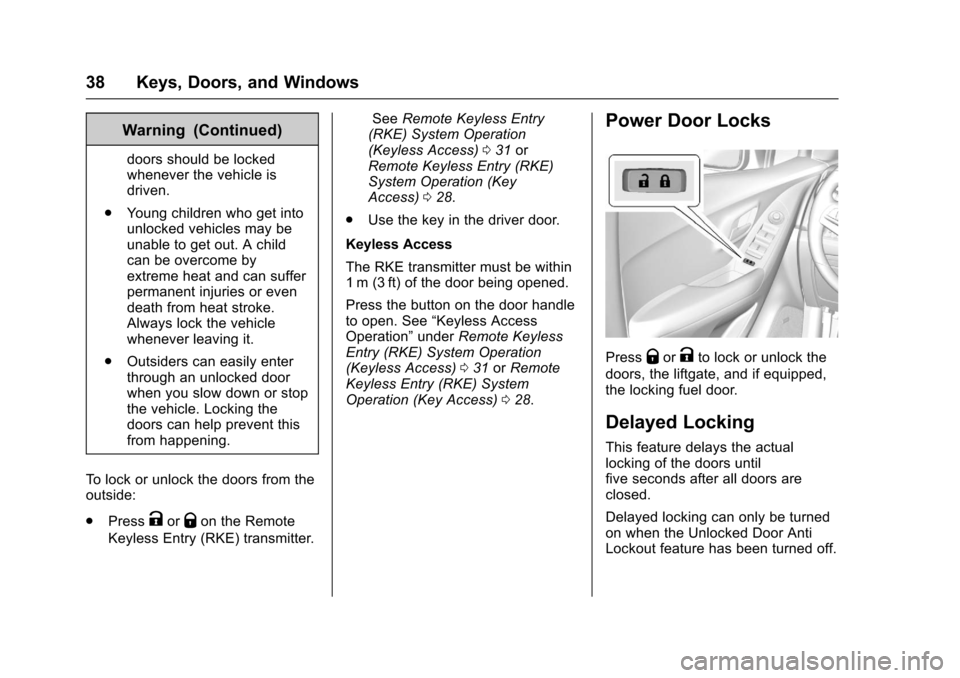
Power Door Locks
PressQorKto lock or unlock the
doors, the liftgate, and if equipped,
the locking fuel door.
Delayed Locking
This feature delays the actual
locking of the doors until
five seconds after all doors are
closed.
Delayed locking can only be turned
on when the Unlocked Door Anti
Lockout feature has been turned off.
Page 41 of 373
Chevrolet TRAX Owner Manual (GMNA-Localizing-U.S./Canada/Mexico-
10122735) - 2017 - crc - 7/12/16
40 Keys, Doors, and Windows
turned on or off in vehicle
personalization. SeeVehicle
Personalization 0137.
Safety Locks
The rear door safety locks prevent
passengers from opening the rear
doors from inside the vehicle.
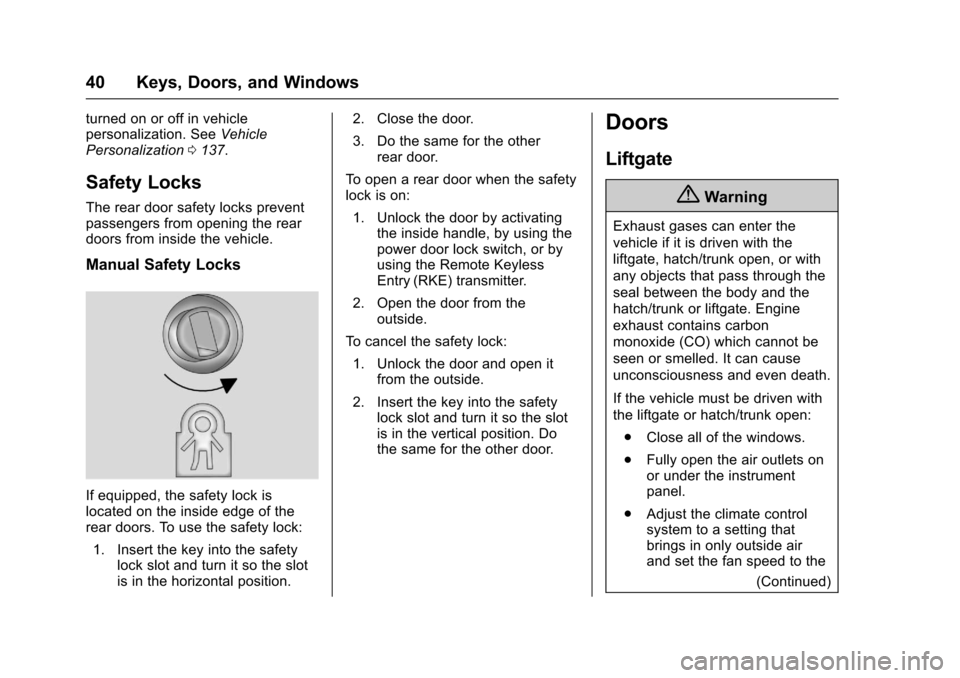
Manual Safety Locks
If equipped, the safety lock is
located on the inside edge of the
rear doors. To use the safety lock:
1. Insert the key into the safety lock slot and turn it so the slot
is in the horizontal position. 2. Close the door.
3. Do the same for the other
rear door.
To open a rear door when the safety
lock is on: 1. Unlock the door by activating the inside handle, by using the
power door lock switch, or by
using the Remote Keyless
Entry (RKE) transmitter.
2. Open the door from the outside.
To cancel the safety lock:
1. Unlock the door and open it from the outside.
2. Insert the key into the safety lock slot and turn it so the slot
is in the vertical position. Do
the same for the other door.
Doors
Liftgate
{Warning
Exhaust gases can enter the
vehicle if it is driven with the
liftgate, hatch/trunk open, or with
any objects that pass through the
seal between the body and the
hatch/trunk or liftgate. Engine
exhaust contains carbon
monoxide (CO) which cannot be
seen or smelled. It can cause
unconsciousness and even death.
If the vehicle must be driven with
the liftgate or hatch/trunk open:
. Close all of the windows.
. Fully open the air outlets on
or under the instrument
panel.
. Adjust the climate control
system to a setting that
brings in only outside air
and set the fan speed to the
(Continued)
Page 42 of 373
Chevrolet TRAX Owner Manual (GMNA-Localizing-U.S./Canada/Mexico-
10122735) - 2017 - crc - 7/12/16
Keys, Doors, and Windows 41
Warning (Continued)
highest setting. See
“Climate Control Systems”
in the Index.
. If the vehicle is equipped
with a power liftgate, disable
the power liftgate function.
For more information about
carbon monoxide, see Engine
Exhaust 0213.
Caution
To avoid damage to the liftgate or
liftgate glass, make sure the area
above and behind the liftgate is
clear before opening it.
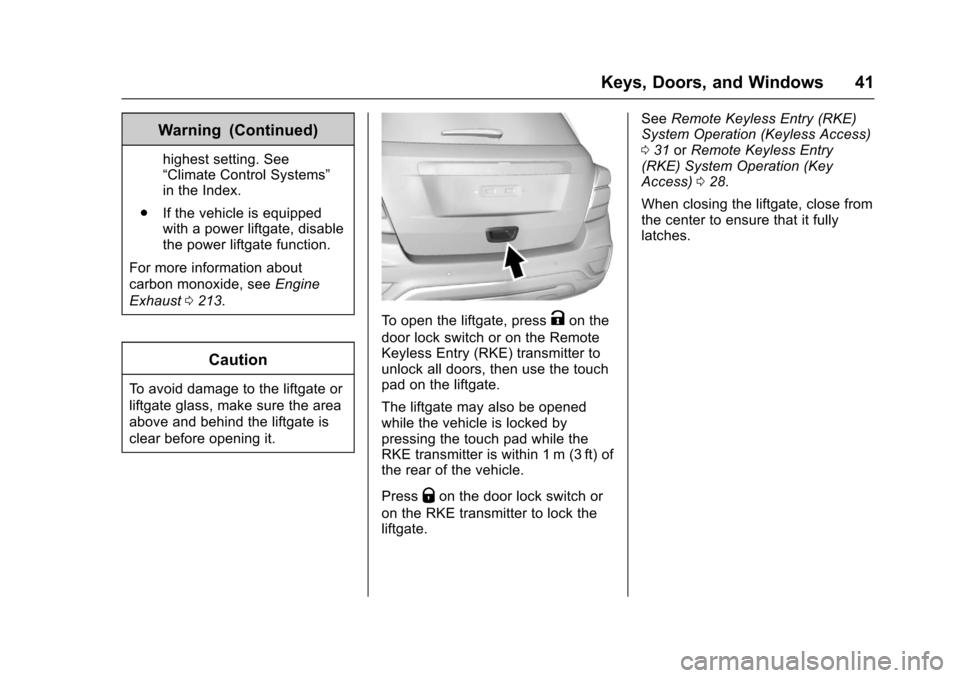
To open the liftgate, pressKon the
door lock switch or on the Remote
Keyless Entry (RKE) transmitter to
unlock all doors, then use the touch
pad on the liftgate.
The liftgate may also be opened
while the vehicle is locked by
pressing the touch pad while the
RKE transmitter is within 1 m (3 ft) of
the rear of the vehicle.
Press
Qon the door lock switch or
on the RKE transmitter to lock the
liftgate. See
Remote Keyless Entry (RKE)
System Operation (Keyless Access)
0 31 orRemote Keyless Entry
(RKE) System Operation (Key
Access) 028.
When closing the liftgate, close from
the center to ensure that it fully
latches.
Page 45 of 373
Chevrolet TRAX Owner Manual (GMNA-Localizing-U.S./Canada/Mexico-
10122735) - 2017 - crc - 7/12/16
44 Keys, Doors, and Windows
Immobilizer Operation
(Keyless Access)
This vehicle has a passive
theft-deterrent system.
The system does not have to be
manually armed or disarmed.
The vehicle is automatically
immobilized when the transmitter
leaves the vehicle.
The immobilization system is
disarmed when the ignition button is
pushed in and a valid transmitter is
found in the vehicle.
The security light in the instrument
cluster comes on when there is a
problem with arming or disarming
the theft-deterrent system.
The system has one or more
transmitters matched to an
immobilizer control unit in yourvehicle. Only a correctly matched
transmitter will start the vehicle.
If the transmitter is ever damaged,
you may not be able to start your
vehicle.
When trying to start the vehicle, the
security light comes on briefly when
the ignition is turned on.
If the engine does not start and the
security light stays on, there is a
problem with the system. Turn the
vehicle off and try again.
If the RKE transmitter appears to be
undamaged, try another transmitter.
Or, you may try placing the
transmitter in the front cupholder.
See
“Starting the Vehicle with a Low
Transmitter Battery” underRemote
Keyless Entry (RKE) System
Operation (Keyless Access) 031 or
Remote Keyless Entry (RKE)
System Operation (Key
Access) 028.
If the engine does not start with the
other transmitter or when the
transmitter in the front cupholder,
your vehicle needs service. See
your dealer who can service the theft-deterrent system and have a
new transmitter programmed to the
vehicle.
Do not leave the transmitter or
device that disarms or deactivates
the theft-deterrent system in the
vehicle.
Page 134 of 373
Chevrolet TRAX Owner Manual (GMNA-Localizing-U.S./Canada/Mexico-
10122735) - 2017 - crc - 7/12/16
Instruments and Controls 133
the vehicle's ability to accelerate.
If this message is on, but there is no
reduction in performance, proceed
to your destination. The
performance may be reduced the
next time the vehicle is driven. The
vehicle may be driven at a reduced
speed while this message is on, but
maximum acceleration and speed
may be reduced. Anytime this
message stays on, or displays
repeatedly, the vehicle should be
taken to your dealer for service as
soon as possible.
Fuel System Messages
FUEL LEVEL LOW
This message displays when the
vehicle is low on fuel. Refuel as
soon as possible.
TIGHTEN GAS CAP
This message displays when the
fuel cap is not on tight. Tighten the
fuel cap.
Key and Lock Messages
NO REMOTE DETECTED
This message displays when the
transmitter battery is weak on
vehicles with Keyless Access. See
“Starting the Vehicle with a Low
Transmitter Battery”underRemote
Keyless Entry (RKE) System
Operation (Keyless Access) 031 or
Remote Keyless Entry (RKE)
System Operation (Key
Access) 028.
REPLACE BATTERY IN
REMOTE KEY
This message displays when the
battery in the Remote Keyless Entry
(RKE) transmitter needs to be
replaced. See “Battery
Replacement” underRemote
Keyless Entry (RKE) System
Operation (Keyless Access) 031 or
Remote Keyless Entry (RKE)
System Operation (Key
Access) 028.
USE TRANSMITTER POCKET
TO START
This message displays when trying
to start the vehicle if an RKE
transmitter is not detected. The
transmitter battery may be weak.
See “Starting the Vehicle with a Low
Transmitter Battery” underRemote
Keyless Entry (RKE) System
Operation (Keyless Access) 031 or
Remote Keyless Entry (RKE)
System Operation (Key
Access) 028.
Lamp Messages
AUTOMATIC LIGHT CONTROL
ON/OFF
This message is displayed when the
automatic light control has been
turned on or off. See Automatic
Headlamp System 0147.
Page 140 of 373
Chevrolet TRAX Owner Manual (GMNA-Localizing-U.S./Canada/Mexico-
10122735) - 2017 - crc - 7/12/16
Instruments and Controls 139
Remote Lock, Unlock, Start
Select and the following may
display:
.Remote Unlock Light Feedback
. Remote Lock Feedback
. Remote Door Unlock
. Passive Door Unlock
. Passive Door Lock
. Remote Left in Vehicle Alert
Remote Unlock Light Feedback
When on, the exterior lamps will
flash when unlocking the vehicle
with the Remote Keyless Entry
(RKE) transmitter. See Remote
Keyless Entry (RKE) System
Operation (Keyless Access) 031 or
Remote Keyless Entry (RKE)
System Operation (Key
Access) 028.
Select Off or Flash Lights. Remote Lock Feedback
Select to set which type of feedback
is given when pressing
Qon the
RKE transmitter. See Remote
Keyless Entry (RKE) System
Operation (Keyless Access) 031 or
Remote Keyless Entry (RKE)
System Operation (Key
Access) 028.
Select Off, Lights and Horn, Lights
Only, or Horn Only.
Remote Door Unlock
Select to set which doors will unlock
when pressing
Kon the RKE
transmitter. See Remote Keyless
Entry (RKE) System Operation
(Keyless Access) 031 orRemote
Keyless Entry (RKE) System
Operation (Key Access) 028.
Select Driver Door or All Doors.
Passive Door Unlock
Select to set which doors will unlock
when the RKE transmitter is within
range and using the button on the
outside driver door handle to unlock the vehicle. See
Remote Keyless
Entry (RKE) System Operation
(Keyless Access) 031 orRemote
Keyless Entry (RKE) System
Operation (Key Access) 028.
Select Driver Door Only or All
Doors.
Passive Door Lock
This allows passive locking to be
turned on or off and selects
feedback. See Remote Keyless
Entry (RKE) System Operation
(Keyless Access) 031 orRemote
Keyless Entry (RKE) System
Operation (Key Access) 028.
Select Off, On, or On With Horn
Chirp.
Remote Left in Vehicle Alert
This feature sounds an alert when
the RKE transmitter is left in the
vehicle. This menu also enables
Remote No Longer Left in Vehicle
alert.
Select Off or On.
Page 143 of 373
Chevrolet TRAX Owner Manual (GMNA-Localizing-U.S./Canada/Mexico-
10122735) - 2017 - crc - 7/12/16
142 Instruments and Controls
Select On or Off.
Comfort and Convenience
Select and the following may
display:
.Chime Volume
. Auto Wipe in Reverse Gear
Chime Volume
Select to set the chime volume
level.
Touch + or −to adjust the volume.
Auto Wipe in Reverse Gear
This allows this feature to be turned
on or off. When on, and the front
wipers are on, the rear window
wiper will turn on automatically
when the vehicle is shifted into
R (Reverse).
Select On or Off.
Lighting
Select and the following may
display:
. Vehicle Locator Lights
. Exit Lighting Vehicle Locator Lights
This feature will flash the exterior
lamps and allows the headlamps,
parking lamps, taillamps, and most
of the interior lamps to turn on
briefly when
Kon the Remote
Keyless Entry (RKE) transmitter is
pressed to locate the vehicle.
Select Off or On.
Exit Lighting
This allows the selection of how
long the exterior lamps stay on
when leaving the vehicle when it is
dark outside.
Select Off, 30 Seconds, 60
Seconds, or 120 Seconds.
Power Door Locks
Select and the following may
display:
. Unlocked Door Anti Lock Out
. Auto Door Unlock
. Delayed Door Lock Unlocked Door Anti Lock Out
When on, this feature will keep the
driver door from locking when the
door is open. If this feature is turned
on, the Delayed Door Lock menu
will not be available.
Select Off or On.
Auto Door Unlock
This allows selection of which of the
doors will automatically unlock when
the vehicle is shifted into P (Park).
Select Off, All Doors, or Driver Door.
Delayed Door Lock
When on, this feature will delay the
locking of the doors. To override the
delay, press the power door lock
switch on the door.
Select Off or On.
Remote Lock, Unlock, Start
Select and the following may
display:
.
Remote Unlock Light Feedback
. Remote Lock Feedback
. Remote Door Unlock
Page 144 of 373
Chevrolet TRAX Owner Manual (GMNA-Localizing-U.S./Canada/Mexico-
10122735) - 2017 - crc - 7/12/16
Instruments and Controls 143
.Remote Start Auto Heat Seats
. Passive Door Unlock
. Passive Door Lock
. Remote Left in Vehicle Alert
Remote Unlock Light Feedback
When on, the exterior lamps will
flash when unlocking the vehicle
with the RKE transmitter.
Select Off or Flash Lights.
Remote Lock Feedback
This allows selection of what type of
feedback is given when locking the
vehicle with the RKE transmitter.
Select Off, Lights and Horn, Lights
Only, or Horn Only.
Remote Door Unlock
This allows selection of which doors
will unlock when pressing
Kon the
RKE transmitter.
Select All Doors or Driver Door. Remote Start Auto Heat Seats
If equipped and turned on, this
feature will turn the heated seats on
when using remote start on
cold days.
Select Off, On-Driver and
Passenger, or On-Driver.
Passive Door Unlock
Select to set which doors will unlock
when the RKE transmitter is within
range and using the button on the
outside driver door handle to unlock
the vehicle. See
Remote Keyless
Entry (RKE) System Operation
(Keyless Access) 031 orRemote
Keyless Entry (RKE) System
Operation (Key Access) 028.
Select Driver Door Only or All
Doors.
Passive Door Lock
This allows passive locking to be
turned on or off and selects
feedback. See Remote Keyless
Entry (RKE) System Operation
(Keyless Access) 031 orRemote
Keyless Entry (RKE) System
Operation (Key Access) 028. Select Off, On, or On With Horn
Chirp.
Remote Left in Vehicle Alert
This feature sounds an alert when
the RKE transmitter is left in the
vehicle.
Select Off or On.
Bluetooth
Select and the following may
display:
.
Discoverable
. Device Information
. Device Management
. Change Pairing PIN
. Ringtones
. Sort Order
. Voice Mail Numbers
. Text Message Alerts
Discoverable
This allows the system to find a
device.
Select Off or On.
Page 151 of 373
Chevrolet TRAX Owner Manual (GMNA-Localizing-U.S./Canada/Mexico-
10122735) - 2017 - crc - 7/12/16
150 Lighting
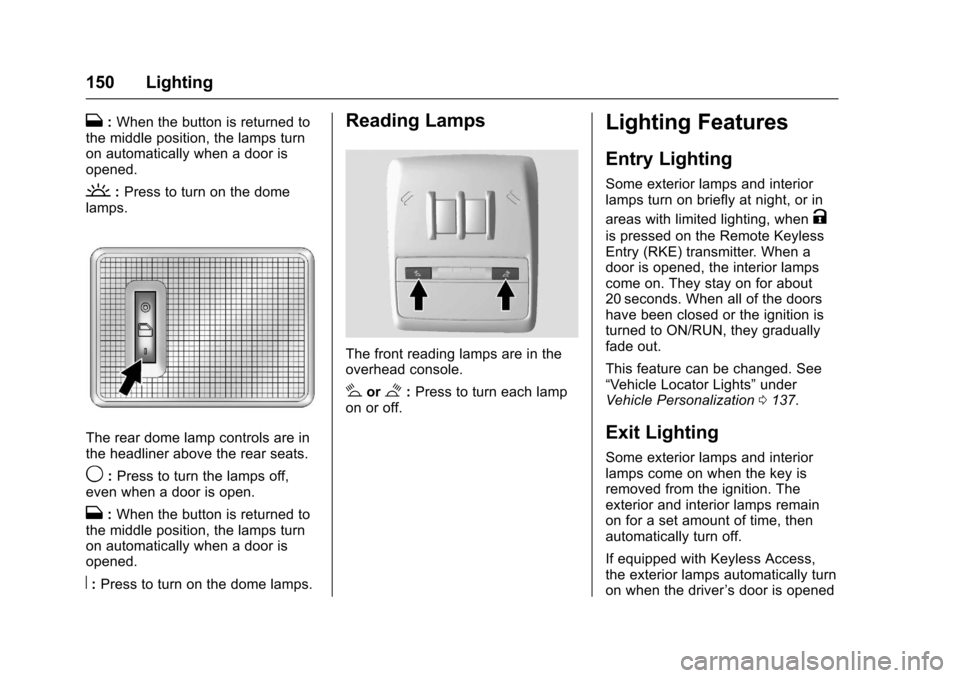
H:When the button is returned to
the middle position, the lamps turn
on automatically when a door is
opened.
': Press to turn on the dome
lamps.
The rear dome lamp controls are in
the headliner above the rear seats.
9: Press to turn the lamps off,
even when a door is open.
H: When the button is returned to
the middle position, the lamps turn
on automatically when a door is
opened.
R: Press to turn on the dome lamps.
Reading Lamps
The front reading lamps are in the
overhead console.
#or$:Press to turn each lamp
on or off.
Lighting Features
Entry Lighting
Some exterior lamps and interior
lamps turn on briefly at night, or in
areas with limited lighting, when
K
is pressed on the Remote Keyless
Entry (RKE) transmitter. When a
door is opened, the interior lamps
come on. They stay on for about
20 seconds. When all of the doors
have been closed or the ignition is
turned to ON/RUN, they gradually
fade out.
This feature can be changed. See
“Vehicle Locator Lights” under
Vehicle Personalization 0137.
Exit Lighting
Some exterior lamps and interior
lamps come on when the key is
removed from the ignition. The
exterior and interior lamps remain
on for a set amount of time, then
automatically turn off.
If equipped with Keyless Access,
the exterior lamps automatically turn
on when the driver ’s door is opened
Page 206 of 373
Chevrolet TRAX Owner Manual (GMNA-Localizing-U.S./Canada/Mexico-
10122735) - 2017 - crc - 7/12/16
Driving and Operating 205
If the ignition becomes difficult to
turn, seeKeys (Keyless Access)
0 27 orKeys (Key Access) 025.
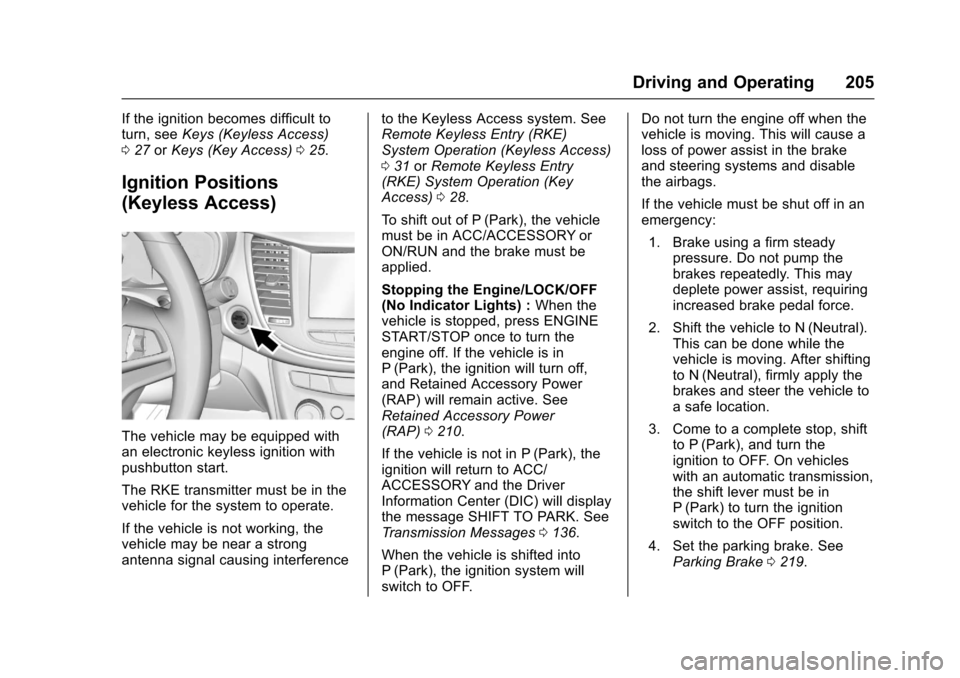
Ignition Positions
(Keyless Access)
The vehicle may be equipped with
an electronic keyless ignition with
pushbutton start.
The RKE transmitter must be in the
vehicle for the system to operate.
If the vehicle is not working, the
vehicle may be near a strong
antenna signal causing interference to the Keyless Access system. See
Remote Keyless Entry (RKE)
System Operation (Keyless Access)
0
31 orRemote Keyless Entry
(RKE) System Operation (Key
Access) 028.
To shift out of P (Park), the vehicle
must be in ACC/ACCESSORY or
ON/RUN and the brake must be
applied.
Stopping the Engine/LOCK/OFF
(No Indicator Lights) : When the
vehicle is stopped, press ENGINE
START/STOP once to turn the
engine off. If the vehicle is in
P (Park), the ignition will turn off,
and Retained Accessory Power
(RAP) will remain active. See
Retained Accessory Power
(RAP) 0210.
If the vehicle is not in P (Park), the
ignition will return to ACC/
ACCESSORY and the Driver
Information Center (DIC) will display
the message SHIFT TO PARK. See
Transmission Messages 0136.
When the vehicle is shifted into
P (Park), the ignition system will
switch to OFF. Do not turn the engine off when the
vehicle is moving. This will cause a
loss of power assist in the brake
and steering systems and disable
the airbags.
If the vehicle must be shut off in an
emergency:
1. Brake using a firm steady pressure. Do not pump the
brakes repeatedly. This may
deplete power assist, requiring
increased brake pedal force.
2. Shift the vehicle to N (Neutral). This can be done while the
vehicle is moving. After shifting
to N (Neutral), firmly apply the
brakes and steer the vehicle to
a safe location.
3. Come to a complete stop, shift to P (Park), and turn the
ignition to OFF. On vehicles
with an automatic transmission,
the shift lever must be in
P (Park) to turn the ignition
switch to the OFF position.
4. Set the parking brake. See Parking Brake 0219.