light CHEVROLET TRAX 2017 1.G User Guide
[x] Cancel search | Manufacturer: CHEVROLET, Model Year: 2017, Model line: TRAX, Model: CHEVROLET TRAX 2017 1.GPages: 373, PDF Size: 6.53 MB
Page 30 of 373
Chevrolet TRAX Owner Manual (GMNA-Localizing-U.S./Canada/Mexico-
10122735) - 2017 - crc - 7/12/16
Keys, Doors, and Windows 29
K:Press to unlock the driver door.
Press again within five seconds to
unlock all doors.The RKE
transmitter can be programmed to
unlock all doors on the first button
press. See Vehicle
Personalization 0137.
The hazard warning lamps may
flash to indicate unlocking. See
Vehicle Personalization 0137.
Pressing
Kwill disarm the alarm
system. See Vehicle Alarm System
0 42. If equipped, pressing
Kwill
also unlock the fuel door.
7: If equipped, press and hold
briefly to initiate vehicle locator. The
exterior lamps flash and the horn
chirps three times.
Press and hold
7for at least
three seconds to sound the panic
alarm. The horn sounds and the
turn signals flash for 30 seconds,
or until
7is pressed again or the
key is placed in the ignition and
turned to ACC/ACCESSORY or
ON/RUN.
/: If equipped, pressQand then
press and hold
/to start the
engine from outside the vehicle
using the RKE transmitter. See
Remote Vehicle Start 036.
The RKE transmitter buttons will not
operate when the key is in the
ignition.
Programming Keys to the
Vehicle
Only RKE keys programmed to this
vehicle will work. If a key is lost or
stolen, a replacement can be
purchased and programmed through
your dealer. When the replacement
key is programmed to this vehicle,
all remaining keys must also be
reprogrammed. Any lost or stolen
keys will no longer work once the
new key is programmed.
Programming with Two
Recognized Keys
To program a new key: 1. Insert the original, already programmed key in the ignition
and turn the key to the ON/
RUN position. 2. Turn the key to LOCK/OFF and
remove the key.
3. Quickly, within five seconds, insert the second original
already programmed key in the
ignition and turn the key to the
ON/RUN position.
4. Turn the key to LOCK/OFF, and remove the key.
5. Insert the new key to be programmed and turn it to the
ON/RUN position within
five seconds.
The security light will turn off
once the key has been
programmed.
6. Repeat Steps 1–5 if additional keys are to be programmed.
If a key is lost or damaged, see your
dealer to have a new key made.
Programming without Two
Recognized Keys
Program a new key to the vehicle
when a recognized key is not
available. Canadian regulations
require that owners see their dealer.
Page 31 of 373
Chevrolet TRAX Owner Manual (GMNA-Localizing-U.S./Canada/Mexico-
10122735) - 2017 - crc - 7/12/16
30 Keys, Doors, and Windows
If two currently recognized keys are
not available, follow this procedure
to program the first key.
This procedure will take
approximately 30 minutes to
complete for the first key. The
vehicle must be off and all of the
keys you wish to program must be
with you.1. Insert the new vehicle key into the ignition.
2. Turn to ON/RUN. The security light will come on.
3. Wait 10 minutes until the security light turns off.
4. Turn the ignition to LOCK/OFF.
5. Repeat Steps 2–4 two more times. After the third time, turn
to ON/RUN; the key is learned
and all previously known keys
will no longer work with the
vehicle.
6. To learn the second key, turn to OFF, insert the second key to
be learned, and rotate to
ON/RUN. After two keys are learned, the
remaining keys can be learned by
following the procedure in
“Programming with Two
Recognized Keys.”
Battery Replacement
The battery is not rechargeable. To
replace the battery:
Caution
When replacing the battery, do
not touch any of the circuitry on
the transmitter. Static from your
body could damage the
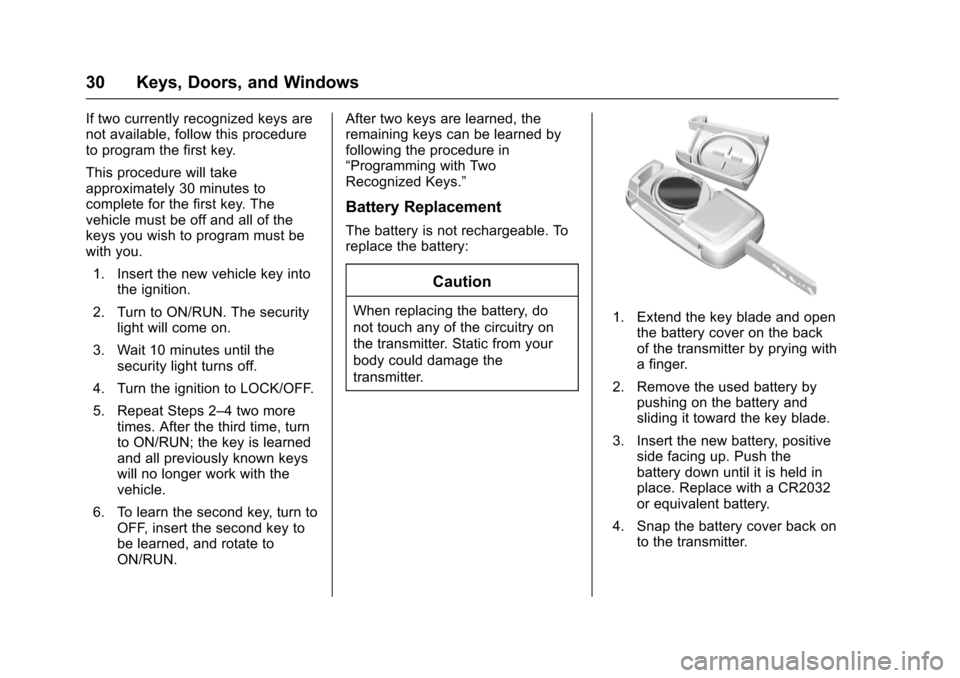
transmitter.1. Extend the key blade and open
the battery cover on the back
of the transmitter by prying with
a finger.
2. Remove the used battery by pushing on the battery and
sliding it toward the key blade.
3. Insert the new battery, positive side facing up. Push the
battery down until it is held in
place. Replace with a CR2032
or equivalent battery.
4. Snap the battery cover back on to the transmitter.
Page 37 of 373
Chevrolet TRAX Owner Manual (GMNA-Localizing-U.S./Canada/Mexico-
10122735) - 2017 - crc - 7/12/16
36 Keys, Doors, and Windows
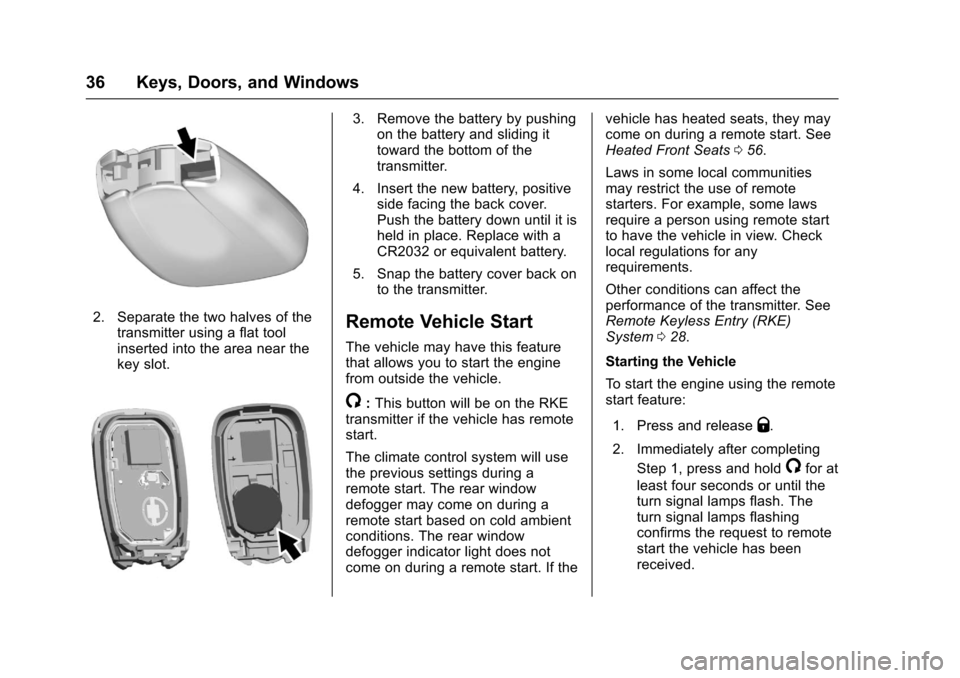
2. Separate the two halves of thetransmitter using a flat tool
inserted into the area near the
key slot.
3. Remove the battery by pushingon the battery and sliding it
toward the bottom of the
transmitter.
4. Insert the new battery, positive side facing the back cover.
Push the battery down until it is
held in place. Replace with a
CR2032 or equivalent battery.
5. Snap the battery cover back on to the transmitter.
Remote Vehicle Start
The vehicle may have this feature
that allows you to start the engine
from outside the vehicle.
/:This button will be on the RKE
transmitter if the vehicle has remote
start.
The climate control system will use
the previous settings during a
remote start. The rear window
defogger may come on during a
remote start based on cold ambient
conditions. The rear window
defogger indicator light does not
come on during a remote start. If the vehicle has heated seats, they may
come on during a remote start. See
Heated Front Seats
056.
Laws in some local communities
may restrict the use of remote
starters. For example, some laws
require a person using remote start
to have the vehicle in view. Check
local regulations for any
requirements.
Other conditions can affect the
performance of the transmitter. See
Remote Keyless Entry (RKE)
System 028.
Starting the Vehicle
To start the engine using the remote
start feature:
1. Press and release
Q.
2. Immediately after completing Step 1, press and hold
/for at
least four seconds or until the
turn signal lamps flash. The
turn signal lamps flashing
confirms the request to remote
start the vehicle has been
received.
Page 43 of 373
Chevrolet TRAX Owner Manual (GMNA-Localizing-U.S./Canada/Mexico-
10122735) - 2017 - crc - 7/12/16
42 Keys, Doors, and Windows
Vehicle Security
This vehicle has theft-deterrent
features; however, they do not make
the vehicle impossible to steal.
Vehicle Alarm System
This vehicle may be equipped with
an alarm system.
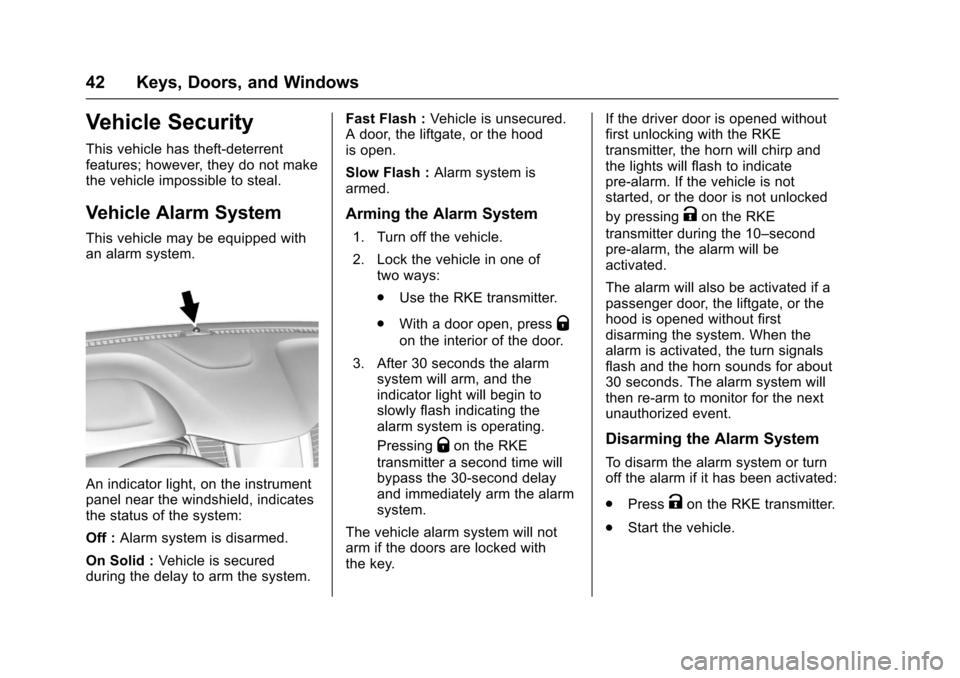
An indicator light, on the instrument
panel near the windshield, indicates
the status of the system:
Off :Alarm system is disarmed.
On Solid : Vehicle is secured
during the delay to arm the system. Fast Flash :
Vehicle is unsecured.
A door, the liftgate, or the hood
is open.
Slow Flash : Alarm system is
armed.
Arming the Alarm System
1. Turn off the vehicle.
2. Lock the vehicle in one of two ways:
.Use the RKE transmitter.
. With a door open, press
Q
on the interior of the door.
3. After 30 seconds the alarm system will arm, and the
indicator light will begin to
slowly flash indicating the
alarm system is operating.
Pressing
Qon the RKE
transmitter a second time will
bypass the 30-second delay
and immediately arm the alarm
system.
The vehicle alarm system will not
arm if the doors are locked with
the key. If the driver door is opened without
first unlocking with the RKE
transmitter, the horn will chirp and
the lights will flash to indicate
pre-alarm. If the vehicle is not
started, or the door is not unlocked
by pressing
Kon the RKE
transmitter during the 10–second
pre-alarm, the alarm will be
activated.
The alarm will also be activated if a
passenger door, the liftgate, or the
hood is opened without first
disarming the system. When the
alarm is activated, the turn signals
flash and the horn sounds for about
30 seconds. The alarm system will
then re-arm to monitor for the next
unauthorized event.
Disarming the Alarm System
To disarm the alarm system or turn
off the alarm if it has been activated:
. Press
Kon the RKE transmitter.
. Start the vehicle.
Page 44 of 373
Chevrolet TRAX Owner Manual (GMNA-Localizing-U.S./Canada/Mexico-
10122735) - 2017 - crc - 7/12/16
Keys, Doors, and Windows 43
Avoid setting off the alarm by
accident by locking the vehicle after
all occupants have left the vehicle
and all doors are closed.
To avoid setting off the alarm by
accident:
.Lock the vehicle after all
occupants have exited.
. Always unlock the vehicle with
the RKE transmitter.
Unlocking the driver door with the
key will not disarm the system or
turn off the alarm.
How to Detect a Tamper
Condition
IfKis pressed on the RKE
transmitter and the horn chirps and
the lights flash three times, an alarm
occurred previously while the
system was armed.
Immobilizer
See Radio Frequency
Statement 0347.
Immobilizer Operation
(Key Access)
This vehicle has a passive
theft-deterrent system.
The system does not have to be
manually armed or disarmed.
The vehicle is automatically
immobilized when the key is
removed from the ignition.
The system is automatically
disarmed when the vehicle is
started with the correct key. The key
uses a transponder that matches an
immobilizer control unit in the
vehicle and automatically disarms
the system. Only an authorized key
starts the vehicle. The vehicle may
not start if the key is damaged.
The security light in the instrument
cluster comes on if there is a
problem with arming or disarming
the theft-deterrent system.
When trying to start the vehicle, the
security light comes on briefly when
the ignition is turned on.
If the engine does not start and the
security light stays on, there is a
problem with the system. Turn the
ignition off and try again.
If the engine still does not start, and
the key appears to be undamaged
or the light continues to stay on, try
another ignition key. If the engine
does not start with the other key, the
vehicle needs service. If the vehicle
does start, the first key may be
damaged. See your dealer who can
service the theft-deterrent system
and have a new key made.
Do not leave the key or device that
disarms or deactivates the
theft-deterrent system in the vehicle.
Page 45 of 373
Chevrolet TRAX Owner Manual (GMNA-Localizing-U.S./Canada/Mexico-
10122735) - 2017 - crc - 7/12/16
44 Keys, Doors, and Windows
Immobilizer Operation
(Keyless Access)
This vehicle has a passive
theft-deterrent system.
The system does not have to be
manually armed or disarmed.
The vehicle is automatically
immobilized when the transmitter
leaves the vehicle.
The immobilization system is
disarmed when the ignition button is
pushed in and a valid transmitter is
found in the vehicle.
The security light in the instrument
cluster comes on when there is a
problem with arming or disarming
the theft-deterrent system.
The system has one or more
transmitters matched to an
immobilizer control unit in yourvehicle. Only a correctly matched
transmitter will start the vehicle.
If the transmitter is ever damaged,
you may not be able to start your
vehicle.
When trying to start the vehicle, the
security light comes on briefly when
the ignition is turned on.
If the engine does not start and the
security light stays on, there is a
problem with the system. Turn the
vehicle off and try again.
If the RKE transmitter appears to be
undamaged, try another transmitter.
Or, you may try placing the
transmitter in the front cupholder.
See
“Starting the Vehicle with a Low
Transmitter Battery” underRemote
Keyless Entry (RKE) System
Operation (Keyless Access) 031 or
Remote Keyless Entry (RKE)
System Operation (Key
Access) 028.
If the engine does not start with the
other transmitter or when the
transmitter in the front cupholder,
your vehicle needs service. See
your dealer who can service the theft-deterrent system and have a
new transmitter programmed to the
vehicle.
Do not leave the transmitter or
device that disarms or deactivates
the theft-deterrent system in the
vehicle.
Page 48 of 373
Chevrolet TRAX Owner Manual (GMNA-Localizing-U.S./Canada/Mexico-
10122735) - 2017 - crc - 7/12/16
Keys, Doors, and Windows 47
pulsing sound when either rear
window is down and the front
windows are up. To reduce the
sound, open either a front window
or the sunroof, if equipped.
Power Windows
{Warning
Children could be seriously
injured or killed if caught in the
path of a closing window. Never
leave keys in a vehicle with
children. When there are children
in the rear seat, use the window
lockout button to prevent
operation of the windows. See
Keys (Keyless Access)027 or
Keys (Key Access) 025.
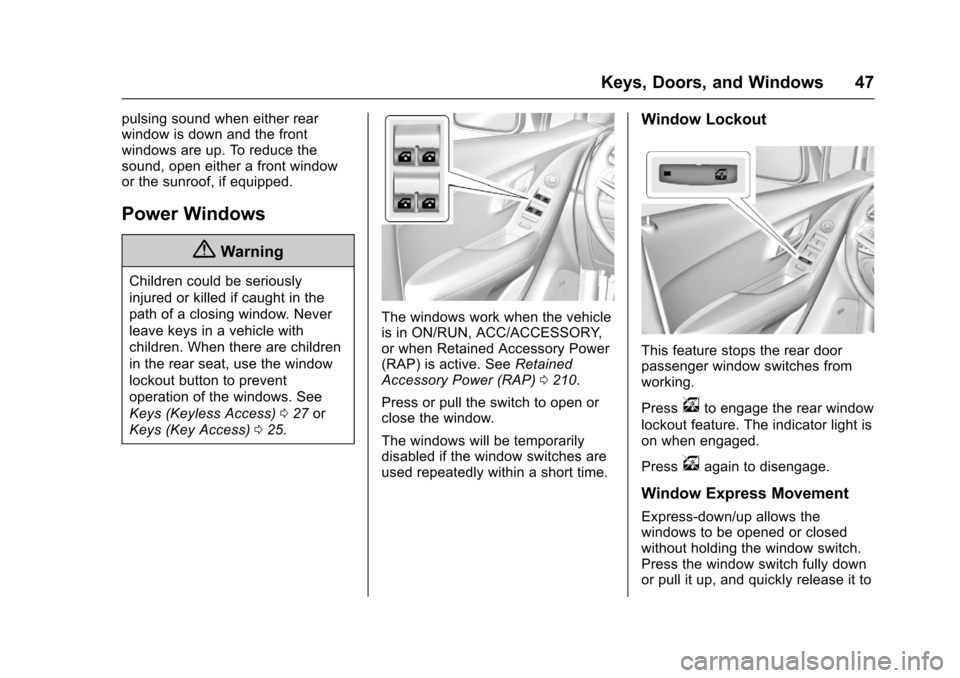
The windows work when the vehicle
is in ON/RUN, ACC/ACCESSORY,
or when Retained Accessory Power
(RAP) is active. See Retained
Accessory Power (RAP) 0210.
Press or pull the switch to open or
close the window.
The windows will be temporarily
disabled if the window switches are
used repeatedly within a short time.
Window Lockout
This feature stops the rear door
passenger window switches from
working.
Press
vto engage the rear window
lockout feature. The indicator light is
on when engaged.
Press
vagain to disengage.
Window Express Movement
Express-down/up allows the
windows to be opened or closed
without holding the window switch.
Press the window switch fully down
or pull it up, and quickly release it to
Page 49 of 373
Chevrolet TRAX Owner Manual (GMNA-Localizing-U.S./Canada/Mexico-
10122735) - 2017 - crc - 7/12/16
48 Keys, Doors, and Windows
engage. Briefly press or pull the
same switch to stop window
movement.
Express Window Obstacle
Detection
The express-up feature will reverse
window movement if it comes in
contact with an object. Extreme cold
or ice could cause the window to
auto-reverse. The window will
operate as normal after the object or
condition is removed.
Obstacle Detection Override
{Warning
If obstacle detection override is
activated, the window will not
reverse automatically. You or
others could be injured and the
window could be damaged.
Before you use obstacle detection
override, make sure that all
people and obstructions are clear
of the window path.The window can be closed by
holding the window switch in the up
position if conditions prevent it from
express closing.
Programming the Power
Windows
Programming may be necessary if
the vehicle's battery has been
disconnected or discharged. If the
window is unable to express-up,
program the window:
1. Close all doors.
2. Place the ignition in ACC/ ACCESSORY or ON/RUN.
3. Partially open the window to be programmed, then close it and
continue to pull the switch
briefly after the window has
fully closed.
4. Press the power window switch until the window is fully open
and briefly hold.
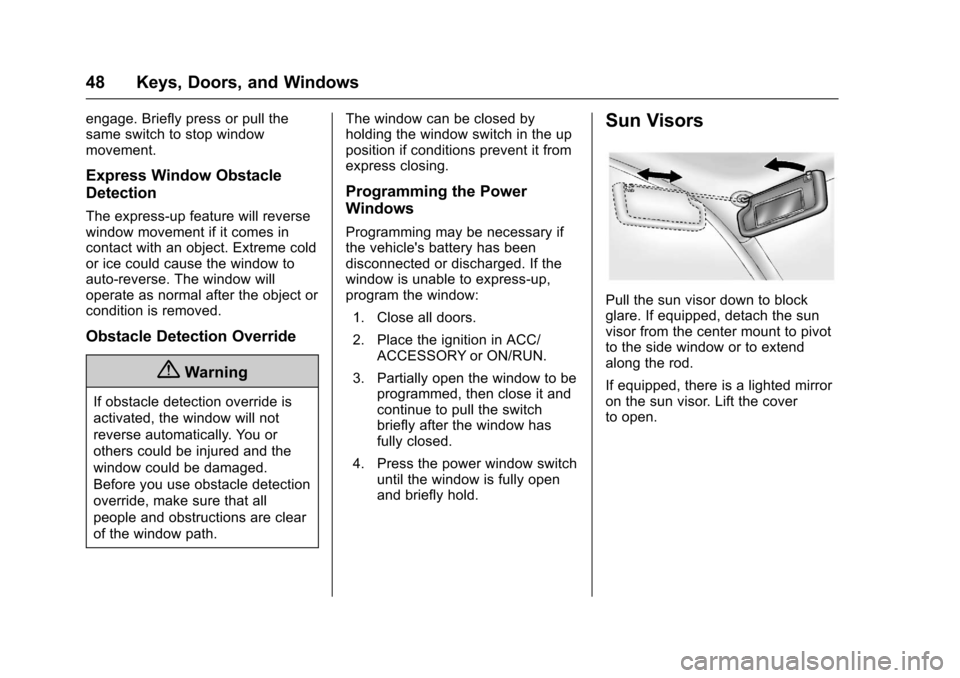
Sun Visors
Pull the sun visor down to block
glare. If equipped, detach the sun
visor from the center mount to pivot
to the side window or to extend
along the rod.
If equipped, there is a lighted mirror
on the sun visor. Lift the cover
to open.
Page 57 of 373
Chevrolet TRAX Owner Manual (GMNA-Localizing-U.S./Canada/Mexico-
10122735) - 2017 - crc - 7/12/16
56 Seats and Restraints
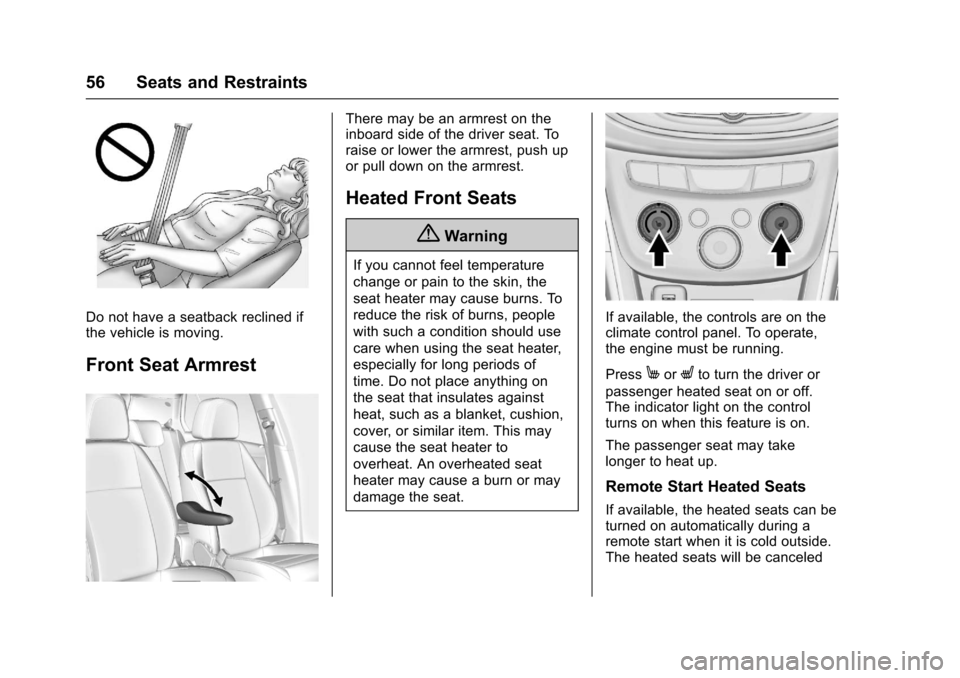
Do not have a seatback reclined if
the vehicle is moving.
Front Seat Armrest
There may be an armrest on the
inboard side of the driver seat. To
raise or lower the armrest, push up
or pull down on the armrest.
Heated Front Seats
{Warning
If you cannot feel temperature
change or pain to the skin, the
seat heater may cause burns. To
reduce the risk of burns, people
with such a condition should use
care when using the seat heater,
especially for long periods of
time. Do not place anything on
the seat that insulates against
heat, such as a blanket, cushion,
cover, or similar item. This may
cause the seat heater to
overheat. An overheated seat
heater may cause a burn or may
damage the seat.
If available, the controls are on the
climate control panel. To operate,
the engine must be running.
Press
MorLto turn the driver or
passenger heated seat on or off.
The indicator light on the control
turns on when this feature is on.
The passenger seat may take
longer to heat up.
Remote Start Heated Seats
If available, the heated seats can be
turned on automatically during a
remote start when it is cold outside.
The heated seats will be canceled
Page 58 of 373
Chevrolet TRAX Owner Manual (GMNA-Localizing-U.S./Canada/Mexico-
10122735) - 2017 - crc - 7/12/16
Seats and Restraints 57
when the ignition is turned on. Press
the control to use the heated seats
after the vehicle is started.
The heated seat indicator lights do
not turn on during a remote start.
The temperature performance of an
unoccupied seat may be reduced.
This is normal.
The heated seats will not turn on
during a remote start unless the
heated seat feature is enabled in
the vehicle personalization menu.
SeeRemote Vehicle Start 036 and
Vehicle Personalization 0137.
Folding Seatback
The front passenger seatback may
fold flat.
{Warning
If you fold the seatback forward to
carry longer objects, such as skis,
be sure any such cargo is not
near an airbag. In a crash, an
inflating airbag might force that
object toward a person. This
(Continued)
Warning (Continued)
could cause severe injury or even
death. Secure objects away from
the area in which an airbag would
inflate. For more information, see
Where Are the Airbags? 069 and
Vehicle Load Limits 0199.
{Warning
Things you put on this seatback
can strike and injure people in a
sudden stop or turn, or in a crash.
Remove or secure all items
before driving.
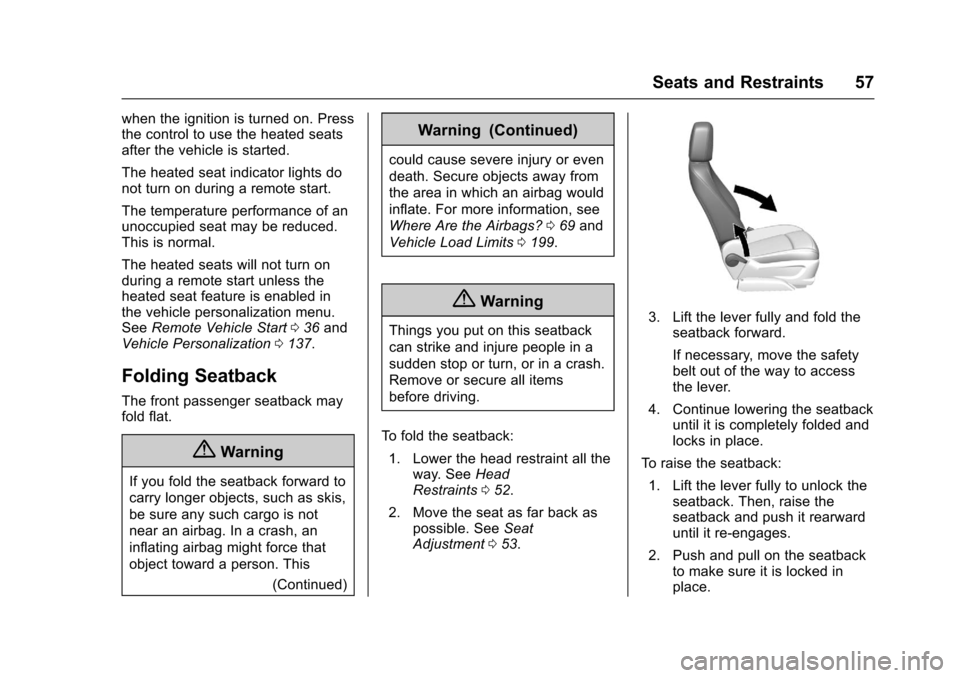
To fold the seatback: 1. Lower the head restraint all the way. See Head
Restraints 052.
2. Move the seat as far back as possible. See Seat
Adjustment 053.3. Lift the lever fully and fold the
seatback forward.
If necessary, move the safety
belt out of the way to access
the lever.
4. Continue lowering the seatback until it is completely folded and
locks in place.
To raise the seatback: 1. Lift the lever fully to unlock the seatback. Then, raise the
seatback and push it rearward
until it re-engages.
2. Push and pull on the seatback to make sure it is locked in
place.