Lift CHEVROLET TRAX 2017 1.G Owner's Manual
[x] Cancel search | Manufacturer: CHEVROLET, Model Year: 2017, Model line: TRAX, Model: CHEVROLET TRAX 2017 1.GPages: 373, PDF Size: 6.53 MB
Page 256 of 373
Chevrolet TRAX Owner Manual (GMNA-Localizing-U.S./Canada/Mexico-
10122735) - 2017 - crc - 7/12/16
Vehicle Care 255
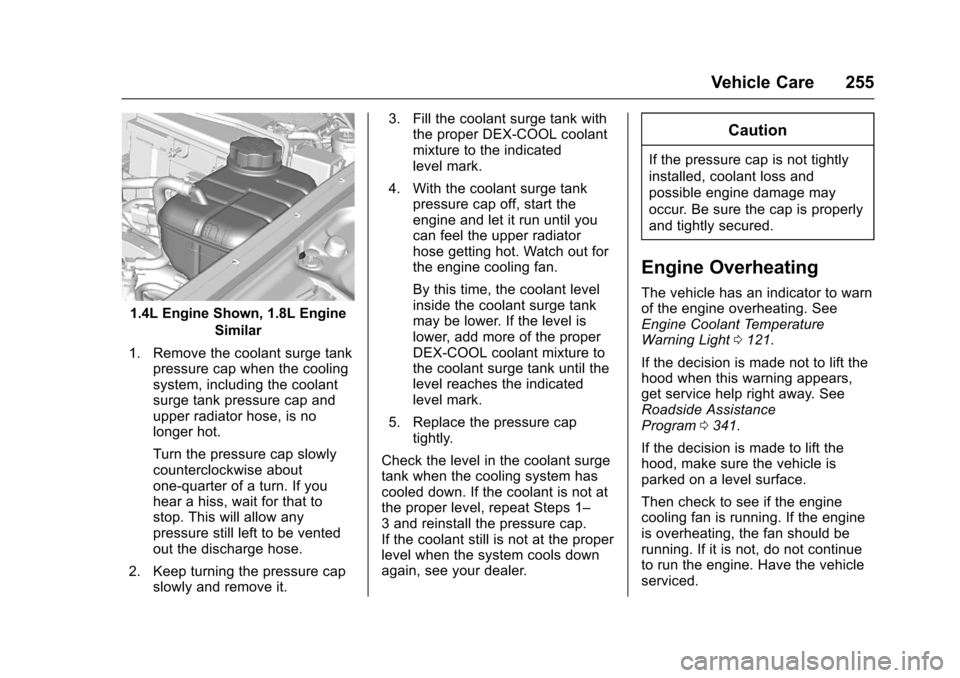
1.4L Engine Shown, 1.8L EngineSimilar
1. Remove the coolant surge tank pressure cap when the cooling
system, including the coolant
surge tank pressure cap and
upper radiator hose, is no
longer hot.
Turn the pressure cap slowly
counterclockwise about
one-quarter of a turn. If you
hear a hiss, wait for that to
stop. This will allow any
pressure still left to be vented
out the discharge hose.
2. Keep turning the pressure cap slowly and remove it. 3. Fill the coolant surge tank with
the proper DEX-COOL coolant
mixture to the indicated
level mark.
4. With the coolant surge tank pressure cap off, start the
engine and let it run until you
can feel the upper radiator
hose getting hot. Watch out for
the engine cooling fan.
By this time, the coolant level
inside the coolant surge tank
may be lower. If the level is
lower, add more of the proper
DEX-COOL coolant mixture to
the coolant surge tank until the
level reaches the indicated
level mark.
5. Replace the pressure cap tightly.
Check the level in the coolant surge
tank when the cooling system has
cooled down. If the coolant is not at
the proper level, repeat Steps 1–
3 and reinstall the pressure cap.
If the coolant still is not at the proper
level when the system cools down
again, see your dealer.
Caution
If the pressure cap is not tightly
installed, coolant loss and
possible engine damage may
occur. Be sure the cap is properly
and tightly secured.
Engine Overheating
The vehicle has an indicator to warn
of the engine overheating. See
Engine Coolant Temperature
Warning Light 0121.
If the decision is made not to lift the
hood when this warning appears,
get service help right away. See
Roadside Assistance
Program 0341.
If the decision is made to lift the
hood, make sure the vehicle is
parked on a level surface.
Then check to see if the engine
cooling fan is running. If the engine
is overheating, the fan should be
running. If it is not, do not continue
to run the engine. Have the vehicle
serviced.
Page 264 of 373
Chevrolet TRAX Owner Manual (GMNA-Localizing-U.S./Canada/Mexico-
10122735) - 2017 - crc - 7/12/16
Vehicle Care 263
Wiper Blade Replacement
Windshield wiper blades should be
inspected for wear and cracking.
SeeMaintenance Schedule 0322.
Replacement blades come in
different types and are removed in
different ways. For proper type and
length, see Maintenance
Replacement Parts 0331.
Caution
Allowing the wiper arm to touch
the windshield when no wiper
blade is installed could damage
the windshield. Any damage that
occurs would not be covered by
the vehicle warranty. Do not allow
the wiper arm to touch the
windshield.
Front Wiper Blade
Replacement
To replace the front wiper blades:
1. Lift the wiper arm from the windshield until no further
movement is possible.
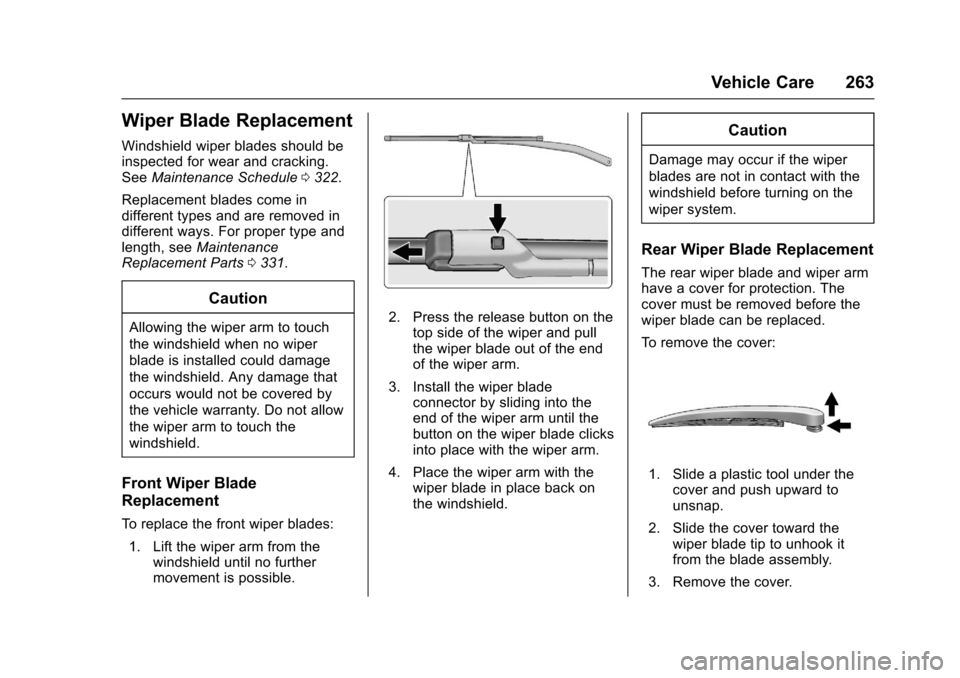
2. Press the release button on the
top side of the wiper and pull
the wiper blade out of the end
of the wiper arm.
3. Install the wiper blade connector by sliding into the
end of the wiper arm until the
button on the wiper blade clicks
into place with the wiper arm.
4. Place the wiper arm with the wiper blade in place back on
the windshield.
Caution
Damage may occur if the wiper
blades are not in contact with the
windshield before turning on the
wiper system.
Rear Wiper Blade Replacement
The rear wiper blade and wiper arm
have a cover for protection. The
cover must be removed before the
wiper blade can be replaced.
To remove the cover:
1. Slide a plastic tool under thecover and push upward to
unsnap.
2. Slide the cover toward the wiper blade tip to unhook it
from the blade assembly.
3. Remove the cover.
Page 265 of 373
Chevrolet TRAX Owner Manual (GMNA-Localizing-U.S./Canada/Mexico-
10122735) - 2017 - crc - 7/12/16
264 Vehicle Care
4. After wiper blade replacement,ensure that the cover hook
slides into the slot in the blade
assembly.
5. Snap the cover down to secure.
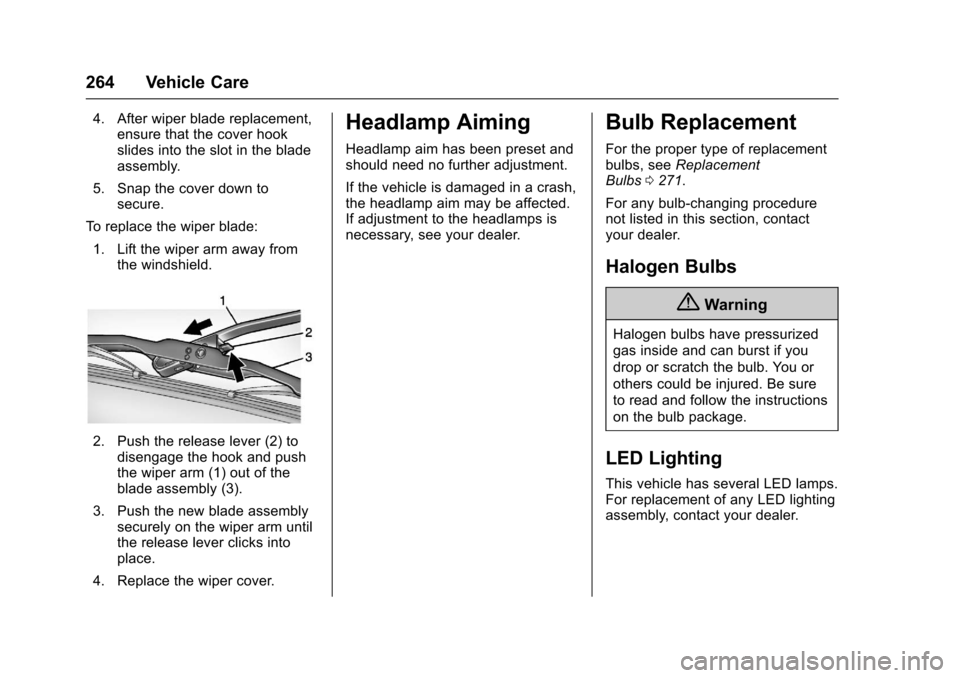
To replace the wiper blade: 1. Lift the wiper arm away from the windshield.
2. Push the release lever (2) to
disengage the hook and push
the wiper arm (1) out of the
blade assembly (3).
3. Push the new blade assembly securely on the wiper arm until
the release lever clicks into
place.
4. Replace the wiper cover.
Headlamp Aiming
Headlamp aim has been preset and
should need no further adjustment.
If the vehicle is damaged in a crash,
the headlamp aim may be affected.
If adjustment to the headlamps is
necessary, see your dealer.
Bulb Replacement
For the proper type of replacement
bulbs, see Replacement
Bulbs 0271.
For any bulb-changing procedure
not listed in this section, contact
your dealer.
Halogen Bulbs
{Warning
Halogen bulbs have pressurized
gas inside and can burst if you
drop or scratch the bulb. You or
others could be injured. Be sure
to read and follow the instructions
on the bulb package.
LED Lighting
This vehicle has several LED lamps.
For replacement of any LED lighting
assembly, contact your dealer.
Page 274 of 373
Chevrolet TRAX Owner Manual (GMNA-Localizing-U.S./Canada/Mexico-
10122735) - 2017 - crc - 7/12/16
Vehicle Care 273
Engine Compartment
Fuse Block
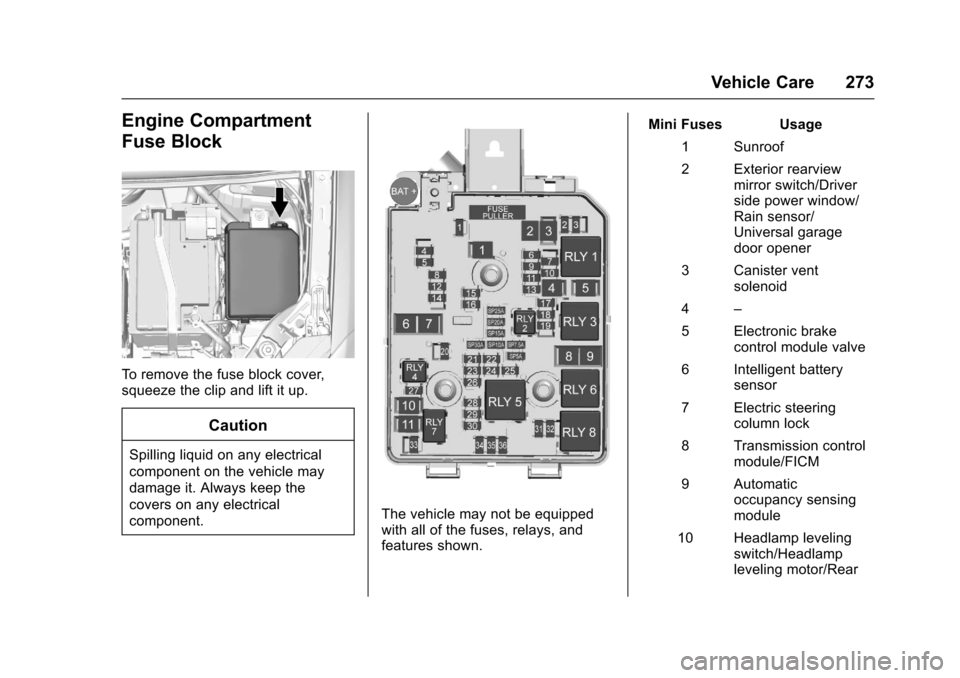
To remove the fuse block cover,
squeeze the clip and lift it up.
Caution
Spilling liquid on any electrical
component on the vehicle may
damage it. Always keep the
covers on any electrical
component.
The vehicle may not be equipped
with all of the fuses, relays, and
features shown.Mini Fuses Usage
1 Sunroof
2 Exterior rearview mirror switch/Driver
side power window/
Rain sensor/
Universal garage
door opener
3 Canister vent solenoid
4 –
5 Electronic brake control module valve
6 Intelligent battery sensor
7 Electric steering column lock
8 Transmission control module/FICM
9 Automatic occupancy sensing
module
10 Headlamp leveling switch/Headlamp
leveling motor/Rear
Page 276 of 373
Chevrolet TRAX Owner Manual (GMNA-Localizing-U.S./Canada/Mexico-
10122735) - 2017 - crc - 7/12/16
Vehicle Care 275
U-MicroRelays Usage
2 Fuel pump
4 –
HC-Micro Relays Usage
7 Starter
Mini Relays Usage 1 Run/Crank
3 Cooling fan –mid
4 –
5 Powertrain relay
8 Cooling fan –low
HC-Mini Relays Usage
6 Cooling fan –highAuxiliary Fuse Block
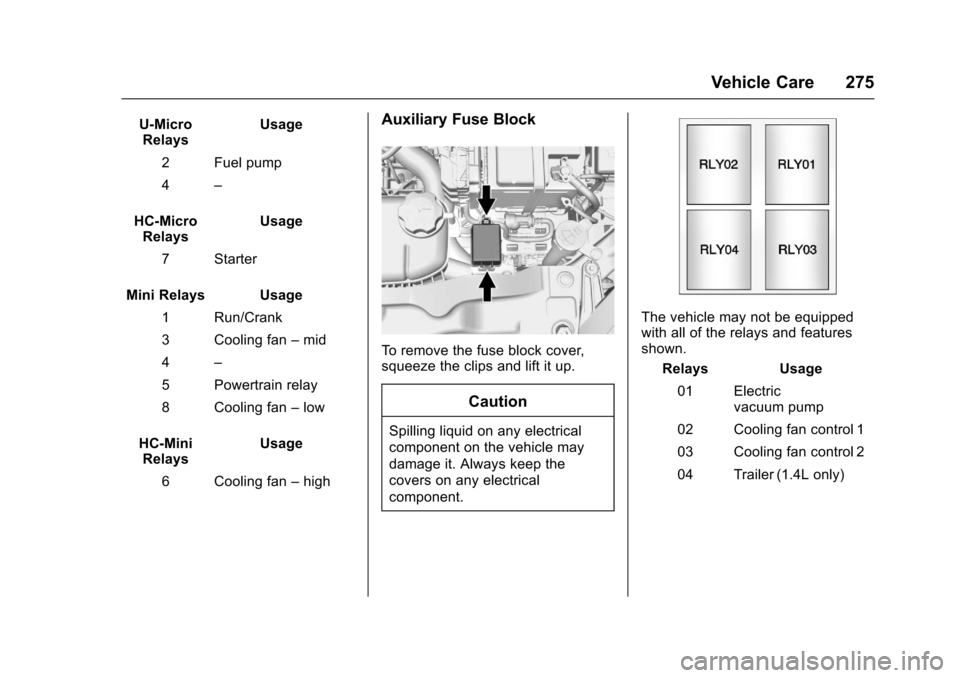
To remove the fuse block cover,
squeeze the clips and lift it up.
Caution
Spilling liquid on any electrical
component on the vehicle may
damage it. Always keep the
covers on any electrical
component.
The vehicle may not be equipped
with all of the relays and features
shown.
Relays Usage
01 Electric vacuum pump
02 Cooling fan control 1
03 Cooling fan control 2
04 Trailer (1.4L only)
Page 277 of 373

Chevrolet TRAX Owner Manual (GMNA-Localizing-U.S./Canada/Mexico-
10122735) - 2017 - crc - 7/12/16
276 Vehicle Care
Instrument Panel Fuse
Block
The instrument panel fuse block is
on the underside of the driver side
instrument panel. To access the
fuses, remove the storage
compartment. To remove the
storage compartment, open the
compartment and pull it out.
The vehicle may not be equipped
with all of the fuses, relays, and
features shown.Fuses Usage
F1 Body control module 1
F2 Body control module 2
F3 Body control module 3
F4 Body control module 4
F5 Body control module 5
F6 Body control module 6
F7 Body control module 7
F8 Body control module 8
F9 Discrete logic ignition switch
F10 Sensing diagnostic module battery
F11 Data link connector
F12 HVAC module/ICS
F13 Liftgate relay
Page 278 of 373
Chevrolet TRAX Owner Manual (GMNA-Localizing-U.S./Canada/Mexico-
10122735) - 2017 - crc - 7/12/16
Vehicle Care 277
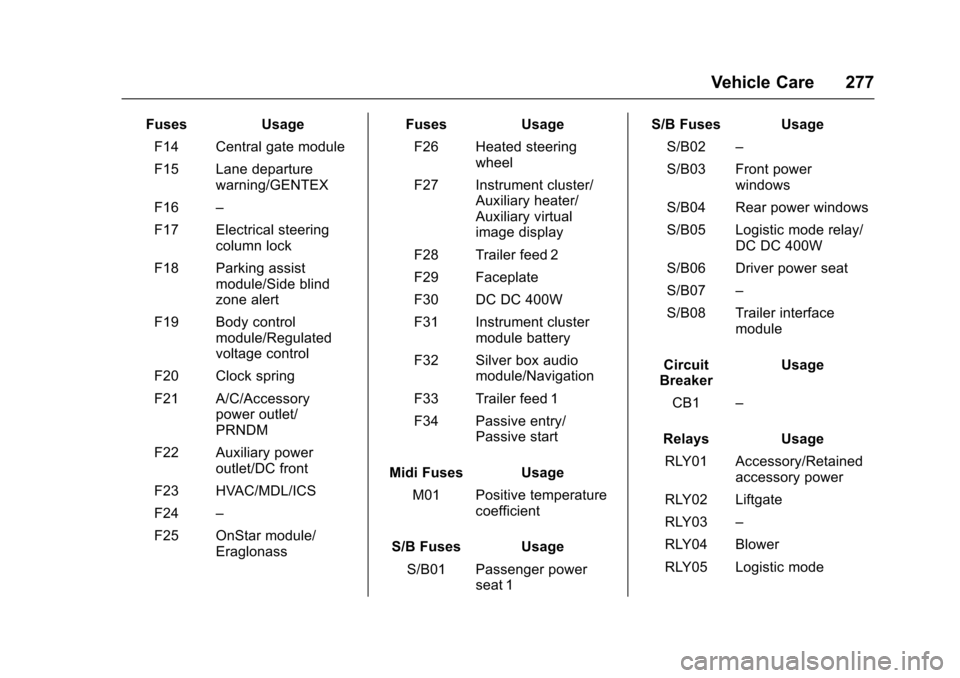
FusesUsage
F14 Central gate module
F15 Lane departure warning/GENTEX
F16 –
F17 Electrical steering column lock
F18 Parking assist module/Side blind
zone alert
F19 Body control module/Regulated
voltage control
F20 Clock spring
F21 A/C/Accessory power outlet/
PRNDM
F22 Auxiliary power outlet/DC front
F23 HVAC/MDL/ICS
F24 –
F25 OnStar module/ Eraglonass Fuses
Usage
F26 Heated steering wheel
F27 Instrument cluster/ Auxiliary heater/
Auxiliary virtual
image display
F28 Trailer feed 2
F29 Faceplate
F30 DC DC 400W
F31 Instrument cluster module battery
F32 Silver box audio module/Navigation
F33 Trailer feed 1
F34 Passive entry/ Passive start
Midi Fuses Usage M01 Positive temperature coefficient
S/B Fuses Usage S/B01 Passenger power seat 1 S/B Fuses Usage
S/B02 –
S/B03 Front power windows
S/B04 Rear power windows
S/B05 Logistic mode relay/ DC DC 400W
S/B06 Driver power seat
S/B07 –
S/B08 Trailer interface module
Circuit
Breaker Usage
CB1 –
Relays Usage
RLY01 Accessory/Retained accessory power
RLY02 Liftgate
RLY03 –
RLY04 Blower
RLY05 Logistic mode
Page 299 of 373
Chevrolet TRAX Owner Manual (GMNA-Localizing-U.S./Canada/Mexico-
10122735) - 2017 - crc - 7/12/16
298 Vehicle Care
Tire Chains
{Warning
Do not use tire chains. There is
not enough clearance. Tire chains
used on a vehicle without the
proper amount of clearance can
cause damage to the brakes,
suspension, or other vehicle
parts. The area damaged by the
tire chains could cause loss of
control and a crash.
Use another type of traction
device only if its manufacturer
recommends it for the vehicle's
tire size combination and road
conditions. Follow that
manufacturer's instructions. To
avoid vehicle damage, drive slow
and readjust or remove the
traction device if it contacts the
vehicle. Do not spin the wheels.
If traction devices are used, install
them on the front tires.
If a Tire Goes Flat
It is unusual for a tire to blow out
while driving, especially if the tires
are maintained properly. SeeTires
0 279. If air goes out of a tire, it is
much more likely to leak out slowly.
But if there ever is a blowout, here
are a few tips about what to expect
and what to do:
If a front tire fails, the flat tire
creates a drag that pulls the vehicle
toward that side. Take your foot off
the accelerator pedal and grip the
steering wheel firmly. Steer to
maintain lane position, and then
gently brake to a stop, well off the
road, if possible.
A rear blowout, particularly on a
curve, acts much like a skid and
may require the same correction as
used in a skid. Stop pressing the
accelerator pedal and steer to
straighten the vehicle. It may be
very bumpy and noisy. Gently brake
to a stop, well off the road,
if possible.{Warning
Driving on a flat tire will cause
permanent damage to the tire.
Re-inflating a tire after it has been
driven on while severely
underinflated or flat may cause a
blowout and a serious crash.
Never attempt to re-inflate a tire
that has been driven on while
severely underinflated or flat.
Have your dealer or an authorized
tire service center repair or
replace the flat tire as soon as
possible.
{Warning
Lifting a vehicle and getting under
it to do maintenance or repairs is
dangerous without the
appropriate safety equipment and
training. If a jack is provided with
the vehicle, it is designed only for
changing a flat tire. If it is used for
anything else, you or others could
(Continued)
Page 301 of 373
Chevrolet TRAX Owner Manual (GMNA-Localizing-U.S./Canada/Mexico-
10122735) - 2017 - crc - 7/12/16
300 Vehicle Care
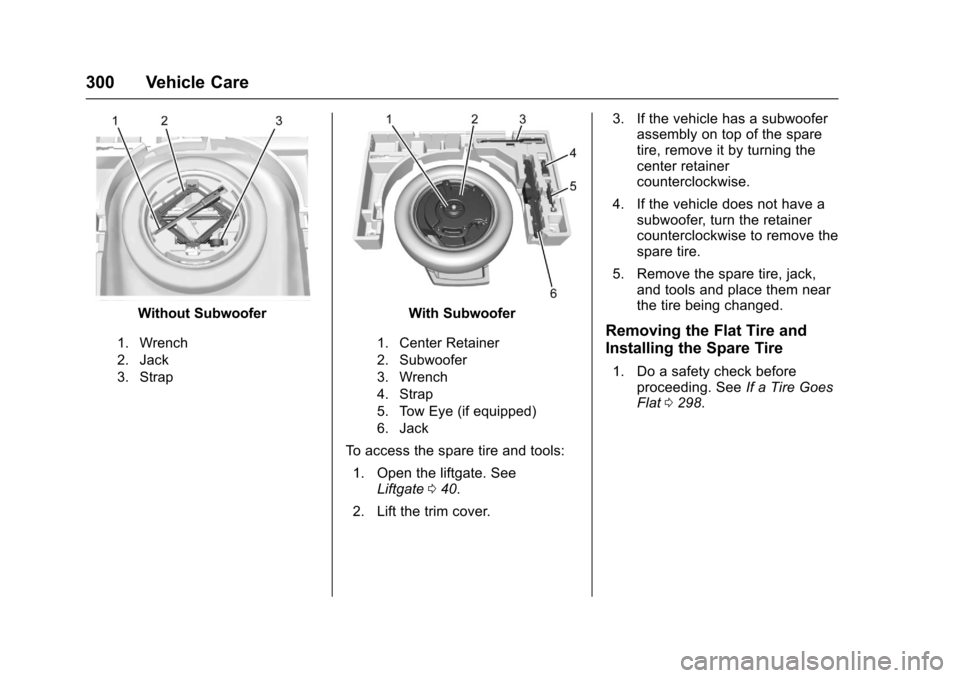
Without Subwoofer
1. Wrench
2. Jack
3. Strap
With Subwoofer
1. Center Retainer
2. Subwoofer
3. Wrench
4. Strap
5. Tow Eye (if equipped)
6. Jack
To access the spare tire and tools:1. Open the liftgate. See Liftgate 040.
2. Lift the trim cover. 3. If the vehicle has a subwoofer
assembly on top of the spare
tire, remove it by turning the
center retainer
counterclockwise.
4. If the vehicle does not have a subwoofer, turn the retainer
counterclockwise to remove the
spare tire.
5. Remove the spare tire, jack, and tools and place them near
the tire being changed.
Removing the Flat Tire and
Installing the Spare Tire
1. Do a safety check beforeproceeding. See If a Tire Goes
Flat 0298.
Page 302 of 373
Chevrolet TRAX Owner Manual (GMNA-Localizing-U.S./Canada/Mexico-
10122735) - 2017 - crc - 7/12/16
Vehicle Care 301
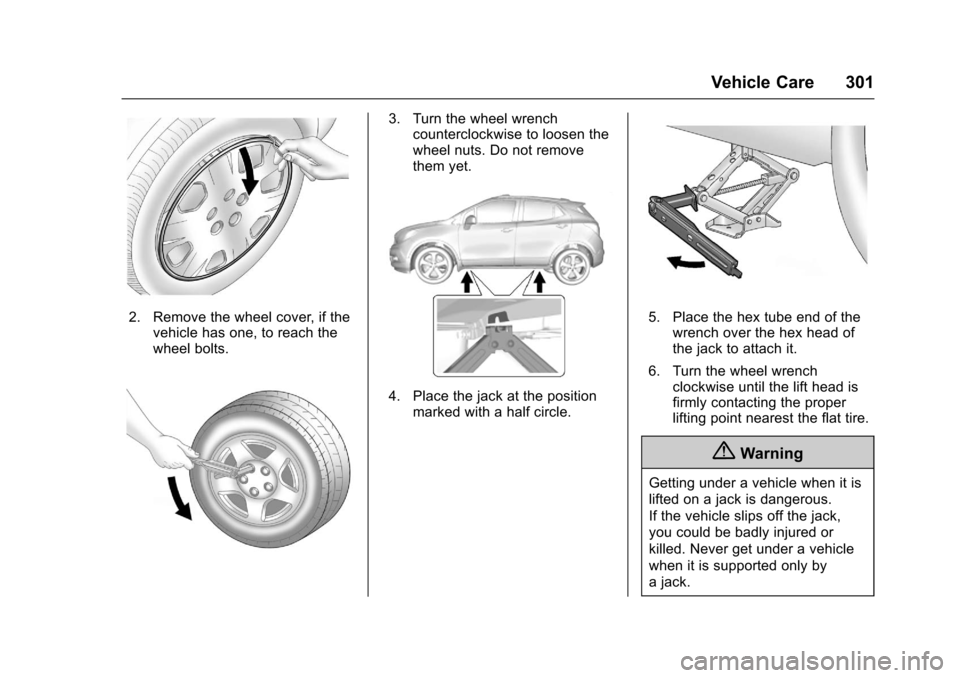
2. Remove the wheel cover, if thevehicle has one, to reach the
wheel bolts.
3. Turn the wheel wrenchcounterclockwise to loosen the
wheel nuts. Do not remove
them yet.
4. Place the jack at the position
marked with a half circle.
5. Place the hex tube end of thewrench over the hex head of
the jack to attach it.
6. Turn the wheel wrench clockwise until the lift head is
firmly contacting the proper
lifting point nearest the flat tire.
{Warning
Getting under a vehicle when it is
lifted on a jack is dangerous.
If the vehicle slips off the jack,
you could be badly injured or
killed. Never get under a vehicle
when it is supported only by
a jack.