warning CHEVROLET TRAX 2017 1.G Manual PDF
[x] Cancel search | Manufacturer: CHEVROLET, Model Year: 2017, Model line: TRAX, Model: CHEVROLET TRAX 2017 1.GPages: 373, PDF Size: 6.53 MB
Page 126 of 373
Chevrolet TRAX Owner Manual (GMNA-Localizing-U.S./Canada/Mexico-
10122735) - 2017 - crc - 7/12/16
Instruments and Controls 125
Information Displays
Driver Information
Center (DIC)
The DIC displays information about
the vehicle. It also displays warning
messages if a system problem is
detected. SeeVehicle Messages
(Base Level) 0129 orVehicle
Messages (Uplevel) 0130. All
messages appear in the DIC display
in the instrument panel cluster.
DIC Operation and Displays
On some models, the trip odometer
reset stem is used to operate the
DIC. On other models, the controls
for the DIC are on the turn signal
lever.
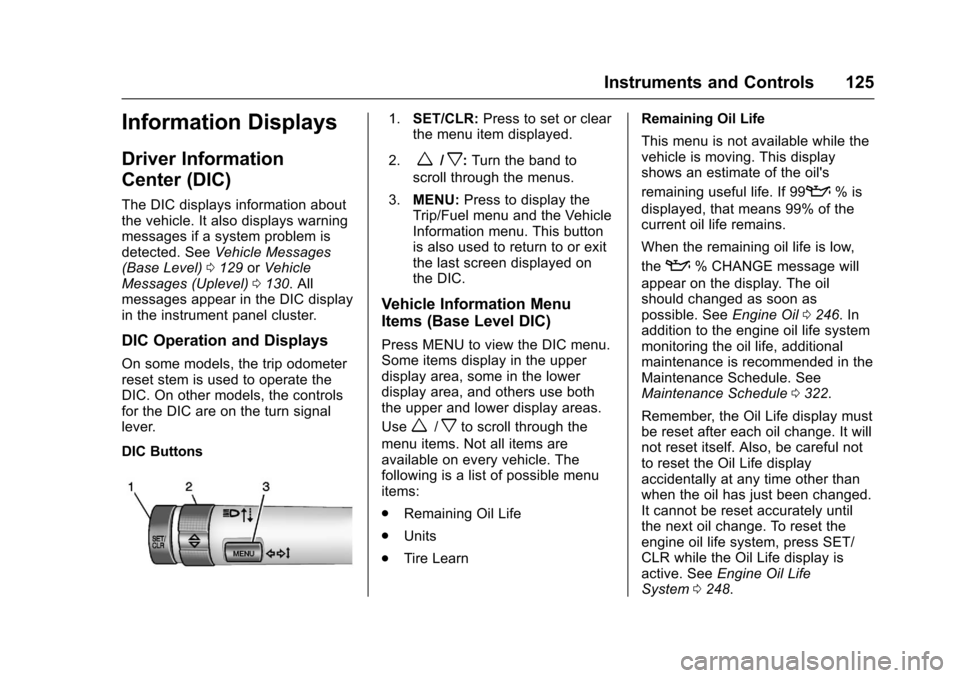
DIC Buttons
1. SET/CLR: Press to set or clear
the menu item displayed.
2.
w/x: Turn the band to
scroll through the menus.
3. MENU: Press to display the
Trip/Fuel menu and the Vehicle
Information menu. This button
is also used to return to or exit
the last screen displayed on
the DIC.
Vehicle Information Menu
Items (Base Level DIC)
Press MENU to view the DIC menu.
Some items display in the upper
display area, some in the lower
display area, and others use both
the upper and lower display areas.
Use
w/xto scroll through the
menu items. Not all items are
available on every vehicle. The
following is a list of possible menu
items:
. Remaining Oil Life
. Units
. Tire Learn Remaining Oil Life
This menu is not available while the
vehicle is moving. This display
shows an estimate of the oil's
remaining useful life. If 99
:% is
displayed, that means 99% of the
current oil life remains.
When the remaining oil life is low,
the
:% CHANGE message will
appear on the display. The oil
should changed as soon as
possible. See Engine Oil0246. In
addition to the engine oil life system
monitoring the oil life, additional
maintenance is recommended in the
Maintenance Schedule. See
Maintenance Schedule 0322.
Remember, the Oil Life display must
be reset after each oil change. It will
not reset itself. Also, be careful not
to reset the Oil Life display
accidentally at any time other than
when the oil has just been changed.
It cannot be reset accurately until
the next oil change. To reset the
engine oil life system, press SET/
CLR while the Oil Life display is
active. See Engine Oil Life
System 0248.
Page 131 of 373
Chevrolet TRAX Owner Manual (GMNA-Localizing-U.S./Canada/Mexico-
10122735) - 2017 - crc - 7/12/16
130 Instruments and Controls
10 :Brakes Overheated
15 : Check High Mounted
Brake Lamp
16 : Check Brake Lamps
17 : Headlamp Leveling Malfunction
— Contact Service
18 : Left Low Beam Failure
20 : Right Low Beam Failure
21 : Check Left Position Lamp
22 : Check Right Position Lamp
23 : Reversing Lamp Failure
24 : License Plate Lamp Failure
25 : Left Front Turn Indicator Failure
26 : Left Rear Turn Indicator Failure
27 : Right Front Turn Indicator
Failure
28 : Right Rear Turn Indicator
Failure
35 : Replace Battery In Remote Key
49 : Lane Departure Warning
Unavailable
52 : Change Timing Belt –See
Owner ’s Manual 53 :
Tighten Gas Cap
59 : Open, Then Close Driver
Window
65 : Theft Attempted
66 : Service Theft Alarm
67 : Service Steering Column Lock
68 : Service Power Steering, Drive
with Care
77 : Service Front Camera
79 : Engine Oil Low –Add Oil
81 : Service Transmission
84 : Engine Power Is Reduced
88 : Use Transmitter Pocket to Start
89 : Service Vehicle Soon
91 : No Remote Detected
92 : No Remote Detected, Press
Brake To Restart
93 : Press Button Again To Turn
Engine Off
94 : Shift to Park
95 : Service Airbag
174 : Low Battery
258 : Park Assist OffEngine Oil Messages
:% CHANGE
This message displays when the
engine oil needs to be changed.
When changing the engine oil, be
sure to reset the Oil Life System.
See Engine Oil Life System 0248,
Engine Oil 0246, and Maintenance
Schedule 0322.
Vehicle Messages
(Uplevel)
Messages displayed on the DIC
indicate the status of the vehicle or
some action that may be needed to
correct a condition. Multiple
messages may display one after the
other.
The messages that do not require
immediate action can be
acknowledged and cleared by
pressing SET/CLR. The messages
that require immediate action cannot
be cleared until that action is
performed. All messages should be
taken seriously and clearing the
messages does not correct the
problem.
Page 135 of 373
Chevrolet TRAX Owner Manual (GMNA-Localizing-U.S./Canada/Mexico-
10122735) - 2017 - crc - 7/12/16
134 Instruments and Controls
CHECK XXX TURN
SIGNAL LAMP
When one of the turn signals is out,
this message displays to show
which bulb needs to be replaced.
SeeBulb Replacement 0264 and
Replacement Bulbs 0271.
TURN SIGNAL ON
This message is displayed if the
turn signal has been left on. Turn off
the turn signal.
Object Detection System
Messages
FORWARD COLLISION
ALERT OFF
This message displays when the
Forward Collision Alert, if equipped,
cannot activate due to a temporary
condition.
FRONT CAMERA BLOCKED
CLEAN WINDSHIELD
This message displays when the
camera is blocked. Cleaning the
outside of the windshield behind the
rearview mirror may correct the issue. Forward Collision Alert and
the Lane Departure Warning system
will not operate.
LANE DEPARTURE WARNING
UNAVAILABLE
If your vehicle has the Lane
Departure Warning (LDW) system,
this message may display if the
LDW system cannot activate due to
a temporary condition.
PARK ASSIST OFF
This message displays when the
parking assist system has been
turned off or when there is a
temporary condition causing the
system to be disabled. See
Parking
Assist 0227.
SERVICE LANE DEPARTURE
WARNING
This message displays when the
Lane Departure Warning (LDW)
system is disabled and needs
service. See your dealer.
SERVICE FRONT CAMERA
If this message remains on after
continued driving, the vehicle needs
service. Take the vehicle to your
dealer. Do not use the Lane
Departure Warning (LDW) and
Forward Collision Alert (FCA)
features.
SERVICE PARKING ASSIST
This message displays if there is a
problem with the parking assist
system. Do not use this system to
help you park. See Parking
Assist 0227.
SERVICE SIDE DETECTION
SYSTEM
If this message remains on after
continued driving, the vehicle needs
service. Side Blind Zone Alert
(SBZA) and Rear Cross Traffic Alert
(RCTA) will not work. See your
dealer.
SIDE BLIND ZONE ALERT OFF
This message displays if the SBZA
has been turned off.
Page 137 of 373
Chevrolet TRAX Owner Manual (GMNA-Localizing-U.S./Canada/Mexico-
10122735) - 2017 - crc - 7/12/16
136 Instruments and Controls
TIRE PRESSURE LOW ADD
AIR TO TIRE
On vehicles with the Tire Pressure
Monitor System (TPMS), this
message displays when the
pressure in one or more of the
vehicle's tires is low.
The low tire pressure warning light
will also come on. SeeTire
Pressure Light 0122.
If a tire pressure message
displays, inflate the tires until the
tire pressure is equal to the values
shown on the Tire and Loading
Information label. See Tires0279,
Vehicle Load Limits 0199, and Tire
Pressure 0286.
More than one tire pressure
message can be received at a time.
The DIC also shows the tire
pressure values. See Driver
Information Center (DIC) 0125.
Transmission Messages
SERVICE TRANSMISSION
This message displays if there is a
problem with the transmission. See
your dealer.
SHIFT TO PARK
This message displays when the
transmission needs to be shifted to
P (Park). This may appear when
attempting to remove the key from
the ignition or from the vehicle if the
vehicle is not in P (Park).
TRANSMISSION HOT —IDLE
ENGINE
This message displays and a chime
sounds if the transmission fluid in
the vehicle gets hot. Driving with the
transmission fluid temperature high
can cause damage to the vehicle.
Stop the vehicle and let it idle to
allow the transmission to cool. This
message clears when the fluid
temperature reaches a safe level.
Vehicle Reminder
Messages
ICE POSSIBLE DRIVE
WITH CARE
This message displays when ice
conditions are possible.
Window Messages
OPEN, THEN CLOSE DRIVER/
PASSENGER WINDOW
This message is displayed when the
window needs to be reprogrammed.
If the vehicle's battery has been
discharged or disconnected, you
may need to program each front
window for the express-up feature to
work. See Power Windows 047.
Page 147 of 373
Chevrolet TRAX Owner Manual (GMNA-Localizing-U.S./Canada/Mexico-
10122735) - 2017 - crc - 7/12/16
146 Lighting
Lighting
Exterior Lighting
Exterior Lamp Controls . . . . . . . 146
Headlamp High/Low-BeamChanger . . . . . . . . . . . . . . . . . . . . 146
Flash-to-Pass . . . . . . . . . . . . . . . . 147
Daytime Running Lamps (DRL) . . . . . . . . . . . . . . . 147
Automatic Headlamp System . . . . . . . . . . . . . . . . . . . . . . 147
Hazard Warning Flashers . . . . . 148
Turn and Lane-Change Signals . . . . . . . . . . . . . . . . . . . . . . 148
Front Fog Lamps . . . . . . . . . . . . . 148
Interior Lighting
Instrument Panel Illumination Control . . . . . . . . . . . . . . . . . . . . . . 149
Courtesy Lamps . . . . . . . . . . . . . . 149
Dome Lamps . . . . . . . . . . . . . . . . . 149
Reading Lamps . . . . . . . . . . . . . . 150
Lighting Features
Entry Lighting . . . . . . . . . . . . . . . . 150
Exit Lighting . . . . . . . . . . . . . . . . . . 150
Battery Load Management . . . 151
Battery Power Protection . . . . . 151
Exterior Lighting
Exterior Lamp Controls
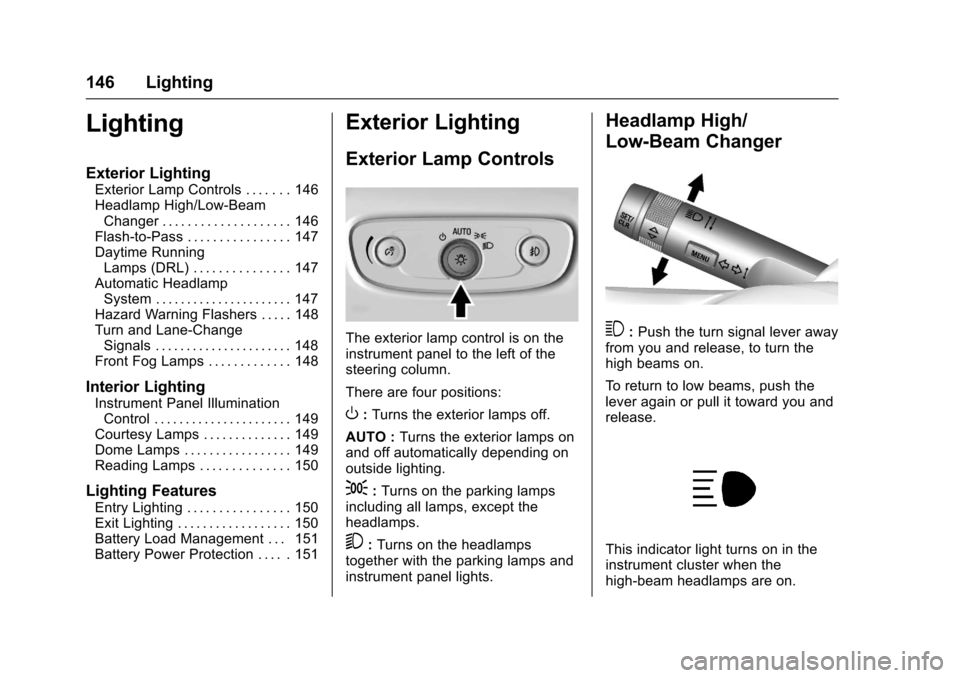
The exterior lamp control is on the
instrument panel to the left of the
steering column.
There are four positions:
O: Turns the exterior lamps off.
AUTO : Turns the exterior lamps on
and off automatically depending on
outside lighting.
;: Turns on the parking lamps
including all lamps, except the
headlamps.
5: Turns on the headlamps
together with the parking lamps and
instrument panel lights.
Headlamp High/
Low-Beam Changer
3: Push the turn signal lever away
from you and release, to turn the
high beams on.
To return to low beams, push the
lever again or pull it toward you and
release.
This indicator light turns on in the
instrument cluster when the
high-beam headlamps are on.
Page 149 of 373
Chevrolet TRAX Owner Manual (GMNA-Localizing-U.S./Canada/Mexico-
10122735) - 2017 - crc - 7/12/16
148 Lighting
Lights On with Wipers
If the windshield wipers are
activated in daylight with the engine
on, and the exterior lamp control is
in AUTO, the headlamps, parking
lamps, and other exterior lamps
come on. The transition time for the
lamps coming on varies based on
wiper speed. When the wipers are
not operating, these lamps turn off.
Move the exterior lamp control to
P
or;to disable this feature.
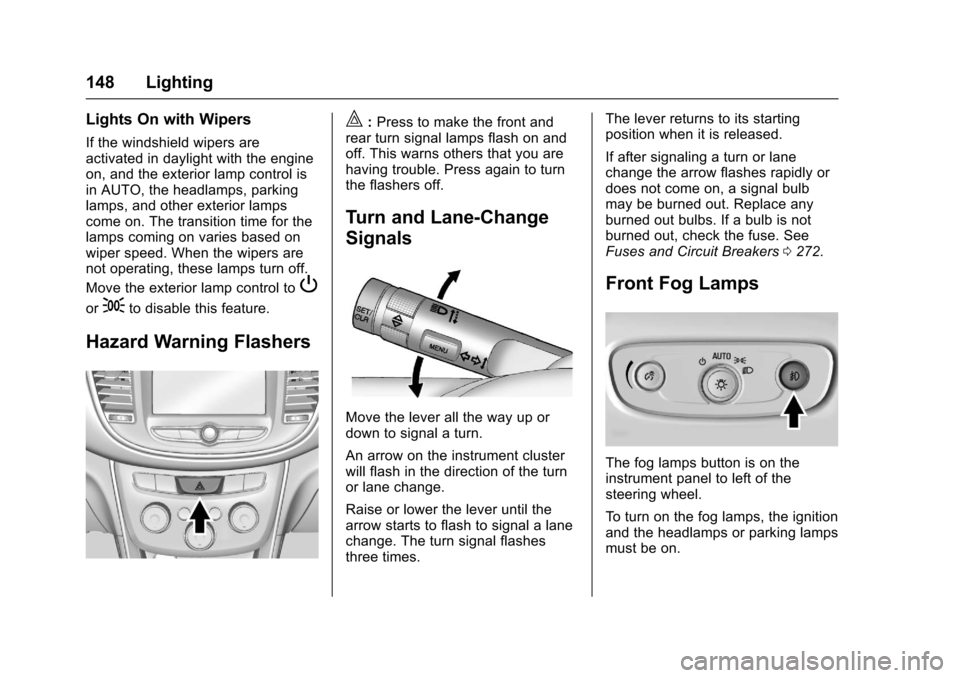
Hazard Warning Flashers
|:Press to make the front and
rear turn signal lamps flash on and
off. This warns others that you are
having trouble. Press again to turn
the flashers off.
Turn and Lane-Change
Signals
Move the lever all the way up or
down to signal a turn.
An arrow on the instrument cluster
will flash in the direction of the turn
or lane change.
Raise or lower the lever until the
arrow starts to flash to signal a lane
change. The turn signal flashes
three times. The lever returns to its starting
position when it is released.
If after signaling a turn or lane
change the arrow flashes rapidly or
does not come on, a signal bulb
may be burned out. Replace any
burned out bulbs. If a bulb is not
burned out, check the fuse. See
Fuses and Circuit Breakers
0272.
Front Fog Lamps
The fog lamps button is on the
instrument panel to left of the
steering wheel.
To turn on the fog lamps, the ignition
and the headlamps or parking lamps
must be on.
Page 153 of 373
Chevrolet TRAX Owner Manual (GMNA-Localizing-U.S./Canada/Mexico-
10122735) - 2017 - crc - 7/12/16
152 Infotainment System
Infotainment
System
Introduction
Infotainment . . . . . . . . . . . . . . . . . . 152
Theft-Deterrent Feature . . . . . . 153
Overview . . . . . . . . . . . . . . . . . . . . . 154
Home Page (Radio withTouchscreen) . . . . . . . . . . . . . . . 157
Operation . . . . . . . . . . . . . . . . . . . . . 157
Radio
AM-FM Radio . . . . . . . . . . . . . . . . 160
Satellite Radio . . . . . . . . . . . . . . . . 163
Radio Reception . . . . . . . . . . . . . . 164
Multi-Band Antenna . . . . . . . . . . 165
Audio Players
Avoiding Untrusted Media Devices . . . . . . . . . . . . . . . . . . . . . 165
USB Port . . . . . . . . . . . . . . . . . . . . . 165
Auxiliary Devices . . . . . . . . . . . . . 171
Phone
Bluetooth (Overview) . . . . . . . . . 171
Bluetooth (Infotainment Controls Radio without
Touchscreen) . . . . . . . . . . . . . . . 173 Bluetooth (Infotainment
Controls Radio with
Touchscreen) . . . . . . . . . . . . . . . 177
Apple CarPlay and Android Auto . . . . . . . . . . . . . . . . 181
Hands-Free Phone . . . . . . . . . . . 182
Trademarks and License
Agreements
Trademarks and License Agreements . . . . . . . . . . . . . . . . . 184
Introduction
Infotainment
Read the following pages to
become familiar with the features.
{Warning
Taking your eyes off the road for
too long or too often while using
any infotainment feature can
cause a crash. You or others
could be injured or killed. Do not
give extended attention to
infotainment tasks while driving.
Limit your glances at the vehicle
displays and focus your attention
on driving. Use voice commands
whenever possible.
The infotainment system has built-in
features intended to help avoid
distraction by disabling some
functions when driving. These
functions may gray out when they
are unavailable. Many infotainment
Page 173 of 373
Chevrolet TRAX Owner Manual (GMNA-Localizing-U.S./Canada/Mexico-
10122735) - 2017 - crc - 7/12/16
172 Infotainment System
contact lists clearly and delete
duplicate or rarely used entries.
If possible, program speed dial
or other shortcuts.
. Review the controls and
operation of the infotainment
system.
. Pair cell phone(s) to the vehicle.
The system may not work with
all cell phones. See “Pairing”
under Bluetooth (Infotainment
Controls Radio with
Touchscreen) 0177 orBluetooth
(Infotainment Controls Radio
without Touchscreen) 0173 or
Bluetooth (Overview) 0171.
. See “Deleting a Bluetooth
Device” underBluetooth
(Infotainment Controls Radio
with Touchscreen) 0177 or
Bluetooth (Infotainment Controls
Radio without Touchscreen)
0 173 orBluetooth
(Overview) 0171.{Warning
When using a cell phone, it can
be distracting to look too long or
too often at the screen of the
phone or the infotainment system.
Taking your eyes off the road too
long or too often could cause a
crash resulting in injury or death.
Focus your attention on driving.
Vehicles with a Bluetooth system
can use a Bluetooth-capable cell
phone with a Hands-Free Profile to
make and receive phone calls. The
infotainment system is used to
control the system. The system can
be used while in ACC/ACCESSORY
or ON/RUN. See Retained
Accessory Power (RAP) 0210. Not
all phones support all functions and
not all phones work with the
Bluetooth system. See
www.gm.com/bluetooth for more
information about compatible
phones in the U.S. and
Canada only.
The Bluetooth system range can be
up to 9.1 m (30 ft). There may be restrictions on using
Bluetooth wireless technology in
some locations.
Due to the variety of Bluetooth
devices and their firmware versions,
the device may respond differently
when performing over Bluetooth.
On a current phone call, an image
of the current contact from the
phone's contact list may be
displayed. Not all phones are
compatible with this feature.
Refer to the cell phone
manufacturer
’s user guide for
questions about the phone's
Bluetooth functionality.
Bluetooth Controls
If equipped with Bluetooth capability,
use the buttons on the infotainment
system and the steering wheel to
operate the system.
Page 192 of 373
Chevrolet TRAX Owner Manual (GMNA-Localizing-U.S./Canada/Mexico-
10122735) - 2017 - crc - 7/12/16
Driving and Operating 191
Driving and
Operating
Driving Information
Driver Behavior . . . . . . . . . . . . . . . 192
Driving Environment . . . . . . . . . . 192
Vehicle Design . . . . . . . . . . . . . . . 192
Distracted Driving . . . . . . . . . . . . 192
Defensive Driving . . . . . . . . . . . . . 193
Drunk Driving . . . . . . . . . . . . . . . . . 193
Control of a Vehicle . . . . . . . . . . . 193
Braking . . . . . . . . . . . . . . . . . . . . . . . 194
Steering . . . . . . . . . . . . . . . . . . . . . . 194
Off-Road Recovery . . . . . . . . . . . 195
Loss of Control . . . . . . . . . . . . . . . 195
Driving on Wet Roads . . . . . . . . 196
Hill and Mountain Roads . . . . . 197
Winter Driving . . . . . . . . . . . . . . . . 197
If the Vehicle Is Stuck . . . . . . . . 198
Vehicle Load Limits . . . . . . . . . . . 199
Starting and Operating
New Vehicle Break-In . . . . . . . . . 203
Ignition Positions (KeyAccess) . . . . . . . . . . . . . . . . . . . . . 203
Ignition Positions (Keyless Access) . . . . . . . . . . . . . . . . . . . . . 205
Starting the Engine . . . . . . . . . . . 206
Engine Heater . . . . . . . . . . . . . . . . 208 Retained Accessory
Power (RAP) . . . . . . . . . . . . . . . . 210
Shifting Into Park . . . . . . . . . . . . . 210
Shifting out of Park . . . . . . . . . . . 211
Parking . . . . . . . . . . . . . . . . . . . . . . . 212
Parking over Things That Burn . . . . . . . . . . . . . . . . . . . 212
Engine Exhaust
Engine Exhaust . . . . . . . . . . . . . . 213
Running the Vehicle WhileParked . . . . . . . . . . . . . . . . . . . . . . 213
Automatic Transmission
Automatic Transmission . . . . . . 214
Manual Mode . . . . . . . . . . . . . . . . . 215
Manual Transmission
Manual Transmission . . . . . . . . . 216
Drive Systems
All-Wheel Drive . . . . . . . . . . . . . . . 218
Brakes
Antilock BrakeSystem (ABS) . . . . . . . . . . . . . . . 219
Parking Brake . . . . . . . . . . . . . . . . 219
Brake Assist . . . . . . . . . . . . . . . . . . 220
Hill Start Assist (HSA) . . . . . . . . 220
Ride Control Systems
Traction Control/Electronic Stability Control . . . . . . . . . . . . . 221
Cruise Control
Cruise Control . . . . . . . . . . . . . . . . 223
Driver Assistance Systems
Rear Vision Camera (RVC) . . . 225
Parking Assist . . . . . . . . . . . . . . . . 227
Forward Collision Alert (FCA)System . . . . . . . . . . . . . . . . . . . . . . 228
Side Blind Zone Alert (SBZA) . . . . . . . . . . . . . . . . 230
Lane Departure Warning (LDW) . . . . . . . . . . . . . 231
Fuel
Fuel . . . . . . . . . . . . . . . . . . . . . . . . . . 233
Fuels in Foreign Countries . . . 234
Fuel Additives . . . . . . . . . . . . . . . . 234
Filling the Tank . . . . . . . . . . . . . . . 234
Filling a Portable FuelContainer . . . . . . . . . . . . . . . . . . . 236
Trailer Towing
General TowingInformation . . . . . . . . . . . . . . . . . . 236
Conversions and Add-Ons
Add-On ElectricalEquipment . . . . . . . . . . . . . . . . . . 237
Page 194 of 373
Chevrolet TRAX Owner Manual (GMNA-Localizing-U.S./Canada/Mexico-
10122735) - 2017 - crc - 7/12/16
Driving and Operating 193
.Watch the road. Do not read,
take notes, or look up
information on phones or other
electronic devices.
. Designate a front seat
passenger to handle potential
distractions.
. Become familiar with vehicle
features before driving, such as
programming favorite radio
stations and adjusting climate
control and seat settings.
Program all trip information into
any navigation device prior to
driving.
. Wait until the vehicle is parked
to retrieve items that have fallen
to the floor.
. Stop or park the vehicle to tend
to children.
. Keep pets in an appropriate
carrier or restraint.
. Avoid stressful conversations
while driving, whether with a
passenger or on a cell phone.{Warning
Taking your eyes off the road too
long or too often could cause a
crash resulting in injury or death.
Focus your attention on driving.
Refer to the infotainment section for
more information on using that
system and the navigation system,
if equipped, including pairing and
using a cell phone.
Defensive Driving
Defensive driving means “always
expect the unexpected.” The first
step in driving defensively is to wear
the safety belt. See Safety
Belts 061.
. Assume that other road users
(pedestrians, bicyclists, and
other drivers) are going to be
careless and make mistakes.
Anticipate what they might do
and be ready.
. Allow enough following distance
between you and the driver in
front of you. .
Focus on the task of driving.
Drunk Driving
Death and injury associated with
drinking and driving is a global
tragedy.
{Warning
Drinking and then driving is very
dangerous. Your reflexes,
perceptions, attentiveness, and
judgment can be affected by even
a small amount of alcohol. You
can have a serious —or even
fatal —collision if you drive after
drinking.
Do not drink and drive or ride with
a driver who has been drinking.
Ride home in a cab; or if you are
with a group, designate a driver
who will not drink.
Control of a Vehicle
Braking, steering, and accelerating
are important factors in helping to
control a vehicle while driving.